 ChatGPT,
 Claude,
 Gemini,
 Grok — all four for
Key highlights
- Understand the fundamental differences between subdomains and subdirectories so you can build a site architecture that actually makes sense for your brand.
- Learn why subdirectories are usually the go-to for concentrating your link equity, even if Google claims to treat both structures the same way.
- Explore the technical scenarios where subdomains shine, particularly for staging sites or apps that need their own dedicated infrastructure.
- Uncover how subdirectories can simplify your SEO strategy by consolidating your ranking power and keeping your analytics data in one clean place.
- Know how to weigh your current technical resources against your long-term goals to choose the site structure that best supports your growth.
If you’ve ever debated whether to launch your blog at blog.[yourdomain].com or [yourdomain].com/blog, you’re not alone. The subdomain vs subdirectory debate has been one of the most persistent technical SEO discussions for over a decade, and it still confuses website owners, developers and marketers in 2026.
At the surface level, both options let you organize your website content. But underneath, they operate in fundamentally different ways that can have real consequences for how search engines crawl your site, how your domain authority is distributed and ultimately how well your pages rank on Google.
With subdomain vs subdirectory explained clearly, you can make a confident, data-informed decision instead of guessing. This article breaks down exactly what each structure is, how Google treats them, their specific SEO implications and which use cases call for each approach.
What is a subdomain?
A subdomain is a prefix added to your root domain that creates a separate web address. It effectively functions as a distinct website that lives beneath your primary domain name, sharing the same registered domain but operating independently at the DNS (Domain Name System) level.
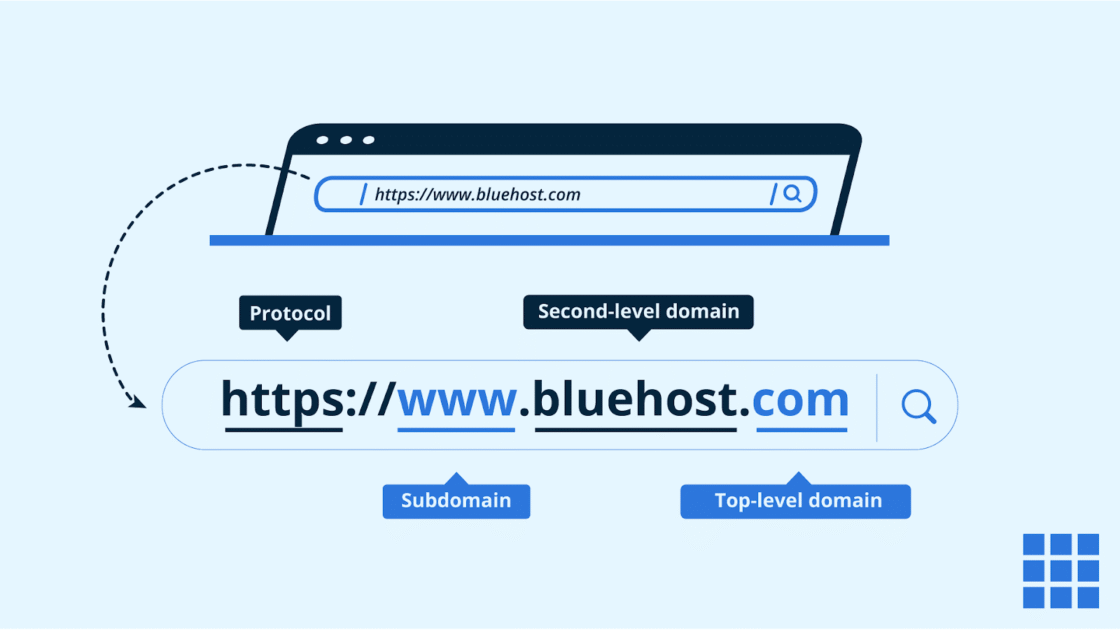
Example format: In ‘www.bluehost.com’, ‘www’ is the subdomain. Other examples include: blog.[yourdomain].com, shop.[yourdomain].com or support.[yourdomain].com, where “blog,” “shop” and “support” are the subdomains.
How it works technically?
Subdomains require a separate DNS A record or CNAME entry. This means your subdomain can resolve to a completely different server or IP address than your main domain. Providers like Cloudflare allow you to manage subdomain DNS routing through their nameserver dashboard, giving you granular control over where each subdomain points. Because DNS treats subdomains as separate entities, they can run on entirely different hosting environments, a key reason they’re popular for applications and platforms.
Common use cases
Subdomains are typically used for:
- Development staging areas (like staging.[yourdomain].com)
- Customer portals
- SaaS dashboards
- Regional websites (like us.domain.com)
- Dedicated support centers
- eCommerce storefronts that operate on separate software platforms
What is a subdirectory?
A subdirectory, sometimes called a subfolder, is a section of your website that exists as a path within your root domain. Rather than creating a new web address, it extends your existing URL structure by adding a folder path after your domain name.
URL structure explanation: The format looks like [yourdomain].com/blog, where everything after the forward slash is a directory path within the site.
How it works within site architecture?
A subdirectory doesn’t require separate DNS configuration. It lives entirely within your existing hosting setup and shares your main domain’s IP address, server resources and SSL certificate. From a crawling perspective, Google treats all subdirectory content as part of the same website.
CMS-level implementation clarity
In platforms like WordPress, subdirectories are created automatically when you organize content into categories or custom post types. You can also set up a WordPress installation in a subdirectory folder (for example, install WordPress inside a /blog folder) while your main site runs on a separate framework. This flexibility makes subdirectories the default choice for most content management scenarios.
Subdomain vs subdirectory: Key differences at a glance
Choosing the right site structure is essential for organizing content and maximizing domain authority. Here is a quick comparison table on how subdomains and subdirectories impact your website’s search engine visibility.
| Factor | Subdomain | Subdirectory |
|---|---|---|
| URL structure | blog.[yourdomain].com | [yourdomain].com/blog |
| SEO authority | Treated as a separate entity; may not fully share root domain authority | Fully shares root domain authority |
| Link equity flow | Links to subdomain may not pass full equity to root domain | All links contribute directly to the main domain |
| Crawl behavior | Googlebot may treat as a separate site; crawl budget may be split | Crawled as part of the same site; unified crawl budget |
| Hosting setup | Can be hosted on a separate server or platform | Shares the same server and hosting environment |
| Analytics tracking | Requires cross-domain tracking configuration | Tracked as part of the same GA4 property by default |
| International SEO | Common for country-specific targeting (us.yourdomain.com) | Also viable using hreflang tags (yourdomain.com/us) |
| Maintenance | Higher overhead; independent updates, SSL and security per subdomain | Lower overhead; centralized maintenance on one domain |
In short, subdirectories are generally the preferred choice for consolidating SEO authority and simplifying technical management within a single environment. However, subdomains remain a powerful solution for businesses that require technical independence or need to host distinct content types on separate servers.
The most important thing you can do is make this decision with a purpose. Don’t just fall into a structure because it’s the default; think about how it’ll actually impact your SEO. Picking the right domain and hosting setup from day one makes every future step a whole lot easier.
Ready to build your site on a fast, reliable foundation that supports both subdomains and subdirectories without the headache? Go ahead and register your domain with Bluehost today.
How Google treats subdomains vs subdirectories today?
Understanding Google’s current stance is essential before deciding on subdomain or subdirectory for your site structure. The search engine’s position has evolved considerably over the years.
Historical debate
For years, the SEO community debated whether subdomains diluted link equity and whether Google truly treated them as separate websites. Early evidence suggested Google gave subdirectories a clear ranking advantage because all content contributed to a single, consolidated domain.
What Google says now?
Google’s John Mueller has stated on multiple occasions that Googlebot can handle both subdomains and subdirectories equally well from a technical standpoint. However, Mueller also acknowledged that in practice, moving content from a subdomain to a subdirectory often results in improved rankings, suggesting that consolidation does provide a real-world benefit even if Google doesn’t explicitly penalize subdomains.
Also read: Google’s John Mueller Warns New Sites about the Hidden SEO Cost of Free Subdomain Hosting
Do subdomains share authority?
Not automatically. Google’s algorithms may recognize the relationship between a subdomain and its root domain, but link signals and domain authority metrics in third-party tools (like Moz’s Domain Authority or Ahrefs’ Domain Rating) typically treat subdomains as separate entities. Backlinks pointing to blog.[yourdomain].com do not directly pass the same equity to [yourdomain].com as a backlink to [yourdomain].com/blog would.
Crawl & indexing implications
Googlebot allocates a crawl budget per domain. When you use a subdomain, Googlebot may treat it as a separate domain and assign it its own crawl budget, which can slow down indexing for newer or lower-authority subdomains.
Link equity consolidation
Every external link pointing to a subdirectory strengthens the root domain. With subdomains, link equity is scattered across multiple properties, which can weaken your overall competitive standing in organic search.
Ranking independence explained
A subdomain can rank independently, which is sometimes desirable. For instance, if your SaaS app runs at app.[yourdomain].com, you likely don’t want those pages competing with or diluting your marketing site’s keyword strategy. This independence is a feature, not a bug, in the right context.
Subdomain vs subdirectory: SEO impact breakdown
Deciding between subdomains and subdirectories is a fundamental technical SEO choice. Learn how these organizational structures affect your site’s crawlability and link equity.
1. Domain authority & link equity
Domain authority, the cumulative weight of backlinks and trust signals your site has earned, flows freely across subdirectory pages. Every blog post, product page or resource living under [yourdomain].com/ benefits from and contributes to the root domain’s authority.
Subdomains, by contrast, start with zero inherited authority unless Google identifies a clear relationship between the two. This means a brand-new subdomain competes on its own merit, requiring an independent link-building effort to gain traction in search results.
2. Internal linking structure
Internal links are one of the most powerful on-page SEO signals. When your blog, resources section and product pages all live within subdirectories, you can pass link equity freely across every page with a single anchor tag.
Subdomains complicate this. An internal link from [yourdomain].com to blog.[yourdomain].com functions more like a cross-domain link in Google’s eyes, which means it may not deliver the full equity benefit of a true internal link. For sites that rely heavily on content clusters and topical authority, this distinction is critical.
3. Keyword consolidation vs dilution
One of the most overlooked SEO risks of subdomains is keyword dilution. When you publish SEO content across multiple subdomains, you may end up with two properties competing for the same keyword: a scenario known as keyword cannibalization.
Subdirectories eliminate this risk by ensuring all relevant content sits within a single domain, allowing Google to build a clearer topical map of your entire site and assign consolidated ranking signals to one authoritative source.
4. Crawl budget & indexing
For large websites, crawl budget (the number of pages Googlebot crawls in a given timeframe) is a meaningful technical SEO consideration. Subdirectories benefit from a unified crawl budget, meaning Google allocates its crawl resources across your entire site as one entity.
Subdomains can fragment this. If you have several subdomains with thin or infrequently updated content, Googlebot may deprioritize crawling them, leading to indexing delays and slower rankings for new content published on those subdomains.
5. International SEO considerations
When targeting multiple countries or languages, you have three main URL structure options: country-code top-level domains (ccTLDs), subdomains or subdirectories. Subdomains (e.g., fr.[yourdomain].com) are a widely accepted approach for international SEO because they can be hosted in region-specific data centers, which may improve page load times for local users.
However, subdirectories (e.g., [yourdomain].com/fr) are generally easier to manage, consolidate global authority into one domain and work just as effectively when combined with proper ‘hreflang’ tag implementation.
6. Performance & site speed factors
Subdomains can be hosted on geographically distributed servers optimized for specific applications, which may improve raw performance for users accessing those tools. However, this advantage only matters if you’re running fundamentally different infrastructure.
For content-heavy sections like blogs, documentation or resources, hosting within a well-optimized subdirectory on a fast hosting platform eliminates any meaningful speed difference. Site speed remains a Google ranking signal, and a well-configured subdirectory on a reliable host performs just as well as a standalone subdomain for most content use cases.
When should you use a subdomain?
Subdomains are highly effective when you need to separate international sites or staging environments, making the subdomain vs subdirectory explained distinction vital for SEO. This configuration provides the flexibility needed for large-scale websites with varying technical requirements or distinct brand segments.
1. Hosting separate applications or platforms
If your web application runs on a completely different technology stack than your marketing site. For example, a React-based app dashboard living separately from a WordPress site; a subdomain is the natural choice. The DNS separation allows each environment to operate independently, scale on its own infrastructure and be deployed without impacting the other property.
2. Creating a staging environment
Developers and agencies routinely use subdomains to host staging or development environments (e.g., staging.[yourdomain].com). This keeps test versions of the site completely separate from the live domain, prevents accidental indexing when combined with noindex directives and allows teams to push changes without risking the main site’s uptime or SEO standing.
Also read: How to Create a Staging Site in WordPress
3. Hosting client portals or SaaS tools
SaaS businesses that provide each customer with a personalized dashboard URL such as [clientname].[yourdomain].com rely on subdomains for this functionality. The architecture allows each client’s environment to be isolated for security and performance reasons, while still operating under the umbrella of the main brand domain.
4. Expanding into a completely different product or niche
If your business is launching a product or service that is fundamentally unrelated to your core offering, a subdomain may make strategic sense. Keeping the content separate prevents topical confusion for search engines and allows each property to build its own keyword footprint without competing against or diluting the primary domain’s thematic relevance.
5. Operating across different countries with technical separation
When you need to host regional websites on servers located within specific countries for latency, compliance or legal reasons, subdomains provide the infrastructure flexibility to point each region to its own server. This is particularly relevant for businesses operating in regions with strict data residency laws or performance-sensitive markets where CDN (Content Delivery Network) proximity matters significantly.
When should you use a subdirectory?
Subdirectories are the ideal choice when your primary goal is to leverage existing root domain authority for new content. This structure consolidates SEO signals and simplifies tracking across your entire website ecosystem.
1. Strengthening overall domain authority
If your primary SEO goal is to build a strong, authoritative domain that ranks competitively across multiple topics, subdirectories are your best structural choice. Every page you publish under [yourdomain].com/ reinforces the overall domain’s credibility with search engines.
Backlinks earned by any page flow upward to benefit the entire domain, creating a compounding SEO effect over time.
2. Managing a blog under the main website
For content marketing strategies, placing your blog in a subdirectory (e.g., [yourdomain].com/blog) is almost always the recommended approach. Your blog posts support the authority of your product and service pages through internal links, topical clustering and shared domain signals.
Case studies from major brands, including HubSpot’s highly cited example of migrating its blog from a subdomain to a subdirectory, have demonstrated measurable organic traffic gains after consolidation.
3. eCommerce section within a main site
If you’re adding an eCommerce store to an existing informational or service-based website, housing it in a subdirectory keeps the entire experience unified. Customers stay on the same domain, trust signals (like SSL certificates and brand recognition) remain consistent and your product pages benefit from the authority your content pages have built.
Platforms like WooCommerce are designed specifically to operate within a WordPress subdirectory structure seamlessly.
4. Maintaining unified branding
From a user experience perspective, subdirectories create a cleaner, more cohesive journey. Visitors moving from your homepage to your blog to your product pages never leave the same domain, which reduces perceived fragmentation and reinforces brand consistency.
A URL like [yourdomain].com/about feels inherently more connected than about.[yourdomain].com to most users.
5. Simplifying analytics & tracking
With a subdirectory structure, Google Analytics 4 (GA4) and other analytics platforms track all your site activity under a single property by default. You see unified data on user journeys, conversion paths and traffic sources without any additional configuration.
Subdomains require cross-domain tracking setup in GA4, and if not configured correctly, they can break attribution data and make it appear as though users are arriving from an external referral source rather than browsing within your own site.
Subdomain vs subdirectory: Decision framework
Use this quick reference framework to choose the right structure based on your specific situation:
- If you want SEO consolidation and maximum domain authority, choose a subdirectory.
- If you need technical separation for a different platform or application, choose a subdomain.
- If you run WordPress on the same hosting environment, choose a subdirectory.
- If you run multiple apps with different tech stacks, choose a subdomain.
- If your goal is unified analytics and simpler tracking, choose a subdirectory.
- If you need region-specific server hosting for compliance, choose a subdomain.
- If you’re building a content cluster or topical authority, choose a subdirectory.
- If you’re setting up a staging, dev or client environment, choose a subdomain.
How to create a subdomain via cPanel?
Creating a subdomain involves updating your DNS settings and configuring your hosting environment to recognize the new address. Here’s a general overview of the process:
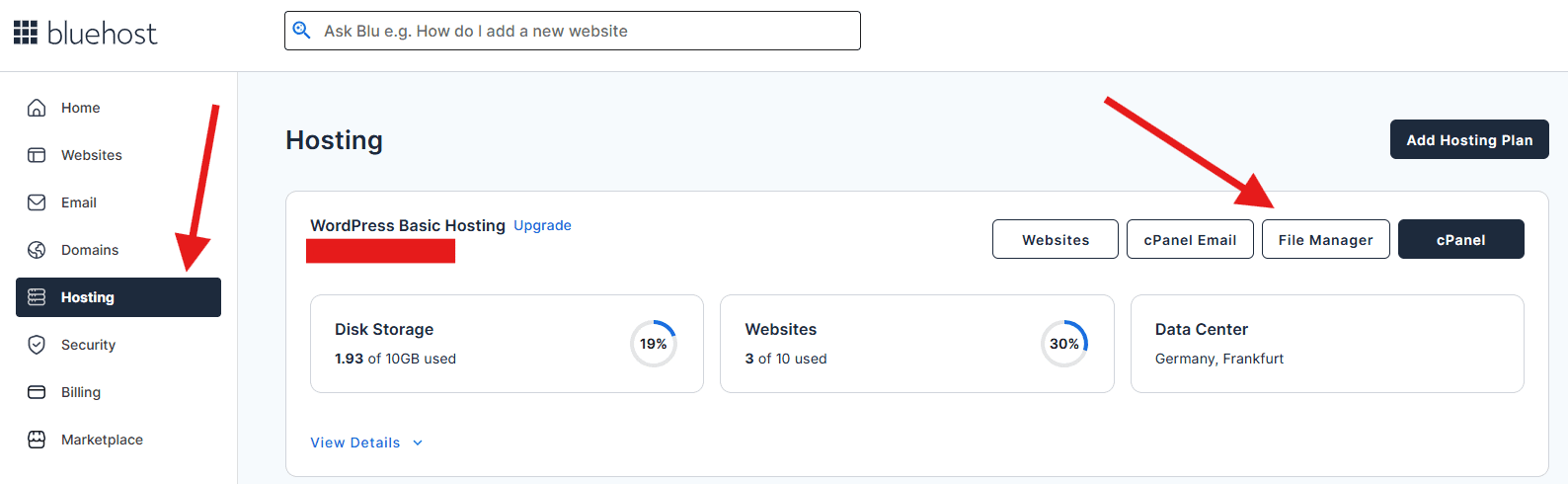
1. Log in to your Bluehost Account Manager.
2. Click Hosting in the left-hand menu.
3. In the hosting details page, click the cPanel button
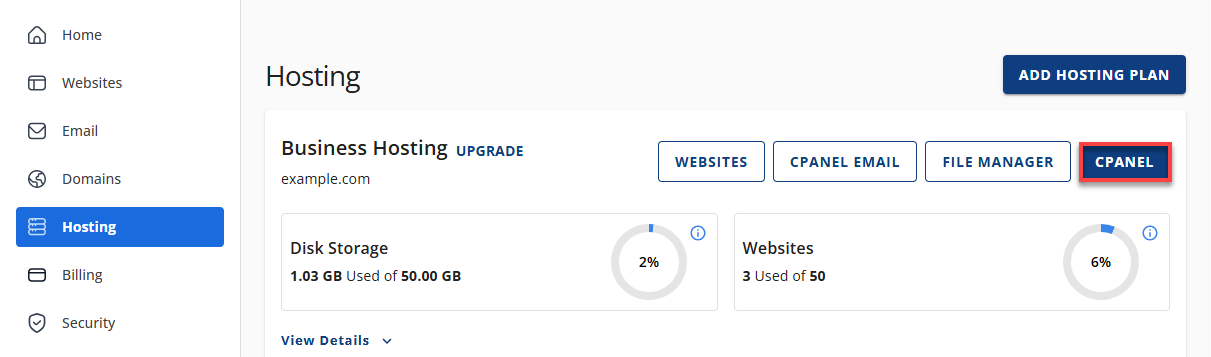
4. Your cPanel will open in a new tab.
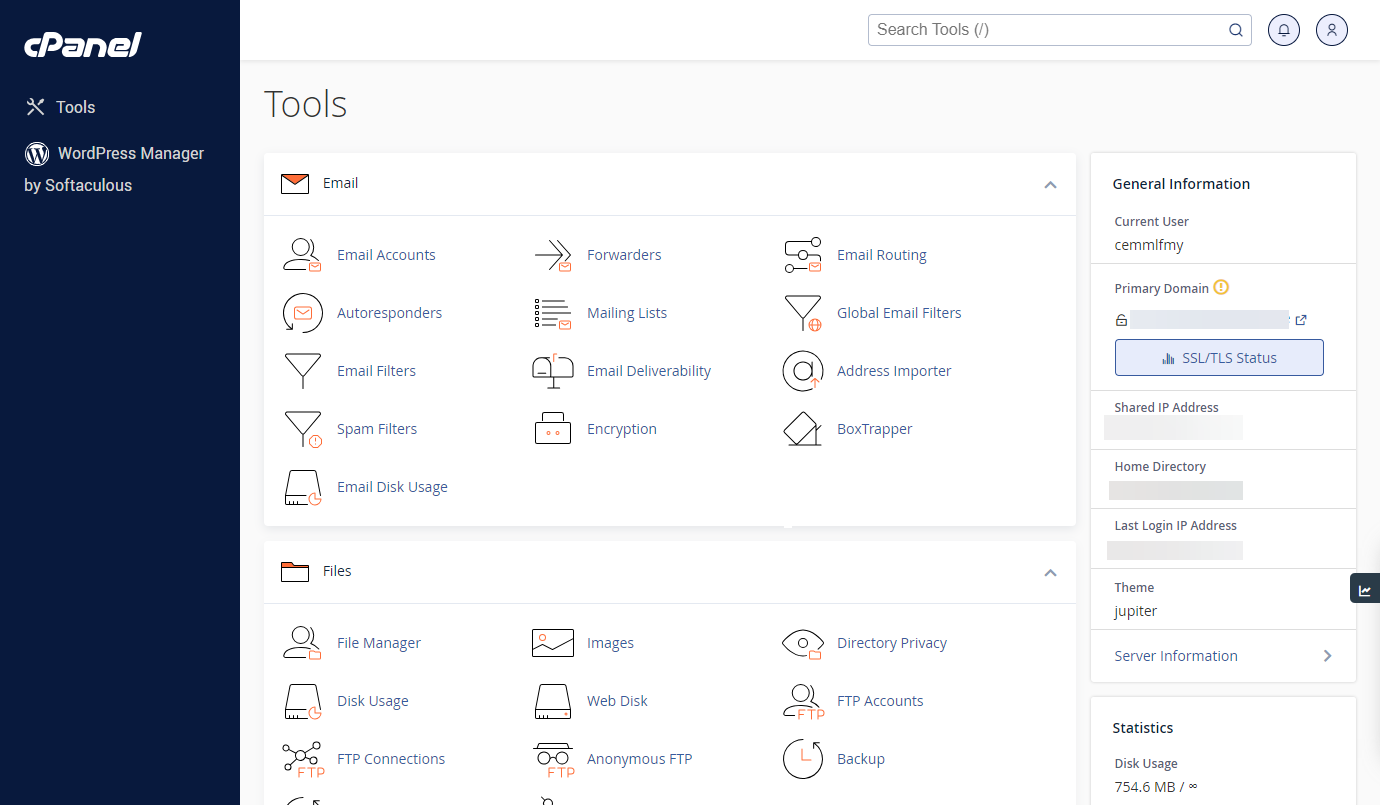
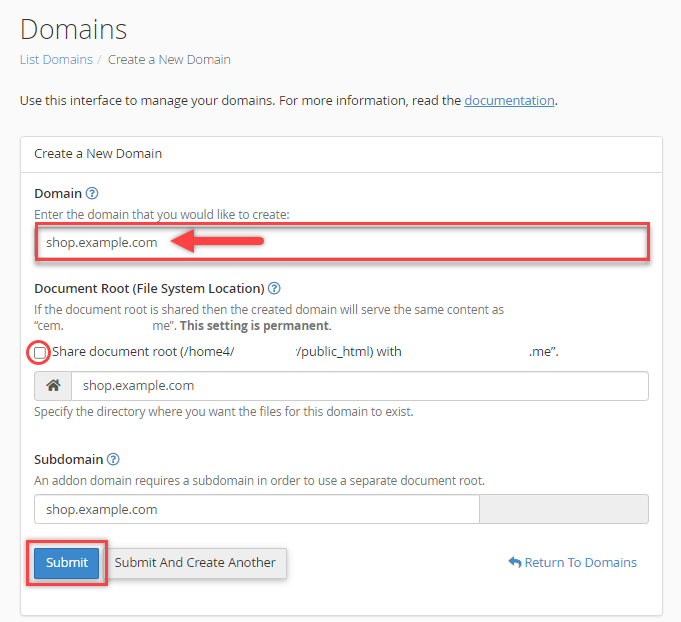
5. From the cPanel, click on the Domain Names icon. Click Domains.

6. Click the Create a New Domain button.
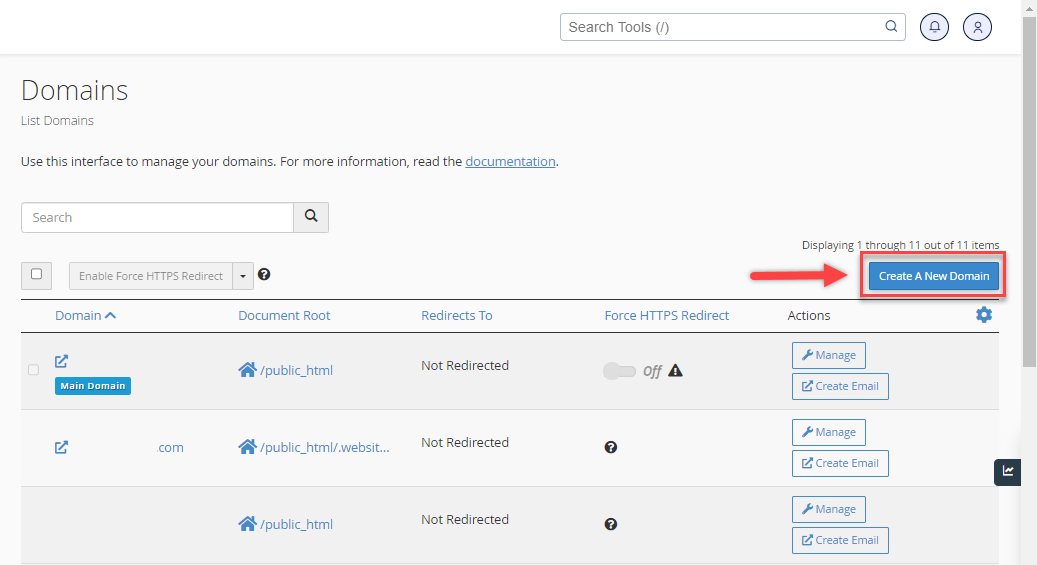
7. Input the desired subdomain name you want to create in the Domain field.
8. Uncheck the option “Share document root (/home/username/public_html) with domain.tld.”
9. Choose the directory for the website you want to show, ideally named after your subdomain. Then click Submit.
How to create a subdirectory in WordPress?
Creating a subdirectory is simpler than setting up a subdomain because it requires no DNS changes. The process varies slightly depending on your CMS or server setup:
1. Log in to your Bluehost Account Manager. Go to Hosting tab, and open File Manager.
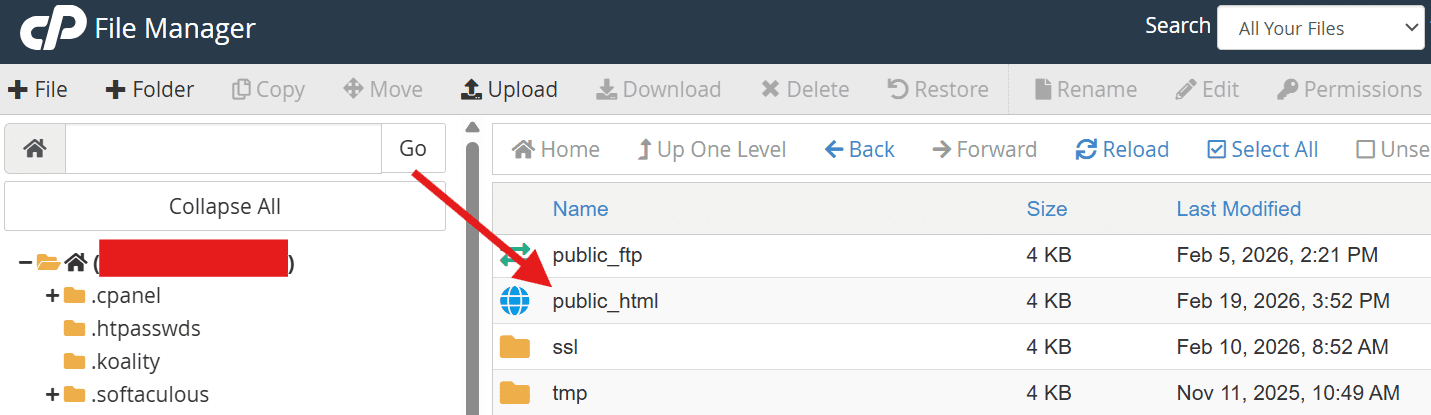
2. Go to public_html.
3. Click + Folder.
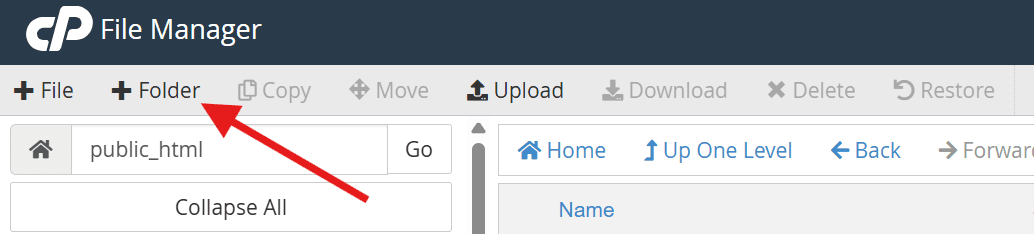
4. Name it (example: blog).

5. Go back to your Bluehost Account manager.
6. From Website tab, select Add Website.

7. Choose Install WordPress.

8. In the installation path field, enter: /blog
9. Complete installation.
Common mistakes to avoid
Whether you choose a subdomain or subdirectory, certain implementation errors can undermine your SEO efforts significantly. Here are the most critical pitfalls to watch for:
- Using subdomains unnecessarily: Many site owners default to subdomains out of habit or convenience, not strategic need. If your content is closely related to your main site and your goal is organic growth, placing it in a subdirectory is almost always the better choice from an SEO standpoint.
- Breaking internal links: When migrating content between a subdomain and a subdirectory or vice versa internal links often break. Always audit your internal link structure using a crawler like Screaming Frog before and after any structural change.
- Improper redirect setup: If you’re consolidating a subdomain into a subdirectory, every URL must have a 301 (permanent) redirect pointing from the old subdomain URL to the new subdirectory path. Missing redirects result in 404 errors, lost link equity and a poor user experience.
- Tracking issues in Google Analytics: Failing to configure cross-domain tracking when using subdomains causes broken user journey data. Sessions appear to restart when users move between your subdomain and root domain, inflating session counts and misattributing traffic sources.
- Duplicate content risks: Subdomains that mirror or closely replicate root domain content create duplicate content issues that can trigger Google’s filtering mechanisms. Always ensure each subdomain serves distinctly different content and use canonical tags appropriately to signal the preferred version to search engines.
Final thoughts
The subdomain or subdirectory decision doesn’t have a single right answer that applies to every website. As this guide has shown, the best choice depends entirely on your technical infrastructure, business goals and long-term SEO strategy.
The most important step you can take is to make the decision deliberately based on what your site actually needs rather than defaulting to one structure without evaluating the SEO consequences. And if you’re starting from scratch, choosing the right domain and hosting setup from day one makes everything easier.
If you’re ready to build your site on a fast, reliable foundation that supports both subdomain and subdirectory configurations, register your domain with Bluehost today.
FAQs
For most SEO purposes, subdirectories outperform subdomains because they consolidate link equity, share domain authority directly and create a unified crawl environment for Googlebot. Subdomains can work well for specific technical use cases, but if your goal is to grow organic traffic on a single domain, a subdirectory structure is generally the stronger choice.
Subdomains don’t automatically hurt your rankings, but they can limit your growth if used where subdirectories would be more appropriate. Because subdomains may not fully share the root domain’s authority, content published there often takes longer to rank and may require an independent backlink-building strategy. Used correctly, for staging environments or separate applications, subdomains carry no ranking penalty.
Yes. All pages within a subdirectory share and contribute to the root domain’s overall authority. A backlink pointing to [yourdomain].comarticle strengthens the entire domain, not just that individual page. This shared authority flow is one of the primary SEO advantages of the subdirectory structure over subdomains.
Yes, a subdomain can rank independently in Google’s search results. Google treats subdomains as separate entities, which means they build their own ranking signals over time. This independence can be advantageous if you’re running a completely separate product or service, but it means you cannot rely on your main domain’s authority to accelerate the subdomain’s rankings from the start.
Yes, the subdomain vs subdirectory debate remains highly relevant in 2026, particularly for businesses making structural decisions that are difficult and costly to reverse later. While Google has improved its ability to associate subdomains with their root domains, real-world migration data consistently shows that consolidating content into subdirectories produces measurable SEO improvements. The debate has practical ranking consequences.
In most cases, no. Placing your blog on a subdomain means that every backlink your content earns benefits the subdomain rather than your main domain. For businesses investing in content marketing as a long-term SEO strategy, a subdirectory blog (e.g., [yourdomain].com/blog) is strongly recommended. The authority your blog builds compounds directly with your main domain, improving the rankings of your product and service pages over time.

Write A Comment