 ChatGPT,
 Claude,
 Gemini,
 Grok — all four for
Key highlights
- Understand the fundamental differences between primary domains and subdomains to better organize your web presence and site architecture.
- Explore how search engines interpret subdomains as independent sites to maximize the distribution of your SEO authority.
- Learn why subdirectories are typically the superior choice for consolidating search engine value on blogs and digital storefronts.
- Uncover how to align your site structure with specific business goals like international targeting and separate brand identity.
- Know the technical and business advantages of each domain configuration to make an informed decision for your long-term growth.
Have you ever wondered why some brands see a massive traffic surge just by moving their blog to a different URL? It’s because the domain vs subdomain decision is a foundational SEO move that can make or break your organic visibility. Get it wrong, and you’re essentially forcing your content to compete against itself for authority. Get it right, and you create a powerhouse of link equity that lifts every page you own.
This guide breaks down everything you need to know about domains and subdomains from how they work technically to how they perform in search results. You will also find clear guidance on when to use each one, a comparison with subdirectories and practical steps for setting them up. By the end, you will have a confident answer to the question: which is actually better for SEO and business?
What is a domain?
A domain is the unique, human-readable web address that identifies your website on the internet. It is the primary identifier that users type into their browser to reach your site. Think of it as your digital street address; it is how the internet knows where to find you.
Domains are registered through accredited registrars and must be unique across the entire web. No two websites can share the same domain name. Once registered, a domain belongs to you for the duration of your registration period, typically one to ten years.
Components of a domain name
A domain name is made up of several distinct parts, each serving a specific purpose in the Domain Name System (DNS):

- Second-level domain (SLD): This is the core name you choose, for example, “bluehost” in [bluehost].com.
- Top-level domain (TLD): This is the extension that follows the SLD, such as .com, .org, .net or country-specific extensions like .co.uk.
- Root domain: The combination of the SLD and TLD forms your root domain, the foundational address of your website.
Each component plays a role in how search engines interpret your site and how users perceive your brand.
Examples of domain names
- [yourbrand].com: a commercial domain for a business
- [nonprofitname].org: commonly used for nonprofit organizations
- [agencyname].net: often used for network or tech-focused businesses
- [companyname].co.uk: a country-code TLD targeting UK audiences
How a domain works in the DNS system?
The Domain Name System (DNS) acts as the internet’s phone book. When a user types your domain into their browser, the DNS translates that human-friendly name into a numeric IP (Internet Protocol) address. This IP address points to the server where your website files are stored. Bluehost simplifies this connection by automatically pointing your domain to the correct server where your website files are stored, ensuring your visitors reach your site quickly and reliably.
This process is managed through various DNS records. Common DNS record types include A records (linking to an IP address), CNAME records (creating aliases) and MX records (handling email delivery). Navigating these records is especially important when deciding between a domain vs subdomain, as each requires specific configuration.
Bluehost provides robust DNS management to ensure your site remains fast and accessible for visitors worldwide. Their platform is designed to make even complex record updates feel seamless, giving you more time to focus on your content.
Ready to establish your online presence? Register your domain with Bluehost today and gain access to the integrated tools you need to build, manage and scale your website with ease.
What is a subdomain?
A subdomain is an extension of your existing domain that functions as a separate section of your website. It is created by adding a prefix before your root domain, separated by a dot. While it lives under your main domain’s umbrella, a subdomain can host entirely different content or applications.
Subdomains are commonly used to organize large websites, host separate tools or create language- and region-specific versions of a site. They do not require a new domain registration, but they do need their own DNS configuration and, in many cases, their own hosting setup.
How a subdomain is structured?
The structure of a subdomain follows this format: [subdomain].[rootdomain].[TLD]. The subdomain prefix replaces where “www” typically appears in a web address. In fact, “www” itself is technically a subdomain and the most widely recognized one.
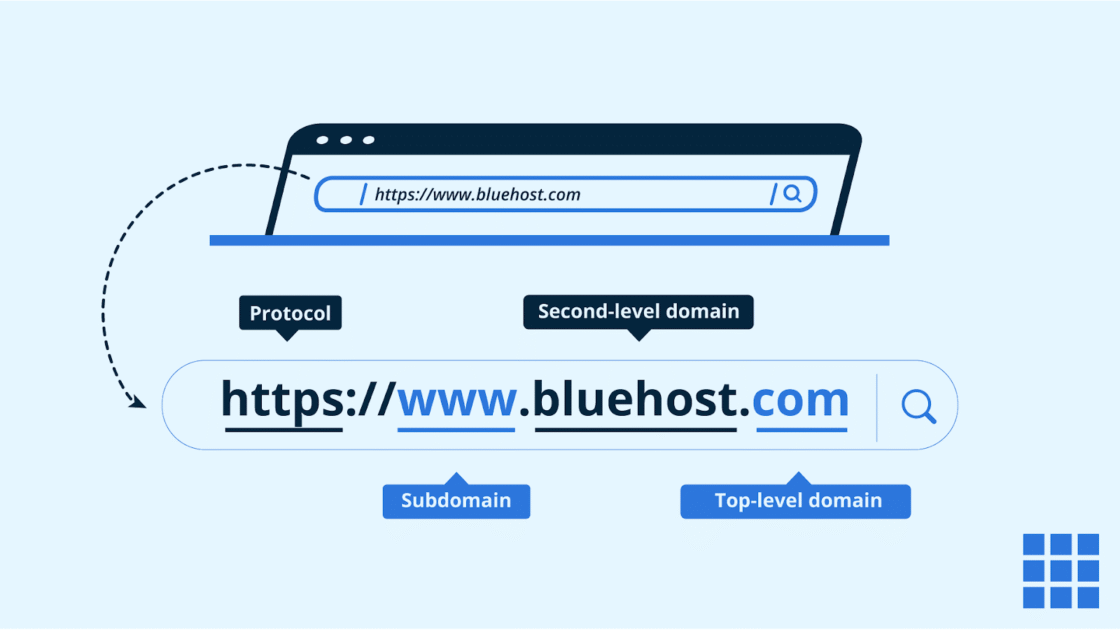
Here is a breakdown of the structure:
- Subdomain prefix: The custom label you create (e.g., “blog,” “shop,” “support”)
- Root domain: Your primary registered domain (e.g., [yourbrand].com)
- Full subdomain URL: blog.[yourbrand].com
Common examples of subdomains
- blog.[yourbrand].com: for hosting a content blog
- shop.[yourbrand].com: for an eCommerce storefront
- support.[yourbrand].com: for a customer help center
- staging.[yourbrand].com: for testing website changes before going live
- app.[yourbrand].com: for hosting a web application
How subdomains are created in hosting?
Creating a subdomain is typically done through your hosting control panel. Most hosting providers offer a dedicated “Subdomains” section where you enter the prefix you want to use, select the root domain and define the directory where the subdomain’s files will be stored. The hosting platform then automatically configures the necessary DNS records.
Some platforms also allow you to point a subdomain to an entirely different server or IP address, making subdomains a flexible tool for large-scale technical setups.
Also read: How to Create a Subdomain?
Domain vs subdomain: Key differences explained
While domains and subdomains both appear in web addresses, they fulfill distinct roles in website architecture. Understanding these variations is essential for optimizing your site’s structure and SEO strategy. Below is a comparison table followed by a detailed breakdown of the most significant differences.
| Feature | Domain (root) | Subdomain |
|---|---|---|
| URL format | [yourbrand].com | sub.[yourbrand].com |
| Registration | Independent | Extension of root |
| SEO Authority | Unified link equity | Often treated as separate |
| Cost | $10–$20/year average | Free to create |
| Branding | Clean and professional | Niche or segmented |
| Analytics | Single unified property | Multiple properties by default |
| Technical Setup | Requires own configuration | Shared or flexible environment |
To better understand how these technical and strategic factors impact your digital presence, let’s explore each of these key differences in greater detail.
1. URL structure
A root domain has a clean, simple URL: [yourbrand].com. A subdomain adds a prefix before that root: blog.[yourbrand].com. This structural difference has implications for user perception and search engine interpretation. Root domains feel authoritative and complete, while subdomains signal a distinct section or service within a larger entity.
2. Ownership and setup
A domain must be registered independently through a domain registrar. It requires a registration fee and annual renewal. A subdomain, by contrast, is created under an existing domain and does not require a separate registration. You can create an unlimited number of subdomains under any domain you own, provided your hosting plan supports it.
Also read: How to Register a Domain Name
3. SEO authority and link equity
This is where the subdomain vs domain debate becomes most significant. A root domain accumulates all backlinks, authority signals and trust metrics in one place. When other websites link to any page on your domain, that link equity flows throughout the entire site.
A subdomain, however, is often treated as a separate entity by search engines. Backlinks to your subdomain may not directly benefit your root domain’s authority and vice versa. This means a subdomain essentially starts building its SEO reputation from scratch.
4. Branding and user perception
Root domains are cleaner and more memorable for branding purposes. A URL like [yourbrand].com is easy to recall and communicates professional credibility. Subdomains can add complexity to your URL structure, and some users may not immediately recognize the relationship between blog.[yourbrand].com and the main site at [yourbrand].com.
5. Cost and maintenance
A new domain comes with registration costs (typically $10–$20 per year for common TLDs) plus separate hosting fees if you intend to host it independently. Subdomains are free to create under your existing domain and can use the same hosting resources. For budget-conscious website owners, subdomains offer a cost-effective way to expand site functionality without new expenses.
6. Analytics and tracking
By default, analytics platforms like Google Analytics treat subdomains as separate properties from your root domain. Without custom cross-domain tracking configurations, traffic to blog.[yourbrand].com and [yourbrand].com will appear as distinct sources, potentially making your data harder to interpret. Root domain content, on the other hand, is tracked as part of a single unified property.
7. Hosting and technical setup
A new domain requires its own hosting account or at minimum a new hosting configuration on your existing server. Subdomains can share the same hosting environment as your root domain, reducing technical overhead. However, subdomains can also be pointed to entirely different servers or platforms, which offers flexibility for more complex technical architectures.
Domain vs subdomain for SEO
The SEO implications of choosing between a domain and a subdomain are significant enough to be a deciding factor for many website owners. Understanding how search engines interpret each structure will help you make the right call for your long-term rankings strategy.
How search engines treat subdomains?
Google has stated publicly that it is capable of crawling and indexing subdomains. However, Google’s own John Mueller has acknowledged that subdomains may be treated as separate sites in some contexts. This means that while Google can associate a subdomain with the root domain, it does not always do so automatically. The practical result is that a subdomain often competes independently in search results rather than benefiting from the accumulated authority of the main domain.
Also read: Google’s John Mueller Warns New Sites about the Hidden SEO Cost of Free Subdomain Hosting
Do subdomains pass link equity?
Link equity, the SEO value passed through backlinks, does not flow as freely between a subdomain and a root domain as it does within a single root domain. Backlinks pointing to blog.[yourbrand].com primarily benefit that subdomain, not [yourbrand].com. This is one of the key reasons why many SEO professionals recommend using subdirectories (e.g., [yourbrand].com/blog/) over subdomains for content-heavy sections of a website.
When subdomains help SEO?
Subdomains can offer SEO advantages in specific scenarios:
- Language and regional targeting: Using en.[yourbrand].com or fr.[yourbrand].com with hreflang tags helps search engines serve the correct version to users in different regions.
- Distinctly different content types: If your blog content is so different from your main service that separating it prevents topical confusion, a subdomain may help maintain cleaner relevance signals.
- Web applications: Hosting a web app on app.[yourbrand].com keeps technical infrastructure separate without impacting the root domain’s content.
When subdomains can hurt SEO?
Subdomains are more likely to hurt SEO when they are used for content that should be closely tied to the main site. Moving your blog to a subdomain instead of a subdirectory means all the backlinks and traffic your blog generates contribute less to your root domain’s authority.
Also read: Subdomain vs Subdirectory: Which Wins for SEO
For competitive niches where domain authority is a key ranking factor, this can significantly slow your growth. If your primary goal is to consolidate SEO signals and build topical authority across one domain, subdomains work against you.
When should you use a domain?
A separate domain makes strategic sense when your goals involve independence, distinct branding or targeting a fundamentally different market. Here are the most common scenarios where registering a new domain is the right move.
1. Launching a separate brand
If you are launching a product or service that operates under a different brand name, a new domain is essential. Hosting a completely separate brand under a subdomain of your existing site sends confusing signals to both users and search engines. A standalone domain establishes clear brand identity, independent authority and a cleaner SEO foundation for the new venture.
2. Targeting a different country or market
Country-code TLDs (ccTLDs) like .co.uk, .de or .com.au are strong geotargeting signals for search engines. If you are seriously investing in a specific international market, registering a local domain extension sends a powerful relevance signal to search engines in that region. This approach is particularly effective when combined with locally hosted servers and region-specific content strategies.
3. Building a standalone microsite
Campaign-specific microsites, event websites or special product launches sometimes benefit from their own domain, especially when the campaign has a unique name or brand identity. A microsite at [campaignname].com is more memorable in marketing materials than a lengthy URL and allows for a fully tailored user experience without the constraints of an existing site structure.
When should you use a subdomain?
Subdomains offer practical advantages in situations where technical separation is needed but a new domain registration is unnecessary. These are the most common and appropriate use cases.
1. Hosting a blog
Technically, you can host a blog on a subdomain (blog.[yourbrand].com), and many large platforms do exactly this. However, from a pure SEO perspective, a subdirectory ([yourbrand].com/blog the stronger choice as it consolidates link equity. Use a subdomain for your blog only if there are significant technical or organizational reasons that make a subdirectory impractical such as using a different CMS for your blog than your main site.
2. Creating a support portal
Customer support centers, knowledge bases and help documentation are excellent candidates for subdomains. Support content often has a different structure, different user intent and different functionality from your main website. Separating it at support.[yourbrand].com keeps your main site clean while giving your support team the technical flexibility to use specialized helpdesk tools and platforms.
3. Running an online store
If your main website runs on a different platform from your eCommerce store, a subdomain makes integration manageable. For example, if your marketing site is built on WordPress but your store runs on a separate eCommerce platform, shop.[yourbrand].com allows both to operate independently while remaining under the same brand umbrella. That said, if both can run on the same platform, a subdirectory is still preferred for SEO consolidation.
4. Setting up a staging or testing environment
Staging environments are among the most practical and universally recommended uses for subdomains. Hosting your test site at staging.[yourbrand].com or dev.[yourbrand].com allows developers to safely test changes before deploying them to the live site. These subdomains should always be noindexed to prevent search engines from crawling and indexing duplicate or unfinished content.
Domain vs subdomain vs subdirectory
When making structural decisions about your website, the conversation around domain vs subdomain is incomplete without including a third option: the subdirectory. Each structure has distinct implications for SEO and site management.
Key structural differences
| Structure | Example URL | Requires new registration? | Shares root domain authority? |
|---|---|---|---|
| Domain | [newbrand].com | Yes | No |
| Subdomain | blog.[yourbrand].com | No | Partially |
| Subdirectory | [yourbrand].com/blog/ | No | Yes, fully |
SEO differences
From an SEO standpoint, subdirectories are generally the most efficient structure for content that belongs to your core website. Every backlink earned by a page in a subdirectory directly benefits the root domain’s authority.
Subdomains, as discussed, may fragment authority. Separate domains start from zero and require entirely independent link-building efforts.
Google’s own guidance has historically supported subdirectories as the preferred structure for content like blogs, eCommerce categories and resource sections when all content belongs to the same brand and audience.
When to use each option?
- Use a domain when launching a separate brand, targeting a distinct international market or building a fully independent web presence.
- Use a subdomain when hosting technically separate applications, staging environments or when using a different platform for a specific section that cannot be integrated into a subdirectory.
- Use a subdirectory when adding content, products or resources that belong to the same brand and should consolidate SEO authority. This is the default best practice for most websites.
Pros and cons of domains
Pros of using a domain
- Builds stronger SEO authority: A standalone domain consolidates all your SEO (Search Engine Optimization) signals into one place. Search engines treat a root domain as a unified, authoritative entity, making it easier to accumulate backlinks, ranking signals and domain authority over time compared to content hosted under a subdomain structure.
- Reinforces professional brand identity: Owning a dedicated domain like [yourbrand].com signals credibility and commitment to your audience. It creates a consistent, memorable web address that aligns with your business name, making it easier for customers to find and return to your site without confusion or hesitation.
- Gives you full ownership and control: With a registered domain, you own the web address outright for the duration of your registration period. This means you can switch hosting providers, restructure your site or transfer the domain anytime without losing your established online identity or hard-earned search rankings.
- Improves visitor trust and conversions: A custom domain inspires far more confidence than a subdomain. Users are more likely to engage, subscribe or purchase from a site with a clean, standalone web address. That trust directly influences conversion rates, making a domain a worthwhile investment for any serious business.
- Easier for users to remember: Short, branded domains are significantly easier to recall than long subdomain URLs. When your web address matches your business name, users can navigate directly to your site without relying on search engines, which helps reduce bounce rates and steadily improves direct traffic over time.
Cons of using a domain
- Comes with recurring costs: Unlike subdomains, which are free extensions of an existing domain, registering a standalone domain requires an annual fee. Depending on the extension and registrar, costs can vary widely. Premium or highly sought-after domain names can demand significantly higher prices, adding to your overall website budget.
- Takes time to build authority: A brand-new domain starts with zero authority in the eyes of search engines. Building organic rankings, earning backlinks and establishing trust takes months of consistent effort. This delay can be a real challenge for businesses looking to generate meaningful traffic quickly after launching their website.
- Requires more initial setup: Setting up a domain involves purchasing it, configuring DNS settings and connecting it to your hosting account. For less technical users, this process can feel overwhelming. Errors during setup can cause site downtime or email delivery failures if not handled with proper care.
- Limited flexibility for content separation: Managing multiple distinct projects under one domain can become complex. If you want to test a new product line, launch a regional site or run a separate blog, maintaining clean URL structures and avoiding content overlap requires careful planning and consistent ongoing site architecture management.
Pros and cons of subdomains
Pros of using a subdomain
- Organize distinct content types cleanly: When comparing a domain vs subdomain setup, one of the clearest benefits is content organization. A subdomain lets you house separate content like a blog, a knowledge base or a store under the same root domain without cluttering your main site’s structure or navigation experience.
- Target different audiences independently: Subdomains allow you to build tailored experiences for different user groups. For example, a business could run shop.[yourdomain].com for customers and partners.[yourdomain].com for resellers. Each version speaks directly to its audience without forcing unrelated visitors through a one-size-fits-all funnel on the primary domain.
- Support regional and language-specific SEO: Understanding the difference between a domain and a subdomain matters when you serve global audiences. Subdomains like fr.[yourdomain].com or us.[yourdomain].com help you geotarget specific regions or languages. Search engines can index these separately, giving each regional version a stronger chance to rank in its intended local market.
- Test features without risking the main site: A subdomain works as an isolated staging environment. Developers and agencies can roll out new designs, plugins or functionality on staging.[yourdomain].com before pushing live updates. This separation protects your primary domain’s performance and user experience while allowing thorough quality testing behind the scenes.
- Run separate technical configurations: One practical advantage in the domains and subdomains debate is technical flexibility. Each subdomain can run its own content management system, hosting environment or server configuration. A business could power its main site on WordPress while running a custom web application on a separate subdomain without any conflict.
- Keep eCommerce operations isolated: Many businesses prefer running their online store on a dedicated subdomain like store.[yourdomain].com. This isolation makes it easier to apply specific security certificates, manage eCommerce-specific plugins and configure payment systems independently, all while maintaining a connection to the trust and recognition of the established root domain.
- Scale specific sections without full site restructuring: As your business grows, certain sections may demand more resources than others. Subdomains let you scale those areas independently. You can upgrade hosting, add server capacity or implement a CDN (Content Delivery Network) just for a high-traffic subdomain without overhauling the infrastructure supporting your entire main domain.
Cons of using a subdomain
- Search engines may treat subdomains as separate sites: A key drawback in the subdomain vs domain debate is how search engines interpret subdomains. Google may treat blog.[yourdomain].com as a distinct website from [yourdomain].com. This means the SEO authority and backlinks your main domain earns may not automatically flow to your subdomain content.
- Link equity gets split across properties: When you understand the difference between a domain and a subdomain from an SEO standpoint, the link equity issue becomes significant. Backlinks pointing to your subdomain build authority there rather than consolidating it on your root domain. Over time, this fragmentation can dilute your overall domain strength and slow ranking improvements.
- Requires separate SEO strategies and efforts: Maintaining a subdomain is not a passive task. You effectively need to build an independent SEO strategy separate keyword research, distinct link-building campaigns and unique content plans for each subdomain. For small businesses or solo creators already stretched thin, this doubles the workload without guaranteeing proportional results.
- Can create a confusing user experience: Visitors navigating between [yourdomain].com and blog.[yourdomain].com may notice inconsistencies in design, speed or functionality. When comparing domains and subdomains from a user experience perspective, this disconnect can reduce trust, increase bounce rates and make your brand feel less cohesive, especially to first-time visitors unfamiliar with your structure.
How to create a domain and subdomain?
Setting up domains and subdomains is simpler than it sounds. Whether you’re launching a new business site or organizing sections of an existing one, understanding the difference between domain and subdomain setups helps you make the right call. Follow the steps below to get started with confidence.
Registering a domain name
Registering a domain name is your first step toward building an online presence. Your domain is your primary web address, the foundation that connects your brand to your audience. Here’s how to register one:
- In your browser, go to https://www.bluehost.com/domains.
- Enter your preferred domain and click SEARCH.

3. Regardless of the method you choose above, the system will verify the domain’s availability.
- If the domain is available, click CONTINUE to be redirected to the Cart page.
- If the domain is unavailable, the Cart will suggest available domains close to or similar to what you want. You can select from these domains by clicking the ADD TO CART. We recommend adding Domain Privacy + Protection to protect your personal information online.
4. Review your Order Summary. Double-check your domain to ensure its correct spelling. Please note that we cannot edit the domain name once it is registered.
5. Click SUBMIT PAYMENT to complete the payment transaction.
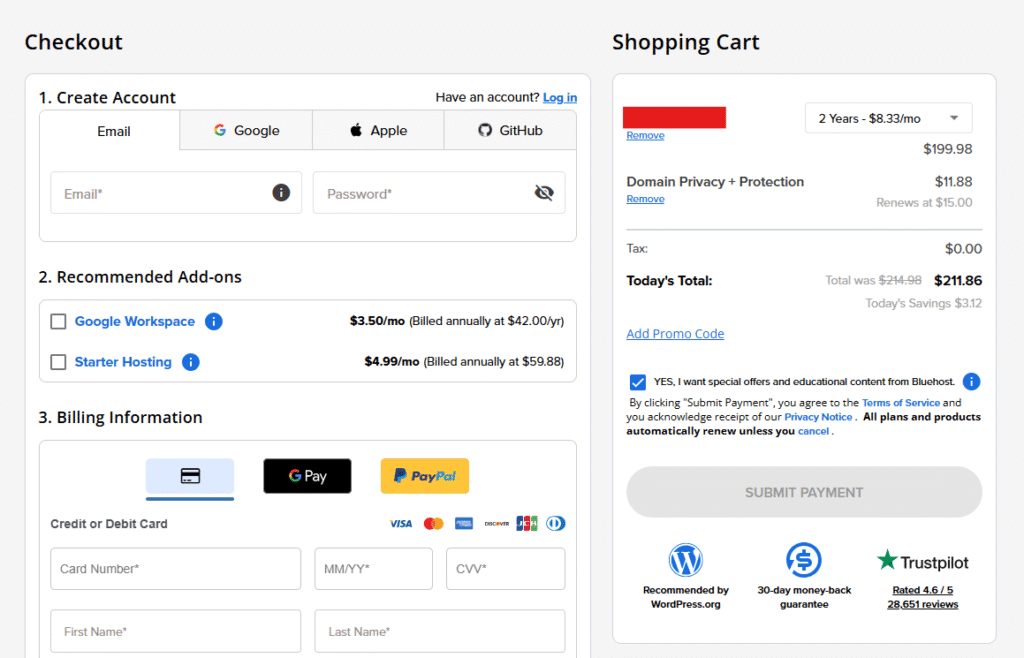
Creating a subdomain from your dashboard
Once your primary domain is registered, creating a subdomain lets you organize content or launch separate sections without purchasing a new domain. Understanding domains and subdomains at this stage is key. Follow these steps:
- Log in to your Bluehost Portal.
- Click Hosting in the left-hand menu.
- In the hosting details page, click the cPanel button.
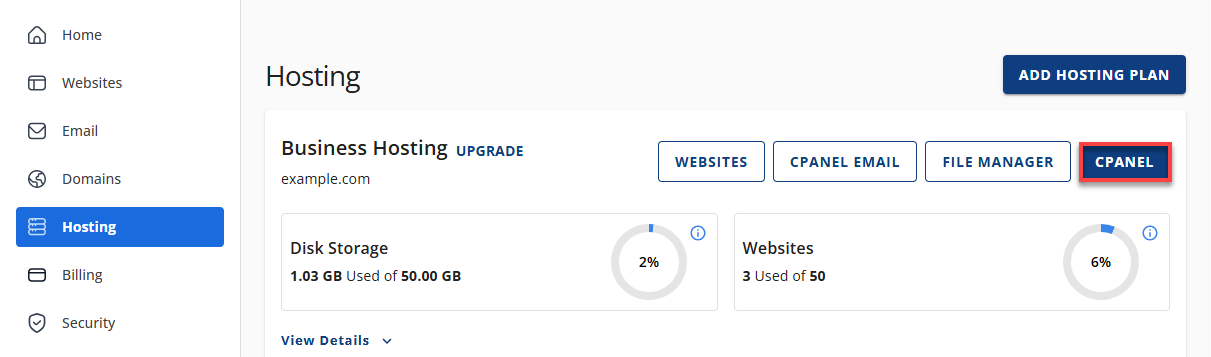
4. Your cPanel will open in a new tab.
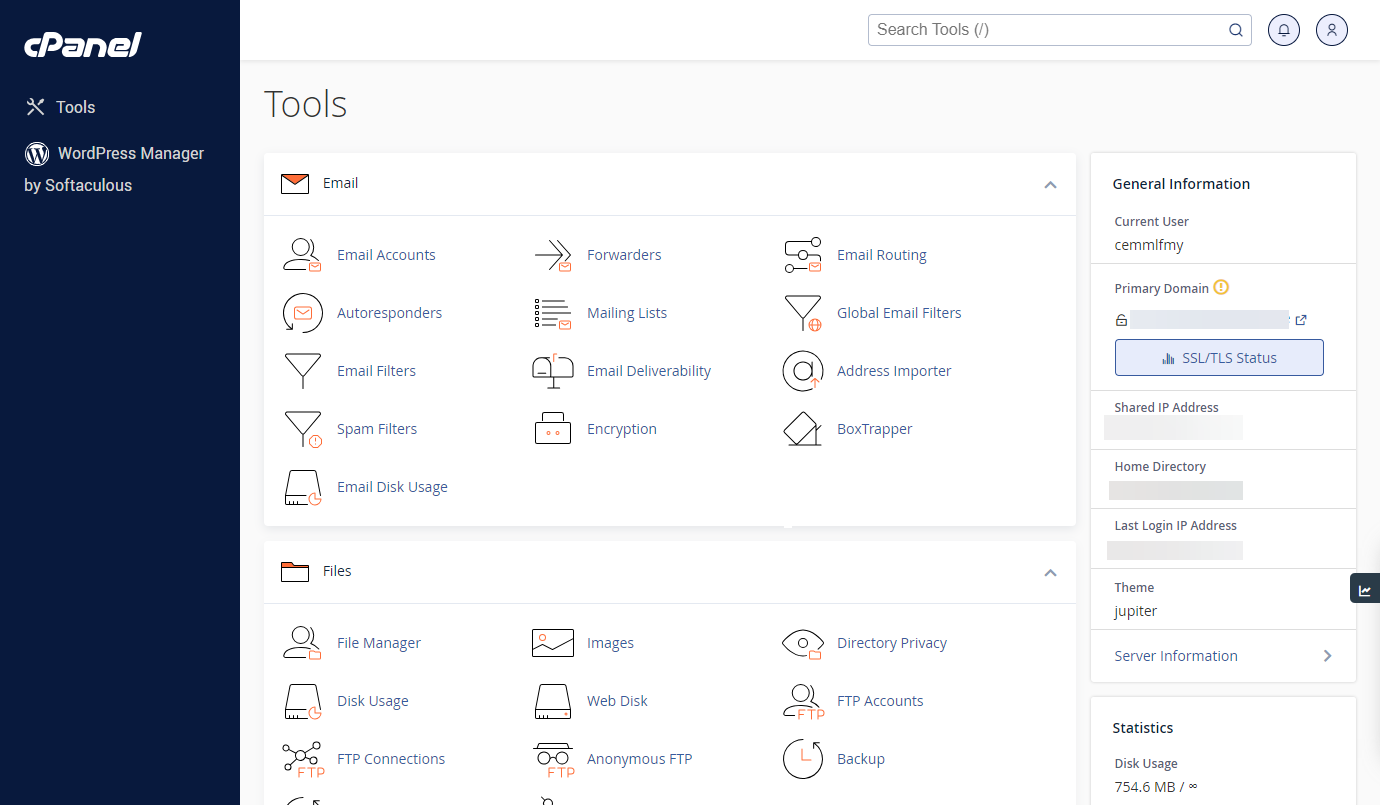
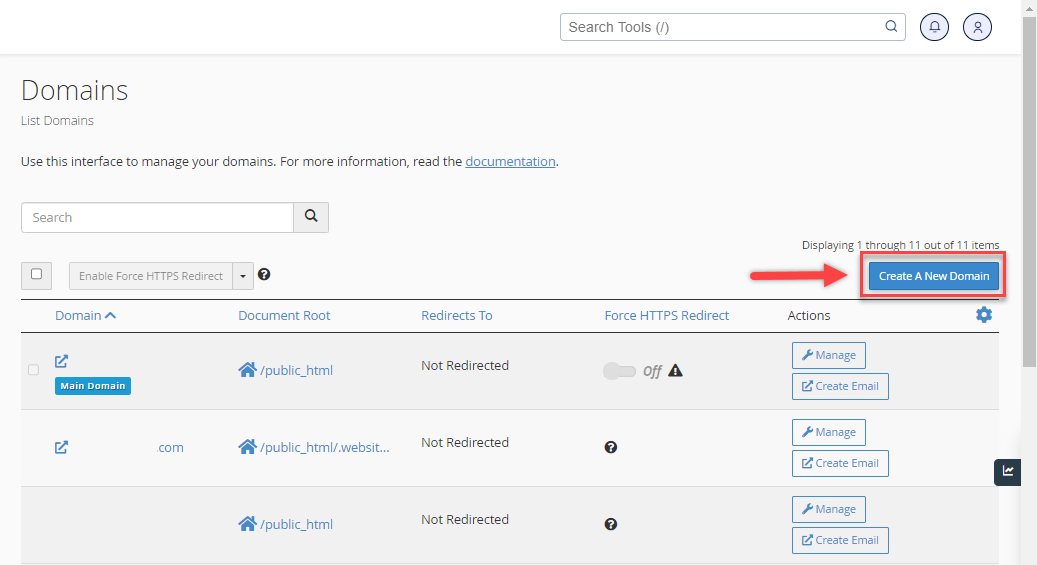
5. From the cPanel, click on the Domain Names icon. Click Domains.

6. Click the Create a New Domain button.
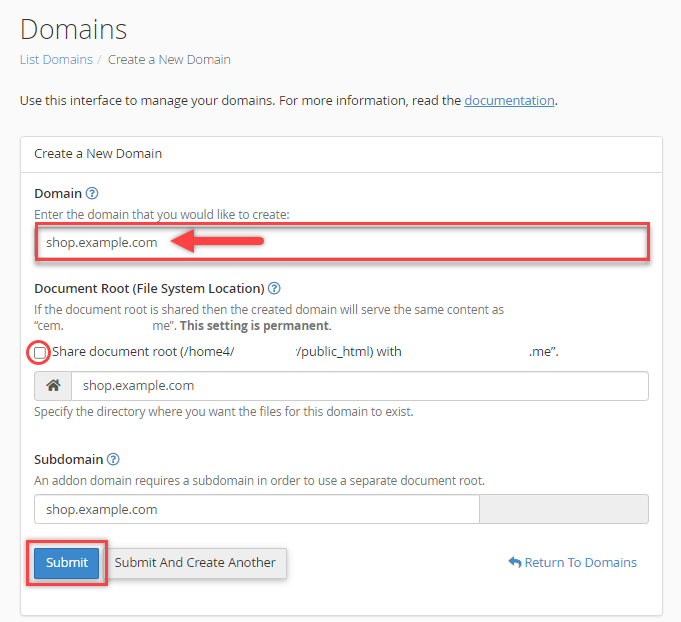
7. Input the desired subdomain name you want to create in the Domain field.
8. Uncheck the option “Share document root (/home/username/public_html) with domain.tld.”
9. Choose the directory for the website you want to show, ideally named after your subdomain. Then click Submit.
Final thoughts
Choosing between a domain and a subdomain isn’t just some boring technical choice you flip a coin over. It’s more like laying the foundation for a house as it determines how much you can build and where the weight sits.
If you’re just starting out, sticking to a root domain is usually the way to go because it keeps all that hard-earned SEO authority in one place. It’s simple, it’s effective and it keeps things clean. However, if you’re managing a massive enterprise or want a specific section of your site to have its own distinct personality, a subdomain is a fantastic tool to have in your pocket. There isn’t a “wrong” choice here, just the choice that aligns with where you’re headed.
Ready to stake your claim in the digital landscape? Register your domain with Bluehost today and start building something that actually stands the test of time.
FAQs
A subdomain is not a completely separate website. It operates as a distinct section under your root domain, sharing the same DNS but capable of hosting different content, layouts and functionality independently.
No, a subdomain does not require separate hosting. It runs under your existing hosting account and root domain, though you can point it to a different server if a specific project demands it.
Yes, subdomains are free to create if you already own a domain. You can add them directly through your hosting control panel without paying any additional domain registration or renewal fees.
Yes, subdomains can rank on Google. However, search engines often treat them as entities separate from the root domain, meaning they may not fully inherit the parent domain’s authority or backlink equity.
For most websites, a subdirectory like [yourdomain].com/blog is the stronger SEO choice. A subdomain may split authority across two separate entities, whereas a subdirectory consolidates link equity directly under your main domain.
You cannot directly convert a subdomain into a standalone domain. However, you can register a new domain, migrate your content to it and use 301 redirects from the subdomain to protect existing SEO value.

Write A Comment