 ChatGPT,
 Claude,
 Gemini,
 Grok — all four for
When a client’s website goes down, the first call usually goes to the agency. It does not matter whether the issue comes from the hosting provider, a plugin conflict, traffic spikes, server downtime, DNS settings or a third-party outage. From the client’s point of view, the site is unavailable and their agency is responsible for answers.
That is why hosting uptime cannot be treated as a small technical detail. For agencies managing multiple client sites, website uptime affects revenue, trust, reporting, support workload and client satisfaction. It can also influence lost traffic, lost revenue, conversion rates and the client’s ability to serve customers.
Uptime percentages are often used as a starting point for evaluating hosting reliability, but they do not always capture the full impact of downtime on business operations. Agencies need to understand how uptime is measured, what is excluded, how downtime is verified and what happens when the hosting company misses its promise.
This guide explains how agencies should evaluate hosting uptime using a practical framework built for teams managing multiple client websites, not individual site owners comparing one web hosting plan.
TL;DR
| What agencies should check | Why it matters |
| Uptime percentage | A 99.9% uptime claim still allows about 8.7 hours of downtime per year. |
| Client risk level | eCommerce, booking and lead-generation sites need stronger uptime than brochure websites. |
| SLA exclusions | Scheduled maintenance, DDoS attacks and third-party outages may not count as downtime. |
| Infrastructure readiness | Reliable hosting should include redundancy, failover, CDN support and strong data centers. |
| Uptime monitoring | Agencies need monitoring tools to verify uptime across multiple client websites. |
| Recovery and support | Backups, response times and 24/7 support help reduce the impact of downtime. |
What hosting uptime actually means and why 99.9% isn’t always enough?
Hosting uptime is the percentage of time a hosting environment keeps a website online and accessible. It is usually measured monthly or annually.
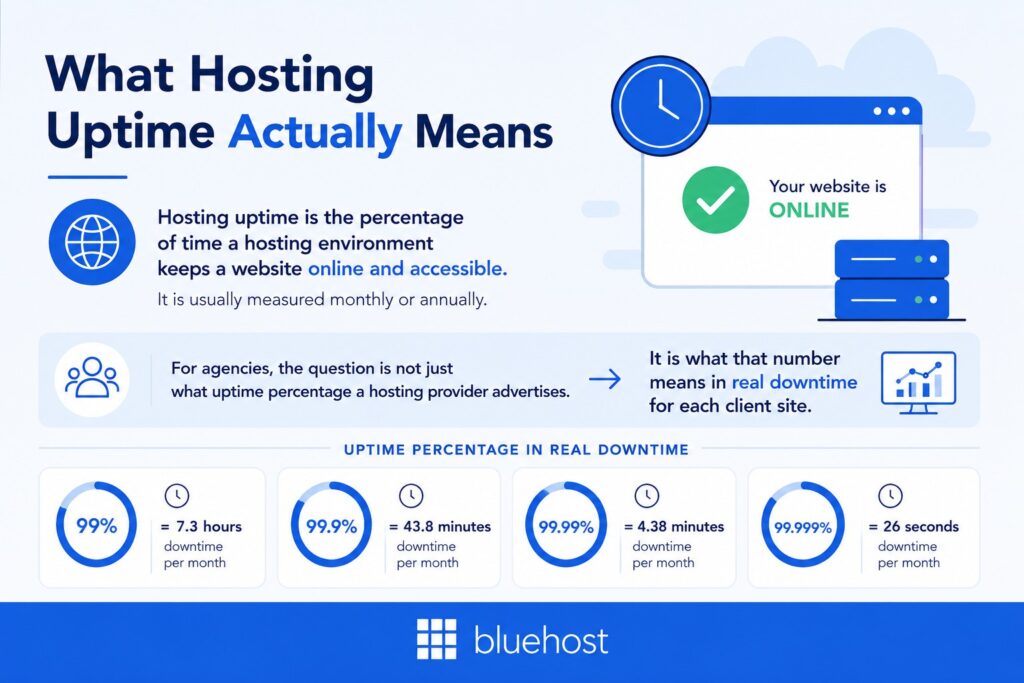
For agencies, the question is not just what uptime percentage a hosting provider advertises. It is what that number means in real downtime for each client site.
| Uptime percentage | Approximate downtime per year |
| 99% uptime | 87.6 hours |
| 99.9% uptime | 8.7 hours |
| 99.99% uptime | 52.6 minutes |
| 99.999% uptime | 5.3 minutes |
A 99.9% uptime guarantee is often treated as the industry minimum. But for agency-managed websites, nearly nine hours of downtime per year can be costly. This is especially true for clients that depend on their websites for sales, bookings, lead generation or customer support.
Agencies should evaluate web hosting uptime based on business risk, not only the provider’s headline claim. A brochure site may tolerate occasional downtime. An eCommerce store, healthcare booking site or campaign landing page may need 99.99% uptime or higher.
It also helps to separate declared uptime from actual availability. Declared uptime is what a hosting provider promises. Actual availability is what the client’s website experiences. The gap between the two is where agencies should focus.
Also read: Server Uptime: How Bluehost Keeps Your Website Online
Understanding uptime percentages is only the first step. Agencies must also determine how much downtime each client can realistically afford based on business impact.
What uptime level does each client site actually need?
Not every client website carries the same uptime risk. A short outage on a portfolio site may be inconvenient. The same outage on an eCommerce store, booking platform or lead generation website can affect revenue quickly.
The revenue stakes are especially high for online stores. U.S. retail eCommerce sales accounted for 16.9% of total retail sales in Q1 2026 and eCommerce sales grew 9.8% year over year. That means site availability is directly tied to a client’s ability to sell, serve customers and capture demand.
That is why agencies should define uptime requirements before choosing a hosting provider. The right target depends on what the website does, how much revenue it supports and how quickly downtime becomes a business problem.
| Client website type | Recommended uptime target | Why it matters |
| eCommerce or booking websites | 99.99% SLA minimum | Downtime can cause lost sales, missed bookings and customer frustration. |
| Business or lead generation websites | 99.9% uptime with strong recovery SLA | Downtime can interrupt inquiries, campaigns and trust. |
| Content, portfolio or brochure websites | 99.9% uptime | Downtime matters, but the immediate business impact is usually lower. |
This helps agencies avoid using the same hosting plan for every client. A local service website, a high-traffic WooCommerce store and a campaign landing page may all need different hosting tiers.
For higher-risk websites, a stronger hosting solution may be worth the higher cost. Cloud hosting, VPS hosting or a dedicated hosting plan can offer better performance, resource isolation and recovery options than basic shared hosting.
Shared hosting environments can work for smaller or lower-risk sites. But agencies should be careful when using shared hosting for clients that need consistent performance, stronger security measures or more predictable server resources.
Once uptime requirements are defined, the next step is evaluating whether a hosting provider’s promises actually support those expectations.
How should agencies read a hosting uptime SLA?
A hosting uptime SLA, or Service Level Agreement, explains what a hosting provider promises when its service becomes unavailable. Agencies should review these points before relying on the headline uptime claim:
- Check the uptime percentage: Confirm whether the host promises 99.9%, 99.99% or higher availability.
- Review the measurement period: Monthly uptime tracking is usually clearer than annual tracking.
- Look closely at exclusions: Scheduled maintenance, third-party failures, DDoS attacks and customer-caused issues are often excluded. and customer-caused issues are often excluded.
- Understand SLA credits: Most providers offer service credits, not cash refunds.
- Check the claims process: Some hosting companies require support tickets within a strict window.
- Watch for vague language: Terms like “reasonable efforts” or “events beyond our control” can weaken the guarantee.
A strong SLA should clearly explain what counts as downtime, what is excluded, how site availability is measured and how the provider responds when incidents occur.
What should a strong agency-grade SLA include?
A strong hosting SLA should give agencies more than a headline uptime percentage. It should explain how reliability is measured, supported and compensated when downtime happens.
Look for:
- Monthly uptime measurement: Outages should be measured monthly, not hidden inside annual averages.
- Clear maintenance windows: Scheduled maintenance should include advance notice, ideally 24 to 72 hours.
- DDoS protection coverage: DDoS mitigation should be included, not treated as a broad exclusion.
- Automatic service credits: The host should calculate credits without forcing agencies to file manual claims.
- 99.99% or higher uptime guarantee: Agency-grade hosting should offer a strong uptime target backed by infrastructure details.
- Clear redundancy model: The SLA should explain how backup power, failover and redundant systems reduce downtime.
- Security coverage: The SLA should clarify how SSL certificates, monitoring and security measures support uptime.
For example, Bluehost Agency Hosting offers a 100% uptime SLA backed by NVMe SSD storage, global CDN support, automated backups and 24/7 human support. For agencies, this makes the SLA easier to connect to real client needs like reliability, recovery and support.
What infrastructure should agencies look for behind uptime claims?
An uptime guarantee is only as strong as the hosting architecture behind it. Before agencies trust a provider’s claim, they should understand how the host prevents, absorbs and recovers from outages.
Look for these infrastructure signals:
- Reliable data centers: Agency-grade hosting should use strong data centers, ideally Tier III or higher, with redundant power, cooling and network systems.
- Redundant infrastructure: Backup power, RAID or distributed storage, failover systems and spare hardware reduce single points of failure.
- Network reliability: Multiple ISP connections and routing redundancy help keep websites reachable during network issues.
- Content delivery network: A CDN distributes content across multiple locations, improving global reach and reducing load on the origin server.
- DDoS and WAF protection: These tools help prevent downtime, slow response times and security warnings caused by attacks.
- Automatic failover: Automatic failover is usually faster than manual recovery, especially during overnight incidents.
- Fast storage: NVMe SSD storage can support faster recovery, faster websites and better performance under load.
Agencies should ask vendors direct questions before committing client sites:
- How many data centers do you use?
- What hosting architecture supports your uptime guarantee?
- How do you reduce single points of failure?
- How is failover triggered during an outage?
- What happens during power outages or network incidents?
- Does your SLA include or exclude DDoS-related downtime?
These details help agencies separate reliable hosting from marketing claims. Infrastructure reliability is important, but agencies should also consider how hosting performs under real-world traffic conditions.
Does uptime still hold when client traffic spikes?
Uptime and performance under load are not the same thing. A website may technically be “up,” but if pages take 30 seconds to load during a campaign or product launch, the client may still experience it as a failure.
For agencies, this matters because traffic spikes often happen during the moments clients care about most, such as launches, seasonal sales, paid campaigns or influencer mentions.
Evaluate these performance factors:
- Server-level caching: Built-in caching reduces server load during peak traffic.
- CDN edge coverage: A strong content delivery network serves content closer to visitors.
- Resource limits: Check whether the hosting plan auto-scales or hard-limits CPU, RAM and PHP workers.
- Traffic spike handling: Ask how the host responds when traffic doubles or triples.
- Performance monitoring: Review load times, slow response times, error rates and other performance issues.
- Core Web Vitals: A reliable hosting provider should support stable load times and better user experience.
Slow load times can hurt the site’s performance, search engines, conversion rates and potential customers. The best hosting setup should keep client sites both available and usable when demand increases. Hosting providers often make impressive availability claims, but agencies should validate those claims independently before migrating client sites.
How can agencies verify uptime before choosing a host?
Agencies should not rely only on a provider’s uptime claims, public status pages or marketing copy. A host may advertise high uptime, but agencies need independent proof before moving client sites to that platform.
Use these verification methods:
- Third-party monitoring tools: Tools like UptimeRobot, Better Uptime and StatusCake help track real uptime.
- Ping checks and HTTP checks: Ping checks confirm whether the server responds. HTTP checks confirm whether the website loads correctly.
- Independent benchmarks: Review sources such as VPSBenchmarks, HostAdvice or Review Signal for average uptime and performance data.
- Community feedback: Forums, agency groups, Reddit threads and search results can reveal repeated outages or support issues.
- Trial-period testing: Set up a test site and monitor it for 30 days before moving important client sites.
- Incident history: Review public status pages to check outage frequency, duration and communication quality.
This helps agencies make hosting decisions based on real site availability, not only provider promises. Verifying uptime before purchase is important, but ongoing monitoring is what helps agencies maintain reliability over time.
How should agencies monitor uptime across multiple client sites?
Single-site uptime monitoring may work for individual website owners. Agencies need a portfolio-level view across multiple client websites.
A centralized uptime monitoring setup helps agencies know which sites are down, how long downtime has lasted and whether the issue affects one site or multiple websites.
Look for:
- Multi-site dashboards: View all client websites in one place.
- Instant alerts: Use SMS, email or Slack alerts when downtime starts.
- Historical incident logs: Track downtime events, response times and recovery patterns.
- SSL monitoring: Track SSL certificates before they expire and trigger security warnings.
- Flexible check intervals: One-minute checks help agencies detect downtime faster than five-minute checks.
- Client-facing reports: Share monthly uptime summaries to build trust and improve transparency.
- Automated tools: Monitor uptime, SSL status, HTTP responses, ping checks and error rates at scale.
Tools like UptimeRobot, Better Uptime, StatusCake and Hyperping can help agencies manage uptime across multiple client sites. The right tool depends on team size, reporting needs and whether the agency wants public status or white-label status pages.
This supports better multi-site management. Instead of waiting for a client to report downtime, the agency can detect the issue first, investigate quickly and keep the client informed.
What should agencies include in client uptime reports?
Client-facing uptime reports help agencies build trust and reduce confusion when downtime happens. They should be simple, transparent and easy for non-technical clients to understand.
Include:
- Monthly uptime percentage: Show the actual uptime recorded for the client’s website.
- Incident summary: List downtime events, duration and resolution.
- Response timeline: Explain when the agency was alerted and what action was taken.
- Provider-related notes: Mention whether the issue came from hosting, DNS, scheduled maintenance, security or third-party tools.
- Next steps: Share improvements such as caching changes, backups, monitoring updates or hosting plan upgrades.
A monthly uptime report works well inside a standard client reporting package. It shows that the agency is actively monitoring reliability, not just reacting when something breaks. Even with reliable hosting and monitoring in place, outages can still occur, making recovery planning just as important as prevention.
What happens when uptime fails?
Even strong hosting can experience downtime. That is why agencies should evaluate not only uptime promises, but also recovery, backups and support.
Two recovery metrics matter most:
- RPO: Recovery Point Objective defines how much data a client can afford to lose.
- RTO: Recovery Time Objective defines how long it should take to bring the site back online.
Ask hosting providers:
- How often are backups created? Daily automated backups are the minimum. Real-time or on-demand snapshots are better for high-risk sites.
- How quickly can backups be restored? A backup only helps if the restore process is fast and reliable.
- Is support available 24/7? Downtime does not follow business hours.
- Which support channels are included? Compare chat, phone and ticket support.
- What response time does the host commit to? Support response times matter during real outages.
- How are server issues handled? Ask whether the host provides updates, support tickets, root cause notes and recovery guidance.
Agencies should also reduce preventable downtime through strong passwords, updated software, valid SSL certificates and basic site hardening.
The goal is not only to reduce downtime. It is to limit data loss, restore sites quickly and keep clients informed. Recovery processes protect websites during incidents, but agencies also need to set realistic expectations with clients before problems arise.
How should agencies translate uptime commitments into client contracts?
Agencies should never pass a hosting provider’s SLA directly to clients without reviewing the fine print. A host may promise 99.99% uptime, but that commitment may exclude planned maintenance, third-party outages, DDoS attacks, DNS issues or customer-caused changes.
A safer approach is to use an SLA pass-through model with a buffer. For example, if the hosting provider guarantees 99.99% uptime, the agency may commit to 99.9% uptime in the client contract. This gives the agency room for exclusions, response time and site-level issues outside the host’s control.
Client contracts should define:
- What counts as downtime: Full site unavailability, checkout failure, server errors or another measurable issue.
- How uptime is measured: Monthly, quarterly or annually.
- What is excluded: Scheduled maintenance, third-party outages, DNS issues, security attacks or client-caused changes.
- How clients are notified: For example, within 30 minutes of confirmed downtime.
- Which hosting plan supports the site: Document the provider, plan tier, uptime SLA and backup terms.
This protects both the agency and the client. The client gets clear expectations, while the agency avoids over-promising beyond what the hosting provider guarantees. That is why agencies need a hosting platform designed to support reliability, scalability and proactive site management.
How Bluehost Agency Hosting helps agencies deliver reliable uptime?
For agencies, hosting affects every client site, campaign and support conversation. Bluehost Agency Hosting helps agencies manage reliability at scale with:
- 100% network uptime SLA: Supports stronger site availability, excluding scheduled maintenance.
- Multi-site management: Manage multiple client websites from one centralized agency workflow.
- Performance-ready infrastructure: Includes NVMe storage, global data centers, edge caching and premium CDN.
- Traffic spike support: Scalable resources help maintain consistent performance during peak traffic.
- Built-in security: Premium WAF, DDoS protection, malware scanning and real-time security scans help reduce downtime risk.
- Backup and recovery tools: Jetpack Backup and real-time backups help agencies restore client sites faster.
- Uptime monitoring: Track site availability across client websites before issues escalate.
- Agency workflow tools: One-click staging, Git integration, WP-CLI, project transfer and team collaboration support faster delivery.
- Expert support: 24/7 priority access to Level 3 support, phone and chat assistance.
- Migration support: Helps agencies move client sites with less disruption.
Ready to strengthen reliability across your client portfolio? Explore Bluehost Agency Hosting to manage, protect and scale client websites with agency-ready infrastructure.
Make uptime a strategic agency decision
Evaluating hosting uptime is not just about choosing the highest uptime percentage. Agencies need to understand what the SLA includes, what it excludes, how downtime is measured and whether the hosting provider can support real-world client needs.
The right hosting solution should combine reliable infrastructure, strong data centers, uptime monitoring, clear recovery processes, automated backups and responsive support. For agencies managing multiple client websites, these factors directly affect site availability, client satisfaction, revenue protection and long-term trust.
Give your agency the hosting reliability clients expect. Explore Bluehost Agency Hosting to manage client websites with stronger uptime, scalable performance and support built for growing portfolios.
FAQs
The industry minimum is usually 99.9% uptime. This allows about 8.7 hours of downtime per year, so agencies should treat it as a baseline. For eCommerce stores, booking websites, high-traffic sites or campaign-driven websites, agencies should look for 99.99% uptime or higher.
Agencies should use portfolio-level monitoring tools instead of checking each website individually. Tools like UptimeRobot, Better Uptime, StatusCake and Hyperping can help track multiple client sites from one dashboard. Look for instant alerts, historical incident logs, SSL monitoring, team notifications, client-facing status pages and monthly uptime reports.
A 99.9% uptime guarantee can still allow nearly nine hours of downtime per year. For clients that depend on their website for sales, leads, bookings or customer support, that downtime can be costly. Agencies should match uptime targets to each client’s business risk instead of using one standard for every website.
Agencies should review the uptime percentage, measurement window, exclusions, credit policy and claims process. Common exclusions include scheduled maintenance, third-party outages, DDoS attacks and customer-caused issues.
No. Agencies should review the provider’s SLA first and add a buffer before making client-facing commitments. For example, if a host promises 99.99% uptime, the agency may choose to commit to 99.9% in the client contract.
Traffic spikes can expose weak server resources, poor caching and limited hosting architecture. A site may remain technically online, but slow load times or high error rates can still make it unusable. Agencies should choose a hosting solution that supports consistent performance during peak traffic.
Uptime monitoring helps agencies detect downtime before clients do. With automated tools, ping checks, HTTP checks and SSL monitoring, agencies can track site availability across multiple client websites and respond faster. This helps reduce downtime, improve transparency and support better client satisfaction.

Write A Comment