 ChatGPT,
 Claude,
 Gemini,
 Grok — all four for
Key highlights
- Discover how to choose the perfect domain name to boost your online presence and brand recognition.
- Learn to use the Bluehost domain name generator to simplify domain registration and save time.
- Explore tips for selecting memorable and professional domain names that attract more visitors.
- Understand the importance of domain privacy protection to secure your personal information.
- Find out how to register and manage new domain names easily through the Bluehost control panel for seamless website setup.
Starting a new website always comes back to two things: picking a name and locking it in with domain registration. Your domain is your online address, but it’s also your first impression. If it’s clean and easy to remember, people trust it faster, click it more often and come back without having to search for you again.
The problem is, finding a good domain name can get frustrating quickly. The obvious choices are taken, the spelling feels off or the extension you want isn’t available. Bluehost Domain Name Generator makes this part easier. You type in a keyword or business name, get a list of relevant domain name ideas, check domain availability instantly and register your domain in just a few steps.
In this guide, you’ll see how to use the Bluehost domain name generator, how to choose a strong website name and how to get better domain suggestions when you need fresh ideas. Let’s get started.
What is the Bluehost Domain Name Generator?
The Bluehost domain name generator is a simple search tool that helps you brainstorm domain ideas, then quickly checks what’s actually available to register. Start with a business name, a couple of keywords or just a rough idea and it’ll suggest variations plus different extensions if your first pick is taken.
Here is what makes the Bluehost Domain Name Generator stand out:
- Generates relevant and creative domain name suggestions based on your business name or niche.
- Includes an AI-powered domain name generator that creates creative, brandable suggestions based on your business description or keywords.
- Instantly checks domain availability across various extensions like .com, .net, .org and newer TLDs.
- Provides access to a vast marketplace of premium domains for businesses seeking standout, memorable web addresses.
- Works directly within your Bluehost account, allowing you to register your domain and connect it to hosting in one convenient place.
- Includes domain privacy protection to keep your personal contact information safe from public WHOIS listings.
- Allows you to register multiple domain extensions and common misspellings to protect your brand.
- Features a user-friendly interface that simplifies the domain search, selection and purchase process.
- Offers competitive pricing and special deals on both standard and premium domains.
- Supports domain management through the Bluehost control panel, making renewals and settings easy to handle.
With the Bluehost Domain Name Generator, you can confidently select the perfect domain to enhance your online presence and set your business on the path to success.
Domain name generator: how it works and when to use one
A domain name generator is a tool that automatically creates website name suggestions based on keywords you provide, saving hours of manual brainstorming. Instead of testing endless combinations yourself, a free domain name generator produces relevant options by mixing your seed words with modifiers, synonyms, prefixes and alternative spellings. It simultaneously checks real-time availability across multiple extensions (.com, .net, .org, country-specific TLDs), instantly showing which domains you can register.
Generators analyze your keywords and apply algorithms to deliver creative domain name generator results. They may add descriptive terms (“best,” “my,” “pro”), swap words with synonyms, suggest niche-specific phrases or recommend newer extensions when .com is taken. Use a generator when starting from a business name and need alternatives, when your preferred .com is unavailable or when securing brand variations and common misspellings for protection.
For an SEO friendly domain name generator to deliver the best results, provide specific inputs:
- Seed keywords describing your business or niche
- Target location (city, region, country) if relevant
- Audience type (consumers, professionals, enthusiasts)
- Brand tone (playful, authoritative, modern, classic)
The more precise your inputs, the more relevant your suggestions become, helping you find and register a memorable domain that strengthens your online presence with Bluehost.
Also read: Top Expensive Domain Sales 2026: Most Expensive Domain Names
How to use the Bluehost Domain Name Generator?
Using the Bluehost Domain Name Search tool is a great way to find an exceptional domain name and complete the domain registration within minutes. This step-by-step guide will show you how to use it.
Step 1. Search for domain names
Begin by heading to the Bluehost domain search page. Here, you’ll be able to search for a new domain name, purchase and complete the domain registration and link it to a Bluehost hosting package.

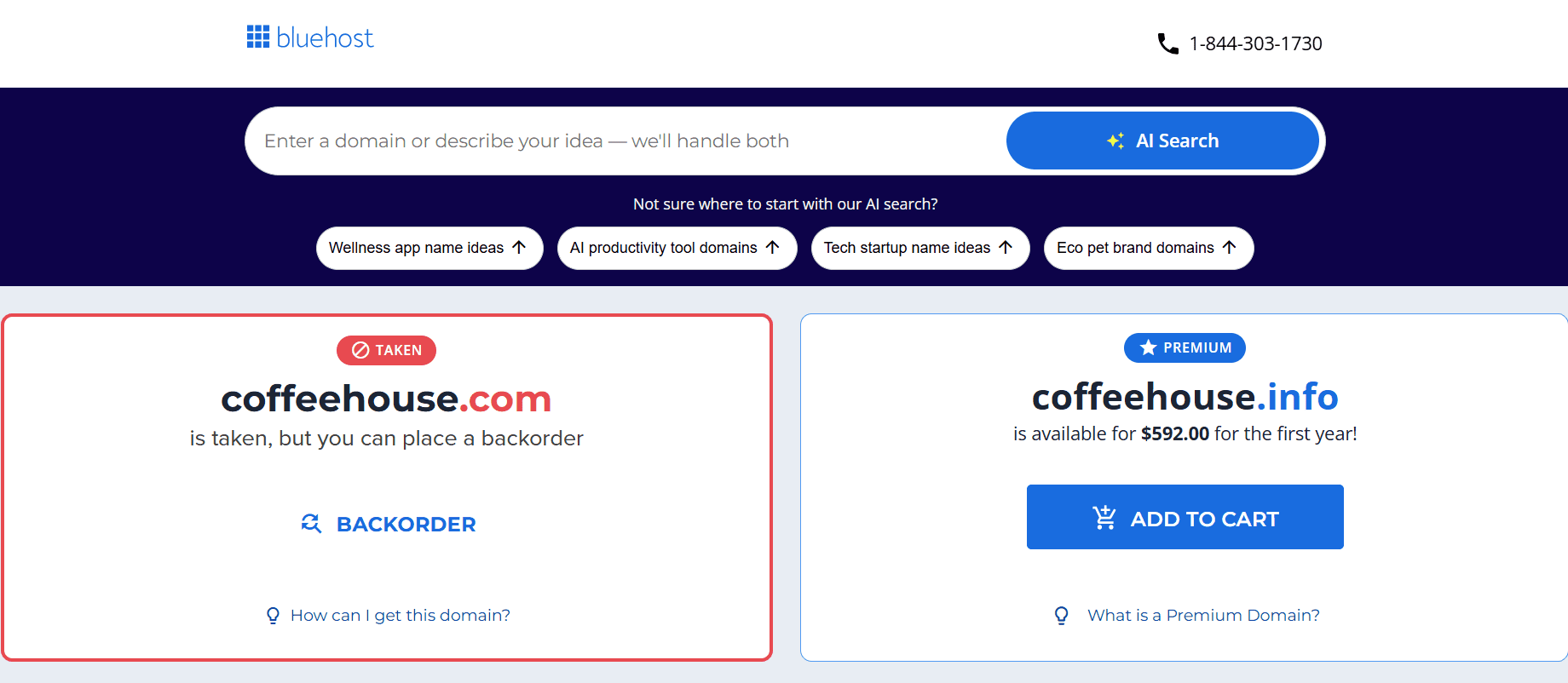
To begin the Bluehost domain search process, simply type in your ideal domain name in the search bar. Not sure what you want your domain name to be? Type in your best website name idea to check Bluehost domain availability.
Step 2. Choose your perfect domain name
After you type in your ideal domain name, you’ll be taken to a list of Bluehost domain search suggestions. If your preferred name is available, you’ll be able to add it straight to your shopping cart.
In case you don’t find your desired domain, Bluehost domain checker will get you a list of suggestions.
Step 3. Add Domain Privacy + Protection
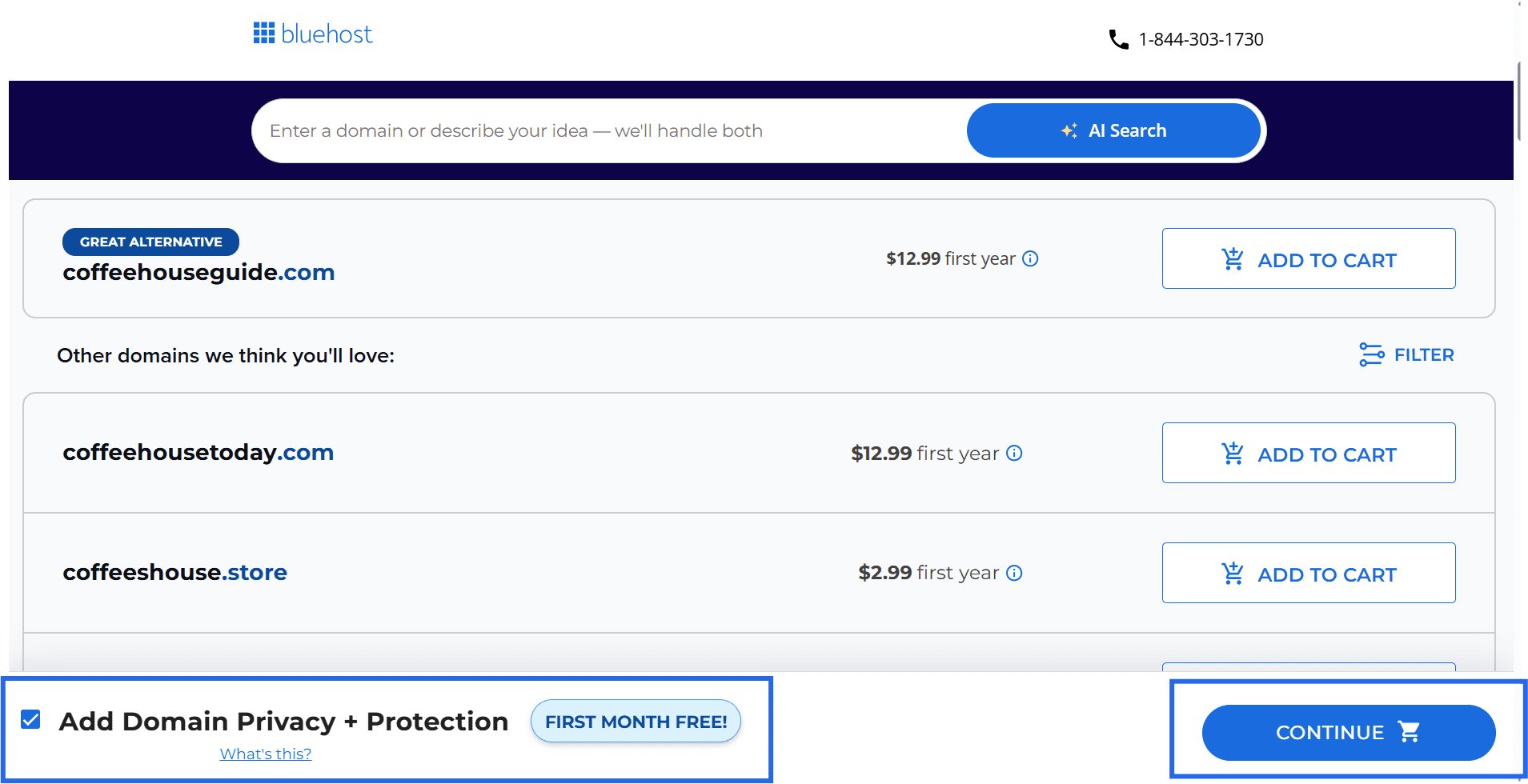
At this stage in the Bluehost domain search, you’ll also see a tick box that says ‘Add Domain Privacy + Protection‘ for each domain. This option ensures your personal information will never be listed publicly in the WHOIS database.
Also read: Do I Need Domain Name Privacy Protection + WHOIS Privacy?
Step 3. Add web hosting and other add-ons
Once you’ve added a domain name (or several) to your cart, you’ll have the option to choose Bluehost as your hosting provider.
With our free 30-day trial, you can try out Bluehost before committing to it. Plus, you’ll get to manage your website and your domain from the same control panel.
You’ll also be given the option to add Google Workspace plan so you can create emails that match your domain.
Step 4. Checkout and register the domain
When you’re ready, click “Continue” to head to checkout. If you don’t already have a Bluehost account, you’ll be asked to create one (or you can log in if you already have one).
On the checkout page, take a quick moment to review your cart on the right side.
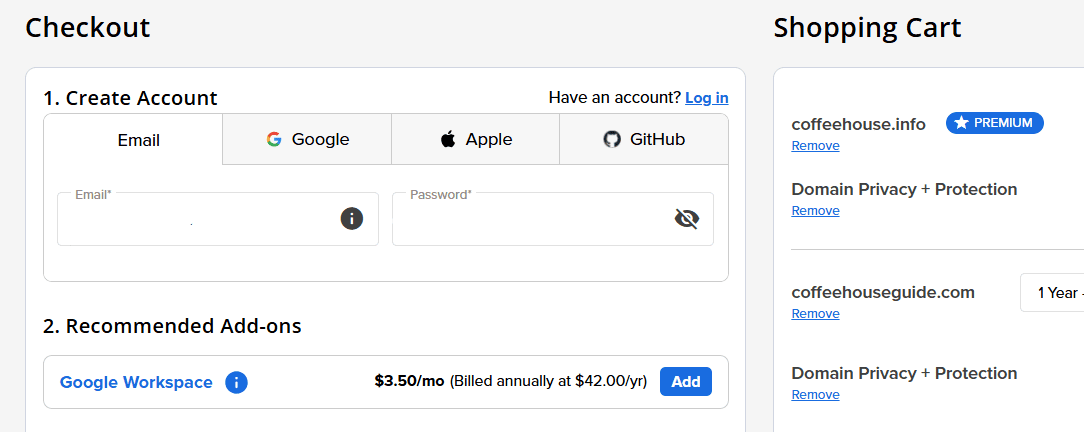
Make sure the domain spelling is correct, confirm the registration term and double-check any add-ons you’ve selected like Domain Privacy + Protection or Google Workspace.
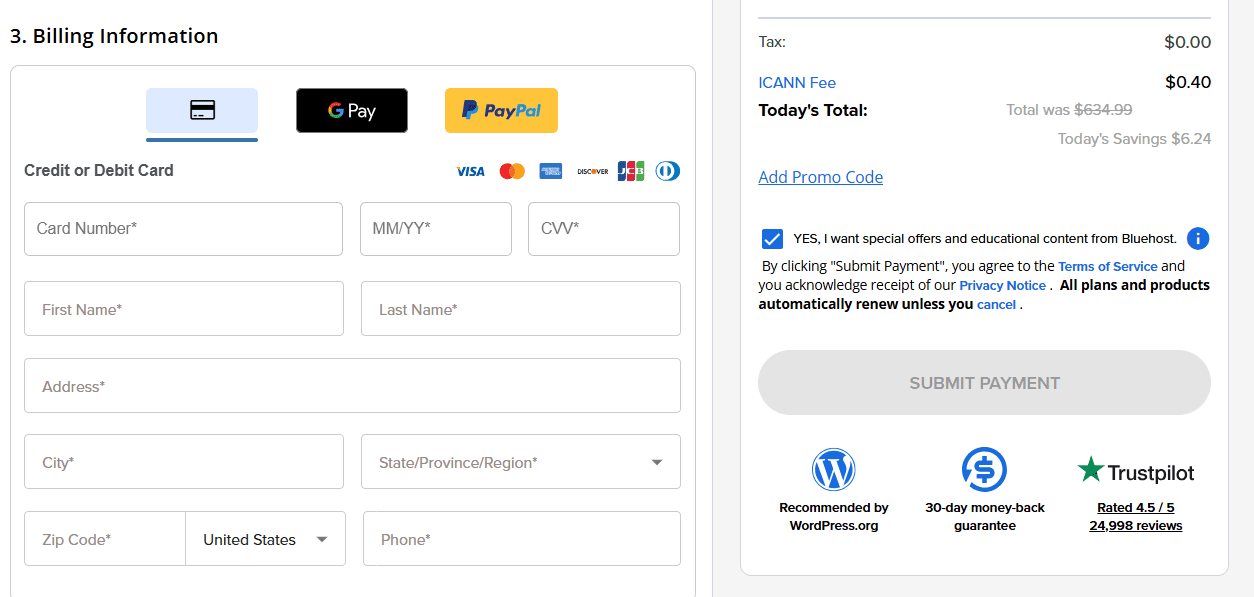
Next, enter your billing details, then select your payment method. Once everything looks right, click “Submit payment” to finish registering your domain.
After checkout, the domain will show up in your Bluehost account, where you can manage renewals and settings.
How to register a new domain from your Bluehost account
If you already have a Bluehost account, you don’t need to start from the public website search again. You can register a new domain right from your Account Manager, then manage it in the same place going forward.
Step 1. Log in to your Account Manager
Log in to your Bluehost Account Manager using your Bluehost credentials.
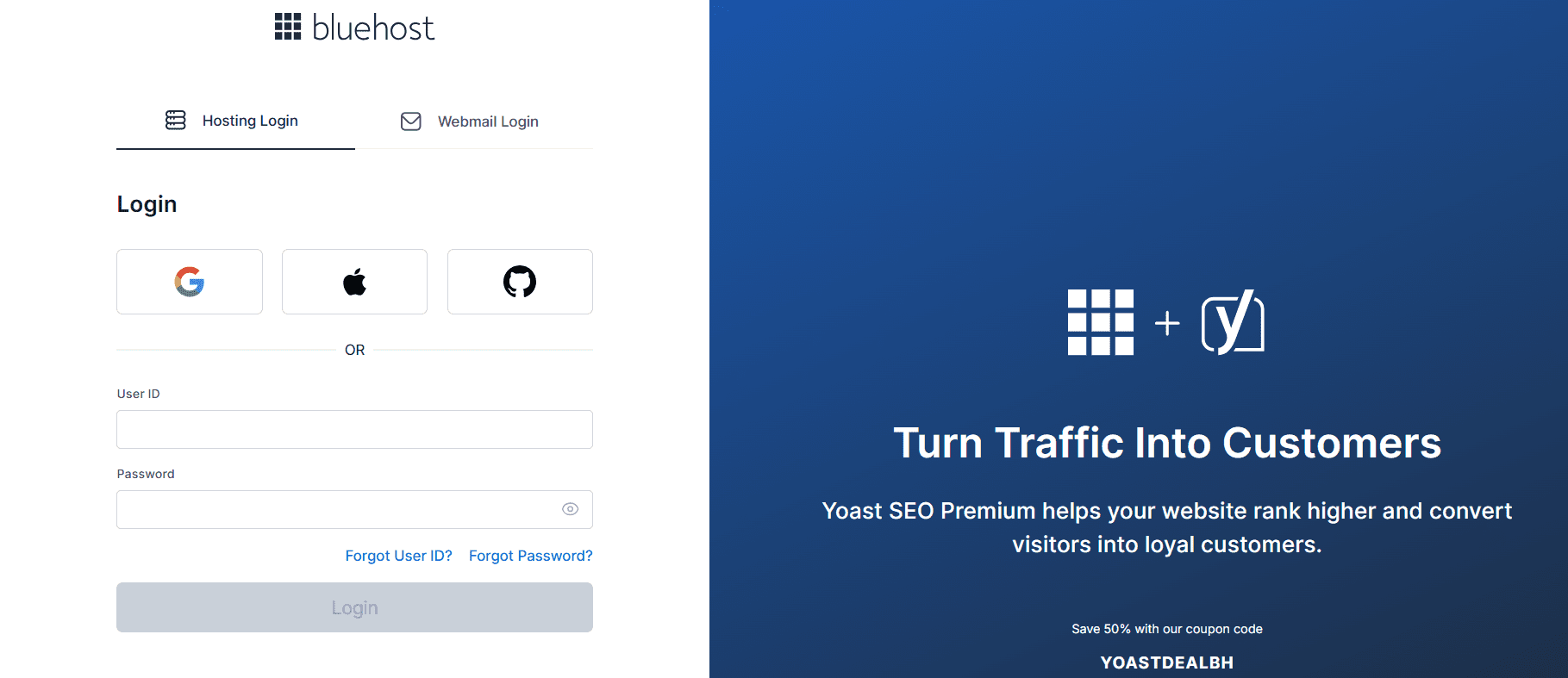
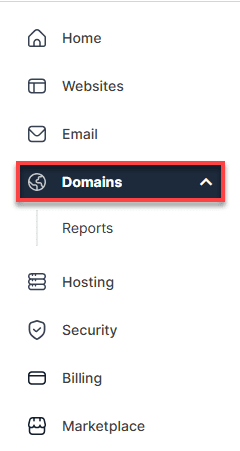
Step 2. Start a new domain purchase
From the left-hand menu, click Domains.
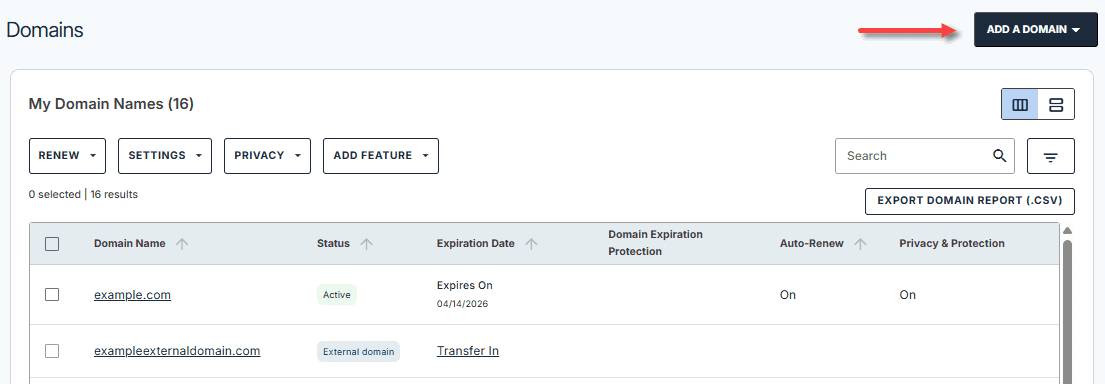
Then, on the right side of the page, open “ADD A DOMAIN”.
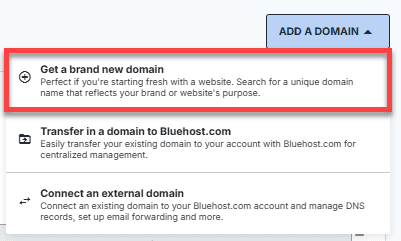
Step 3. Search and pick your domain
Select “Get a brand new domain”, then click “Buy a domain”. Use the search bar to check if the domain is available.
Step 4. Review your cart and add Domain Privacy + Protection
If your domain is available, click “Buy Domain” to go to the cart.

Bluehost recommends adding “Domain Privacy + Protection” to protect your personal details.
Step 5. Submit payment to complete registration
Review the Order Summary, double-check the spelling (domains can’t be edited after registration), then click “SUBMIT PAYMENT” to finish.
Also read: How to Transfer A Domain Name To Us
7 key features that make a great domain name
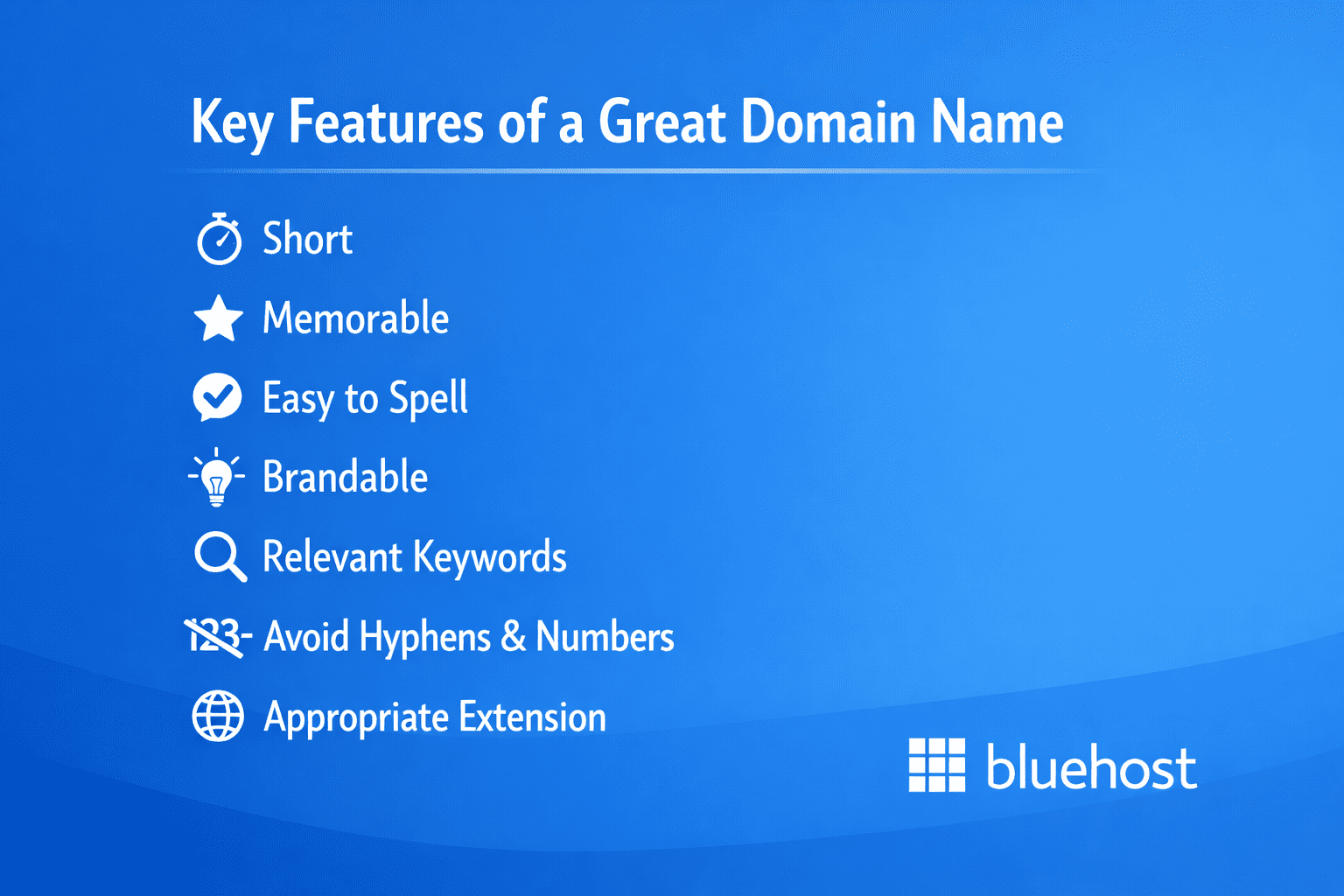
Now that you know how to use the Bluehost domain name search to find and register a domain, here are some simple tips to help you pick a great domain name.
1. Domain name length
Try to keep your domain name relatively short. The longer your domain, the harder it will be to read and to remember. As more domain names are created, some businesses have opted for longer domains as they are all that seem to be available.
However, according to DataGenetics, domain names that are shorter tend to receive more web traffic. The most common length tends to be around 12 characters and ideally, the length should be between six and 14 characters.
2. Domain name suffix
The domain name suffix is the extension that follows your domain name. Common domain suffixes include .com, .net and .org. These are also called “top-level domains,” or TLDs. While .com is the most trusted TLD, others can be just as useful for certain businesses.
Also read: Should I Buy a .org Domain? How To Register a .org Domain Name
There’s a wide range of domain extensions that can offer more specificity for your company, such as .biz or .info.
There are also second-level domains or geo-location domains that indicate location, such as .co.uk.
Some new business owners select a random domain name suffix when the .com version of their preferred domain isn’t available. However, it can be important to choose a suitable suffix.
Statista reports that 51.6% of websites use a .com TLD. Many marketers also believe that having a .com domain name can help with SEO.
However, in some cases, choosing a relevant suffix can also be a good first step if the .com is unavailable when you complete your domain registration. After all, as your company grows, you may be able to acquire the .com later.
3. Choose a memorable domain name
Your domain name length and your domain suffix can help make your domain more memorable. But there are other ways you can encourage visitors to remember your domain (and thus be more likely to type it into the search bar correctly next time):
- Avoid using hyphens
- Keep it close to your business name
- Avoid unnecessary numbers
- Use words that are easy to pronounce and spell
- Make sure it’s unique
4. Keep it professional
Try to keep your website name ideas professional. Even if you don’t have much of a reputation in your industry, a professional-sounding domain name can make visitors think you’re a well-established company.
5. Protect your new brand
Unfortunately, as your company grows, other young companies may try to capitalize on your success by snapping up similar domain names.
We recommend buying several domain extensions and some common misspellings of your domain name to prevent your competitors from taking them.
6. Check for copyright issues
Avoid getting into legal trouble by researching your chosen domain name before you complete the domain registration. Just because a domain name is available doesn’t always mean that another business with the same name doesn’t already exist.
Try searching your website name idea in the U.S. Patent and Trademark Office to quickly double-check that your domain name isn’t trademarked.
7. Consider keywords
Your domain name can help draw in organic traffic through SEO. If you can, try to incorporate relevant keywords into your domain name if that makes sense for your business.
For instance, if you’re hoping to add a few extra alternate domain names to help with SEO and you run a website that sells jeans, you could try domain names like:
- [Straightleggedjeans].com
- [Retromomjeans].com
- [Acidwashjeans].com
Curious to find out how likely your domain name is to improve your ranking? Try the Moz Domain Authority checker for free.
With these key features in mind, you’re ready to choose a domain name that effectively represents your brand while boosting your online visibility and credibility.
Next, discover how Bluehost’s AI-powered tool can simplify and speed up this process by creating smart, customized website name ideas.
How to create website name ideas with Bluehost?
Bluehost AI Domain Name Generator helps create website name ideas effortlessly and efficiently. By harnessing artificial intelligence, our tool quickly generates customized, relevant domain name options tailored to your business keywords and niche.
Here’s why it stands out:
- Smart customization: Enter your business name or keywords and the AI crafts unique, brandable domain suggestions designed to fit your style.
- Wide variety: Access hundreds of domain options across popular and new extensions, giving you more chances to find the perfect match.
- Real-time availability: Instantly see which domain names are available, streamlining your selection and registration process.
- Exclusive free domain bundle: Get a FREE .online domain name and Domain Privacy + Protection when you register a new .com, .net, .org, .info, .biz or .us domain through Bluehost, giving your brand extra protection and online visibility.
Disclaimer: The free one-year registration and Domain Privacy + Protection will automatically renew at regular rates after the first year. Offer valid on new qualifying domain registrations only.
By leveraging AI, Bluehost removes the guesswork and speeds up finding a memorable, professional domain name that boosts your online presence.
Final thoughts
Coming up with a great website name idea and finding an available domain name can be tricky. With the Bluehost search domain tool, you can go through the trial-and-error process without missing any of your options.
With every Bluehost hosting plan, you receive a FREE domain registration for the first year, giving you the ultimate advantage to kickstart your online presence.
Claim your unique Bluehost domain now and make your mark on the web with a standout online identity.
FAQs
Yes! When you purchase Bluehost hosting, you often get a free domain registration for the first year. This makes it easy to start your website with both hosting and a domain name.Disclaimer: This offer applies only to selected domain extensions and is subject to availability.Pro tip: Pairing your Bluehost Domain with our hosting ensures your domain and hosting are managed in one place.
Yes, domain search Bluehost helps you find domain names with relevant keywords that can improve your website’s search engine ranking and increase online visibility.
Yes, the tool supports multiple domain extensions like .com, .net, .org and even country-specific TLDs like .tokyo, .me, .in and much more. This helps you secure a domain suitable for your target audience globally.
No, you can use the generator for free without purchasing hosting. However, pairing it with Bluehost hosting simplifies the process of launching your website quickly with intuitive AI-onboarding.
Once you have registered your domain, you can link it to your Bluehost hosting using the control panel. Bluehost provides detailed, easy-to-follow instructions to guide you through pointing your domain to your hosting account, ensuring your website is up and running quickly. For any further questions, you can visit our comprehensive knowledge base or contact our customer support team for assistance.
Yes, the tool provides creative alternatives, including different extensions (.com, .net, .org) and keyword variations to help you find a suitable domain. With the domain name search Bluehost feature, you can effortlessly explore a wide range of options to secure the perfect domain that fits your brand and boosts your online presence.
To transfer your domain, unlock it at your current registrar and get the authorization code. Then, in your Bluehost control panel, go to Domains > Transfer, enter your domain and code and follow the steps to complete the transfer. The process usually takes a few days.

Write A Comment