 ChatGPT,
 Claude,
 Gemini,
 Grok — all four for
Key highlights
- Accelerate website creation timelines by using drag-and-drop design elements instead of writing custom code.
- Lower overall development expenses by building and publishing pages without hiring external web developers.
- Maintain total design control by using visual layout tools that display real-time page modifications.
- Expand digital revenue channels using integrated search engine optimization capabilities and eCommerce tools.
- Simplify ongoing site administration by making routine updates directly within visual editing interfaces.
You know what your business needs from a website. Turning that idea into a live page without hiring a developer or learning to code is the harder part for most small-business owners.
The benefits of a no-code website builder start with speed and accessibility. Instead of writing HTML or CSS by hand, you work in a visual editor, arrange content on the page and preview changes before anyone else sees them. That shift changes how quickly a site gets built, who can update it and how much you depend on outside technical help.
This article walks through what actually changes when you swap custom code for a visual builder: how fast you can launch, how much control you keep over daily updates and what to check before you commit to this approach for your business.
What are the main benefits of a no-code website builder?
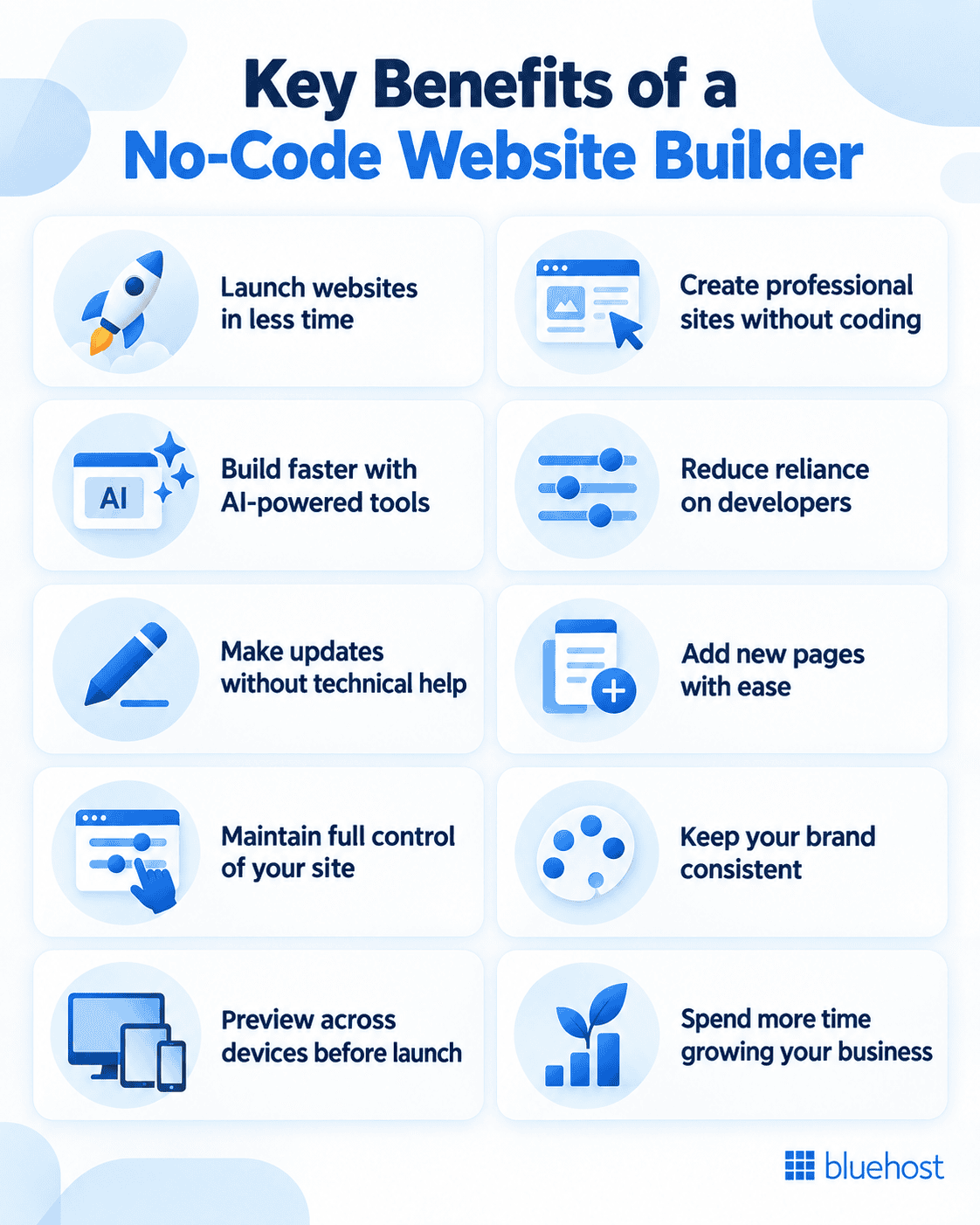
A no-code website builder cuts down the time, technical skill and back-and-forth coordination needed to launch and manage a site. You get faster launches, direct control over updates, consistent branding across pages and more time to spend on customers instead of code.
1. Launch your website faster
Traditional development often means writing a scope, waiting for a build and testing before anything goes live. A no-code builder collapses those steps into one workspace, so you can move from a blank page to a published site in the same sitting instead of over several weeks.
2. Build without learning to code
This is where the benefits of a drag-and-drop website builder show up most clearly. You place text blocks, images and buttons where you want them, and the underlying code is generated for you. Someone with no development background can produce a page that looks like it took a professional team to build.
3. Get more from an AI-powered no-code website builder
AI (Artificial Intelligence) adds another layer on top of the visual editor. Instead of starting from a blank template, you describe your business and the tool generates a working layout with sample content already in place. Bluehost’s AI Site Creation feature, for example, generates three unique site versions in minutes based on a short business description, giving you a starting point to edit rather than a blank canvas to fill.
4. Less development work with a no-code website builder
The clearest advantage of using a website builder over custom code is that a standard business website rarely needs a developer writing functions from scratch. Layouts, forms, image galleries and basic eCommerce features already exist inside the builder. You may still need a developer for something highly specific, but most day-to-day pages do not require one.
5. Make routine updates yourself without code
Business hours change, prices shift and phone numbers get updated. With a no-code builder, you open the page, edit the text and republish it in minutes instead of submitting a request and waiting for a developer to have time for it.
6. Turn ideas into new pages without custom code
Launching a new service, a seasonal offer or an event page usually means starting from an existing layout instead of a blank codebase. You duplicate a page, swap the content and publish, which makes it realistic to test a new idea without committing to a full site rebuild.
7. Keep more control over your website
Every handoff to a developer adds a delay. When you can edit directly, fewer people need to be involved in a simple change, and you are not waiting on someone else’s schedule to fix a typo or swap a photo.
8. Keep your branding consistent across every page
Reusable styles for colors, fonts and layout blocks mean a new page automatically looks like it belongs on your site. You are not manually recreating your header and footer every time you add a page.
9. Preview and refine before you publish
You can view how a page looks on a phone, tablet and desktop before it goes live, and adjust anything that looks off. That reduces the number of live mistakes visitors ever see.
10. Spend more time running your business—not coding
Every hour not spent troubleshooting a broken page or waiting on a technical fix is an hour you can put toward customers, marketing or operations. That is the practical payoff behind most of the benefits of no-code development: less time managing the website itself.
What makes a website builder truly no-code?
A no-code website builder lets you create, edit, preview and publish pages through visual controls while the platform handles the underlying code. You work with visible page elements rather than HTML, CSS or scripts, making routine website creation manageable without programming knowledge.
Prebuilt sections turn common needs, such as service summaries, contact forms and image galleries, into ready-made building blocks. Reusable styles keep your colors, fonts and spacing consistent, while responsive layouts adapt the page for phones, tablets and desktops. Preview and publishing tools let you check the result, then make your approved version live.
No-code does not mean code is absent. The platform still generates and runs it behind the scenes. Low-code tools expose more technical controls and may require custom code for parts of the build, while a truly no-code editor keeps standard page work inside the visual interface.
How does a no-code website builder compare with coding from scratch?
A no-code website builder favors speed, accessibility, and independent updates for standard sites, while coding from scratch gives developers greater control over specialized requirements. Builders avoid writing HyperText Markup Language (HTML) and Cascading Style Sheets (CSS), but custom development suits unique workflows and applications.
| Factor | No-code builder | Coding from scratch | Best fit |
|---|---|---|---|
| Launch time | Pages can be assembled and published quickly. | Design, development, and testing take longer. | Standard business websites |
| Coding skills | Visual controls handle routine page work. | Requires HTML, CSS, and often programming knowledge. | Custom applications |
| Upfront cost | Usually involves a platform subscription. | Often includes developer or agency fees. | Standard business websites |
| Ongoing cost | Updates can be handled internally. | Technical changes may require paid support. | Standard business websites |
| Customization | Works within available templates and settings. | Allows tailored features and interfaces. | Custom applications |
| Maintenance | The platform manages core technical upkeep. | Teams manage code, fixes, and updates. | Standard business websites |
| Integrations | Connects through supported apps and tools. | Can support custom integrations. | Custom applications |
| Portability | Content may export more easily than layouts. | Code can move between compatible hosts. | Custom applications |
| Scalability | Handles typical site growth within platform limits. | Can be engineered for complex growth needs. | Custom applications |
Why use a no-code website builder for your small business?
So why use a no-code website builder instead of hiring a developer for every change? The table below breaks down a few common website tasks, the friction they usually involve and what changes with a no-code approach.
| Website task | Traditional friction | No-code benefit | Business outcome |
|---|---|---|---|
| Updating business hours | Submit a developer request | Edit the page directly | Publish accurate information sooner |
| Creating a campaign page | Coordinate design and development | Build from a layout or prompt | Launch campaigns faster |
| Replacing images or copy | Wait for technical assistance | Make visual edits | Keep content current |
| Testing a new offer | Pay for or schedule a new build | Create and revise a page | Test ideas with less initial effort |
These patterns repeat across most small-business sites. The moment you can act directly on your own pages, a task that used to take days can be finished before lunch, and testing a new idea stops feeling like a financial risk.
How no-code tools improve collaboration across your business
Visual editing gives each person a clearer role: owners set priorities, marketers update offers, designers maintain layouts and contractors supply approved copy or images. Shared fonts, colors and reusable sections help every contributor work within the same brand rules, rather than rebuilding page elements from scratch.
Broader access does not have to create disorder. Give a small group permission to publish, assign others drafting or review responsibilities and require a preview before changes go live. A local salon, for example, can have its marketer refresh a seasonal campaign page while the owner reviews the mobile preview and approves the final version, without waiting for a developer. That shared workflow is one of the practical benefits of a no-code website builder: faster input from the right people with controlled publication.
When is a no-code website builder the right choice?
No-code builders work well for the kinds of sites most small businesses actually run. If your site fits one of the categories below, a visual builder is usually enough to get you fully launched.
- A standard business website with service pages, an about page and contact details.
- A portfolio site for freelancers or creative professionals.
- A blog or content site built around regular publishing.
- A service-based business site with booking or inquiry forms.
- A straightforward online store selling a limited range of products.
If your business fits one of these patterns, a no-code builder can likely handle the entire build. Sites that depend on custom software, complex data integrations or highly specific functionality are the exception, and that is where the next section matters most.
What to consider before choosing a no-code approach
A no-code builder solves most website needs, but it is fair to acknowledge where it has limits. Weigh these points before you commit to a platform.
- Customization ceiling: Highly specific design requests may go beyond what the builder’s templates and blocks support.
- Platform dependency: Your site’s structure is tied to the builder you choose, which matters if you plan to switch platforms later.
- Third-party integrations: Check that the tools you rely on, such as booking software or payment processors, connect directly to the builder.
- Data portability: Understand how easily your content and pages can be exported if you decide to move providers.
- Complex functionality: Custom logins, advanced automation or specialized calculators usually still need a developer.
None of these points cancel out the benefits described earlier. They are simply the questions worth answering before you build, so you are not surprised later. If you want a closer look at how these platforms work behind the scenes, a guide on how a no-code website builder works can walk through the technical side in more detail.
Which no-code website builder is best for your needs?
The best no-code website builder depends on your website type, preferred level of control and long-term plans, not on one universal winner. Choose a platform based on how you will build, operate and grow the site after launch.
For building, test the visual editor before committing. Check whether you can adjust layouts manually, preview mobile pages and create a design that fits your brand without fighting fixed templates. Bluehost AI Website Builder is a React and Tailwind tool with a Build-to-Buy model, manual editing controls and a conversational AI agent that shows its work in real time. Bluehost AI Site Creation is different: it helps create a WordPress site through Shared Hosting.
For daily operation, review SEO: Search Engine Optimization tools, product and payment options for eCommerce, and integrations for booking, email or customer management. Security, dependable hosting and 24/7 human support also matter because a website needs attention long after its first publish date.
For growth, ask how easily you can export content, add pages and change plans or platforms later. The benefits of AI-powered no-code website builders are strongest when automation gives you a useful starting point while you retain control of the finished site.
Build and manage your website with Bluehost
Bluehost gives you two starting points depending on how you want to build. AI Site Creation, included with Shared Hosting, generates a working no-code WordPress site in minutes from a short description of your business, and you can edit the design, text and layout from there. The AI-powered website builder takes a different approach: it is a conversational, build-to-buy tool where you describe your site, watch it come together and preview the finished result before you pay for it.
Either path connects to the same essentials a website actually needs to run: a free domain for the first year, a free SSL (Secure Sockets Layer) certificate for encrypted connections, reliable hosting backed by a 99.9% uptime guarantee, and 24/7 human support if you get stuck. You are not just getting a page builder, you are getting the infrastructure that keeps the site online and secure once it is live.
Final thoughts
The real value of a no-code website builder is not that it removes every technical decision. It is that it puts the routine ones back in your hands, so a business owner can fix a typo, add a page or launch a campaign without waiting on someone else’s calendar. That is the practical shift behind the benefits of a no-code website builder: fewer handoffs, faster changes and more of your time spent on the business itself rather than the site behind it.
If you have a standard business site to launch or manage, explore Bluehost’s AI website builder and start bringing your website idea to life.
FAQs
The biggest benefit is speed of change. You can update, test and publish website content yourself instead of waiting on a developer, which shortens every task from a business hours update to a full campaign page.
It depends on the platform and how it stores your content. Some builders let you export text and images, while page layouts and design elements are often tied to that specific tool. Check a platform’s export options before you build if switching later is a priority for you.
Many do, though the specifics vary by provider. Bluehost, for example, bundles hosting, a free domain for the first year and a free SSL certificate with its website-building tools, so you are not sourcing those pieces separately.
Yes, for most standard business sites. Because you are not paying a developer for routine builds and updates, a no-code website builder can reduce the ongoing costs tied to launching and maintaining a site, though costs still vary by business and by platform.
If your site needs custom software, advanced automation or highly specific integrations, a no-code builder may only handle part of the project. In those cases, it is common to build most of the site with no-code tools and bring in a developer for the specific feature that needs custom work.

Write A Comment