 ChatGPT,
 Claude,
 Gemini,
 Grok — all four for
Key highlights
- Compare Gemini and ChatGPT on current model versions, pricing tiers and context limits to find the best fit for your workflow.
- Evaluate where each tool stands out: ChatGPT for structured coding and agentic tasks, Gemini for multimodal generation and Google Workspace connections.
- Review real costs across free plans and premium subscriptions before committing your monthly software budget.
- Follow a clear decision path: subscribe to a single tool natively, or access multiple models simultaneously when your project demands vary.
- Discover practical steps for taking AI-generated drafts and turning them into a live, published website.
Two years ago, comparing these two platforms felt straightforward. ChatGPT held an early lead with widespread adoption, recognized branding and mature developer features. Gemini arrived as Google’s challenger, steadily evolving through continuous updates.
That gap has largely closed. In several key benchmarks and multimodal tasks, Gemini now sets the pace.
Today, evaluating gemini vs chatgpt is no longer about finding an absolute winner. Both platforms run on frontier foundation models capable of complex writing, programming logic and deep research. Gemini provides a context window reaching up to 1 million tokens, while ChatGPT Pro offers extended reasoning with up to 400K tokens. The better option depends on your specific daily tasks and software setup.
This breakdown compares model architectures, core capabilities, real test prompts and pricing structures so you can choose the right setup without spending hours testing both platforms yourself.
ChatGPT vs Gemini: Quick comparison table
If you need an immediate overview, this table outlines the essential differences between native OpenAI and Google subscriptions.
| Feature | OpenAI (ChatGPT) | Google (Gemini) |
| Parent company | OpenAI | |
| Current flagship model | GPT-5.5 / GPT-5.6 (Sol reasoning on paid tiers) | Gemini 3.1 Pro (Gemini 3.5 Flash for speed) |
| Context window | Up to 400K tokens on Pro tiers | Up to 1 million tokens on AI Pro and Ultra tiers |
| Image generation | Native DALL-E / GPT Image tools | Native Imagen and Nano Banana Pro engines |
| Video generation | Not available natively in chat | Veo 3.1 video generation on supported tiers |
| Audio and music creation | Advanced Voice Mode (speech synthesis) | Native audio processing and Lyria music engine |
| Memory and recall | Cross-chat memory settings | Persistent memory plus optional Google Personal Intelligence |
| Agent capabilities | Codex coding agent and desktop task actions | Jules coding agent and Gemini Spark automation |
| Custom assistants | Custom GPTs (creation requires paid plan) | Gems (available across free and paid accounts) |
| Deep research | Web browsing and multi-source synthesis | Search and Google Scholar grounding |
| Bundled cloud storage | None included | 15 GB on Free, scaling to 5 TB on AI Pro |
| Free tier | Yes, standard access with rate caps | Yes, generous daily limits on Flash models |
| Standard paid tier | ChatGPT Plus at $20/month | Google AI Pro at $19.99/month |
Note: Feature availability and standalone subscription rates reflect current vendor documentation. Always check the official OpenAI and Google portals for recent plan adjustments.
Gemini vs ChatGPT pricing and subscription plans
For Gemini vs ChatGPT for everyday use, the practical difference is what each subscription bundles beyond higher AI limits. Prices and quotas change often, and some tools remain country or language restricted, so confirm details in OpenAI and Google’s official plan documentation before subscribing.
| Plan | Price and access | Storage, media and best fit |
|---|---|---|
| ChatGPT Free | $0 with capped GPT access, uploads, images and research. | No cloud storage. Best for occasional writing and questions. |
| ChatGPT Go | $8/month in the US, with more GPT-5.6 usage, uploads, images and analysis. | No storage. Suits frequent personal use on a budget. |
| ChatGPT Plus | $20/month with higher limits, advanced reasoning and Codex access. | No storage. Best for regular research, documents and coding. |
| ChatGPT Pro | $200/month with maximum access to OpenAI’s highest-tier models and tools. | No storage. Built for heavy professional use. |
| Google AI Plus | $9.99/month with increased Gemini Flash access. | 400 GB plus Flow media tools. Good for light Google users. |
| Google AI Pro | $19.99/month with expanded Gemini 3.1 Pro and Deep Research access. | 5 TB, Flow and Google app features. Best for Workspace users. |
| Google AI Ultra | $200/month with the highest Gemini limits and premium agent features. | 20 TB plus higher image, music and video limits. Best for intensive creators. |
For chatgpt vs gemini AI users who need several models, Bluehost AI All-Access Pack costs $20/month for ChatGPT 5, Gemini 3 Pro, Claude 4.5 and Grok 4.1. It has no token quota and does not require Bluehost hosting. Privacy+ costs $25 per seat and adds privacy controls. Neither tier offers a free trial, but access begins immediately. Consolidating plans can reduce subscription fatigue and the fragmentation tax of separate AI bills.
Background and development: How Gemini and ChatGPT got here
ChatGPT established the consumer AI market in late 2022. OpenAI moved quickly, introducing Code Interpreter, Custom GPTs and deep reasoning modes to turn a conversational interface into an essential daily utility for professionals.
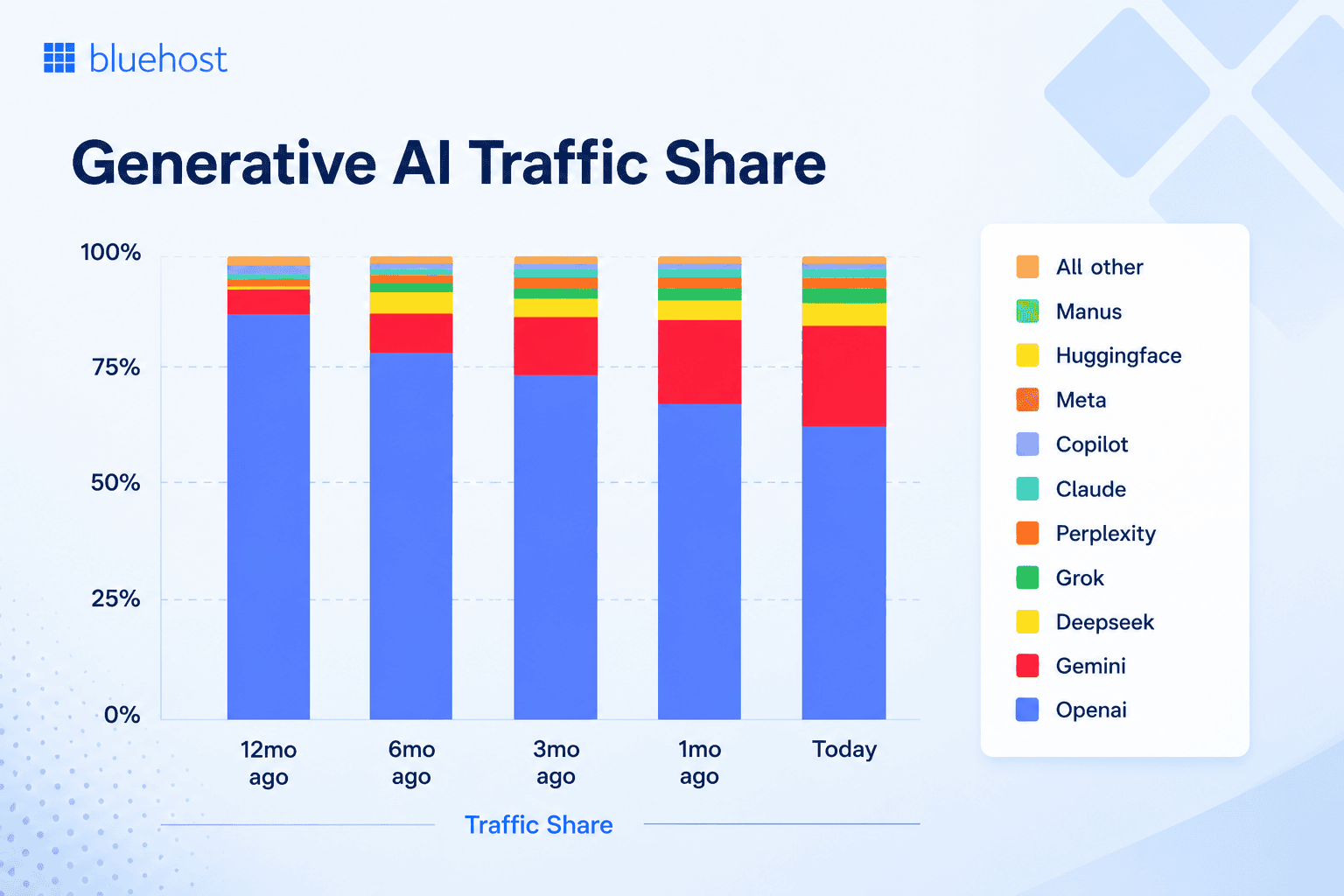
While OpenAI maintains substantial market share, competition has expanded choices for creators and businesses. Data from tracking services like Similarweb shows users distributing their workloads across multiple tools rather than relying exclusively on one assistant.
Google developed Gemini by uniting DeepMind research with its global search and cloud infrastructure. Gemini 3 and 3.5 models were trained natively on audio, video, code and text together. This native multimodal foundation lets the model analyze dense mixed media without secondary translation layers.
The resulting dynamic is clear: OpenAI remains exceptionally sharp for technical reasoning and developer workflows, while Google embeds Gemini directly into documents, spreadsheets and email inboxes.
Model architecture and training approach
Both companies deliver broad multimodal capabilities, but their architectures prioritize different functional strengths.
- ChatGPT (GPT-5 series): Built for deep logical reasoning, stepwise validation and autonomous tool execution. Paid tiers emphasize structured chains of thought, producing dependable results for code generation and mathematical problem-solving.
- Gemini (Gemini 3 series): Designed as a native multimodal engine from day one. Gemini 3.5 Flash handles rapid parsing and routine prompts efficiently, while Gemini 3.1 Pro processes massive text and media files through its million-token context window.
These architectural philosophies create distinct operational personalities: ChatGPT leans analytical and precise, while Gemini feels fluid across expansive datasets and diverse media types.
Also read: How Small Law Firms Use Generative AI for Due Diligence
Benchmark performance: Is Gemini or ChatGPT actually smarter?
Neither model holds an insurmountable intellectual advantage across every discipline.
On industry benchmarks such as SWE-bench Verified, top models from OpenAI and Google record competitive scores within a narrow margin. Results fluctuate slightly depending on prompt structure and system instructions, meaning real-world output quality often depends more on user prompting than raw model parameters.
Information freshness provides one notable point of divergence. Retrieval speeds and index updates differ, giving Gemini an advantage when sourcing real-time news through Google Search, whereas ChatGPT excels at synthesizing uploaded files into cleanly structured analytical briefs.
How ChatGPT and Gemini answer the same prompt, side by side
Evaluating raw metrics provides context, but reviewing live responses demonstrates how these systems handle realistic workplace assignments. We tested five common tasks across both platforms to evaluate their outputs.
Prompt
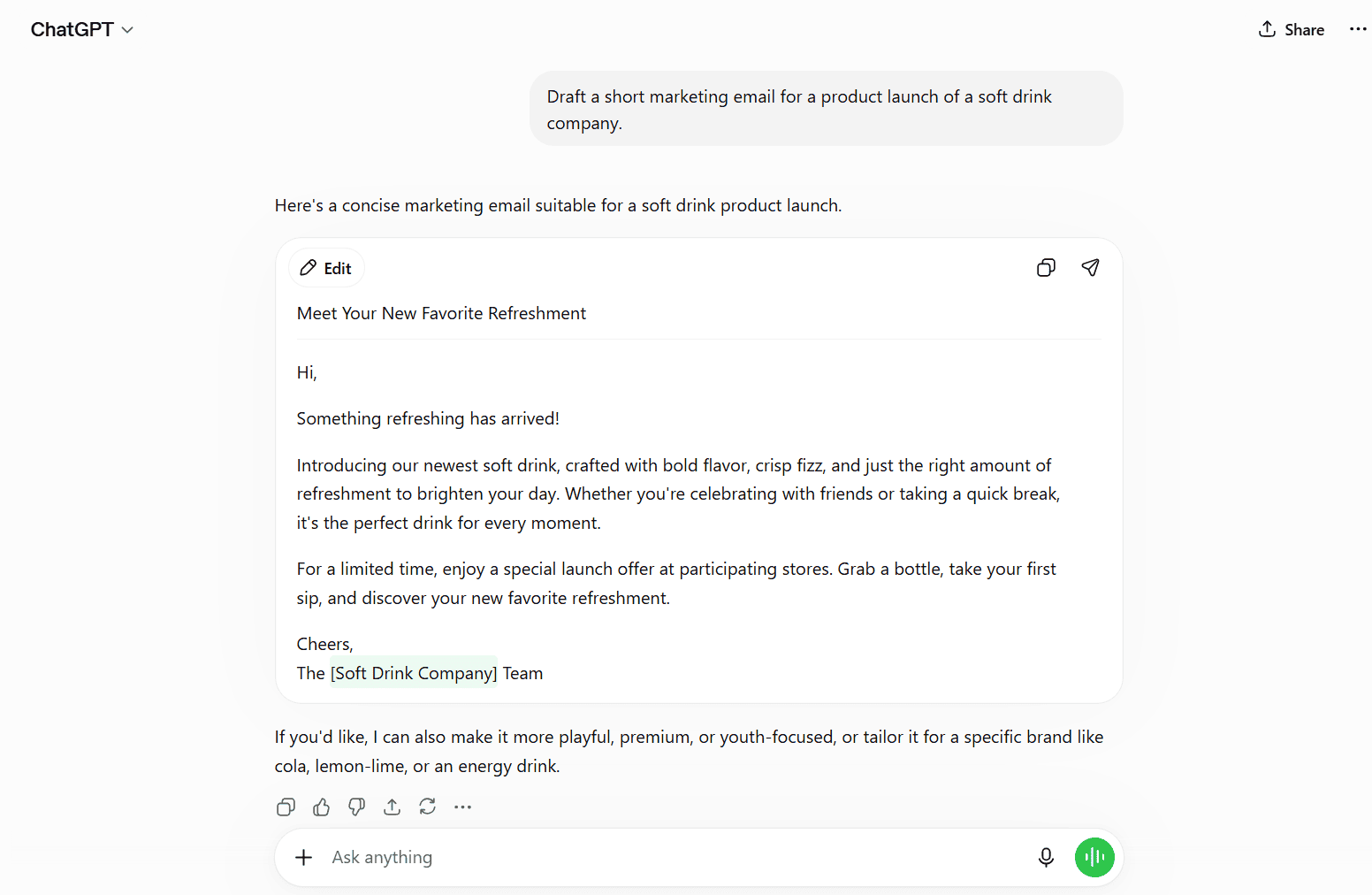
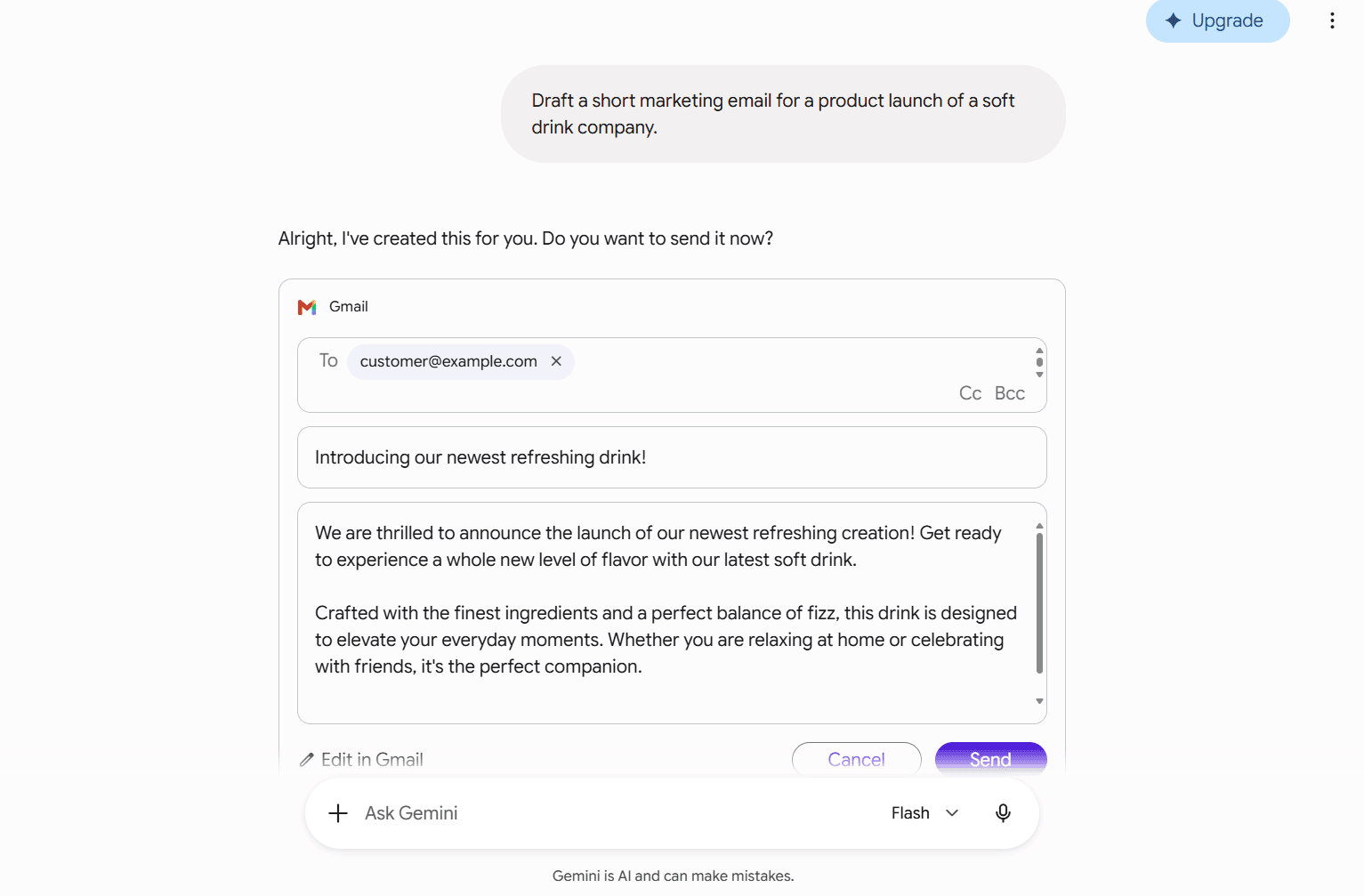
Draft a short marketing email for a product launch of a soft drink company.
ChatGPT response summary
Gemini response summary
Which felt stronger and why
ChatGPT structured a campaign-ready message complete with clear call-to-action sections and subject line options. Gemini delivered a creative, conversational draft that felt engaging but required manual formatting before sending.
Prompt
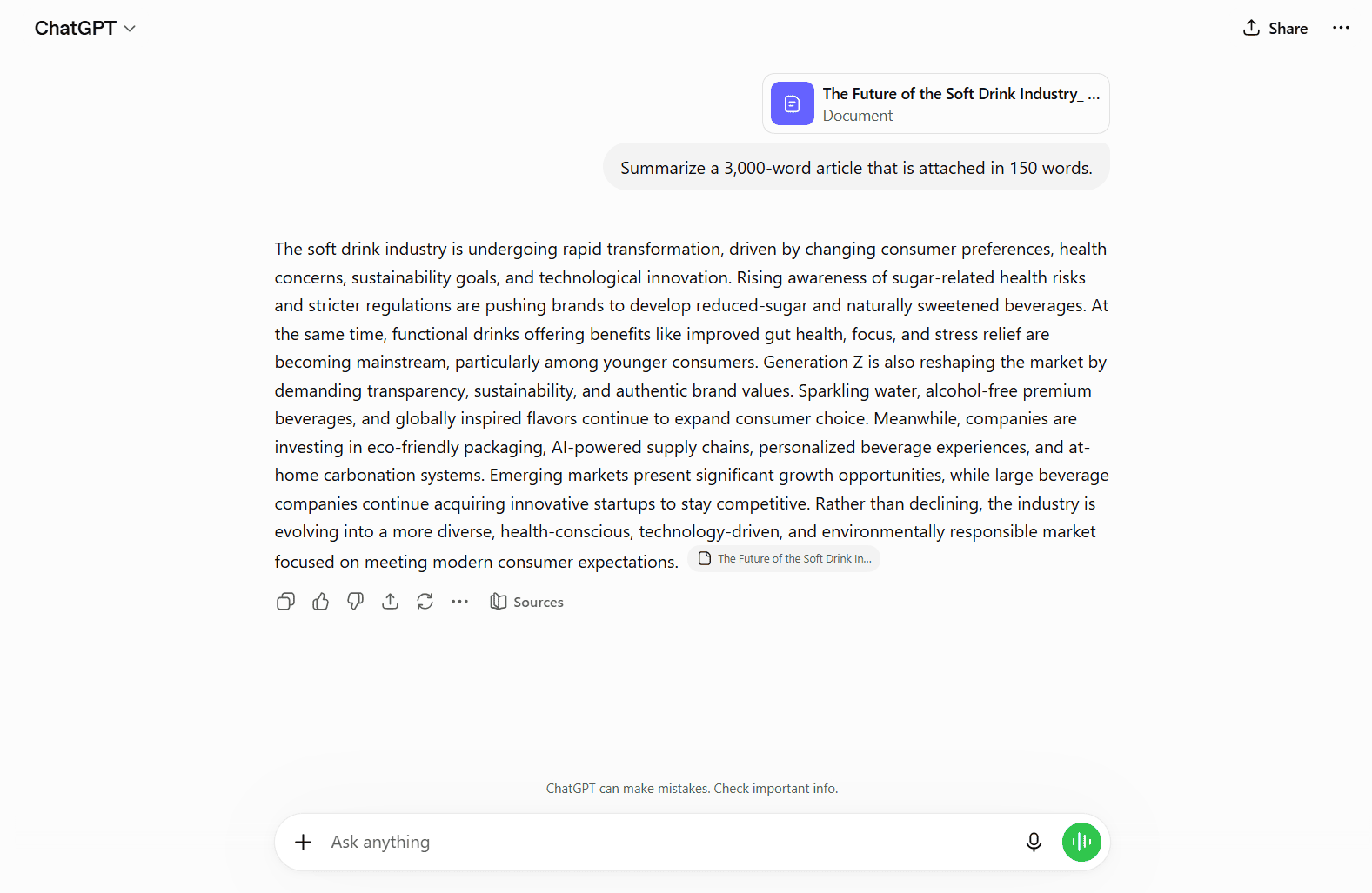
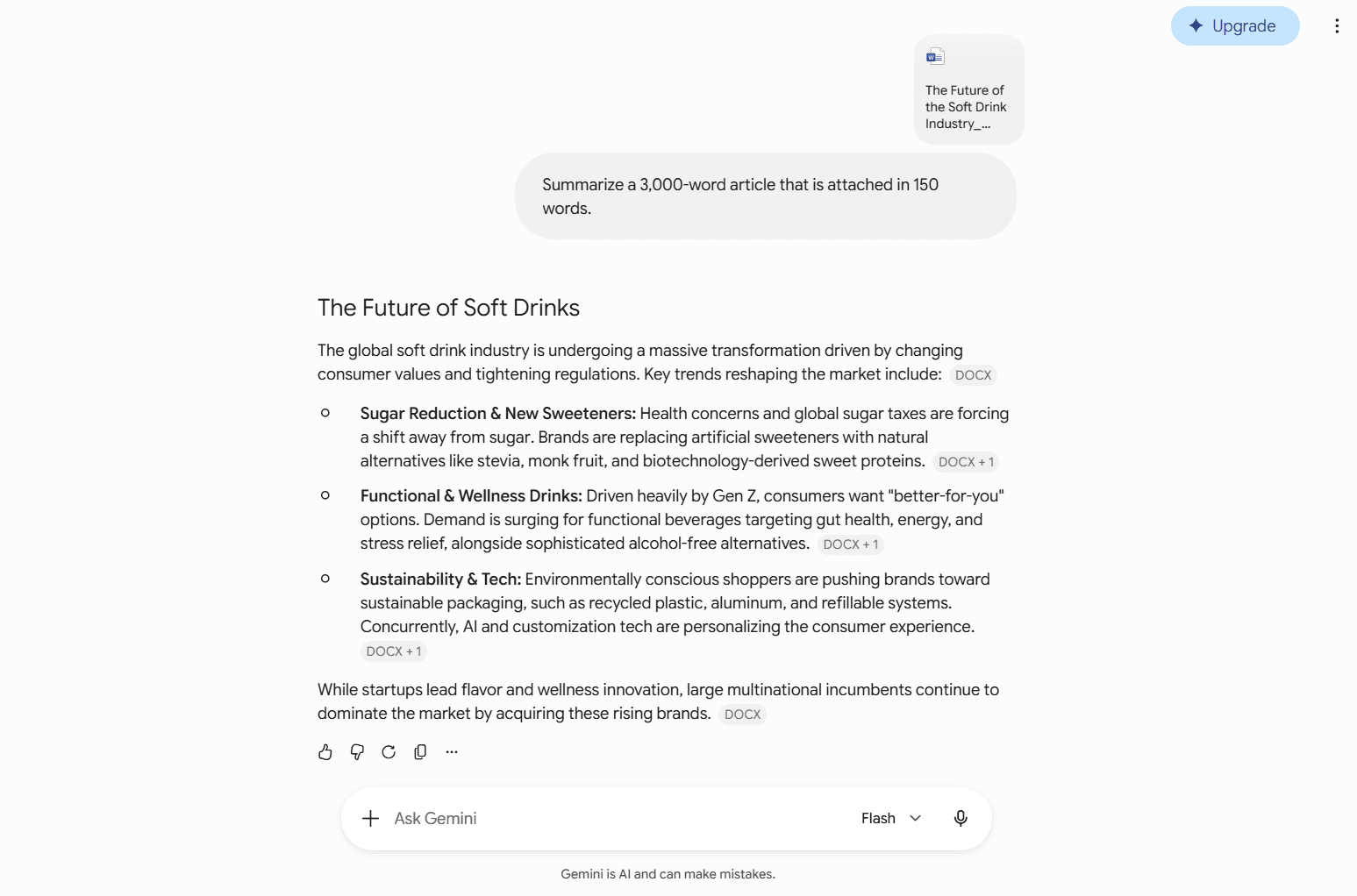
Summarize a 3,000-word article that is attached in 150 words.
ChatGPT response summary
Gemini response summary
Which felt stronger and why
ChatGPT strictly adhered to the length constraint, highlighting central themes in an executive summary format. Gemini preserved nuanced arguments from the text and presented main takeaways with bulleted clarity.
Prompt
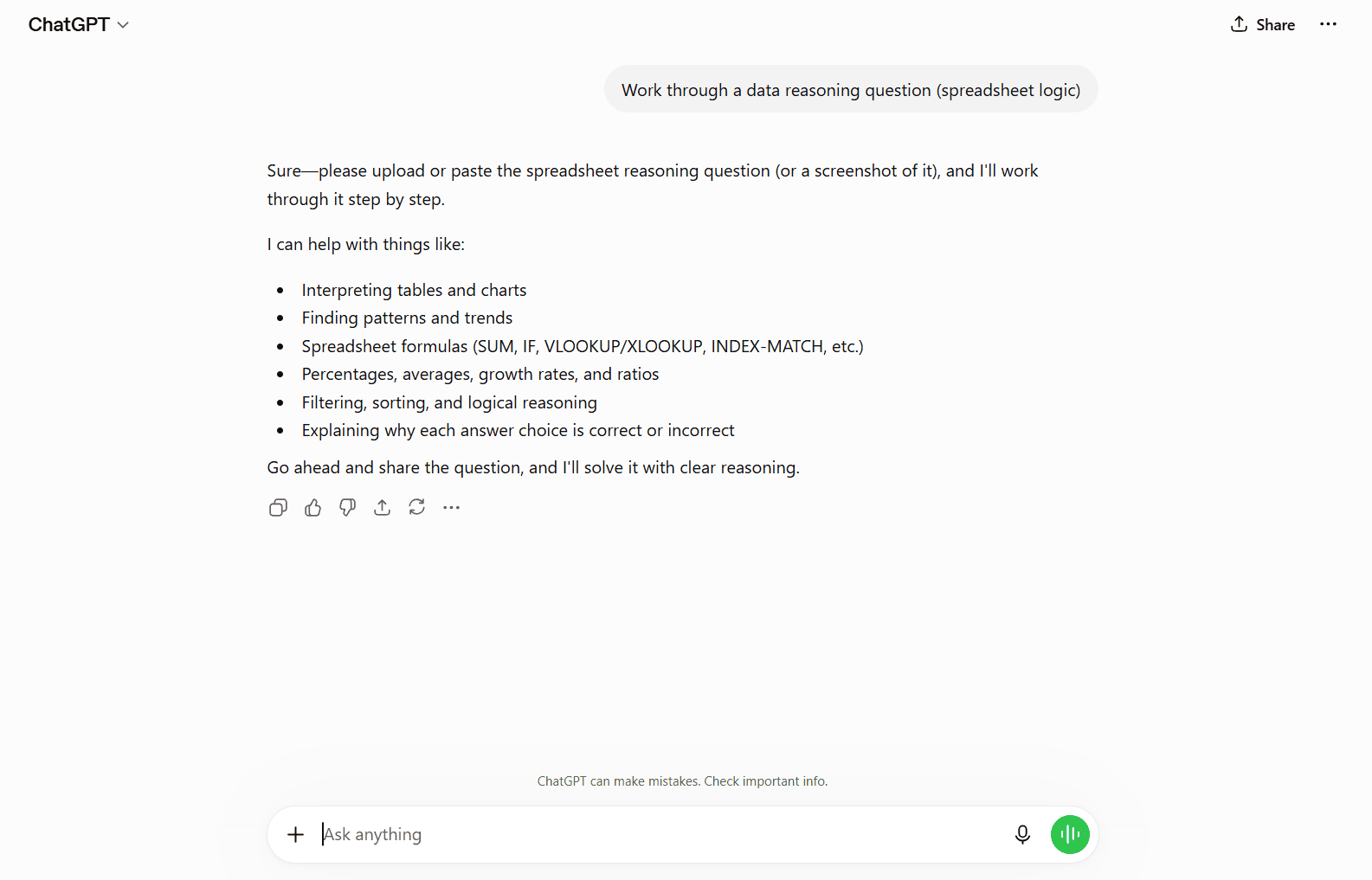
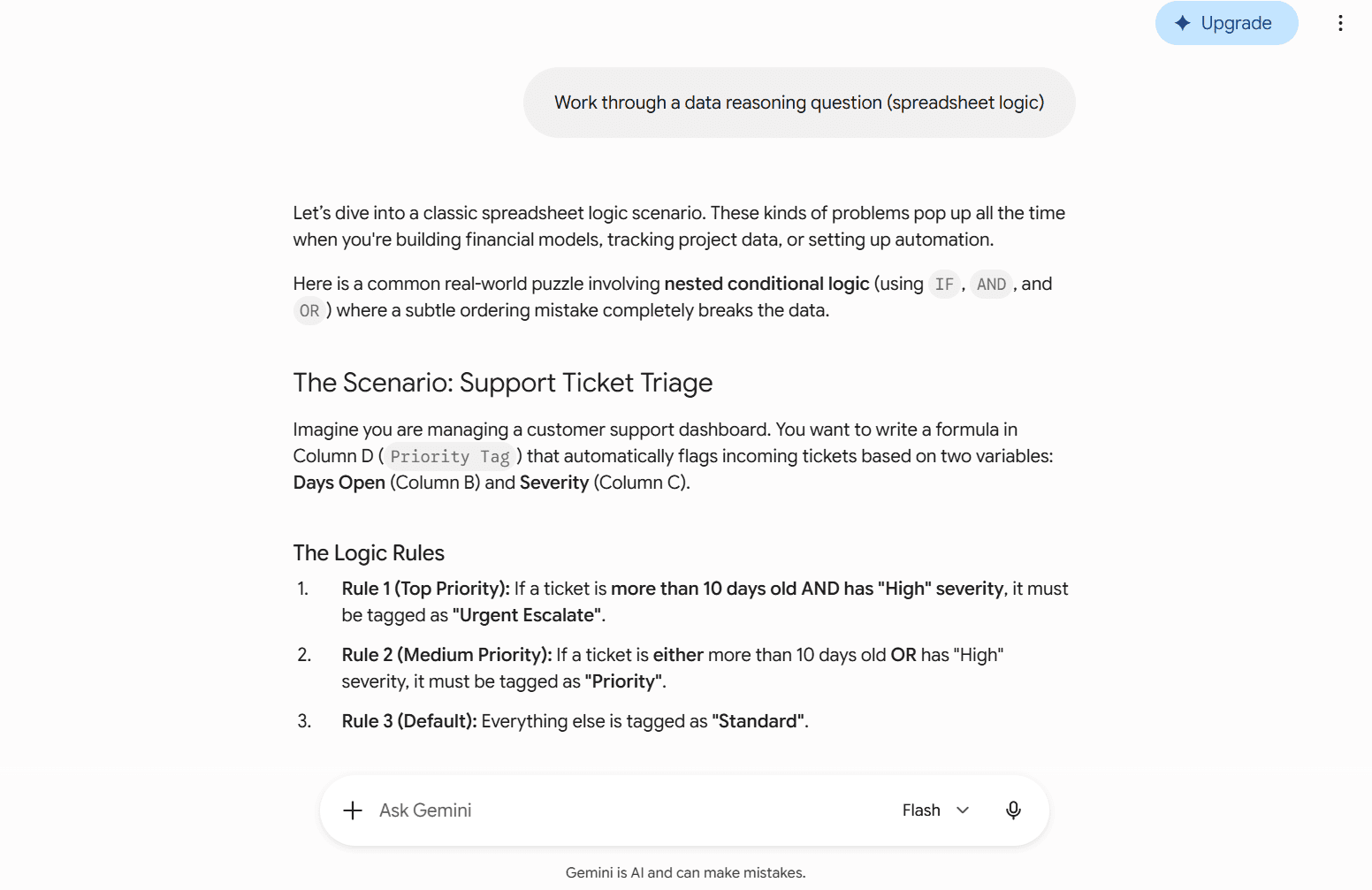
Work through a data reasoning question (spreadsheet logic)
ChatGPT response summary
Gemini response summary
Which felt stronger and why
ChatGPT diagnosed ambiguities in the prompt and requested specific column structures before proposing formulas. Gemini generated a sample dataset to answer immediately, which provided helpful inspiration but made assumptions about the underlying data.
Prompt
Answer a creative brief for a short story opening for a soft drink brand.
ChatGPT response summary
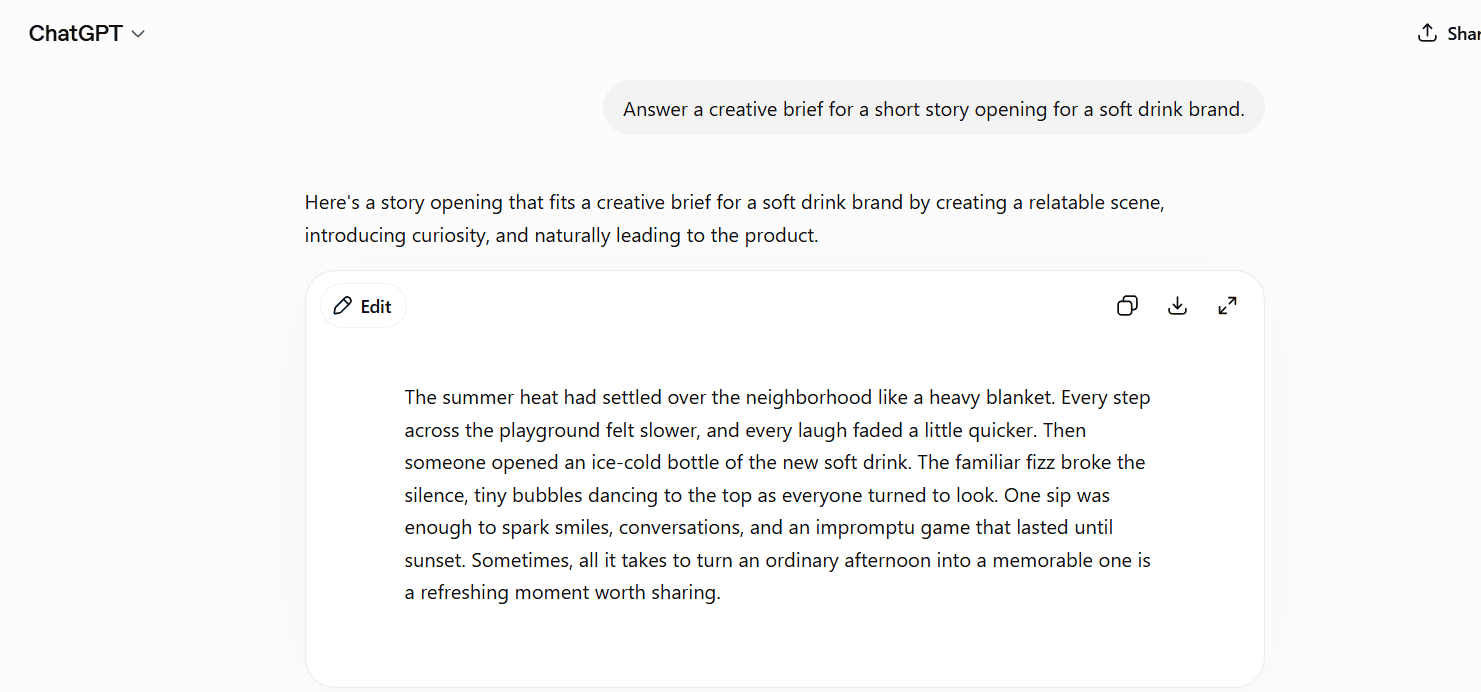
Gemini response summary
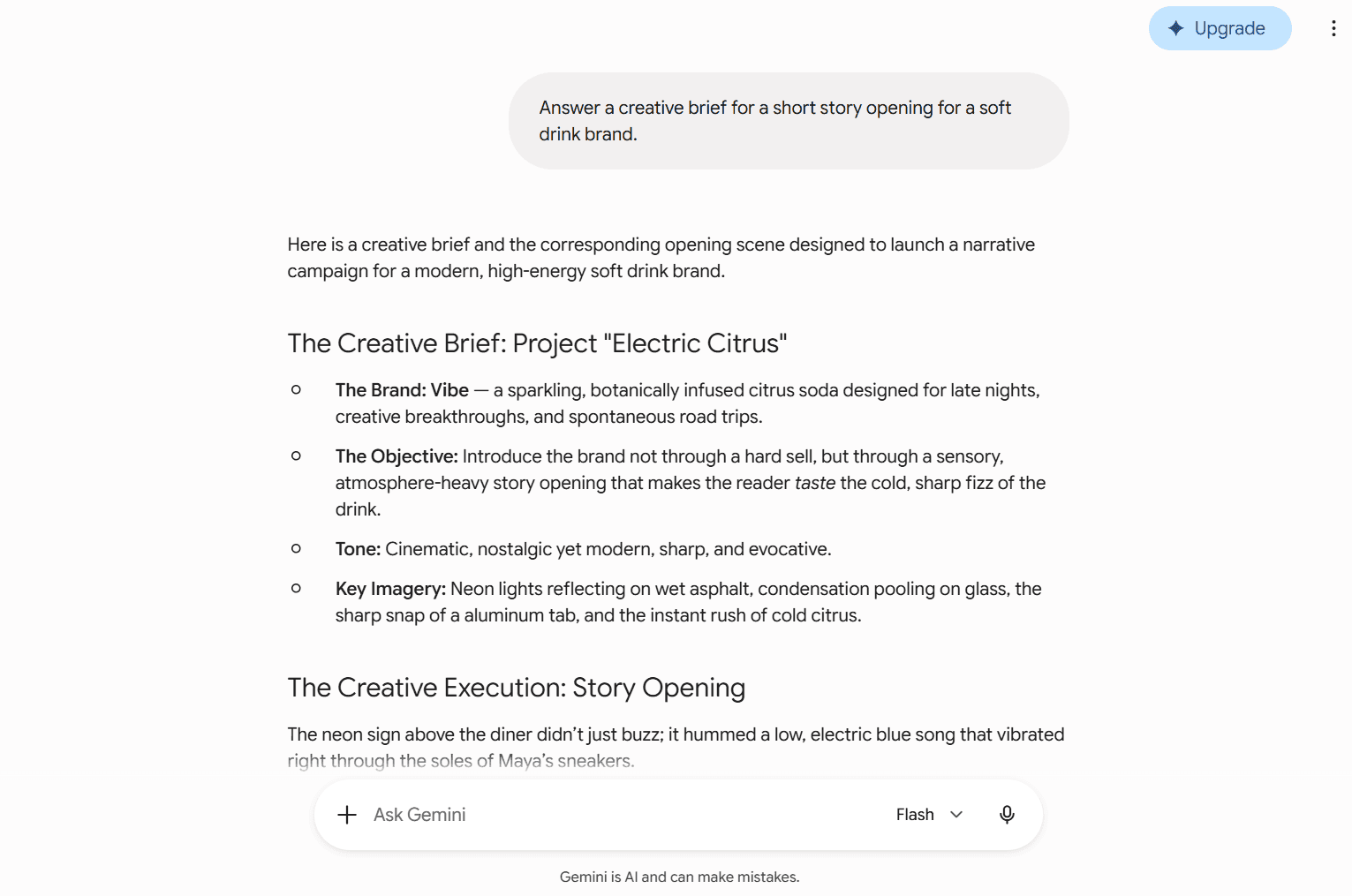
Which felt stronger and why
Gemini produced a richer, highly sensory narrative tailored to brand storytelling. ChatGPT delivered a focused opening scene that read cleanly but offered fewer stylistic flourishes.
Prompt
Identify all objects in this picture and explain what is happening.
ChatGPT response summary
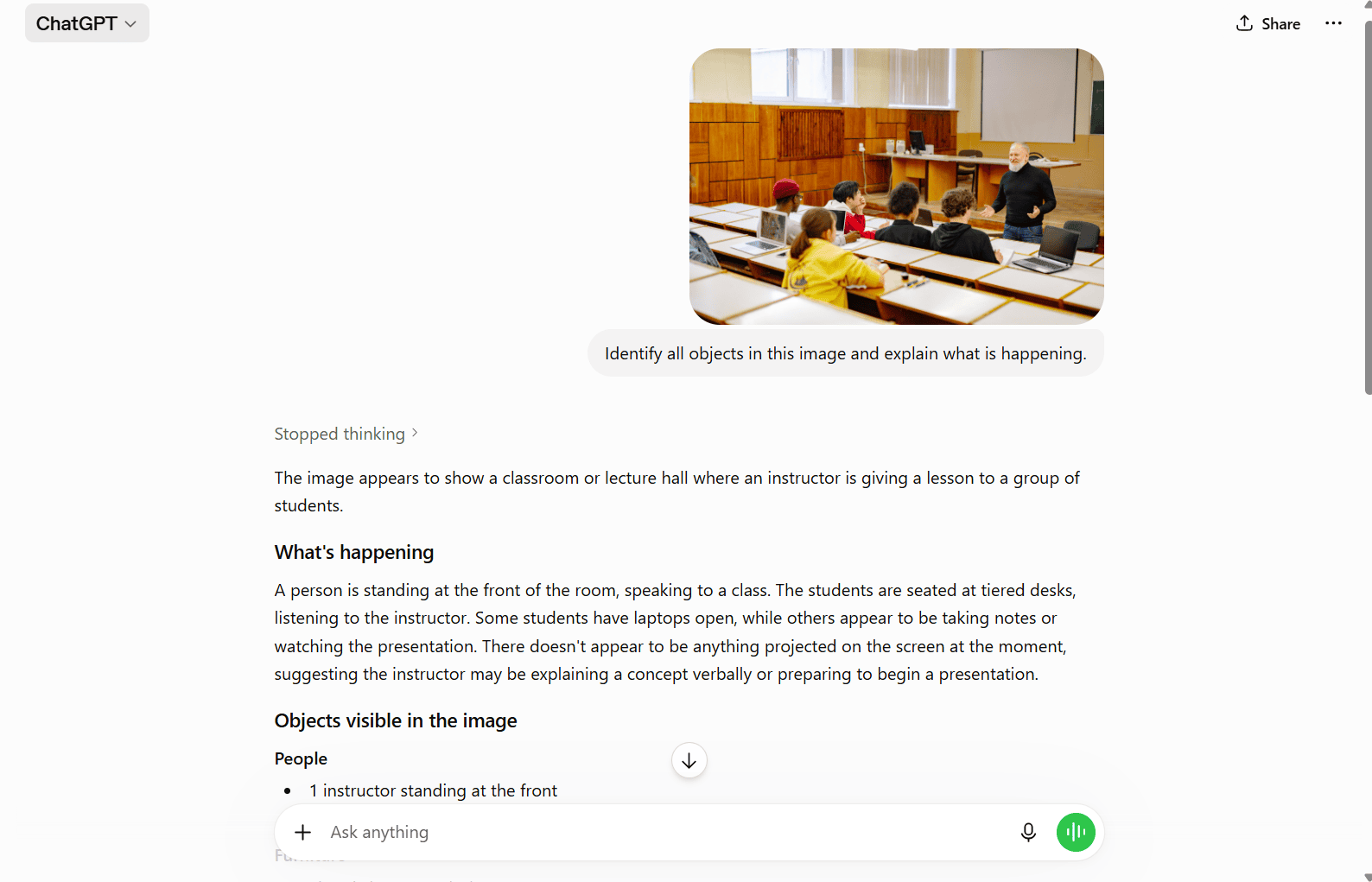
Gemini response summary
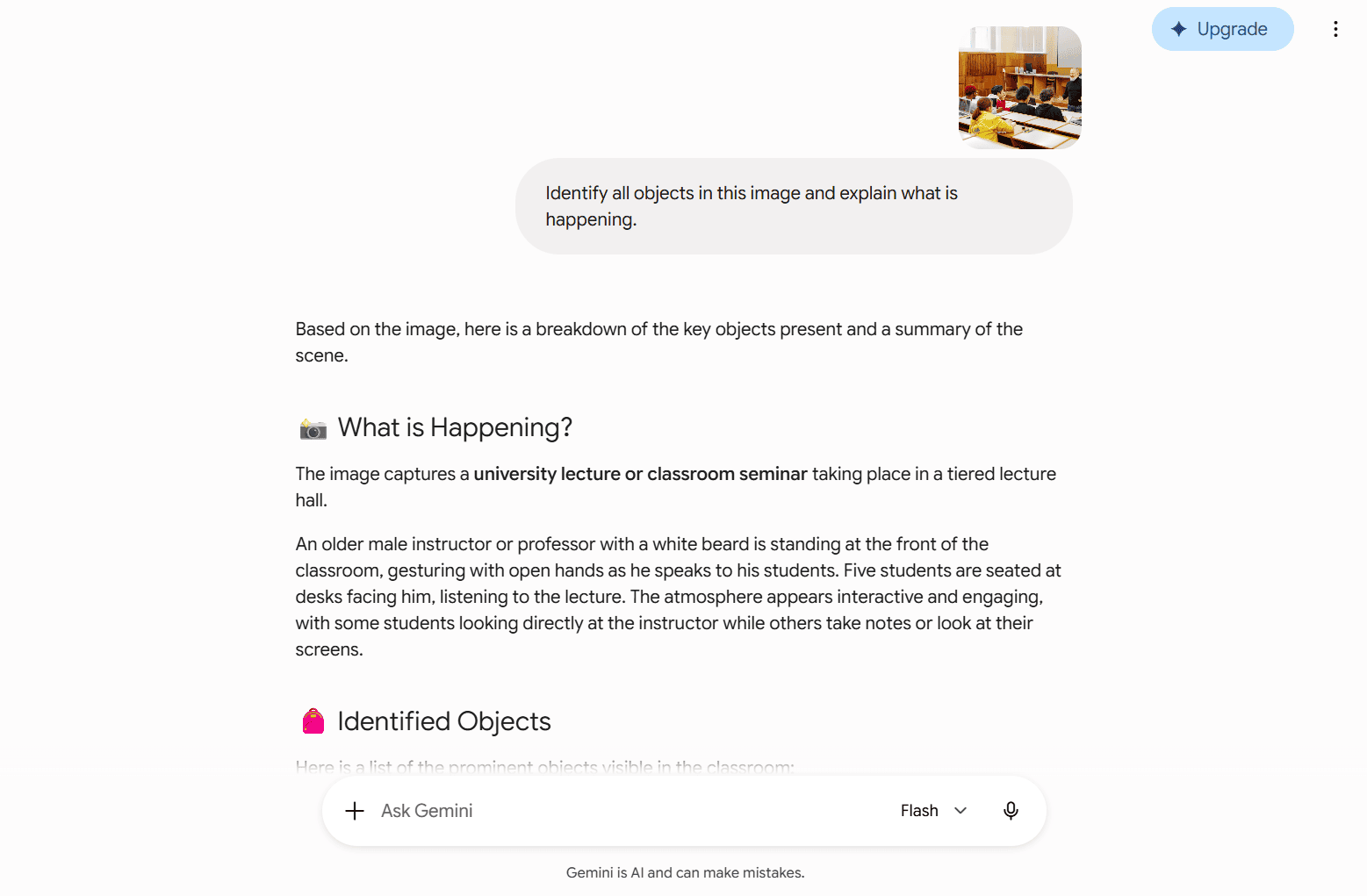
Which felt stronger and why
ChatGPT itemized background details, lighting conditions and spatial layouts methodically. Gemini quickly captured the core action and context of the image, delivering an organized overview in fewer words.
Prompt
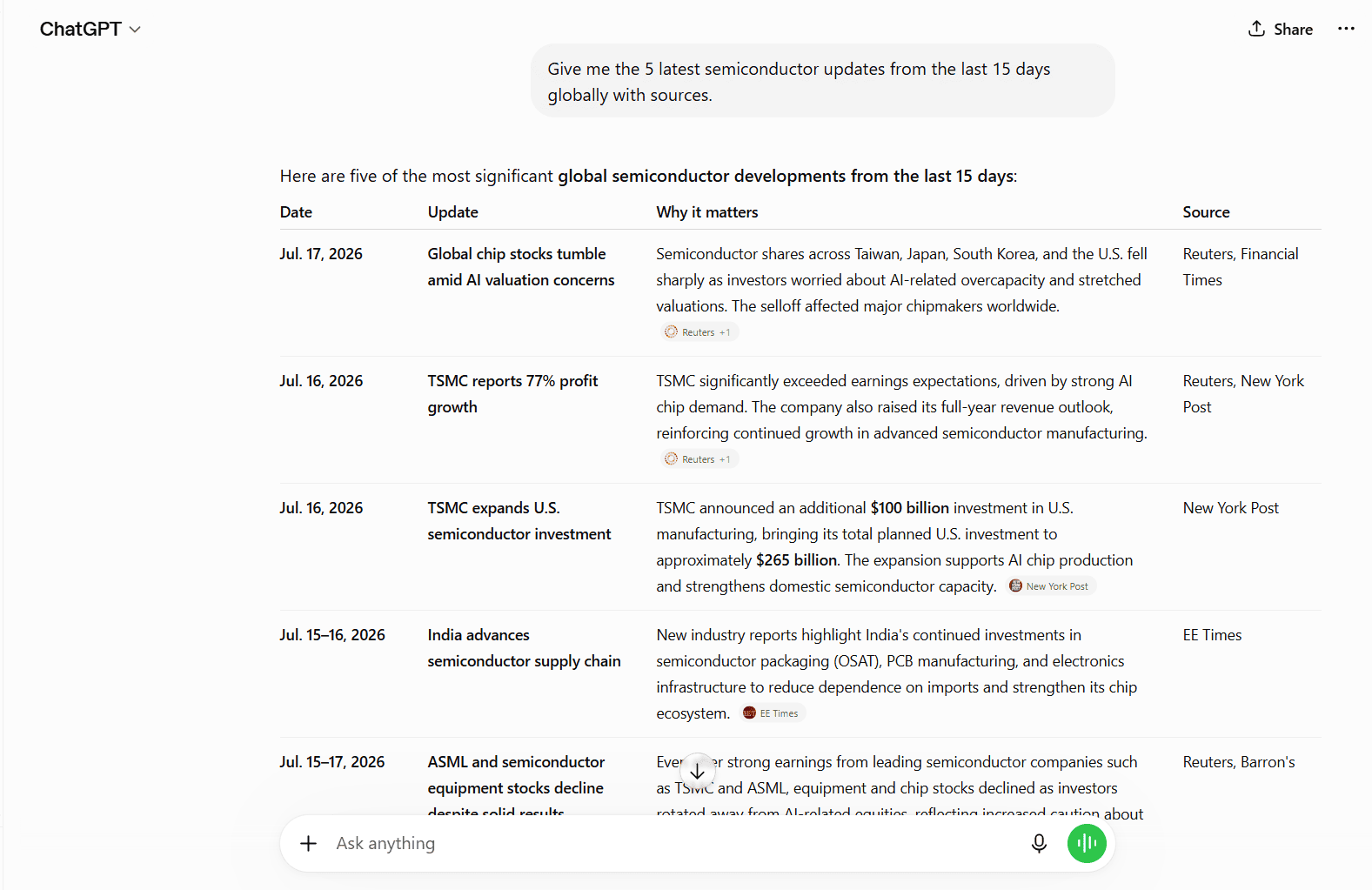
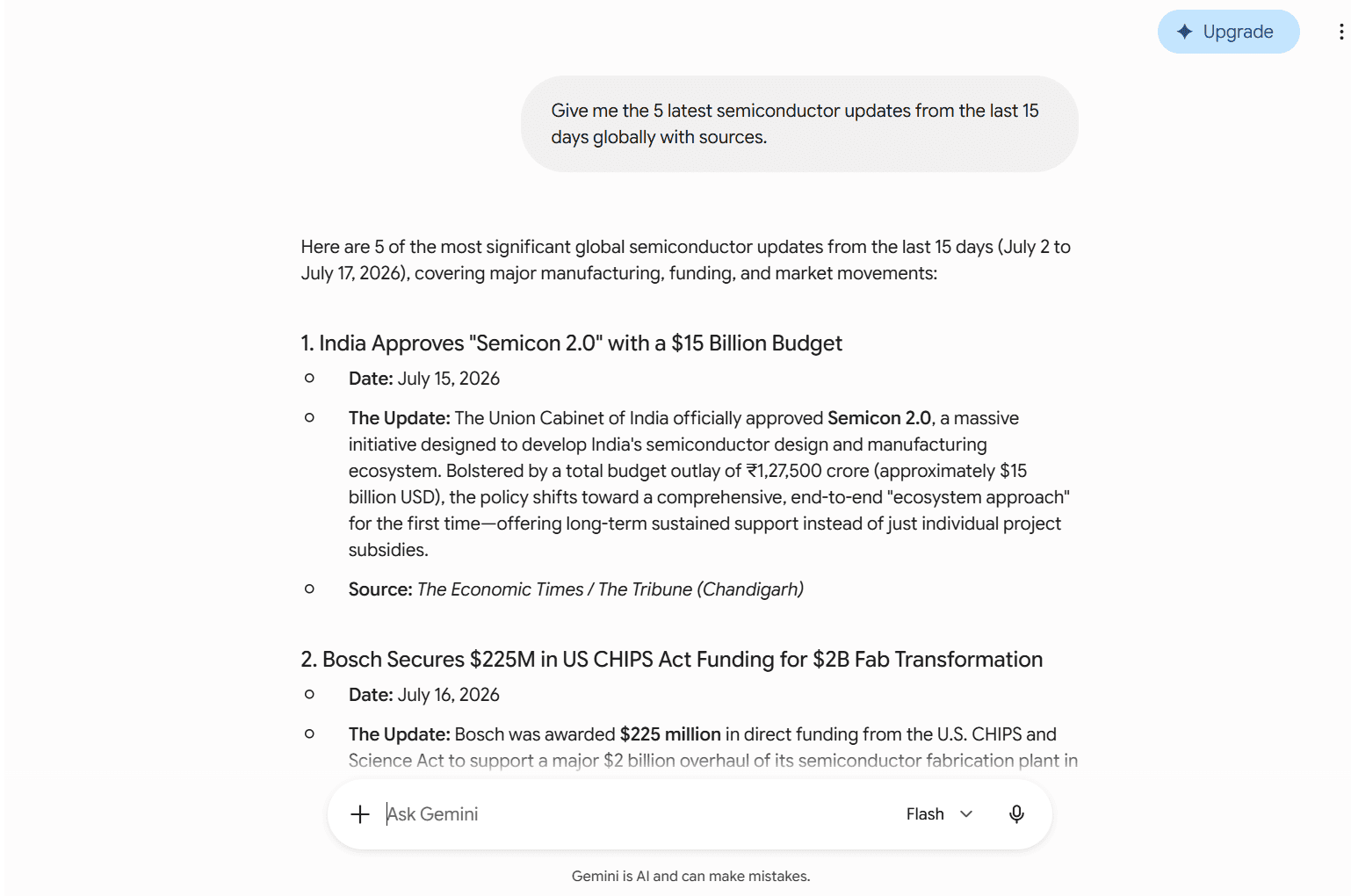
Give me the 5 latest semiconductor updates from the last 15 days globally with sources.
ChatGPT response summary
Gemini response summary
Which felt stronger and why
ChatGPT compiled fresh developments into a structured table with direct source links. Gemini provided deeper historical commentary on manufacturing shifts, though its citations were less immediate.
Gemini vs ChatGPT comparison: Feature-by-feature
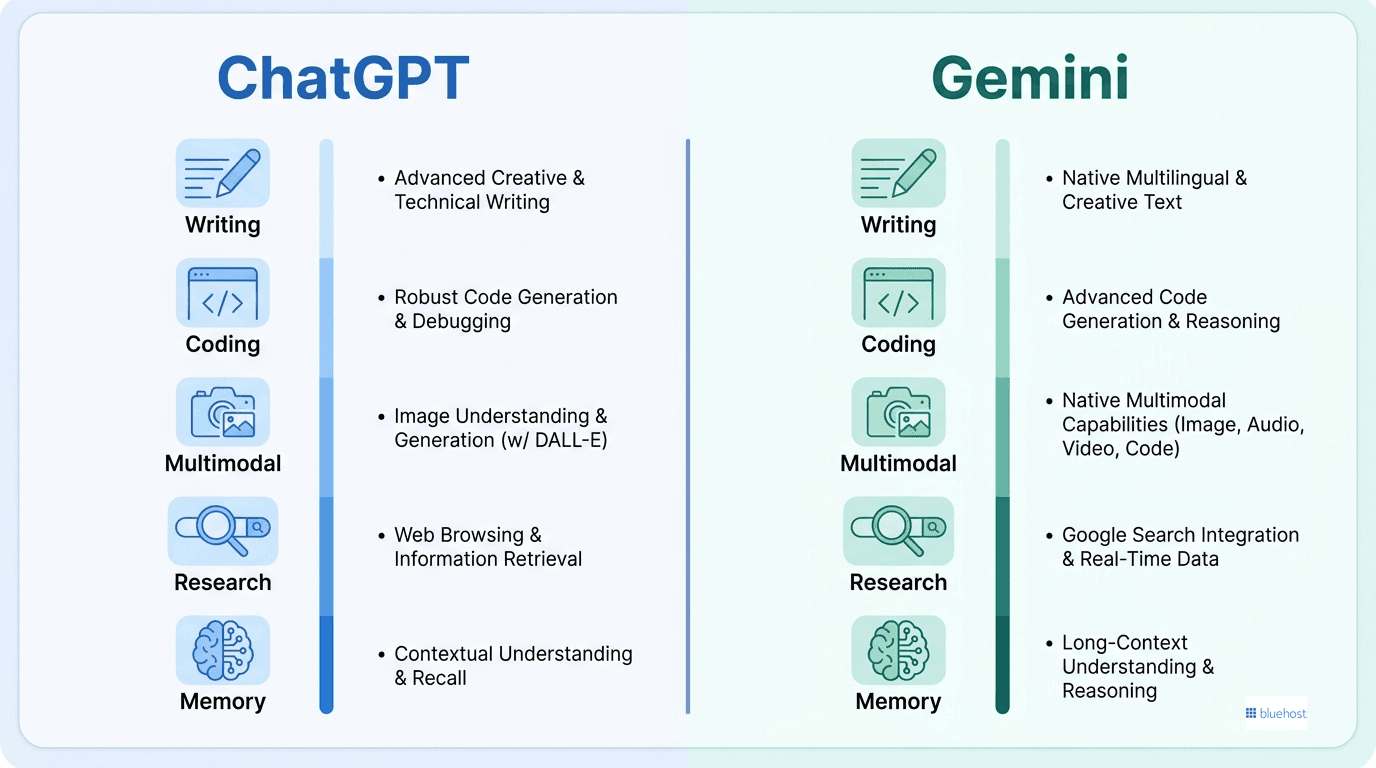
Functional trade-offs emerge when you apply each model to specific business disciplines. Here is how they compare across core operational areas.
Writing and content creation
Both assistants generate fluent copy, adapt to custom brand tones and draft long articles quickly. Dedicated canvas interfaces in both platforms let you edit specific paragraphs, adjust reading levels and refine drafts without restarting the entire conversation. Teams producing editorial content can use either assistant for dependable first drafts.
Organizations aiming to speed up daily output can also explore an AI assistant for business to support writing, research and routine communication tasks across departments.
Coding and developer tools
ChatGPT holds an edge in software development. The Codex environment and dedicated coding reasoning modes provide rigorous syntax validation, dependency tracking and multi-file debugging. While Gemini handles standard code generation and script explanations, ChatGPT remains the preference for technical teams building software solutions alongside dedicated coding assistants.
Multimodal capabilities
Gemini leads native media creation. While both platforms generate detailed images, Gemini natively integrates video production through Veo and custom music generation via Lyria. Users seeking native video capabilities without external subscriptions can compare alternatives among top AI video generators.
Can Gemini understand images as well as ChatGPT?
For Gemini vs ChatGPT for everyday use, both assistants can interpret uploaded images, but accuracy varies by task, model and plan. Each can identify objects, extract text with optical character recognition, answer visual questions and explain basic charts or documents.
Gemini’s native multimodal design can be helpful when an image appears alongside long text, video or other files. ChatGPT often gives more methodical descriptions of spatial relationships, background details and chart assumptions. Neither should replace human review for dense tables, handwritten notes or high-stakes document analysis.
Image understanding is separate from image creation: GPT Image 2 and Nano Banana 2 or Nano Banana Pro generate or edit visuals rather than simply analyze them. Review privacy settings before uploading confidential photos, IDs, medical records or client documents to a consumer account.
Research and learning: Gemini vs ChatGPT
Both platforms offer deep research tools capable of crawling the live web, cross-referencing multiple publications and compiling structured reports. Gemini connects naturally with Google Search and Google Scholar for broad academic discovery. ChatGPT excels at organizing complex research papers into clear, sectioned executive summaries.
Memory and personalization
ChatGPT stores facts, preferences and instructions across distinct chats, allowing you to manage or delete memory entries directly. Gemini features Personal Intelligence, which connects with your permission to Gmail, Google Docs and Google Photos. This integration delivers helpful personal context, though it requires intentional privacy management.
Also read: 16 Best AI Tools for Content Creation in 2026
Ecosystem and integration: Where Gemini and ChatGPT live
| Features | ChatGPT | Gemini |
| Native integrations | Microsoft 365, SharePoint, Outlook, Teams, 140+ workplace apps | Gmail, Google Drive, Docs, Sheets, Maps, YouTube |
| Third-party connectivity | Zapier integration and extensive API options | Google AI Studio and cloud connectors |
| Agent workflows | Custom GPT actions and autonomous desktop agents | Gemini Spark and workspace automations |
| Best ecosystem fit | Multi-platform environments and Microsoft users | Businesses invested in Google Workspace |
If your team works daily inside Google Docs, Sheets and Gmail, Gemini removes friction by processing those documents directly inside chat conversations. If you rely on Microsoft tools or need wide third-party software connections, ChatGPT offers broader platform reach.
How do Gemini Gems compare with custom GPTs in ChatGPT?
Gems and custom GPTs are reusable assistants within Gemini and ChatGPT, not separate foundation models. For Gemini vs ChatGPT for everyday use, both save repeat instructions, but they differ in how they connect to files, tools and coworkers.
| Area | Gemini Gems | Custom GPTs |
|---|---|---|
| Setup and knowledge | Personal Google accounts can create Gems with instructions and uploaded device or Drive files. | Eligible Business, Enterprise and Edu workspaces can build GPTs with instructions and up to 20 knowledge files. |
| Connections and sharing | Gems suit Google Workspace tasks and can be shared with viewer or editor access. | GPTs can use connected apps or custom API actions, with workspace controls and, where eligible, GPT Store publishing. |
| Best fit | Choose Gems for repeat work tied to Gmail, Drive or Docs. | Choose GPTs for specialized workflows that need external actions or a broader assistant marketplace. |
Gems do not include the full ChatGPT product. OpenAI’s current documentation limits new GPT creation to eligible managed workspaces, while Google allows custom Gem creation with personal accounts.
How ChatGPT and Gemini handle your data and privacy
Both providers offer security settings to safeguard user data, but policies differ between platforms. OpenAI stores chat history by default to train future models, though users can disable model training in account preferences or use temporary chats that expire after 30 days. Learning how ChatGPT uses your conversations helps clarify data retention policies.
Google takes a modular approach. Personal apps like Gmail, Drive or Photos connect only with explicit permission, and Google states that private Workspace content is not used to train consumer foundation models. Organizations handling client records or regulated financial data can use secure AI for business solutions to maintain compliance while accessing leading models.
Both platforms function best as helpful assistants rather than repositories for unencrypted, sensitive personal records.
Real-world use cases: Which AI model fits your work?
Choosing the right assistant depends on your primary daily tasks:
- Software developers and technical teams: ChatGPT, due to superior code debugging and the Codex execution environment.
- Google Workspace users: Gemini, for direct connections to Drive, Docs and Gmail without copying text across tabs.
- Multimedia creators: Gemini, for built-in video synthesis and audio tools.
- Enterprise administrators: ChatGPT, for extensive connector support across diverse business software stacks.
- Everyday research and drafting: Either platform. Both free editions provide reliable conversational intelligence.
Beyond the chatbot: Turning AI output into an actual website
ChatGPT and Gemini excel at producing raw copy, marketing outlines, code snippets and images. However, neither native chatbot hosts a website, configures web domains or publishes live pages for an audience.
Content creators and small business owners generating digital copy eventually need a reliable online home to publish their work. While standalone AI subscriptions handle text generation, web platforms provide the hosting infrastructure, SSL security and design tools needed to turn text into a published brand. For users looking to manage multiple models from one place, the Bluehost AI All-Access Pack offers an alternative way to access top AI engines alongside web hosting services.
This multi-model option bundles ChatGPT 5, Gemini 3, Claude 4.5 and Grok 4.1 in a unified $20/month dashboard. Instead of paying multiple separate $20 subscriptions across individual vendors, users can draft content using whichever model fits the prompt, then move those drafts directly into a live WordPress site.
This approach solves the transition between drafting text in an AI prompt window and managing a functioning web presence online.
Pros and cons summary
ChatGPT
- Superior coding performance and deep logical reasoning
- Extensive third-party tool integrations and custom GPT directory
- No native video or music generation inside standard chat
Gemini
- Native multimodal engine supporting text, video, audio and image inputs
- Direct integration with Google Workspace tools and Google Cloud storage
- Advanced autonomous agent capabilities reserved for premium tiers
Gemini vs ChatGPT: Which AI model should you choose?
Selecting between these systems comes down to your primary work environment and whether your tasks require a single tool or a flexible multi-model approach.
Here is a clear decision path: Choose Gemini natively if your daily routine centers on Google Workspace, or if you require integrated video and audio creation. Choose ChatGPT natively if you write code frequently, build custom automations or rely on Microsoft enterprise software. If your work varies across technical coding, multimedia creation and long-form analysis, you can avoid paying multiple native subscriptions by using a multi-model dashboard like AI All-Access to switch between ChatGPT, Gemini and Claude based on the task at hand.
Also read: Is ChatGPT Secure for Business
Final thoughts
Overall, the gap between OpenAI and Google has narrowed into a choice of workflow style rather than raw capability. Both tools deliver capable free tiers and cost-effective entry plans that handle daily writing, research and problem-solving. Review your primary software stack, test both models on realistic assignments and pick the setup that complements how you work.
If you want the strengths of both platforms without managing multiple subscriptions, try the AI All-Access Pack. You get ChatGPT, Gemini, Claude and Grok inside a single dashboard for $20 per month, giving you every leading model in one convenient workspace.
FAQs
ChatGPT remains the preferred choice for software development. Its Codex engine, multi-file code editing capabilities and structured debugging logic provide greater reliability for production environments, while Gemini is catching up through its developer tools.
Both platforms perform well when deep search mode is engaged. Gemini provides an advantage for live web discovery and academic citations through Google Search and Scholar, while ChatGPT produces cleanly categorized analytical summaries.
Schools can use AI models to prepare lesson outlines, summarize curriculum materials and manage administrative paperwork. Districts should adopt solutions with student privacy controls and strict data boundaries to ensure responsible classroom use.
Gemini provides generous allowances on its free tier and bundles cloud storage with Google AI Pro subscriptions. For users needing both engines, multi-model platforms provide access to multiple frontier assistants under a single monthly plan.
Yes. Many professionals run both tools side by side, using ChatGPT for coding logic and structural writing while relying on Gemini for Workspace tasks and media processing. Multi-model plans let you access both without maintaining individual subscriptions.
Both free tiers provide an intuitive starting point. Gemini offers generous usage limits for everyday queries, while ChatGPT features an approachable conversational layout that helps new users learn effective prompting techniques.
Once you generate website copy and visual assets with either assistant, web platforms like Bluehost provide the hosting infrastructure, domain configuration and WordPress publishing tools needed to turn drafts into a live website.
Legal practices should never enter confidential client records into consumer AI chats with data retention enabled. Legal organizations should select enterprise-grade configurations with zero-data-retention agreements and secure audit controls.
Financial institutions can apply AI to market analysis, draft reporting and customer service operations, provided they implement private, compliant environments that meet regulatory data governance standards.

Write A Comment