


Key highlights
- Learn how OpenClaw functions as an always-on agent runtime that ingests events, manages sessions and executes tools to automate complex workflows.
- Understand the layered OpenClaw architecture including control interfaces, messaging channels, the gateway control plane, the agent runtime and the tools layer.
- Explore where OpenClaw can be deployed and why VPS infrastructure provides the reliability, isolation and predictable resources needed for production workloads.
- Know the security and operational practices needed to run OpenClaw safely including credential protection, tool governance, cost controls and detailed activity auditing.
OpenClaw is best understood as an always-on agent runtime that listens for events, manages sessions, queues work, executes tools and coordinates outcomes through a control plane. It is not just “an AI assistant.” It is an automation engine with an embedded agent loop.
That difference matters, because the runtime behaves like infrastructure. It needs uptime, predictable resources and tight security boundaries. If you treat it like a desktop app, you will eventually run into reliability and credential risk issues.
This guide explains how OpenClaw works at a system level, what its architecture gets you, how it compares to other AI agent tools and how to host OpenClaw safely in production.
How OpenClaw works: High-level overview
At a high level, OpenClaw runs as a long-lived process that does four jobs continuously:
- Ingest events and requests from “channels” (APIs, webhooks, schedulers, message buses, UI triggers).
- Create and manage sessions so a workflow has identity, memory and state across steps.
- Queue work so multiple workflows can run concurrently without stepping on each other.
- Execute an agent loop that calls models, invokes tools and produces outputs under policy controls.
If you are wondering what is OpenClaw, you can think of it as a small operating system for automations. It is responsible for routing inputs to the right workflows, controlling execution and keeping the whole system observable. Let us dive deeper and understand the OpenClaw architecture.
Understanding OpenClaw architecture
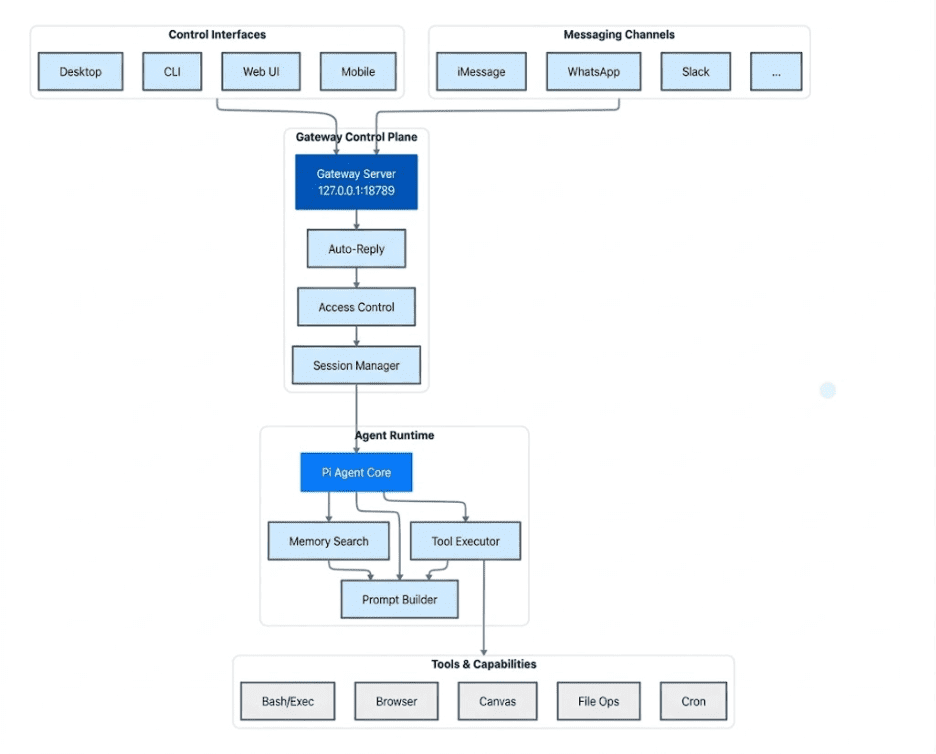
OpenClaw is designed as a layered system that receives requests, processes them through an AI agent runtime and executes actions using integrated tools. The architecture can be understood through five core components: control interfaces, messaging channels, the gateway control plane, the agent runtime and the tools layer.
1. Control interfaces
Control interfaces are the ways developers and operators interact with OpenClaw directly. These interfaces allow users to configure the system, trigger workflows and monitor automation activity.
Common control interfaces include:
- Desktop applications
- Command line interface (CLI)
- Web user interface
- Mobile interfaces
These tools are primarily used for managing the automation environment and interacting with the system in a controlled way.
2. Messaging channels
Messaging channels are sources of events and requests that trigger workflows inside OpenClaw. These channels allow the system to receive inputs from external communication platforms and applications.
Examples include:
- iMessage
- Slack
- Other connected messaging or integration platforms
Requests from these channels can include user messages, automation triggers or events generated by other systems.
3. Gateway control plane
The gateway control plane acts as the entry point for all incoming requests. It receives events from control interfaces and messaging channels and manages how they move through the system.
This layer is responsible for routing requests, enforcing access controls and managing sessions so workflows can maintain context across multiple steps. By coordinating these tasks, the gateway ensures that requests are processed in an organized and secure manner before being passed to the agent runtime.
4. Agent runtime
The agent runtime is where the core AI reasoning and workflow execution occur. This layer analyzes incoming requests, retrieves relevant context and determines the actions needed to complete a task.
Within the runtime, the agent core coordinates memory searches, constructs prompts for AI models and invokes tools when necessary. This allows OpenClaw to move beyond simple responses and perform structured, multi-step automation workflows.
5. Tools and capabilities
At the foundation of the system are the tools that allow OpenClaw to perform real operations. These capabilities enable the agent to interact with systems, run commands and manipulate data as part of an automation workflow.
Examples of available capabilities include:
- Running system commands through Bash or execution environments
- Browsing and interacting with web content
- Managing files and data operations
- Generating structured outputs or visual content
- Scheduling automated tasks through cron jobs
These tools extend OpenClaw’s functionality from decision-making into real-world execution, allowing AI agents to automate tasks across multiple systems and environments.
Where to run OpenClaw and why a VPS fits the architecture
OpenClaw behaves more like infrastructure than a typical application. Because of this, choosing where to run it becomes a decision about security, reliability and operational stability, not just convenience.
OpenClaw can run in several environments. Developers commonly deploy it on local machines such as a laptop, desktop PC or Mac Mini during development. It also supports remote infrastructure environments including VPS servers and container platforms.
While these environments all work, the runtime characteristics of OpenClaw make certain hosting models more suitable for production use.
Runtime characteristics of OpenClaw
OpenClaw runs as a long-lived gateway process that coordinates channels, sessions and tool execution. Because of this architecture, the runtime has a few practical infrastructure requirements.
- First, it needs persistent availability. OpenClaw is designed to operate as an always-on assistant that processes messages, API triggers and scheduled workflows. Environments that frequently sleep or restart can interrupt these tasks.
- Second, it benefits from predictable compute resources. The system runs on a Node.js runtime with session management, queues and tool orchestration. While OpenClaw can run with around 2 GB RAM, 4 GB is recommended for stability and higher memory may be needed for heavier workloads like browser automation.
- Third, it requires controlled networking. The gateway communicates with messaging platforms, LLM APIs and other services, so managing network access and exposure is important.
Finally, it benefits from environment isolation. Since agents may run tools that access files, commands and external services, keeping credentials and secrets in a separate environment helps reduce security risk.
Why VPS environments fit OpenClaw well
For many users, a Virtual Private Server (VPS) provides the right balance of flexibility, reliability and operational control for running OpenClaw. Its architecture and runtime behavior align well with what a VPS environment offers.
Key advantages include:
1. 24/7 persistent availability
- OpenClaw runs as an always-on assistant.
- A VPS keeps the gateway online continuously, allowing it to process scheduled tasks, incoming messages and event-driven workflows without interruption.
2. Natural fit for OpenClaw’s hub-and-spoke architecture
- OpenClaw relies on a central gateway that acts as the control plane.
- A VPS provides a stable hub where messaging platforms, control interfaces and integrations can reliably connect.
3. Dedicated and predictable resources
- CPU, RAM and storage are allocated directly to the VPS instance.
- This prevents OpenClaw from competing with background applications or OS processes, which often happens on personal machines.
4. Improved security and isolation
- The OpenClaw gateway binds to 127.0.0.1 (loopback) by default, preventing public exposure.
- When hosted on a VPS, access can be controlled using SSH tunnels or private networking tools such as Tailscale, keeping the system secure while still accessible.
5. Lower latency to APIs and services
- Data center infrastructure often has faster network paths to LLM APIs and messaging platforms.
- This improves responsiveness during the agent execution loop when the system retrieves context, calls models or streams responses.
Together, these capabilities make VPS infrastructure a practical and reliable environment for running.
For users who prefer not to configure everything from scratch, some hosting providers now offer preconfigured OpenClaw VPS environments or simplified deployments. At Bluehost, our OpenClaw VPS hosting provides a one-click setup that launches the runtime on a dedicated VPS while still allowing full server-level control.
Running OpenClaw on Bluehost VPS: Infrastructure and runtime capabilities
Running OpenClaw on Bluehost VPS is easiest to understand in three layers. Bluehost VPS provides the infrastructure foundation. OpenClaw runs on that foundation as the automation runtime. Teams can then extend the deployment with optional tools, monitoring setups and governance controls based on their own operational needs.
This distinction matters because it separates what the hosting platform directly provides from what OpenClaw enables and what users can add themselves.
Bluehost VPS as the infrastructure foundation
Bluehost VPS provides the server environment teams can use to self-host OpenClaw in a more stable and controlled setting than a local machine.
Because the platform runs in a dedicated VPS environment, teams can host OpenClaw on infrastructure they control. This is especially useful when agents interact with internal systems, APIs and credential-protected services.
At the infrastructure layer, Bluehost VPS supports the operational foundation needed for long-running OpenClaw deployments:
1. Always-on hosting for persistent automation workloads
A VPS gives OpenClaw a persistent environment where workflows can continue running beyond short-lived local test sessions. This is important for automations that need to stay available over time and respond reliably to events, API calls and messaging activity.
2. Dedicated resources for predictable performance
Running OpenClaw on VPS infrastructure provides dedicated CPU and RAM for automation workloads. This helps support concurrent workflow execution and tool runs in a more predictable environment than a local machine that is also handling day-to-day desktop activity.
3. Stable networking for connected systems
OpenClaw workflows often depend on stable connections to messaging channels, external APIs and internal services. A VPS provides the network foundation needed to keep these connections available while allowing teams to configure secure access around their deployment.
4. Flexibility for self-managed deployment setups
Bluehost VPS gives teams a hosting base they can configure for containerized or custom OpenClaw deployments. This makes it easier to shape the environment around the runtime rather than forcing the runtime into a short-lived or limited local setup.
At this layer, Bluehost VPS is the infrastructure foundation. It supports the runtime, but it does not directly provide workflow orchestration, governance controls or automation logic.
OpenClaw as the automation runtime
On top of that infrastructure, OpenClaw acts as the software layer that handles workflow execution, agent activity and automation logic.
This is the layer where teams design, run and manage automations through OpenClaw itself.
1. Centralized automation and orchestration
OpenClaw acts as a central control layer for automation workflows. Teams can design and manage workflows through a visual, event-driven interface instead of relying heavily on custom scripts. This can make automation management more approachable for teams operating more complex workflow systems.
2. Multi-system workflow coordination
OpenClaw can coordinate workflows across cloud services, internal systems and APIs from one deployed runtime. By centralizing automation logic in one environment, teams can reduce fragmentation across separate scripts and disconnected workflow tools.
3. Persistent automation runtime
Once deployed on a VPS, OpenClaw can run as an always-available automation runtime that receives events, processes context and executes workflows over time. This makes it better suited for production-style automation than a local-only setup used mainly for testing or experimentation.
These are OpenClaw runtime capabilities running on Bluehost VPS. They are not native Bluehost platform features, even though the VPS environment makes them possible.
Optional tools and governance patterns added by the user
Beyond the infrastructure layer and the OpenClaw runtime, teams may choose to add supporting tools and governance controls to fit their own deployment model.
These capabilities depend on how the environment is configured and which tools a team decides to use.
1. Workflow lifecycle management
Teams may choose to treat automation workflows like structured software components by organizing them into reusable building blocks, versioning related configurations and maintaining repeatable deployment practices across projects.
2. Governance and access control
For shared environments, teams may add role-based access controls, deployment permissions and audit processes through the application layer or surrounding tooling. These controls help define who can create, modify or deploy automations when multiple operators work on the same infrastructure.
3. Operational visibility and monitoring
Teams can also layer in monitoring, logging and troubleshooting workflows to improve operational visibility. This can include tracking workflow executions, reviewing logs and diagnosing failures or performance bottlenecks across the stack.
4. Integration with modern automation tooling
A common user-managed stack may combine:
- OpenClaw for AI reasoning and agent execution
- n8n for event-driven integrations and workflow triggers
- Docker for packaging and deploying services consistently
- Portainer for visual container management and operational simplicity
This self-managed stack gives teams greater flexibility in how they build and operate OpenClaw on VPS infrastructure.
These tools and controls should be understood as optional deployment extensions added by the user, not as built-in Bluehost VPS features.
For teams looking to move from experimentation to production, deploying OpenClaw on Bluehost VPS offers a stable infrastructure foundation for running persistent automation workloads.
Security risks and production best practices for OpenClaw
Treating OpenClaw as core infrastructure allows you to manage it with better precision. This involves planning for security, monitoring costs and setting up activity tracking from the start to ensure the system remains stable in a live environment.
1. Securing the system from public access
The majority of technical security issues occur when a system is accidentally exposed to the open internet, where anyone can find it.
Use these strategies to keep your environment isolated and secure:
- Place OpenClaw behind a secure API gateway or a reverse proxy to manage all incoming traffic.
- Only open the specific entry points that are absolutely necessary for your workflow, such as required webhooks.
- Enforce strict login protocols and use IP allowlists to restrict every connection to trusted users.
- Run internal tasks on private networks that are not reachable from the public web.
If your workflow requires public webhooks, focus on securing that specific entry point rather than leaving your entire infrastructure open.
2. Protecting access keys and credentials
Credentials give agents the power to automate tasks across your systems, but they also represent your biggest risk if they are stolen or leaked.
Maintain safety by following these credential management rules:
- Least privilege: Assign access tokens only the minimum permissions they need to perform their specific tasks.
- Rotation: Change your access keys on a regular schedule and replace them immediately if you suspect a leak.
- Separation: Use entirely different sets of credentials for your testing and live production environments.
- Secure storage: Keep all secrets in an encrypted manager instead of storing them in plain text files or code.
- Limited sessions: Link credentials to specific tasks or short sessions rather than the entire system.
If an agent uses tools with incorrect or overly broad credentials, it can result in significant accidental damage to your data and systems.
3. Managing tool execution risks
Tools allow AI to turn text-based instructions into real-world actions. While powerful, this capability introduces new technical dangers.
Use these execution patterns to maintain control over your tools:
- Sandboxing: Run files and commands in isolated, safe environments to prevent them from affecting the rest of your system.
- Approvals: Require a human to manually confirm high-risk actions like payments, data deletions or configuration changes.
- Circuit breakers: Set the system to shut down automatically if a process fails repeatedly or behaves in an unexpected way.
- Allowlists: Restrict your tools so they can only contact a pre-approved list of specific websites and API endpoints.
- Validation: Thoroughly check all inputs before they are processed, especially when tools interact with your live databases.
A simple safety rule applies: any tool that has the power to change or delete data requires much tighter security than a tool that only reads information.
4. Controlling costs and preventing loops
AI systems can fail in ways that lead to high costs. A small logic error can create an endless loop of expensive requests and retries.
Implement these controls to avoid unexpected bills and system overloads:
- Set a hard limit on the total number of steps an agent is allowed to take for any single task.
- Establish strict spending budgets for every individual session or automated workflow.
- Configure automated alerts to notify you of high activity levels or spikes in spending.
- Limit the number of retries allowed for a task and slow them down if errors continue to occur.
- Control the speed and frequency of actions allowed for every external connection.
The ability to stop a process safely and instantly should be a standard feature of your setup, not just an emergency procedure.
5. Activity tracking and system auditing
If a failure occurs, you must be able to quickly answer these questions to resolve the issue:
- What specific task was the system trying to complete?
- Who made the most recent changes to the system or its instructions?
- Which specific tools were utilized during the process?
- What were the actual results or data outputs produced?
- Why exactly did the process fail or stop working?
To obtain these answers, you need to set up the following:
- Organized logs that are linked to unique session IDs for easy filtering.
- A detailed, step-by-step history of every task the agent performs.
- Tracking systems for any changes made to system settings or tool definitions.
- Records showing exactly who accessed the system and what specific actions they took.
Without this detailed information, responding to a technical problem is just a guessing game rather than a data-driven fix.
Final thoughts
OpenClaw can run in several environments. Developers often begin on a local machine for testing or deploy to cloud platforms, containers or virtual machines as their workflows grow. This flexibility makes it easy to experiment with agent-driven automation without being tied to a single hosting model.
However, when moving to production, a VPS is often the most practical option. OpenClaw runs as a long-lived gateway that manages sessions, queues and tool execution. It performs best in an environment that stays online continuously, offers predictable CPU and RAM and provides clear control over networking and credentials.
A VPS delivers exactly that. It gives you an always-on runtime, dedicated resources for concurrent workflows and an isolated environment for handling sensitive integrations. This allows OpenClaw agents to run reliably, process events and execute tools without interruption.
If you want your agent workflows to run consistently and securely, the next step is simple: deploy OpenClaw on a stable VPS environment and let your automation run without limits.
Several platforms now offer infrastructure designed specifically for these always-on AI runtimes, making it easier to launch and manage agent-driven workflows at scale. Explore Bluehost VPS hosting for OpenClaw to launch a production-ready runtime built for agent-based automation.
FAQs
OpenClaw is an always-on agent runtime built for automation, not just conversation. Instead of only answering prompts in a chat session, it listens for events, manages sessions, queues work and executes tools to complete multi-step tasks across systems. This makes it closer to an automation engine than a traditional AI assistant.
OpenClaw can run on a local machine for testing, development and early experimentation. However, production deployments usually benefit from a VPS because OpenClaw behaves like long-running infrastructure. It needs stable uptime, predictable compute resources, controlled networking and a safer place to store credentials and manage integrations.
A VPS is better suited for production because it stays online continuously, offers more predictable CPU and RAM and provides a cleaner isolation boundary for secrets, APIs and automation tools. Local machines are useful for development, but they are more likely to sleep, restart, lose connectivity or compete with other day-to-day workloads.
No. Bluehost VPS provides the infrastructure foundation, such as an always-on server environment, dedicated resources and networking control. OpenClaw provides the automation runtime itself. Governance, monitoring, access control and related operational features usually depend on how the user configures the application and which additional tools they choose to add.
The biggest risks usually come from exposing the runtime too broadly, storing credentials insecurely, giving tools excessive permissions and allowing agents to run high-risk actions without proper safeguards. Production setups should focus on least-privilege access, secret management, network restrictions, approval flows for sensitive actions and strong logging for auditing and troubleshooting.

Write A Comment