 ChatGPT,
 Claude,
 Gemini,
 Grok — all four for
You build a great website, hand it off and then the messages start. Something broke after an update. The site is slow. They think they’ve been hacked. None of this was in the original scope, but it all lands on you anyway.
The problem isn’t the work. It’s that you never packaged it. Every hour spent on ad hoc site maintenance, security monitoring or emergency fixes is an hour you’re not billing for.
The fix is straightforward. Bundle hosting, maintenance, and support into a structured website care plan. It becomes a sellable, recurring service that turns your most draining client work into predictable monthly revenue. This guide shows you exactly how to build one, price it and deliver it profitably.
What it means to bundle hosting, maintenance and support as an agency?
Most agencies start the same way: build the site, hand it off, move on. It works, until the ongoing support requests start eating into time you’re not being paid for.
Also read: What Is Agency Hosting? Guide for Agencies
Bundling hosting, maintenance and support means making a deliberate shift from “I build websites” to “I manage websites.” It’s the foundation of a recurring services business and the financial difference between the two models is significant.
What each layer means in practice:
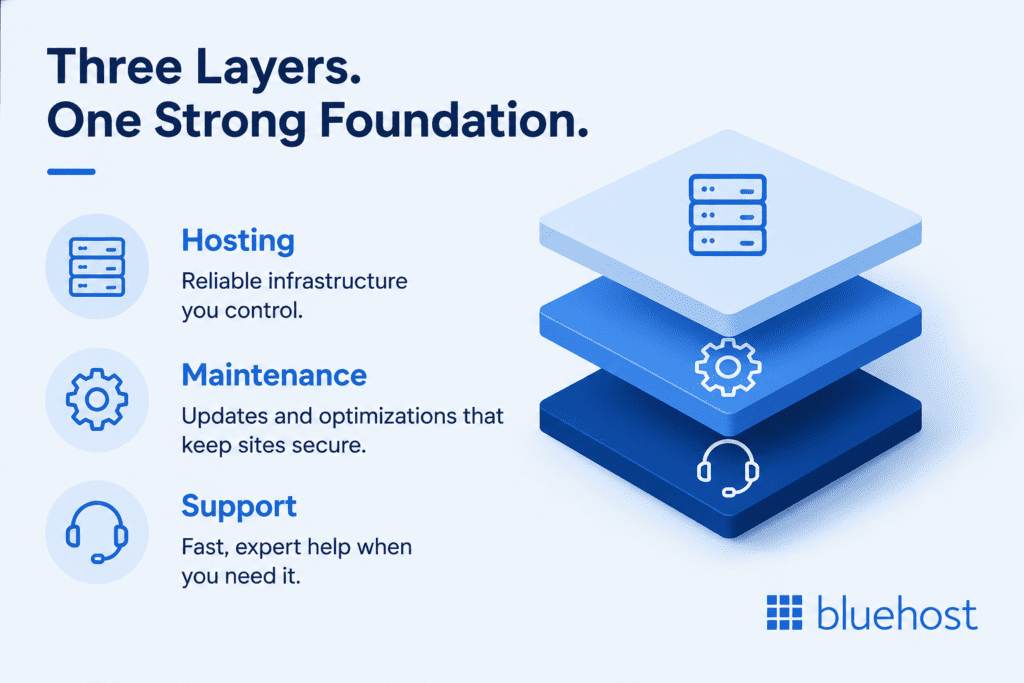
- Hosting: Reliable infrastructure you manage for clients, with full control over performance and uptime.
- Maintenance: Ongoing updates, security fixes, and optimizations that keep sites secure and running smoothly.
- Support: Fast technical assistance with guaranteed response times when clients need help.
These three aren’t independent services, they’re interdependent. Fast hosting with no regular maintenance still leads to security breaches. Solid maintenance on an unreliable hosting provider still loses client trust the moment a site goes down. And support without the right infrastructure behind it means you’re firefighting instead of delivering.
Bundling all three into a single website maintenance package, one platform, one dashboard, one escalation path, is what separates a professional website maintenance service from scattered, reactive work. It’s also what makes it sellable.
With most small businesses owning websites but lacking in-house technical staff, the demand for someone to manage their ongoing care and digital presence is already built in. Agencies are perfectly positioned to capture it.
Understanding why hosting, maintenance and support work best as a bundled service is only the first step. The next is building a care plan that delivers clear, ongoing value clients are willing to invest in month after month.
What a client-ready care plan bundle should include?
A website care plan is only as strong as what powers it behind the scenes. Before you can sell one confidently, you need to know exactly what you’re promising clients and what infrastructure must deliver on that promise. Here’s the non-negotiable checklist for every client-ready bundle.
1. Hosting infrastructure
- What you promise clients: Fast load times, no unexpected downtime and a site that stays online.
- What powers it: NVMe SSD storage, high-frequency CPUs, global CDN with edge caching, 100% uptime SLA and auto-scaling vCPUs for traffic spikes.
- Agency angle: You absorb the infrastructure risk. Clients pay for reliability and optimal performance without needing to understand what makes it possible.
2. Software, CMS and application updates
- What you promise clients: Their website and underlying software stay updated, secure and fully functional without disrupting day-to-day operations.
- What powers it: Automated updates where appropriate, staging environments for testing changes before deployment and a controlled update process for CMS platforms, plugins, themes and server-level applications.
- Agency angle: Testing updates before they reach a live environment protects both site performance and your reputation. Catching compatibility issues early turns potential emergencies into routine maintenance tasks.
3. Security monitoring and protection
- What you promise clients: Their site is protected, monitored and recoverable if anything goes wrong.
- What powers it: Premium WAF, DDoS protection, real-time malware scanning, SSL certificates, site isolation and automated security patches.
- Agency angle: You’re not just “checking in”; you have enterprise-grade security measures running 24/7 in the background. This alone justifies a monthly care plan fee and directly addresses client concerns around data breaches and security breaches.
4. Backup and recovery
- What you promise clients: Their data is safe, backed up and recoverable fast.
- What powers it: Real-time automated backups, one-click restore and regular backups that run without any manual intervention.
- Agency angle: Position this as a safety net, clients don’t think about website backup until they desperately need it. You include it so that conversation never has to happen.
5. Support access
- What you promise clients: Someone to call, or call on their behalf, when something breaks.
- What powers it: 24/7 priority chat, Level 3 WordPress experts and weekday phone support routed directly to trained specialists.
- Agency angle: Your hosting provider’s expert support becomes your Tier-2 escalation layer. You handle client-facing communication; your hosting partner handles the technical heavy lifting.
Pro tip: Before committing to any hosting provider, test their support response time by opening a live chat with a question about your setup. A provider that takes 20 minutes to respond during the sales process will be even slower when a client site goes down at 2am.
Once you’ve defined what your care plan includes, the next challenge is delivering those services without adding operational complexity to your agency.
Why bundling beats managing client sites with scattered tools?
Many agencies build their maintenance stack the same way, a hosting plan here, a security plugin there, a backup tool bolted on and a developer on retainer for emergencies. It feels flexible. In practice, it’s expensive, time-consuming and fragile.
DIY stack vs. agency hosting: the real per-site cost
The side-by-side comparison below shows how quickly costs, management overhead and accountability can add up when agencies rely on separate tools and vendors.
| Feature/service | DIY stack | Agency hosting |
| Enterprise DDoS protection | $200+ | Included |
| CDN | $25 | Included |
| Backups | $9.95 | Included |
| Malware scanning | $9.95 | Included |
| Yoast SEO Premium | $9.90 | Included |
| SSL certificates | $3.33 | Included |
| Uptime monitoring | $29 | Included |
| Migration support | $13 | Included |
| Hours to manage | 5–10 hrs/mo | ~1 hr/mo |
| Accountability when something breaks | You | Your provider |
| Total monthly cost | $300+ | ~$5/site |
When you bundle hosting, maintenance and support into a single agency hosting platform, that entire stack is replaced and the savings go straight to your margins.
The responsibility gap no one talks about
Beyond the dollar cost, managing multiple vendors creates what’s known as a responsibility gap. When a client site goes down at 2am, no single vendor is accountable. You are, simultaneously coordinating between your hosting provider, security plugin, backup tool and support contact. That’s not a web maintenance process. That’s a crisis.
A consolidated platform eliminates that gap entirely. One dashboard, one support escalation path, one place where accountability lives and one less reason to be awake at 2am.
What consolidation actually frees up
Research from Harvard Business Review highlights a clear benefit of automation and tool consolidation. They reduce operational friction and allow teams to spend less time reacting to issues and more time driving growth. For agencies, that means fewer hours spent on manual maintenance tasks and more hours spent on billable work.
Switching from a DIY stack to a unified platform specifically removes:
- Manual monitoring across multiple tools and dashboards
- Chasing vendor support across different platforms during incidents
- Reconciling separate billing for security, backup and CDN providers
- Repetitive maintenance tasks that should be fully automated
Having the right infrastructure in place is only part of the equation. The next step is turning those capabilities into a care plan that clients understand, value and are willing to pay for.
How to package, price and sell your care plan to clients?
Building a great care plan is only half the work. The other half is packaging your services so clients understand the value, delivery stays efficient, and your agency remains profitable. Here’s how to approach all three.
Start with a three-tier packaging model
Most successful agencies offer three maintenance tiers, each designed for different client needs and budgets while sharing the same core foundation.
| Tier | What you can charge to your clients | What’s included | Best for |
| Essential | $50–$100/mo | Hosting, auto-updates, weekly backups, email support | Small blogs, brochure sites |
| Professional | $100–$200/mo | Everything in Essential + daily backups, security monitoring, live chat support | Small business websites |
| Premium | $200–$300+/mo | Everything in Professional + real-time backups, staging, priority support, monthly report | eCommerce, high-traffic sites |
This structure gives clients a clear choice while giving you a scalable delivery model. Most agencies find the Professional tier becomes their most popular, it hits the sweet spot between what small businesses need and what they’re willing to pay for ongoing care.
Price on value, not on hours
The biggest mistake agencies make when building maintenance plans is pricing only for time. A $150/month care plan that runs mostly on automation is far more profitable than a $150/month retainer billed hourly and it delivers more consistent results for clients.
Anchor your pricing conversation around three things:
- Risk coverage – The cost of a hacked or downed client site far exceeds the cost of a monthly care plan. Frame your pricing around what it prevents, not just what it includes.
- Peace of mind – Clients aren’t buying hours. They’re buying the confidence that their site is secure, up to date and running at peak performance without them having to think about it.
- Business continuity – For eCommerce websites and small businesses, downtime isn’t an inconvenience, it’s lost revenue. A monthly website maintenance plan is business insurance.
Pro tip: Focus on building a service that scales efficiently, not one that’s tied directly to your time. A $150/month plan that runs mostly on automation is more profitable than a $150/month retainer billed hourly.
After defining your care plans, the next step is selecting the infrastructure that helps you deliver and manage them profitably.
How Bluehost Agency Hosting helps you deliver care plans profitably?
Once you’ve structured your care plans, the next challenge is delivering them at scale. Ongoing maintenance, updates, backups, security, performance monitoring and support, can quickly become time-consuming across multiple client sites.
Bluehost Agency Hosting helps agencies turn this into a repeatable service model by combining hosting, performance, security, backups, SEO tools and multi-site management into one WordPress platform. This reduces manual work and makes it easier to manage more clients efficiently.
Also read: How to Manage Client Websites with Agency Hosting?
Infrastructure that scales with your agency
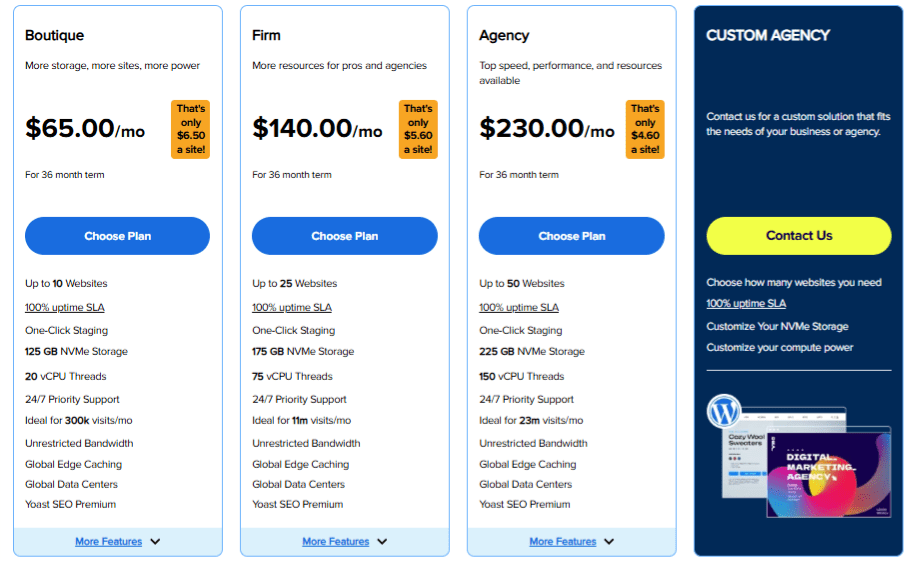
Bluehost Agency Hosting is built for agencies managing multiple WordPress sites, from small portfolios to large client networks. Plans support up to 10, 25 and 50 websites, with options for larger agencies.
Each plan includes 100% uptime SLA, NVMe storage, vCPU resources, unlimited bandwidth, global edge caching and priority support.
This gives agencies a predictable foundation, lower operational surprises, easier cost forecasting, and improved per-site profitability as the portfolio grows.
Built-in tools that reduce maintenance workload
Each plan includes tools that would otherwise require separate subscriptions:
- Jetpack Security and Backup
- WAF, DDoS protection and malware defense
- Automated WordPress and plugin updates
- One-click staging
- CDN and edge caching
- Uptime monitoring
These tools help agencies deliver more value inside care plans while keeping operations lean and margins protected.
Manage all client sites from one dashboard
Agencies can manage all websites from a single dashboard, handling updates, performance monitoring, staging and site health without switching tools.
This reduces admin work and allows teams to support more clients with the same resources.
Turn care plans into predictable recurring revenue
With bundled tools and scalable infrastructure, Bluehost Agency Hosting helps agencies build care plans that are easier to price, deliver and grow.
Clients get faster, more secure websites. Agencies get better margins and a scalable recurring revenue model.
After setting up your care plan structure, the next step is selecting a hosting platform that can reliably support it.
How to choose the right hosting platform to power your care plan?
Not all hosting platforms are built for agency work. A plan that works fine for a single personal blog will buckle under the weight of managing multiple client sites, handling traffic spikes and delivering the uptime your care plan promises.
Before committing to any hosting provider, here are the six questions every agency should ask.
Agency’s checklist: 6 questions to ask before you commit
- Does the platform support multi-site management from one dashboard?
Logging into separate accounts for each client site isn’t a workflow, it’s a time sink. Look for a centralized dashboard where you can monitor, update and manage your entire portfolio in one place.
- Are WordPress updates, security and backups automated or do you trigger them manually?
Manual maintenance tasks don’t scale. Automation is what makes a care plan profitable across 10, 25 or 50 client sites.
- Is support included and does it reach a trained specialist, not a generic agent?
Generic helpdesk support can’t resolve agency-specific issues quickly. You need direct access to Level 3 experts, not a ticketing queue with no specialist on the other end.
- Does pricing scale per site without unpredictable overage charges when client campaigns drive traffic spikes?
A surprise invoice after a successful campaign is the last thing your client relationship needs. Look for fixed pricing tiers that protect your margins regardless of traffic volume.
- Is staging included so you can test updates before pushing to live client sites?
One broken update on a live client site is a support emergency. One-click staging turns that same issue into a five-minute fix before it ever reaches a live environment.
- Does the platform offer free migration support to move existing client sites over without downtime or SEO impact?
Switching hosting providers shouldn’t cost your clients their rankings or their data. Expert-assisted, zero-downtime migration is a non-negotiable.
The six questions above provide a practical framework for evaluating any hosting provider. Here’s how Bluehost Agency Hosting stacks up against those criteria.
What Bluehost Agency Hosting brings to the table?
Bluehost Agency Hosting is built to answer yes to every question above. Key differentiators include:
- Centralized dashboard for managing all client sites, user permissions and vCPU allocation in one place
- Git integration and WP-CLI for developer-friendly workflows
- One-click staging on every plan – test updates before they ever touch a live site
- Free migration with zero downtime, preserving all content, themes, plugins and SEO rankings
- 100% uptime SLA backed by real service credits
- 24/7 priority chat with under 30-second response times, routed directly to Tier-3 WordPress experts – not a generic helpdesk
- No extra charges for traffic spikes – client campaigns won’t eat into your margins
The next step is identifying the warning signs that can indicate a hosting provider may not be the right fit for your care plan.
Red flags to watch for when evaluating hosting providers
- Platforms that charge extra when client campaigns drive traffic spikes
- Backups not included natively – or only available as a paid add-on
- Support routed to generic helpdesks with no specialization
- No staging environment included on standard plans
Once you have the right infrastructure in place, the next step is turning it into a repeatable care plan that clients can easily understand and adopt.
How to set up your care plan and onboard clients in 5 steps?
Building a successful care plan business requires more than just offering updates and backups. Agencies need streamlined onboarding, scalable hosting and clear service tiers to manage client websites efficiently.
Step 1: Choose your Bluehost Agency Hosting plan
Select a Bluehost Agency Hosting plan based on your current client portfolio size and expected growth. Boutique supports up to 10 sites, Firm supports up to 25 sites and Agency supports up to 50 sites, making it easier to scale without changing infrastructure later.
Step 2: Define your care plan tiers
Outline what each maintenance package includes before selling your services to clients. Clearly defined tiers help set pricing expectations and prevent scope creep as your agency grows.
Step 3: Migrate existing client sites
Move existing websites into your centralized hosting environment for easier long-term management. We offer free migration with zero downtime, helping preserve content, themes, plugins and SEO rankings during the transfer process.
Step 4: Set up automation
Configure automated backups, updates and security monitoring for each client website. Managing these tasks from a centralized dashboard reduces manual work and ensures maintenance happens consistently.
Step 5: Onboard clients with a clear support process
Provide clients with a simple one-page care plan summary explaining what is covered, how to request support and what hosting reliability is included. Clear onboarding improves communication and builds trust from the beginning of the relationship.
A structured onboarding workflow helps agencies deliver a more professional experience while simplifying day-to-day website management. With the right hosting setup, automation tools and clearly defined care plans, agencies can scale client operations more efficiently without increasing administrative complexity.
Turn your hosting into a revenue line, not a line item
Hosting doesn’t have to be a cost you absorb, it can be the foundation of a service you sell. Bundle hosting, maintenance and support into a structured monthly website maintenance plan turns your services into an ongoing partnership. It helps you move beyond one-time project revenue and build a more predictable recurring income stream.
The business case is clear: stronger client retention, less time firefighting and margins that improve with every site you add to your portfolio. Automation handles the routine maintenance tasks. Your infrastructure handles the technical heavy lifting. You focus on growing your agency.
Ready to build a care plan your clients will pay for month after month? Get started with Bluehost Agency Hosting today and turn your infrastructure into a recurring revenue engine.
FAQs
A website care plan bundles hosting, maintenance and support into one recurring monthly service. A standard hosting plan only provides infrastructure, a care plan adds proactive upkeep, security monitoring and guaranteed support access.
Most agencies charge $50–$300 per month depending on the tier. Essential plans start around $50–$100/mo, professional plans at $100–$200/mo and premium plans covering eCommerce and high-traffic sites at $200–$300+/mo.
Yes. Bluehost Agency Hosting’s centralized dashboard lets you manage, monitor, update and stage all client sites from one place, including user permissions and vCPU allocation across your entire portfolio.
Nothing is lost. Bluehost offers free migration with zero downtime, preserving all content, themes, plugins and SEO rankings. The entire process is handled by experts with no disruption to live sites.
Yes. Every plan includes auto-scaling vCPUs, a global CDN, and traffic-spike protection. This ensures your WooCommerce store can handle high traffic, product launches, and peak-season demand without performance loss.
No. Most agencies can manage client communication during business hours while relying on their hosting provider for around-the-clock technical support. With Bluehost’s 24/7 priority support for WordPress, VPS, and Dedicated Hosting, agencies have an escalation path for infrastructure and server issues without maintaining an in-house 24/7 support team.

Write A Comment