 ChatGPT,
 Claude,
 Gemini,
 Grok — all four for
Key highlights
- To manage multiple client websites efficiently, centralize hosting, updates, backups, security monitoring and reporting in one repeatable workflow.
- Agency hosting is a specialized hosting solution built for multiple client sites, stronger access control, staging environments and scalable server resources.
- The right hosting solution depends on site size: shared hosting works for small sites, while VPS, cloud or dedicated hosting is better for high traffic sites and eCommerce stores.
- Regular updates, automated backups, ssl certificates and strict permissions protect client trust, data integrity and business continuity.
The best way to manage multiple client websites with agency hosting is to centralize all client sites on one hosting platform. This gives your agency one place to manage updates, backups, security, staging, performance and team access.
Managing a few client websites is simple. Managing 20 or more client sites without a system can quickly lead to missed updates, backup issues, security gaps and growing support requests.
Agency hosting helps agencies bring multiple client websites into one organized hosting platform. With centralized dashboards, automated backups, staging environments, security monitoring and uptime tracking, agencies can manage multiple websites more efficiently and keep client sites running smoothly.
This guide explains how to manage multiple client websites with agency hosting so your agency can save time, improve client satisfaction and scale day to day operations with less manual work.
What is agency hosting and how is it different from regular hosting?
Agency hosting is a specialized hosting solution built for agencies that manage multiple client websites from one place. Unlike regular web hosting, which is usually designed for a single website owner, agency hosting supports multi-site management, team access, staging, automated backups, security monitoring and performance tracking across many client sites.
For a digital agency, this means fewer scattered logins, fewer disconnected hosting environments and better control over day-to-day website management. Instead of managing multiple WordPress sites across many hosting providers, your team can use one hosting platform to keep client websites organized, secure and running smoothly.
Regular hosting works well for individuals or small businesses with one website. Agency hosting is better for teams managing multiple websites because it offers centralized control, scalable resources, priority support and tools that make client website management easier.
Also read: What Is Agency Hosting? Guide for Agencies
What are the common challenges of managing multiple client websites?
Managing multiple client websites becomes harder as your agency grows. What works for a few client sites can quickly become inefficient, risky and difficult to scale.
- Security risks from missed updates: One unpatched plugin across 20 sites can multiply your attack surface. If updates are delayed, the risk of security breaches increases across your entire client portfolio. According to the U.S. Small Business Administration, 41% of small businesses were victims of a cyberattack in 2023, with a median cost of $8,300 per incident.
- Manual login and password sprawl: Logging into each site separately wastes hours every week and creates credential management issues for your team.
- Inconsistent backup coverage: Without a standard backup process, some client websites may have daily automated backups while others may not have been backed up in months.
- Client reporting friction: Manually compiling uptime stats, update logs, security checks and performance reports for every client becomes unsustainable at scale.
- Unclear team responsibilities: Without role-based access and clear ownership, team members may accidentally make changes to the wrong client site or access areas they do not need.
Pro tip: If you manage more than five client sites and still log into each dashboard separately, it is a clear sign that your agency has outgrown standard hosting.
How to manage multiple client websites with agency hosting?
Managing multiple client websites becomes much easier when your agency follows a standardized workflow. Instead of handling every client site differently, agency hosting helps you centralize updates, security, backups and performance management under one system.
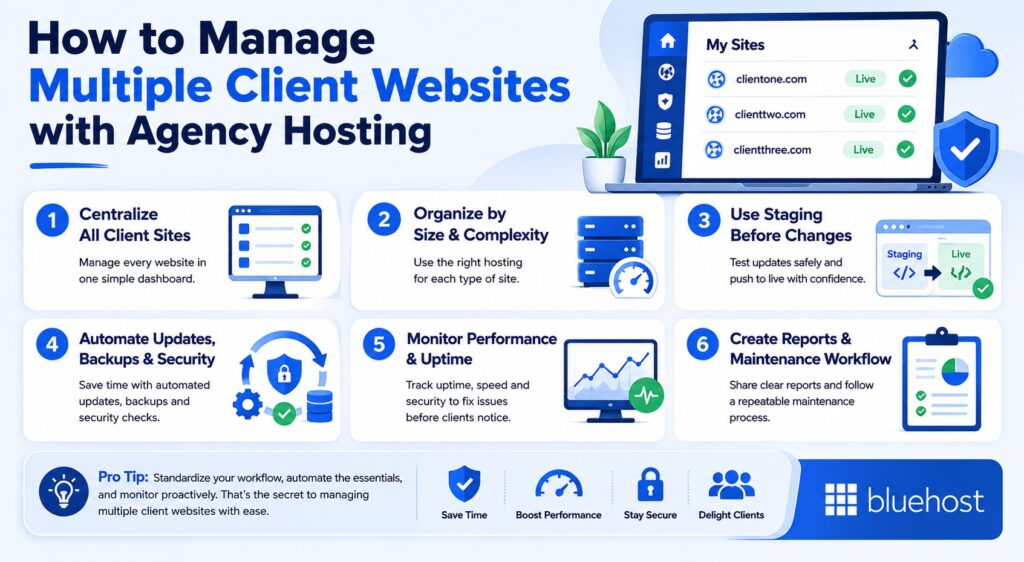
1. Centralize all client websites in one dashboard
Start by creating your agency hosting account and adding your first client website. From there, configure the site-level settings your agency will use for every client site, including domain setup, SSL certificates, backups, user roles and staging environments.
To keep multiple client websites organized, use a clear naming system. For example, you can create staging URLs like clientname.[youragency].com before connecting the client’s live domain. This makes it easier to manage multiple projects without confusing staging sites, live sites or client accounts.
If you already manage existing client websites, migrate them into your agency hosting account so everything lives in one hosting platform. Bluehost makes this easier with a free migration tool and up to five free migrations in the first 30 days.
For every new client site, create a simple onboarding checklist that includes:
- Domain connection
- SSL setup
- Backup configuration
- User roles and permissions
- Staging setup
- Security checks
- Performance monitoring
Pro tip: Create a standardized client onboarding checklist and duplicate it for every new site launch. It cuts setup time and helps ensure nothing falls through the cracks.
2. Organize client sites by size and complexity
Not all client websites need the same hosting environments. Small brochure websites may run well on shared hosting, while e Commerce stores and high traffic sites often require dedicated resources or a virtual private server for optimal performance.
Grouping client projects by traffic levels, functionality and server resources helps agencies choose the right hosting solution for each website.
3. Use staging environments before making changes
Staging environments allow agencies to test plugin updates, redesigns and new features safely before pushing changes live. This reduces the risk of downtime, broken layouts and security issues on active client websites.
For agencies managing multiple WordPress sites, staging environments are essential for keeping websites running smoothly during maintenance and development work.
4. Automate updates, backups and security checks
Automated updates are essential when managing multiple client websites. Updating one site manually may only take a few minutes, but doing the same across 30 client sites can create hours of weekly maintenance work.
Focus on three main update areas:
- WordPress core updates: Keep the main WordPress installation current for performance, security and compatibility.
- Theme updates: Update active themes to prevent layout issues and security gaps.
- Plugin updates: Prioritize plugins because outdated plugins are one of the most common causes of WordPress security issues.
Agency hosting helps automate these updates across multiple WordPress sites. Agencies can often set site-specific rules, such as enabling automatic updates for minor WordPress versions while reviewing major version upgrades manually before pushing them live.
Staging environments make this process safer. Test updates on a staging site first, confirm the website works properly and then push the approved changes to the live client website.
For teams with technical expertise, WP-CLI can also help run batch updates across multiple sites more efficiently.
5. Monitor performance and uptime across all client sites
Proactive monitoring helps agencies fix issues before clients notice them. If a client is the first person to tell you their site is down, slow or compromised, it can quickly affect client trust.
Focus on three key monitoring areas:
- Uptime monitoring: Track whether client websites are online and available. A 99.99% uptime baseline is a strong standard for client-facing sites.
- Performance monitoring: Watch page load speeds, traffic spikes and server resources so you can keep client sites running smoothly.
- Security scanning: Monitor for malware, unauthorized file changes and suspicious activity before they become larger security issues.
Hosting-level monitoring and plugin-based monitoring both play important roles. Hosting-level tools can track server health, uptime, DDoS protection and resource usage, while plugin-based tools can monitor WordPress-specific issues like malware, file changes and plugin vulnerabilities.
Set up email or SMS alerts when a client site goes down, performance drops or a security threat is detected. This helps your support team respond faster and reduce downtime.
Bluehost Agency Hosting provides a strong hosting-level foundation with built-in malware scanning, WAF protection, DDoS protection and uptime SLA support. This helps agencies manage multiple client websites with better visibility and confidence.
6. Create repeatable reporting and maintenance workflows
Client access should be useful without giving clients full control over hosting-level settings. In WordPress, user roles like Administrator, Editor and Author help you decide what each client can do inside their website. For previews or approvals, use a separate staging environment so clients can review changes without affecting the live site.
Your agency team also needs scoped permissions. Assign developers, designers and account managers only to the client sites they work on. This reduces the risk of accidental cross-client changes and keeps website management more secure.
Monthly reporting is also one of the easiest ways to show your agency’s value. A strong client report should include:
- Uptime percentage
- Updates applied
- Backups completed
- Security scan results
- Website speed or performance improvements
- Any resolved issues or support requests
Many agency management platforms and hosting dashboards include reporting tools that make this easier to automate. For agencies managing multiple client websites, regular reporting can become a client retention tool because it turns behind-the-scenes maintenance into visible proof of value.
How to scale your agency hosting as your client portfolio grows?
What works for five client websites usually does not work for 25 or 50. As your agency grows, managing multiple client websites on the same hosting setup can lead to slower website speed, rising support requests and more time spent on manual maintenance.
Here is a simple comparison of common agency hosting options:
| Growth stage | Common challenges | Recommended hosting setup |
| 1–5 client sites | Basic website management, limited traffic | Shared hosting or managed WordPress hosting |
| 5–25 client sites | More plugin updates, support requests and billing complexity | Agency Hosting with centralized dashboards and automated backups |
| 25+ client sites | Performance issues, traffic spikes and higher resource usage | VPS or Dedicated Hosting with dedicated resources and advanced monitoring |
For most agencies, agency hosting offers the best balance between scalability, website management and client satisfaction. It combines centralized control, multi site management tools and optimized hosting environments that help agencies manage multiple websites more efficiently as they take on more client projects.
As your agency grows, the right hosting provider should make it easier to upgrade hosting plans, allocate server resources and maintain consistent performance across all client websites.
How Bluehost Agency Hosting supports multiple client website management?
Bluehost Agency Hosting is built specifically for agencies managing multiple client websites at scale. Instead of juggling disconnected hosting environments and scattered workflows, agencies can centralize website management, performance monitoring and maintenance from one hosting platform.
For agencies handling multiple sites, Bluehost combines centralized dashboards, automated updates, staging environments and security monitoring to simplify day to day operations while helping client websites maintain consistent performance.
Key ways Bluehost supports agencies:
- Backed by a 100% uptime SLA
- Competitive per-site pricing starting at $5/month
- Award-winning 24/7 expert support for agencies managing multiple client websites
- Savings of $300+ per month per site through bundled features
Note: Bundles features include Yoast SEO Premium, Jetpack Security features, automatic backups and performance optimization tools without additional setup costs.
- Centralized dashboards for managing multiple client websites from one interface
- Automated backups and disaster recovery tools to protect client data
- One-click staging and cloning for safer development workflows
For agencies managing multiple client sites, these built-in tools help reduce hosting cost, improve client satisfaction and simplify multiple site management without relying on multiple third-party services.
Build a scalable system for managing client websites
Managing multiple client websites becomes easier when your agency has the right systems in place. With agency hosting, you can centralize site management, automate backups, test changes in staging environments and monitor performance from one hosting platform.
The right hosting solution helps your team save time, reduce support requests and keep client websites running smoothly as your agency grows.
Bluehost Agency Hosting gives agencies the tools to manage multiple WordPress sites with centralized dashboards, automated updates, built-in security, priority support and bundled savings on tools like Yoast SEO Premium.
Explore Bluehost Agency Hosting to simplify multi-site management and support more client sites with confidence.
FAQs
Yes. Agency-focused hosting plans are built to manage multiple client websites from one account with centralized billing, dashboard access, staging, backups and multi site management tools. This is different from standard shared hosting, where each site may need separate account-level management.
The easiest way is to use agency hosting with centralized dashboards, automated backups, uptime monitoring, staging environments and security tools. This helps agencies manage updates, performance and support from one hosting platform instead of switching between multiple hosting providers.
Managed WordPress hosting handles server-level maintenance, updates, backups and security for you. It is ideal for agencies that want to focus on client work. VPS hosting gives more control and flexibility, but it requires more technical expertise. Most agencies can start with managed WordPress hosting and move to VPS when they need custom configurations or more dedicated resources.
Agencies can use WordPress user roles like Editor, Author or site-level Administrator to give clients access only to what they need. Hosting dashboard or cPanel credentials should stay with the agency. For feedback and approvals, use staging environments instead of giving clients access to live development settings.
Use a migration tool that transfers files, databases and configurations while the live site remains online. With Bluehost, agencies can use the free migration tool and get up to five free site migrations in the first 30 days. Always test the migrated site on a staging URL before updating DNS.
Agencies usually price hosting in three ways: a flat monthly retainer, a cost-plus model or a managed hosting package based on site complexity. The best approach is to position hosting as a managed service that includes maintenance, backups, security and support, not just a pass-through hosting cost.
Agency hosting should include free SSL, WAF protection, DDoS protection, malware scanning, isolated site environments and automated daily backups. Bluehost Agency Hosting includes built-in WAF, DDoS protection, malware scanning, SSL and automated backups to help protect multiple client websites.
Yes. Reseller hosting focuses on selling hosting accounts to clients. Agency hosting is built for managing client websites with centralized dashboards, staging, automated backups, performance monitoring, security tools and team workflows.

Write A Comment