


Key highlights
- Implement automated daily MySQL backups to prevent catastrophic data loss from server failures or human errors.
- Choose logical backups with mysqldump for maximum compatibility across different MySQL versions and hosting environments.
- Set up incremental MySQL database backup strategies to minimize storage costs while ensuring complete data protection.
- Test backup restoration procedures monthly to ensure your MySQL backup files actually work when disaster strikes.
- Store MySQL database backup files in secure locations with encryption and strict access controls to protect sensitive database information.
- Monitor MySQL database backup completion status and file integrity regularly to detect failures before the data is needed.
Your MySQL database stores critical business data that keeps your operations running. From customer information and transaction records to product catalogs and content libraries, every piece of data is essential to your business continuity. A single hardware failure, cyberattack or human error can wipe out years of accumulated data in seconds. According to a 2025 report, 2 out of 3 organizations experienced significant data loss in the past year, making the risk more real than ever. Without a proper MySQL database backup strategy, you risk losing your most critical data.
This guide shows you proven methods to protect your MySQL databases through automated backups, secure storage solutions and reliable recovery procedures. Implementing these backup practices ensures your data remains safe and recoverable when disaster strikes.
Why MySQL database backups often fall short?
Most website owners believe that having any backup means they’re protected. This dangerous misconception leads to devastating discoveries when data recovery becomes necessary. However, there’s a critical difference between simply having a MySQL database backup file and having one that can actually be restored. Understanding this distinction may determine whether your business can recover from data loss or faces permanent consequences that could impact operations and customer trust.
Let’s explore the most common backup failures that put your MySQL database at risk:
Common backup failures that compromise your data:
- Partial database dumps: Many automated tools only capture table data while missing critical components like stored procedures, triggers and user permissions. When you restore from these incomplete backups, your applications break in unexpected ways and critical functionality disappears because the backup didn’t include all database components.
- Single backup method dependency: Relying on a single MySQL database backup means any corruption or accidental deletion eliminates your safety net entirely. Without redundancy across different storage locations and backup types, you’re left with no recovery options when your primary backup method fails.
- Poor timing and performance issues: Ignoring database size and traffic patterns creates backup timing problems. Large databases require longer backup windows that can impact website performance, while high-traffic sites need strategies that minimize disruption to active users during the backup process.
Understanding these common pitfalls helps you implement MySQL backup strategies that actually protect your data when emergencies occur. The key is recognizing that effective backups require both completeness and redundancy to ensure data consistency throughout the recovery process.
Now that you understand why backups fail, let’s examine the specific database components that need proper MySQL database backup coverage.
What are you actually backing up in a MySQL database?
Your MySQL database contains multiple data types that require different backup approaches. Understanding what’s included and what’s not ensures you have complete protection when disaster strikes.
At the core of your database, you’ll find:
- Tables that store your actual content including posts, products, user accounts and transaction records
- Indexes that speed up database queries but can be recreated from table data
- Database schema structures including table definitions, column data types and relational mappings essential for MySQL database backup
However, database backups don’t capture everything needed for complete site restoration. Several critical components exist outside your MySQL database and require separate backup procedures. Together, these options give you finer control over how MySQL backups are created, making them especially useful for complex databases and advanced backup workflows. Security is equally critical in your backup strategy. Protecting your backup data from unauthorized access requires multiple layers of defense:
- File uploads, images, themes and plugins stored on your server
- DNS configurations and SSL certificates
- Email accounts and their associated settings
Understanding these limitations prevents false confidence in incomplete MySQL database backup strategies. Moreover, many backup tools also miss advanced database elements that control critical functionality:
- Stored procedures and triggers containing custom database logic that control automated processes, data validation and complex calculations
- Views that provide virtual tables based on underlying data relationships
- User permissions that determine who can access specific database functions
Missing any of these components during backup creates restoration problems down the line. Finally, database configuration settings affect how MySQL operates but aren’t included in standard data exports. Server variables, performance settings and security configurations require documentation or separate backup procedures. This comprehensive understanding guides backup decisions that capture everything needed for complete database restoration.
Now that you understand what components make up your MySQL database and what needs protection, the next critical decision involves choosing how to store these backups.
Backup types that shape how your MySQL data is stored
Understanding MySQL backup fundamentals helps you protect your database effectively. Each backup approach offers unique advantages that can make or break your data recovery strategy. To help you identify the right method for your hosting environment immediately, review this quick comparison of the core backup types.
| Backup Type | Key Characteristic | Best Used For |
|---|---|---|
| Logical | Exports SQL statements (e.g., INSERTs) | Migrating data between different MySQL versions or operating systems |
| Physical | Copies actual raw database files | Fast recovery of large databases on identical configurations |
| Full | Captures the complete dataset | Creating a reliable foundation for your recovery strategy |
| Incremental | Saves only changes since the last backup | Minimizing storage space and backup windows |
| Differential | Saves changes since the last full backup | Balancing storage efficiency with faster restoration speeds |
Now that you have an overview, let’s explore the details of how these backup types determine how your MySQL data gets stored and recovered.
1. Logical vs physical backups
Logical backups export database content as SQL statements capable of recreating your data. The common mysqldump command creates logical backups by generating INSERT statements for all table data. These backups are highly portable, meaning they work across different MySQL versions and operating systems. Logical backups also include complete schema information, allowing you to selectively restore specific tables or databases.
Physical backups, on the other hand, copy the actual database files directly from your MySQL data directory. These backups restore significantly faster than logical backups, but they typically only work on identical MySQL configurations. Physical backups require consistent file states during the copying process to prevent corruption. Storage engines like InnoDB often require special handling during physical backup procedures.
Beyond choosing between logical and physical methods, you will need to decide how frequently and comprehensively to capture your database changes.
2. Full, incremental and differential backups
Full backups capture your complete database content at a specific point in time. While these provide the most comprehensive protection, they require significant storage space and time to complete. Full MySQL backups serve as the critical foundation points for other backup strategies.
Incremental backups only capture changes made since the last backup of any type. This approach minimizes storage requirements and shortens the backup duration. However, restoring from incremental backups is more complex, as it requires applying multiple backup files in the correct sequence. Binary logs are what enable incremental backup capabilities for MySQL databases.
Differential backups contain all changes made since the last full backup. These require more storage than incremental backups but simplify the restoration procedure. You only need the most recent full backup plus the latest differential backup to achieve complete data recovery.
Once you have decided on your backup frequency approach, ensuring data consistency during the backup process becomes equally critical.
3. Consistency, locking and live databases
Database consistency ensures all backup data represents the exact same point in time. Without proper locking, backups might capture partial transactions or inconsistent relationships between tables. MySQL provides specific locking mechanisms to maintain data consistency during backup operations.
Table locking prevents data changes during backup procedures but has the side effect of blocking website functionality. Read locks allow continued data access while preventing modifications. The single-transaction option creates consistent backups without blocking database access for InnoDB tables.
Live backup strategies balance data protection with website availability requirements for different business scenarios. Understanding these concepts prepares you to evaluate which backup methods align with your database management goals.
While these backup approaches provide essential groundwork for protecting your MySQL data, our Bluehost users benefit from additional integrated solutions that simplify the entire backup process.
Built-in MySQL backup options for our Bluehost users
We at Bluehost offer several convenient MySQL database backup solutions integrated directly into your hosting environment. These built-in options range from automated services to manual export tools, giving you flexibility based on your technical comfort level and specific backup needs.
Let’s explore each backup method to help you choose the right approach for protecting your database.
1. Automated daily MySQL backups with CodeGuard
CodeGuard is a website backup and monitoring service that helps you keep your website safe, secure and running smoothly. It automatically backs up your website daily, so you can always restore it to a previous version if something goes wrong. It also monitors your website for any changes or errors and alerts you if any issues need your attention.
With CodeGuard, you can know that your website is always protected and backed up. The service captures complete database content including tables, procedures and user permissions. CodeGuard stores backups in secure cloud locations with version history for multiple restoration points.
This solution works best for small to medium websites with standard MySQL configurations. CodeGuard handles backup scheduling, storage management and basic restoration procedures automatically. Start backing up and restore your data with CodeGuard today.
For users seeking even more comprehensive protection, real-time backup solutions offer added reassurance.
2. Real-time MySQL backups with Jetpack
Jetpack backup enables you to effortlessly restore or download a copy of your website at any time. It’s like having a powerful undo button for WordPress. You can now quickly build your site without missing a word, image, page or worrying about it. Jetpack Backup automatically creates backups and allows you to recover or transfer your site.
Real-time backups excel for high-activity websites where data loss between scheduled backups creates significant problems. WordPress-specific optimizations ensure compatibility with plugin data and theme customizations. Jetpack provides easy restoration interfaces integrated with WordPress administration panels.
This backup method focuses on WordPress environments and may not suit other applications using MySQL databases.
Also read: Jetpack Backup and Restore
Another option worth considering is the direct export approach through phpMyAdmin, which gives you complete control over the backup process.
3. Manual database exports using phpMyAdmin
With phpMyAdmin, you can easily create a MySQL backup database without using the command line. Follow these steps to export your database through the Bluehost Account Manager:
- Log in to your Bluehost Account Manager.
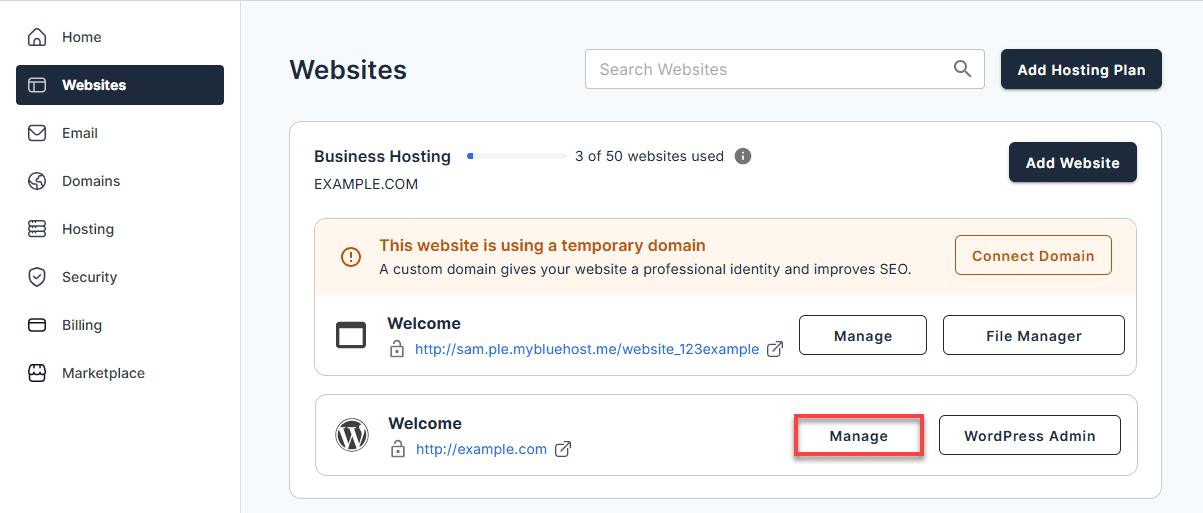
- In the left-hand menu, click Websites.
- Click the Manage button located next to the website you want to manage.
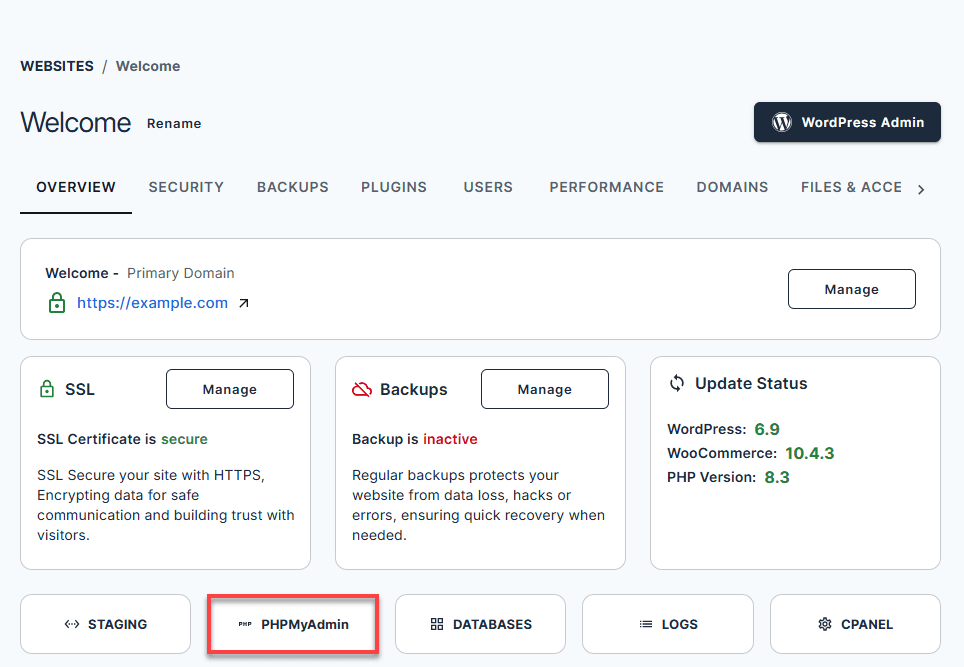
4. In the OVERVIEW tab, click the PHPMyAdmin button.
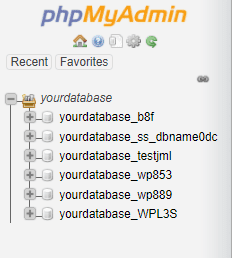
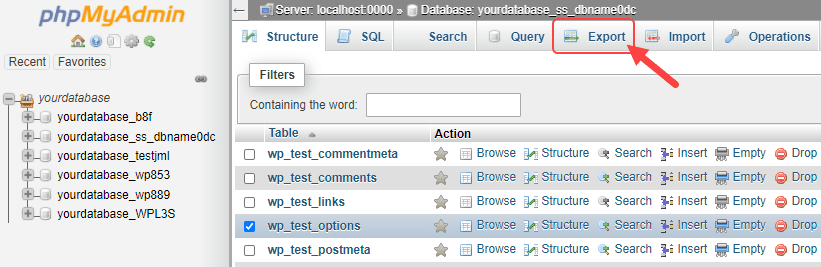
5. From the phpMyAdmin interface, select the MySQL database you wish to back up in the list on the left.
6. When you select the MySQL database, click on the Export tab at the top.
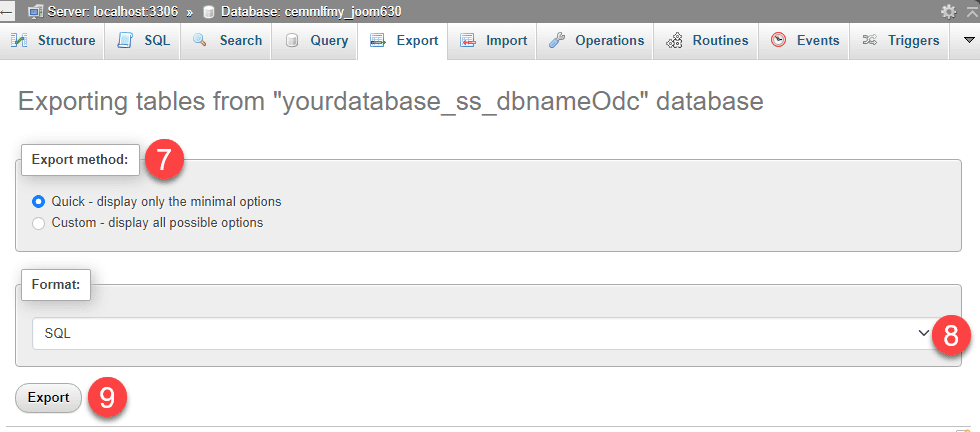
7. Choose your preferred Export method by clicking the radio button.
8. Click the ▼ icon to choose the database format (e.g., SQL, CSV, XML, PDF, etc.).
9. Click the Export button.
Technical users comfortable with server access may prefer working directly through command line tools for added efficiency.
4. Command line MySQL backups via SSH
For advanced users comfortable with command line tools, you can export your database directly using SSH. Enter the following command to export your database:
mysqldump -u username -p database_name filenamehere.sql
After pressing Enter, you will be prompted for your MySQL password. Enter your password and this will export a copy of the database into your specified filename. Please see the separate Help Desk article to manage databases with Command Line SSH.
Protecting your MySQL database doesn’t have to be complicated. We at Bluehost, provide easy access to phpMyAdmin through the Account Manager, giving you direct control over your database management. For enhanced protection, CodeGuard is available as an advanced backup option featuring both automated and manual backups. Combined with our 24/7 expert support, these tools work together to keep your data secure and accessible whenever you need it.
Get started with our Bluehost hosting and safeguard your data with reliable database protection you can count on.
With these built-in solutions providing a solid foundation, you’re ready to explore more advanced MySQL database backup approaches that offer enhanced control and customization for your specific protection needs.
Manual MySQL backup methods that give you full control
The mysqldump command is one of the most reliable ways to create logical backups of a MySQL database. It allows you to define exactly what data is included while keeping the backup portable and easy to manage.
For a single database backup, you can use the following syntax:
mysqldump -u username -p database_name > backup_file.sql
This command exports all tables, schema definitions and related database objects for the specified database into a single SQL file.
If you need to back up multiple databases at once, the --all-databases flag simplifies the process:
mysqldump -u username -p --all-databases > all_databases.sql
In some cases, you may want more selective backups. For example, structure-only backups can be created using the --no-data option, while data-only backups rely on --no-create-info. These options are helpful when you’re dealing with schema changes or partial database migrations.
To reduce storage usage, you can also create compressed backups by piping the output through gzip:
mysqldump -u username -p database_name | gzip > backup_file.sql.gz
Adding timestamps to backup filenames is another good practice, as it prevents accidental overwrites and makes version tracking easier:
mysqldump -u username -p database_name > backup_$(date +%Y%m%d_%H%M%S).sql
For more advanced scenarios, mysqldump provides several options that improve backup consistency and completeness:
--single-transaction
Creates a consistent snapshot for databases using InnoDB tables without locking them, allowing normal database operations to continue during the backup.--lock-tables
Applies table-level locks to maintain data integrity when backing up MyISAM tables, which do not support transactional consistency.--routines
Ensures stored procedures and functions are included in the backup.--triggers
Captures trigger definitions associated with the database tables.
While mysqldump handles routine backup operations with great flexibility, mission-critical applications and large enterprise databases require more comprehensive protection. These systems depend on additional backup strategies to ensure business continuity and minimize potential risks.
Additionally, a database backup is only one part of the equation. To ensure complete restoration, you must also account for the critical components that exist outside your MySQL database. Overall, combining these backup options offers you finer control over your data, making it easier to manage complex sites and advanced workflows.
Backup and restore a MySQL database
Creating a reliable backup of your MySQL database is just the beginning; the true test lies in restoring that data during a crisis. A backup file is valuable only when it can successfully bring your website back online after data corruption or failure. This section moves from simple protection to active recovery.
Success in data management relies on the ability to restore a MySQL database using your saved files. Whether relying on phpMyAdmin or the command line, this process effectively reverses backup logic to recreate tables and repopulate them with your essential information.
Backup a single MySQL database
To begin the backup process, verify that you have your MySQL username, the precise database name and the intended folder path for saving the file. Once your credentials are ready, open your terminal and execute the following dump command, ensuring you replace the placeholders with your specific information.
mysqldump -u username -p database_name > filename.sqlAfter running the command, you will be prompted to enter your password; submitting it authenticates the session and authorizes the generation of your SQL dump file.
You can optimize this workflow by customizing the output settings to better suit your needs. We recommend appending a timestamp to the filename, such as backup_2024-10-01.sql, to maintain clear version control and prevent accidental overwrites. Additionally, if storage capacity is a concern, piping the output to a compression utility like gzip can significantly reduce file size. These simple adjustments ensure your MySQL database backup remains both secure and manageable.
Backup every MySQL databases
Backing up every MySQL database is essential for full server migrations or comprehensive disaster recovery plans where you cannot risk missing interconnected data. Before starting, verify you have sufficient disk space since capturing the entire server state creates a massive file. Run the mysqldump command with the –all-databases flag to export everything at once. To manage file sizes and keep your archives organized, compress the output using gzip and apply a clear naming convention that includes the date, such as full_backup_[date].sql.gz, to prevent overwriting previous versions.
Once the process completes, verify the output by checking the file size to ensure the backup is valid. You should immediately move this file to secure, off-site storage. Because this MySQL backup contains sensitive data like user credentials and customer information, you must restrict file permissions to prevent unauthorized access and protect your business from potential security breaches.
Download a MySQL database backup
Once your backup is complete, locating the actual file is the first step toward recovery. If you used an automated tool like CodeGuard or Jetpack, navigate to your dashboard to download the specific backup version you need, typically as a compressed .zip file. For manual exports via phpMyAdmin, the file usually saves directly to your local computer’s “Downloads” folder. Conversely, MySQL database backups created via the command line remain on your server unless you manually download them using SFTP.
Before initiating a restore, perform a quick validation check to ensure you have the correct data. Verify that the file extension matches standard formats (commonly .sql or .sql.gz) and that the file size looks appropriate for your database’s scale. Confirm the timestamp matches your desired recovery point to avoid reverting to outdated information. Finally, identify where you will upload this file—whether through the “Import” tab in phpMyAdmin or a specific directory on your server—to ensure a smooth restoration process.
Restore a MySQL database
Before restoring a MySQL database backup, always safeguard your current data by creating a fresh backup and verifying your credentials. Using a staging environment is highly recommended to prevent accidental data loss on your live site.
To restore a mysql database backup using phpMyAdmin, simply follow this process:
mysql -u username -p database_name < backup_file.sql
Once completed, verify the restoration by confirming that all tables are present, row counts look accurate and your application login and checkout processes function correctly.
Handling MySQL backups in high-risk or large-scale environments
Managing backups in demanding environments requires specialized approaches that balance performance with protection. Large databases create unique challenges, including extended backup windows and potential performance impacts during operations. However, with the right strategies in place, you can safeguard your data effectively while maintaining optimal website performance.
Technical strategies for large-scale protection
To keep your site running smoothly while securing your data, you need to move beyond standard backup methods. Here are some advanced strategies to help you manage large databases effectively:
- Schedule full backups during off-peak hours for databases exceeding several gigabytes, using incremental approaches for regular protection between major backup windows.
- Implement master-slave replication in high-traffic environments, enabling backups from read-only secondary servers without interrupting active user sessions or affecting primary database performance.
- Optimize backup performance using –single-transaction for faster InnoDB operations and –quick option to retrieve rows efficiently. Leverage compressed backup streams when network bandwidth is limited.
- Balance storage decisions between accessibility and security by combining local backup storage for rapid restoration with remote storage protected by secure transmission methods to guard against hardware failures.
- Deploy enterprise-grade solutions including dedicated backup servers, automated testing procedures and geographic distribution for comprehensive disaster recovery scenarios.
While these technical solutions address complex environments effectively, reliable data protection extends beyond specific scenarios. Building a MySQL backup system that maintains effectiveness over time requires establishing core practices that adapt to changing database needs and technological evolution.
Top 3 MySQL backup practices that hold up over time
Data loss can happen in an instant, but a solid recovery plan ensures it never becomes a permanent disaster. By implementing these fundamental practices, you can build a resilient backup strategy that safeguards your MySQL databases against corruption, theft and accidental deletion.
1. Strategic scheduling and retention
Overall, creating a reliable backup strategy requires careful consideration of your database’s unique needs. Your backup frequency should align with how often your data changes and how much data loss your organization can tolerate. For instance, high-activity databases typically benefit from daily full backups supplemented by hourly incremental backups, whereas static websites might only need weekly full backups with daily differential updates.
Once you establish your backup frequency, the next step is implementing smart retention policies. These policies help you balance storage costs while maintaining the flexibility to recover from various scenarios. A proven approach includes retaining daily backups for one month, keeping weekly backups for six months and storing monthly backups for one year. Establishing a consistent schedule sets the foundation for your strategy, but you must also ensure those files remain safe from unauthorized access.
2. Security and infrastructure diversity
Security is critical in your backup strategy since backup files contain a complete copy of your operational data. Because they represent a significant target for malicious actors, protecting your backup data from unauthorized access requires multiple layers of defense. You should encrypt backup files using strong algorithms before storage or transmission, implement access controls limiting backup system permissions to essential personnel only and conduct regular security audits to maintain appropriate protection levels.
To further strengthen your backup infrastructure, avoid single-point failures by diversifying your approach. This includes using multiple backup locations for geographic distribution and maintaining both cloud storage and local backups for faster restoration options. Additionally, deploying different backup tools can reduce risks from software-specific failures or compatibility issues. However, owning secure and redundant copies is only half the battle if you do not verify that they function correctly during a crisis.
3. Restoration testing and maintenance
Finally, your backup strategy is only as good as your ability to restore from it. Regular testing validates that everything works when you need it most. You should perform monthly restoration tests to staging environments, document all restoration procedures thoroughly and update documentation whenever infrastructure changes occur. These practices ensure your backups provide reliable protection when needed most.
Final thoughts
A MySQL backup strategy is only valuable when it’s executed consistently and matches your database requirements. The methods covered in this guide offer practical approaches for securing your data across various hosting configurations and business needs.
Successful database protection extends beyond periodic exports. It demands a clear understanding of your recovery objectives, proper implementation of backup types and a dependable system that performs reliably when you need it most. Begin with automated daily backups, verify your restoration process frequently and expand to more sophisticated strategies as your database grows.
Your MySQL database holds critical business data, customer information and operational records. Protecting this asset requires the right infrastructure and support.
We at Bluehost provide hosting solutions designed with database reliability in mind. With a 99.9% uptime guarantee and 24/7 expert support, you get the robust infrastructure needed to keep your MySQL databases secure and accessible. Whether you’re running a small business website or managing multiple client databases, we offer scalable plans with flexible security options tailored to your data protection needs. Get started with Bluehost today and build your website on a hosting platform that prioritizes data security and reliability.
FAQs
Use the mysqldump command: mysqldump -u username -p database_name > backup_file.sql. This creates a logical backup containing all tables, data and schema information. For automated backups, consider using tools like CodeGuard or Jetpack that handle scheduling and storage automatically.
MySQL backups include logical backups (SQL statements), physical backups (file copies), full backups (complete database), incremental backups (changes only) and differential backups (changes since last full backup). Choose based on your restoration speed requirements and storage limitations.
Export entire databases using mysqldump with –all-databases flag: mysqldump -u username -p –all-databases > all_databases.sql. This captures every database, table and stored procedure. For selective exports, specify individual database names or use phpMyAdmin’s export function.
Physical backups copy actual database files while logical backups export data as SQL statements. Physical backups restore faster but only work on identical MySQL configurations. Logical backups provide better portability across different systems and MySQL versions.



Write A Comment