 ChatGPT,
 Claude,
 Gemini,
 Grok — all four for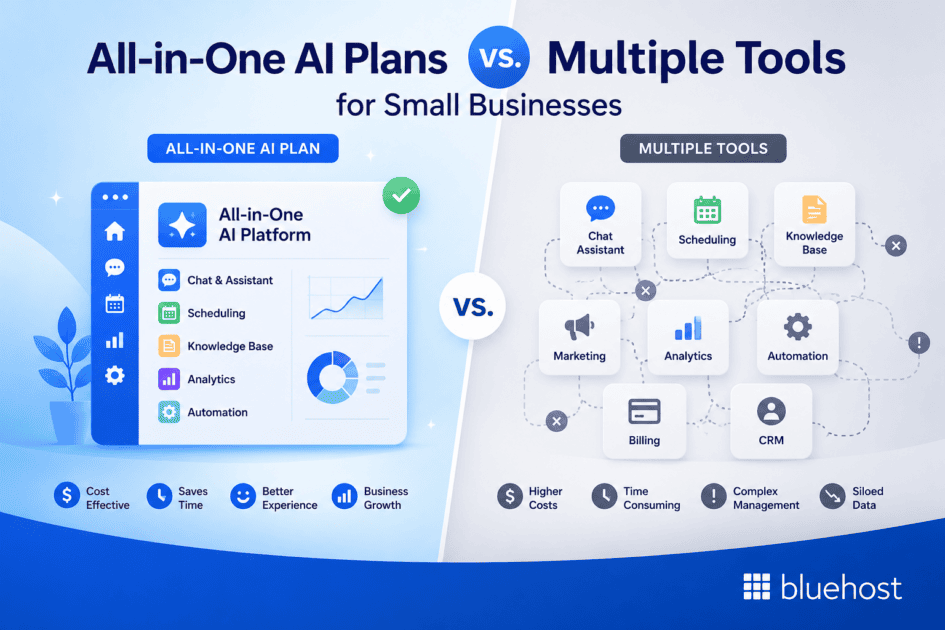
Key highlights
- Compare the true costs of a single AI subscription versus juggling multiple specialized tools.
- Discover the hidden integration challenges and workflow friction from managing separate AI apps.
- Evaluate which model offers superior security and data privacy for your business information.
- Learn how an all-in-one plan can streamline team collaboration and simplify billing.
As a small business owner, you face a key choice with AI. Should you use a single all-in-one AI plan or combine multiple specialized tools? Specialized tools provide deep features for one task, but a unified platform often delivers better value, security and efficiency.
This guide compares both models to help you find the right fit for your business needs and budget. Let’s explore the true cost of using multiple AI tools and whether an all-in-one AI subscription offers a better alternative.
How do AI tools help small businesses?
AI, or artificial intelligence, helps small businesses save time, expand what small teams can handle and support better decisions. It can draft first versions, sort information and spot patterns, freeing you to focus on customers, quality control and work that needs human judgment.
For marketing, AI can turn product notes or service details into social posts, email drafts and blog outlines when writing time runs short. For customer support, it can prepare replies to common questions, helping staff respond consistently while they handle sensitive requests or complex issues personally.
Research and data analysis also become more manageable. AI can summarize competitor information, organize customer feedback and highlight trends in sales or inquiries, giving you a starting point for decisions rather than a substitute for expertise. It can also assist with routine administration, such as meeting notes, invoice categories and task summaries, reducing repetitive manual work.
Human review remains essential. Check facts, tone, calculations and any output that affects customers, finances or compliance. When you evaluate AI tools for business needs, start with a recurring task that consumes staff time and measure whether the tool produces accurate, usable work.
What are the real costs of juggling multiple AI tools?
The price of a single AI tool can seem low. However, costs add up quickly when you need separate subscriptions for content creation, marketing, research and data analysis.
Beyond subscription fees, businesses often encounter hidden expenses that affect productivity, team efficiency and overall ROI.
Direct subscription fees
Managing multiple AI subscriptions means tracking different plans, billing cycles and vendors.
Some examples include:
- Jasper: $59/month for the Pro plan
- Microsoft 365 Copilot: $18–$30 per user/month
- Notion AI: $20 per user/month add-on
These individual costs can create a substantial monthly expense for growing teams. An all-in-one AI plan simplifies this into a single predictable payment.
Hidden costs: Time, training and integration
Direct costs are only part of the equation.
Using multiple AI platforms often results in:
- Context switching between applications
- Additional employee training requirements
- Workflow interruptions
- Integration challenges between disconnected tools
- Increased administrative overhead
These hidden costs can significantly reduce the actual value businesses receive from their AI investments.
How can small businesses make AI subscriptions more affordable?
Control AI spending by matching each subscription to work your team actually performs, not to a feature list. To evaluate AI tools for business needs, track the full cost of ownership, including setup, training, integrations and administration.
- Prioritize high-frequency tasks. Start with recurring work such as drafting customer replies, research or meeting summaries. A tool that saves time every week deserves more budget than one used occasionally.
- Calculate your current monthly cost. Add subscription fees, paid seats, implementation time and staff hours spent switching tools or managing accounts. This answers the practical question: what is the cost of AI subscriptions for small businesses?
- Test free plans or trials on real, low-risk tasks. Compare output quality, limits and adoption before paying. Review each provider’s current pricing, usage caps and privacy terms because plans change.
- Limit paid access to active users. Give occasional users shared, approved processes where plan rules allow, while reserving paid seats for employees who use AI regularly.
- Consolidate overlapping tools. Retire subscriptions that perform the same task adequately, but keep specialist software where it supports a clear business need.
- Review usage monthly. Cancel idle seats, check renewal dates and measure whether training or integration costs still justify the subscription.
How does an all-in-one AI plan simplify your business workflow?
A unified AI platform brings multiple tools together under one subscription. Instead of managing several vendors, logins and billing accounts, businesses can centralize AI operations in a single dashboard.
For small businesses, this means spending less time managing software and more time focusing on growth.
A single dashboard for everything
An all-in-one AI platform allows users to access multiple AI models from one location.
For example, Bluehost AI All-Access Pack includes:
- ChatGPT
- Gemini
- Claude
- Grok
Users can switch between models without re-entering prompts and compare responses side by side, making it easier to generate better results faster.
Simplified team management and billing
Managing multiple AI tools across teams can become complicated.
A centralized platform provides:
- One invoice
- One admin dashboard
- Centralized user permissions
- Easier onboarding
- Scalable seat management
This simplifies operations and reduces administrative workload as teams grow.
What is AI automation in business?
AI automation in business uses artificial intelligence to start or complete repeatable work after a defined event. Unlike manually asking a generative AI assistant for each task, an automated workflow connects triggers, data and actions so work moves forward consistently.
For example, a new lead form can trigger a follow-up draft, a support inbox can produce a summary of a customer request, and uploaded receipts can be categorized for invoice review. Staff should approve customer-facing messages, payment decisions and exceptions rather than treating generated output as final.
Teams learning how to use AI tools for business automation often need specialized software when workflows require deep connections to a customer relationship management system, accounting platform or custom database. An all-in-one AI subscription can suit lighter needs such as drafting, research and summaries in one workspace. Grant only the permissions each workflow needs, remove sensitive personal data from prompts where possible and review how each provider stores and processes information.
Which AI subscription model offers better features and flexibility?
The best choice depends on your business goals.
An all-in-one AI plan provides broad functionality and convenience, while specialized tools may offer deeper capabilities for specific use cases.
| Feature | All-in-One Plan | Multiple Specialized Tools |
|---|---|---|
| Model access | Multiple leading AI models in one subscription | Usually limited to one model per tool |
| Billing | Single monthly payment | Multiple subscriptions and invoices |
| Team management | Centralized user controls | Separate accounts for each platform |
| Security | Unified privacy and security controls | Different standards across vendors |
| Workflow | Single dashboard | Frequent app switching |
| Cost | Predictable pricing | Costs can increase significantly with multiple tools |
For many small businesses, the convenience and value of an all-in-one solution outweigh the benefits of managing several separate AI platforms.
How should you choose the right AI tool for your business?
Choose the option that scores highest for the work your team performs every week, not the one with the longest feature list. To evaluate AI tools for your business needs, assign points using this scorecard.
| Criterion | Weight | What a high score looks like |
|---|---|---|
| Workflow fit | 20% | The tool supports recurring tasks such as research, drafting or customer replies. |
| Output quality | 15% | Your team can produce accurate, editable work with human review. |
| Model breadth or specialist depth | 15% | Choose broad model access for varied work or a specialist for a critical niche task. |
| Total ownership cost | 15% | Include subscriptions, training, administration and integration maintenance. |
| Integrations and controls | 15% | Required connections, permissions and approval steps match your processes. |
| Privacy terms | 10% | Data handling, retention and model-training terms meet your requirements. |
| Scalability and support | 10% | The provider supports added users, higher workloads and timely help. |
Run a two-week pilot with real tasks, such as an n8n workflow, SEO draft or appointment inquiry. Compare time, quality and rework. Verify current product claims, pricing, integrations and usage limits before signing an annual contract.
What are the security and privacy risks with different AI setups?
Security remains one of the most important considerations when adopting AI.
Every AI platform that receives company or customer data introduces potential risk.
Data exposure across multiple third-party tools
When businesses use several AI providers, they must trust multiple vendors with sensitive information.
This can create challenges such as:
- Different privacy policies
- Inconsistent security practices
- Increased compliance complexity
- Greater risk of data exposure
The more platforms involved, the harder it becomes to maintain consistent data governance.
How a unified platform can enhance data protection
An all-in-one platform can centralize security controls and simplify compliance efforts.
Features may include:
- Data masking
- End-to-end encryption
- Private AI environments
- Enhanced user controls
- Centralized privacy settings
By reducing the number of vendors involved, businesses can better manage security risks and maintain stronger oversight of sensitive information.
Which free AI tools are useful for small businesses?
Free AI tools work best for testing low-risk tasks such as draft social posts, meeting summaries, and public-market research before you pay for wider access.
| Tool | Best free use | Free-plan limits | Team and data considerations | When paid access adds value |
|---|---|---|---|---|
| ChatGPT Free | Drafts, brainstorming, and basic file analysis. | Message, file, and advanced-model access limits can change with demand. | The free version targets individual use. Review OpenAI data controls before entering business information. | Pay when staff need higher limits, shared workspace controls, or regular advanced features. |
| Google Gemini | Research support and first drafts using public information. | Feature availability and usage caps vary by account and region. | Free access does not replace managed business controls. Avoid customer records and confidential documents. | Paid Workspace plans suit teams that need administration and AI within Google work apps. |
| Claude Free | Editing, summarizing, and structured writing tasks. | Usage resets after limited activity, with capacity varying over time. | The free plan serves individual users. Check Anthropic’s current privacy terms before sharing data. | Upgrade when frequent work hits limits or your team needs more consistent capacity. |
Track how often each test saves meaningful time. If a task becomes part of daily business automation, paid plans often provide better availability, administration, and privacy options. Verify current limits and terms before assigning work that involves sensitive data.
Why choose the Bluehost AI All-Access Pack for your business?
For small businesses looking to maximize AI value while minimizing complexity, Bluehost AI All-Access Pack offers a balanced solution.
It combines multiple leading AI models, privacy-focused features and simplified management into a single subscription.
Access the best AI models in one subscription
The platform includes access to:
- ChatGPT 5
- Claude Sonnet 4.5
- Gemini 3
- Grok 4.1
This allows users to compare outputs across models and choose the best response without maintaining separate subscriptions.
Protect your data with enterprise-grade privacy
The Privacy+ tier includes advanced security features designed for businesses handling sensitive information.
Key benefits include:
- Context-aware data masking
- Privately hosted AI infrastructure
- End-to-end encryption
- User-specific security controls
These features help reduce data exposure while supporting secure AI adoption.
Scale your team with simple, predictable pricing
Bluehost offers transparent per-user pricing that makes budgeting easier.
Benefits include:
- Straightforward seat-based pricing
- Easy user management
- Simplified scaling
- Reduced administrative complexity
This approach allows businesses to expand AI access across teams without managing multiple vendor contracts.
Final thoughts
For many small businesses, an all-in-one AI platform offers the best combination of value, efficiency and security.
Managing multiple AI tools can introduce hidden costs through additional subscriptions, training requirements and workflow complexity. A unified platform simplifies operations while providing access to multiple leading AI models under one subscription.
If your goal is to streamline workflows, improve collaboration and simplify AI management, an all-in-one AI solution may be the smarter long-term investment.
FAQs
Yes. Many all-in-one AI platforms allow users to switch between models such as ChatGPT, Gemini and Claude depending on the task, helping teams choose the best output for each project.
In most cases, no. Consolidating tools often reduces onboarding requirements, simplifies billing and eliminates the need to manage multiple accounts.
Many platforms offer centralized privacy controls, encryption, data masking and enhanced security features that help businesses better protect sensitive information.
While some specialized tools offer advanced features for niche use cases, all-in-one platforms cover the majority of common business needs and provide access to multiple AI models for greater flexibility.
No. Leading all-in-one AI platforms typically update their offerings as new models and features become available, helping businesses stay current without purchasing additional subscriptions.

Write A Comment