



Key highlights
- Discover how WooCommerce dropshipping works and why this business model provides a low-cost, low-risk way to start your online store
- Discover the complete WooCommerce dropshipping setup, from securing your domain to connecting reliable dropshipping suppliers.
- Explore the best WooCommerce dropshipping plugins to find trusted suppliers, streamline the import process and automate operations.
- Understand the key benefits of WooCommerce dropshipping, including scalability, automation, global reach and lower shipping costs.
- Master advanced WooCommerce dropshipping marketing strategies to drive sales, optimize store performance and cultivate customer loyalty through responsive support.
Traditional business ventures demand substantial capital investment – storefronts, inventory management, payroll and advertising budgets can quickly drain resources. WooCommerce dropshipping transforms this paradigm by eliminating upfront inventory costs and reducing operational overhead. With minimal investment, you can launch and scale an online store powered by WordPress and WooCommerce, creating an accessible pathway for entrepreneurs to build profitable eCommerce businesses without traditional financial barriers.
WooCommerce allows you to sell products online without buying inventory. You only need a target audience and a great marketing strategy, then you partner with a supplier of a high-quality product. As simple as it sounds, this used to be a costly feat.
So where do you start? In this guide, you’ll see why WooCommerce is an excellent tool to run your dropshipping business. Then, you’ll learn the steps to setting up an online store that’s ready to go. Read on to discover:
What is dropshipping?
Dropshipping is an eCommerce model that allows entrepreneurs to sell products without holding any inventory. Once a customer places an order, the retailer passes on the order details to a third-party supplier, who then ships the product directly to the customer. This business model eliminates the need for storage and inventory management, which allows businesses to cut down on upfront costs.
What is WooCommerce dropshipping?
WooCommerce is a WordPress plugin that lets you create a fully functional eCommerce store without holding inventory. It seamlessly integrates with your WordPress site, providing tools to manage products, suppliers and orders efficiently.
How dropshipping works with WooCommerce
The beauty of lies in its automated workflow, which transforms your WordPress site into a fully functional retail powerhouse without the inventory headaches. The process works in a seamless four-step loop: first, a customer visits your store, places an order and pays the retail price. You immediately receive the payment and an order notification. While traditional retail requires you to fulfill the order manually, WooCommerce uses specialized plugins to handle this heavy lifting for you.
These plugins connect your store directly to reliable , automatically forwarding order details and shipping addresses the moment a purchase is verified. This integration effectively bridges the gap between your storefront and the warehouse, managing inventory synchronization in real-time so you never with out-of-stock items. Once the supplier receives the automated request, they pick, pack and ship the item directly to your customer. Throughout this cycle, tracking numbers and order status updates flow back to your store and the customer, keeping everyone informed. This hands-off system allows you to run a business efficiently, freeing up your time to focus on marketing and growing your brand rather than packing boxes.
Why choose WooCommerce dropshipping?
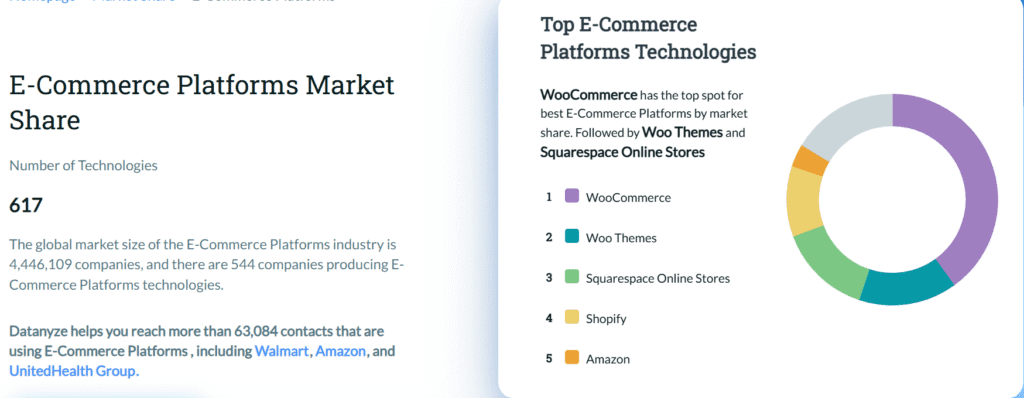
A report by Datanyze indicates that WooCommerce is the go-to solution for 40.07% of eCommerce businesses, which has the highest global market share among its competitors. Why is it so beloved?
Here’s just a taste of what the WooCommerce add-on enhances:
- Inventory management: WooCommerce allows you to sync your inventory with suppliers, so your stock levels are always up to date. This feature prevents overselling and helps maintain customer satisfaction.
- Automated order fulfillment for WooCommerce dropshipping: The platform enables automated WooCommerce dropshipping order fulfillment processes. You can send order details to your dropshipping suppliers with a single click, streamlining your WooCommerce operations and reducing manual workload.
- Suppliersintegration: Manage multiple suppliers effortlessly. WooCommerce enables you to assign products to specific suppliers and set up automated notifications for order updates.
- Paymentgateways: WooCommerce integrates with various payment gateways such as PayPal for WooCommerce or WooCommerce Payments, enabling you to take payments in various forms and currencies.
You’ll reap many other benefits by using WooCommerce for your dropshipping business.
WooCommerce vs. Shopify: Which is better for dropshipping?
When deciding between the two e-commerce giants, the choice often comes down to a trade-off between convenience and control. Shopify is a fully hosted platform, meaning it is easier to set up initially but comes with ongoing monthly subscriptions and transaction fees that can eat into your margins. In contrast, offers superior long-term value through open-source flexibility, allowing you to avoid platform lock-in and retain full ownership of your store data. While Shopify restricts you to its proprietary ecosystem, WooCommerce grants access to the vast WordPress plugin library, letting you customize every aspect of your business.
| Feature | WooCommerce | Shopify |
|---|---|---|
| Setup & monthly costs | Low (hosting costs only) | High (subscription + transaction fees) |
| Ownership | 100% data ownership | Platform-dependent |
| Customization | Unlimited (open-source) | Limited by themes and apps |
| Scalability | High (flexible hosting) | Tiered pricing plans |
| Ease of use | Moderate learning curve | Beginner-friendly |
For entrepreneurs looking to maximize profitability, the ability to generally provides a better return on investment. You aren’t penalized for growth with increasing platform fees and you have the freedom to switch service providers at any time. Bluehost bridges the gap in ease of use by offering specialized WooCommerce hosting that comes pre-installed and configured. This gives you the control of a self-hosted site with the reliability and security usually reserved for managed platforms, making it the smart choice for users evaluating their long-term options.
Getting started with WooCommerce dropshipping
Below, you’ll learn how to set up an eCommerce website that’s ready for dropshipping. If you’re unsure about how the business model works, check out our guide that describes making a dropshipping business plan, step by step.
You can create a functional WooCommerce dropshipping store, with no hassle, by following the steps.
Purchase a domain
You’ll need a domain before you begin. A domain enables your website to be hosted on the internet at a specific digital address. If you don’t have a domain, pick a provider; they’ll give you instructions on purchasing one. For convenience, here’s how to buy a domain from Bluehost.
Head to the Bluehost control panel and log in or create an account. Once you’re signed in, you’ll see a screen like the one below.

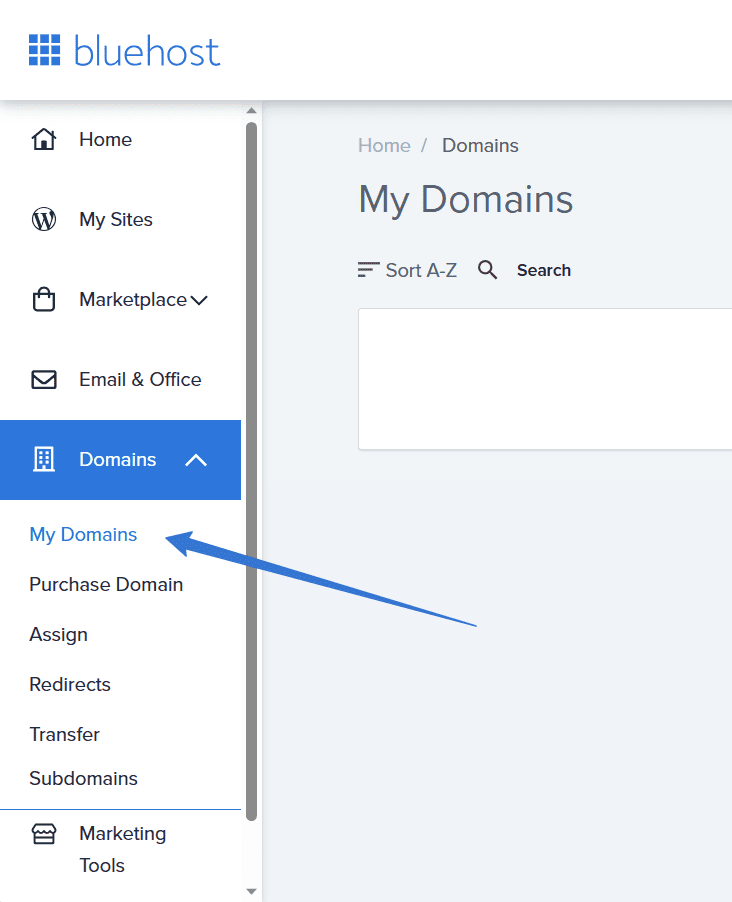
From the sidebar on the left, go to Domains > Purchase Domain. Type in your preferred store name and Bluehost will check its availability. If the name you entered is available, add it to your cart.

Once it’s added, initiate checkout by clicking on the shopping cart icon on the top right corner of the page. A popup will show the particulars of your cart. Click on Go to Checkout.

After completing the steps to verify your account, complete the transaction by providing your credit card information or other necessary payment details. The domain is now yours. It will show up in the My Domains section of the control panel.
The domain is now yours. It will show up in the My Domains section of the control panel.
After acquiring a domain, move on to purchasing a hosting plan and installing WordPress.
Install WordPress
Before proceeding with installing WordPress, ensure you have purchased a hosting plan. Hosting is required to make your website live and accessible on the internet. Without an active hosting plan, you won’t be able to access the control panel (cPanel) or proceed with the installation.
To purchase a hosting plan with Bluehost:
- Log in to your Bluehost account control panel.
- Navigate to Marketplace > Hosting.

- Select a suitable hosting plan for your needs and complete the checkout process.
Once your hosting plan is confirmed, you’ll gain access to the control panel, allowing you to proceed with installing WordPress.
There are two ways to proceed; both require a hosting plan.
For the most simplified route to setting up your dropshipping store, pick from Bluehost’s specialized WooCommerce hosting plans. They come with an express installation of WordPress and WooCommerce, plus over $450 of plugins already added. Bluehost also offers cloud hosting plans, which provide enhanced scalability, reliability and performance for high traffic dropshipping stores. This can be particularly beneficial if your business grows rapidly and needs additional resources.
With the online store preconfigured, you can already add unlimited products, accept payments securely, print shipping labels and maintain customer accounts.
If you’re wondering about customization, you can download templates for everything from product pages to cart abandonment notifications.
If you want to install WordPress manually, Bluehost makes the process straightforward:
Log in to your Bluehost account control panel.
Once your hosting plan is confirmed, navigate to My Sites and click Add site. You should land on the page shown below. Provide a website name and a tagline for your WordPress store. Click Next.

In the next step, provide your domain name and a directory for your WordPress installation. If this is your first website on this domain, ignore the directory box and click Next. Bluehost will automatically install WordPress.

When the installation completes, navigate back to My Sites. You should see a list of all your websites.

At this point, your WordPress website is ready for use. The next step is to get your WooCommerce set up.
Install and configure WooCommerce
It’s time to set up and configure WooCommerce so you can start adding products. The steps below will guide you through the configuration process.
From the Bluehost account panel, specifically the My Sites tab, click Manage site. It will lead you to the website’s dashboard. In the top right corner, click on Log into WordPress.
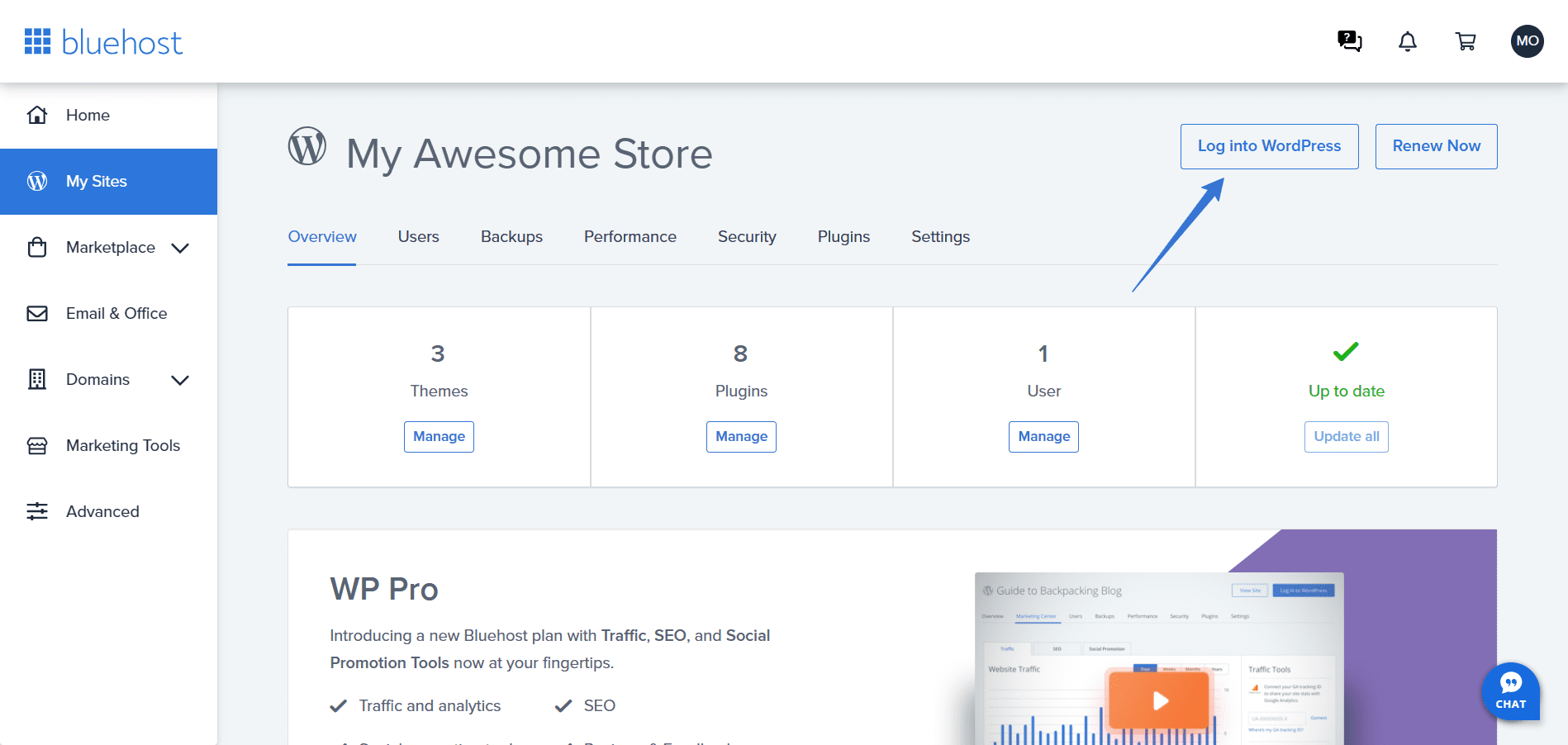
WordPress will load in a new browser tab. In the WordPress menu, navigate to Plugins > Add New.

On the plugins page, use the search field to type “WooCommerce” — press Enter to find the WooCommerce plugin. Click Install Now, as shown below.

After installing the WooCommerce plugin, the Install Now button will turn into Activate. Click on it to activate the plugin.

After activation, WordPress will redirect you to a setup wizard for WooCommerce. Start setting up your online store by clicking Set up my store.

The setup wizard will request that you select the option that best describes you. Pick one and click Continue.

The second stage is where you provide a store name, select the type of product or service you’ll be selling and disclose the location of your business. Click Continue after providing this information.

In the next step, you select the free features you’d like to preinstall. Uncheck the perks you don’t anticipate needing. Then, click Continue.

The wizard will ask you to connect your account to WordPress. Then, it will finalize the installation and redirect you to a page where you add your first product.
Speaking of products, you’ll need to find yourself some suppliers.
Install plugins to find dropshipping suppliers
To thrive, you’ll need high-quality suppliers to source your dropshipping products. This is the core of your WooCommerce dropshipping business. So how do you find a supplier?
There are plugins for that. For your convenience, here are some popular dropshipping supplier plugins:
- WooCommerce dropshipping: This plugin automates order notifications to suppliers and helps manage inventory. It also supports CSV uploads for bulk product imports.
- Spocket: Offers access to a vast network of US and EU suppliers, providing faster shipping times and high-quality products.
- Syncee: A comprehensive dropshipping solution that connects you with suppliers worldwide. It includes automated product updates and order tracking.
- CJdropshipping: Direct integration with AliExpress and other suppliers. It supports automated order processing and custom pricing rules.
To find a suitable dropshipping supplier plugin on your own, follow the steps below.
Navigate to the WordPress dashboard and go to Plugins > Add New. To find new suppliers or supplier directories, type “supplier” in the search field and press Enter. Please note that only some of the results will be plugins made to find you suppliers. Simply check the plugin descriptions to distinguish supplier plugins from the rest.

Scan the results and identify plugins with over 700 active installations.

Select the plugin you want to install and activate. Each plugin allows you to explore and import dropshipping products from various suppliers; on some plugin dashboards, you can order directly from suppliers. Most supplier directory plugins require you to purchase a membership.
Keep in mind that unreliable dropshipping suppliers will reflect poorly on your business. If a supplier fails to notify you when specific products run out of stock or they deliver products late, that’s a sign to immediately change suppliers. Do your due diligence with research to ensure you only work with the best.
Where possible, ensure the suppliers are in the same region as your customers. This drastically reduces shipping times, which helps you get positive customer reviews.
Next, consider WordPress plugins that automate your WooCommerce dropshipping website.
Step-by-step: Installing the WooCommerce Dropshipping plugin
The WooCommerce Dropshipping plugin automates order fulfillment by sending customer orders directly to your suppliers. This essential plugin integrates seamlessly with your WooCommerce dashboard, streamlining your entire dropshipping workflow.
- Log in to your WordPress dashboard and navigate to Plugins > Add New
- Search for “WooCommerce Dropshipping” in the search field, or click Upload Plugin if you have the zip file
- Locate the official WooCommerce Dropshipping plugin and click Install Now
- After installation completes, click the Activate button
- Navigate to WooCommerce > Settings > Dropshipping to access the plugin configuration menu
Once activated, the plugin integrates directly into your WooCommerce interface, allowing you to configure supplier notifications, manage inventory updates and automate order forwarding—all without leaving your dashboard.
Install plugins to automate your business

As a dropshipper, certain plugins are literally made for you. They’ll help you get the most out of WooCommerce, support your efforts and hasten your growth.
Here are some of the best options to consider:
- : This add-on imports handpicked AliExpress products to sell online. Furthermore, AliNext enables you to create flexible pricing rules in your online store, which is handy if you have a big catalog. You also can make AliExpress orders in bulk. It’s a great entry point to AliExpress dropshipping.
- Dropified: With this extension, you can find dropshipping suppliers and list their products directly on your online store. The best part is that when you receive an order, in a single click you can forward it to the supplier. The supplier will pack and ship the order for you.
- Klaviyo: This helps you form personalized customer relationships. You can send personalized emails and SMS at scale, an important function to stay relevant to your customers.
- Google Feed Manager: You can integrate Google Merchant Center with WooCommerce, allowing your dropshipping products to appear in Google searches. But to submit your products to Merchant Center, you’ll need Google Feed Manager, which organizes your products in Google’s preferred, optimized format.
- : This plugin simplifies the dropshipping process by automating order notifications to suppliers. It enables you to send automated emails with order details and shipping information to your suppliers, ensuring that the fulfillment process runs smoothly. Additionally, it offers tools to manage supplier information, bulk-import products and synchronize stock levels
- Amazon fulfillment (MCF): If you sell products through Amazon, this plugin integrates WooCommerce with Amazon’s fulfillment services. Once a buyer puts an order, Amazon handles the picking, packing and shipping. It allows for seamless order fulfillment and provides shipping options such as standard, expedited and priority shipping.
- : Spocket is a great dropshipping plugin for those looking to source products from suppliers based in the US and the EU. It gives an option to import products directly into your WooCommerce store and automates the order fulfillment process. Spocket also provides fast shipping options, making it an excellent choice for dropshippers targeting global customers.
You can find more useful add-ons on the WooCommerce extensions page.
How to find reliable dropshipping suppliers?
The success of your WooCommerce dropshipping business hinges on partnering with trustworthy vendors. Prioritize suppliers located near your target audience – such as using Spocket for US and EU markets—to ensure rapid delivery. Before integrating a partner, order samples to verify product quality and packaging standards personally. True reliability goes beyond just shipping speed; you must validate their operational competence through a strict vetting process.
- Communication: Test if they respond to support queries within 24 hours to gauge future responsiveness.
- Technology: Ensure they offer real-time stock availability notifications to prevent overselling on your site.
- Reputation: Scrutinize reviews for recurring complaints about quality or hidden fees.
- Policies: Avoid suppliers with vague return procedures, which are a major red flag.
Practical example: Building a T-shirt dropshipping shop
Imagine launching “Trendy Tees,” a T-shirt business with zero inventory. Start by selecting a print-on-demand supplier like Printful or Printify through their WooCommerce plugins. After installation, connect your store by authorizing API access—this creates a direct bridge between your WooCommerce dropshipping shop and the supplier’s production facility. Upload your T-shirt designs through the supplier’s interface, customize product variants (sizes, colors), set your retail pricing above the supplier’s base cost and push products directly to your WooCommerce catalog. When a customer orders a design, the workflow becomes completely hands-off: your store captures payment, the plugin automatically forwards order details and customer shipping information to the supplier, they print the custom design on demand and ship directly to your customer with your branding. You earn the profit margin while the supplier handles production, packaging and logistics—transforming WooCommerce dropshipping into a truly automated business model.
Benefits of WooCommerce dropshipping business

WooCommerce dropshipping offers numerous advantages for entrepreneurs seeking to create a successful eCommerce business with minimal upfront investment. Let’s explore some of the key benefits from the list in greater detail:
1. Low maintenance costs
Setting up a WooCommerce dropshipping store is cost-effective. Since WooCommerce is free, you only pay for essential services like hosting and domain names. You also don’t need to invest in inventory upfront.
2. Seamless integration with WordPress
This is because Automattic (the company that heads WordPress) is also the developer of WooCommerce.WooCommerce integrates effortlessly with WordPress, providing you with SEO tools, content management features and a vast library of plugins. You can use WordPress’s built-in tools to boost your search engine ranking and drive organic traffic to your store.
3. Customizable
WooCommerce offers a high level of customization. You can tailor your store’s design, checkout flow, product pages and automation workflows using themes, plugins and extensions. Whether you want to integrate multiple suppliers or automate operations, WooCommerce gives you full control.
4. Sell anything
With WooCommerce dropshipping, you can sell almost any type of product without worrying about storage or inventory management. You can source items from multiple suppliers and quickly adapt your product catalog based on trends, customer demand, or seasonal opportunities.
5. Strong developer community
WooCommerce is supported by a strong global developer ecosystem. Thousands of developers actively build plugins, themes and custom solutions for WooCommerce. This ensures continuous improvements, regular updates and access to advanced functionality as your dropshipping business grows.
6. Large user community
WooCommerce allows you to sell globally by offering multiple payment gateways and supporting various currencies. Dropshipping plugins like Spocket connect you to suppliers in the US, EU and other regions, ensuring faster shipping times.
Your hosting provider will be one of the most impactful factors in your website’s security, so pick one that understands your circumstances. Bluehost, for instance, has specialized WooCommerce hosting plans that offer responsive, 24/7 customer support to help build your online store and deal with error messages that arise.
Best WooCommerce dropshipping plugins compared
Choosing the right tool is critical for your dropshipping success. While basic setups connect you to suppliers, top-tier plugins like Spocket, AliDropship and Syncee offer advanced automation, syncing inventory and prices in real-time to prevent overselling. Your choice largely depends on your target market; for instance, Spocket and Syncee excel with US and EU suppliers, ensuring faster shipping times (2-7 days) which justifies slightly higher product costs. Conversely, solutions like AliDropship and CJdropshipping connect you deeply with Chinese markets (AliExpress), offering significantly lower wholesale prices but requiring strategic management of longer shipping durations.
| Plugin name | Best for | Supplier region | Key features | Pricing model |
|---|---|---|---|---|
| Spocket | Fast US/EU shipping | US / EU | Branded invoicing, curated products | Free & Premium |
| AliDropship | AliExpress automation | China / Global | One-click import, auto-updates | One-time fee |
| CJdropshipping | Order fulfillment | China / Global | Warehousing, quality checks | Free (service fees) |
| WooCommerce Dropshipping | Native integration | Global | Amazon affiliate support, local suppliers | Annual license |
| Syncee | B2B Marketplace | Global | DataFeed manager, auto-ordering | Free & Premium |
| Dropified | High-volume automation | Global | Advanced tracking, multi-platform | Premium subscription |
To select your WooCommerce dropshipping plugin effectively, align the tool with your specific business model. If you need highly curated products to boost trust, DropshipMe is an excellent add-on to existing setups. For those scaling rapidly, Dropified provides robust automation across multiple platforms. Ultimately, the best WooCommerce dropship suppliers are those that integrate seamlessly with your store, ensuring that stock levels are accurate and orders are fulfilled without manual intervention.
Advanced tips for scaling your WooCommerce dropshipping store
As your business grows, consider implementing advanced strategies to manage operations more efficiently:
1. Use marketing automation tools
Use tools like Mailchimp or Klaviyo to automate your marketing campaigns. Segment your audience based on their purchase behavior and send targeted emails for product promotions, abandoned cart reminders and personalized recommendations.
2. Build customer retention strategies
Implement a loyalty program using WooCommerce plugins like Points and Rewards or WooCommerce Memberships. Offer exclusive discounts or early access to new products to encourage repeat purchases.
3. Use product bundling and upselling techniques
Increase your average order value by creating product bundles and upselling related products. Use plugins like WooCommerce Product Bundles or WooCommerce Checkout Add-Ons to offer customized product combinations and add-ons during checkout.
4. Optimize your store’s performance
Ensure your store loads quickly and efficiently by using a content delivery network (CDN) and optimizing images. Choose a robust hosting provider that can handle high traffic and provide excellent uptime. Regularly update your plugins and theme to keep your store secure and running smoothly.
Next, after careful consideration of plugins and strategies, the next step is to give your audience the best customer service.
Managing customer support and service excellence
Providing exceptional customer service is essential for the long-term success of any dropshipping business. Here are some quick tips to ensure you’re offering top-tier support:
- Multi-channel support: Offer customer assistance through multiple platforms like live chat, email, phone and social media. This accessibility allows store owners to reach their target market through preferred channels, enhancing user experience. Tools such as LiveChat, Zendesk and even Facebook Messenger integrate easily with WooCommerce and other platforms, streamlining support management and ensuring prompt responses.
- Clear return & refund policies: Make sure to clearly display your return and refund policies across multiple touchpoints – product pages, FAQs and during checkout. Including company details and branded invoicing in these policies builds trust and helps maintain a consistent brand voice. Clearly defined policies reduce the chances of disputes and build loyal customers, leading to higher retention and better profit margins.
- Comprehensive FAQ section: A well-structured FAQ section can significantly reduce repetitive inquiries by answering common questions about shipping times, targeting customers, order tracking and dropshipping marketing strategies. For example, if you’re sourcing from a wide supplier network or using AliExpress dropshipping, include details about shipping methods and timelines. Keeping FAQs updated with accurate information helps improve customer satisfaction, reduces support requests and strengthens your marketing messages.
- Leverage automation tools and plugins: Enhance customer service efficiency with smart plugins and tools. For instance, an AliDrop Google Chrome extension can help simplify the import process from suppliers. Platforms with built-in dropshipping features assist in managing customer details and automatically notify suppliers. Some integrations, including Amazon affiliate support, allow expansion to other platforms, giving store owners more flexibility in serving customers effectively.
Final thoughts
With the right setup and plugins, you can launch a fully functional WooCommerce dropshipping store in just a few hours. Focus on optimizing your product listings, automating key processes and providing excellent customer service to build a successful online business.
With specialized WooCommerce hosting plans from Bluehost, nearly everything you need for your WooCommerce dropshipping website comes preinstalled, which means you get started with just a few clicks. Plus, your business will be launched with a reliable host that guarantees high uptime and has excellent customer service.
FAQs
What is WooCommerce dropshipping?
WooCommerce dropshipping is a business model where you sell products through your WooCommerce store without holding inventory. When a customer makes a purchase, you forward the order to a supplier who ships the product directly to the customer. You earn the difference between the wholesale and retail price.
What is the most important component of a WooCommerce dropshipping store?
The most important component is choosing the right dropshipping plugin to automate order management and inventory updates. These plugins handle the import process, manage wholesale price calculations and automatically notify suppliers when orders are placed, making them essential for any complete store setup.
Is WooCommerce a heavy plugin?
No, WooCommerce is one of the friendliest WordPress plugins that has been fine-tuned for years to work seamlessly with WordPress. On its own, WooCommerce doesn’t slow down your website or affect performance. However, your website may become sluggish if you install a high number of plugins beyond the essential ones needed for your ecommerce platform.
What are the key plugins and tools recommended for WooCommerce dropshipping?
To successfully run a WooCommerce dropshipping store, you’ll need WordPress, WooCommerce, a supplier plugin, a payment gateway, a Google Analytics plugin and a cart abandonment plugin. WordPress is the foundation, while WooCommerce lets you build and customize your store efficiently. Supplier plugins enable product discovery through the import process, handle wholesale price management and forward orders to suppliers. Payment gateways process customer transactions, cart abandonment plugins recover lost sales and Google Analytics tracks performance for continuous improvement of your complete store setup.
How does dropshipping with WooCommerce work?
Dropshipping with WooCommerce works in four simple steps:1. Customer places an order on your WooCommerce store and enters customer details2. You receive the order and payment through your chosen shipping methods3. You notify suppliers with order details and customer shipping address4. Supplier ships the product directly to your customer using your packing slips
How to start dropshipping with WooCommerce?
To start dropshipping with WooCommerce, install WordPress and WooCommerce plugin first. Choose reliable suppliers like Spocket or AliExpress, then install the best WooCommerce dropshipping plugins like AliDropship. Configure dropshipping settings, import products and set up shipping methods. The complete store setup takes 3-7 days with low startup costs of $100-500.
What shipping methods work best for WooCommerce dropshipping?
The best shipping methods for WooCommerce dropshipping include partnering with reliable suppliers offering multiple shipping options. Configure dropshipping settings to automatically calculate shipping costs based on customer shipping addresses. Local suppliers provide faster delivery (2-7 days) compared to international suppliers (15-45 days).
What marketing strategies work best for dropshipping?
The best dropshipping marketing strategies include social media marketing on Instagram, TikTok and Facebook for visual products. Implement SEO targeting, Google Ads for immediate traffic and email marketing for customer retention. Use influencer partnerships for real customer reviews and retargeting campaigns to re-engage visitors.
What’s the best platform for dropshipping beginners?
WooCommerce is the best platform for dropshipping beginners because it offers low startup costs, built-in dropshipping features and extensive plugin support.
Where to sell dropshipping products for maximum reach?
You can sell dropshipping products through your WooCommerce store and expand reach by integrating with marketplaces like Amazon, eBay and social media platforms.


Write A Comment