 ChatGPT,
  Claude,
  Gemini,
  Grok — all four for
 Bluehost Agency Hosting Data Centers Explained
When creating a website on Bluehost Agency Hosting, you will be asked to select a primary data center location. This selection helps optimize performance for your visitors by hosting your site closer to your primary audience.
While a primary data center is selected during site creation, your website is not limited to a single location. Behind the scenes, Bluehost Agency Hosting infrastructure automatically mirrors your website across multiple data centers, allowing for automatic failover in the event of an outage or infrastructure issue.
This multi-data-center architecture, combined with continuous website replication, automatic failover, cloud infrastructure, and CDN technologies, is a key component of the reliability and availability standards that support the Agency Hosting uptime SLA.
Available Data Center Locations
When creating a new Cloud or Agency website, you can choose from one of four primary data center locations:
- Los Angeles, California
- Dallas, Texas
- Ashburn, Virginia
- Amsterdam, Netherlands
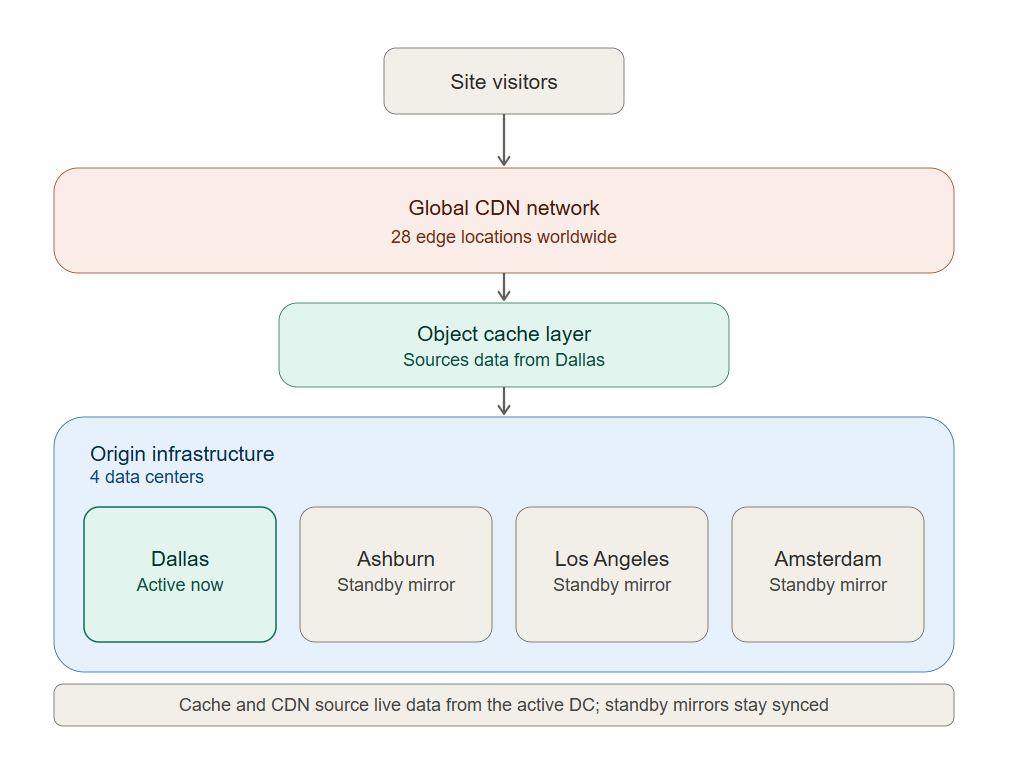
Your selected location becomes the website's primary data center, where the site is primarily hosted and where origin requests and cache generation occur.
Choosing the Best Data Center
As a general best practice, choose the data center closest to the majority of your website visitors.
Recommended Selection
| Primary Audience Location | Recommended Data Center |
|---|---|
| Western United States | Los Angeles |
| Central United States | Dallas |
| Eastern United States | Ashburn |
| Europe | Amsterdam |
Choosing a data center closer to your visitors can help reduce latency and improve response times for content that is not already being served from cache.
How the Hosting Infrastructure Works
Although you select a primary data center, your website is automatically replicated across all available data center locations.
For example, if you select Dallas as your primary data center:
Primary Location
- Dallas, Texas
Mirrored Locations
- Los Angeles, California
- Ashburn, Virginia
- Amsterdam, Netherlands
This means multiple synchronized copies of your website exist across the hosting infrastructure at all times.
Automatic Failover Protection
One of the advantages of the Cloud and Agency hosting platform is automatic failover protection.
If an issue affects your primary data center, the platform automatically routes traffic to one of the mirrored data centers that hosts a synchronized copy of your website.
This process occurs automatically and requires no action from the site owner.
Benefits
- Continuous site availability
- Protection against individual data center outages
- Built-in redundancy
- Improved reliability and resilience
- Reduced risk of downtime
Example: Normal Operation
Example: Failover State
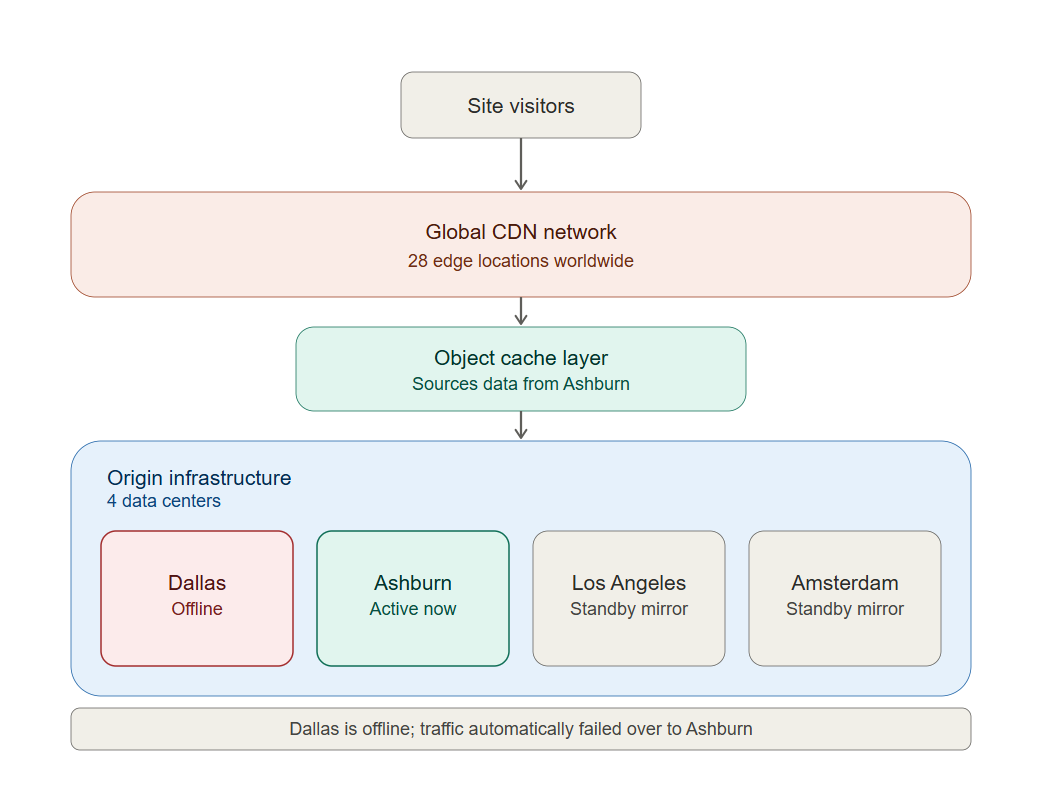
Because the website already exists in multiple locations, traffic can be redirected quickly to an available data center.
How This Supports the Agency Hosting Uptime SLA
Many hosting environments rely on a single data center. If that facility experiences a significant outage, websites hosted there may become unavailable until service is restored.
Cloud and Agency hosting are built differently.
The platform includes multiple layers of redundancy designed to help maintain website availability, including:
- Multiple geographically distributed data centers
- Continuous website replication
- Automatic failover capability
- Global traffic routing
- Cloud CDN edge caching
Since your website is mirrored across all available data centers, it is not dependent on a single physical location remaining online.
This multi-layer approach, which includes geographically distributed data centers, continuous replication, automatic failover, cloud infrastructure, global traffic routing, and CDN technologies, helps support the reliability and availability standards behind the Agency Hosting uptime SLA
For additional information regarding Bluehost's uptime commitment and service credits, refer to the Agency Hosting uptime SLA available on the Bluehost Agency Hosting page.
How the Cloud CDN Fits Into the Architecture
The primary data center and the Cloud CDN serve different purposes.
Primary Data Center
The primary data center is responsible for:
- Origin website hosting
- Processing uncached requests
- Generating cache content
- Serving as the primary website location
Cloud CDN
The Cloud CDN provides:
- Global edge caching
- Faster content delivery worldwide
- Reduced latency
- Improved visitor experience
The CDN helps improve performance, while the distributed data center infrastructure helps ensure reliability and uptime.
Can I Change My Data Center Later?
There is currently no direct option to change a website's primary data center after it has been created.
However, it is possible to effectively move your website to a different primary data center using the staging workflow.
To Move a Site to a Different Data Center
- Create a staging site in the desired data center.
- Verify the staging site is functioning as expected.
- Promote the staging site to production.
Once promoted, the new production site will use the data center selected when the staging environment was created.
Frequently Asked Questions
Q: Does my data center selection affect uptime?
A: No. Your data center selection primarily affects website performance and latency. Platform availability is supported through multiple technologies, including geographically distributed data centers, website replication, automatic failover, cloud infrastructure, and CDN services.
Q: What happens if my primary data center experiences an outage?
A: The platform automatically routes traffic to a mirrored copy of your website hosted in another available data center.
Q: Does the Cloud CDN replace the need to choose a data center?
A: No. The Cloud CDN improves content delivery globally, while the primary data center remains the origin location for your website.
Q: Which data center should I choose?
A: Choose the location closest to the majority of your website visitors whenever possible.
Q: Can I directly change my data center after creation?
A: No. However, you can effectively move your website to a different primary data center by creating a staging site in the desired location and promoting it to production.
Summary
Selecting the right data center helps optimize website performance by placing your site closer to your primary audience. Cloud and Agency Hosting automatically replicate your website across four geographically distributed data centers in Los Angeles, Dallas, Ashburn, and Amsterdam. Combined with cloud infrastructure, Cloud CDN edge caching, and automatic failover technology, this redundant architecture helps maintain website availability and supports the reliability and uptime standards of the Agency Hosting platform..
If you need further assistance, Bluehost Chat Support is available 24 hours a day, 7days a week while Bluehost Phone Support is available 7 days a week from 7 am-12 midnight EST.
- Chat Support - While on our website, you should see a CHAT bubble in the bottom right-hand corner of the page. Click anywhere on the bubble to begin a chat session.
- Phone Support -
- US: 888-401-4678
- International: +1 801-765-9400
You may also refer to our Knowledge Base articles to help answer common questions and guide you through various setup, configuration, and troubleshooting steps.