 ChatGPT,
  Claude,
  Gemini,
  Grok — all four for
 Reimage Your Server for Nanoclaw Installation
Nanoclaw is an advanced coding environment you can deploy on your Bluehost Self-Managed VPS or Virtual Dedicated Server (VDS). This guide walks you through reimaging your server for Nanoclaw installation using the Bluehost Portal and shows you how to access your Nanoclaw dashboard, so you can start coding efficiently and securely.
System Requirements
Before deploying, ensure your server meets the following minimum hardware requirements. For a stable production deployment, we recommend using higher specifications than the minimum requirements.
- Do not purchase a server that only meets the minimum requirements (4 GB RAM). The minimum specifications represent the software's bare survival threshold and do not account for operating system overhead or production workloads. Running with lower specifications can result in severe performance slowdowns, system freezes, or unexpected crashes during traffic spikes.
- Bluehost Self-Managed VPS and VDS lack dedicated GPUs (VRAM). Running local LLMs entirely on their CPUs will cause extremely slow response times. For optimal performance, host your application on Bluehost but connect it to an external AI cloud provider (like OpenAI or Anthropic) via API.
- For a stable deployment, we recommend using the recommended specifications (8 GB RAM). While lower specs might be sufficient for basic installation, consider allocating additional resources if you plan to store recordings, logs, or other application data.
| Resource | Minimum | Recommended |
|---|---|---|
| RAM | 4 GB | 8 GB |
How to Reimage Your Server for Nanoclaw Installation
- Nanoclaw requires Docker (Docker is preinstalled on your server).
- Nanoclaw also requires Claude Code. Go to the Anthropic Console and sign up for an account.
- Is the Anthropic Console free?
- Creating an Anthropic account is free. However, generating an API key and accessing Claude typically requires entering billing information and may incur charges. Please refer to Anthropic's pricing page for current details.
To reimage your server and install Nanoclaw:
This applies to both VPS and VDS.
- You can install only one application using the one-click installer.
- To change or delete your application, follow the guide: How to Change an Application. Create a backup of your existing applications or templates.
- To keep your current template, install the new application manually using SSH. Follow the same steps for both Self-Managed VPS and Virtual Dedicated Server (VDS). The system automatically selects the recommended operating system for Nanoclaw.
- Log in to your Bluehost Portal.
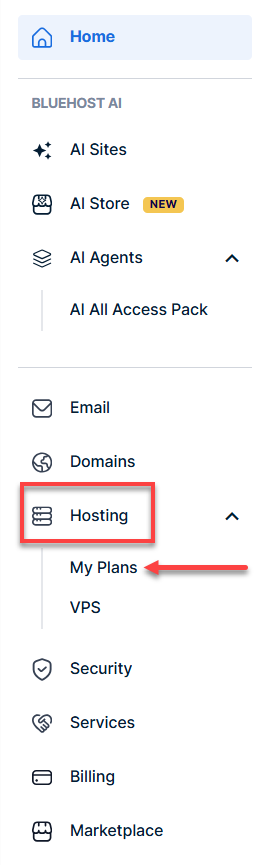
- In the left-hand menu, click Hosting, then select My Plans.
- Click the Manage button on the hosting package you want to reimage.

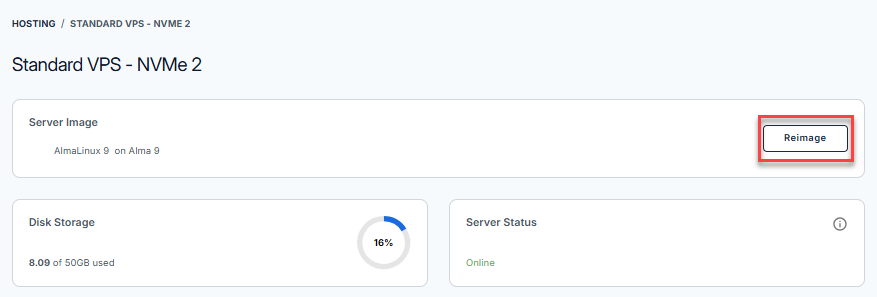
- Click the Reimage button.
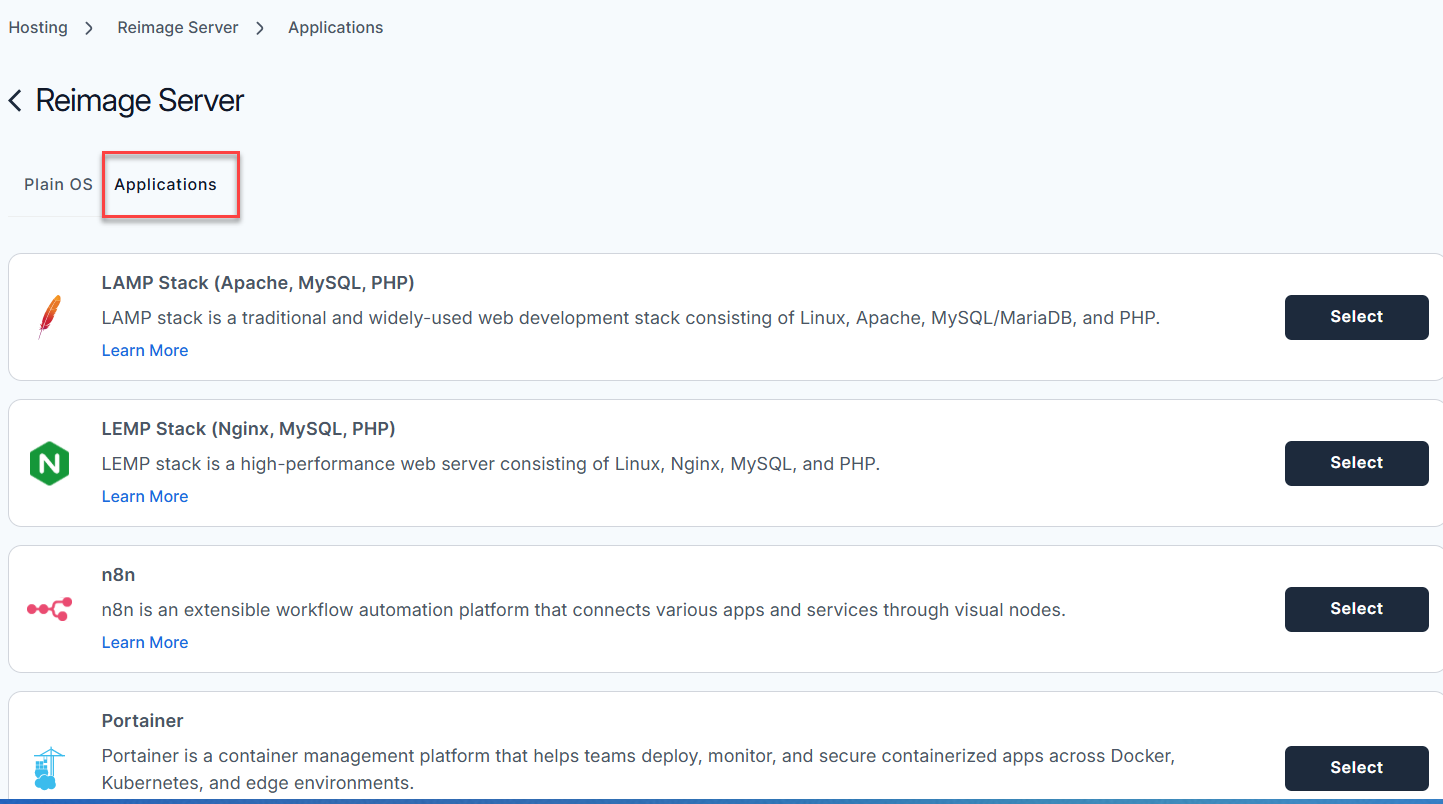
- Select the Applications tab.
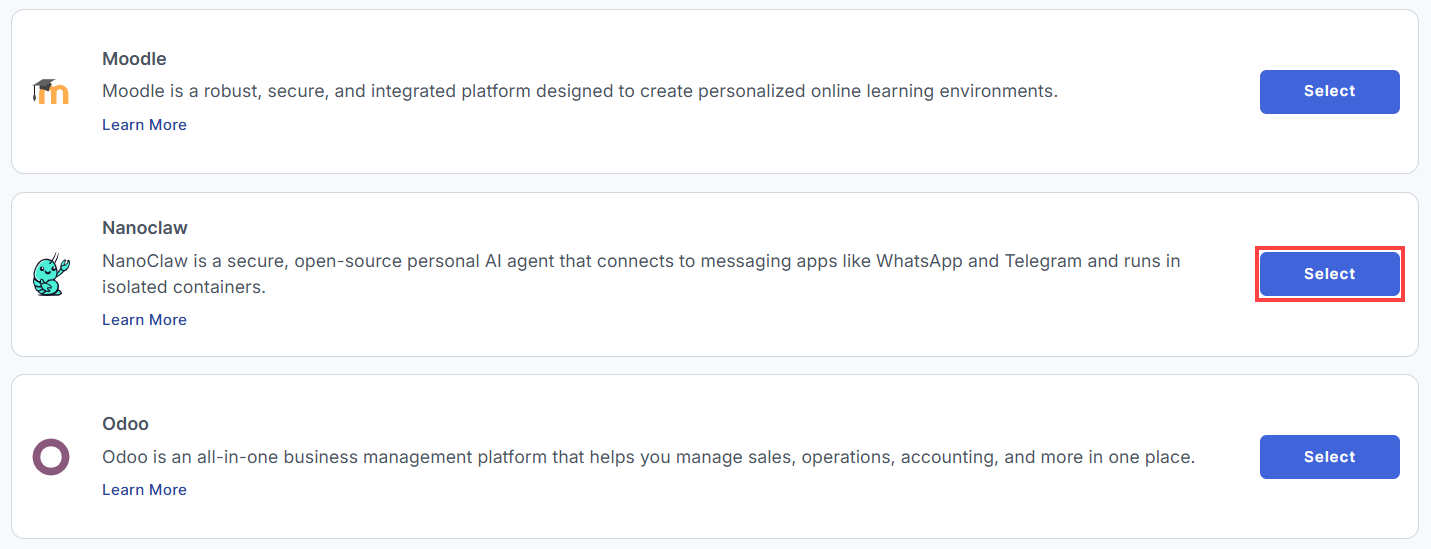
- From the list, find Nanoclaw and click Select.
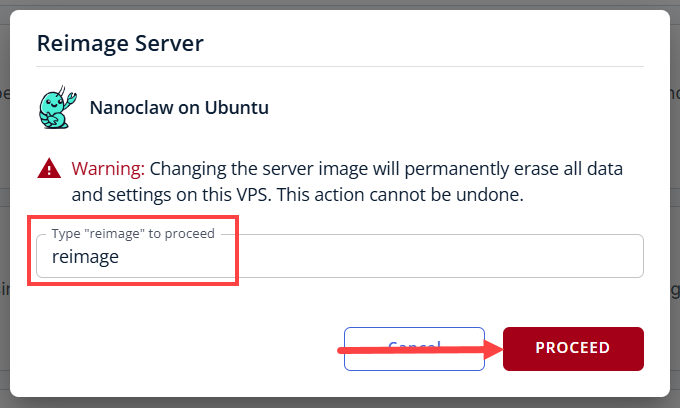
- To confirm, please type "reimage" and then click Proceed to start the process.
- Wait a few moments while the installation completes.

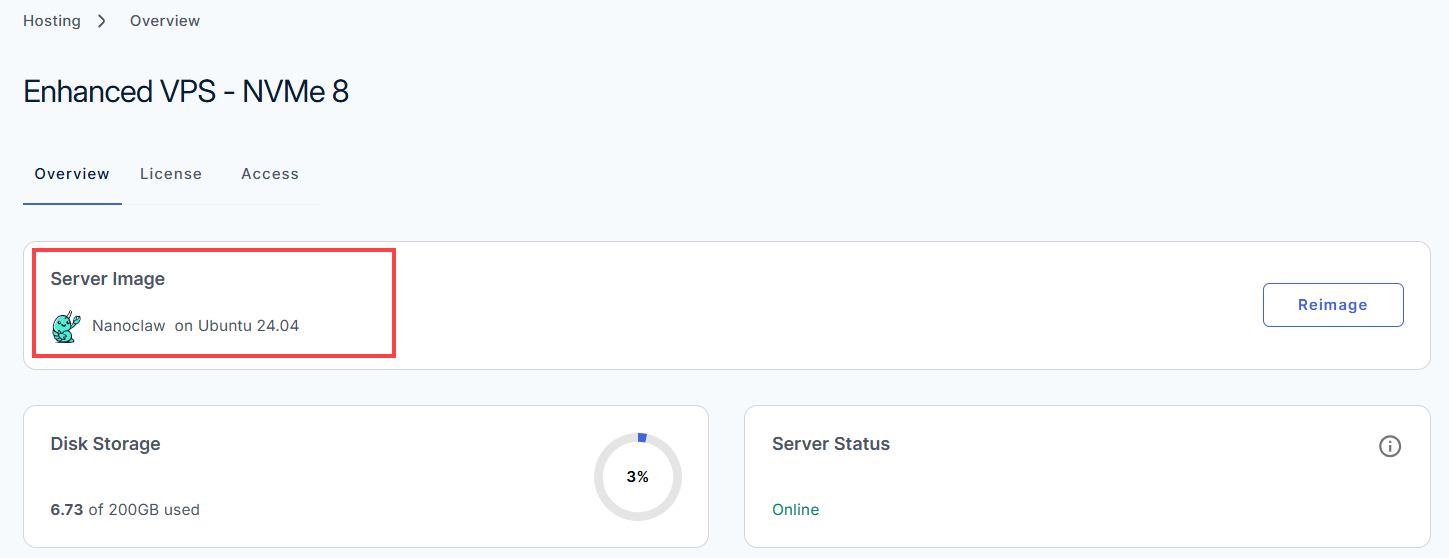
- Once completed, you will see Nanoclaw listed in the Server Image section.
How to Set Up Nanoclaw
After the installation is complete, follow the steps below to configure your application.
- Log in to your Bluehost Portal.
- In the left-hand menu, click Hosting, then select My Plans.
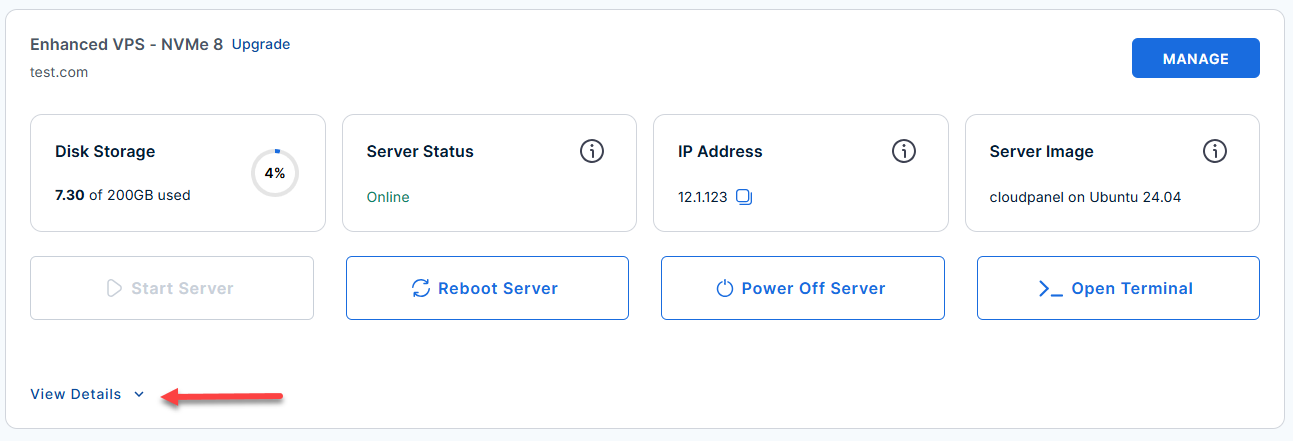
- Locate the server you want to manage, then click View Details in the bottom-left corner to expand the section and access additional server information.
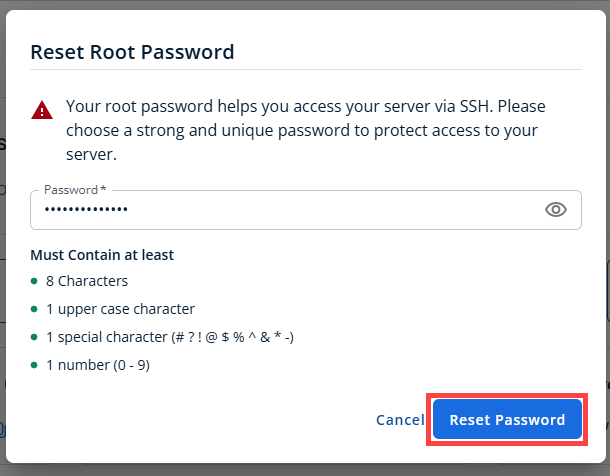
- Click the Reset Password.
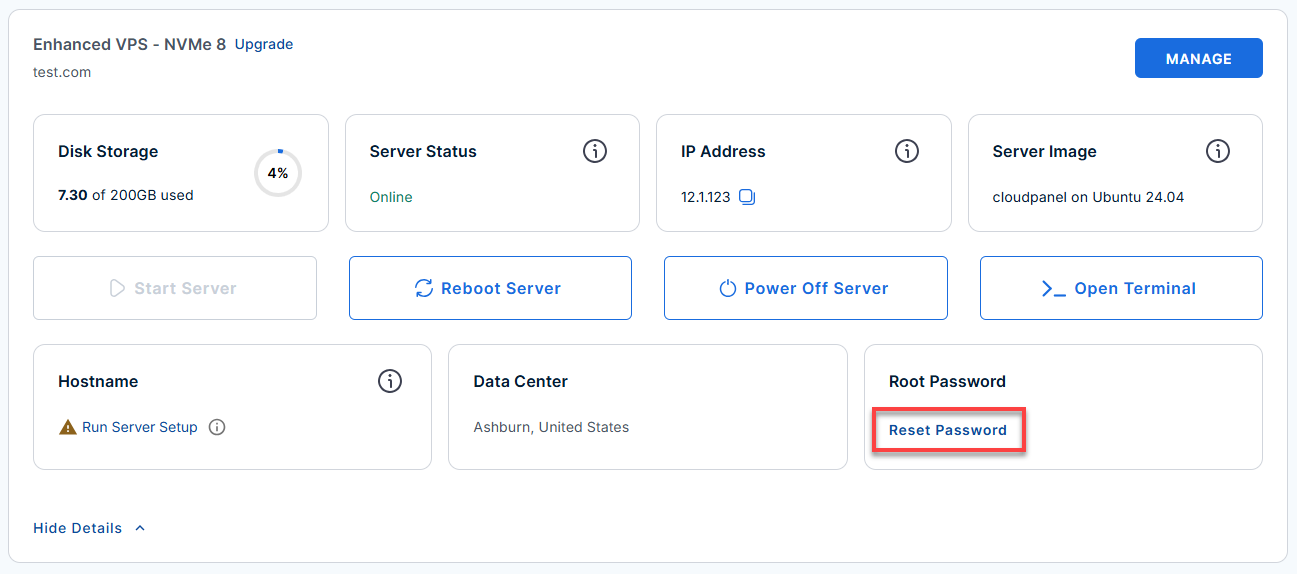
- In the pop-up window, type your new root password, then click Reset Password again to confirm and save the changes.
- SSH into your server: Open your terminal and connect as the root user:
Replace
your_server_ipwith your actual server IP address.ssh root@your_server_ipExample Output:
Welcome to Ubuntu 24.04.4 LTS (GNU/Linux 6.8.0-124-generic x86_64) ******************************************************************************** Nanoclaw AI Agent installed but NOT started -- initial setup required. -------------------------------------------------------------------------------- FIRST-TIME SETUP -------------------------------------------------------------------------------- Step 1 -- on the HOST (as root), enter the nanoclaw user session: machinectl shell nanoclaw@ The remaining steps run INSIDE the machinectl shell: Step 2 -- run the setup script: cd ~/nanoclaw bash nanoclaw.sh During setup, Nanoclaw generates a long-lived OAuth token and prints: export CLAUDE_CODE_OAUTH_TOKEN=<token> Step 3 -- copy and run that export command in the same shell once setup finishes: export CLAUDE_CODE_OAUTH_TOKEN=<token-shown-above> -------------------------------------------------------------------------------- RETURNING USERS (2nd login onwards) -------------------------------------------------------------------------------- Nanoclaw auto-starts on every boot (linger is enabled). To use Claude Code (INSIDE machinectl shell nanoclaw@): machinectl shell nanoclaw@ <-- run on the HOST claude <-- run inside machinectl shell /exit <-- to exit Claude Code -------------------------------------------------------------------------------- TROUBLESHOOTING (all commands run INSIDE machinectl shell nanoclaw@) -------------------------------------------------------------------------------- Enter user session first (on the HOST): machinectl shell nanoclaw@ Check service status: systemctl --user list-unit-files | grep nanoclaw systemctl --user status 'nanoclaw-v2-*' --no-pager -l View live logs: journalctl --user -u 'nanoclaw-v2-*' -f Restart service: systemctl --user restart 'nanoclaw-v2-*' Re-run setup (e.g. "FATAL: No channels connected"): cd ~/nanoclaw && bash nanoclaw.sh -------------------------------------------------------------------------------- Files & Documents -------------------------------------------------------------------------------- App : /home/nanoclaw/nanoclaw Env : /home/nanoclaw/nanoclaw/.env README : /home/nanoclaw/README.md | /root/README.md Nanoclaw AI Agent : https://nanoclaw.dev/ ******************************************************************************** To delete this MOTD: rm -rf /etc/update-motd.d/99-nanoclaw - Enter the
nanoclawuser session:machinectl shell nanoclaw@root@server-123456:~# machinectl shell nanoclaw@ Connected to the local host. Press ^] three times within 1s to exit session. nanoclaw@server-123456:~$ - Run the setup script inside the
nanoclawshell:cd ~/nanoclaw bash nanoclaw.sh◆ How would you like to begin? │ ● Standard setup │ ○ Advanced (override default)- Standard setup: Recommended for fast, guided experience (defaults + prompts).
- Advanced (override default): Manual config for custom ports, environments, expert needs.
- Wait for sandbox and vault creation, and handle OneCLI prompt:
│ Your assistant lives in its own sandbox. It can only see what you explicitly share. ... ◆ Found an existing OneCLI at http://172.17.0.1:10254. What would you like to do? │ ● Use the existing instance (recommended) │ ○ Install a fresh instance for NanoClaw- Use the existing instance: Maintains compatibility for all apps (recommended).
- Install a fresh instance: Creates a new, isolated vault (if required).
- Connect to Claude:
◆ How would you like to connect to Claude? │ ● Sign in with my Claude subscription (recommended if you have Pro or Max) │ ○ Paste an OAuth token I already have (sk-ant-oat…) │ ○ Paste an Anthropic API key (pay-per-use via console.anthropic.com) │ ○ Skip — I'll connect later (not recommended)- Sign in with my Claude subscription: Easiest and provides full access (Pro/Max).
- Paste an OAuth token: Use with a token from another device/account.
- Paste an Anthropic API key: Metered/easy per-use billing (via Anthropic Console).
- Skip — I'll connect later: Not recommended; delays complete setup.
Example outputs for each selection:
- Sign in with my Claude subscription
Open the browser to sign in… Launching: https://claude.ai/oauth?session=abc123 When sign-in completes: ✓ OAuth grant confirmed ✓ Linked to Claude subscription as [email protected] - Paste an OAuth token I already have (sk-ant-oat…)
Paste the OAuth token: sk-ant-oat-xxxxxxxxxxxxxxxxxxxxxxxxxxxxxxx ✓ Token accepted. Linked to Claude account. - Paste an Anthropic API key
Paste your Anthropic API key: sk-ant-xxxxxxxxxxxxxxxxxxxxxxxxxxxxxxxx ✓ API key accepted. Claude Code API rate limits/billing apply. - Skip — I'll connect later
◆ Skip Claude sign-in? The agent won't be able to run until you connect, and we won't be able to help debug setup errors. │ ○ Yes / ● No- If they select Yes (skip):
⚠ Warning: Skipped Claude sign-in.
NanoClaw cannot run until Claude is connected!
Setup will finish, but Claude features unavailable.
- If they select Yes (skip):
- Once Claude is set up, set your assistant’s display name:
◇ Access rules set. (0s) ◇ NanoClaw is running. (4s) ◆ What should your assistant call you? │ nanoclaw - Allow sandbox to warm up. If ping test fails, follow troubleshooting message. You may be prompted to sign into Claude CLI, then set timezone:
Assistant wired up. (1s) ... ◇ Your assistant didn't reply in time. (30s) ◇ Skipping the first chat ───────────── │ No reply from your assistant within 30 seconds. Check `logs/nanoclaw.log` for clues, then try `pnpm run chat hi`. ... ◆ Claude CLI isn't signed in. Sign in now? (a browser will open) │ ● Yes / ○ No ◇ Timezone set. (0s) ◆ Your system reports UTC as the timezone. Is that right, or are you somewhere else? │ ● Keep UTC (remote server / happy with UTC) │ ○ I'm somewhere else - Connect messaging/chat platforms (Telegram, Discord, etc.):
◆  Want to chat with your assistant from your phone?
│  ● Yes, connect Telegram (recommended)
│  ○ Yes, connect Discord
│  ○ Yes, connect WhatsApp
│  ○ Yes, connect Signal (needs signal-cli installed)
│  ○ Yes, connect iMessage (experimental) (remote Photon only)
│  ○ Yes, connect Slack (experimental) (needs public URL)
│  ○ Yes, connect Microsoft Teams (complex setup)
│  ○ Other… (install via /add- after setup)
│  ○ Skip for now (I'll just use the terminal)
Example outputs and official setup/token documentation links for each selection:
- Connect Telegram
To create a Telegram bot and get an HTTP API access token, review the Telegram BotFather Setup Guide.
Opening Telegram linking flow… Send the following code to @nanoclaw_bot in Telegram: /start dcaf-1234 ✓ Telegram account linked. - Connect Discord
To create a Discord bot and obtain your Application Token, follow the steps in the Discord Developer Getting Started Guide.
Open Discord and message @nanoclaw#1234 the code: dcaf-5678 ✓ Discord account linked. - Connect WhatsApp
To set up a WhatsApp Business platform connection and generate a permanent token, reference the Meta WhatsApp Cloud API Setup Guide.
A QR code has been generated. Scan it in WhatsApp to connect. ✓ WhatsApp linked to your nanoclaw agent. - Connect Signal
Signal integration requires signal-cli. See the docs: https://nanoclaw.dev/docs/signal - Connect iMessage
iMessage is only supported on remote Photon deployments. - Connect Slack
To configure bot permissions and generate a Bot User OAuth Token, see the Slack API Authentication Guide.
Paste your Slack public Webhook URL to complete the link: - Connect Microsoft Teams
Teams integration is advanced—see full setup guide: https://nanoclaw.dev/docs/teams - Other…
To add other platforms, use the /add-<name> command after setup. - Skip for now
No messaging integration selected.
You can chat via terminal only for now; add integrations any time later.
- Connect Telegram
- Finish and test your assistant:
You're ready! Chat with `pnpm run chat hi`.- To chat from the terminal:
pnpm run chat hi
- If you enabled chat integration, try messaging your assistant from your linked device as well.
- To chat from the terminal:
Additional Information and Example Documentation Output
You can run cat /root/README.md to see more information and useful commands:
Example Output:
root@server-123456:~# cat /root/README.md
# Nanoclaw

## Description

NanoClaw is a secure, open-source personal AI agent that connects to messaging apps like WhatsApp and Telegram and runs in isolated containers. Built on the Claude Agent SDK, it supports agent swarms, scheduled tasks, per-group memory, and web access all within a minimal codebase of around 15 files that you can fully read and customize.

This image installs:

- Docker (required container runtime)
- Node.js
- Claude Code CLI
- OneCLI credential gateway
- Nanoclaw application source and dependencies

> **Important:** Nanoclaw is **installed but intentionally not auto-started**.
> Initial setup must be completed first. If started before setup, Nanoclaw exits with:
>
> - `FATAL: No channels connected`

---

## Minimum Requirements

| Resource | Minimum | Recommended |
|----------|---------|-------------|
| RAM      | 4 GB    | 4 GB        |

> **Important:** Claude Code requires at least 4 GB of RAM. Running setup with less will OOM-kill Claude before setup can complete.

---

## Services

| Service | Port | Purpose |
|---------|------|---------|
| OpenSSH | 22   | SSH |

All other ports are blocked by UFW except the explicitly allowed ports.

---

## What Gets Installed

| Component | Version | Notes |
|----------|---------|------|
| Node.js | 22.x | Installed via NodeSource |
| Claude Code | latest | Global CLI (`@anthropic-ai/claude-code`) |
| OneCLI | latest | Credential gateway |
| Docker | latest | Required container runtime |
| Nanoclaw | latest | Cloned from `nanocoai/nanoclaw` |

Nanoclaw is installed to:

```text
/home/nanoclaw/nanoclaw
Summary
Nanoclaw is a robust coding platform that empowers you to develop and manage code directly on your Bluehost Self-Managed VPS or Virtual Dedicated Server (VDS). By following this guide, you can easily reimage your server for Nanoclaw installation using the Bluehost Portal and access your dashboard to start coding with confidence and efficiency.