 ChatGPT,
  Claude,
  Gemini,
  Grok — all four for
How to Disable Anonymous FTP on Bluehost
Disabling anonymous FTP is an important step in securing your hosting account. Anonymous FTP allows users to access your FTP server without providing a username or password, which can pose a security risk if left enabled.
By default, this feature is typically disabled, and Bluehost strongly recommends keeping it that way to protect your files and server.
What Is Anonymous FTP?
Anonymous FTP is a feature that allows anyone to connect to your FTP server using a generic login (such as anonymous) without authentication.
While it can be used to share public files, it also introduces potential risks:
- Unauthorized access to your server
- Risk of malicious uploads
- Increased vulnerability to attacks
Because of these risks, most hosting providers recommend disabling anonymous FTP.
How to Disable Anonymous FTP in Bluehost
You can disable anonymous FTP through your hosting control panel.
- Log in to your Bluehost Portal.
- Click Hosting in the left-hand menu.
- On the hosting details page, click the cPanel button.
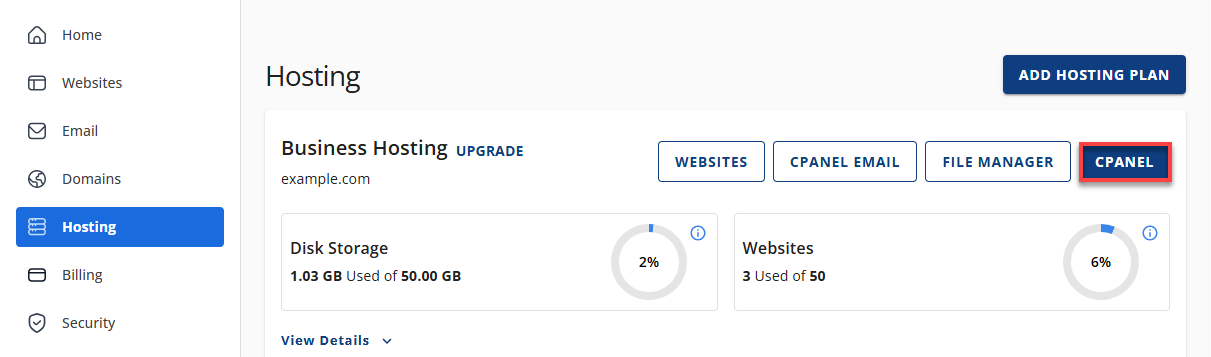
- Your cPanel will open in a new tab.
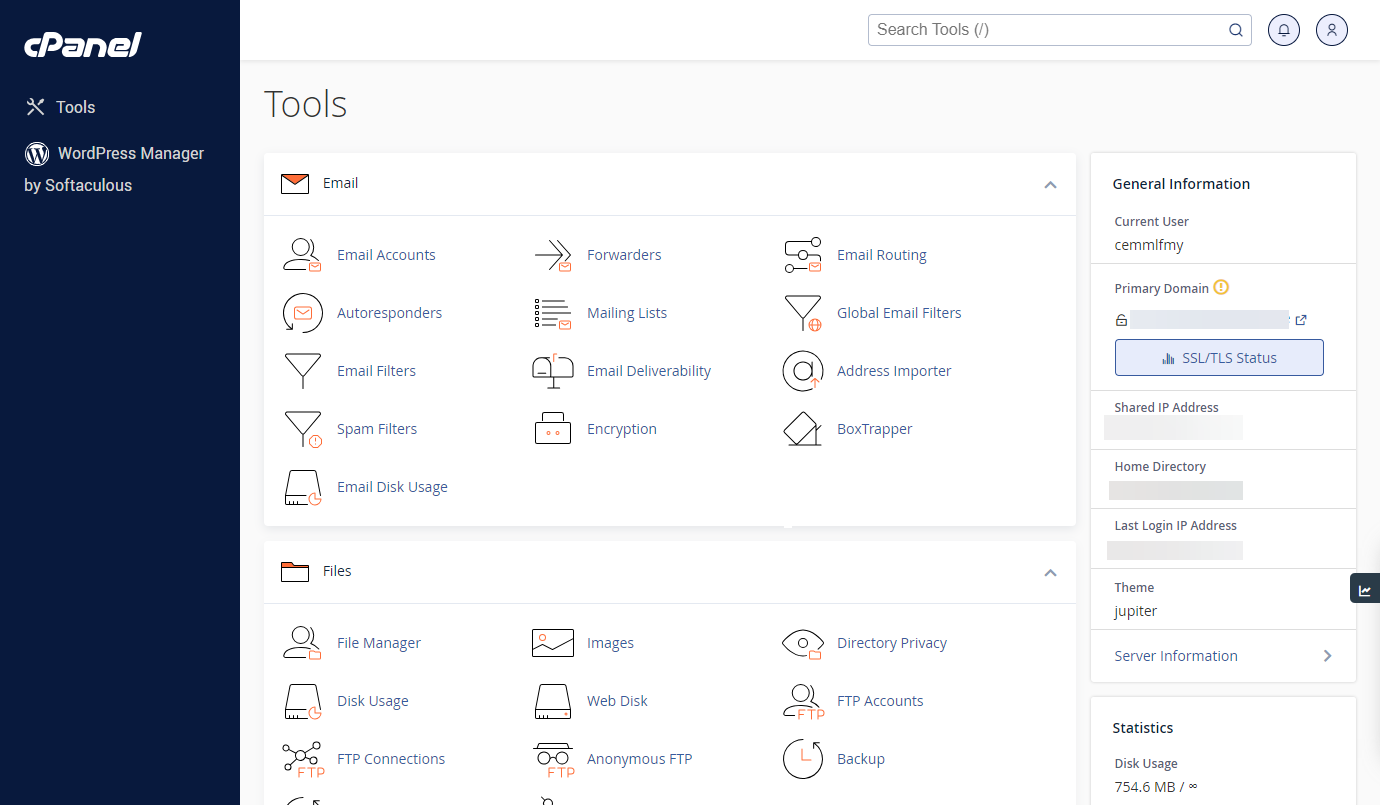
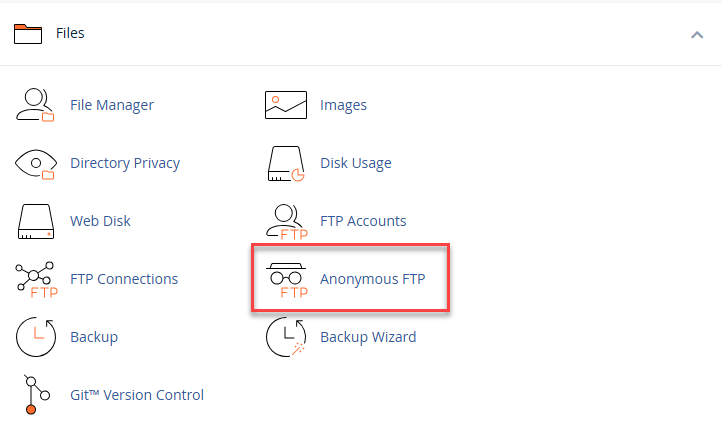
- In the Files section, click Anonymous FTP.
- Under Anonymous FTP Controls, uncheck the following options:
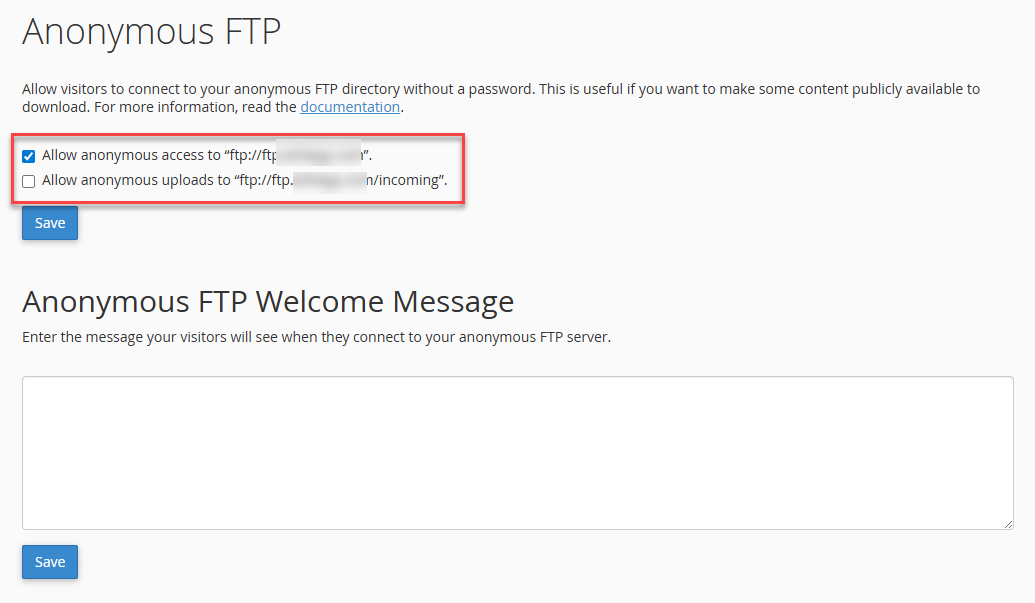
- Allow anonymous access
- Allow anonymous uploads
- Click Save.
Once saved, anonymous FTP access will be disabled on your account.
What Happens After Disabling Anonymous FTP?
After disabling anonymous FTP:
- Users will no longer be able to access your FTP server without credentials.
- Public FTP access is removed.
- Your server becomes more secure.
You may still see default anonymous FTP entries in your control panel, but they will no longer be active.
When Should You Use Anonymous FTP?
Anonymous FTP is rarely needed for most websites. It may only be useful if:
- You are hosting public download files.
- You intentionally want open access to specific directories.
Even in these cases, it is recommended to carefully manage permissions and monitor activity.
Summary
To Disable Anonymous FTP on Bluehost, access your control panel and turn off anonymous access in the FTP settings. This prevents unauthorized users from accessing your server and helps improve overall security. Keeping anonymous FTP disabled is a recommended best practice for protecting your website and hosting environment.
If you need further assistance, Bluehost Chat Support is available 24 hours a day, 7days a week while Bluehost Phone Support is available 7 days a week from 7 am-12 midnight EST.
- Chat Support - While on our website, you should see a CHAT bubble in the bottom right-hand corner of the page. Click anywhere on the bubble to begin a chat session.
- Phone Support -
- US: 888-401-4678
- International: +1 801-765-9400
You may also refer to our Knowledge Base articles to help answer common questions and guide you through various setup, configuration, and troubleshooting steps.