 ChatGPT,
  Claude,
  Gemini,
  Grok — all four for
Purchase a Self-Managed VPS with Hermes Agent Installation
Hermes Agent is a smart assistant that learns and grows with you. Unlike basic AI, which forgets every time you close the app, Hermes remembers your projects and builds its own library of skills to work faster. Since it stays active in the background and works across apps like Telegram, it can handle long-term tasks for you even when you're busy or away from your desk.
To get the most out of Hermes Agent, consider a Self-Managed VPS hosting plan for better control and performance.
This article covers why Hermes Agent is important, its common uses, and how to purchase and set up VPS hosting for it.
Why Use Hermes Agent?
Hermes Agent is more like a digital worker than a simple chat box because it learns from everything it does. Instead of forgetting your past conversations, it saves what it learns as new skills, making it smarter and faster the next time you ask for help. Since it works across apps like Telegram and Discord, you can give it a big project and let it work in the background even when you aren't at your computer. It can use many different AI models, giving you the freedom to pick the best one for your job while it keeps track of all the details for you.
Uses of Hermes Agent
Hermes Agent’s capabilities span across several domains of autonomous productivity and digital management:
- Self-Iterative Learning: Automatically create, save, and refine "Skill Files" from successful tasks to improve performance on future requests.
- Persistent Research: Conduct deep-dive investigations and monitor data sources 24/7, providing real-time updates via Telegram, Slack, or Discord.
- Project Memory Management: Recall specific context, user preferences, and historical data across different sessions and devices.
- Autonomous Coding and DevOps: Execute terminal commands, patch files, and manage deployments within secure sandboxed environments or remote servers.
- Omnichannel Communication: Manage emails and messaging threads autonomously, acting as a high-level filter and responder for your digital life.
- Cross-Model Orchestration: Swap between hundreds of different LLMs to balance cost and reasoning power depending on the complexity of the task.
The platform’s self-evolving nature and persistent presence make it the ideal solution for users looking to transition from basic AI prompting to a fully integrated, autonomous digital workforce.
How to Purchase Self-Managed VPS with Hermes Agent Installation
To get started with Hermes Agent on Bluehost, you first need to purchase a Self-Managed VPS plan. Follow the steps below:

New to VPS or not sure where to start? No worries! At the top of the Self-Managed VPS purchase page, you’ll see the Pre-configured Setup section. This handy feature is perfect if you’re feeling a bit unsure—just pick the type of project you want, like WordPress Site, AI Agent/Claude Code, Dev/Staging, or eCommerce Store. We’ll take care of the rest by automatically filling in the best plan, operating system, and template for you.
- Super simple for beginners or anyone who just wants a quick setup
- Instantly get the recommended settings for your project
- Skip the guesswork and save time
- You can still customize things later if you want
- In your browser, go to https://www.bluehost.com/vps-hosting.
- Click the Choose Plan button under your preferred VPS hosting plan.
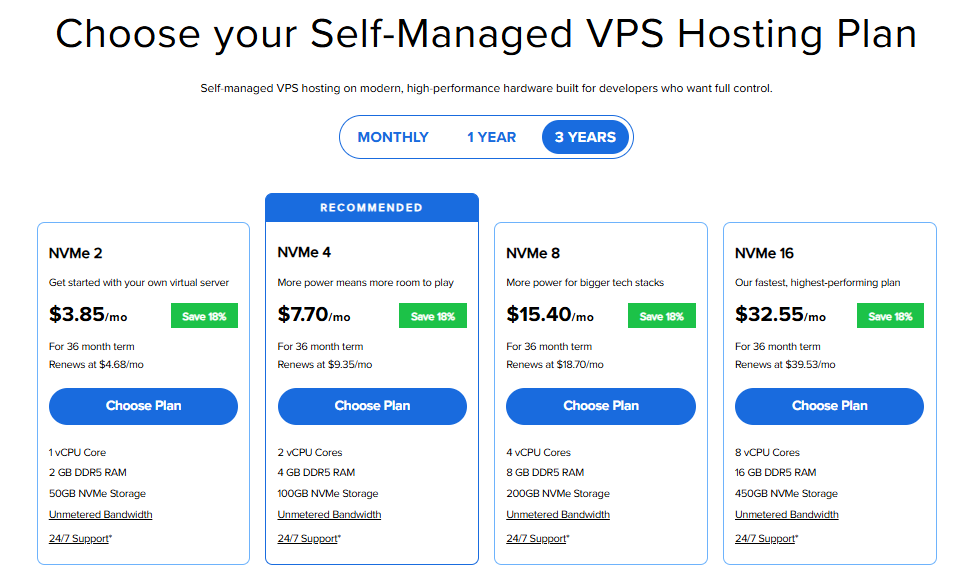
Important: Pricing is subject to change—please visit https://www.bluehost.com/vps-hosting for the current introductory/sign-up offer for Bluehost VPS Hosting. For the most up-to-date renewal pricing, visit your Bluehost Portal Renewal Center.
- Select your preferred Data Center location.

- On the Cart page, you can configure your server to fit your needs in the following section:
- Hardware:
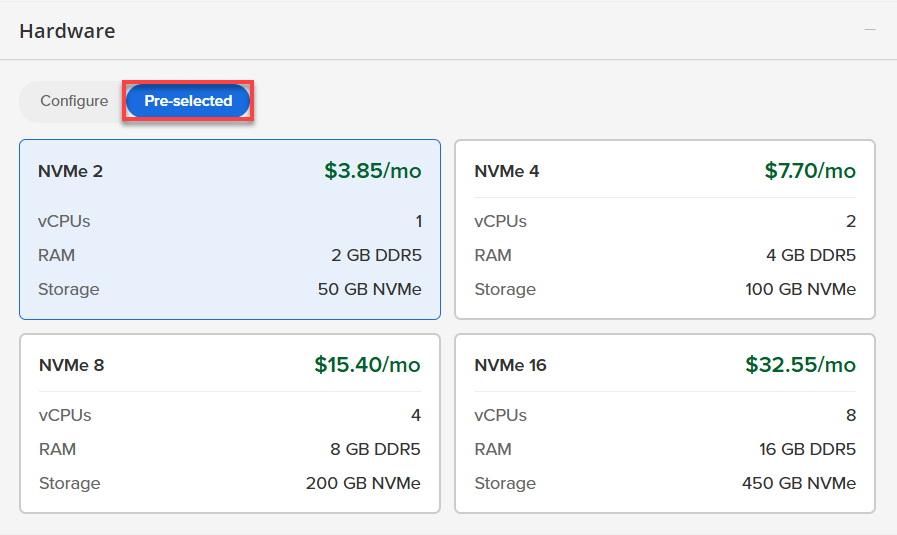
- Pre-selected:
You can select a different Self-Managed VPS plan in this section.
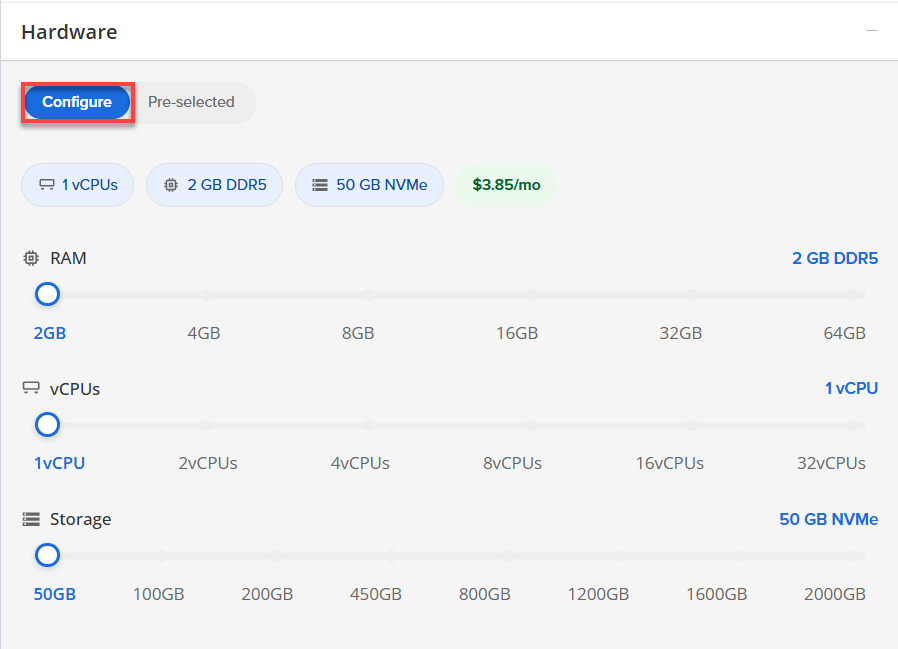
- Configure:
Click Configure to customize your package.
Note that your changes help customize your plan, and the overall cost will adjust accordingly to fit your needs.
- Pre-selected:
- Software:
If the selected plan does not meet the app's minimum requirements, the app will be grayed out.
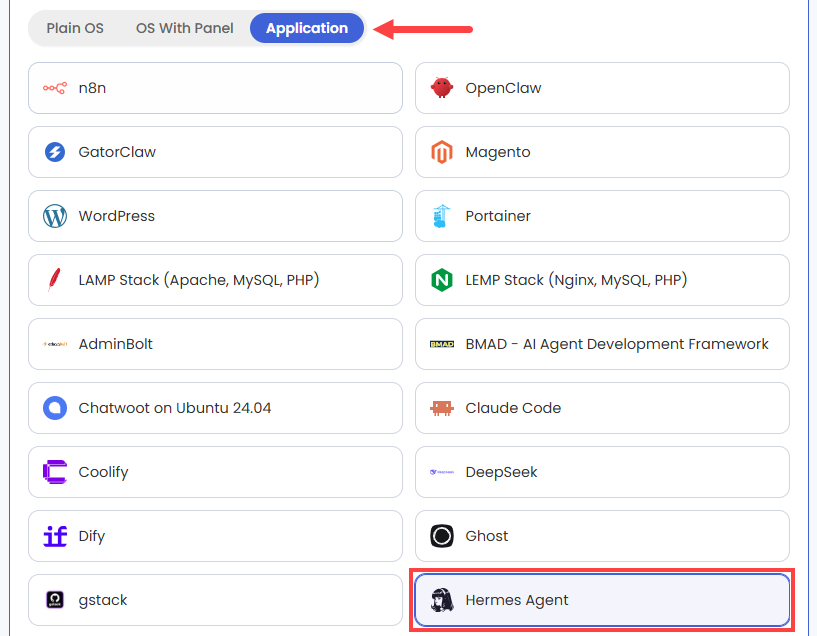
- Click the Application tab.
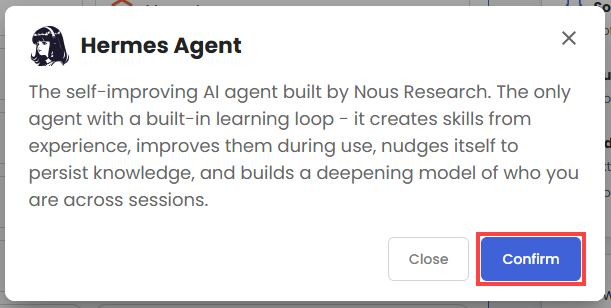
- Select Hermes Agent.
- In the pop-up, click Confirm.
- Hardware:
- Add-Ons: You can add Premium Support here, which gives you priority access to expert assistance and faster response times.

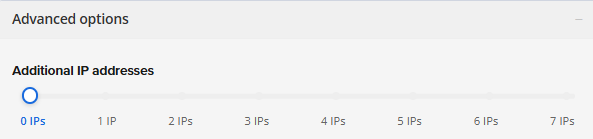
- In the Advanced options:
- Extra IP's: You can add extra IP addresses for an additional fee.
Pricing changes based on how many IPs you add. - Hostname: Assign a custom hostname to easily identify your server. This is optional.
- Extra IP's: You can add extra IP addresses for an additional fee.
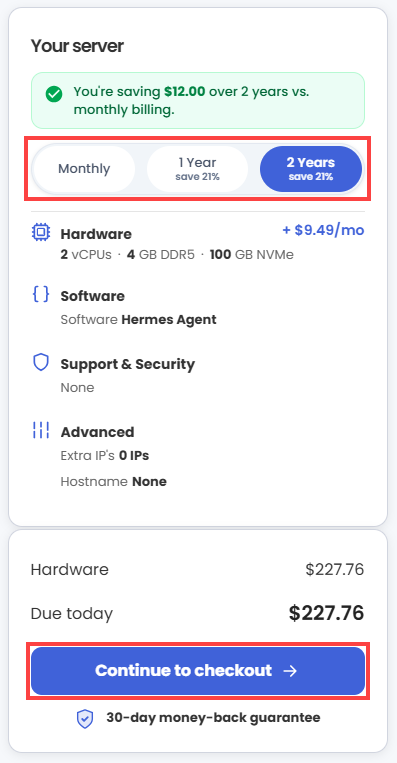
- Next, select your preferred billing term and review your Order Summary, then click Continue to Checkout.
- Do the following on the Checkout page:
If you're new with Bluehost:
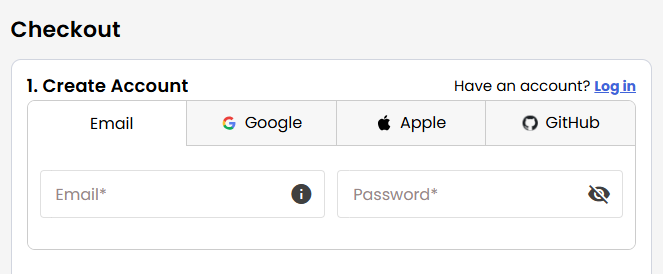
- Create your Bluehost account by using your email address or by connecting with your Google, Apple, or GitHub account — whichever you prefer!
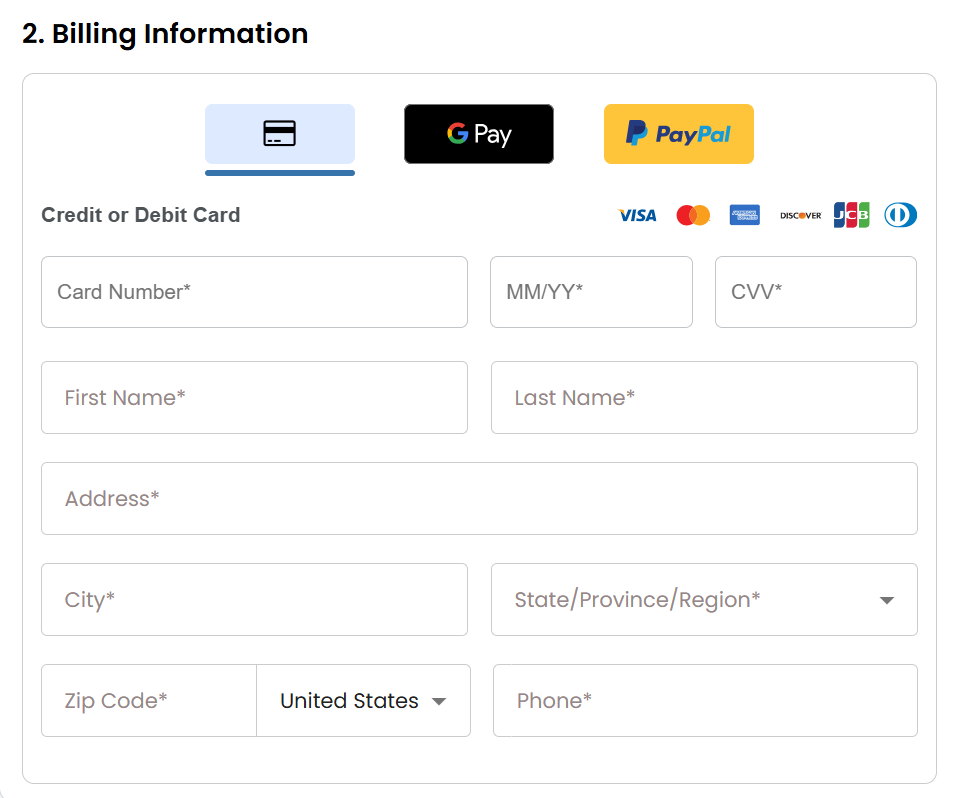
- Select your preferred payment method: credit card, Google Pay, or PayPal. Enter your billing information.
If you have an account with us, you will see your Bluehost login details when you are logged into your Bluehost Portal. If you are not logged in, please click the Log In link.
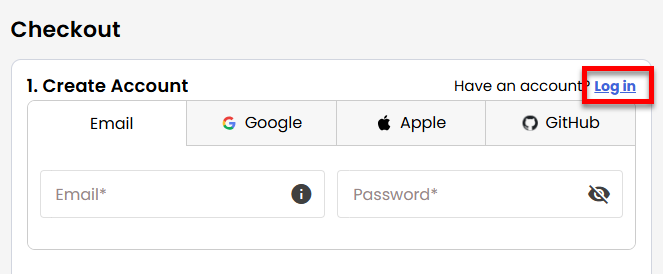
- Create your Bluehost account by using your email address or by connecting with your Google, Apple, or GitHub account — whichever you prefer!
- In the Shopping Cart section, you can still adjust your billing term if needed.
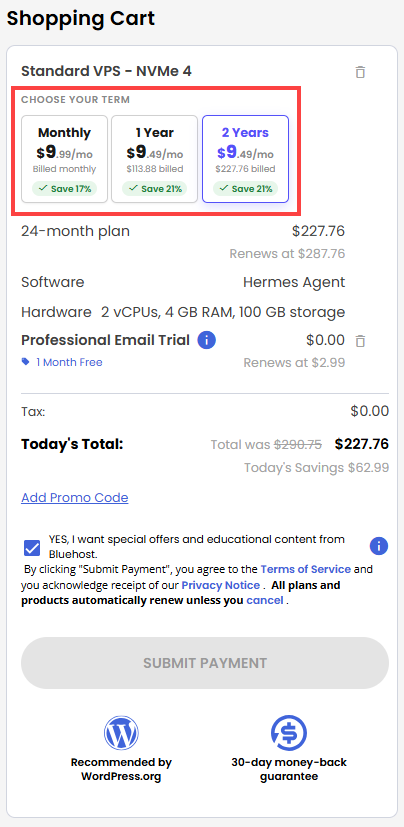
- Review the items in your cart, add a Promo Code if you have one, and then click Submit Payment to complete the purchase.
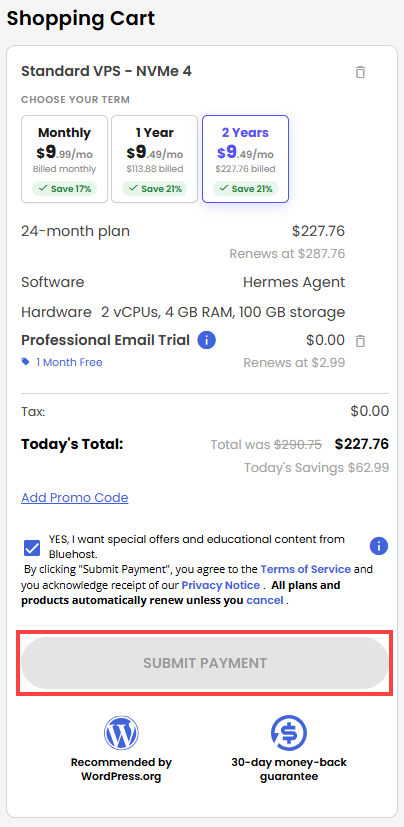
After completing the purchase, your VPS hosting will begin provisioning. You can access and manage your new VPS hosting in the Hosting tab of your Bluehost Portal.
How to Set Up Hermes Agent
After installation completes:
- Log in to your Bluehost Portal.
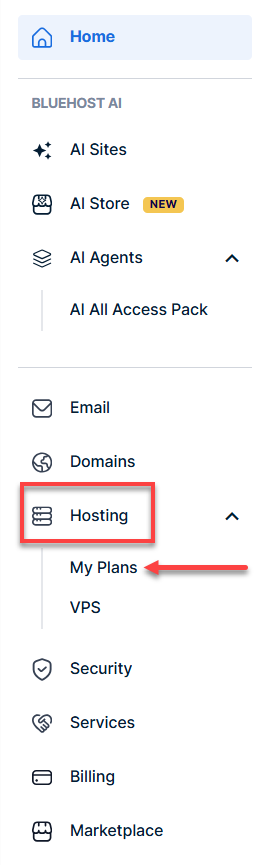
- In the left-hand menu, click Hosting, then select My Plans.
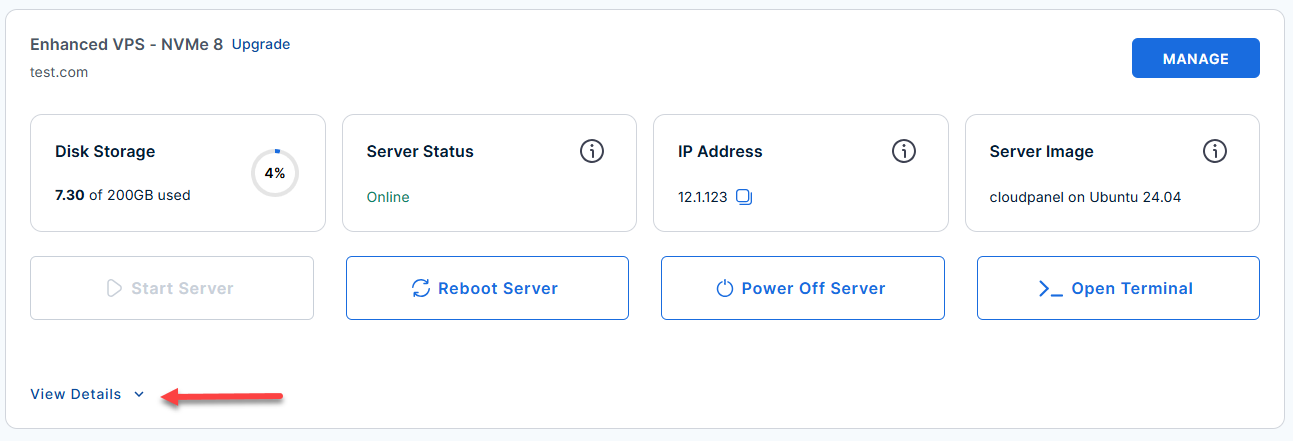
- Locate the server you want to manage, then click View Details in the bottom-left corner to expand the section and access additional server information.
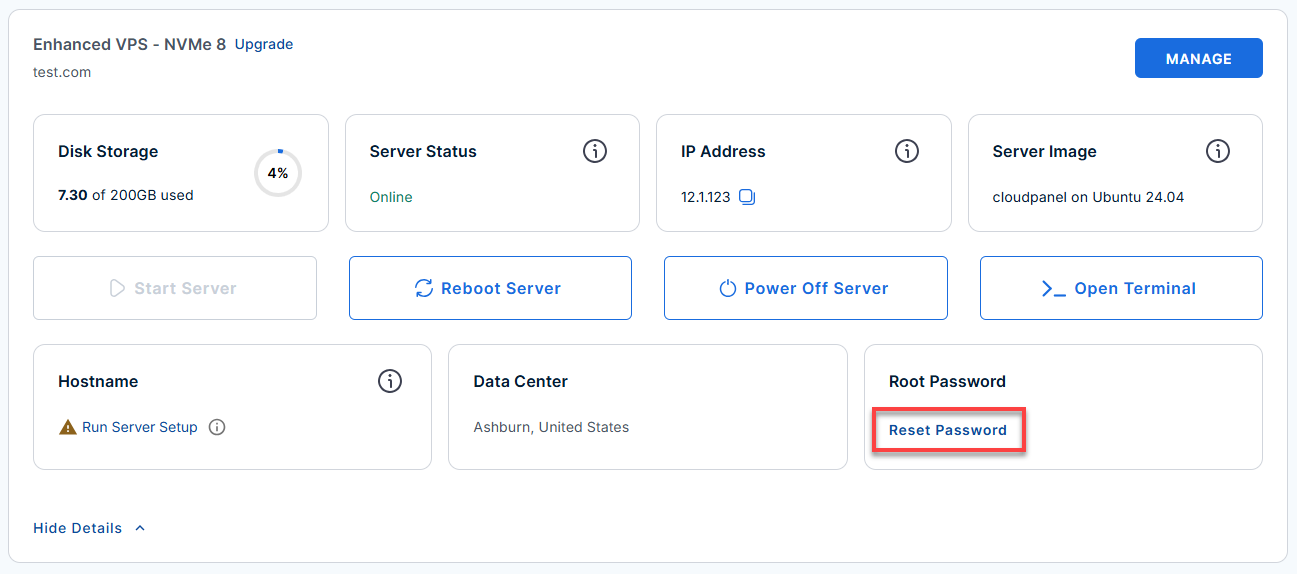
- Click the Reset Password.
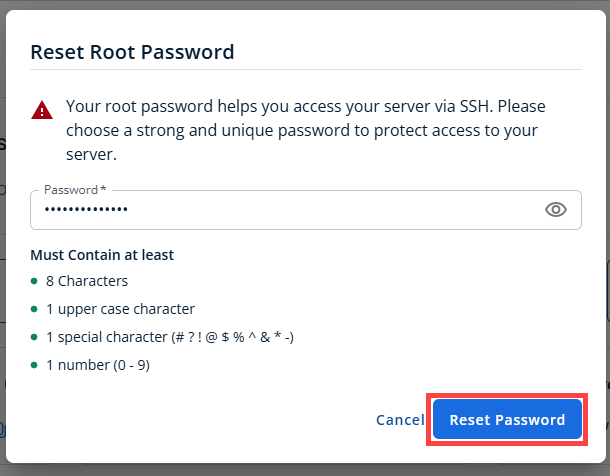
- In the pop-up window, type your new root password, then click Reset Password again to confirm and save the changes.
- Log in to your server via SSH.
Use your VPS IP and credentials with an SSH client, follow the prompts, and enter your root password when asked:Replaceyour_server_ipwith your actual server IP address.ssh root@your_server_ipExample Output:
Welcome to Ubuntu 24.04.4 LTS (GNU/Linux 6.8.0-111-generic x86_64) ******************************************************************************** Hermes is running on this server. The UFW firewall is enabled. All ports are BLOCKED except 22 (SSH) How To Use Log in to your server and type hermes to get started. To ensure the most up-to-date experience update Hermes before starting the setup process. hermes update hermes setup For more details please see /root/README.md To delete this message of the day: rm -rf /etc/update-motd.d/99-hermes ******************************************************************************** - Update Hermes Agent for the latest features:
hermes update
Example Output:
root@server-123456:~# hermes update ⚕ Updating Hermes Agent... → Fetching updates... ✓ Code updated! → Syncing bundled skills... ✓ Update complete! Tip: You can now select a provider and model: hermes model # Select provider and model - Start the Hermes Agent setup wizard:
hermes setup
You’ll see a setup menu (navigate with arrow keys):
How would you like to set up Hermes? ↑↓ navigate ENTER/SPACE select ESC cancel → (●) Quick Setup (Nous Portal) — free OAuth login, no API keys, model + tools (recommended) (○) Full setup — configure every provider, tool & option yourself (bring your own keys)- Quick Setup: Recommended for most users (uses OAuth, no API keys needed).
- Full Setup: For advanced users who want to bring their own API keys and configure every provider/tool.
- If you select Quick Setup:
- You’ll be prompted to log in via your browser. Open the provided link, and if prompted, enter the code shown.
┌─────────────────────────────────────────────────────────┐ │ ⚕ Hermes Agent Setup Wizard │ ├─────────────────────────────────────────────────────────┤ │ Let's configure your Hermes Agent installation. │ │ Press Ctrl+C at any time to exit. │ └─────────────────────────────────────────────────────────┘ ◆ Nous Portal One subscription, 300+ models, plus the Tool Gateway: web search, image generation, TTS, browser automation. Sign up: https://portal.nousresearch.com/manage-subscription Not logged into Nous Portal. Starting login... Starting Hermes login via Nous Portal... Portal: https://portal.nousresearch.com To continue: 1. Open: https://portal.nousresearch.com/manage-subscription?user_code=VYWR-6QX5 2. If prompted, enter code: VYWR-6QX5 Waiting for approval (polling every 1s)... - After you approve login in your browser, your terminal will show confirmation and link your Hermes Agent to Nous Portal:
    ✓ Login approved!
    ✓ Connected as [email protected]
    ✓ Hermes Agent is ready to use.
- You’ll be prompted to log in via your browser. Open the provided link, and if prompted, enter the code shown.
- Start Hermes Agent when setup is complete:
hermes
Example Output:
    root@server-123456:~# hermes

    Welcome to Hermes Agent TUI (Terminal User Interface)
    ─────────────────────────────────────────────────────

    Type 'help' or use arrow keys for navigation.
    Select an action:

    → Run a skill         (browse and execute available skills)
      Manage models       (select or switch AI providers)
      Project memory      (review/recall agent insights)
      Messages            (send/reply to Telegram, Discord, etc.)
      Shell/DevOps        (terminal automation and scripting)
      Settings            (view or edit configuration)
      Update Agent        (self-update and skill sync)
      Exit

    Agent is ready. Press 'q' to quit.
or view help:
hermes helpExample Output:
    root@server-123456:~# hermes help

    Hermes Agent CLI - Command Reference
    ────────────────────────────────────

    Usage:
      hermes [command]

    Available commands:

      setup       Start the Hermes Agent setup wizard
      update      Update the Hermes Agent software/skills
      tui         Start the interactive Terminal UI (default for 'hermes')
      model       Select AI model/provider
      skill       List or run installed skills
      memory      Access agent memory and context
      shell       Run shell/DevOps commands with Hermes
      help        Show this help

    For the full user guide, visit:
    https://hermes-agent.nousresearch.com/docs/user-guide/
Additional Information and Example Documentation Output
For advanced configuration, usage instructions, and details about skills or integrations, review the Hermes Agent documentation by running:
Example Output:
    root@server-123456:~# cat /root/README.md
    # Hermes Agent

    ## Description

    The self-improving AI agent built by Nous Research. The only agent with a
    built-in learning loop - it creates skills from experience, improves them
    during use, nudges itself to persist knowledge, and builds a deepening
    model of who you are across sessions.

    ## Services

    Service | Ports | Purpose
    --------|-------|---------
    OpenSSH | 22    | SSH

    ## How-to-use

    Log in to your server and type `hermes` to get started. To ensure the most up-to-date experience update Hermes before starting the setup process.

    hermes update
    hermes setup

    ## Links

    Using Hermes CLI Interface: https://hermes-agent.nousresearch.com/docs/user-guide/cli

    Using Hermes TUI Interface: https://hermes-agent.nousresearch.com/docs/user-guide/tui
Summary
Hermes Agent transforms your Bluehost Self-Managed VPS into a powerful, always-on digital assistant. With secure, easy setup and OAuth login via the Nous Portal, you get instant access to hundreds of AI models, deep tool integrations, and persistent skill-building for continuous productivity. By following this guide, you’ll be able to install, update, and configure Hermes Agent for the most advanced autonomous workflows—whether you’re coding, researching, or automating everyday tasks.