 ChatGPT,
 Claude,
 Gemini,
 Grok — all four for
Key highlights
- Learn how to build a WordPress website with AI by generating three custom site versions in minutes.
- Understand how the Bluehost WordPress AI Builder assists with ongoing site updates instead of only generating a static first draft.
- Explore design features that simplify the website creation process for non-technical users.
- Uncover methods to customize your layout and content to match your brand identity.
- Know how to use integrated tools to prepare your new site for search engines and visitors.
AI is rapidly changing the web development industry. With tools like WordPress AI website builders, it’s easier and faster for anyone to create a professional website without technical skills. In fact, the global market for WordPress AI in web development is expected to grow substantially in the coming years, as more people seek a faster, more efficient way to build a WordPress website using AI.
So, how does Bluehost WordPress AI Builder stand out in this competitive space? Designed specifically for WordPress users, the builder streamlines the entire process, giving you a custom-built site with just a few clicks.
Why spend hours tweaking designs and searching for the perfect layout when you can build a WordPress website with AI?
Finally, if you’re wondering how to build a website with Bluehost, let’s dive into how Bluehost WordPress AI Builder can help you create WordPress websites in record time, with professional results.
Let’s get started!
What is a WordPress AI builder? How can you build a WordPress website with AI?
WordPress AI builder is a tool that uses artificial intelligence to automate website creation for busy small business owners, content creators and web professionals. It analyzes your inputs like business type, goals and preferences to generate complete site layouts, designs and content suggestions in minutes instead of hours.
AI reduces setup friction by eliminating the most time-consuming decisions when you build a website with AI. Instead of manually selecting themes, arranging page layouts or writing starter copy from scratch, the AI website generator proposes structured site designs based on your specific needs. This means you skip the overwhelming “blank canvas” problem and start with a professional foundation tailored to your industry and audience.
The AI typically handles initial site structure, page layout suggestions, design element placement and starter content outlines. However, you maintain full control over your WordPress site after setup. You can edit pages, swap themes, install plugins, customize content and access the complete WordPress dashboard. WordPress AI builder tool simply accelerates the launch process while preserving your ability to personalize every aspect of your site as your needs evolve.
Also read: AI in web development: How AI is transforming the industry
What is Bluehost WordPress AI Builder?
Bluehost WordPress AI Builder is an all-in-one tool that helps you build a professional WordPress website using AI quickly and without any technical skills. Acting as a complete AI WordPress site creator, the builder automates everything from design layout to content creation, making it easier than ever for beginners and professionals to launch a website.
Our WordPress AI Builder integrates seamlessly with WordPress, offering a user-friendly interface that eliminates the need for coding while still providing powerful customization options. With features like intelligent templates, AI-generated layouts and personalized design suggestions, you can easily build a WordPress site with AI in minutes.
Whether you’re searching for an AI website builder for WordPress, exploring AI website design tools or looking to streamline your WordPress setup, Bluehost WordPress AI Builder ensures your site looks polished, loads fast and remains easy to manage.
Also read: How to Use AI to Create an Online Store Within a Few Minutes
Why the Bluehost WordPress AI Builder matters?
1. WordPress ownership and editability
When you choose to build a WordPress website with AI, you need a system that creates a standard self-hosted site rather than a locked, proprietary layout. Bluehost provides complete access to the WordPress dashboard, themes, plugins and native configuration settings.
Platform ownership ensures that you control your files, database and administrative choices. You can install third-party software, access files via SFTP and export your entire database at any time. If your business requirements change, you can migrate your files to another hosting provider without rebuilding the layout. This portability simplifies scaling your operations, adding eCommerce features and implementing custom code.
2. Hosting performance and uptime for AI-built sites
Every design generated by artificial intelligence requires reliable hosting to achieve fast page loading and high availability. Substandard infrastructure increases page latency, which causes visitors to leave your pages and reduces your search visibility regardless of how well your layout is designed.
Server speed influences your user experience and SEO rankings. Search engines prioritize fast pages, while audiences routinely abandon pages that load slower than three seconds. Optimized hosting configurations with high uptime metrics keep your website accessible and performant during traffic spikes.
Before publishing your site, verify that your host provides the following technical features:
- A Content Delivery Network (CDN) to accelerate asset delivery globally
- Server-side caching configurations to decrease server response times
- Automated daily backups to safeguard website databases and files
- A Free SSL certificate to encrypt connections and secure user data
These integrated utilities ensure your system remains stable, secure and optimized for search engine crawlers without manual configuration.
What to look for before you choose WordPress AI builder?
Not all AI website builders create true WordPress sites, and this distinction matters for your long-term success. WordPress-native integration ensures your site remains:
- Fully maintainable through the standard WordPress dashboard
- Works seamlessly with essential SEO plugins like Yoast SEO
- Supports future redesigns without rebuilding from scratch.
A genuine WordPress AI builder delivers a real WordPress site you control completely, not a proprietary platform that limits your options later.
Before selecting an AI builder for WordPress, evaluate these essential factors:
- Editability in WP Admin: Confirm full access to the WordPress editor, page management and unlimited plugin installation.
- Theme and plugin compatibility: Verify the site works with popular WordPress themes and extensions without restrictions.
- Hosting performance: Check for WordPress-optimized infrastructure including CDN, caching, SSL certificates and automatic backups.
- Security measures: Look for malware scanning, firewall protection and proactive monitoring built into the platform.
- Expert support: Ensure access to WordPress-specific troubleshooting help and scaling guidance when you need it
WordPress-native AI builders deliver the optimal balance of automated setup speed and long-term flexibility, making them ideal for businesses planning to grow their online presence.
Key features of the Bluehost WordPress AI Builder
The Bluehost WordPress AI Builder provides a structured onboarding experience to help you build a WordPress website with AI. Included with WordPress hosting plans, this tool is designed for users who specifically want WordPress as their content management system and seek an easier setup flow.
1. Curated website previews and templates
To begin, you answer a few questions about your project goals. The builder then generates three curated website previews for you to choose from. This custom starting point helps you set up a blog, portfolio or business site with a layout tailored to your needs.
2. Customizable layouts and branding options
You can adjust layouts, color palettes, typography and page sections to match your brand. The builder provides structured customization options that guide you through the design process while leaving you in full control of the final look.
3. Guided onboarding and content structure
The guided onboarding experience offers content outlines, page structure suggestions and layout recommendations to help organize your site. These structured prompts help reduce the initial learning curve associated with WordPress setup.
4. Direct integration with the WordPress admin
The builder saves your progress directly to the WordPress admin. This allows you to easily access standard WordPress themes, plugins and settings for further editing and long-term site management.
5. Simple block-based editing
You can further customize your website using block-based editing within the native WordPress editor. This allows you to rearrange sections, add media elements and refine layouts without requiring programming skills.
Benefits of using Bluehost WordPress AI Builder
Our Bluehost WordPress AI Builder provides a faster, simpler and more guided path to creating a professional WordPress site. These key benefits make our builder a valuable choice for your website creation journey:
- Time-saving: Our builder speeds up website creation, helping you launch a functional WordPress site in minutes. Instead of spending hours on layout decisions, you can publish your site quickly and focus on your business goals.
- Simplicity for beginners: Our guided setup and clear interface help you create a WordPress website without technical experience. We remove the usual complexity of starting a site, making it accessible from your first click.
- Professional design without coding: You can build a polished website without writing code. Our builder provides clean layouts, modern designs and organized page structures to ensure your site looks professional.
- Customizable yet automated: Although we automate much of the setup, you retain full freedom to personalize your pages. You can adjust colors, swap images, update text and refine layouts to reflect your brand.
- A balanced website-building experience: By combining speed and flexibility, our builder offers a structured way to build a WordPress website using AI tools backed by our trusted hosting platform.
Also read: How to Create a Website: A Beginner’s Guide for 2026
Pros
- Faster launch: Our AI generates a complete site structure in minutes, which eliminates hours of manual setup and helps you go live quickly.
- Guided structure: Pre-built page layouts and content frameworks remove guesswork, giving you a professional foundation that follows proven design patterns.
- Fewer decisions: Our onboarding flow narrows design and layout choices to three curated previews, reducing decision fatigue.
- Easier iteration: Testing different layouts is fast because our AI provides multiple versions you can preview and switch between.
- Consistent layouts: We apply design principles uniformly across pages, ensuring visual cohesion and brand consistency without manual alignment work.
Cons
- Required hosting purchase: You must purchase our hosting plan first before you can build your website, rather than starting with a free trial.
- WordPress learning curve: Although we simplify the setup process, users still edit within the WordPress admin dashboard, which may require some familiarity with the platform.
- Pre-determined layout choices: The builder generates three curated website previews to choose from, which offers less initial variety than fully conversational AI tools.
Bonus: For users looking for a more conversational approach to website creation, we also offer Bluehost AI Website Builder, powered by Agentic AI. While Bluehost WordPress AI Builder provides a guided WordPress-first experience, Bluehost AI Website Builder helps users generate, customize and publish websites through natural language prompts. Both solutions are designed to simplify website creation while supporting different user preferences and workflows.
Pros and cons of building a WordPress website with AI
When you build a WordPress website with AI, you reduce the initial setup time. AI website builders generate layouts, structures and starter content in minutes, which eliminates the initial blank-page phase. However, automated platforms require manual customization to match your specific brand voice, adjust design layouts and meet legal or accessibility standards.
An AI-driven approach works well for blogs, portfolios, standard eCommerce stores and small business sites that rely on common design patterns. If your business model requires complex user workflows, proprietary features or custom integrations with internal databases, traditional development remains necessary to ensure complete technical control and platform scalability.
| Pros | Cons |
|---|---|
| Generates functional layouts, structures and initial content in minutes | Requires manual editing to align with unique brand guidelines and voice |
| Handles repetitive setup tasks, allowing immediate launch for standard business sites | Demands traditional development for complex workflows or custom database integrations |
| Provides an affordable foundation for blogs, portfolios and standard eCommerce stores | Requires human review to ensure compliance with accessibility and legal standards |
Step-by-step guide to building a WP website with Bluehost WordPress AI builder
After you’ve bought a web hosting plan from Bluehost, you’re ready to create an amazing website using the WordPress AI website builder.
Follow the steps below to get your site up and running.
Step 1: Sign up for a Bluehost plan
To get started, you’ll need a Bluehost hosting plan that includes access to the Bluehost WordPress AI Builder. Head over to our website and select a plan that fits your needs. Once you sign up, you’ll gain access to the WordPress AI Builder along with your hosting package.
- Visit the Bluehost website: Click here to get started.
- Select a plan: Choose from one of the WordPress hosting plans. For most users, the Starter plan offers all the essential features. However, if you need more resources or additional tools, you can upgrade to higher plans.
- Choose a domain: You can either register a new domain or use your own domain during this step. With Bluehost hosting plan you get a free domain for the first year.
- Complete registration: Once you’ve selected your plan, complete the registration process and you’re ready to begin.
Also read: How to Check if a Domain Name is Available: Quick Steps
Step 2: Access the Bluehost WordPress AI Builder
After signing up, log in to your Bluehost dashboard. From there, you’ll find the option to start building your WordPress website using AI site builder. Click on the “Add Site” button to begin the process.
Step 3: Start the initial website setup process
Choose ‘AI website creator’ and then, click on Get Started. Here, you can add a short description explaining the type of website you want to create. For example, whether you want to create an online store or a personal blog.
Step 4: Connect a Facebook account
To include details from Facebook, simply connect your account by clicking the ‘Connect Facebook’ button. This allows our WordPress AI Builder to gather more information about your website, improving its accuracy.
If you don’t have an official Facebook page for your website, you can simply click the ‘Skip for Now’ button and proceed to the next step.
Step 5: Upload your website logo
After adding your site’s description, add your website logo. To create a logo for your website, you can use an image generation tool like Canva. This website comes with multiple templates and designs that you can choose from and create any kind of graphic you want within minutes.
- Keep the design unique, simple and readable.
- Ensure the logo is relatable to your brand.
- Consider using your business initials for the logo.
- A simple and catchy design aids brand recognition and recall.
To upload your brand’s logo, you can either drag and drop the image in the box or click on the ‘browse’ button to select an image from your local drive.
Next, select your WordPress experience level. Bluehost WordPress AI Builder will prepare three versions of your website based on your expertise.
Step 6: Select the AI-generated website version
Bluehost WordPress AI Builder generates three unique versions of your site. To view a full preview of each version, simply click the ‘Preview’ button.
And if you want to see more website versions, click on the ‘Regenerate’ button.
Step 7: Customize your WordPress website layout and pages
After you’ve opened your website’s Preview version, click on the ‘Customize’ button in the top-right corner.
You can customize the template colors by choosing from the available options or creating your own combination by selecting ‘Pick your own colors.’
Similarly, you can adjust the website fonts using the preset options or by clicking ‘Select your own fonts.’ Once you’re done, click ‘Save & Continue’ to apply the changes.
Step 8: Edit your pages with Block Editor
To edit your site with WordPress, go to the Bluehost dashboard from the WordPress admin panel.
Then, click on ‘Preview your site’ and then, ‘Edit page’.
At the top-left corner of the page, you can find option to edit. Clicking on it will take you to various custom blocks that you can choose from or you can opt to use a pre-designed page.
If you want, you can also modify the existing text or images to make the page more personalized according to your needs.
Step 9: Publish your website and manage it in WordPress
Once you’re satisfied with the customization, it’s time to publish and manage your website:
Before going live, review your site for any final tweaks or adjustments. Double-check content, images and layout. Once everything looks good, hit the publish button. Your WordPress site is now live!
Also read: Mastering WordPress SEO: Essential Tips for Optimal Site Performance
What types of websites can you build with an AI?
A WordPress AI builder can create virtually any type of WordPress site you need. From small business brochure sites and service landing pages to portfolios, blogs, eCommerce stores and appointment-based booking sites, the builder adapts to your goals and delivers a professional foundation in minutes.
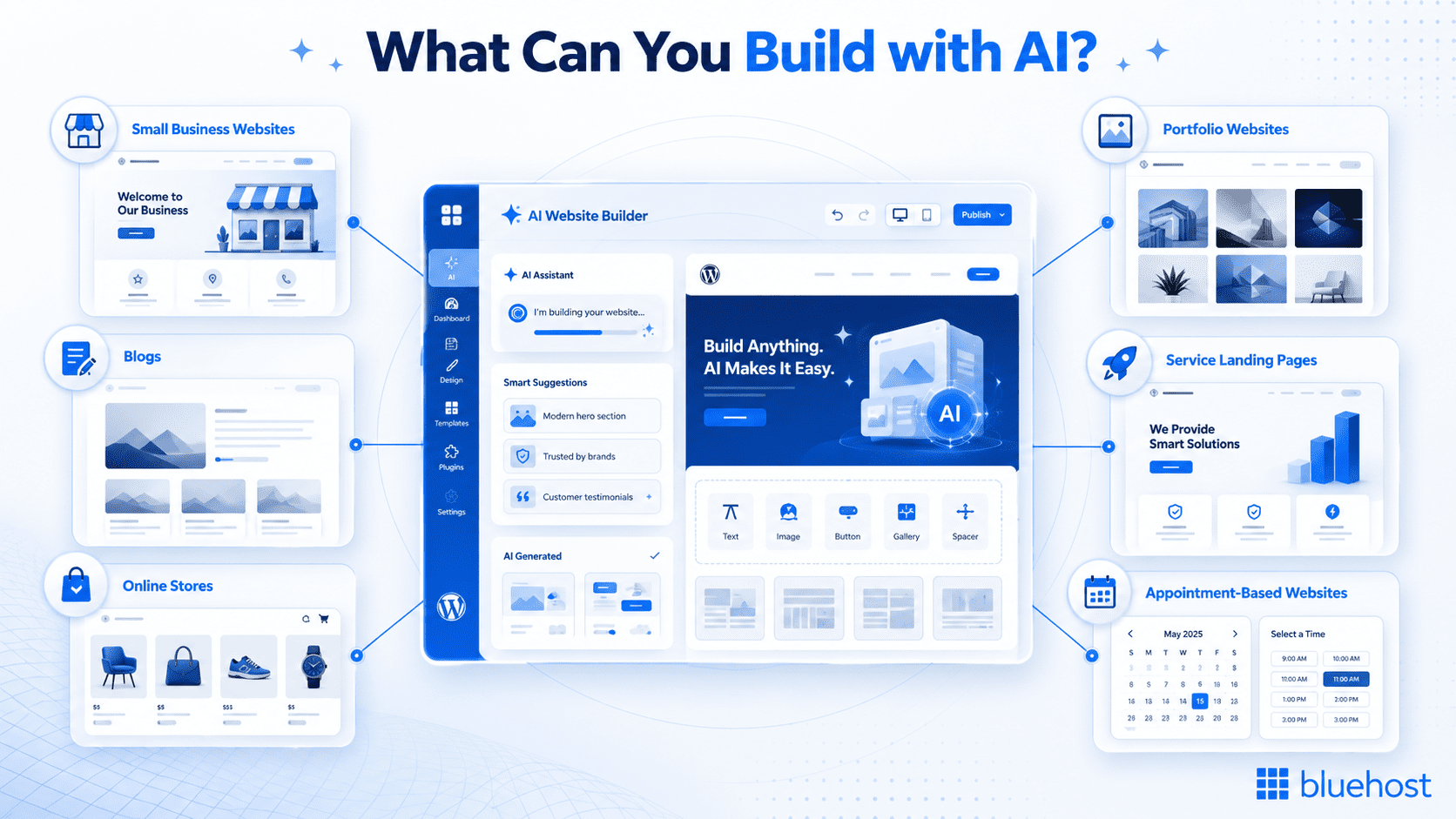
- Small business brochure site: AI quickly generates essential pages like About, Services and Contact with structured layouts, saving you hours of planning and design work.
- Service landing pages: The WordPress AI builder creates focused, conversion-optimized pages that highlight your offerings with clear calls-to-action and professional formatting.
- Portfolio: AI helps you build a visually appealing showcase for your work, automatically organizing project galleries and case studies in a clean, browsable layout.
- Blog: Launch a content-ready blog with AI-generated category structures, post templates and optimized navigation, so you can start publishing immediately.
- eCommerce store with WooCommerce: The WordPress AI builder sets up product pages, shopping cart functionality and checkout flows, streamlining the technical setup so you can focus on adding inventory.
- Appointment or booking site: AI configures service pages, scheduling integrations and contact forms, making it faster to launch a bookable service business online.
Why choose WordPress AI builder over traditional website building?
When building a website, the choice between WordPress AI builder and traditional methods comes down to efficiency and customization. WordPress AI builder streamlines the setup process, reduces technical hassles and helps you launch a polished WordPress website much faster than building everything from scratch.
Here are a few benefits to consider:
1. Efficiency and speed
One of the primary advantages of utilizing AI for website building is its speed. With traditional WordPress website setups, users often spend hours or even days selecting a theme or installing plugins. In contrast, the WordPress AI builder can have a fully functional site live in minutes.
The WordPress AI builder automatically generates layouts, image creation and content suggestions based on your input, streamlining the entire process. This makes it ideal for beginners or business owners who want to quickly build a WordPress website with AI, without sacrificing quality.
2. Cost-effectiveness
Building a website using traditional methods often involves hiring web designers or developers, which can be costly. Bluehost WordPress AI Builder significantly reduce the need for external help.
The tool provides pre-designed templates and content suggestions, eliminating the need for expensive design services. For users with tight budgets, using the WordPress AI builder is a more affordable option that still produces professional results.
3. Quality of output
WordPress AI builder tools have evolved significantly, offering designs that meet modern standards for aesthetics, functionality and responsiveness. These tools utilize best practices in web design, ensuring your WordPress website using AI is visually appealing and optimized for all devices.
Additionally, AI-generated sites incorporate features such as mobile responsiveness and accessibility guidelines, ensuring your website meets professional standards from the outset.
4. Customization options
A common misconception about AI-generated websites is that they may look too “cookie-cutter.” However, this is far from the case with our Bluehost WordPress AI Builder. While the AI provides a foundation, users still have full control over customization. You can tweak layouts, change fonts, adjust color schemes and modify content to make your site unique.
By choosing a WordPress AI site builder, users can enjoy a balance of speed, cost-efficiency and quality without compromising on customization. This makes it a strong alternative to the traditional approach to website building.
Advanced customization options in WordPress after AI setup
Advanced customization options in WordPress, following an AI setup, can enhance your website’s design and functionality. Here are some examples.
1. Using WordPress plugins
After setting up your website using Bluehost WordPress AI Builder, you can further enhance its functionality by integrating.
- eCommerce functionality: Add WooCommerce for a complete website, allowing you to manage products, payments and shipping seamlessly.
- SEO: Plugins like Yoast SEO help you optimize your website for search engines by guiding you through keyword usage, meta tags and sitemap generation.
- Security: Protect your site with plugins like Wordfence or Sucuri to enhance security features such as malware scanning, firewall protection and login security.
With thousands of plugins available, your AI WordPress site builder-created website can be tailored to meet your specific needs, no matter the type of website you’re running.
2. Personalizing design
Although Bluehost WordPress AI Builder provides a strong starting point, you can still customize your site further with WordPress themes and design plugins. AI-generated websites are fully compatible with WordPress’s vast collection of themes, giving you the flexibility to change or refine your website’s appearance beyond the AI’s suggestions.
- Themes: If you want a different look, you can easily switch to any WordPress theme that suits your brand’s style and goals.
- Design plugins: You can use page builders to fine-tune your website’s layout and visual elements. These WordPress AI builder tools offer drag-and-drop interfaces, making it easy to add sections, animations or interactive features.
With WordPress, your AI generated website remains flexible, allowing you to change or enhance its design at any time.
3. Managing content
Ongoing site management is crucial for maintaining performance and keeping your content fresh. Several powerful AI tools now integrate with WordPress to assist with content management, SEO and performance analysis:
- AI content generators: Tools like Jasper or Writesonic can help generate blog posts, high converting landing page copy or social media content, saving you time on content creation.
- AI powered tools for SEO: AI powered tool like Yoast SEO analyze your content and suggest keyword optimizations and structure improvements, helping you rank higher in search engines.
- Performance analysis: Tools like Google’s Lighthouse or SEMrush use AI to assess your site’s performance and provide actionable insights on speed and overall functionality.
Also read: Yoast SEO Free vs Yoast SEO Premium: Which One is Right for You?
Creative ideas and tools for AI website creation
AI website creation opens up new possibilities for both design and functionality. Below are some creative ideas and the tools that can bring them to life:
- Content generation: AI can automate content creation, offering blog posts, product descriptions and more. Copy.ai is an example of a tool that helps generate engaging, SEO-friendly content based on your audience’s needs.
- Voice integration: Voice-based navigation improves accessibility and engagement. Dialogflow is a great tool for integrating conversational AI, allowing users to interact with your site via voice commands.
- User behavior analytics: AI can analyze user interactions and provide valuable insights for enhancing UX. Tools like Hotjar, when combined with AI analytics, help track user behavior and suggest optimizations for an improved user experience.
- Automated SEO optimization: AI can enhance your site’s SEO by analyzing trends and competitor data. Yoast SEO, with AI-based recommendations, helps optimize content for search engines, ensuring higher rankings.
- AI-Powered Chatbots: Adding AI chatbots, such as those offered by Tidio, enhances customer support by answering queries in real-time, improving the user experience and boosting conversions.
Also read: 20 Best AI Content Generators in 2026: Advantages and Disadvantages + Key Features
Comparing DIY website builders and Bluehost WordPress AI Builder
| Feature / factor | DIY website builder | Bluehost WordPress AI Builder |
|---|---|---|
| Ease of use | User-friendly but requires manual setup | Extremely beginner-friendly with guided setup |
| Speed of website creation | Slower, build pages and layouts manually | Much faster, AI generates layouts and page structures instantly |
| Design flexibility | Maximum creative control | High flexibility with AI suggestions and easy editing |
| Content creation | Fully manual | AI provides content outlines and suggestions |
| Technical skills needed | Low to moderate | Minimal, ideal for non-technical users |
| Customization | Highly customizable from scratch | Customizable with automated, ready-made structures |
| Best for | Users wanting full control and custom builds | Users wanting a fast, efficient, professional site with less effort |
Both DIY website builder and the Bluehost WordPress AI Builder offer:
- User-friendly interfaces that require no coding knowledge.
- A selection of pre-designed templates to get started quickly.
- Options to customize website design and content.
Biggest differences
A traditional DIY website builder gives more creative control over your website’s structure and design from the start. This means building a site from scratch can take more time and effort.
In contrast, AI website builders utilize artificial intelligence to automate many of the tasks involved in creating a website. This saves time and resources while offering a guided, beginner-friendly approach.
If you want complete control over every aspect of your website or have highly specific design needs, a DIY builder may be the better choice. However, for those seeking a faster and more efficient way to build a WordPress website with AI, Bluehost WordPress AI Builder is a smart solution.
Final thoughts
Bluehost WordPress AI Builder offers a seamless, efficient way to build a professional WordPress website. With AI handling the heavy lifting, you can quickly launch a site without requiring coding skills. The AI tool’s combination of speed, ease of use and the power to personalize ensures that both beginners and seasoned website owners can create high-quality sites with minimal effort.
Included with Bluehost WordPress hosting, our WordPress AI Builder comes with a range of features designed to simplify website creation, management and growth. Whether you’re building your first website or launching a new project, you get the tools, hosting and support needed to create a strong online presence.
Now is the perfect time to experience the advantages of AI-driven web development. Ready to launch your website quickly and effortlessly?
Get started with Bluehost WordPress hosting today!
FAQs
Absolutely. Bluehost WordPress AI Builder is highly reliable, producing professional, responsive and well-designed websites. Utilizing advanced algorithms, the WordPress website AI generator generates visually appealing sites optimized for both performance and SEO. You still have full control to customize layouts, images and content, ensuring a high-quality final result.
Bluehost WordPress AI Builder stands out by offering seamless WordPress integration with your website. Our WordPress AI Builder provides access to a vast ecosystem of themes, plugins and customization options. Utilize Bluehost WordPress AI Builder such as:
1. WordPress Website Builder Blocks
2. WordPress Website Builder Start / AI Site Creator
3. WordPress Website Builder Help Assistant
4. WordPress Website Builder Cart
5. WordPress Website Builder Theme
These features combined streamline the design process while keeping your site fully editable.
Absolutely. After using Bluehost WordPress AI Builder, you have complete control to personalize your site. You can tweak layouts, adjust colors, update content or use the AI page builder WordPress to fine-tune design elements, ensuring your site reflects your brand perfectly.
No, WordPress itself doesn’t include a built-in AI website builder. However, with Bluehost WordPress AI Builder, you can create a WordPress website using AI, leveraging an AI website design WordPress tool to generate layouts, content and full website structures quickly.
Bluehost WordPress AI Builder features allow you to create eCommerce websites easily. Select eCommerce templates and the AI builder for WordPress will suggest product-related content blocks, layouts and designs to help you launch your online store efficiently.
The Bluehost WordPress AI Builder uses AI powered tools and an intuitive AI assistant to help beginners build their own WordPress site quickly. Our builder generates layouts, content sections and design options similar to the best AI website builders on the market. Even existing websites can be improved using its AI capabilities and automated suggestions.
An AI Site Planner helps map out pages, structure and content using smart AI website generator technology. It works like an AI builder that suggests layouts, branding elements and blocks compatible with the WordPress block editor. This makes it ideal for a small business owner who needs a clear, guided setup.
Yes, Google Cloud hosting can work smoothly with many free AI builder platforms and AI site creator solutions. Backed by Bluehost’s WordPress-optimized hosting, your AI-built site is designed to load fast and stay reliable.
Free AI tools can help you generate ideas, plan layouts and enhance existing websites. While they may not match the full AI capabilities of premium options, they are useful for quick drafts or design refreshes. For advanced image editing features or deeper customization, a more robustAI builder is recommended.
A free AI WordPress builder is helpful for a small business owner who needs fast, guided website creation without coding. These tools offer AI-powered templates, basic AI assistant features and quick-start designs that save time. As the business grows, upgrading to a platform with advanced AI capabilities becomes beneficial.

Write A Comment