 ChatGPT,
 Claude,
 Gemini,
 Grok — all four for
Key highlights
- Choose the perfect WordPress hosting plan and domain name that grows with your business needs.
- Select and customize professional themes that make your website stand out from the competition.
- Optimize your site for lightning-fast loading speeds and better search engine rankings.
- Install essential plugins that boost functionality, security, and user experience.
- Create a mobile-friendly design that looks amazing on all devices and screen sizes.
- Implement proven strategies to drive more traffic and convert visitors into customers.
Ever stared at a blank WordPress dashboard, wondering where to even begin? Or maybe you’ve launched a site, only to realize it’s missing that professional edge that makes visitors stay, engage and convert. You’re not alone – building a website that truly works for your business isn’t just about hitting “publish.” It’s about making smart choices that transform your WordPress site from ordinary to extraordinary.
Here’s the exciting part: whether you’re a complete beginner or a seasoned developer, WordPress puts powerful tools at your fingertips. This platform powers over a third of the world’s websites – from humble personal blogs to thriving online stores and enterprise-level brands. Best of all? It’s completely free and open-source, meaning you can customize it to match your exact vision without breaking the bank.
But here’s what most people don’t realize: the secret to a truly awesome WordPress website isn’t just installing the platform – it’s knowing which features to leverage, which plugins to trust, and which design choices will keep visitors coming back. With thousands of themes and endless customization options, the possibilities can feel overwhelming. That’s where these 10 proven tips come in. Ready to build a WordPress site that stands out from the crowd? Let’s dive in.
TL;DR: WordPress Tips to Build a Professional Website Fast
- Choose reliable hosting and a memorable domain name that represents your brand
- Select a professional theme that aligns with your brand identity and goals
- Install must-have plugins for security and SEO optimization
- Optimize your site for mobile devices to reach users on all screens
- Ensure fast loading speeds for better user experience and rankings
- Create compelling content with clear, intuitive navigation
- Implement proper SEO practices to improve search visibility
- Prioritize user experience to keep visitors engaged
- Secure your site with regular backups and updates
- Track performance with analytics and continuously improve based on user behavior
Working with WordPress
WordPress powers over 43% of all websites on the internet, making it the world’s most popular content management system (CMS). Its widespread adoption stems from a flexible architecture built on three essential components: the WordPress core (the foundation that powers your site), themes (which control your site’s design and layout) and plugins that extend functionality—from adding WooCommerce for online stores to integrating contact forms and SEO tools.
What makes WordPress particularly appealing is its accessibility for all skill levels. According to WordPress.org, beginners can build and customize professional websites using the intuitive dashboard and block editor—no coding required. Meanwhile, developers can access core files and style sheets for advanced customization. This dual approach means you can start simple and scale your technical involvement as your needs grow.
However, to ensure your site not only looks great but also performs well, attracts visitors and converts them into loyal customers, you’ll need to follow strategic best practices. That’s where these essential WordPress tips and tricks come in—helping you build a WordPress website that truly stands out and delivers results.
What you need to create a WordPress website?
Creating a successful WordPress website requires careful planning and the right tools to bring your vision to life. Whether you’re launching your first blog, building a business site or creating an online store, having the essential components in place will set you up for success. Here’s everything you need to get your WordPress website up and running effectively.
- A Domain Name – Choose a memorable and relevant domain name that reflects your brand or purpose. Your domain should be easy to spell, type and remember. Consider using your business name or a keyword-rich option that helps visitors understand what your site offers.
- Reliable Web Hosting – Select a hosting provider that offers excellent uptime, fast loading speeds and WordPress optimization. Look for features like one-click WordPress installation, SSL certificates, daily backups and 24/7 customer support to ensure your site runs smoothly.
- WordPress Installation – Install WordPress through your hosting provider’s control panel or use their automated installation tools. Most quality hosts offer one-click WordPress setup, making this process simple even for beginners.
- A Professional Theme – Choose a responsive theme that matches your brand and industry. Your theme should be mobile-friendly, fast-loading and customizable. Consider whether you need specific features like eCommerce integration or portfolio layouts.
- Essential Plugins – Install key plugins to extend your site’s functionality. Must-have plugins typically include security protection, SEO optimization, backup solutions, contact forms and caching for improved performance.
- Quality Content Strategy – Plan your website content including pages like About, Contact, Services and your blog structure. Create compelling, original content that provides value to your visitors and helps establish your expertise in your field.
- Security Measures – Implement security best practices including strong passwords, regular updates, security plugins and SSL certificates. These measures protect your site from malware, hackers and data breaches.
- Backup Solution – Set up automated backups to protect your content and data. Regular backups ensure you can quickly restore your site if anything goes wrong during updates or if security issues arise.
- SEO Fundamentals – Optimize your site for search engines by configuring SEO settings, creating descriptive page titles, writing meta descriptions and ensuring your content includes relevant keywords naturally.
- Mobile Optimization – Ensure your website looks and functions perfectly on mobile devices. Test your site across different screen sizes and optimize loading speeds, as mobile-friendliness is crucial for both user experience and search engine rankings.
Build your site structure
Before you dive into design, take time to plan your website’s foundation by first defining your site’s primary goal—whether it’s a personal blog, business showcase, or eCommerce store. Map out your essential pages: Home, About, Services/Products, Blog, Contact, and Privacy Policy. Keep your navigation menu short with clear labels and logical categories, making it effortless for visitors to find what they need. Use short, descriptive URLs like “yoursite.com/web-hosting” instead of lengthy, confusing ones.
Create natural internal links between related pages and posts, but avoid repetitive anchor text and keep links opening in the same tab. This thoughtful structure supports SEO by helping search engines crawl your site seamlessly and understand your content’s topical relevance. A well-organized site structure isn’t just user-friendly—it’s the backbone that supports everything from navigation to search rankings as your website grows.
How to build a WordPress site?
Building a WordPress website follows a straightforward process that takes you from concept to launch in manageable steps. First, you’ll decide what type of site you need—whether it’s a personal blog, business website, or online store—then secure your domain name and hosting plan. Once that foundation is set, you’ll install WordPress (most hosts make this a one-click process), choose a professional theme that matches your brand, and add essential plugins for security, Search Engine Optimization, and functionality.
The next phase focuses on content creation and customization. You’ll build your core pages like Home, About, Services, and Contact, then publish your first blog post to start attracting visitors. Don’t forget to test your site on mobile devices since most people browse on their phones today. Throughout this process, you’ll want to keep things simple—WordPress is designed to be user-friendly, so you don’t need coding skills to create something professional.
After your site goes live, maintenance becomes key to long-term success. This includes regular updates, backups, and monitoring your site’s performance. The beauty of WordPress is that you can start basic and add features as you grow, making it perfect whether you’re launching your first blog or expanding an existing business online.
10 best WordPress tips and tricks
Before you start designing pages or installing plugins, it’s important to set the right foundation. The following 10 WordPress tips and tricks will help you build a professional, secure and SEO-optimized website from day one.
1. Start with the right hosting foundation
Your hosting provider is the backbone of your entire website—speed, security, uptime and user experience all depend on it. This is why many beginners and small businesses choose Bluehost, one of WordPress.org officially recommended hosting providers.
We have created our hosting plans keeping WordPress users in mind. You get:
- One-click WordPress installation, so you can launch your website in minutes
- WordPress-optimized servers for faster loading and smoother performance
- Automatic updates that keep your site secure without extra effort
- Free SSL certificate, essential for trust and SEO
- 24/7 expert support, perfect for beginners who need quick assistance
- A user-friendly dashboard to manage domains, hosting, and WordPress tools in one place
This combination of speed, security, reliability and simplicity makes Bluehost an ideal starting point—especially if you’re building your first website.
2. Optimize Your WordPress Theme for Mobile Responsiveness
With over 60% of web traffic coming from mobile devices, making your WordPress site mobile-friendly isn’t optional—it’s essential. Choose responsive themes that automatically adapt to different screen sizes.
How to test mobile responsiveness:
- Use Google’s Mobile-Friendly Test tool
- Test on actual devices, not just browser resize
- Check loading speeds on mobile networks
- Ensure buttons and links are easily tappable
Consider using WordPress themes specifically designed for mobile-first experiences and always preview your site on multiple devices before going live.
3. Install Essential Security Plugins and Implement Best Practices
WordPress powers over 40% of all websites, making it a prime target for hackers. Implementing robust security measures protects your site and your visitors’ data.
| Security Layer | Recommended Action |
| Login Security | Enable two-factor authentication, limit login attempts |
| File Security | Regular malware scans, file integrity monitoring |
| Database Security | Change default table prefixes, regular backups |
Remember: Keep WordPress core, themes, and plugins updated regularly. Outdated software is the #1 vulnerability hackers exploit.
4. Master WordPress SEO with Strategic Plugin Selection
Search engine optimization isn’t just about keywords—it’s about creating content that both users and search engines love. The right SEO plugins can automate technical optimizations while you focus on creating quality content.
“WordPress SEO success comes from combining technical optimization with high-quality, user-focused content that naturally incorporates your target keywords.”
Essential SEO optimizations:
- Optimize title tags and meta descriptions for each page
- Use structured data markup for rich snippets
- Create XML sitemaps for search engines
- Optimize images with descriptive alt text and compressed file sizes
- Implement internal linking strategies to boost page authority
5. Speed Up Your WordPress Site with Caching and Optimization
Website speed directly impacts user experience and search rankings. A one-second delay in page load time can reduce conversions by 7% and increase bounce rates significantly.
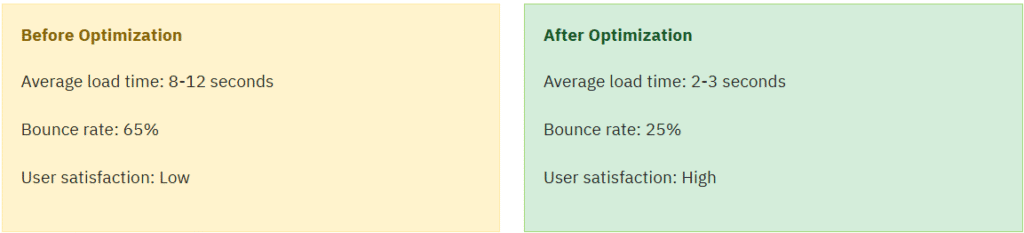
Speed optimization checklist:
- Enable browser caching and server-side caching
- Compress and optimize images (WebP format recommended)
- Minify CSS, JavaScript, and HTML file
- Use a content delivery network (CDN)
- Remove unused plugins and themes
6. Create Effective Landing Pages with Page Builders
Modern WordPress page builders allow you to create professional landing pages without coding knowledge. Focus on clear value propositions, compelling calls-to-action, and distraction-free designs.
Landing page best practices:
- Single focused objective: Each landing page should have one primary goal
- Above-the-fold clarity: Visitors should understand your offer within 3 seconds
- Social proof integration: Include testimonials, reviews, or trust badges
- Mobile optimization: Ensure forms and buttons work perfectly on mobile
7. Implement Robust Backup and Recovery Systems
Website disasters happen—from server crashes to hacking attempts to accidental deletions. A comprehensive backup strategy is your safety net for business continuity.
⚠️ Backup Horror Story: A small business lost 3 years of blog content and customer data because they relied solely on their hosting provider’s backups, which failed during a server migration. Don’t let this happen to you!
Backup strategy components:
- Frequency: Daily automated backups for active sites
- Storage locations: Multiple locations (cloud storage, external drives)
- Retention period: Keep backups for at least 30-90 days
- Testing: Regularly test backup restoration processes
- Documentation: Document your backup and recovery procedures
8. Optimize WordPress Database and Clean Up Regularly
Over time, your WordPress database accumulates unnecessary data—spam comments, post revisions, expired transients, and unused plugins. Regular maintenance keeps your site running smoothly.
| Database Element | Cleanup Action | Frequency |
| Post Revisions | Limit to 3-5 revisions per post | Monthly |
| Spam Comments | Delete spam older than 30 days | Weekly |
| Unused Media | Remove orphaned images and files | Quarterly |
Pro tip: Before any database cleanup, always create a full backup. Use staging environments to test database optimization plugins before applying them to your live site.
9. Set Up Professional Email and Communication Systems
Using generic email providers like Gmail or Yahoo for your business communications undermines your professional credibility. Professional email hosting with your domain name builds trust and brand recognition.

The professional email immediately conveys legitimacy and attention to detail that potential customers notice.
Professional email features to look for:
- Custom domain integration
- Advanced spam protection
- Calendar and contact management
- Mobile app synchronization
- Collaborative tools for team communication
You get all the features wheb you choose Bluehost along with our professional email hosting solution. Get the best for your website today!
10. Monitor Performance and Implement Analytics Tracking
You can’t improve what you don’t measure. Implementing comprehensive analytics and monitoring helps you understand user behavior, identify problems, and make data-driven decisions for your WordPress website.

Key metrics to track weekly:
- Site speed: Average page load time should be under 3 seconds
- Uptime: Aim for 99.9% availability
- User engagement: Time on site, pages per session, bounce rate
- Conversion rates: Goal completions, form submissions, sales
Remember: Set up automated alerts for critical issues like site downtime or security threats. The faster you can respond to problems, the less impact they’ll have on your business and user experience.
These tips will help you create a professional, secure and high-performing WordPress website that stands out from the competition. Remember, building a great website is an ongoing process—implement these strategies gradually and monitor your results. Now lets see how you can implement these with Bluehost.
Tips for building a business website
Building a credible business website requires more than just attractive design—it demands strategic trust-building elements that convert visitors into customers. Your website must address immediate business needs while supporting long-term growth, focusing on reliability, usability, and support accessibility. Start with essential trust signals: a clear value proposition that immediately communicates what you offer, prominent contact information including your business address and phone number, and visible SSL security certificates that protect customer data. SSL certificates improve both SEO rankings and customer trust, with free SSL typically included in quality hosting plans.
Your conversion strategy should center on simplicity and clarity. Design streamlined contact forms, create dedicated service pages that detail your offerings, and place compelling calls-to-action throughout your site—particularly after explaining key benefits. Position CTAs after providing context first, placing them where they grab attention: above the fold, early in content, within content, and at the end. For local businesses, include service areas, business hours, and location-specific content that helps customers find and choose you.
Don’t overlook performance fundamentals that directly impact your bottom line. Ensure consistent uptime and performance while building scalable plans that support all business stages. Essential pages like About, FAQ, and privacy policies build legitimacy, while fast loading speeds and reliable uptime keep potential customers engaged. Address user expectations by offering intuitive navigation, flexible functionality, and access to support resources that empower your business at every stage.
Customize your WordPress theme
WordPress theme customization starts in your dashboard’s Appearance > Customize section, where you can easily modify colors, fonts, headers, and footers without touching code. Focus on maintaining brand consistency by establishing a cohesive color palette, selecting readable typography, and ensuring your logo appears consistently across all pages. Keep accessibility in mind by choosing high-contrast color combinations and readable font sizes, while avoiding performance-heavy elements like excessive animations or multiple font variants that slow loading times.
For major theme changes, consider using a child theme to protect your customizations during updates, or test modifications in a staging environment first. Before publishing any changes, review your site on different devices, check that all navigation elements work properly, verify your contact information displays correctly, and ensure your calls-to-action remain visible and compelling. These simple steps help maintain a professional appearance while building your online presence with confidence.
How to implement a WordPress website redesign?
If your WordPress site feels outdated, converts poorly, loads slowly or isn’t mobile-friendly, it’s time for a strategic redesign. Start by auditing your current site to identify specific problems, then set clear goals for improvement. The key to a safe redesign is using a staging environment where you can test changes without affecting your live site or search rankings.
Follow this proven workflow: conduct your audit → define redesign goals → create a staging site → implement theme and page changes → refresh your content → perform SEO checks → complete quality assurance testing → launch confidently. Always create a complete backup before starting, and never skip the staging phase—it’s your safety net for testing themes, plugins and layout changes without risking downtime.
Protect your search engine rankings by keeping important URLs or setting up proper redirects, preserving your metadata, checking all internal links and re-submitting your sitemap after launch. Take time to test everything thoroughly on staging first. A well-planned redesign improves user experience and conversions while maintaining the SEO progress you’ve already built.
How do I Create My Own Website with Bluehost?
- Choose your Bluehost hosting plan – Select a WordPress hosting plan that fits your needs, from basic shared hosting to advanced options. Bluehost offers WordPress-optimized servers with automatic updates and expert 24/7 support, plus the credibility of being officially recommended by WordPress.org
- Register or connect your domain – Secure your website’s address with a free domain included in your hosting plan, or connect an existing domain through your Bluehost dashboard.
- Use one-click WordPress installation – Bluehost’s automated WordPress installation gets your site running in minutes without technical setup. This eliminates the complexity of manual installations and database configurations.
- Select and activate a theme – Choose from thousands of free WordPress themes or premium options that match your brand and goals. Bluehost includes pre-installed themes and drag-and-drop builders to simplify customization.
- Install essential plugins – Add core functionality like SEO optimization, security, and contact forms. Bluehost bundles include Yoast SEO, security tools, and backup solutions to enhance your site’s performance and protection.
- Customize your core pages – Create essential pages like Home, About, Services, and Contact using WordPress’s intuitive editor to establish your online presence and credibility.
- Launch your site – Your site goes live automatically with SSL encryption included for security and SEO benefits, backed by Bluehost’s reliable infrastructure and ongoing support.
Final thoughts
Success isn’t about luck—it’s about strategy. Building an impressive WordPress website demands strategic implementation of these proven website building tips and best practices. Whether you’re a beginner learning how to create a website from scratch or an experienced developer looking to enhance your WordPress development skills, these techniques will help transform your site into a professional, high-performing online presence.
But, what separates ordinary sites from conversion machines? Strategic decisions from day one. Pair reliable WordPress hosting with smart plugin choices and performance-focused optimization techniques. Your vision deserves the right tools to thrive. Stop planning. Start building.
Transform these expert WordPress tips into your competitive advantage with Bluehost WordPress hosting plans. Your high-performing website awaits—take action now and watch your online presence soar.
FAQs
Here’s the thing—WordPress itself won’t cost you a penny. It’s free. But you’ll need to budget for hosting (usually runs between $3-10 monthly) and grab yourself a domain name (expect around $10-15 per year). Now, if you go with quality hosting like Bluehost, they’ll often throw in a free domain for your first year, which honestly makes getting started pretty affordable.
Not even close. WordPress comes with this intuitive block editor that lets you build pages by dragging and dropping stuff around—no computer science degree required. Most hosting providers even offer one-click WordPress installation these days, so you can literally have your site up and running in minutes. Zero coding knowledge needed.
WordPress.org is what you want. It’s the self-hosted version that gives you complete control—and when people talk about “WordPress,” this is what they mean. WordPress.com, on the other hand? It’s a hosted service that comes with limitations you’ll probably find frustrating. For real customization and room to grow, WordPress.org paired with solid hosting is definitely your best bet.
Start with hosting that has built-in security features. Then stay on top of WordPress and plugin updates—seriously, don’t ignore those notifications. Make sure you’ve got SSL certificates installed (most quality hosts include these for free). And optimize your images before uploading them. The good news? Quality hosting providers handle a lot of the technical security stuff and performance optimization automatically, so you can focus on creating great content instead of worrying about server configurations.
Absolutely—and thousands of people do it every day. With modern WordPress themes and page builders, you’ve got access to professional designs right out of the box. The drag-and-drop interface means you’re basically designing your site visually. Sure, there’s a learning curve, but it’s way less steep than you’d think. Plus, there are tons of tutorials and support forums if you get stuck.
You can have a basic site up in an afternoon—really. The initial setup takes maybe 30 minutes, and you can start adding content immediately. Now, mastering all of WordPress’s features? That’s more of an ongoing journey. But here’s what’s cool: you don’t need to know everything before launching. Start simple, publish your site, and learn as you grow. Most beginners feel comfortable with the basics within a week or two of regular use.
Nothing catastrophic, promise. You can switch themes anytime—though you might need to tweak some settings afterward. Same goes for plugins. If something doesn’t work the way you expected, just deactivate it and try something else. That’s the beauty of WordPress’s flexibility. Just remember to back up your site before making major changes (most hosting providers offer automatic backups, so check what’s included in your plan).
WordPress powers over 43% of all websites on the internet—and that number keeps growing. It’s not just relevant; it’s the industry standard for a reason. The platform constantly evolves with new features, security improvements, and modern design capabilities. From small personal blogs to massive corporate sites, WordPress scales beautifully. Unless you have very specific technical requirements that WordPress can’t handle (which is rare), you’re making a solid choice that’ll serve you well for years.


Write A Comment