 ChatGPT,
 Claude,
 Gemini,
 Grok — all four for

Key highlights
- AI models often miss high-value content on your website.
- The llms.txt file directs AI systems to your most important pages.
- Yoast SEO automates file creation without coding or manual edits.
- Content-heavy websites benefit most from structured AI guidance.
- WordPress users can enable llms.txt directly from plugin settings.
Ever asked ChatGPT about your website and noticed it skipped key pages or gave half-baked answers? That’s not a glitch – it’s how AI works. Unlike search engines, large language models don’t index your entire site. They fetch information on the spot, pulling only what’s easy to find and read.
If your most valuable pages aren’t clearly surfaced, they get ignored. That’s exactly what the llms.txt file is built to fix.
It’s a lightweight markdown file with a big purpose: telling AI exactly which pages matter. By giving tools like ChatGPT a clean, structured list of your key linked URLs provided, you help shape how your brand is represented in AI-generated answers.
In this llms.txt guide, you’ll learn how llms.txt works, why it’s essential for modern SEO strategy and how to enable it effortlessly using Yoast SEO.
Let’s get started!
What is llms.txt and why is it gaining importance?
Modern AI agents and large language models (LLMs) do not systematically index every corner of a website. Instead, they tend to scrape content in real time, focusing primarily on data that is readily accessible and digestible. If your site’s most valuable information is tucked away behind intricate menus or heavy JavaScript layouts, these AI tools are likely to bypass that content entirely during their retrieval phase.
To bridge this gap, the llms.txt file has emerged as a critical new standard. It is a plain-text file hosted in a website’s root directory that provides a concise, Markdown-formatted map of a site’s most important resources. This file is gaining importance because it offers a standardized way for AI crawlers to identify and process high-quality information, ensuring that your content is accurately surfaced in AI-generated answers and search results as the web moves toward an AI-first discovery model.
Also read: What is a TXT Record
Who created llms.txt and why?
Proposed in 2024 by Jeremy Howard of Answer.AI, llms.txt serves as a new open-standard convention designed to help large language models navigate website content with greater precision. This initiative provides AI tools with a curated, easy-to-parse set of priority pages, ensuring they can locate and interpret essential information more efficiently.
- Practical Motivation: Unlike robots.txt and sitemap.xml, which were designed for traditional search engine indexing, llms.txt is optimized for the real-time access patterns of AI assistants.
- Bridging the Gap: It solves the “discoverability gap” by providing a reliable, human-curated shortlist that LLMs can utilize during live queries without needing to index the entire site.
- Naming Convention: To ensure cross-platform compatibility and AI discovery, the convention requires the file to be named specifically as
llms.txt(notllm.txt).
Because AI tools have become primary information sources, Howard’s proposal has seen rapid adoption across developer and SEO communities. Content teams and technical professionals are increasingly implementing this standard to provide a consistent method for identifying the most relevant pages on any site, streamlining how modern AI models interact with web data.
Also read: What Is a robots.txt File?
Crawlers vs LLMs: How AI models process your site differently
Search engines and large language models (LLMs) handle your site in completely different ways. Understanding this gap is key to making your content AI-friendly.
How do search crawlers work?
- Use fixed processing methods to scan and index your entire site
- Revisit your site regularly for updates
- Follow robots.txt, sitemap.xml and Google Search Console instructions
- Store content for long-term ranking and retrieval
How do LLMs work?
- Access content only at the time of a user query
- Don’t index or remember your site
- Work within shorter context windows
- Skip content not clearly linked or easily readable
- Struggle with JavaScript-heavy layouts and cluttered pages
- Face difficulty converting complex HTML pages into LLM-readable formats
Because LLMs don’t process your site like crawlers do, important pages like tutorials, developer docs or blog content can be missed. That’s why LLM-friendly content, like a structured single markdown file such as llms.txt, is essential for proper AI visibility.
llms.txt vs robots.txt vs sitemap.xml: What’s the difference?
To understand how llms.txt fits into your overall SEO strategy and AI strategy, here’s a quick comparison with robots.txt and sitemap.xml:
| File | Purpose | Audience | Format |
| llms.txt | Guides AI models to key content | Large language models | Plain text (Markdown) |
| robots.txt | Controls crawler access to site pages | Search engine crawlers | Plain text |
| sitemap.xml | Lists all indexable pages on a site | Search engines | XML |
Each file serves a different role in how your site is discovered and interpreted. Using the two files together ensures both search engines and AI platforms get the right information.
How does Yoast SEO automate llms.txt generation?
Manual setup of llms.txt can be time-consuming and error-prone. That’s why automation isn’t just helpful, it’s the smarter path forward.
Yoast SEO simplifies the entire process by generating and managing the file for you.
Here’s how Yoast keeps your file AI-ready:
- One-click activation from settings: Once enabled in Yoast SEO, the plugin automatically creates and manages the llms.txt file for your site.
- Weekly regeneration using cron jobs: Yoast refreshes your llms.txt file every week using WordPress cron jobs. This keeps your site’s key information current without you lifting a finger.
- Smart content selection: Yoast automatically detects your most updated blog posts, product guides or documentation. It picks the most relevant URLs, making sure AI tools like ChatGPT or Gemini get the right context during real-time access.
- Preview before publishing: You can view the generated file before it’s live, with all key URLs and optional metadata formatted and ready.
By letting Yoast generate and maintain your llms.txt file, you save time, avoid technical pitfalls and ensure that large language models read and understand your site correctly. This leads to more accurate AI answers, stronger branding and better control over how your website is portrayed across AI platforms.
How to integrate the llms.txt file on your site
Integrating llms.txt means publishing the file at your site’s root URL so it resolves publicly at https://[yourdomain].com/llms.txt. The file must return a 200 HTTP status, use HTTPS, stay UTF-8 encoded and be refreshed regularly as your content evolves. Getting these fundamentals right determines whether AI tools can actually read it.
Before confirming your file is live, run through these integration checks to catch common issues early:
- Filename: Must be exactly llms.txt, not llm.txt or LLMs.txt. The filename is case-sensitive on most servers.
- Directory: Place it in the root, not a subdirectory. It must load at the root-level URL, not a subfolder path.
- HTTPS: The file must be accessible over HTTPS. An HTTP-only URL or mixed-content warning breaks accessibility for AI tools.
- Cache and CDN: Purge your CDN cache after any update so AI tools retrieve the latest version, not a stale copy.
- Permissions and redirects: Confirm the file isn’t blocked by server permissions or redirected to another URL. A redirect chain returns the wrong status code.
- Content-type: The server should return
text/plainas the content type. Incorrect MIME types can cause parsing failures.
Your llms.txt file complements, not replaces, robots.txt or sitemap.xml. Robots.txt controls crawler access, sitemap.xml maps all indexable pages for search engines and llms.txt curates a shortlist of high-signal pages specifically for large language models. All three can coexist in your root directory without conflict.
Quick verification checklist (under 5 minutes):
- Open a browser and visit https://[yourdomain].com/llms.txt, confirm it loads with readable Markdown content.
- Use a browser developer tool or curl command to check the response status is 200 OK.
- Confirm the content-type header shows text/plain.
- Check that all listed URLs load correctly and are not blocked in your robots.txt.
How do you enable llms.txt in Yoast SEO?
Enabling the llms.txt feature in Yoast SEO takes less than a minute. You don’t need to touch any code or manually upload a .txt file. Once activated, Yoast automatically generates a large language model–friendly file and places it in your site’s root directory.
Also read: How to enable llms.txt with Yoast SEO • Yoast
Here’s how to enable it:
1. Log in to your WordPress dashboard
Make sure you’re running the latest version of the Yoast SEO plugin.
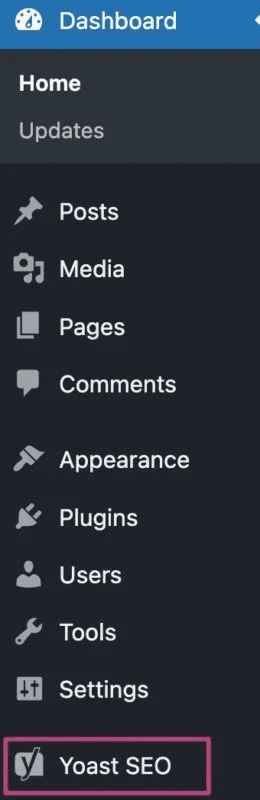
2. Navigate to Yoast SEO → Settings
In the left-hand menu, click on ‘Settings‘ under the Yoast SEO section.
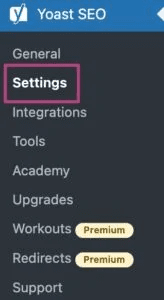
3. Go to ‘Site Features‘
Scroll down to find the card labeled AI discovery file (llms.txt).
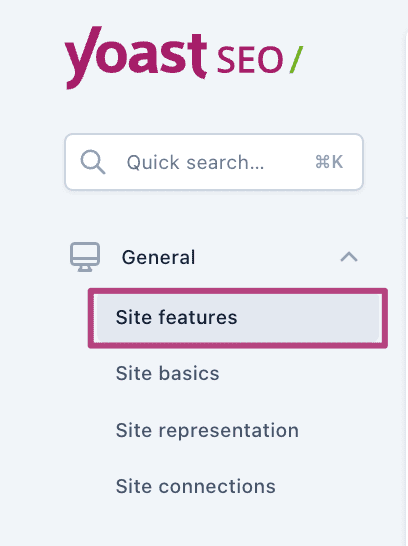
4. Toggle the switch ‘ON‘
Enable the feature with one click. This will automatically generate the llms.txt file based on your most relevant web content.
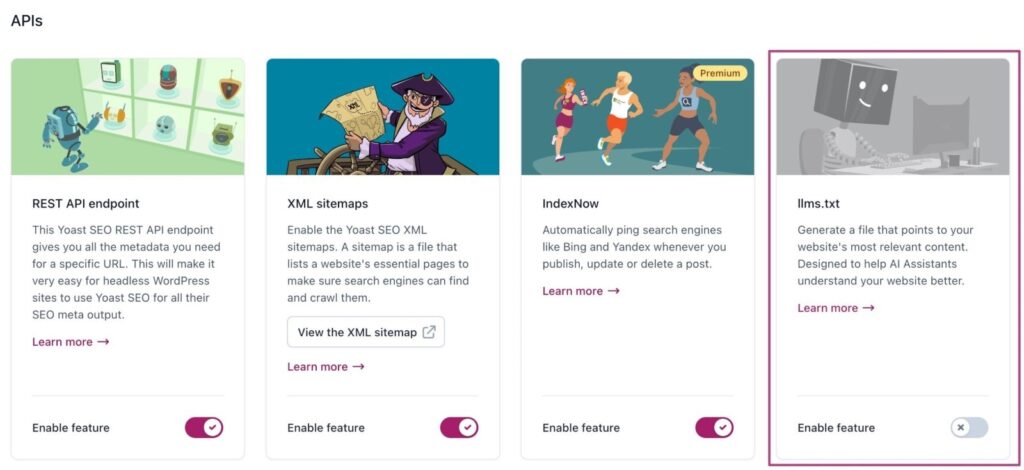
5. Save your changes
Don’t forget to hit ‘Save changes‘ at the bottom of the page.

6. Preview the file
Visit [yourdomain].com/llms.txt to view your AI discovery file. This allows you to verify that your key URLs, link titles and content are being captured correctly.
This one-time setup ensures your site is ready for real-time access by large language models. It helps AI tools like ChatGPT and others retrieve your most accurate and relevant content without relying on complex HTML pages or outdated indexing signals.
If you’re aiming to increase organic traffic, improve how AI represents your brand and make your site future-ready, enabling llms.txt is a simple but powerful move.
Once enabled, this is what your AI discovery file will contain.
Also read: Optimizing for AI Search with llms.txt and Yoast SEO
What does Yoast-generated llms.txt include?
A Yoast-generated llms.txt file is more than just a list of links. It’s a smart, LLM-friendly text file that highlights your most valuable content in a clean, precise format. This gives artificial intelligence tools better context during real-time reads, improving how your brand appears in AI-generated answers.
Here’s what it includes:
- Curated high-priority URLs: Highlights your latest blog posts, key documentation and important pages most relevant to LLMs.
- Optional link titles for clarity: Adds short, descriptive labels to each URL to help AI tools interpret page intent more accurately.
- Only indexable pages: Filters out any URLs marked as noindex or blocked in robots.txt to avoid surfacing hidden content.
- Standard UTF-8 encoding: Uses proper file encoding to ensure all characters render correctly for global AI compatibility.
- AI-optimized Markdown formatting: Structures each link in a clean, lightweight format that’s easy for language models to scan in real time.
Yoast’s automation ensures your llms.txt file stays updated, accessible and aligned with how language models process web content. This boosts your site’s clarity, reduces hallucinations and supports your organic traffic strategy across both search engines and AI platforms.
Wondering why Yoast is at the forefront of AI discoverability? Here’s what sets us apart.
Why is Yoast leading this initiative?
Yoast isn’t just keeping up with AI, we are helping shape how websites interact with artificial intelligence. With the introduction of the llms.txt file, Yoast continues its mission to make SEO and AI accessibility available to everyone.
Here’s why Yoast is ahead of the curve:
- Mission to democratize SEO: Yoast has always focused on making technical tools simple. From robots.txt generation to XML sitemaps, our features help site owners create search and AI-friendly content without needing programming skills. Adding llms.txt is a natural extension of that mission.
- No-code setup removes technical barriers: With one click, users can generate an llms.txt file-no Markdown, encoding or manual uploads required. Even non-technical users can now create LLM-friendly content that supports accurate AI discovery.
- Proactive approach to AI evolution: While most tools still rely on traditional SEO methods, Yoast recognizes that LLMs work differently. They require shorter context windows, real-time access and prefer clean .txt files over complex HTML. This forward-looking approach makes Yoast the first major SEO plugin to support this shift.
By adhering to the llms.txt standard, Yoast ensures that your website stays ahead in Google search results and in the evolving world of AI-powered discovery.
Editing llms.txt: What you should and should not change
You can safely adjust which URLs appear in your llms.txt file and how each link is labeled, but you must not alter the Markdown structure, change the file encoding or move it from your site’s root directory. Those three elements determine whether AI tools can read the file at all.
Safe to change: adding or removing high-priority URLs, updating link titles for clarity, excluding low-value or outdated pages and ensuring all URLs are canonical.
Avoid: renaming the file (llm.txt will not be recognized), switching away from UTF-8 encoding, adding noindex or robots.txt-blocked URLs, overloading the file with dozens of links or including gated pages and JavaScript-heavy URLs that AI tools cannot render.
If your edits are not showing up, run through this quick check:
- Clear your site cache and CDN layer
- Confirm Yoast’s weekly regeneration has run
- Check that permalink changes haven’t broken existing URLs
What’s next for llms.txt?
llms.txt is still in early adoption, but it is gaining momentum as a practical way to improve the discoverability of AI-generated content. As more AI tools pull answers from live web sources, a clear llms.txt file can help your most important pages get found, read and represented more accurately.
- Formal standardization potential: Like robots.txt, which began as a community convention in 1994 before becoming widely adopted, llms.txt appears to be on a similar path as AI providers increasingly recognize and honor it at scale.
- Expanding AI tool support: As leading Large Language Model providers refine retrieval, sites with an accurate llms.txt or correctly named llm.txt file may see measurable visibility gains over time, making this a low-risk step that can compound in value.
- The rise of GEO: Generative Engine Optimization (GEO) is the emerging discipline of optimizing content for AI-generated answers rather than traditional rankings and llms.txt is positioned to become a foundational GEO signal.
- Community-driven refinement: Because llms.txt is open, real-world tool behavior will shape how it evolves and early adopters help influence best practices through implementation feedback.
- Broader platform integration: Expect more CMSs and website platforms to add native llms.txt support, reducing manual work and making ongoing updates easier.
If you have been asking “what is llms.txt” and whether it is worth doing now, early implementation is a smart way to position your site as the standard matures and AI discovery becomes more competitive.
Also read: How to Locate Your malware.txt File
Final thoughts
Don’t let AI decide what users see about your brand. Take control with llms.txt. This simple file helps large language models find and prioritize your most valuable content. It’s fast to set up and has a powerful impact.
Using WordPress? Activate llms.txt with Yoast SEO in just a few clicks, no coding required. Enable the file, review your key pages and give AI the direction it needs to represent your site the right way.
FAQs
The llms.txt meaning lies in its role as a specialized, plain text guide that helps AI systems navigate and prioritize your website’s key content efficiently, improving the accuracy of AI-generated answers.
The llms.txt file is a lightweight, curated list of key URLs in Markdown format meant to guide AI tools during real-time content reads. On the other hand, an “LLMs Full txt” (if implemented) would contain a more exhaustive index of all site URLs, similar to an XML sitemap. Right now, llms.txt is the proposed standard for AI-focused discovery.
LLM stands for Large Language Model. Tools like ChatGPT, Gemini and Claude use these models to read, understand and generate text. When a user asks a question, LLMs fetch content in real time making it critical that your website content is accessible, accurate and AI-readable via tools like llms.txt.
Manual maintenance of your llms.txt file can be time-consuming and error-prone. You must format links correctly, ensure proper encoding, update the file frequently and place it in the correct directory. Missing any of these steps can cause AI tools to ignore the file altogether or misinterpret your site content.
There is no official universal support yet. However, many popular AI tools are starting to honor llms.txt as part of their experimental or future-facing capabilities. It’s a low-risk, forward-looking step that prepares your website for better AI visibility similar to how robots.txt and sitemap.xml became standard over time.
This article serves as a comprehensive llms.txt guide and includes llms.txt best practices such as maintaining proper Markdown formatting, updating the file regularly and ensuring it is placed correctly in your site’s root directory for optimal AI visibility.
No. The llms.txt file is designed for large language models, not search engine crawlers. It doesn’t replace your XML sitemap or change how Google indexes your site. If anything, it complements your SEO by ensuring your web content is accurately understood by both search engines and AI tools.


Write A Comment