 ChatGPT,
 Claude,
 Gemini,
 Grok — all four for
Key highlights
- Understanding domain vs hosting is the first step to building a website that actually works online.
- A domain gives your website its name and address. Hosting stores everything visitors actually see.
- Domain and hosting connect through DNS – without that link, your site won’t go live.
- Registering a domain takes minutes, but the right name and extension shape your brand long-term.
- Hosting type directly affects your site’s speed, uptime and search engine rankings.
- Domain and hosting have separate billing cycles – missing one renewal can take your site offline.
- Manage your domain name and hosting together with Bluehost for a seamless and user-friendly website setup.
Domain vs hosting – aren’t they the same thing?
If that’s what you thought, you’re not alone – and you’re in the right place. Most people starting their first website assume these two terms mean the same thing or come bundled together automatically. They don’t.
Both are essential to get your website up and running, but they do very different things
Think of your domain name as your website’s address and web hosting as the actual home where your site lives. You need both to have a working website, but they serve completely different purposes and are purchased separately.
This guide explains exactly what each one is, how they connect and which combination makes sense for your situation.
Domain vs hosting: Key differences
When you’re building a website, two terms you’ll hear often are domain and hosting. Although they work closely together, they serve completely different purposes.
The table below highlights the main differences between a domain name and web hosting, helping you understand how each one functions in the website-building process.
| Feature | Domain name | Hosting |
| What it does | Acts as your website’s address on the internet | Stores your website’s files, data and content |
| Managed by | Domain registrar (e.g., Bluehost, ICANN-accredited companies) | Web hosting provider (e.g., Bluehost) |
| Purpose | Helps users locate and access your website | Makes your website content available online 24/7 |
| Example | [yourbrand].[com] | Bluehost WordPress hosting, shared hosting, VPS hosting |
| Technical role | Points a user browser to the correct hosting server through DNS | Retrieves and displays website data when a domain is accessed |
| Dependency | Cannot function alone & needs hosting to show content | Needs a domain to help users reach the website |
| Cost structure | Typically purchased yearly (renewal required) | Monthly or yearly hosting plans based on resources |
| Storage involved | No storage. Only a readable web address | Provides storage, RAM, bandwidth, CPU resources |
| Security involved | Domain privacy (WHOIS protection), DNS protection – managed by your registrar | SSL, firewall, malware protection, backups |
| Impact on branding | Represents your brand identity and online presence | Impacts your website speed, performance and user experience |
| Ownership | You reserve the right to use the name for a specific period | You rent server space, environment and resources |
Also read: A Must-Have Website Security Checklist
Now that you understand the key differences, let’s look at what a domain name actually is, how it works and why it matters for your website.
Domains vs hosting vs website: What each one means
Think of building a website like opening a physical shop. Your domain is the street address – it’s what people type to find you online, like [yourbrand].com. Your hosting is the actual building – the server space that stores your site’s files, images and data. Your website is everything inside: the pages, content and design that visitors see and interact with.
Here’s a quick breakdown of what you actually handle for each:
- Domain: Register yearly, manage DNS records and enable auto-renewal to keep your address active.
- Hosting: Choose a plan based on your site’s size and traffic, then store your website files on the server.
- Website: Build pages, publish content and make design updates through your chosen platform.
All three must be in place and properly connected before your site can go live.
What is a domain name and how does domain registration work?
Before your website can go live, it needs a name people can type into their browsers, that’s your domain name. It is the unique address that helps people find your website online.
Instead of remembering a complex IP address like 192.0.2.1, users simply type your domain such as [yourbrand].[com] into their web browser to reach your site.
A domain registered through a domain registrar, which reserves it for your use and connects it to your hosting server via the Domain Name System (DNS). This process is called domain registration and it’s usually renewed yearly.
You can register your domain with Bluehost. We offer both domain and hosting packages in one place making website creation simple and seamless.
Also read: What is a Domain Name? Beginner’s Guide for 2025
Domain name structure
A domain name isn’t just a random string of words; it follows a clear structure made up of different parts. Here’s how it breaks down:
| Part | Example | Description |
| Top-level domain (TLD) | .com, .org, .net | The last part of your domain. These are also called generic top-level domains (gTLDs) or sponsored top-level domains (sTLDs). |
| Second-level domain (SLD) | yourbrand | The unique name you choose for your site usually your brand or business name. |
| Subdomain | blog.[yourbrand].com | An optional prefix that helps organize sections of your website, like a blog or shop. |
Together, these elements form your complete domain name, such as www.bluehost.com.
When you register a custom domain, you’re essentially claiming that address for your website. It helps visitors and search engines recognize your brand easily.
How to register a domain name?
Registering a domain name is a quick and simple process but choosing the right one matters. Here’s how to do it:
1. Brainstorm your domain name first
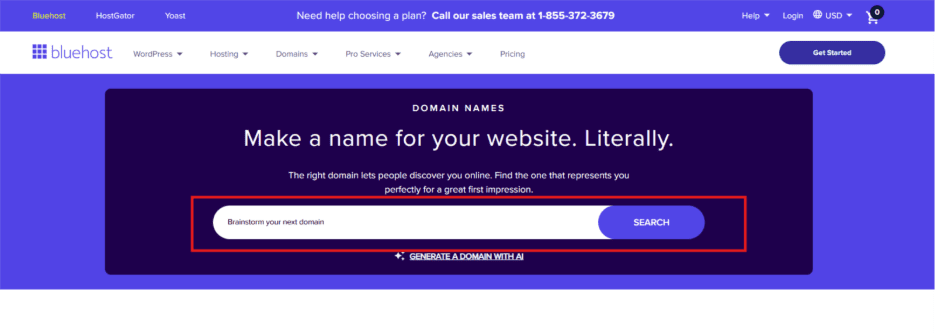
Having a name that reflects your brand, is easy to spell and memorable makes all the difference. Keep it short and avoid numbers or hyphens when possible. Not sure where to start? Our AI Domain Name Generator can suggest available options based on your brand or niche.
2. Choose a domain name
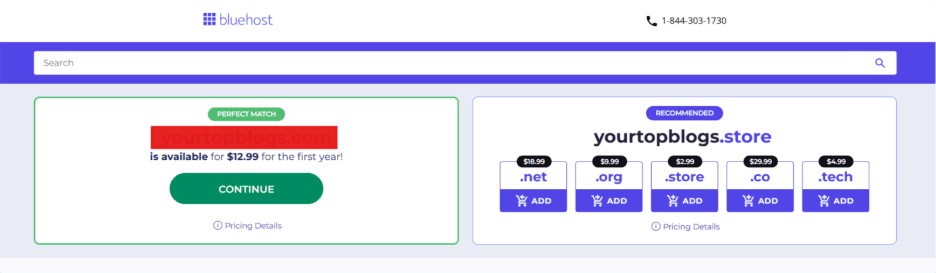
Once you have a few name ideas ready, head to our domain search page and enter your preferred name. The search will instantly show you if it’s available and suggest alternative extensions like .net, .org or .store in case your first choice is taken.
3. Finalize desired domain name
Happy with your choice? Click “CONTINUE”. If it’s taken, try variations or different domain extensions like .net, .org, .store, .co or .tech.
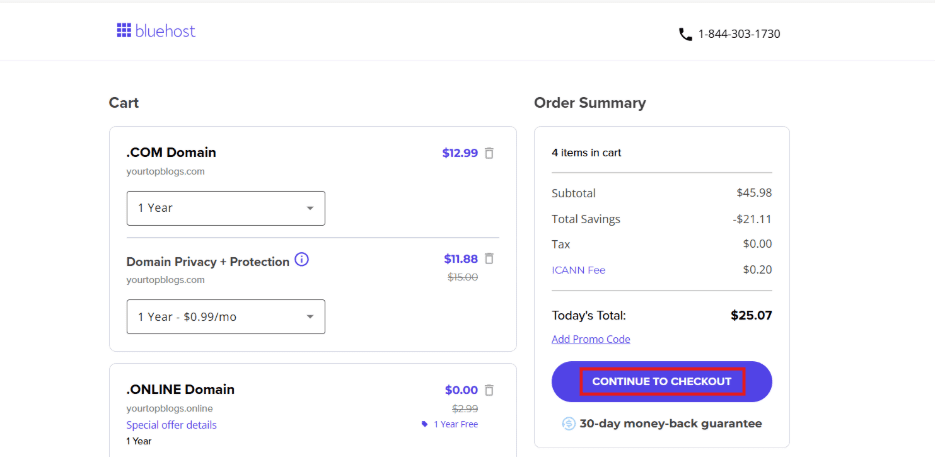
4. Complete the registration
Add your domain to the cart. Then click on “CONTINUE TO CHECKOUT”. We also recommend adding Domain Privacy + Protection at this step – it hides your personal details from the public WHOIS database.
5. Make final purchase
Now, enter your details and click on “SUBMIT PAYMENT” to purchase it. Most domains are valid for one year, but you can register for multiple years upfront.
Once registered, your domain is officially yours. Now, it is ready to connect to your web hosting account and launch your site.
One important thing to know: registering a domain doesn’t mean you own it permanently. You’re licensing the right to use it – typically for 1 to 10 years – and must renew it before it expires. If you miss your renewal window, your domain can become available for anyone else to purchase. The safest move is to enable auto-renewal in your Bluehost dashboard the moment you register. Bluehost also sends reminder emails before renewal is due.
What are domain registrars and ICANN?
When you buy a domain, you’re not buying it forever. You’re reserving it through a domain registrar, a company authorized to manage domain name registrations.
All domain registrars are accredited by ICANN i.e. the Internet Corporation for Assigned Names and Numbers. ICANN oversees the global Domain Name System (DNS), ensuring every domain name is unique and linked to the correct IP address.
Popular domain registrars and web hosting providers, like Bluehost, make it easy to register, renew or transfer your domain name without dealing directly with ICANN.
What is a domain name checker tool?
A domain name checker is an online tool that helps you instantly find out if your desired domain name is available for registration. It saves time and helps you explore alternatives before you finalize your choice.
When you enter a name into a domain checker, it scans the domain name system (DNS) and lists available domain extensions like .com, .org or .blog. Some checkers even suggest related names or creative options based on your input.
Also read: Bluehost Domain Name Generator for SEO-Friendly Websites
What are different types of domain extensions and their pricing?
When registering a domain name, you’ll notice different endings or extensions such as .com, .org or .net. These are called Top-Level Domains (TLDs) and they help define your website’s purpose and identity.
Here are the main types:
| Type | Example | Purpose |
| Generic top-level domains (gTLDs) | .com, .info, .biz | The most common and widely used extensions. Perfect for businesses and blogs. |
| Sponsored top-level domains (sTLDs) | .edu, .gov, .mil | Restricted to specific organizations or sectors. |
| Country-code TLDs (ccTLDs) | .in, .uk, .ca | Represent specific countries or regions. Great for local targeting. |
| New domain extensions | .store, .tech, .blog | Modern and creative options that reflect your niche or industry. |
Domain pricing depends on the extension, demand and registrar. Standard domains like .com often cost between $10–$15 per year, while premium or niche extensions may cost more.
Also read: The Ultimate List of Top Level Domains: What They Mean & How to Choose One
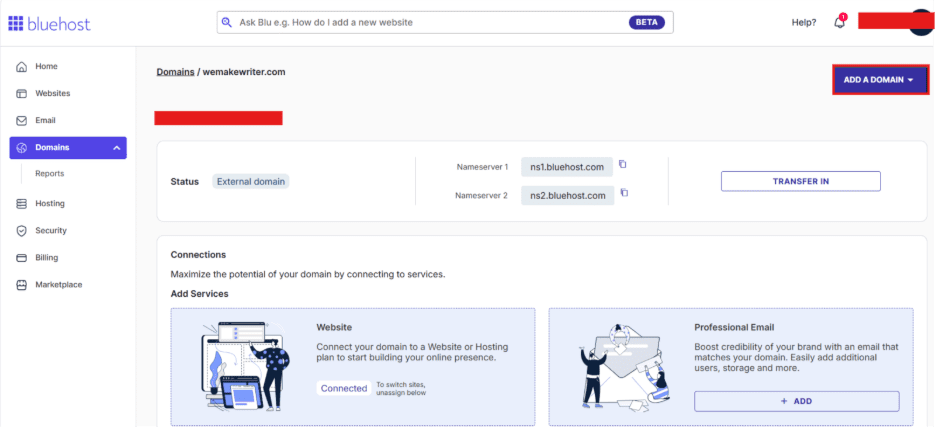
How to change website domain name?
Changing your domain name doesn’t mean rebuilding your website. Your files, hosting setup and content stay intact – you’re only changing the address. Here’s how it works:
- Buy or register a new domain name with us.
- Update your DNS settings to connect the new domain to your web hosting account.
- Redirect your old domain to the new one to maintain SEO rankings and avoid broken links.
- Notify search engines through Google Search Console and update your site links.
If you host your site with Bluehost, you can easily update your domain through your Bluehost dashboard or cPanel. Alternatively, you can contact our technical support team for help.
How does your domain name impacts your business branding?
Your domain name is more than just a website address, it’s a key part of your brand identity. A memorable and relevant domain can instantly build trust and make your business stand out online.
Here’s how the right domain supports your branding:
- Creates a strong first impression: Your domain is often the first thing people see in search results or social media links.
- Improves credibility: A professional custom domain (like [yourbrand].[com]) looks more trustworthy than a free subdomain.
- Builds consistency: Matching your domain with your brand name helps customers easily remember and recognize you.
- Supports SEO and visibility: Including a keyword in your domain can make it easier for search engines and users to find you.
Now that we’ve covered everything about domain names – what they are, how they’re structured and why they matter – let’s look at hosting, the other essential piece of a working website..
What is hosting?
Web hosting is a service that stores your website’s files, images and data on a server connected to the internet, making your site accessible to visitors 24/7.
Once you’ve registered your domain name, you need a place to store your website files, images and data. That’s where web hosting comes in.
Web hosting is a service that allows your website to live on a physical server connected to the internet. This server is managed by a web hosting provider or hosting company, which keeps your site online 24/7 so visitors can access it through their web browsers.
In terms of domain registration vs hosting, if your domain name is your website’s address, web hosting is your website’s actual house, where everything from text to code to images is stored.
There are different types of hosting services such as shared hosting, VPS hosting, dedicated hosting and Bluehost for Agencies, each offering different levels of performance and control.
If you’re just starting out, a Bluehost hosting plan gives you reliable performance, dedicated resources and even a free domain to help you launch your site quickly.
What do hosts provide?
A web hosting provider does much more than just store your website files. It offers the technology, security and support needed to keep your website running smoothly.
Here’s what a reliable hosting company like Bluehost typically provides:
- Server space: Stores all your site files, images and databases on a secure web server.
- DNS management: Connects your domain name to your hosting server so your site can go live.
- Email hosting: Lets you create professional email addresses using your website’s domain (like [info]@[yourbrand].com).
- Technical support: Helps you with setup, performance and troubleshooting whenever needed.
- Security features: Includes SSL certificates, backups and malware protection to keep your website’s data safe.
- Scalability: Options to upgrade to VPS hosting, cloud hosting or dedicated hosting as your traffic grows.
How to choose the right hosting provider?
Choosing the right hosting provider can make or break your website’s performance. A good web hosting service provider keeps your site secure, fast and always online, while a poor one can lead to downtime and slow loading speeds.
Here’s what to consider before buying a hosting plan:
- Reliability and uptime: Look for a provider that guarantees at least 99.9% uptime. This matters for SEO too – Google evaluates page speed and availability through Core Web Vitals, which are direct ranking factors. A slow or frequently down host can quietly cost you search visibility over time, not just visitors.
- Speed and performance: Ensure the hosting server uses modern infrastructure and dedicated resources.
- Scalability: Choose a service that lets you upgrade from shared hosting to VPS hosting, cloud hosting or dedicated hosting as your site grows.
- Security: Features like SSL certificates, automatic backups and firewalls protect your website’s data.
- Customer support: Round-the-clock technical support helps resolve issues quickly.
Also read: Choosing the Right Web Hosting Provider With Satish Hemachandran
What are the different types of hosting and pricing?
Not all web hosting services are the same. The right domain names and web hosting plan depend on your website’s size, traffic and technical needs. Here’s a breakdown of the main types of website hosting available:
| Hosting type | Best for | Description | Average price range |
|---|---|---|---|
| Shared hosting | Beginners & personal websites | Multiple sites share one server. Easy setup, often includes a free domain for the first year and seamless WordPress install. | $3.99-$9.99/mo |
| VPS hosting | Growing sites & eCommerce | A dedicated slice of server resources within a shared environment. Available as self-managed (full root access) or managed (provider handles maintenance). | $34.99-$74.99/mo |
| Dedicated hosting | Large, high-traffic websites | Your own physical server for maximum performance, security and control. Ideal for enterprises and traffic-heavy applications. | $144.19-$315.19/mo |
| WooCommerce hosting | Online stores | WooCommerce + WordPress pre-installed with SSL, integrated payments and performance optimizations for stores. | $9.99-$11.99/mo |
| Bluehost for Agencies | Agencies & high-performance sites | Managed WordPress with uptime SLA, built-in global CDN, auto-scaling and automated DDoS protection for high-traffic sites. | $75-$250/mo |
Note: Pricing information is accurate as of February 2026. For the most up-to-date plans and offers, please visit Bluehost pricing page.
How domain and hosting work together to build a website?
Understanding how your domain and hosting connect is the step most beginners skip – and the one that causes the most confusion. Here’s exactly what happens when someone visits your site, and what you need to do depending on how you’ve set things up.
1. What actually happens when someone types your domain into a browser
- Someone types [yourbrand].com into their browser
- Their browser contacts the DNS (Domain Name System) – think of it as a global address book for the internet
- The DNS finds your domain’s listing and translates it into a numerical server address (called an IP address)
- The browser connects to your hosting server at that address
- Your hosting server sends back your website files and the page loads on the visitor’s screen
The key point to make: your domain and your hosting server are linked through your DNS settings. Without this link, your domain is just an address that points to nothing.
2. When you buy both from us – what’s different
When you purchase your domain and hosting together from us, the DNS connection is configured automatically. The nameservers are pre-set to point your domain to your Bluehost hosting account. You don’t need to configure anything manually – your site is linked and ready to go from day one.
3. When you buy domain and hosting from different providers – what you need to do?
- Log in to your Bluehost account and go to Hosting → Details to find your nameservers (commonly ns1.bluehost.com and ns2.bluehost.com). Copy them – you’ll need them in the next step.
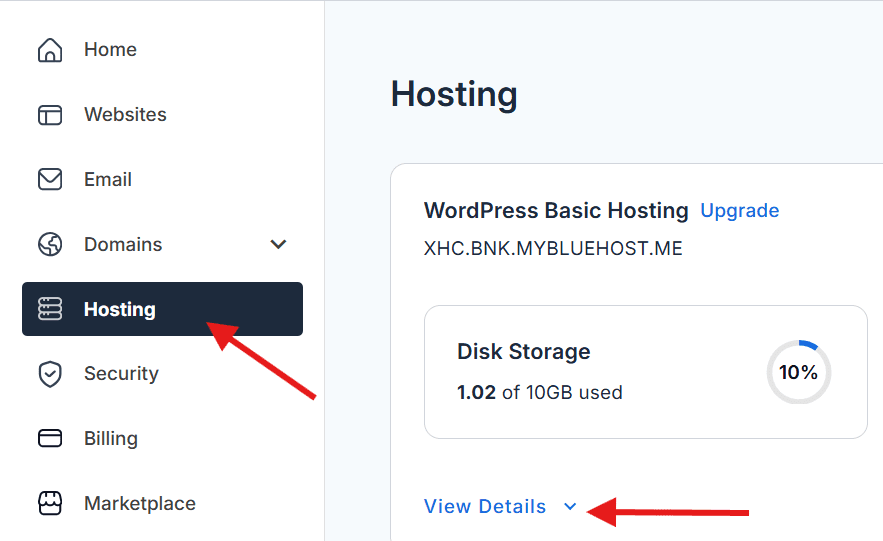
2. Log in to your domain registrar – wherever you originally bought your domain (e.g., GoDaddy, Namecheap, Google Domains).
3. Go to your domain’s DNS or Nameserver settings.
4. Replace the existing nameservers with Bluehost’s nameservers that you copied in Step 1.
5. Save your changes.
6. Wait for DNS propagation (explained below).
4. DNS Propagation – What it is and how long it takes?
After you update your nameservers, there is a waiting period called DNS propagation. This is the time it takes for the global DNS system to recognize your changes and update itself worldwide. It can take anywhere from a few minutes to 48 hours – and during this window, some visitors may see your old site while others see the new one.
This is completely normal. It is not a mistake or a technical problem – it is just the internet’s update process working as designed. If you want to check how far propagation has spread, you can use a free tool like WhatIsMyDNS.net.
How Bluehost can be the ultimate platform to build your website?
When it comes to bringing your website idea to life, Bluehost offers everything you need under one roof. Whether you’re registering a domain name, setting up web hosting or managing your site files, Bluehost makes it simple, secure and beginner-friendly.
With Bluehost, you can:
- Register your domain with Bluehost and get a free domain for the first year with select hosting plans.
- Choose from shared hosting, VPS hosting or dedicated hosting. Each hosting is optimized for performance and reliability.
- Enjoy 24/7 technical support, automatic updates and a user-friendly control panel.
- Easily build and manage your site with WordPress hosting, trusted by millions worldwide.
- Scale anytime with cloud hosting and dedicated resources that grow with your business.
- We provide advance security features such as free SSL, free malware scanning, web application firewall, DDOS protection included and weekly website backups.
- Our services enriched with marketing tools like Yoast SEO (free plugin), pro email (free trial) and creative mail (email marketing).
Bluehost isn’t just a hosting provider, it’s your partner in creating, managing and growing a functioning website that stands out online.
Common domain and hosting mistakes beginners make (And how to avoid them)
Even with the right domain and hosting in place, a few common missteps can take your site offline or cause unnecessary headaches. Here are four mistakes beginners most often make – and exactly how to avoid each one:
Mistake 1: Letting your domain expire
Because domain names renew annually (not monthly like most hosting plans), many beginners forget about renewal until it’s too late. If your domain expires, it enters a grace period – but after that, it can be purchased by anyone else, including domain squatters or competitors. The safest action: enable auto-renewal for your domain the moment you register it. We send renewal reminder emails, but auto-renewal is the true safety net – and if you want an extra layer of cover even when a payment fails, our Domain Expiration Protection keeps your domain safe regardless.
Mistake 2: Buying domain and hosting from different providers and not understanding why the site isn’t loading
Many beginners buy a domain through GoDaddy and hosting through Bluehost, then expect everything to work automatically. It won’t – you need to update your nameservers at your registrar to point to Bluehost (as explained above). This is the most common support request from new website owners. Avoid it by either buying both from us (auto-configured) or updating nameservers immediately after signing up for hosting elsewhere.
Mistake 3: Not enabling domain privacy (WHOIS protection)
When you register a domain, your personal information – name, email address, phone number, physical address – is stored in a public database called WHOIS. By default, anyone can look it up. Domain privacy protection (also called WHOIS protection) hides your details from this public record. Bluehost’s Domain Privacy + Protection add-on does this automatically. Enable it when you register. It’s a small cost for a significant privacy benefit.
Mistake 4: Treating domain renewal and hosting renewal as the same billing event
These are two completely separate products with different billing cycles. Your domain typically renews once a year. Your hosting plan might be monthly or annual. Missing either one can take your website offline. When you set up your account, note both renewal dates separately and enable auto-renewal for both. Don’t assume that renewing one automatically renews the other.
Final thoughts
Hopefully, the confusion that brought you here is gone now. Domain and hosting – two different things, two different jobs, but both needed to get your website live.
Understanding the difference between domain and hosting is the first step toward building your online presence. Your domain name gives your website its identity, the easy-to-remember address that users type in their web browsers.
Meanwhile, hosting services provide the storage, server resources and technology needed to make your website accessible to visitors worldwide.
It’s the foundation of everything – your brand name, your address online, the thing people will type to find you. The sooner you secure it, the better.
Search for your domain on Bluehost today – and if the right one is available, grab it before someone else does. Buy Your Domain with Bluehost.
FAQs
Yes, you do. A domain name is just your website’s address, it helps people find you online. But for your website to actually exist on the internet, you need web hosting. Hosting stores your website files, images and content on a web server, so visitors can access your site anytime they type your domain into their browser. Without hosting, your domain would just lead to a blank page.
Yes. Having web hosting without a domain name is like having a house with no address – no one will know how to reach it. Your domain name gives your site a professional identity and makes it easy for users to remember and visit. It’s best to get both a domain and hosting so your site looks complete and trustworthy.
If you do buy them separately, you’ll need to update your domain’s nameservers at your registrar to point to your hosting provider – and then wait up to 48 hours for DNS propagation before your site goes live. When you buy both from Bluehost, this step is handled automatically.
Yes. If your domain is registered with another provider, you can easily transfer it to Bluehost. The process is quick and secure – Bluehost guides you through each step and your website stays live during the domain transfer. Once it’s done, you can manage both your domain and hosting in one place.
Yes, moving your site to Bluehost is simple. Whether it’s WordPress hosting, shared hosting or VPS hosting, Bluehost offers <a href=”http://my1.bluehost.com/cgi/help/wordpress-migrate” target=”_blank” title=”How To Migrate A WordPress Site – Website Migration – Bluehost”>seamless migration tools</a> to help you transfer your website files, DNS settings and keep your functioning website live during the process.
Domain hosting manages your domain name and DNS settings, while web hosting stores your actual web pages and media on a server. The difference between domain name and web hosting is that one manages your address and the other manages your data.
Your domain name is like your site’s address, while web hosting is the place where all your site files live. When users enter your domain name into a browser, the hosting server retrieves those files and displays your website. In short, both names and web hosting work hand-in-hand to keep your website live and accessible.
Yes, depending on your hosting plan. Some plans allow multiple addon domains, while entry-level plans may allow only one.
Absolutely. You can register a domain now and build your website later.
Email hosting is separate from web hosting and not required to launch a website. But a professional email address ([you@yourbrand].com) adds credibility – especially for small businesses. Bluehost offers Professional Email and Google Workspace as add-ons. You can add email hosting at any time; it doesn’t need to happen on day one.
DNS (Domain Name System) works like the internet’s address book – it translates your domain name into the IP address of your hosting server so browsers know where to load your website from. Without DNS, your domain would have no way to find and connect to your hosting.
WHOIS privacy hides your personal details (name, email, address) from public domain lookup.
Domain names are usually registered for 1 year but can be renewed for up to 10 years.
A free subdomain ([yoursite.wordpress].com) is given by the platform – you don’t own it and it looks unprofessional. A free custom domain (yourbrand.com) is an actual domain registration you control. Bluehost includes a free .com custom domain with select hosting plans – that’s a real domain you own, not a platform subdomain. Make sure you know which one you’re getting before committing to any platform.


Write A Comment