 ChatGPT,
 Claude,
 Gemini,
 Grok — all four for
Finding the best tool for eCommerce shouldn’t mean managing multiple platforms, plugins and add-ons just to run one store. Yet most tools for eCommerce websites are sold separately – adding to both cost and complexity.
I’ve seen this happen with a lot of small businesses. What starts as a simple setup quickly turns into ongoing integrations, maintenance and unexpected expenses that take time away from actually growing the store.
A better approach is to use a solution that brings everything together. The right setup includes the top eCommerce tools needed to run and grow your store – without extra purchases or technical overhead.
In the sections ahead, you’ll learn what to look for and how an all-in-one approach helps you run your store more efficiently and scale with confidence.
Why small businesses struggle with eCommerce tools?
Running an eCommerce store isn’t just about listing products. You need tools for payments, marketing, customer retention, analytics and more – each solving a different part of the business.
The challenge is that most of these eCommerce tools are not built to work together out of the box. Small businesses often end up adding multiple plugins or services just to get basic functionality up and running.
From experience, this leads to three common issues:
- Rising costs: Each tool comes with its own pricing, turning a simple store into an expensive setup.
- Complex integrations: Connecting different tools takes time and often requires ongoing fixes.
- Operational overhead: Managing updates, compatibility and performance becomes a constant task.
Instead of helping you grow, your setup starts slowing you down. That’s why the focus shouldn’t be on adding more tools – but on choosing the right setup from the start.
In the next section, let’s look at what actually makes top eCommerce tools and what small businesses like yours should prioritize.
What makes the best tool for eCommerce?
The right eCommerce setup should remove the need to keep adding tools as you go.
From what I’ve seen, the setups that work well for small businesses are the ones that cover the core needs from the start – without forcing you to patch things together later.
That usually comes down to a few things:
- Everything in one place: Payments, marketing, retention and store customization should work together without extra setup.
- No added costs for basics: Essential features shouldn’t sit behind separate tools or upgrades.
- Simple to run: You shouldn’t have to manage multiple dashboards, updates or integrations.
- Ready to scale: The same setup should continue to support your store as it grows.
When this is in place, your store runs without constant fixes or additions.
In the next section, let’s look at what an all-in-one eCommerce setup actually includes – and how it works in practice.
Everything you need in one place with Bluehost WooCommerce hosting
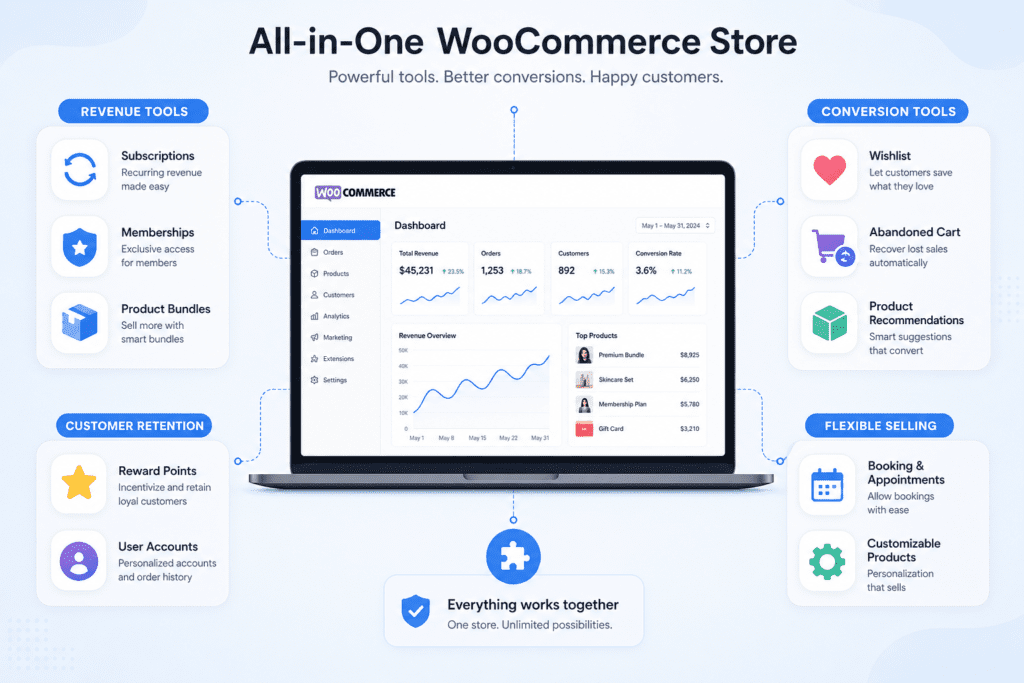
With Bluehost WooCommerce hosting, the focus isn’t on adding more eCommerce tools – it’s on what those tools help you do. The platform combines WooCommerce with built-in tools and features so you can take action on growth without setting up separate solutions.
Here’s how these tools work in practice for your small business:
1. Tools to drive revenue
For most small businesses, revenue is tied to one-time purchases. That makes growth unpredictable. These tools help you build consistency and increase how much each customer spends.
- Subscriptions: Turn repeat purchases into automated recurring revenue – ideal for products customers buy regularly.
- Memberships: Create gated access to exclusive products, services or content, adding a steady income layer membership website builder.
- Product bundles: Group complementary items together to increase average order value without increasing traffic.
What this means for you: You’re not starting from zero every month. A portion of your revenue becomes predictable, and each customer contributes more over time. Instead of focusing only on acquiring new buyers, you build systems that generate ongoing value from existing ones.
2. Tools to increase conversions
Getting traffic is only part of the job. These tools help turn visitors into paying customers.
- Wishlists: Let customers save products and return when they’re ready to buy, especially for considered purchases using WooCommerce Wishlist.
- Cart recovery: Automatically re-engage shoppers who leave without completing checkout.
- Product recommendations: Surface relevant products at the right time to increase basket size and reduce decision friction.
What this means for you: You capture intent instead of losing it. More visitors convert into customers, and more carts turn into completed orders – without needing to increase your marketing spend.
3. Tools to retain customers
Customer acquisition is expensive and time-consuming. Retention is what improves long-term profitability.
- Points and rewards: Incentivize repeat purchases and encourage ongoing engagement.
- Customer accounts: Simplify reordering, order tracking and account management.
- Email marketing and automation: Stay connected through targeted campaigns, abandoned cart emails, post-purchase follow-ups and promotional sequences.
- CRM capabilities: Track customer behavior, segment audiences and personalize communication based on purchase history and preferences.
What this means for you: Your business doesn’t rely only on new traffic. Existing customers return more often, spend more over time and stay engaged with your brand through consistent, automated communication.
4. Tools for flexible selling
Not every small business fits into a standard “product-only” model. These tools allow you to expand how you sell without changing platforms.
- Bookings and appointments: Let customers schedule and pay for services directly from your website.
- Custom product options: Offer personalization, add-ons or variable pricing based on customer needs.
What this means for you: You’re not limited by your store structure. Whether you sell services, customized products or a mix of both, your setup adapts without requiring new tools or workflows.
5. SEO tools for eCommerce growth
Getting discovered is critical for any eCommerce website. These tools help improve visibility and bring in organic traffic.
- Yoast SEO tools: Optimize product pages, categories and content for search engines.
- On-page optimization: Improve titles, descriptions and site structure.
What this means for you: Your store becomes easier to find, helping you attract consistent, high-intent traffic without relying only on paid channels.
6. Marketing tools to drive engagement
Marketing tools help you reach, engage and convert your audience consistently.
- Campaign management: Run promotions, offers and seasonal campaigns.
- Email marketing: Connect with customers through targeted communication.
What this means for you: You stay visible to your audience and turn engagement into repeat sales.
7. Automation tools to simplify operations
As your store grows, manual work becomes harder to manage. Automation keeps everything running consistently.
- Automated emails: Handle cart recovery, follow-ups and order communication.
- Workflow automation: Set up customer journeys without manual intervention.
What this means for you: You reduce time spent on repetitive tasks while ensuring nothing slips through – from missed sales to customer communication.
8. AI tools to build and optimize your store
AI helps you move faster – from setup to scaling – without needing technical expertise.
- Bluehost AI website builder: Generate your website structure, design and content by simply describing your business.
- AI content and insights: Get suggestions for site content, layout and performance improvements.
What this means for you: You don’t start from a blank page. Your store is created with a strong foundation – ready to customize, launch and grow faster.
What this setup actually changes?
When all of these tools work together in one place, the difference shows up in how your business runs day to day.
- You’re not managing multiple plugins or troubleshooting conflicts.
- You’re not adding new costs every time you need a feature.
- You’re not rebuilding your store as your needs evolve.
Instead, your store runs on a system where everything is already connected – so you can focus on execution rather than setup.
From launching your first product to scaling your operations, the same foundation continues to support your growth.
That’s the real value of Bluehost WooCommerce hosting. It’s not just access to eCommerce tools – it’s having the right tools, ready to use, working together and built to support long-term performance.
See all included tools in Bluehost WooCommerce hosting.
How to determine which eCommerce tools your store needs?
Knowing the categories of tools available is only half the picture. The harder question is which specific tools for your eCommerce website actually belong in your setup. Work through these five steps before adding or replacing anything.
- Audit your current setup: List every tool, plugin and service you currently pay for. For each one, note whether it actively solves a problem or sits unused, then identify where functional gaps remain across payments, marketing, retention and analytics.
- Map each gap to a business goal: A gap only matters if it connects to a real outcome such as increasing revenue, improving retention or reducing manual work. Assigning each gap to a specific goal prevents you from chasing features that won’t measurably move your store forward.
- Check for native integration: Before committing to any candidate tool, confirm whether it connects directly with your platform or requires custom code to bridge the two. Tools that need ongoing technical maintenance to stay compatible quietly consume time and budget that could go toward growth instead.
- Calculate total cost of ownership: Subscription fees are just the starting point. Factor in maintenance time, compatibility risks and any hidden overage charges that kick in once your store scales past a certain traffic or order threshold.
- Prioritize coverage over patchwork: If a single platform covers the majority of your gaps, that setup beats assembling individual best-of-breed tools every time. Fewer integrations mean fewer failure points and a lower long-term cost to keep everything running together.
Why an all-in-one eCommerce setup matters for small businesses?
By this point, it’s clear that having the right tools is important. But how those tools are set up matters just as much.
When you rely on separate eCommerce tools, your store becomes harder to manage over time. Every new requirement means adding another plugin, another integration and another point of failure.
An all-in-one setup changes that.
- Lower total cost: You’re not paying separately for every feature you need.
- Fewer moving parts: Tools are built to work together, reducing conflicts and errors.
- Better performance: A streamlined setup avoids unnecessary load from multiple plugins.
- Faster execution: You can launch, update and scale without constant setup work.
What this means in practice is simple – you spend less time managing your store and more time improving it. Instead of reacting to issues or adding tools as you go, you’re working with a setup that’s already designed to support growth.
In the next section, let’s look at how this applies to different types of small businesses.
Built for different small business needs
The value of having all your tools for eCommerce websites in one place is flexibility. You’re not locked into a single way of selling. The same setup adapts to how your business operates – without adding new tools or changing your stack.
Here’s how different small businesses can use these tools in practice:
1. Online stores
If you’re selling physical or digital products, growth depends on how much value you get from each visitor.
- Use product bundles and recommendations to increase order value.
- Set up subscriptions for repeat purchases.
- Drive repeat sales with rewards and customer accounts.
What this means: You maximize revenue from existing traffic instead of relying only on new visitors.
Get started now to create your scaling online store!
2. Restaurant websites
Restaurants need more than just online ordering. They need ways to increase order size and repeat visits.
- Offer combos and add-ons to boost average order value.
- Enable bookings for reservations or special events.
- Use loyalty and rewards to bring customers back.
What this means: You build a direct ordering channel that increases margins and customer retention.
3. Health and wellness businesses
These businesses often combine services, products and ongoing plans.
- Offer appointments or consultations through bookings.
- Create membership programs for exclusive access or content.
- Set up subscriptions for recurring product delivery.
What this means: You create consistent revenue while offering a more structured customer experience.
4. Service-based businesses
If your business is based on time or expertise, selling online should support scheduling and customization.
- Use bookings to manage appointments and availability.
- Offer custom options for tailored services or packages.
- Combine payments and scheduling in one flow.
What this means: You simplify operations while making it easier for customers to book and pay.
5. Niche and custom product businesses
If you sell personalized or made-to-order products, flexibility is key.
- Add custom product options for personalization.
- Use bundles to package complementary items.
- Encourage repeat purchases with rewards and accounts.
What this means: You can offer tailored buying experiences without complicating your store setup.
Across all these use cases, the goal is the same – use the right tools for eCommerce websites to support how you sell, without adding complexity.
With everything already included, your setup adapts as your business grows, so you’re not rebuilding your store every time your needs change. If you’re ready to build your online presence with the right tools in place, here’s how to get started with Bluehost.
Get started with all the eCommerce tools you need
Getting started doesn’t need to involve multiple tools or a long setup process. With Bluehost WooCommerce hosting, the foundation is already in place – you just need to configure it for your business.
Here’s how you can get up and running:
- Choose your WooCommerce hosting plan
Pick a plan that supports your store size and expected growth.
- Set up your online store
Install WooCommerce, add your products or services and configure basics like payments and shipping.
- Enable built-in tools
Turn on features like subscriptions, bookings, wishlists and rewards based on how you plan to sell.
- Customize your store experience
Adjust layouts, product pages and checkout flows to match your business needs.
- Launch and start selling
Once everything is in place, your store is ready to go live and scale as you grow.
In most setups, these capabilities come from multiple paid plugins of $1200+ added over time. Here, they’re already part of your environment from day one, so you’re not assembling your store piece by piece or investing separately in every feature you need.
Final thoughts
Running an online store shouldn’t mean managing a stack of disconnected tools. For most small businesses, that’s where time, cost and complexity start to add up.
The shift is simple – start with a setup that already includes what you need, so you can focus on selling, improving customer experience and growing your business.
If you’re ready to move forward, the next step is to choose a platform that brings everything together from day one. Explore Bluehost WooCommerce hosting and see how you can launch, manage and scale your store with all the essential eCommerce tools already in place.
FAQs
The best tool for eCommerce is an all-in-one platform that includes essential features like payments, marketing, customer retention and store management, so you don’t need multiple tools for your eCommerce website.
Tools for eCommerce websites typically include product management, payment processing, shipping, marketing, eCommerce SEO tools, customer retention features and analytics to run and grow an online store.
Many eCommerce websites use multiple tools, but the best tool for eCommerce combines these features into one setup, reducing the need for separate plugins and integrations.
Yes, all-in-one eCommerce tools are often the best choice for small businesses because they include all essential tools for eCommerce websites without requiring separate purchases or complex setup.
eCommerce tools help increase sales by improving conversions, enabling upsells and cross-sells, automating marketing and encouraging repeat purchases.
eCommerce tools are individual features like SEO tools or email marketing tools, while eCommerce platforms combine multiple tools for eCommerce websites into one system.
Yes, many modern eCommerce tools include built-in SEO tools, email marketing tools, automation and CRM features to help manage both marketing and sales.
Tools for eCommerce websites become expensive because most features are sold separately, and businesses need multiple tools to manage operations, marketing and customer retention.
Look for tools for eCommerce websites that offer all-in-one functionality, built-in SEO tools, marketing features, easy management and scalability without requiring additional integrations.


Write A Comment