 ChatGPT,
 Claude,
 Gemini,
 Grok — all four for
Your site is slower than it used to be. Traffic is up, which should be good news, but pages hang during your busiest hours and you have started to wonder whether the hosting plan you signed up for three years ago is still the right one.
That is usually the moment people start reading about dedicated hosting.
This guide explains what dedicated hosting is, how it works day to day and who genuinely benefits from it. It also covers the part most articles skip: the responsibilities that come with a dedicated server, and the situations where a smaller plan is still the smarter call. Start with what the term actually means.
What is dedicated hosting?
Dedicated hosting is a web hosting arrangement in which one customer gets an entire server environment to themselves. No other websites share it. Every resource in that environment, including CPU, RAM, storage and bandwidth, is reserved for you alone.
This is the part that makes the difference. On shared hosting, one server environment is divided among many customers, so a traffic surge on someone else’s site can slow yours down. With dedicated hosting, that cannot happen. There is no one else in the environment to compete with.
Dedicated hosting is the highest tier most providers offer, sitting above shared hosting and VPS in cost, capability and control.
What is a dedicated server?
A dedicated server is the server environment itself: a complete set of computing resources assigned to a single customer and isolated from everyone else. When people ask what are dedicated servers, the short answer is that they are hosting environments with no neighbors.
You get administrative control over that environment, usually through full root access. That means you decide what software is installed, how the environment is configured, which security rules apply and when updates happen.
What is dedicated web hosting?
Dedicated web hosting is the same thing described from the customer’s side. The term simply emphasizes that the dedicated server is being used to host websites and web applications rather than, say, a private database or an internal tool.
You will see providers use several labels for the same product. So if you are asking what is dedicated server hosting and getting slightly different answers, that is why.
Dedicated hosting, dedicated web hosting and dedicated server hosting all describe an arrangement where one customer occupies one server environment. The naming varies. The model does not.
Knowing the definition still leaves the practical question open, which is what actually happens once you buy one.
How does dedicated hosting work?
Dedicated hosting works by reserving a full server environment for you, giving you administrative access to it and leaving the underlying infrastructure to your provider. Here is the sequence, from signup to running site.
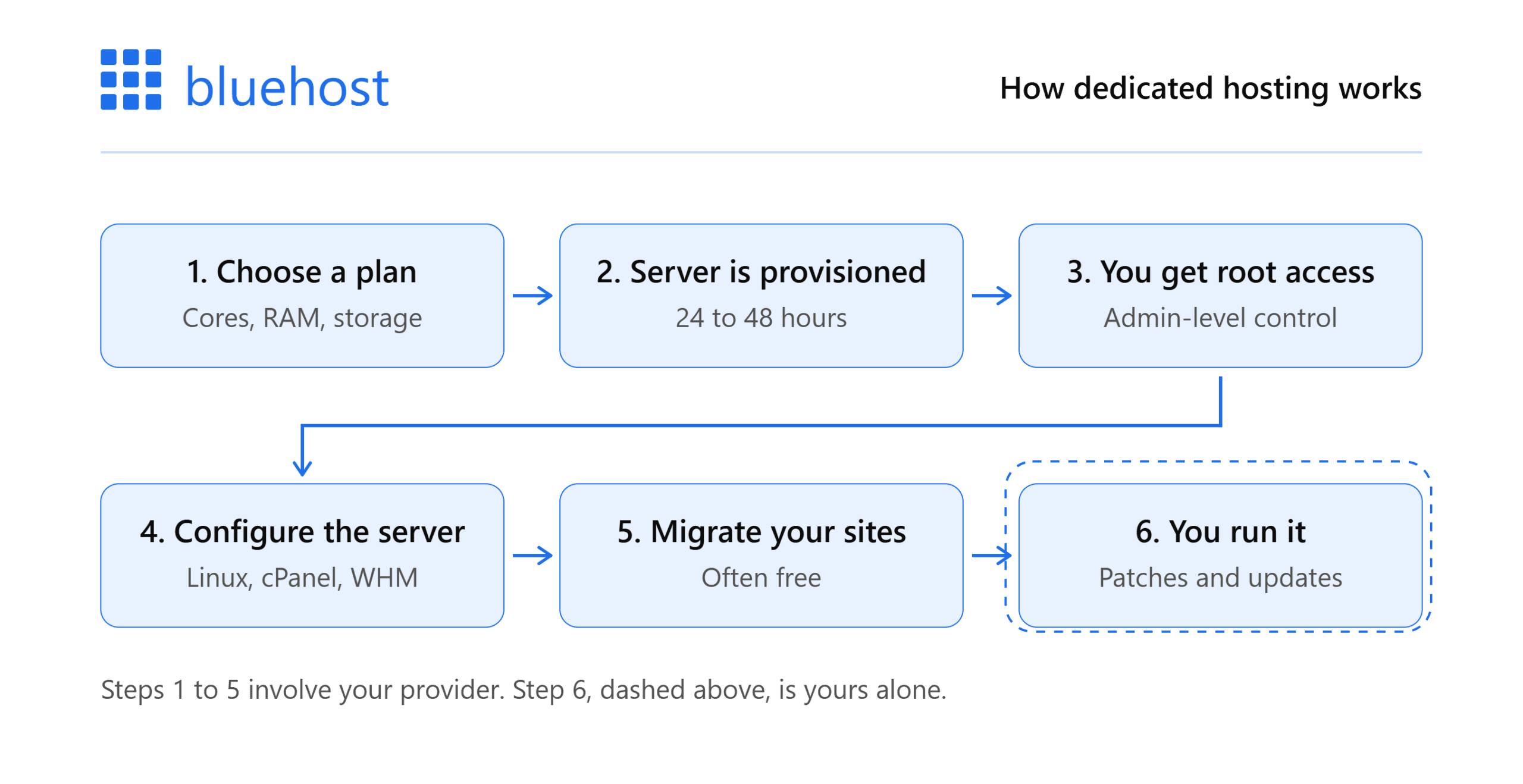
1. You choose a configuration: Dedicated hosting services are sold in tiers based on processing cores, memory and storage. You pick the tier that matches your workload.
2. The provider provisions your environment: This is not instant the way shared hosting is. Provisioning typically takes a day or two, because resources are being set aside specifically for you rather than added to a pool you share.
3. You receive root access: Root access is administrator-level permission. Combined with SSH, it lets you install software, edit configuration files, set firewall rules and change anything about how the environment runs.
4. You configure the environment: Most dedicated servers ship with a Linux operating system and a control panel such as cPanel for site management and WHM for account management. From there you install your web server, databases and applications. Our dedicated server setup guide walks through the sequence in detail.
5. You migrate your sites: Many providers will move existing sites for you at no charge.
From that point, day-to-day management is yours. Security patches, software updates and performance tuning are your responsibility, not your host’s.
Where your responsibility starts
This is the detail that catches people out, so it is worth stating plainly.
Your provider maintains the infrastructure, the network and the data center. If something fails at that level, they fix it. Uptime commitments cover that layer.
Bluehost dedicated servers give you exclusive access to every resource on the machine. A spike in another customer’s traffic can never affect your site. You get full root access by default, along with SSH, WHM and cPanel.
If nobody on your team is comfortable with a command line, you can take the cost of a system administrator or fully managed dedicated server hosting into consideration before you commit.
That responsibility is the real cost of a dedicated server, and it only makes sense once you see what shared hosting and VPS ask of you instead.
How dedicated hosting compares to shared and VPS?
Most people arrive at dedicated hosting gradually. They start on shared hosting, outgrow it and start comparing options. If you are weighing only those two, our full breakdown of shared hosting vs dedicated hosting goes deeper.
Here is how the three tiers differ.
| Shared hosting | VPS hosting | Dedicated hosting | |
|---|---|---|---|
| Resources | Shared across many customers | Partitioned allocation | Entire environment reserved for you |
| Performance impact from others | Yes | Limited | None |
| Root access | No | Usually | Yes |
| Technical skill needed | Low | Moderate | High |
| Typical monthly cost | Low | Moderate | Highest |
| Best for | New and small sites | Growing sites | High-traffic sites and agencies |
VPS sits in the middle and handles a lot of growth well. The move to dedicated servers usually happens when a site needs guaranteed resources, deeper configuration control or both.
The table shows where dedicated hosting pulls ahead. The features behind those results are worth looking at individually.
What are the key features of dedicated hosting services?
Features vary between providers, but most dedicated hosting services include some version of the following.
- Full root access: Administrator-level control over the entire environment.
- Dedicated IP addresses: Your own IP addresses rather than ones shared with other customers. Useful for SSL certificates, domain-matched email and custom firewall rules. There are more benefits of a dedicated IP than most people expect.
- Control panels: cPanel for managing sites, files, databases and email. WHM for managing multiple accounts, which matters if you host client sites.
- Choice of operating system and software stack: You decide the Linux distribution, web server, database and language runtimes.
- Uptime commitments: Reputable providers back dedicated servers with a formal uptime service level agreement.
- Isolated security: Your firewall rules, your patch schedule, your access controls. Nothing another customer does affects your environment.
- Scalable resources: Room to grow into more processing power, memory and storage without changing hosting model.
A feature list only tells you what is included. What matters to your business is what those features let you do.
Benefits of dedicated server hosting
The advantages fall into five areas, covered in more depth in our rundown of the benefits of dedicated hosting.
Consistent performance under load: Traffic spikes elsewhere never touch you, because there is no elsewhere. Your resources are your resources.
Stronger security control: Isolation removes an entire category of risk. On a shared environment, a vulnerability in a neighbor’s site can create exposure. On a dedicated server, the only security posture that matters is your own. That control also makes it easier to run DDoS protected dedicated servers.
Configuration freedom: Custom PHP versions, specific database tuning, unusual software dependencies, automation through cron jobs and scripts. If your application needs it, you can install it. See our guide to dedicated server configuration for what that involves.
Room to grow: High-traffic sites, large eCommerce catalogs and media-heavy applications need headroom. Dedicated hosting provides it.
Better handling of multiple sites: Agencies and resellers can run many client sites in one environment, with account separation and billing tools built in.
Every one of those advantages carries a cost, and being clear about them now saves an expensive correction later.
What should you consider before choosing dedicated hosting?
Dedicated hosting is not automatically the right answer, and it is worth being honest about the tradeoffs. It is also worth knowing the common dedicated hosting problems before you move.
1. Cost
A dedicated hosting service costs considerably more per month than shared hosting or VPS. If your current plan is comfortably handling your traffic, the upgrade buys you capacity you are not using.
2. Technical responsibility
You are the administrator. That is the point of the product, and it is also the workload that comes with it.
3. Setup time
Provisioning takes longer than shared hosting, so plan your migration rather than doing it the night before a launch.
4. Compliance is not the same as security
Dedicated hosting gives you strong security, performance and governance, but it is a different thing from formal certification. If you operate in a regulated field such as healthcare, financial services or legal services, confirm with any provider whether their environment meets the specific framework you are required to satisfy, including standards like SOC 2. Do not assume that a dedicated server satisfies a compliance obligation on its own.
Taken together, these tradeoffs suit a particular kind of site. Here is how to tell whether yours is one of them.
Who needs dedicated hosting?
Dedicated hosting makes sense when a site has outgrown shared resources, when configuration control has become a requirement rather than a preference or when someone is hosting sites on behalf of others. In practice, these are the clearest signals.
Your site has outgrown shared hosting: Slow load times during peak hours, resource limit warnings from your host or timeouts under normal traffic all point the same direction.
You run a high-traffic website: Publishers, busy ecommerce stores, membership sites and media-heavy platforms need guaranteed resources rather than a share of a pool. If you run on Magento, our comparison of dedicated hosting and VPS covers that decision specifically.
You manage sites for clients: Agencies, freelancers and web professionals benefit from running multiple accounts in one environment they fully control, with reseller and billing tools available.
Your application needs specific configuration: Custom software, particular language versions, unusual dependencies or automation that a shared plan will not permit. This is why dedicated servers for developers are a common step up.
Security isolation is a business requirement: You want full control over firewall rules, access and patching rather than inheriting decisions made for a shared environment.
You are planning for growth you can already see: Moving before you hit the ceiling is easier than moving after. If you are early, compare the best dedicated servers for startups.
If none of these describe you, a good VPS plan is very likely the better value.
If several of them do, the next question is what a provider actually hands you for the money.
What you get with Bluehost dedicated hosting
If those signals sound familiar and you are comparing dedicated hosting services, here is how Bluehost Dedicated Hosting is built.
Bluehost dedicated servers give you exclusive access to every resource in your environment, so a spike in another customer’s traffic can never affect your site. You get full root access by default, along with SSH, WHM and cPanel, so you can install software and configure settings exactly as you need. Bluehost maintains the underlying infrastructure, network and data center. Day-to-day management of the environment stays with you, with support available if you want a hand.
1. Performance
NVMe-backed storage delivers read and write speeds of up to 20 GB/s, on a network built for up to 100 Gbps of port speed with unmetered data transfer. If you are wondering whether that number means anything for a real site, our piece on how NVMe changed VPS and dedicated hosting puts it in context.
Every plan is backed by a 99.99% uptime SLA, a Tier 3 data center and RAID1 mirrored storage, which matters more than most buyers realise once you understand the true cost of dedicated server downtime.
2. Control
AlmaLinux 9 with full root access, secured with an IPTables firewall. Apache, MySQL, PHP, Perl, Python, Ruby on Rails and FFmpeg support. Unlimited MySQL databases with phpMyAdmin, plus SSH access and cron job scheduling for automation.
3. Management tools
The latest cPanel for site statistics, one-click installs, email, databases and file management. The latest WHM for managing multiple accounts from one interface, including reseller management, WHMCS billing tools and a panel you can brand with your own logo.
4. Dedicated IPs
Up to three dedicated IP addresses with every server, at no extra cost, for things like a domain-matched mailbox, your own SSL certificate or your own firewall.
5. Included with every plan
A staging environment, dedicated firewalls, a CDN add-on, 24/7 real-time monitoring, automated backups, HTTP/2-enabled servers and support for unlimited applications.
6. Setup and support
Servers are typically provisioned within 24 to 48 hours. Migration is available free. Chat support is available 24/7 and phone support is available seven days a week from 7 a.m. to midnight ET.
If you want reserved resources without a physical server environment, Bluehost also offers a Virtual Dedicated Server. VDS locks your vCPU allocation at the hypervisor level and deploys in minutes, but it is self-managed and comes without cPanel, WHM or the managed support layer. Dedicated hosting is the better fit when you want the full machine and someone to help you run it.
Note: Pricing changes. Check the Bluehost dedicated hosting page for current rates or compare tiers in our breakdown of dedicated hosting plans.
Every plan comes with a 30-day money-back guarantee, so you can test the environment against your real workload rather than guessing.
Which tier you pick depends on which resource is holding your site back today, and thirty days is long enough to find out which one that is.
High Performance Without the Heavy Lifting
Power high-traffic websites with dedicated resources while our experts help manage your hosting environment.
Start TodayHow to choose the right dedicated server plan
The right dedicated server plan is the one that fixes the resource your site runs out of first. Cores, memory and storage solve different problems, so start with your bottleneck rather than the price.
| If your site is slow because of | The resource to prioritise | Typical signs |
|---|---|---|
| Concurrent traffic and application processing | Processing cores | Pages hang at peak hours, CPU sits high under load |
| Database size, caching or many simultaneous connections | Memory | Queries crawl, caching fails, connections time out |
| Large media libraries or many client accounts | Storage | Disk fills faster than you expect, backups grow unwieldy |
Memory is the one people underestimate most, so it is worth working out how much RAM your dedicated server needs before you pick a tier.
Then check three things before you commit:
- Root access and control panel. Confirm you get full root access, plus cPanel and WHM if you manage more than one site.
- Uptime SLA and support hours. A formal SLA and clear support availability matter more than a long feature list.
- Migration and guarantee. Free migration and a money-back window lower the risk of moving.
If you are between two tiers, start at the lower one. Scaling up later is straightforward. Paying for cores you never use is not. The exception is if you already know a launch, seasonal peak or migration is coming within the next few months, in which case size for that rather than for today.
Final thoughts
Dedicated hosting solves a specific problem. When a site has more traffic, more complexity or more security requirements than a shared environment can support, a dedicated server removes the ceiling and hands you the controls.
The tradeoff is real. You pay more, and you take on the administration. For a growing business, a busy publisher or an agency running client sites, that tradeoff usually pays for itself in performance and control.
If the signals in this guide describe your situation, compare dedicated hosting services on resources, uptime commitment, support availability and migration terms. Then start at the tier that matches your actual bottleneck and grow from there. You can compare Bluehost’s dedicated server plans to see where yours would land.
Frequently asked questions
There is no set visitor number. What matters is resource contention, not headcount. A small site running heavy database queries can strain a shared plan. Watch for resource limit warnings, slow response times during peak hours and timeouts under normal load.
Usually not. If your VPS handles your traffic without hitting resource ceilings, it is doing its job. Move when the VPS itself becomes the constraint, when you need guaranteed rather than allocated resources or when you need configuration control a virtualized environment cannot give you.
Bluehost dedicated servers ship with cPanel, WHM, automated backups and 24/7 monitoring in place, and Bluehost maintains the hardware and network beneath them. Administering the server itself, including patches, updates and tuning, stays with you. You need comfort with server administration, not a background in building environments.
It is more isolated, which is not the same thing. No neighbor’s vulnerability can expose your site. But every patch, firewall rule and access control is yours to maintain. A well-run dedicated server is far more secure. A neglected one can be worse.
Yes. WHM lets you manage separate accounts from one interface, with reseller tools, WHMCS billing and a panel you can brand. Every Bluehost server includes up to three dedicated IPs. Your limit is resources, not account count, so size the plan against combined load.
It means normal use is not billed by volume. It does not mean unlimited. Bluehost requires compliance with its Terms of Service and caps sustained usage at under 25% of system resources for more than 90 seconds. Typical websites never come close.
Provisioning a dedicated server usually takes 24 to 48 hours and after that you still need time to configure the environment, migrate your sites and let DNS propagate. Test everything before pointing your domain. Bluehost provisions within that 24 to 48 hour window and includes free migration.
Not directly. Search engines do not rank sites by hosting type. What it affects is page speed under load, uptime and stability during traffic surges. If slow responses or downtime are hurting you now, fixing that helps. If not, rankings will not move.

Write A Comment