 ChatGPT,
 Claude,
 Gemini,
 Grok — all four for



Key highlights
- Learn the fundamental differences in pricing structures and setup complexity for each platform.
- Understand how WooCommerce and PrestaShop handle scalability to support your business growth.
- Explore the vast range of customization options, plugins, and themes available for your store.
- Uncover critical insights into security features and performance optimization for both solutions.
- Identify the perfect eCommerce platform that aligns with your technical skills and budget.
Imagine this: You’re finally ready to launch your dream online store. You have your first product lined up, a solid business idea and a vision of customers filling up their carts. But then comes the big question – which eCommerce platform should you choose?
We’ll also explore their key features one by one. This will help you figure out which one might be the best fit for your eCommerce store.
Let’s get started!
TL;DR: WooCommerce vs PrestaShop
- WooCommerce is a WordPress-based eCommerce plugin known for flexibility, strong SEO tools and a massive plugin ecosystem.
- PrestaShop is a standalone eCommerce platform with robust built-in store management and multistore capabilities.
- WooCommerce is generally easier for beginners, especially for users already familiar with WordPress.
- PrestaShop may suit businesses with technical expertise that want advanced eCommerce features without relying heavily on plugins.
- Your ideal choice depends on your technical skills, customization needs and long-term growth plans for your online store.
WooCommerce vs PrestaShop: Quick comparison
Now, before we dive in, let’s get one thing straight. This comparison shows how WooCommerce and PrestaShop stack up against each other. They’re both excellent eCommerce solutions for building your online business.
| Feature | WooCommerce | PrestaShop |
|---|---|---|
| Platform type | WordPress eCommerce plugin | Standalone open-source eCommerce platform |
| Ease of use | Beginner-friendly, especially for WordPress users | Moderate learning curve |
| Customization | Extensive customization with plugins and themes | Customizable but often requires coding |
| Pricing | Free core plugin; hosting and extensions may add cost | Free platform; hosting and paid modules may add cost |
| SEO capabilities | Strong SEO tools through WordPress plugins | Basic SEO tools with additional modules |
| Extensions ecosystem | Access to thousands of WordPress plugins and themes | Large marketplace of modules and templates |
| Best suited for | Businesses wanting flexibility and WordPress integration | Businesses focused primarily on eCommerce functionality |
Tip: If you already use WordPress or rely heavily on content marketing and SEO, WooCommerce is often the more flexible choice. If you prefer a dedicated eCommerce platform with built-in store management tools, PrestaShop can be a strong alternative.
WooCommerce vs PrestaShop: Overview
Both WooCommerce and PrestaShop are powerful eCommerce platforms when it comes to building a fully functional eCommerce store.
What is WooCommerce?
WooCommerce is an open-source eCommerce platform that’s completely free. It’s one of the most widely used platforms out there.

With WooCommerce, you can sell a variety of products, including physical goods, digital downloads, subscriptions and memberships. Its open-source nature provides full control over your data, and it is compatible with most web hosts.
Bluehost has been officially recommended by WordPress.org since 2005, offering elite WooCommerce hosting plans to help you get started with website building. We offer many advanced eCommerce features such as a free domain for the first year, store analytics, secure online payments, sales & promotions builder, AI website builder and much more.
Alternatively, you can use Bluehost for Agencies plans. It is a Managed WordPress platform designed for fast page load times and 100% uptime. It offers high scalability to meet both your website’s and your clients’ demands. Also, Bluehost does not impose resource limits or penalize you for traffic spikes.
Who should choose WooCommerce?
WooCommerce is ideal for:
- WordPress users & bloggers: If you already have a WordPress site, WooCommerce integrates seamlessly, allowing you to turn it into an online store.
- Businesses of all sizes: From small startups to large enterprises, WooCommerce scales well, especially with the right hosting and plugins.
- Store owners wanting maximum customization: WooCommerce offers thousands of plugins, themes and extensions to tailor your store to your exact needs.
- Content-driven eCommerce brands: If content marketing is a key part of your strategy, WooCommerce works exceptionally well with WordPress’s SEO capabilities.
- Subscription & membership-based businesses: WooCommerce supports subscription models with plugins like YITH WooCommerce Subscriptions, making it a great choice for recurring payments.
What is PrestaShop?
PrestaShop is another strong open-source eCommerce solution that allows you to launch an online store with ease. Whether you’re selling handmade crafts or tech gadgets, this platform can accommodate all your needs.
You can install PrestaShop on any web host. It also offers a wide range of PrestaShop templates and modules for customization, allowing you to tailor your store’s design to match your brand perfectly.

One thing to consider is that PrestaShop has an extensive library of online documentation to assist with troubleshooting. But dedicated support is not included unless you choose a paid Prestashop support plan for expert assistance.
If you are comfortable managing your eCommerce store independently, this should be fine. But it’s something to keep in mind if you require additional support.
Who should choose PrestaShop?
PrestaShop is an excellent choice for:
- Small to medium-sized businesses (SMBs): If you need a feature-rich, scalable eCommerce solution without ongoing subscription fees, PrestaShop is a solid option.
- Merchants with some technical knowledge: PrestaShop offers extensive customization, but it also requires some coding or developer support for advanced modifications.
- Businesses needing multistore functionality: If you want to manage multiple stores under one dashboard, PrestaShop’s built-in multistore feature is beneficial.
- Those seeking a cost-effective solution: While PrestaShop itself is free, you may need to invest in modules and themes, but it’s still more budget-friendly than SaaS-based platforms.
PrestaShop vs WooCommerce: Current trends comparison
Both PrestaShop and WooCommerce maintain strong positions in the eCommerce world. PrestaShop is a seasoned eCommerce platform and WooCommerce is a rapidly growing contender.
PrestaShop has been a reliable choice since the early days of eCommerce, while WooCommerce has quickly risen in popularity, becoming a significant player in the eCommerce market.
According to Google Trends, WooCommerce’s search popularity is increasing rapidly, reflecting growing interest. However, it’s important not to base your decision solely on trends.
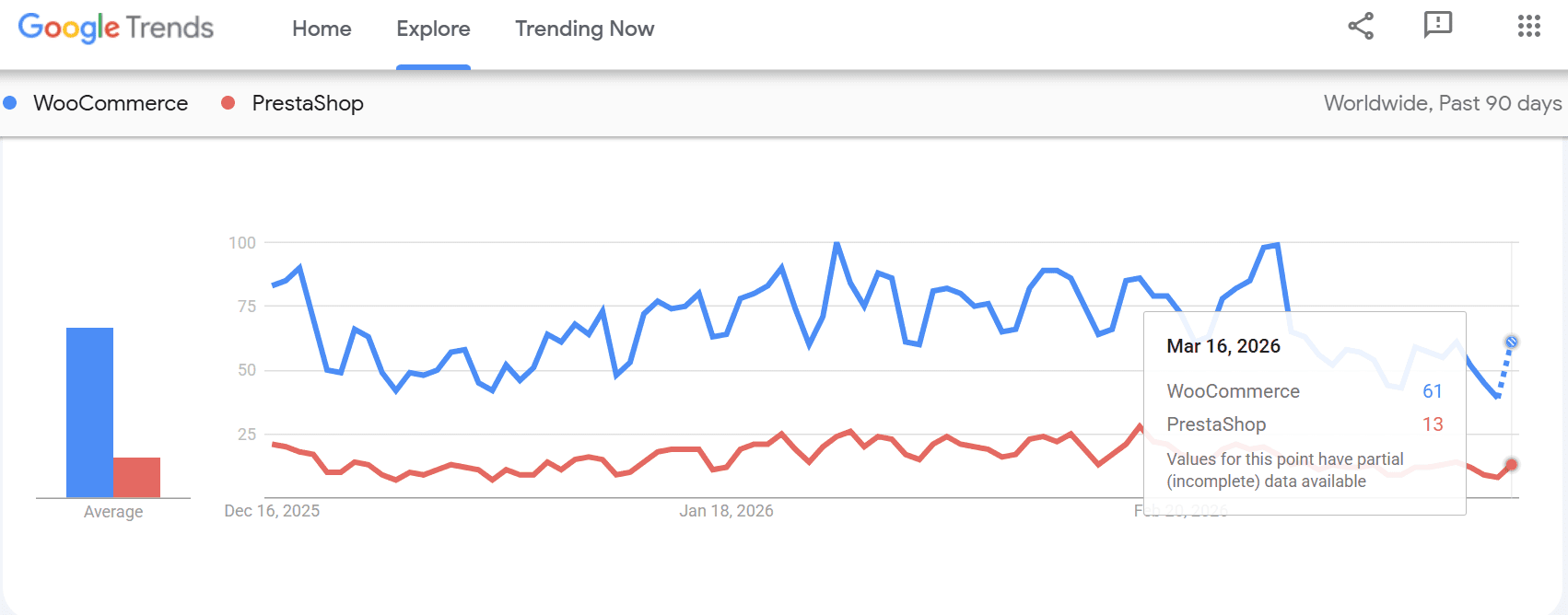
Both platforms offer a variety of extensions to enhance your store’s functionality, and your choice may depend on the level of customization and development you are prepared to undertake. If you’re not experienced in coding, it might be beneficial to consult with a developer to discuss your specific needs.
WooCommerce vs PrestaShop: Features comparison
At first glance, WooCommerce and PrestaShop appear quite similar; both provide robust tools to create and manage your online store. However, a significant difference emerges when you look deeper: WordPress integration.
WordPress integration
Choosing WooCommerce means you’re also selecting WordPress. This combination offers the best of both worlds: WordPress’s flexibility to build any website you envision, along with WooCommerce’s reliable eCommerce functionality.
In contrast, PrestaShop is solely focused on eCommerce, which is advantageous if your primary goal is to sell online. However, this narrower focus might limit you if you want more than just a storefront.
Key features comparison
| Feature | WooCommerce | PrestaShop |
| Price | Free (hosting costs apply) | Free (hosting costs apply) |
| Streamlined installation | Yes, depending on web host | Yes, depending on web host |
| Expertise required | Beginner-friendly with advanced options | Beginner-friendly with advanced options |
| SEO tools | Access to WordPress SEO plugins | Basic SEO options with additional modules |
| Support | No official support offered | Official support available at a premium |
| Extensibility | Hundreds of WooCommerce extensions and thousands of WordPress plugins | Thousands of modules and templates |
WooCommerce vs PrestaShop: Pricing comparison
When it comes to affordability, both WooCommerce and PrestaShop are excellent choices for budget-conscious entrepreneurs.
Both platforms are open-source and free to download, allowing you to install PrestaShop and WooCommerce on any server without initial costs. However, additional expenses such as hosting and a domain name should be considered.
With WooCommerce, you need to set it up on an existing WordPress site; these hosting costs can vary.
The minimal setup cost is inexpensive; once you start exploring WooCommerce themes and plugins, expenses can increase. PrestaShop themes and modules tend to be pricier, ranging from $80 to $250, while WooCommerce generally offers a wider selection at more affordable prices.
WooCommerce vs PrestaShop cost breakdown
| Cost factor | WooCommerce | PrestaShop |
|---|---|---|
| Core platform | Free WordPress plugin | Free open-source platform |
| Hosting | Starts around $10–$30/month depending on provider | Starts around $10–$30/month depending on provider |
| Domain name | Around $10–$20/year | Around $10–$20/year |
| Themes | Free themes available; premium themes $30–$100 | Free themes available; premium themes $80–$250 |
| Extensions/modules | Free and paid plugins ($30–$300 depending on feature) | Paid modules often $50–$300 |
| Payment processing | No platform transaction fees (gateway fees apply) | No platform transaction fees (gateway fees apply) |
| Maintenance | Optional costs for plugins, security and backups | Optional costs for modules, maintenance and security |
In most cases, WooCommerce tends to be more budget-friendly for beginners because the WordPress ecosystem offers a large number of free plugins and themes. PrestaShop also provides flexibility, but many essential features often require paid modules, which can increase the overall cost as your store grows.
Both platforms offer free and paid add-ons, so you’re not required to spend extra unless you want to enhance your store’s functionality or appearance. Investing in these optional extras can provide long-term benefits by unlocking additional features or giving your store a more polished look.
PrestaShop vs WooCommerce: Installation comparison
Installing either WooCommerce or PrestaShop can be straightforward, depending on your technical skills.
WooCommerce: If you have a WordPress website, installing WooCommerce is simple through the WordPress dashboard with just a few clicks. Bluehost offers pre-installed WordPress and WooCommerce plugins with our WooCommerce hosting plans, saving you time and effort.
Check out: Mastering CMS Installation: A Step-by-Step Guide
PrestaShop: Most web hosts support PrestaShop and offer streamlined installation through tools like Softaculous. With Softaculous, setting up either WooCommerce or PrestaShop is just a few clicks away, no need to manually download, upload or install anything.
For DIY enthusiasts, you can download either of the eCommerce software from their respective websites, upload it to your server and manually install it.
If you’ve installed software on a server before, this process shouldn’t be too difficult. However, if you’re new to this, you might find yourself watching a few YouTube tutorials that will guide you through the steps.
PrestaShop vs WooCommerce: Ease of use comparison
Both WooCommerce and PrestaShop offer user-friendly setup wizards to help you get started.
PrestaShop: Its wizard guides you through creating products and customizing your store’s appearance with ease.
WooCommerce: If you’re familiar with the WordPress Classic Editor, managing products will feel intuitive.
Both platforms allow detailed customization of product pages. PrestaShop’s interface is more streamlined, making it easy to find settings through a user-friendly navigation menu.
WooCommerce offers similar control but requires navigating through the WordPress dashboard and settings, adding a few extra steps when configuring your store.
WooCommerce vs PrestaShop: Store management
1. Content management
WooCommerce excels in content management thanks to its WordPress foundation. WordPress provides a powerful content management system (CMS) that makes it easy to create, edit and manage content-rich pages.
Whether you prefer the Classic Editor or the modern Gutenberg Editor, WordPress offers the flexibility to customize nearly every aspect of your store’s pages.
Also read: WordPress Block Patterns: 2026 Guide for Gutenberg Users
This level of control is particularly useful for content-heavy WooCommerce stores.
PrestaShop also includes a CMS section for creating informational pages, but its options are more limited. If your store relies on dynamic and regularly updated content, WooCommerce offers the extra creative freedom you might need.
2. Product management
Both WooCommerce and PrestaShop provide user-friendly interfaces for managing products, including bulk uploads via Excel files. PrestaShop’s tools are specifically designed for eCommerce, offering advanced product management features.
Also read: What is WP Content Uploads in WordPress?
WooCommerce leverages WordPress’s post format, making it familiar for those already accustomed to managing content on WordPress.
3. Stock management
Both platforms offer robust inventory control. PrestaShop stands out with its advanced stock management features, such as low-stock notifications and multi-store support. WooCommerce covers the basics and can be enhanced with various extensions to meet more advanced needs.
Also read: Best WooCommerce Inventory Management Plugin: Expert Picks
WooCommerce vs PrestaShop: Performance
A fast and responsive store is essential for customer satisfaction and sales. Both WooCommerce and PrestaShop can deliver great performance. But since they are open-source platforms, your site’s speed and responsiveness will largely depend on your hosting provider.
If you’re running an eCommerce business with a large inventory on a budget-friendly shared hosting plan, you might experience some performance issues.
To ensure your store loads quickly and runs smoothly, consider upgrading your hosting plan and keeping your PHP version up to date. Small changes like these can significantly improve performance.
Both platforms are scalable and capable of handling growth with the right hosting setup. They can manage thousands of products and handle large volumes of traffic without significant slowdowns, provided you choose an appropriate hosting plan.
Find your perfect plan
📋 View PlansWooCommerce vs PrestaShop: Security
Protecting customer data is paramount when running an online store. Both WooCommerce and PrestaShop prioritize security, but PrestaShop has reported more security vulnerabilities than WooCommerce in recent years.
According to CVE Details, PrestaShop has over 120 publicly disclosed vulnerabilities across its ecosystem, while WooCommerce has significantly fewer recorded vulnerabilities in the CVE database. However, most of these issues were minor, and both platforms regularly release updates to patch security gaps.
A crucial rule for online stores is to always update your eCommerce software. Both PrestaShop and WooCommerce typically release updates monthly or close to it.
Keeping your store and its plugins, themes and add-ons up to date is the best way to prevent security issues. Make sure not to ignore update notifications to maintain the security of your store.
PrestaShop vs WooCommerce: Customization
Customization is essential for creating a successful online store. Both PrestaShop and WooCommerce offer extensive customization options, but the WooCommerce store has the advantage thanks to its vast WordPress ecosystem.
PrestaShop provides around 4,000 modules, which is impressive.
WooCommerce offers access to over 59,000 plugins and 12,000 WordPress themes, allowing for extensive customization. From design tweaks to advanced eCommerce features, there’s a plugin for almost anything you need, including functionalities you might not have initially considered.
Also read: Best WooCommerce Themes: 2026 Speed & SEO Picks
A word of caution: Not all WordPress plugins are compatible with WooCommerce. Always check reviews and compatibility notes before installing a WordPress plugin to avoid issues with your store’s functionality.
WooCommerce vs PrestaShop: Marketing and SEO
Effective SEO is crucial for your store’s visibility. PrestaShop includes solid SEO features out of the box, such as custom meta titles and descriptions and the ability to configure product redirects.
These tools help keep your catalog optimized for search engines.
WooCommerce relies on WordPress SEO plugins like Yoast SEO, which offer advanced optimization tools. Yoast SEO not only helps you optimize meta descriptions but also previews how your products will appear on social media.

Additionally, it allows you to add schema markup to help search engines better understand your pages. Keeping this in mind, Bluehost offers a free Yoast SEO plugin with its WooCommerce hosting plans.
Start with the free version to optimize content, follow SEO best practices and attract more traffic from search engines. As your site grows, upgrade to Yoast SEO Premium for advanced features like AI-powered optimization, internal linking suggestions and redirect management. If you’re launching a new site, you can also bundle Yoast SEO Premium with Bluehost hosting to get built-in SEO tools, AI website creation, a free domain and strong security features.
Ready to optimize your site with Yoast SEO on Bluehost?
Both platforms support various marketing strategies, including paid ads, email marketing and social media integration.
PrestaShop promotes specific add-ons like PrestaShop Marketing for connecting with Google Merchant Center, while WooCommerce offers a more open-ended approach with a vast library of plugins for marketing enhancements.
PrestaShop vs WooCommerce: Reporting and analytics
Data insights are vital for optimizing your store. WooCommerce provides a comprehensive analytics dashboard right out of the box, offering essential metrics like online sales, revenue and top-selling products, along with a monthly performance snapshot.

PrestaShop offers detailed statistics on store performance, including abandoned carts and orders. For more in-depth analysis, you can integrate PrestaShop with Google Analytics, which provides insights into user behavior, conversion funnels and more.
This combination can offer actionable insights to improve your store’s performance.

Both platforms support effective reporting, but WooCommerce offers more features out of the box. If you need additional data layers, pairing PrestaShop with Google Analytics might be the extra touch your store requires.
Also read: A Complete Guide to WooCommerce Reporting & Analytics
WooCommerce vs PrestaShop: Customer support
Launching an online store can be challenging, but both WooCommerce and PrestaShop provide support options to help you navigate the process.
1. Customer service and direct support
For both platforms, direct support is generally available through paid packages. Unlike hosted platforms like Shopify, where support is included, WooCommerce and PrestaShop require some DIY effort.
If you encounter technical issues, you can purchase support packages, such as PrestaShop’s Support Plan or hire Verified WooCommerce Experts. Be prepared for these services to come at a higher cost.
For example, PrestaShop’s technical assistance (level 1) starts at around €300 and is not unlimited. It’s important to keep track of your support time if you opt for these services.
2. Online resources and communities
Fortunately, you don’t have to manage everything on your own. Both platforms are supported by active communities that offer extensive documentation, guides, tutorials and forums.
Need help getting started or optimizing your website? At Bluehost, we provide extensive support to guide you every step of the way. You can explore our comprehensive knowledge base, helpful blog resources and step-by-step YouTube tutorials to find quick answers and expert tips.
Ready to build and grow your website with reliable support?
If you prefer a DIY approach, you’ll find plenty of free resources to help you resolve issues. Simply explore the forums and documentation to find solutions to common problems.
WooCommerce stands out with its large user base, providing a wealth of resources and tutorials. PrestaShop also has a solid community, but WooCommerce has the edge in terms of the volume of available resources.
3. Support from web hosting provider
Don’t overlook the support offered by your web hosting provider. Many hosts, especially those focused on WordPress and WooCommerce, offer assistance with installation and troubleshooting.
With Bluehost, you get dedicated eCommerce support to help you with WooCommerce setups, building eCommerce stores and growing your website.
Get expert guidance over a call
📞 Call 888-401-4678If you choose PrestaShop, ensure your host provides strong support for the platform, which may require a bit more research to confirm.
Why Bluehost is the ideal hosting partner for your WooCommerce store?
Launching and scaling an eCommerce store requires more than just installing WooCommerce. You need reliable hosting, security, performance optimization and built-in tools to grow your business. Bluehost WooCommerce hosting is designed specifically for WordPress stores, offering optimized infrastructure, built-in commerce tools and expert support to help businesses start selling faster.
Below is a quick overview of why Bluehost stands out as a strong partner for building and growing your WooCommerce store.
Bluehost WooCommerce hosting at a glance
| Feature | What you get |
|---|---|
| WooCommerce auto-installation | Launch your store quickly with automatic WooCommerce setup |
| Free domain (1st year) | Establish your brand identity with a custom domain |
| Free SSL certificate | Secure customer transactions and checkout |
| Free CDN | Faster global page load speeds |
| Managed WordPress updates | Automatic updates for improved security and performance |
| 24/7 expert support | Assistance through chat and phone |
| 30-day money-back guarantee | Risk-free trial period |
These features help simplify the process of launching and managing an online store while keeping your site secure and scalable.
WooCommerce hosting plans overview
Bluehost offers WooCommerce plans designed for businesses at different growth stages.
- eCommerce Essentials: Ideal for new online stores that need essential commerce tools and simple setup.
- eCommerce Premium: Best for growing businesses that need advanced store features such as bookings, subscriptions and marketing tools.
- Custom Commerce solutions: Designed for larger stores that require additional scalability and advanced customization.
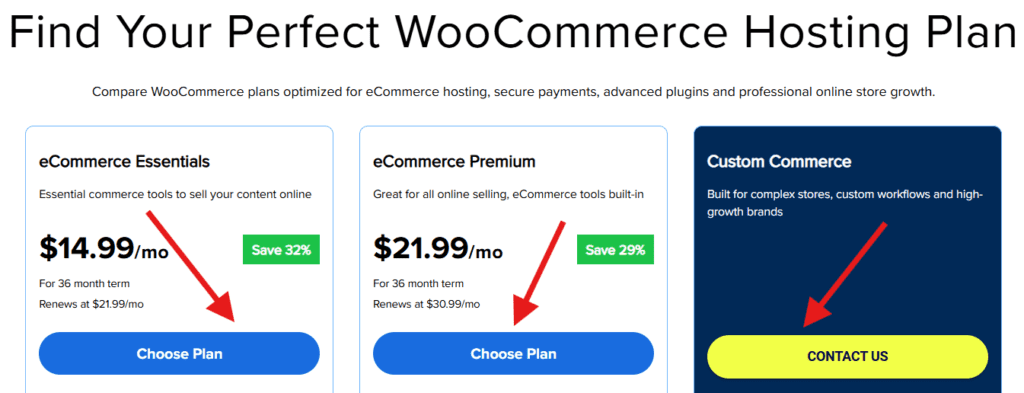
All plans include security features like malware scanning, firewall protection and SSL encryption, helping protect customer data and transactions.
Who should use Bluehost WooCommerce hosting?
| Business type | Why Bluehost works well |
|---|---|
| New eCommerce entrepreneurs | Easy setup with WooCommerce auto-installation |
| WordPress users | Seamless integration with the WordPress ecosystem |
| Growing online stores | Scalable hosting with advanced commerce tools |
| Agencies or developers | Flexible plans and custom configurations |
Ready to launch your WooCommerce store?
With optimized performance, built-in eCommerce tools and expert support, Bluehost WooCommerce hosting provides everything you need to build and grow your online store.
Start your eCommerce journey today with Bluehost WooCommerce hosting and turn your website into a powerful online store.
Pros and cons: WooCommerce vs PrestaShop
Advantages of using WooCommerce
- Seamless WordPress integration: WooCommerce is the best choice for WordPress users, ensuring a smooth and easy setup.
- User-friendly and beginner-friendly: Unlike PrestaShop, WooCommerce is designed for users of all skill levels, making it an excellent choice for small business owners.
- Extensive plugin and theme marketplace: With thousands of free and premium plugins, WooCommerce offers unlimited possibilities for customization.
- Superior SEO capabilities: Since WooCommerce runs on WordPress, it inherits powerful SEO tools, helping stores rank higher on search engines.
- Lower initial cost: WooCommerce is free to use and while premium extensions are available, a fully functional store can be set up with minimal expenses.
- Large community and support: WooCommerce has one of the largest eCommerce communities, providing access to extensive documentation, forums and expert support.
- Scalability for growing businesses: WooCommerce can handle small startups and scale up effortlessly to accommodate large, high-traffic stores.
Disadvantages of using WooCommerce
- Requires WordPress: While WordPress integration is a strength, those unfamiliar with WordPress may face a slight learning curve. For such users, WooCommerce alternatives can be a better choice.
- Performance optimization required for large stores: To ensure optimal performance, WooCommerce stores may require caching plugins and high-quality hosting.
- Security relies on updates and plugins: WooCommerce itself is secure, but users must stay on top of updates and security plugins.
Advantages of using PrestaShop
- Standalone eCommerce platform: PrestaShop does not require a CMS, making it a good option for those looking for a dedicated store setup.
- Advanced built-in eCommerce features: PrestaShop offers built-in order management tools, multi-currency and multi-language support.
- Highly customizable: Store owners have access to a range of modules and themes to tailor their store’s design and functionality.
- Security-focused: PrestaShop offers native security features that help protect online stores from common threats.
Disadvanatages of using PrestaShop
- Steeper learning Curve: PrestaShop is not as beginner-friendly as WooCommerce and requires some technical expertise. Therefore, PrestaShop alternatives can be a better choice for users with no technical background.
- Paid modules for essential features: Many critical features require paid add-ons, increasing the total cost of running a store.
- Smaller community support: Compared to WooCommerce, PrestaShop has a smaller community, meaning fewer resources and support options.
- Hosting and maintenance costs: Since PrestaShop does not provide built-in hosting, users must manage their own hosting, which can be expensive for high-traffic stores.
Which is better WooCommerce or PrestaShop?
Selecting the right foundation for your online store depends on your technical expertise, specific business requirements, and plans for scalability. Here is how to decide between WooCommerce and PrestaShop.
Choose WooCommerce if…
- You are already comfortable using WordPress or have an existing WordPress site.
- Content marketing and SEO are central to your growth strategy.
- You want access to the world’s largest ecosystem of themes and plugins for maximum customization.
- You prefer a more user-friendly interface that is easier for beginners to master.
- You are looking for a cost-effective way to start small and scale your features as needed.
Choose PrestaShop if…
- You need a platform that was built exclusively for eCommerce from the ground up.
- You plan to manage multiple stores from a single back-office interface.
- You require advanced internationalization features, such as multi-currency and multi-language support, out of the box.
- You have a very large and complex product catalog with numerous attributes and combinations.
- You have access to technical resources or developers to handle more advanced configuration and maintenance.
WooCommerce vs PrestaShop vs other eCommerce platforms: A quick eCommerce platform comparison
Here’s a brief comparison of PrestaShop and WooCommerce alongside other popular eCommerce platforms:
| Feature | WooCommerce (WordPress) | PrestaShop | Wix eCommerce | Shopify | Magento 2 (Adobe Commerce) |
| Ease of use | User-friendly, integrates seamlessly with WordPress | Moderate learning curve | Simple drag-and-drop | Beginner-friendly but limited flexibility | Complex setup, best for developers |
| Customization | Highly customizable with plugins and themes | Customizable but requires coding | Limited customization | Theme-based, less flexibility | Advanced customization but requires technical expertise |
| Cost | Free core plugin; hosting and extensions vary in price | Free to use; paid modules and hosting required | Subscription-based, lower upfront costs | Subscription-based with transaction fees | High development and hosting costs |
| Payment options | Supports multiple gateways, no transaction fees | Supports various gateways, may require add-ons | Limited built-in options, higher processing fees | Own payment gateway (Shopify Payments) + other options | Wide range of payment integrations |
| Scalability | Scales well with the right hosting and optimization | Suitable for small to medium businesses | Best for small stores | Good for small to medium stores | Enterprise-level scalability |
| SEO & marketing | Strong SEO tools via WordPress | Decent SEO features, but not as strong as WordPress | Basic SEO capabilities | Good SEO tools but less flexible than WooCommerce | Advanced but requires developer knowledge |
| Best for | Businesses looking for flexibility, control and WordPress integration | Mid-sized businesses with some technical knowledge | Small businesses needing an all-in-one solution | Dropshipping, print-on-demand and quick store setups | Large enterprises needing advanced features |
The above comparison will help you choose the most apt eCommerce platform based on your specific needs. Carefully assess your requirements and choose the platform that aligns best with your vision for long-term growth and success in the competitive online marketplace.
Key factors to consider when choosing an eCommerce platform
When choosing an eCommerce platform, several key factors should be considered to ensure the platform fits your business needs and growth potential.
Here are the main factors to evaluate:
1. Ease of use
- User-friendliness: Choose a platform that is easy to navigate, especially if you’re new to eCommerce. A simple interface and intuitive design will save time and reduce the learning curve.
- Customization: Consider how much flexibility you need for customization and whether the platform allows you to make design or functional changes without needing advanced technical skills.
2. Cost
- Upfront costs: Some platforms have monthly or annual fees, while others might charge transaction fees. Make sure to understand the overall pricing structure.
- Additional costs: Be aware of costs for additional features, themes, apps and integrations that may be necessary as your business grows.
3. Scalability
- Growth potential: As your business expands, will the platform be able to scale with you? Look for features that can accommodate increased product listings, traffic and orders.
- Upgrade options: Ensure the platform offers easy upgrades or add-ons that will grow with your business.
4. Payment gateways and fees
- Payment options: Check if the platform supports multiple payment methods like credit cards, PayPal, Apple Pay, etc. Some platforms may have limitations on what payment processors they support.
- Transaction fees: Some platforms charge a percentage of each transaction. Make sure you understand the costs associated with each payment gateway.
5. Security
- SSL encryption: Make sure the platform offers secure payment options and SSL certificates to protect customer data.
- PCI compliance: Verify the platform adheres to the Payment Card Industry Data Security Standard (PCI DSS) to handle credit card transactions securely.
6. Mobile optimization
- Responsive design: Ensure the platform provides mobile-friendly themes and designs, as a significant portion of eCommerce traffic comes from mobile devices.
- Mobile app options: Some platforms provide mobile apps for managing your store on the go, which can be a huge convenience.
7. SEO capabilities
- SEO features: Look for platforms that allow easy optimization of your site for search engines, including customizable URLs, meta descriptions and title tags.
- Site speed: Fast loading times are critical for both user experience and SEO. Choose a platform that prioritizes performance.
8. Customer support
- 24/7 support: Ideally, the platform should offer round-the-clock customer support through multiple channels (live chat, email, phone).
- Help resources: A comprehensive knowledge base, tutorials and community forums can be beneficial for resolving issues and learning more about the platform.
9. Integrations and apps
- Third-party integrations: Consider whether the platform integrates with tools you already use, such as accounting software, email marketing services and shipping solutions.
- App marketplace: Access to a robust marketplace with apps for marketing, accounting, inventory management, etc., can enhance the platform’s functionality.
10. Design and themes
- Customization: Make sure the platform offers a variety of themes or templates that you can tailor to your brand. Some platforms may have free options, while others might charge for premium themes.
- Visual appeal: A visually appealing store can boost conversions, so ensure the platform supports high-quality design features.
11. Inventory management
- Stock tracking: The platform should allow you to manage and track inventory easily, including features like automatic stock updates and low-stock alerts.
- Multichannel selling: If you plan to sell across multiple platforms, choose a solution with seamless integrations. Ensure platform integration with major marketplaces like Amazon, eBay, Etsy, Walmart, Shopify, Google, Magento 2, Bonanza and WooCommerce for efficient order management.
12. Marketing and sales tools
- Built-in marketing tools: Look for platforms that offer integrated marketing tools like discount codes, email marketing and social media integrations to promote your store.
- Analytics and reporting: Detailed reporting and analytics can help you track sales, customer behavior and inventory, helping you make data-driven decisions.
Once you have listed down all your essential eCommerce needs, it’s time to choose the platform.
Why WooCommerce stands out compared to PrestaShop as an eCommerce platform
When it comes to choosing the right eCommerce platform, WooCommerce stands out as a robust and scalable solution. It provides unparalleled flexibility, ease of use and extensive customization options to the users.
Unlike PrestaShop, WooCommerce easily integrates with WordPress, offering business owners a powerful content and commerce combination that drives traffic and enriches user engagement and upscale conversions.
Final thoughts
Choosing between WooCommerce and PrestaShop depends on your specific needs. Both platforms are excellent, cost-effective solutions suitable for small to large online stores.
WooCommerce offers greater flexibility through WordPress integration, a vast plugin ecosystem and user-friendly hosting options. It’s ideal for those who want extensive customization and access to a large support community.
PrestaShop is focused solely on eCommerce. It provides robust product management and advanced stock control. It’s a strong choice for businesses that prioritize eCommerce functionality and are comfortable handling customization on their own.
Ultimately, your choice should align with the unique requirements of your online shops and your comfort level with customization and technical management. Whether you’re starting a new store or growing an old one, Bluehost offers the resources and adaptability you need to be successful.
Get started with Bluehost WooCommerce hosting right now!
FAQs
WooCommerce is better for those seeking flexibility and ease of use within WordPress, while PrestaShop excels for large-scale, international stores needing robust built-in management tools. The best choice ultimately depends on your technical expertise.
Both platforms function similarly but differ in their ecosystems. PrestaShop uses modules, while WooCommerce relies on plugins. WooCommerce also has a larger community, making it a popular choice for businesses focused on digital marketing. If you’re looking to compare PrestaShop with WooCommerce, the latter stands out for its extensive ecosystem and user base.
Small and medium-sized businesses often prefer WooCommerce due to its popularity and ease of use. WooCommerce users, in particular, appreciate its flexibility and scalability for growing businesses.
Both are designed for simplicity. However, WooCommerce tends to be more straightforward, especially for eCommerce store owners who are familiar with WordPress. PrestaShop’s frequently changing UI can be challenging for less experienced users.
WooCommerce leads in customization thanks to its vast number of plugins and the adaptable nature of WordPress.
WooCommerce has a larger global user base and developer community, providing more resources and support options.
WooCommerce generally leads for SEO because it integrates with powerful WordPress plugins like Yoast. While PrestaShop has solid built-in tools, the superior blogging capabilities and extensive plugin ecosystem of WordPress provide a distinct ranking advantage.
When it comes to security, WooCommerce stands out with fewer publicly reported vulnerabilities compared to PrestaShop, making it a safer option for many online store owners concerned about safeguarding customer data.
WooCommerce offers a significantly larger collection of WordPress plugins, while PrestaShop has a solid but smaller set of modules.
Both PrestaShop and WooCommerce are free. But costs vary based on the plugins or modules you choose to enhance functionality. Compare WooCommerce and PrestaShop’s add-ons to see which eCommerce platform aligns better with your budget.
Both eCommerce platforms are mobile-friendly, ensuring a smooth browsing experience for customers on any device.
Both WooCommerce and PrestaShop are scalable and can grow with your business, provided you choose the right hosting plan.

Write A Comment