


Key highlights
- Know why Bluehost is the best WordPress hosting in 2026 with clear use-case picks.
- Explore a quick table for prices, free domain, free SSL and 24/7 support.
- Understand essentials that speed launch and growth, including one-click install, backups, staging, CDN and uptime.
- See real performance signals, including infrastructure upgrades and page speed improvements, that support long-term WordPress growth.
- Uncover tips to avoid mistakes and choose better plans with practical explanations and a checklist.
Nobody wants a website that loads painfully slow, crashes frequently or worse, gets hacked because of weak security. The difference between a fast, reliable WordPress site and a frustrating one often comes down to a web hosting provider.
The best WordPress hosting provider ensures your site delivers a smooth user experience, maintains reliable uptime and simplifies setup where it matters.
As a growing website, your focus should be on creating content and scaling your business, not dealing with hosting issues. The right WordPress hosting service simplifies website management, provides reliable support and keeps your site secure, allowing you to focus on what truly matters.
In this blog, we explore the most reliable WordPress hosting options in 2026 based on performance, managed features and long-term growth.
TL;DR: Best WordPress hosting for beginners 2026
- Bluehost: Best overall managed WordPress hosting (speed, performance & reliability).
- HostGator: Best budget WordPress hosting option.
- Kinsta: Best for beginner-first WordPress hosting.
- InMotion: Best customer support.
- Hostinger: Best value WordPress hosting with guided onboarding.
Beginner hosting glossary
Use this quick glossary while choosing WordPress hosting for beginners. Short, plain-English definitions only.
- WordPress hosting: Web hosting tuned for WordPress with tools for install, updates and security.
- Shared hosting: Many sites share one server. Most affordable start. Resources are limited.
- Managed WordPress hosting: Host handles core updates, backups and security so you do less.
- VPS (Virtual Private Server): A slice of a server with dedicated resources. More control than shared.
- Dedicated server: One physical server for your site only. Highest control and cost.
- Cloud hosting: Your site runs on a cluster. Easier scaling and high availability.
- Hosting plan: The bundle of resources and features you pay for. Check limits and renewals.
- Website builder compatibility: AI site builders like WonderStart AI and WonderBlocks (Bluehost-exclusive) also simplify setup.
- Control panel (cPanel, site tools): The dashboard to manage files, databases, email and DNS.
- One-click install: Automated WordPress setup so you can launch fast.
- Staging site: A private copy of your site to test changes before you go live.
- Backups: Automatic copies of your site. Needed for quick restore after errors or hacks.
- CDN (Content Delivery Network): Global servers that deliver images, CSS and JS closer to visitors. Faster page load.
- Caching: Saves ready-to-serve pages or objects in memory or disk to speed up requests.
- SSL certificate / free SSL: Encrypts data between your site and visitors. Needed for HTTPS and trust.
- Domain name: Your web address, like yoursite.com.
- Subdomain: A prefix before your domain, like blog.yoursite.com.
- DNS / Nameservers: The phonebook of the web. Points your domain to your hosting.
- Uptime / SLA: The time your site stays online. SLA is the host’s uptime promise with credits.
- Bandwidth / traffic: How much data your visitors use. Some plans say “unmetered” with fair-use rules.
- Storage (SSD / NVMe): Where your files live. SSD and NVMe are faster than HDD.
- PHP / MySQL (MariaDB): Programming language and database that power WordPress.
- SFTP / SSH: Secure ways to access files and run commands on your server.
- Malware scanning / WAF / DDoS protection: Tools that block attacks and remove threats.
- Migration: Moving your site from one host to another. Can be manual or assisted.
- Money-back guarantee: Refund window if you cancel early. Check terms.
- Intro price vs renewal: First-term discount vs regular price. Compare total cost.
- Customer support: Help via chat, phone or tickets. Look for 24/7 and WordPress expertise.
Quick picks: Best beginner WordPress hosting at a glance
Here is a comparison table to help you understand the key differences between the best WordPress hosting platforms:
| Hosting provider | Best for | From (USD/mo) | Free domain | Free SSL | Money-back | Backups | Staging | CDN | Storage | Migration | Uptime |
| Bluehost | Best overall managed WordPress | $3.99 | ✓ | ✓ | 30d* | ✓* | ✓ | ✓ | NVMe | Free | 99.99%* |
| Liquid Web (Nexcess) | Managed WordPress | $4.00 | ✗ | ✓ | — | ✓ | ✓ | ✓ | — | ✓ | SLA |
| Kinsta | beginner-first managed WordPress | $30.00 | ✗ | ✓ | — | ✓ | ✓ | ✓ | SSD | ✓ | 99.9% |
| Hosting.com | Ease of use | $14.99 | ✗ | ✓ | 30d | ✗ | ✗ | ✗ | NVMe | ✓ | 99.9% |
| InMotion Hosting | Customer support | $3.29 | ✗ | ✓ | 90d | ✓ | ✗ | ✗ | NVMe | ✓ | 99.9% |
| Namecheap | Budget WordPress | $9.88 | ✓* | ✓ | — | ✓ | ✗ | ✓ | SSD | ✓ | 99% |
| DreamHost | Simplicity | $19.99 | ✓* | ✓ | 30d | ✓ | ✓* | ✓* | SSD | ✓ | 99%* |
| HostGator | Budget WordPress hosting | $3.50 | ✓* | ✓ | 45–30d | ✗ | ✗ | ✓ | — | ✓ | 99.9% |
| SiteGround | Growth | $2.99 | ✓† | ✓ | 30d / 14d | ✓ | ✓ | ✓ | — | ✓ | 99.9% |
| Hostinger | Value | $2.99 | ✓* | ✓ | 30d | ✓ | ✓ | ✓ | NVMe | ✓ | 99.9% |
Notes:
- Free domain is typically included for the first year on annual billing (eligibility varies by provider and TLD).
- Backup frequency, CDN scope and staging availability may vary by plan.
- Uptime figures reflect provider guarantees or SLAs; actual performance may vary.
- Prices are introductory and accurate as of January 2026.
Our top 3 best WordPress hosting for beginners 2026
Choosing WordPress hosting for beginners comes down to setup ease, support quality and a clear upgrade path. Here’s a quick, practical view so you can pick with confidence.
1. Bluehost
Bluehost is a premium WordPress hosting provider with fast-performing plans, managed features and tools that support long-term growth. WordPress.org also lists Bluehost as a recommended host, which reinforces our credibility in the WordPress ecosystem.
Ready to build and scale your WordPress site? Explore Bluehost WordPress hosting and get free domain, SSL and 24/7 expert support.
Why Bluehost is the best WordPress hosting for beginners?
- Managed infrastructure with performance-focused features.
- Free domain and SSL included on eligible plans to reduce first-year setup cost.
- Ongoing updates, security tools and expert support designed for WordPress users.
2. HostGator
HostGator offers entry-level WordPress plans with straightforward setup and a path to grow. A free domain and SSL certificate are available on 12, 24 or 36-month terms. If you’re migrating in, you’ll find clear guidance on the process.
When is HostGator a good fit?
- You want a low-friction start and plan to commit to a longer billing term to unlock the free domain.
- You prefer familiar tooling and documentation while you learn the basics.
Also read: HostGator vs. Bluehost: Which Is the Best Web Hosting for Business in 2026?
3. Hostinger
Hostinger’s managed WordPress hosting offers quick launch, AI-assisted site setup and 24/7 support. A free domain is included on eligible hosting plans, with a 30-day money-back window to try the platform.
When is Hostinger a good fit?
- You want an affordable start with guided WordPress setup and a simple upgrade path as traffic grows.
- You’d like the convenience of a free domain and easy migration in one place.
Also read: Bluehost vs Hostinger: 7 Major Differences
Best WordPress hosting providers for beginners: Use case-specific
Different sites have different needs. This quick map helps you choose WordPress hosting for growing websites based on what you value most right now.
1. Best overall managed WordPress hosting — Bluehost
For growing WordPress websites, it’s important to pick a host that is reliable, scalable and performance focused. That’s where Bluehost stands out as a strong all-round choice for WordPress websites at different growth stages. We are a premium web hosting provider with fast-performing plans and a simple path from setup to launch.
Go live with confidence: Start with Bluehost WordPress hosting — performance-driven hosting solution built to grow with your website.
Why does it fit this use case?
- Guided onboarding from checkout to a live site, reducing operational friction.
- Managed tools for updates, staging, backups and core security.
- Clear upgrade paths as traffic, content and business needs grow.
Verdict: Bluehost is the most reliable all-round choice for WordPress beginners, balancing ease, speed and support.
2. Best budget option — HostGator
HostGator offers entry plans that keep first-year costs predictable. Setup is straightforward with one-click install and an included SSL. On longer terms, a free domain is available. If you are moving from other hosting services, migration guidance is easy to follow.
Why does it fit this use case?
- Lower starting price with simple starter features.
- Familiar control panel for first-time users.
- Clear steps for domain connection and launch.
Verdict: HostGator is the most affordable beginner option, but you’ll need longer billing terms to unlock the free domain.
3. Best for beginners — Kinsta
Kinsta focuses on performance at the platform level. It runs on premium cloud infrastructure with built-in caching, CDN integration and staging. That combination helps reduce page load times without manual tuning.
Why does it fit this use case?
- Server-level optimizations out of the box.
- Tools to test changes in staging before you go live.
- Resources that adjust as traffic patterns change.
Verdict: Kinsta delivers good speed with Google Cloud infrastructure, though pricing is premium for beginners.
Also read: Kinsta vs Bluehost: Which Web Hosting for Business Is Best in 2026?
4. Best for customer support — InMotion Hosting
InMotion Hosting highlights accessible help and practical guidance for new WordPress users. You get round-the-clock assistance and a knowledge base that covers common setup questions, SSL, email and basic performance checks.
Why does it fit this use case?
- Consistent access to human support when you get stuck.
- Clear articles for first-time tasks.
- Sensible features included for a stable start.
Verdict: InMotion stands out for its dependable customer support if you need step-by-step guidance.
Also read: InMotion vs. Bluehost: Discover the Best Web Host for Your Needs
5. Best for ease of use — Hosting.com
Hosting.com keeps the early steps simple. One-click install, an intuitive dashboard and optional migration help reduce friction. Managed WordPress plans are available if you prefer the host to handle more maintenance tasks.
Why does it fit this use case?
- Quick path from purchase to a working WordPress site.
- Familiar tooling for edits and updates.
- Options to offload routine upkeep.
Verdict: Hosting.com makes early setup painless, but advanced Turbo features are locked behind higher-tier plans.
Also read: A2 Hosting vs Bluehost: Best WordPress Hosting for Beginners Compared
Pro tip: If you want the lowest lift, a clean upgrade path and performance-first platform, shortlist Bluehost first. If your priority is entry pricing, compare HostGator next. This approach keeps your WordPress hosting options aligned with your goals without chasing generic WordPress hosting ratings.
Still wondering what is the most reliable WordPress hosting for beginners? Let’s explore the best WordPress hosting options in detail to help you make an informed decision.
10 best WordPress hosting for beginners 2026
Choosing the right WordPress hosting can boost your website’s performance and positively impact its success.
1. Bluehost

Bluehost is built for WordPress websites that need consistent performance, dependable uptime and room to scale. As a WordPress.org-recommended hosting provider, Bluehost combines managed infrastructure, performance-optimized storage and expert human support to reduce the operational burden of running a growing WordPress site.
Unlike generic shared hosting, Bluehost offers a managed WordPress experience designed to support websites beyond the launch phase. From guided onboarding and secure defaults to performance tuning and upgrade flexibility, Bluehost helps site owners focus on growth instead of ongoing maintenance.
Key features:
Here’s what Bluehost offers for growing WordPress websites:
- Guided WordPress installation: Launch WordPress quickly with a guided setup that reduces manual configuration.
- Centralized, user-friendly dashboard: Manage websites, domains, performance tools and updates from a single control panel.
- 24/7 WordPress-trained customer support: Access round-the-clock help from experts familiar with WordPress hosting environments.
- Free domain and SSL certificate (year one, eligible plans): Secure your website and reduce initial setup costs.
- 99.99% network uptime SLA: Infrastructure-level uptime commitment backed by service credits.
- Multi-regional fault tolerance: Designed to improve reliability and resilience during infrastructure disruptions.
- Built-in caching and CDN support: Improve page load performance for visitors across different regions.
- SSD or NVMe storage: Faster data access for improved site responsiveness and database performance.
- Security and backup options: Baseline security features included, with advanced daily backups and recovery available via add-ons.
- Staging and WordPress site tools: Test updates, themes or plugins safely before deploying changes to your live site.
Pros
- Managed WordPress tools that reduce day-to-day maintenance as sites grow
- Free domain and SSL help lower first-year setup costs
- Clear upgrade paths into higher-performance or eCommerce hosting without switching providers
Cons
- Some advanced features vary by plan, so check details before checkout.
Why do we recommend Bluehost?
Bluehost is designed to remove operational friction as WordPress websites grow. From guided onboarding and secure defaults to performance optimizations and scalable hosting tiers, we allow you to focus on content, business and traffic growth rather than ongoing hosting maintenance.
With managed WordPress tools, expert human support and a reliable infrastructure foundation, Bluehost offers a balanced hosting solution for websites that need to scale confidently over time.
Who is Bluehost best for?
Bluehost is a strong fit for:
- Website owners seeking dependable, managed WordPress hosting with room to scale
- Bloggers and publishers running content-heavy WordPress sites
- Small and mid-sized businesses that need reliable performance, security and 24/7 WordPress expert support
- WooCommerce stores looking for predictable hosting and growth-ready infrastructure
Pricing
Bluehost offers a range of WordPress hosting plans designed to support different growth stages, from content sites to high-performance business websites.
Standard plans
- Starter ($3.99/month): Ideal for a simple website or blog.
- Business ($6.99/month): Best for multiple websites needing storage, security and backups.
- eCommerce Essentials ($14.99/month): Includes essential tools to sell your content or products online.
High Performance Plans
- Pro ($9.99/month): Suited for growing companies needing extra power and flexibility.
- Premium ($13.99/month): Built for sites prioritizing storage and CPU performance.
- Enhanced ($16.49/month): For intensive sites needing powerful tools and storage.
- Elite ($19.99/month): Designed for brands requiring enterprise-grade infrastructure and performance.
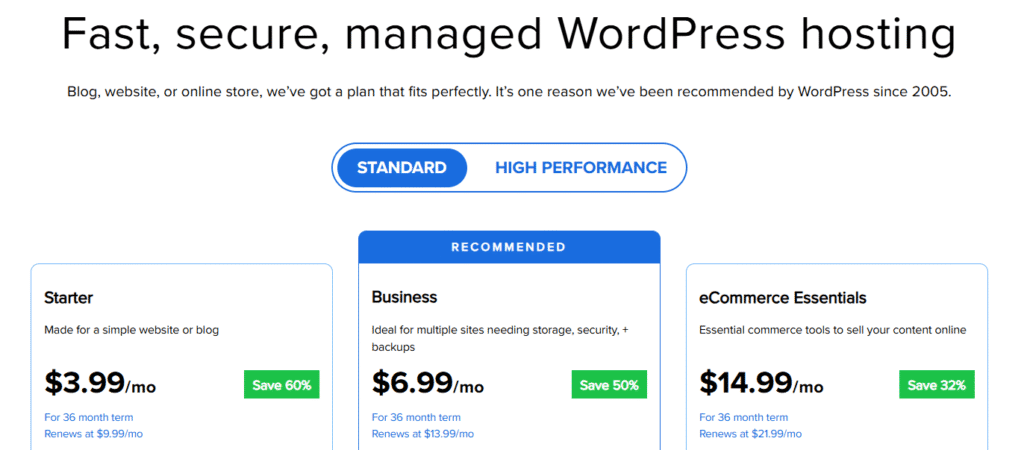
Note: Pricing reflects introductory rates on eligible billing terms and is subject to change. Always refer to the Bluehost pricing page for the most current details.
Rating (Overall: 4.8/5)
- Speed & uptime: 4.8/5
- Beginner onboarding: 4.9/5
- Support responsiveness: 4.7/5
- Pricing & value: 4.6/5
2. Liquid Web

Liquid Web (via its sister brand Nexcess) is a managed platform designed to reduce maintenance work on WordPress sites. Nexcess provides automatic WordPress updates, daily backups, staging, SSL management and autoscaling options.
Liquid Web’s network SLA adds a clear uptime commitment. This combo suits teams that want less manual upkeep on a new site.
Key features:
Here’s what it offers:
- Top-tier support: You get 24/7 expert assistance via phone, chat and email.
- Automatic updates: The hosting provider offers automated WordPress core, theme and plugin updates to keep your website running smoothly.
- Daily backups: You get daily off-site backups, ensuring that your data is safe from phishing, hacking and malware.
- Reliable performance: Get fast load times with built-in caching, CDN integration and scalable cloud infrastructure.
- SSL management: Issue and renew certificates without extra steps.
Pros
- Maintenance tasks (backups, updates, staging) are built in.
- Clear network uptime commitment.
- Guided migrations available.
Cons
- Managed WordPress is operated under the Nexcess brand, which may add an extra step when comparing plans.
- Promotional entry pricing varies; confirm renewal rates before checkout.
Who is it best for?
Liquid Web provides a secure hosting environment and manages the server effectively, making it ideal for:
- New sites that want managed WordPress features from day one.
- Small businesses or agencies that prefer staging and visual-compare before updating plugins.
Pricing
Liquid Web offers managed WordPress hosting plans under its Spark tier, tailored for different levels of performance and features.
- Launch ($4/month): Provides solid hosting resources.
- Thrive ($8/month): Includes enhanced performance and additional features.
- Elevate ($16/month): Premium hosting with full feature access.
Rating (Overall: 4.5/5)
- Speed & uptime: 4.7/5
- Beginner onboarding: 4.5/5
- Support responsiveness: 4.6/5
- Pricing & value: 4.3/5
3. Kinsta

Kinsta runs on Google Cloud’s premium infrastructure and focuses on managed WordPress hosting. The stack uses Google’s C2/C3D machines and Premium Tier network, with Cloudflare enterprise security at the edge. Daily automatic backups, staging and 24/7 support are included. Kinsta offers 99.9% uptime SLA.
Key features:
Kinsta is built on Google Cloud Platform, meaning it delivers fast load times, automatic scaling and high uptime. It includes:
- Built-in caching: The WordPress hosting provider uses server-level caching and CDN integration to optimize website speed and performance without requiring extra plugins.
- Security features: Enjoy daily malware scanning, DDoS protection and automatic firewalls, ensuring your website stays secure from online threats.
- Automatic backups: Get daily automated backups with one-click restore options, so your data is always safe and easily recoverable.
Pros
- Platform-level performance features reduce manual tuning.
- Built-in backups, staging and security simplify maintenance.
- Migration help lowers risk when switching hosts.
Cons
- Pricing is premium; confirm current promos and renewals before checkout.
Who is it best for?
It has an intuitive and beginner-friendly dashboard, making the platform ideal for:
- Content-heavy bloggers to handle high traffic without slowdowns, thanks to built-in speed optimizations.
- eCommerce stores to keep transactions seamless with scalable resources and WooCommerce-specific optimizations.
- Business websiteswho want enterprise-grade security and uptime guarantees for mission-critical WordPress sites.
Pricing
Kinsta offers managed WordPress hosting plans designed for different needs.
- Single-Site plan ($30/month): Best for individuals or small businesses.
- Multiple-Site plan ($59/month): Ideal if you’re managing 2 or more sites.
Rating (Overall: 4.6/5)
- Speed & uptime: 4.8/5
- Beginner onboarding: 4.5/5
- Support responsiveness: 4.6/5
- Pricing & value: 4.2/5
Also read: Top Kinsta Alternatives: Discover Top Web Hosting for Business in 2026
4. Hosting.com (formerly A2 hosting)

This web host provides managed WordPress hosting with performance-focused features. Hosting.com uses Turbo Servers that load pages 20x faster than traditional hosting. It’s a suitable choice for beginners looking for speed without paying a premium hosting price.
You also get 24/7/365 support, free site migration in most cases, a 99.9% uptime commitment and a 30-day money-back guarantee.
Key features:
The platform offers:
- Free site migration: You get hassle-free, expert-assisted site migration, ensuring a smooth transition with minimal downtime.
- SSD storage: The WordPress hosting provider offers high-speed NVMe SSD storage, which significantly improves website speed, responsiveness and database performance.
- 24/7 support: The expertsupport team is available round the clock via live chat, phone or email.
- 30-day money-back guarantee: You get risk-free hosting with a full money-back guarantee if you’re not completely satisfied.
Pros
- Performance enhancements available on Turbo plans with LiteSpeed and NVMe.
- Always-on support and free migration reduce setup friction.
- Clear uptime and refund policies.
Cons
- Turbo features are on higher tiers, so check plan details before checkout.
- Some features vary by plan; verify what’s included on your chosen WordPress hosting plan.
Who is it best for?
Hosting.com is an affordable solution with performance-driven features, making it ideal for:
- Beginners who want an easy-to-use control panel, free site migration and speed-optimized hosting without technical complexities.
- Small website owners for fast-loading pages, reliable uptime and secure hosting at budget-friendly rates.
Pricing
Hosting.com offers optimized WordPress hosting plans with fast performance, free site migration and developer-friendly features.
- Lite ($14.99/month): Great for beginners launching a single website.
- Starter ($29.99/month): Best for users needing more resources and features at the same entry price.
- Pro ($59.99/month): Designed for advanced users and businesses requiring higher performance.
Rating (Overall: 4.5/5)
- Speed & uptime: 4.6/5
- Beginner onboarding: 4.4/5
- Support responsiveness: 4.6/5
- Pricing & value: 4.3/5
Also read: Top A2 Hosting Alternatives for Superior Web Hosting
5. InMotion Hosting

InMotion Hosting is a web hosting platform providing comprehensive server solutions and reliability. It’s a practical option if you want a ready-to-launch WordPress setup.
Security, backups and performance tooling are included on WordPress plans of InMotion Hosting, with free site transfers available on select tiers. A 90-day money-back guarantee applies to Hosting for WordPress and Shared plans.
Key features
InMotion hosting offers:
- Free website migration: The hosting provider transfers your website for free, with zero downtime.
- Solid security features: You get free SSL certificate, DDoS protection and automatic backups.
- 24/7 U.S.-based support: The support team is always available to help with technical troubleshooting, performance optimization or WordPress setup.
Pros
- Security and backup features are included, reducing extra setup.
- 24/7 human support and free migrations on eligible plans.
- Long 90-day refund window on WordPress/Shared.
Cons
- Uptime SLA language is specific to Shared Hosting; review fine print for WordPress plans.
- Pricing and inclusions vary by tier; check renewal terms and feature lists before purchase.
Who is it best for?
One of the best WordPress hosting for beginners, InMotion Hosting delivers speed, scalability and 99.9% uptime, making it suitable for:
- First-time website owners who want a simple setup, free migration and reliable support.
- Freelancers who require flexibility to manage multiple client sites’ projects efficiently.
- eCommerce stores that are looking for smooth online transactions and high conversions.
Pricing
InMotion offers flexible WordPress hosting plans with performance optimization, free SSL and scalability for different website needs.
- WP Core ($3.29/month): Best for individuals running a single website.
- WP Launch ($5.09/month): Good choice for small businesses or bloggers with multiple sites.
- WP Power ($5.09/month): Designed for growing websites with more resources.
- WP Pro ($11.09/month): Built for agencies or advanced users.
Rating (Overall: 4.6/5)
- Speed & uptime: 4.6/5
- Beginner onboarding: 4.5/5
- Support responsiveness: 4.7/5
- Pricing & value: 4.4/5
Also read: InMotion Alternatives for Domains and Website Hosting
6. Namecheap

Namecheap offers two beginner-friendly WordPress hosting options: EasyWP (managed WordPress) and standard Shared hosting with 1-click WordPress. EasyWP includes free CDN, free PositiveSSL, backups and an uptime guarantee (99.9% on Starter/Turbo; 99.99% on Supersonic).
Namecheap is an affordable hosting platform with solid WordPress hosting features. A free domain is included on yearly EasyWP Turbo and Supersonic plans. Shared hosting of Namecheap also includes a first-year domain on annual terms.
Key features
It offers:
- Free domain and SSL certificate: You get a free domain name for the first year, along with a free SSL certificate to encrypt your website data.
- Quick performance: The hosting provider is powered by fast SSD storage, built-in caching and optimized server infrastructure.
- WordPress optimization: Designed for effortless WordPress performance, it offers one-click installation, auto-updates and an intuitive dashboard.
Pros
- Simple managed WordPress with CDN, SSL and backups included on all EasyWP tiers.
- Clear traffic guidelines and uptime commitments.
- Promotional free domain on yearly Turbo/Supersonic; Shared Hosting also offers first-year domain on annual billing.
Cons
- Free PositiveSSL presently tied to Namecheap-registered domains; check compatibility if your domain is elsewhere.
- Promotional pricing and domain offer vary by term; verify renewal rates and TLD list.
Who is it best for?
Namecheap is an ideal choice for WordPress users who require space, power, simplicity and speed. The platform provides a low-cost hosting solution without sacrificing basic functionality, making it ideal for:
- Personal bloggers who need a cost-effective, easy-to-manage hosting solution.
- Small websites looking for reliable hosting with essential features like free SSL, quick setup and scalability.
Pricing
Namecheap’s EasyWP hosting offers budget-friendly managed WordPress plans with fast setup and easy scalability.
- Starter ($9.88/month): Ideal for beginners starting a single site.
- Turbo ($13.88/month): Includes added performance.
- Supersonic ($20.88/month): Best for high-performance needs.
Rating (Overall: 4.5/5)
- Speed & uptime: 4.5/5
- Beginner onboarding: 4.5/5
- Support responsiveness: 4.4/5
- Pricing & value: 4.6/5
Also read: Namecheap vs Bluehost: Which Web Hosting for Business Offers the Best Value?
7. DreamHost

DreamHost is known for its simple setup, unlimited bandwidth and no long-term commitments. It keeps setup simple with one-click WordPress, a custom control panel, free SSL and unmetered bandwidth on shared plans.
You also get free automated WordPress migrations and a 99% uptime guarantee backed by service credits in their Terms of Service.
For managed WordPress (DreamPress), daily and on-demand backups, staging, built-in caching and CDN are included. DreamHost also includes 24/7 chat/ticket customer support.
Key features
It offers:
- Easy setup: Get your website up and running quickly with one-click WordPress installation and an intuitive control panel designed for beginners.
- Unlimited bandwidth: Enjoy unrestricted traffic with no limits, ensuring smooth performance even as your website grows.
- Free WordPress migrations: Seamlessly transfer your existing site with DreamHost’s automated migration tool or expert-assisted migration service at no extra cost.
- Simple pricing structure: Transparent and affordable plans with no hidden fees, making it easy to choose the right hosting package without surprises.
Pros
- Simple launch flow with free SSL and automated WordPress migration.
- Managed WordPress adds staging, backups, caching and CDN without extra plugins.
- Clear uptime commitment (100% guarantee with credits).
Cons
- Phone support is callback-based; chat/tickets are primary.
- Refund window is 30 days per current policy (older articles still cite 97 days). Verify at publish.
Who is it best for?
DreamHost makes sure your website is fast, secure and always running. It provides straightforward shared hosting plan with unlimited storage and features, making it ideal for:
- Bloggers who need affordable, reliable hosting with easy WordPress integration and fast performance.
- Non-profits looking for budget-friendly hosting with strong security, unlimited bandwidth and free domain options.
- Small businesses that need scalable hosting, free migrations and a simple setup to establish their online presence effortlessly.
Pricing
DreamHost provides affordable and beginner-friendly shared hosting options that fully support WordPress.
- DreamPress 1 ($19.99/month): Perfect for beginners running a single website.
- DreamPress 2 ($24.99/month): Great for hosting multiple websites, including WordPress.
Rating (Overall: 4.5/5)
Also read: Bluehost vs. DreamHost comparison for the best web hosting for business needs
- Speed & uptime: 4.6/5
- Beginner onboarding: 4.5/5
- Support responsiveness: 4.4/5
- Pricing & value: 4.5/5
8. HostGator

HostGator offers managed WordPress hosting and shared hosting with an easy start for new WordPress sites. You get WordPress pre-installed, free SSL, Cloudflare CDN and a money-back guarantee window that varies by plan type. A free domain is included on 12, 24 or 36-month terms for Shared, WordPress or Cloud plans of HostGator.
Key specs
- WordPress pre-installed: Launch fast with Cloudflare CDN and malware scanning on WordPress plans.
- Free SSL included: Upgrade to Positive SSL on WordPress hosting if needed.
- Free domain (year 1): Available on 12/24/36-month Shared, WordPress or Cloud terms; check eligible TLDs.
- Self-service migration: Move your site with the InstaWP-powered tool.
- 99.9% uptime and money-back: 45-day on Shared; 30-day on WordPress plans.
- 24/7 support: Get help via chat and other channels.
Pros
- Simple launch with WordPress pre-installed and CDN/SSL included.
- Free domain on longer terms reduces first-year cost.
- Built-in, self-service migration lowers switching friction.
Cons
- Free domain requires 12+ month term and renews at standard rates.
- Refund windows differ by plan type, so check policy details before purchase.
Who is it best for?
- First-time site owners who want WordPress ready on day one with CDN and SSL in place.
- Users willing to choose a longer billing term to unlock the free domain offer.
- Beginners moving from another host who want a guided, plugin-based migration.
Pricing
HostGator offers flexible WordPress hosting plans with free domain registration for the first year, unmetered bandwidth, and user-friendly tools.
- Baby Plan ($3.50/month): Entry-level plan perfect for new websites and small projects.
- Business Plan ($5.25/month): Best for growing websites with added resources and features.
- Pro Plan ($13.95/month): Designed for businesses and advanced users who need more performance.
Rating (Overall: 4.5/5)
- Speed & uptime: 4.5/5
- Beginner onboarding: 4.4/5
- Support responsiveness: 4.4/5
- Pricing & value: 4.5/5
Also read: Top HostGator Alternatives: Best Web Hosting for Business in 2026
9. SiteGround

SiteGround provides managed WordPress hosting on Google Cloud infrastructure with built-in caching, a free CDN tier, one-click installs, staging, free SSL, automated backups and 24/7 support.
The WordPress plan page highlights auto-install/transfer, CDN, caching and expert help. SiteGround also documents a free (Standard) and paid (Premium) SiteGround CDN available on all plans.
Key specs
- Auto-install and managed updates: WordPress auto-install/transfer with managed updates.
- SiteGround CDN: Standard free; Premium available.
- Speed Optimizer and SuperCacher: Dynamic caching with Memcached.
- Staging tool: Test changes safely before going live.
- Backups: Up to 30 daily copies (shared); up to 7 (cloud).
- 24/7 support: Chat and tickets; phone via client area.
- Uptime: 99.9% guaranteed, with some infrastructure backed by a 99.99% SLA.
- Refunds: 30-day (shared); 14-day (cloud).
Pros
- Google Cloud foundation plus built-in CDN and caching for faster page load without extra plugins.
- Staging and 30-day backup retention on shared plans simplify recovery and testing.
- 24/7 customer support with multiple channels.
Cons
- SLA language varies by page (99.9% vs 99.99% post); check your WordPress hosting plan terms.
- Some features (e.g., Premium CDN, certain backup options) require higher tiers or add-ons.
Who is it best for?
- New sites wanting managed WordPress hosting with caching/CDN included.
- Teams that want staging and backup restores for safer edits.
- Users who value Google Cloud infrastructure but prefer a simple control panel.
Pricing
SiteGround is a popular WordPress hosting provider known for speed, security, and excellent customer support. All plans include a free domain and free site transfer for a limited time.
- StartUp ($2.99/month): Best for personal projects and small sites.
- GrowBig ($4.99/month): Perfect for growing businesses with extra resources and premium features.
- GoGeek ($7.99/month): Designed for larger sites needing more power and advanced tools.
Rating (Overall: 4.5/5)
- Speed & uptime: 4.6/5
- Beginner onboarding: 4.5/5
- Support responsiveness: 4.4/5
- Pricing & value: 4.3/5
Also read: Bluehost vs SiteGround for Business Web Hosting: In-Depth Comparison
10. Hostinger

Hostinger offers managed WordPress hosting with quick launch, built-in security, backups, staging on higher tiers and 24/7 chat/email support. WordPress plans include a free domain for 1 year on eligible terms plus free SSL. Hostinger publishes a 99.9% uptime guarantee in its agreement.
A beginner-friendly stack with one-click install, smart updates, automatic backups and a staging tool on Business and above. Free, unlimited WordPress migrations help you move in with minimal friction.
Key specs
- 24/7 multilingual support: Live chat and email.
- Backups: Weekly on Premium; daily and on-demand on Business and above.
- Staging tool: Available on Business and Cloud.
- Free domain and SSL: Domain year 1 on annual WordPress plans; SSL on all plans.
- LiteSpeed and CDN: Hostinger CDN on higher tiers; NVMe on Business/Cloud.
- Uptime and refunds: 99.9% uptime guarantee; 30-day money-back policy.
Pros
- Clear upgrade path: weekly to daily backups, staging, CDN, NVMe as you move up.
- Free migrations and quick setup reduce launch time for a first site.
- Competitive pricing with a 30-day refund window.
Cons
- Best performance/features (staging, daily backups, CDN, NVMe) are on Business/Cloud. Check plan details.
- Uptime credit is defined by TOS; read the fine print before purchase.
Who is it best for?
- New sites that want low-friction launch and room to scale.
- Beginners comparing WordPress hosting providers who plan to grow into Business or Cloud for staging and daily backups.
- Users who prefer chat-first support and automated maintenance.
Pricing
Hostinger is known for its affordable WordPress hosting plans that include fast performance, free SSL, and beginner-friendly tools.
- Premium ($2.99/month): Everything you need to get started with a single website.
- Business ($3.99/month): Best for growing websites with more power and resources.
- Cloud Startup ($7.99/month): Optimized for higher performance and advanced scalability, suitable for larger sites.
Rating (Overall: 4.6/5)
- Speed & uptime: 4.6/5
- Beginner onboarding: 4.6/5
- Support responsiveness: 4.4/5
- Pricing & value: 4.6/5
Also read: Best Web Hosting for Business: Top Hostinger Alternatives Compared for 2026
Why is Bluehost the best choice for WordPress users? [Proofs included]
WordPress users often look for reliable hosting platforms that reduce ongoing maintenance, and that’s where Bluehost stands out. We combine managed WordPress tools with a comprehensive suite of performance, security and site-management features to support growing websites.
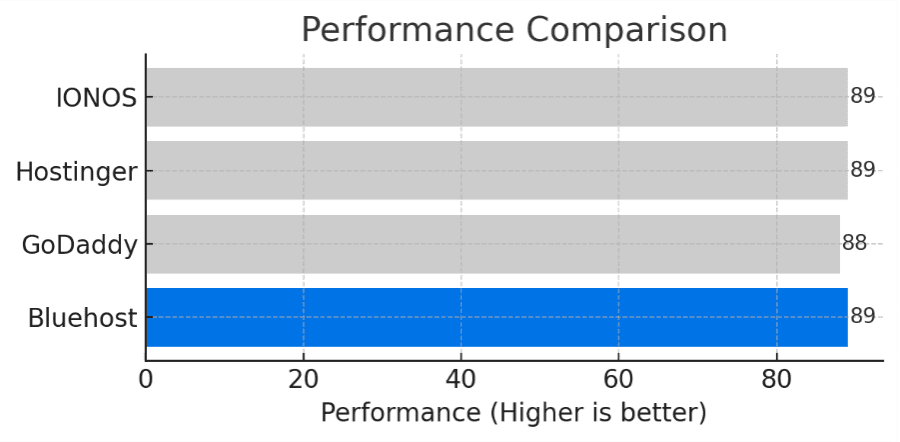
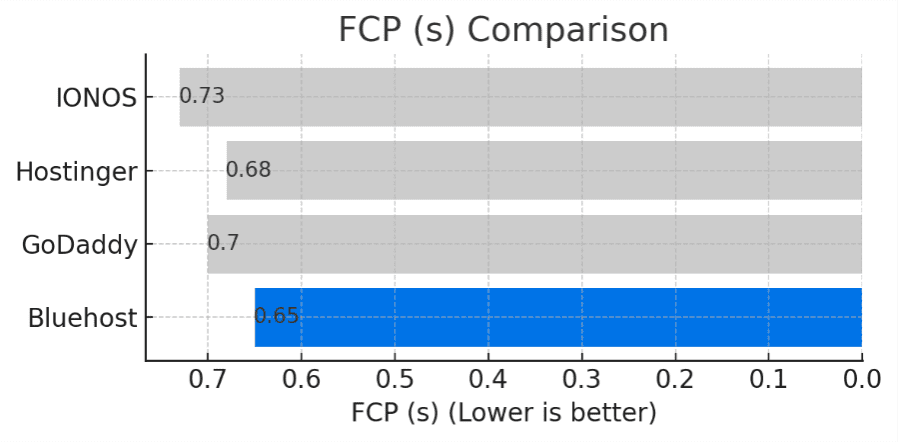
After moving our hosting infrastructure from on-premise hardware to Oracle Cloud Infrastructure (OCI), we observed measurable improvements across key performance metrics.
1. Faster page load in core Lighthouse metrics
Internal Lighthouse testing shows improvements following the OCI migration:
- Overall performance score: 84 → 87
- Speed index: 2.15s → 1.90s
- FCP: 0.74s → 0.68s
- LCP: 1.83s → 1.69s
These drops help your pages render sooner and feel snappier on first visit.
2. Quicker server response & TTFB
Back-end performance improvements were also observed:
- Server response: 1,120ms → 1,012ms
- TTFB: 1,264ms → 1,192ms
These improvements contribute to faster interactions and support better SEO performance when combined with proper site optimization.
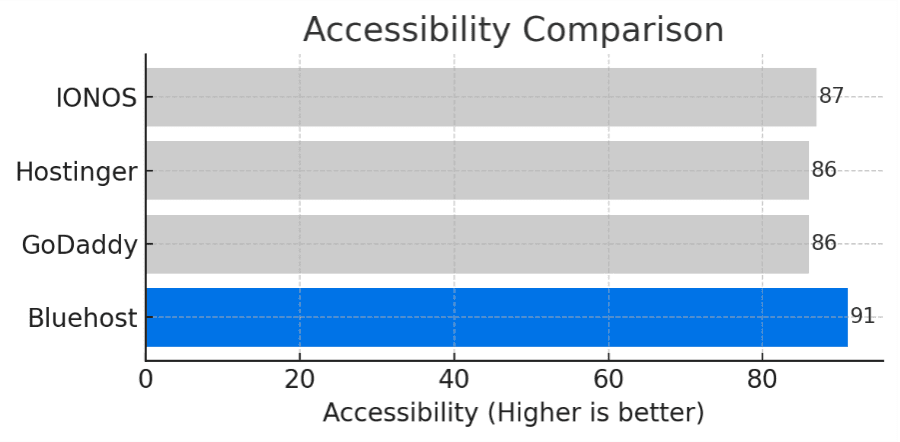
3. Better user experience: Accessibility & best practices
Bluehost also showed improvements in Lighthouse accessibility and best-practice metrics. Stronger accessibility and adherence to best practices can help support a more usable and reliable experience for site visitors.
Why this matters for beginners?
- Faster page rendering helps reduce bounce rates and improve perceived performance.
- Improved FCP and LCP are especially valuable for mobile visitors.
- Better infrastructure performance reduces dependency on manual optimizations.
- You may spend less time troubleshooting infrastructure-level issues and more time managing content and growth.
Also read: Top 10 Web Hosting Month to Month Plans for Flexible Budgeting
Why choosing the right WordPress hosting for beginners matters?
WordPress is dominant and one of the best CMS platforms, powering 43.4% websites on the internet today. These websites leverage a reliable web hosting provider that positively impacts their site’s speed, user experience and overall success.
Selecting the best web hosting for WordPress beginners can make launching and managing a website easy and stress-free. Here’s how:
1. Simplified use
As a beginner, you require a hosting provider that handles the technical side of your business, including WordPress installation, automatic updates and backups. A beginner-friendly host will have an intuitive and customized dashboard, making it easy to manage your site without needing coding skills.
2. Rapid site speed
A slow website can drive visitors away. Prominent search engines like Google also consider page speed to rank a site, meaning a sluggish speed can hurt your visibility. The right hosting provider ensures fast loading times, keeping both visitors and search engines happy.
Also read: Optimize Your Site: Website Speed Test GTmetrix Tips
3. Backup and security
Cybersecurity is a real concern, even for beginners. A good WordPress host will offer built-in security features like SSL certificates, malware scanning and automated backups, so you don’t have to worry about hackers or data loss. Bluehost includes basic backups on some plans, with advanced daily backups available through CodeGuard or Jetpack Security.
4. Scalability
You might be starting small, but what happens when your website grows? An ideal hosting provider allows you to upgrade easily, ensuring your site can handle increased traffic without downtime or major costs.
Also read: How to Choose the Best Scalable WordPress Hosting for Beginners and High-Traffic Sites
5. Uptime and reliability
Downtime hurts trust and sales. Pick a host with a clear uptime commitment, active monitoring and a proven track record. Look for status pages, automatic failover and daily backups so your site stays available and recoverable.
6. Customer support responsiveness
Beginner-friendly hosting should include fast, helpful customer support. Live chat or phone should solve setup, SSL and performance questions without long waits. Prefer WordPress-trained teams that can guide installs, migrations and basic troubleshooting on your first WordPress hosting plan.
7. Value for money
Low intro prices matter, but renewals and what’s included matter more. Compare total cost with essentials like a free domain, free SSL certificates, backups, staging and a CDN. The best WordPress hosting providers give you these basics upfront and a simple upgrade path when traffic grows.
How to choose the best WordPress hosting for beginners?
With so many options available, choosing the best WordPress hosting for beginners depends on your business requirements. Whether you’re starting a blog, an online store or a professional website, the suitable hosting provider is beginner-friendly, reliable and affordable. Here are the key factors to consider:
1. Ease of setup
As a beginner, you want a hosting provider that simplifies the setup process. Look for:
- One-click WordPress installation
- User-friendly dashboard
- Pre-configured settings
- Website builder compatibility
2. Customer support
Even with an easy setup, you may run into questions or issues. Select the hosting partner that provides:
- 24/7 support
- WordPress expertise
- Insightful resources
3. Pricing
The best web hosting for WordPress beginners provides a balance between affordability and necessities. Consider:
- Introductory vs. renewal prices
- In-built features
- Refund policy
4. Performance
A slow website can frustrate visitors and hurt your SEO rankings. A good hosting provider should guarantee:
- Fast load time
- Uptime guarantee
- Optimized for WordPress
5. Security features
A secure host protects your site and data. Look for:
- Free SSL certificates on every plan.
- Automated backups with easy restore.
- Malware scanning and removal.
- DDoS protection and a web application firewall.
- Secure access options like SFTP and two-factor login.
6. WordPress specific features
You want tools built for WordPress so you can work faster. Look for:
- Managed WordPress hosting with automatic core, theme and plugin updates.
- Staging to test changes safely before you go live.
- Built-in caching and CDN to improve page load.
- 1-click migrations or a guided migration tool.
- Starter templates and site tools that reduce setup time.
Bluehost includes Yoast SEO to help beginners optimize pages for search engines with guided recommendations.
7. Storage
Make sure the hosting plan fits your content today and your growth later. Consider:
- SSD or NVMe storage for faster reads and writes.
- Clear limits on storage, bandwidth and file counts.
- Database and email allowances if you need them.
- A simple upgrade path from shared hosting to VPS or cloud when traffic grows.
Key tips for beginners to prevent costly web hosting business mistakes
Getting started with WordPress hosting can feel overwhelming, especially when every web hosting company promises fast speeds and “unlimited” everything. Beginners often fall into traps that can make personal websites slow, insecure or even unusable. Here’s what to watch out for:
1. Choosing on price only
It’s tempting to grab the most affordable plan you see. But WordPress hosting that hides renewal costs or skips essentials like free SSL, backups or a CDN will cause problems later.
What to do? Compare the full 12–36 month cost. Make sure the plan includes a free domain, SSL certificates, backups and caching. Affordable doesn’t have to mean incomplete.
2. Picking the wrong plan type
If you’re running a heavy eCommerce store on a basic shared plan, your site will crawl. On the flip side, a simple blog doesn’t need a costly enterprise server.
What to do? Match your needs to your plan. Start small for personal websites. But confirm your host offers an easy upgrade path to managed or secure WordPress hosting when traffic grows.
3. Skipping uptime and backups
Without clear uptime guarantees or daily backups, your site could disappear for hours or worse, lose data permanently.
What to do? Look for hosting companies that offer 99.9% uptime, daily backups and one-click restore tools.
4. Ignoring support quality
Many providers highlight “24/7 support” but not all actually have WordPress experts on standby. Beginners often need guidance with plugins, themes or DNS setup.
What to do? Choose a host with live chat support and agents trained in hosting WordPress sites, not just generic tech support.
5. Launching without SSL and security
A site without HTTPS looks untrustworthy to visitors and search engines. Malware and brute force attacks also target new installs.
What to do? Enable free SSL right away. Use malware scanning, SFTP and two-factor authentication to secure your hosting account.
6. Updating live without staging
Changing themes or plugins directly on your main site can break pages.
What to do? Use a staging or test site to preview changes. Only push updates to your live site when everything is stable.
7. Overloading a fresh install
Adding too many plugins, heavy themes or unoptimized images is a classic beginner mistake.
What to do? Keep your setup lean, enable caching and use a CDN. Optimize images before uploading to keep your site fast.
8. Not monitoring resources
Even “unlimited” plans come with hidden resource limits on CPU, storage or inode counts.
What to do? Check usage in your control panel regularly. Clean up old backups, logs and unused plugins.
9. Forgetting domain and DNS timing
Launching a website without pointing nameservers early can lead to delays and broken links on your big announcement day.
What to do? Update DNS records ahead of time and allow for propagation.
10. Assuming “unlimited” means unlimited
Fair-use rules still apply, especially for bandwidth, email or file counts.
What to do? Read the fine print. Understand what’s truly included in your plan.
11. Neglecting renewals and refunds
Many beginners are shocked when teaser rates expire. Others miss refund deadlines.
What to do? Note renewal pricing, refund windows and conditions that void guarantees.
12. Scattering tools across providers
Managing email with one web hosting provider, backups with another and domains elsewhere can create chaos.
What to do? Consolidate where possible, or document everything clearly so you don’t lose track.
Pro tip for beginners: Don’t hesitate to ask questions in the WordPress community or seek help from top hosting companies for WordPress with strong reputations (Bluehost or WP Engine). They can guide you through common queries, including what is the most reliable WordPress hosting for beginners.
A host with WordPress experts, secure WordPress hosting and responsive live chat support can save you hours of frustration as you grow your site.
Final thoughts
Selecting the best WordPress hosting company depends on your specific business requirements. Every hosting platform comes with distinct features and benefits tailored to different website owners.
If you want the best WordPress hosting for beginners 2026, start with Bluehost and use this checklist to match features to your goals.
With 5 million+ users worldwide, Bluehost has been a WordPress-recommended choice since 2005, offering powerful tools, intuitive features and rock-solid performance.
Want a seamless WordPress setup? Get started with Bluehost WordPress hosting today!
FAQs
HostGator is the easiest WordPress hosting for beginners. But choose Bluehost for long-term value. We offer one-click install, a free domain, free SSL, AI website builder and 24/7 support. These tools remove setup friction so even first-time users can launch fast.
Yes. Bluehost is designed to support growing WordPress websites with managed tools, scalable hosting plans and performance-focused infrastructure. As traffic and content increase, site owners can upgrade resources, add security or eCommerce features and continue operating within the same platform.
A reliable WordPress hosting provider should offer:
1. Guided WordPress installation and managed updates
2. Built-in performance tools such as caching and CDN support
3. Automated backups with restore options
4. Strong security features including SSL and malware protection
5. Scalable plans with clear upgrade paths
6. Responsive customer support from WordPress-trained experts
Shared hosting is a generic environment where many sites share one server. WordPress hosting is tuned for WordPress with tools like one-click install, automatic updates, caching and security. Bluehost WordPress hosting combines the affordability of shared hosting with CMS-specific high performance and support. So, our plans are ideal for everyone from beginners to enterprises.
Yes, it reduces manual maintenance. Tasks like updates, backups, security and staging are handled at the hosting level, allowing site owners to focus on content and business growth. While managed hosting can cost more than basic shared plans, the time saved and reduced risk can outweigh the additional cost.
WordPress software is free. Reliable hosting is not. You can test locally at no cost, but a public site needs paid hosting and usually a domain. Bluehost includes free SSL, free domain and a guided setup with WordPress hosting to keep first-year costs predictable.
Intro plans from major WordPress hosting providers often start in the low single digits per month on multi-year terms. Renewals are higher. Bluehost WordPress hosting starts at $3.99 and offers a free domain, SSL certificate, backups, staging and CDN. This makes us the most reliable WordPress hosting for growing websites.
HostGator is the most affordable reliable options, starting under $3 per month. However, Bluehost offers the best balance of affordability and reliability, with free domain, SSL, backups and strong support.
Yes, Bluehost provides free WordPress migration for growing websites. Our team handles the transfer with minimal downtime, so your site moves smoothly without technical headaches.
Bluehost offers performance-optimized WordPress hosting for growing websites. We offer NVMe or SSD storage, built-in caching, a CDN and PHP 8+. You can test your site with Core Web Vitals and GTmetrix after launch to see the results.
WordPress.org is self-hosted. You pick a host, get full control, custom themes and plugins and can scale on your terms. WordPress.com is hosted for you with plan-based limits on themes, plugins and monetization. Most users who want flexibility choose WordPress.org with a reliable web host.


Write A Comment