
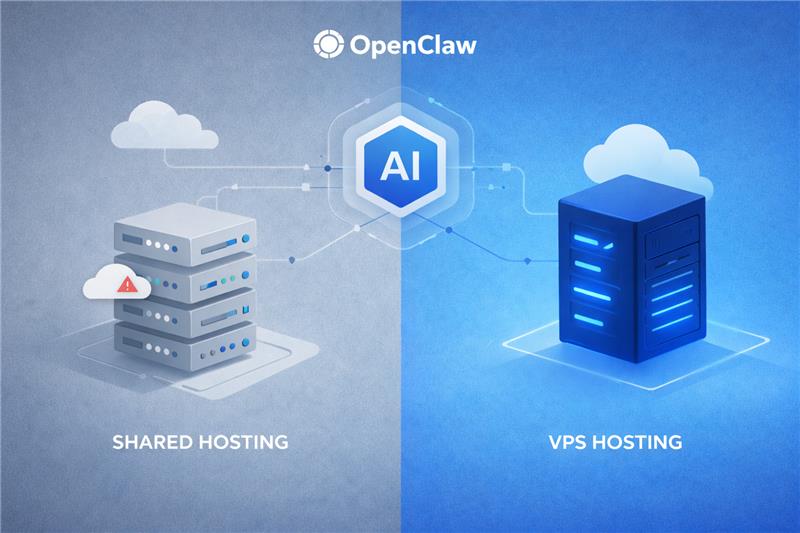


Key highlights
- Compare resource allocation between VPS and Shared hosting to determine the best environment for OpenClaw’s specific processing needs.
- Evaluate speed and latency differences to maximize the execution efficiency of OpenClaw scripts.
- Assess the security advantages of isolated VPS environments compared to the shared nature of standard web hosting.
- Analyze the cost-to-performance ratio for hosting OpenClaw to ensure project budget optimization.
- Identify scalability limitations in shared hosting that could hinder the long-term growth of OpenClaw deployments.
OpenClaw is flipping the script on how technical teams handle AI. It is a robust platform for building autonomous agents that don’t just chat, they execute complex workflows. We’re finally moving away from opaque SaaS toward infrastructure you actually own.
But let’s be real. Once you start productizing your internal tools, the hosting environment becomes everything. It’s the difference between a smooth operation and a total, frustrating bottleneck.
Different setups handle background processes and heavy automation logic with varying success. Your infrastructure choice directly dictates performance, data security and the long-term stability of your private AI agents.
This leads to the big question: can you get by with shared hosting or do you need the dedicated muscle of a VPS? We’re comparing both to see which one fits your needs.
How does OpenClaw work?
OpenClaw is a self-hosted AI agent framework that enables autonomous task execution through tool calling, memory retention and multi-step workflow automation, giving technical teams full ownership of their AI logic without depending on external SaaS platforms.
Also read: What is OpenClaw AI?
When a prompt or automated trigger fires, OpenClaw activates an AI reasoning cycle that selects the appropriate tools or APIs, executes the required actions and returns a completed outcome, all without manual steps in between.
Unlike a conventional chatbot that generates a text response and stops, OpenClaw keeps working until the task is finished, making it a genuinely autonomous and repeatable business tool you can integrate directly into your existing systems.
- Persistent agent execution: Agents stay active and respond to scheduled events, webhook triggers or API calls, so your workflows run continuously without you needing to intervene at every step.
- Tool calling and API integration: OpenClaw connects to external services, databases and internal systems to take real-world actions, not just produce text. This way your agents can actually move work forward across your stack.
- Memory and context retention: The platform maintains task state and conversation history across multi-step workflows. This keeps automation outcomes coherent and reliable over time rather than resetting with every new interaction.
Why does hosting matter when running OpenClaw?
OpenClaw is built for technical operators who need to move beyond simple AI experimentation and into building reliable, repeatable systems. Because the platform relies on long-running automation tasks, API integrations and background processes, the underlying hosting environment is critical. Unlike shared environments, a dedicated VPS ensures that your AI agents have the persistent execution power and stable server resources needed to function as an autonomous operational layer.
- Resource stability: Complex multi-step reasoning flows require consistent vCPU and RAM to prevent task failures during intensive AI processing or long-running agent executions.
- Environment flexibility: Technical teams gain the infrastructure-level control needed to install specific dependencies and configure custom runtimes required for unique AI logic and tool calling.
- Data security and ownership: Self-hosting on a VPS keeps sensitive proprietary data on your own server, avoiding the risks and opacity associated with external SaaS AI wrappers.
- Scalable orchestration: Dedicated infrastructure allows for unmetered bandwidth and high-speed NVMe storage to support expanding AI workflows and real-time data processing across your business systems.
The ability to manage server resources and configure custom environments directly impacts how reliably OpenClaw operates. When your AI infrastructure is owned rather than subscribed to, you can integrate agents directly into your workflows with full control over execution logic and security guardrails.
Ultimately, your choice of hosting serves as the foundation for your private AI automation engine. At Bluehost, we prioritize performance and scalability through our VPS solutions. This ensures your internal AI tools stay fast, secure and ready to handle end-to-end automation across your entire ecosystem.
Overall, while the advantages of a virtual private server are clear for AI workloads, it is important to evaluate the feasibility and performance trade-offs of using less powerful hosting solutions.
Running OpenClaw on shared hosting
Shared hosting is a budget-friendly option where you share server space with multiple websites. It’s pretty simple, the provider handles the heavy lifting, so you just upload your files and go.
It’s a tempting starting point for new projects, but running an automation platform like OpenClaw in such a crowded environment comes with some baggage.
The draw of low-cost hosting
Most people start here because it’s low-risk and low-effort. It’s the easiest way to get a site live without a huge bill.
Here are the main reasons users stick with it:
- Significantly cheaper than a VPS or dedicated server.
- Plug-and-play setup with user-friendly control panels.
- The host manages all the boring server maintenance.
- Perfect for basic blogs or static landing pages.
Shared hosting may suit a regular website, but OpenClaw demands far more space and flexibility to run properly. However, these benefits come with limitations that can make running OpenClaw difficult on shared hosting.
Why shared hosts struggle with OpenClaw
OpenClaw isn’t just a static page; it’s an active AI agent that needs to stay “awake” and talk to other systems. Shared hosts aren’t usually built for that level of persistence.
You’ll likely run into these common hurdles:
- Locked-down access: You can’t install custom dependencies or tweak system settings.
- Killed processes: Hosts often shut down scripts that run too long to keep the server stable for others.
- Noisy neighbors: If another site on your server gets a traffic spike, your automation slows to a crawl.
- Rigid environments: You’re stuck with whatever software versions the host chooses.
- Unreliable execution: Scheduled tasks and background triggers often fail in these restricted environments.
These restrictions don’t just limit OpenClaw’s capabilities. They can directly disrupt how your automation runs, leading to delays, failures or inconsistent results, issues we explore in the next section on the impact on your automation.
The impact on your automation
Because OpenClaw thrives on persistent, “always-on” workflows, shared hosting usually falls short. You end up fighting the server’s own security rules just to keep things moving.
It might work for a quick experiment, but for serious production? You’ll probably run into limits. Overall, the lack of control makes it a frustrating home for reliable AI agents.
To ensure OpenClaw runs efficiently and securely, you need an environment that provides dedicated resources, full control and complete isolation. This is why a VPS serves as the ideal foundation for your automation projects.
Running OpenClaw on a VPS
A VPS gives your automation projects a dedicated home. Unlike shared hosting, where resources are split between random users, a VPS ensures that your CPU and RAM belong only to you, which is a must for reliable performance.
This is crucial for AI agents. They often run background tasks or multi-step workflows that need a stable, uninterrupted environment to actually finish the job without timing out.
What does VPS environment provide?
Essentially, a VPS is a private server living inside a larger machine. It gives you full control over the operating system and how every single part of your stack is configured.
It offers a range of important benefits:
- Guaranteed resources, so your workflows never lag when someone else’s site spikes.
- Complete isolation from other users for better security and stability.
- Full root access to install any specific software or packages you need.
The freedom to set up custom runtimes and niche AI dependencies.Now that we’ve outlined what a VPS provides, let’s examine why these features make it an ideal environment for running OpenClaw.
Why VPS works well for OpenClaw?
AI automation isn’t just a “one-and-done” task; it relies on persistent, long-running processes. A VPS handles these background chores perfectly without the typical hosting restrictions that kill long tasks.
Here is why it fits the OpenClaw model so well:
- You can run agents that stay active and focused for long periods.
- It supports complex prompt chains that require multiple processing steps.
- Easy, secure connections to your own internal APIs and databases.
- Reliable handling of scheduled tasks and automated event triggers.
With the benefits of a VPS in mind, it’s important to explore why this environment is especially well-suited for running OpenClaw
Built for customizable automation infrastructure
The real win is the flexibility. You don’t have to force your workflows to fit a host’s rigid rules; instead, you build the server environment to match your specific needs.
It’s the ideal setup for handling things like:
- Deep AI model integrations and custom API connections.
- Complex automation pipelines and orchestration systems.
- Linking up with your team’s internal communication tools.
- Steady background processes that keep autonomous agents running 24/7.
In the end, moving to a VPS is what takes OpenClaw from a simple testing tool to a professional-grade system that can handle real business logic. Next, let’s look at how a VPS differs from shared hosting and why that matters for OpenClaw.
VPS vs shared hosting for OpenClaw: key differences
Choosing the right infrastructure for OpenClaw is a critical decision for operators transitioning from AI experimentation to building reliable business systems. Shared hosting may suit basic projects, but AI tasks like multi-step reasoning and memory retention need the dedicated power and control only a VPS provides..
Understanding these differences is essential for maintaining infrastructure ownership and ensuring that your proprietary data remains within your own systems.
| Feature | VPS hosting (one-click OpenClaw) | Standard shared hosting |
| Performance | Dedicated vCPU and NVMe storage ensure AI agents run without lag. | Shared resources often lead to timeouts for complex AI reasoning. |
| Security & privacy | Self-hosted deployment keeps sensitive data on your own server. | Multi-tenant environments increase the risk of proprietary data exposure. |
| Workflow control | Full infrastructure control to connect agents to internal APIs and tools. | Restricted access limits the ability to embed AI into existing workflows. |
| Scalability | Scalable RAM and CPU options to support growing automation needs. | Fixed resource caps prevent the scaling of continuous AI operations. |
| Reliability | Isolated environment avoids “noisy neighbor” performance drops. | Fluctuating performance based on other users’ website traffic. |
Ultimately, picking between a VPS or shared hosting for OpenClaw is about choosing a dedicated engine over a cramped web slot. Shared hosting is usually too limiting, it rarely handles the compute-heavy tool calling or API chains AI needs. A Bluehost VPS changes that, providing NVMe-backed performance and dedicated RAM to make OpenClaw a scalable, private powerhouse.
With these key differences in mind, it’s clear that the choice of hosting directly impacts OpenClaw’s performance, security and scalability. Next, let’s explore how a VPS keeps your AI deployment safe and fully under your control.
Is OpenClaw secure on a VPS?
Yes, running OpenClaw on a VPS is a secure approach to AI deployment. Your data, prompts and agent logic remain entirely within your own server environment, isolated from other users and never transmitted to third-party SaaS providers. This makes a VPS the clear choice for any team handling sensitive or proprietary information.
- Single-tenant data isolation: A VPS allocates resources exclusively to your environment, meaning no adjacent tenant can access your agent configurations or proprietary prompts. This is a fundamental contrast to shared hosting, where multi-tenant architecture means server processes and memory exist in close proximity to other users’ applications.
- API key and credential management: Store all AI provider API keys and database credentials as server-side environment variables rather than embedding them in configuration files. This prevents accidental exposure through version control commits or misconfigured file permissions, two of the most common causes of credential leaks.
- Network access control: Root access on a Bluehost VPS lets you configure firewall rules that restricts both inbound and outbound traffic to only authorized services. This means your agent workflows cannot be triggered by unauthorized external requests, keeping your automation logic protected at the network level.
- Ownership of agent logic and training data: Because OpenClaw is self-hosted, no prompt data or workflow logic leaves your server to train or inform external AI models. For businesses handling confidential internal information, this is a non-negotiable security requirement.
A VPS gives technical operators the tools to enforce their own security standards rather than deferring to a third-party provider’s policy. Now, let us take a closer look at when shared hosting can be a suitable option for running OpenClaw.
When does shared hosting work for OpenClaw?
While many developers prefer the power of a dedicated environment for gaming engines, shared hosting can still be a functional choice for basic testing or small-scale community sites. Overall, these plans offer a cost-effective way to get your project online when high performance and root access are not your immediate priorities.
- Low Traffic Requirements: Shared hosting is a viable option if you are using OpenClaw for personal testing or for a very small group of players where high concurrency is not expected.
- Budget-Friendly Development: For hobbyists looking to host the Captain Claw engine recreation on a strict budget, shared plans offer the most affordable entry point.
- Simplified Server Management: This hosting model works well for users who prefer managed environments and graphical control panels over the complex command-line administration required by a VPS.
- Overall Resource Efficiency: If your specific deployment does not require significant dedicated processing power or high-speed memory, shared hosting can successfully support the project’s basic functionality.
Shared hosting can work for OpenClaw in low-traffic, budget-conscious scenarios, but for higher performance and full control, a VPS is the better choice. Let’s explore why VPS hosting often provides the ideal environment for more demanding OpenClaw deployments.
When is VPS the better choice for OpenClaw deployments?
Choosing a robust hosting environment is essential for the seamless execution of the OpenClaw platform. Overall, a VPS is the superior choice for developers and operators who need to meet specific performance demands, as it allows you to achieve the following technical goals:
- Full administrative control: Utilize full root access to install custom dependencies and specialized server-side configurations required for the OpenClaw platform.
- Dedicated resource allocation: Ensure that dedicated CPU and RAM resources are always available to handle real-time game processing and high-quality video streaming without interruption.
- Latency and speed optimization: Minimize latency and improve response times for claw control by optimizing the server environment specifically for high-speed performance.
- Secure environment isolation: Maintain a secure and isolated hosting environment that protects your gaming data from vulnerabilities often associated with shared servers.
- Scalable infrastructure: Scale your infrastructure seamlessly to accommodate a growing player base and increased traffic demands over time.
Choosing a VPS ensures OpenClaw deployments run efficiently, securely and with full control over performance. With the right hosting environment in place, the next step is managing your OpenClaw instance for consistent, reliable operation.
Managing your OpenClaw instance
Getting OpenClaw running is only the first step, consistent management is what turns a working installation into a reliable, production-grade AI automation layer your team can depend on around the clock. A Bluehost VPS gives you both the root access and dedicated resources needed to maintain the platform entirely on your own terms, without restrictions imposed by a shared environment.
- Keep OpenClaw updated: Running the latest version ensures your agents benefit from new tool integrations, security patches and stability improvements. Updating via npm takes only seconds and should happen whenever a new release is available, skipping updates leaves your workflows exposed to known vulnerabilities.
- Monitor resource usage: Check CPU and RAM consumption periodically to confirm agents are not approaching your VPS plan limits. Because Bluehost VPS resources are dedicated, usage remains predictable and scaling up your plan is straightforward if your automation needs grow.
- Rotate and audit API credentials: Review which external services your agents call and rotate API keys on a regular schedule. Stale or compromised credentials can silently disrupt live workflows, so proactive auditing keeps your integrations trustworthy.
- Configure automatic service restarts: Set up a process manager such as PM2 to restart OpenClaw automatically after any server reboot. This removes the need for manual intervention and ensures genuine 24/7 autonomous availability without gaps in agent execution.
- Review logs for failed tasks: Checking OpenClaw output logs regularly helps you catch agent errors, failed tool calls or misconfigured integrations early, before a small issue escalates into a workflow disruption that affects your broader automation stack.
Proper management ensures your OpenClaw instance remains secure, stable and fully operational. With these practices in place, let’s explore why Bluehost VPS hosting is the best choice for running OpenClaw.
Why choose Bluehost VPS hosting for OpenClaw?
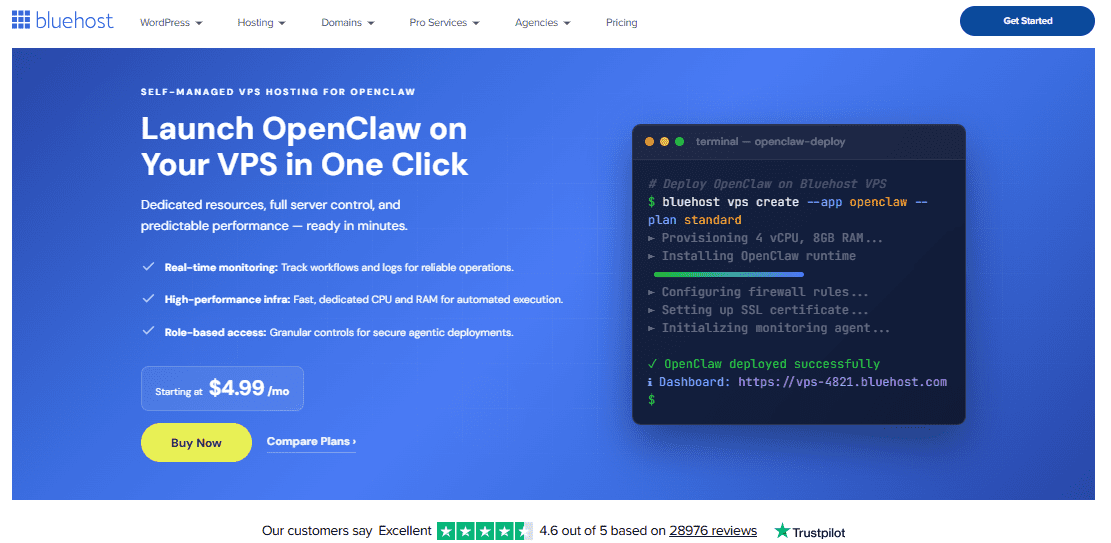
Bluehost VPS Hosting provides the infrastructure needed for teams that want to move beyond SaaS-based AI and build a private, self-managed automation environment. By deploying OpenClaw By deploying OpenClaw on a dedicated virtual private server, organizations gain full control over their AI workflows. This also ensures that proprietary data remains securely within their own infrastructure.
The following advantages explain why a VPS environment is particularly well suited for running OpenClaw.
1. Infrastructure ownership and data privacy
Choosing a VPS over shared hosting or external SaaS tools ensures that your sensitive data never leaves your controlled environment to train someone else’s model. OpenClaw on Bluehost VPS allows for the deployment of private AI agents that interact with internal systems without exposing proprietary workflows to third-party providers.
This infrastructure ownership is critical for businesses that require high security standards and complete governance over their AI orchestration and logic. By hosting your own AI engine, you maintain absolute control over every prompt, integration and execution step within your workflow.
Also read: Securing Cloud Data with VPS Servers: The Best Practices
2. Scalable performance with dedicated NVMe resources AI workloads, particularly those involving multi-step reasoning and autonomous task execution, require consistent and high-speed resources to function reliably. Bluehost VPS offers dedicated NVMe storage and vCPU cores, providing the necessary compute power to handle complex AI memory systems and persistent context across interactions.
Unlike shared hosting environments where resource contention is common, a VPS ensures that your AI agents have the stable performance needed for real-time tool calling and API chaining. This scalable architecture allows your automation stack to grow alongside your business requirements without the risk of performance bottlenecks.
3. Flexible customization and system integration
A self-hosted VPS environment provides the flexibility to configure your server exactly how your AI automation demands, including the ability to connect with local models or various cloud providers via your own API keys. Technical operators can seamlessly integrate OpenClaw with other self-hosted tools like n8n, creating a powerful, owned automation stack that handles both event-driven workflows and advanced AI reasoning.
This level of customization enables the creation of autonomous internal copilots that can trigger actions across communication platforms, productivity tools and even IoT systems. Having full server-level access allows for the installation of specialized libraries and community-built nodes that standard SaaS wrappers simply cannot support.
With the infrastructure foundation established, the next step is to implement the setup itself. The following section walks through how to deploy OpenClaw on your Bluehost VPS and configure it for a secure, fully functional AI automation environment.
Deploying OpenClaw on your Bluehost VPS
Setting up OpenClaw on a Bluehost Self-Managed VPS offers a level of control and scalability that far exceeds traditional shared environments. There are two primary ways to install the platform: you can either select it during the initial purchase of your VPS for an automated setup or install it manually after your server is provisioned.
How to install OpenClaw during VPS purchase
For those looking for the fastest deployment, choosing the pre-configured application option during checkout is recommended. This ensures your OpenClaw on VPS environment is ready for immediate use.
Also read: What Is OpenClaw? A Complete Overview
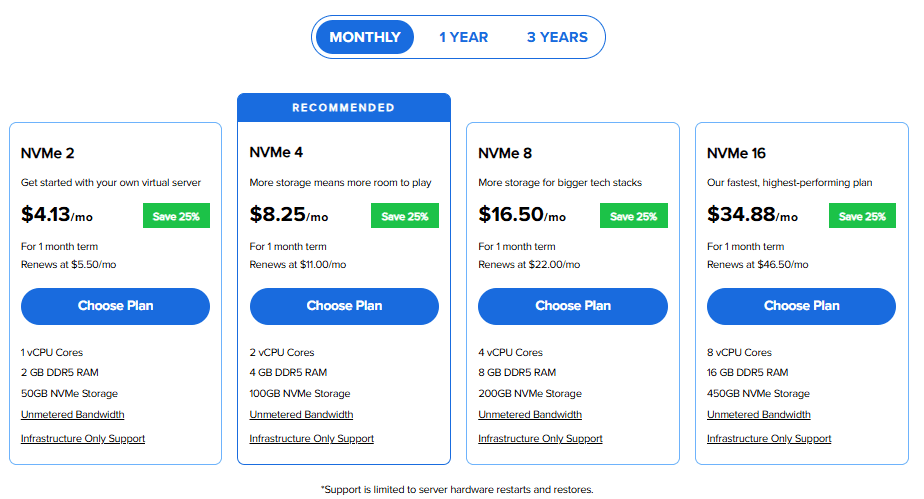
- Navigate to the Bluehost VPS Hosting page and click the Choose Plan button for your selected tier.
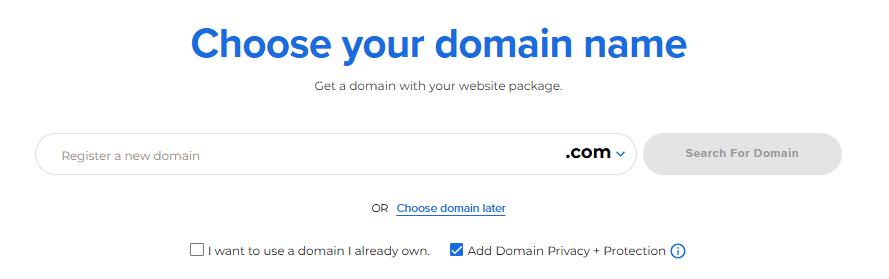
- On the domain selection page, enter your new or existing domain name. You can also opt to choose your domain later.
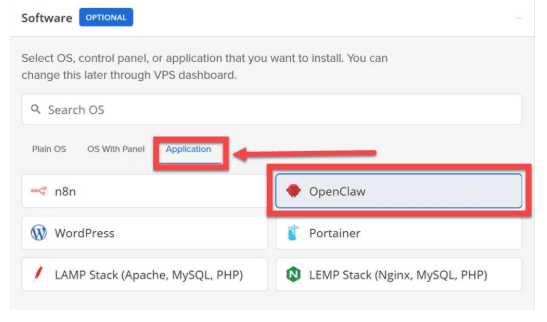
- In the Cart section, locate the Software settings and click on the Application Tab.
- Select OpenClaw from the available applications list to ensure it is pre-installed on your server.
- Review your hardware configuration and consider adding Premium Support for priority access to technical experts.
- Click Continue to Checkout, then create your Bluehost account using your email or a third-party login (Google, Apple or GitHub).
- Enter your billing details in the form provided, adjust your terms in the Shopping Cart summary and click Submit Payment.
Also read: OpenClaw GitHub Guide: Installation, Setup and Troubleshooting
By deploying OpenClaw on a Self-Managed VPS, you gain a powerful, self-hosted AI platform that connects seamlessly with chat applications like WhatsApp and Slack. Unlike shared hosting, this environment ensures you maintain full control of your hardware and data, making your AI assistant more responsive and secure across multiple channels.
Final thoughts
Deciding between shared hosting and VPS for OpenClaw depends on your project’s scale. Shared plans may work for basic testing but often falter under the resource-heavy demands of AI orchestration. A VPS provides the isolation and dedicated power needed for reliable, repeatable AI systems.
While shared hosting is easy to start with, it cannot match the stability, control and security of Bluehost VPS. Dedicated infrastructure lets operators run AI workflows with full control and keeps proprietary data private, transforming AI from a novelty into a core, owned capability.
Stop experimenting and start owning your AI. Launch private OpenClaw agents in minutes with Bluehost VPS One-Click OpenClaw powered by NVMe storage and starting at $4.99/mo. Take full control of your data, prompts and server today.
FAQs
Can OpenClaw run on shared hosting?
OpenClaw can run on shared hosting, but it is generally not recommended. Shared hosting limits server resources and background processes, which can affect performance. Since OpenClaw is a resource-intensive AI agent, a VPS or dedicated server usually provides better reliability and control.
Is VPS hosting better for running OpenClaw automation workflows?
Yes, VPS hosting provides dedicated resources and full control over your environment. This ensures your AI agents operate with consistent performance, enabling complex multi-step reasoning flows and secure API chaining that shared hosting environments cannot reliably support.
What are the main limitations of shared hosting for OpenClaw?
Shared hosting limits resource availability and environmental control, which are critical for AI agents. It lacks the power for autonomous task execution and the privacy needed to ensure your proprietary data isn’t used to train external models.
Can you migrate OpenClaw from shared hosting to a VPS later?
Migration is possible, but starting on a VPS is ideal for technical operators. OpenClaw’s memory and context systems require specific server configurations that are best established early to ensure a seamless transition from experimentation to production-ready AI infrastructure.
Do you need a VPS to run OpenClaw in production?
For professional production environments, a VPS is necessary. It provides the dedicated vCPU cores and stability required for “set-and-run” operational AI, ensuring your automated workflows remain reliable, scalable and fully integrated without the constraints of shared hosting.

Write A Comment