



Key highlights
- Learn how to choose an SEO plugin for WordPress by comparing essentials like schema support, ease of use and integrations.
- Compare popular WordPress SEO plugins (including Yoast SEO vs Rank Math) to find the right fit.
- Use practical tips to improve results, from schema setup to performance checks.
- Avoid common WordPress SEO plugin mistakes that can impact rankings, and fix them fast.
- See how Bluehost supports WordPress SEO with fast hosting and solid plugin compatibility.
Struggling to get your WordPress site seen on search engines in 2026? You’re not alone.
With millions of blog posts going live every day, SEO isn’t optional—it’s essential. And if you’re on WordPress, choosing the best SEO plugin for WordPress can make a real difference in how easily people find your site.
The right WordPress SEO plugin does more than “add keywords.” It helps structure your site for search engines, optimize on-page content and improve click-through rates (CTR) from search results.
In this guide, you’ll learn why WordPress SEO plugins are a must-have in 2026, which tools stand out and how to choose the best option based on your goals and experience level.
Our top 3 WordPress SEO plugin picks in 2026
If you want the best SEO plugin for WordPress, these three options are a strong place to start.
Each WordPress SEO plugin below matches a different need—content guidance, feature depth or a beginner-friendly setup.
| Plugin | Best for | Why it’s a top pick | Free/Paid |
|---|---|---|---|
| Yoast SEO | Content analysis and on-page guidance | A popular SEO plugin for WordPress that provides real-time recommendations for titles, meta descriptions, readability and key on-page improvements—ideal if you want clear publishing guidance. | Free + paid |
| Rank Math | Extensive free features with scalable upgrades | One of the most feature-rich SEO plugins for WordPress, offering automation and advanced settings—often shortlisted when people compare the best WordPress SEO plugin options. | Free + paid |
| Slim SEO | Beginners who want simplicity | A lightweight SEO plugin WordPress users like for quick setup and fewer settings, making it easier to improve SEO for WordPress without a steep learning curve. | Free |
These top picks help you narrow down the best WordPress SEO plugin for your goals.
No matter which you choose, each is a reliable WordPress SEO plugin that supports stronger SEO for WordPress—from content optimization to technical essentials.
What are WordPress SEO plugins?
WordPress SEO plugins are add-on tools that help you optimize your site for Search Engine Optimization (SEO) without writing a single line of code. They exist because WordPress, powerful as it is, doesn’t handle search optimization out of the box—and these plugins fill that gap so your content has a real chance of being found.
The best SEO plugins for WordPress automate the technical tasks that search engines rely on to understand and rank your site. Instead of manually editing metadata or coding structured data, you get a guided interface that handles it for you. That said, WordPress SEO plugins don’t replace a solid content strategy or fast hosting—they work best when paired with quality content and a reliable foundation.
Here are the most common jobs these plugins handle:
- Meta titles and descriptions: Customize how each page appears in search results
- XML sitemaps: Automatically generate and submit a sitemap so search engines index your pages
- Schema markup: Add structured data to unlock rich results like star ratings and FAQs
- Robots controls: Tell search engines which pages to crawl or ignore
- Canonical URLs: Prevent duplicate content issues by specifying the preferred version of a page
Why SEO plugins matter for WordPress?
WordPress powers over 40% of all websites, but without proper WordPress SEO, even the best content can stay buried beyond page one. That’s where WordPress SEO plugins come in.
The right WordPress SEO plugin handles the technical and on-page basics that search engines look for—making it easier to improve WordPress SEO without writing code.
Here’s how SEO plugins for WordPress make a difference:
- Automate technical SEO setup: Tools like Yoast SEO and Rank Math can help manage robots.txt settings, meta tags, XML sitemaps and structured data, core features people expect from the best SEO plugin for WordPress.
- Boost your chances of ranking: By supporting keyword usage, titles, descriptions and internal linking, a good SEO WordPress plugin strengthens on-page signals. That’s a key part of improving visibility with SEO for WordPress.
- Simplify SEO for beginners: Setup wizards and real-time checks make it easier to follow best practices, especially if you’re choosing your first SEO plugin WordPress site owners rely on.
- Improve click-through rates: Schema markup for rich results (like FAQs), breadcrumbs and cleaner metadata can improve how your pages appear in results, helping increase CTR over time.
Now, let’s dive into the list of SEO plugins for WordPress.
What are the top 20 SEO plugins for WordPress in 2026?
To help you stay ahead, we’ve rounded up the 20 best SEO plugins for WordPress in 2026. Each of them is designed to tackle different aspects of SEO and boost your site’s visibility where it matters most.
- Yoast SEO
- RankMath
- SEOPress
- SEOBoost
- All in One SEO for WordPress (AIOSEO)
- SEO Squirrly
- Internal Link Juicer
- MonsterInsights
- SEO Framework
- WordLift
- Broken Link Checker
- Redirection
- Slim SEO
- CrawlWP
- XML Sitemaps
- SmartCrawl
- WP Rocket
- W3 Total Cache
- Schema Pro
- SeedProd
Here’s a comparison table for the top 20 WordPress SEO plugins in 2026. This table highlights their primary focus, best use case, pricing model and standout features:
| Plugin name | Primary focus | Best for | Free or paid | Standout features |
|---|---|---|---|---|
| Yoast SEO | On-page SEO | Content creators, bloggers and other users | Both | Readability check, schema, meta editor |
| Rank Math | Full SEO suite | Bloggers, WooCommerce users | Both | AI tools, local SEO, redirections, rank tracking |
| SEOPress | Lightweight SEO | Developers, agencies | Both | No ads, unlimited keywords, white-label |
| SEOBoost | AI-powered SEO | Solopreneurs, SMBs | Paid | AI audits, keyword suggestions, auto-optimization |
| All in One SEO (AIOSEO) | All-in-one SEO | Niche websites, publishers | Both | Smart schema, TruSEO score, Google News sitemap |
| SEO Squirrly | Guided SEO | Marketers, beginners | Both | Live SEO assistant, audits, competitor analysis |
| Internal Link Juicer | Internal linking | Bloggers, long-form content | Both | Keyword-based links, custom anchors, auto-linking |
| MonsterInsights | SEO analytics | Businesses, eCommerce stores | Both | Google Analytics integration, affiliate tracking, content insights |
| The SEO Framework | Lightweight automated SEO | Developers, minimalist sites | Free + extensions | Auto meta tags, Open Graph, no upsells |
| WordLift | Semantic SEO | Editorial teams, enterprise sites | Paid | AI schema, content widgets, entity-based linking |
| Broken Link Checker | Link monitoring | All WordPress users | Free | Finds and flags broken links for quick fixes |
| Redirection | Redirect management | Migrations, dynamic sites | Free | 301 redirects, 404 tracking, conditional redirects |
| Slim SEO | Simple SEO automation | Small websites, beginners | Both | Auto sitemaps, breadcrumbs, meta tags |
| CrawlWP | Crawl optimization | Technical SEO specialists | Paid | Crawl control, index management, log insights |
| XML Sitemaps | Sitemap generation | Minimal SEO setups | Free | Auto XML generation, search engine submission |
| SmartCrawl | On-page SEO basics | Beginners, small businesses | Both | Simple setup, meta controls, sitemaps, schema/social metadata |
| WP Rocket | Speed & caching | Sites prioritizing performance | Paid | Caching + performance optimization, LazyLoad, easy setup |
| W3 Total Cache | Speed & caching | Advanced users, flexible setups | Both | Granular caching controls, minification, CDN support |
| Schema Pro | Schema markup | Sites needing advanced schema | Paid | Sitewide schema rules, multiple schema types, templates |
| SeedProd | Landing pages & page builder | Marketers, conversion pages | Both | Drag-and-drop builder, landing page templates, theme builder (higher tiers) |
There are countless SEO tools for WordPress editor, but not all are built equally. This was a comparison of the best options to help you choose what suits your goals.
Here’s the detailed section for all the SEO WordPress plugins:
1. Yoast SEO

Yoast SEO is widely regarded as one of the best SEO plugins for WordPress, trusted by over 13 million websites globally as of 2026. This plugin has been a trailblazer in simplifying search engine optimization for WordPress users, empowering both beginners and experienced SEO professionals to optimize their websites effectively. Yoast has established a strong reputation for its robust features, simplicity and long-standing commitment to delivering high-quality SEO tools.
Yoast SEO provides an extensive suite of tools to improve on-page SEO as well as technical SEO. With this plugin, you can access real-time feedback about your content’s readability and keyword usage, helping you create SEO-friendly content with minimal effort. The traffic light system (red, orange, green) is a unique feature of Yoast SEO, allowing users to clearly see areas of improvement and make necessary adjustments before publishing content.
Beyond content optimization, Yoast SEO excels in providing technical SEO tools. It supports features like XML sitemaps, schema markup, structured data and canonical URLs, ensuring that your website’s technical setup is optimized for search engines. This combination of content-focused guidance and technical SEO capabilities makes Yoast SEO a go-to plugin for bloggers, business owners, eCommerce websites and content creators who want a user-friendly tool that can boost their site’s SEO performance without getting bogged down in complicated technicalities.
Best for: Bloggers, business owners, content creators and anyone looking for a reliable and user-friendly SEO tool.
Key features
Yoast SEO includes a comprehensive set of features that help improve both the quality of your content and its ability to rank higher in search engines. Here’s a breakdown of the plugin’s key features:
- Real‑time readability and SEO scoring: Yoast’s built-in readability analysis provides feedback on aspects like sentence length, paragraph structure, passive voice and the use of subheadings. These tips help users create content that’s not only SEO-friendly but also engaging for readers. This real-time guidance ensures content is well-optimized before publishing.
- SEO analysis: Yoast’s famous traffic light system (green, orange, red) provides clear, actionable feedback on areas such as keyword usage, meta descriptions and titles. This simple color-coded system helps you easily track and fix any SEO issues.
- Schema.org structured data integration: Yoast SEO automatically adds schema markup to your site’s pages, making it easier for search engines like Google to understand your content. This improves the chances of earning rich snippets in search results, like star ratings or FAQ blocks.
- XML sitemap generation: Yoast automatically generates a sitemap for your site, which helps search engines crawl and index your content more efficiently. XML sitemaps are essential for ensuring that all your pages are discovered and indexed by Google and other search engines.
- Internal linking suggestions (Premium): With Yoast SEO Premium, users get smart internal linking suggestions as they write content. This feature helps users build a strong internal link structure, which improves SEO and encourages visitors to explore more pages on your website.
- Redirect manager and 404 monitor (Premium): The Redirect Manager in Yoast SEO Premium allows you to easily set up 301 redirects whenever you change URLs or delete pages. This is crucial for maintaining SEO health because it ensures that users and search engines are directed to the right page, rather than encountering 404 errors.
- AI-powered optimization (Premium): Yoast SEO Premium offers AI-powered suggestions for creating SEO titles and meta descriptions, ensuring that your pages are optimized for search engines. The AI also provides recommendations to improve content, with inclusive language support available in the Premium version.
- Educational resources: With the Yoast SEO Academy, users have access to a wide range of educational content, including free and paid courses covering SEO fundamentals, technical SEO and SEO copywriting. These resources empower users to deepen their SEO knowledge and improve their site’s performance over time.
- Seamless integrations: Yoast SEO integrates effortlessly with tools like Semrush for keyword insights and Wincher for rank tracking. These integrations allow users to monitor their SEO performance directly from their WordPress dashboard.
- WooCommerce SEO and local SEO: Yoast SEO includes specialized add-ons for WooCommerce SEO, making it a great choice for eCommerce websites looking to optimize product pages and improve visibility in search results. Additionally, it offers tools for local SEO, helping businesses rank well in local search queries and Google Maps.
- Social media preview: Yoast SEO also allows users to customize how their content appears on social media platforms like Facebook, Twitter and LinkedIn. The Open Graph and Twitter Cards settings ensure that your posts look polished and professional when shared, increasing the likelihood of engagement.
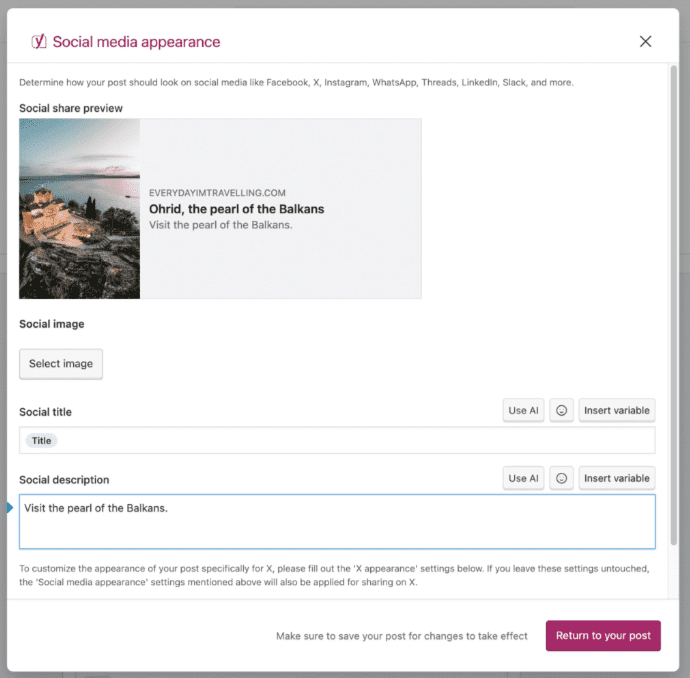
Pros & cons of Yoast SEO
In any WordPress SEO plugins guide, it’s impossible to ignore Yoast SEO’s long-standing dominance in the WordPress SEO plugin space.
Pros:
- Beginner-friendly: Yoast SEO is widely recognized for its ease of use, offering step-by-step guidance to simplify the process of optimizing your content.
- Comprehensive readability and SEO analysis: With detailed tips on improving readability and SEO, Yoast helps you create content that both search engines and readers will love.
- Trusted and reliable: With millions of installations and a strong community behind it, Yoast SEO is a tried-and-tested solution for SEO optimization.
- Predictable pricing: The Yoast SEO Premium plan includes AI-powered optimization, schema tools and more, all for a fixed annual fee without any hidden charges.
- Dedicated tools for eCommerce and local SEO: Specialized tools are available for both WooCommerce SEO and local SEO, making it a versatile plugin for a variety of business types.
- Rich educational ecosystem: The Yoast SEO Academy provides valuable resources to improve your SEO knowledge, helping users at every skill level.
Cons:
- Some advanced features require Premium: Features like multiple focus keywords, AI-powered suggestions and the Redirect Manager are available only in the Premium version.
- Pricing for agencies: Agencies managing multiple sites may find Yoast SEO’s per-site pricing more expensive, though bulk licensing options are available.
Who is Yoast SEO ideal for?
Yoast SEO is perfect for a wide range of users:
- Beginners who want simple and effective SEO guidance.
- Bloggers and content creators who need actionable insights to improve both readability and SEO.
- Small to medium businesses looking for reliable SEO tools with no surprises in pricing.
- ECommerce sites that need specialized tools for product page optimization.
- Agencies that require an easy-to-manage plugin for multiple client sites.
- Advanced users who want professional-grade SEO tools without sacrificing usability.
Active Installations & ratings
- Active installations: Over 13 million active installations
- Rating: 4.9/5 stars from over 23,000 ratings on WordPress
Pricing
- Yoast SEO Free: Includes essential SEO tools like the traffic light system, readability analysis, XML sitemaps and schema markup.
- Yoast SEO Premium: Available at $118.80/year (billed annually), this version unlocks advanced features such as multiple focus keywords, the Redirect Manager, internal linking suggestions and AI-powered optimization tools.
Also read: Yoast SEO Plugin | How to use the Yoast WordPress SEO Plugin
2. Rank Math

Rank Math is a powerful all-in-one WordPress SEO plugin in 2026. It’s fast, feature-rich and ideal for those who want more control over their search engine optimization. Rank Math supports unlimited keywords, rich snippets and Google Search Console integration. The setup wizard is beginner-friendly, but advanced features also suit pros.
This plugin integrates managing WooCommerce SEO, local SEO and even image SEO. It offers built-in redirection management, 404 monitoring and content AI suggestions. Rank Math also helps optimize schema markup and metadata for better ranking on Google SERPs.
Best for: Bloggers, online stores and users needing a full WordPress SEO suite.
Key features
- AI-based content optimization
- Local SEO and WooCommerce SEO support
- Google Analytics and Search Console integration
- Rich snippets with schema generator
- Keyword rank tracking and performance reports
- Redirection manager and 404 error monitoring
- SEO audit tool with actionable fixes
Pros & cons
Before diving into the details, here are the standout aspects of Rank Math:
Pros:
- Feature-rich: Offers many advanced SEO features, such as local SEO, WooCommerce SEO and AI-driven content analysis, even in the free version.
- User-friendly interface: Provides an easy-to-navigate dashboard for both beginners and advanced users.
- Free version: Provides a lot of functionality in the free version, which is unusual for many premium SEO plugins.
- Advanced Schema support: Offers structured data support that helps improve the chances of rich snippets in search results.
Cons:
- Premium features are locked behind a paywall: Features like advanced redirection, rank tracking and content AI suggestions are only available in the paid version.
- Occasional compatibility issues: Some users report occasional conflicts with other plugins or themes, especially when using advanced features.
Who is it ideal for?
Rank Math is perfect for:
- Bloggers who want a feature-rich free plugin with solid SEO capabilities.
- Small business owners and online store owners who need a robust eCommerce SEO tool with strong WooCommerce and local SEO integrations.
- Advanced SEO users who need deeper control over SEO settings, custom schema options and advanced features like AI-driven analysis.
- Agencies needing an affordable solution to manage multiple websites with advanced tools.
Active Installations & ratings
- Active Installations: Over 2 million active installations globally, proving that Rank Math has quickly become one of the most popular WordPress SEO plugins.
- Ratings: Rank Math boasts a 4.8/5 stars rating on WordPress with over 8,000 reviews.
Pricing
- Free version available; PRO starts at $7.99/month billed annually.
3. SEOPress

SEOPress is a lightweight yet powerful SEO plugin for WordPress in 2026. It offers full control over your on-page SEO, without slowing down your website. With a clean interface and no ads, SEOPress is ideal for developers and agencies who need custom SEO configurations.
This plugin supports meta titles, meta descriptions, canonical URLs, schema markup and even Google Analytics tracking. It also allows unlimited keywords and offers full white-label options for agencies. SEOPress integrates with WooCommerce, helping eCommerce websites boost visibility.
Best for: Agencies, developers and users looking for ad-free WordPress SEO tools.
Key features
- SEO meta tags editor (titles, descriptions, etc.)
- Google Analytics & Matomo integration
- XML and HTML sitemap generation
- Schema.org integration for rich snippets
- Social media metadata (Open Graph, Twitter Cards)
- Image SEO automation
- White-label and multi-site support
Pros & cons
Pros:
- Ad-free interface: Unlike some other plugins, SEOPress offers an entirely ad-free experience, ensuring a smoother workflow.
- All-in-one SEO solution: Covers on-page SEO, XML sitemaps, schema markup, content optimization and more in a single package.
- Affordable Premium version: SEOPress offers a Pro version with advanced features like local SEO, Google News integration and 404 monitoring at a competitive price.
- Easy setup: The plugin’s setup process is user-friendly, making it ideal for beginners.
- White-labeling: SEOPress allows you to white-label the plugin, making it ideal for agencies.
Cons:
- Limited free features: While the free version covers essential SEO, some advanced features like Google Analytics integration and redirection management are reserved for the Pro version.
- Smaller user community: Compared to Yoast or Rank Math, SEOPress has a smaller community, which may affect the availability of third-party resources and support.
Who is it ideal for?
- Agencies looking for a white-label SEO solution.
- Developers who need full control over their website’s SEO setup.
- Bloggers and small businesses looking for a lightweight, no-frills SEO plugin.
- Advanced users who want a robust set of tools without being bombarded by ads or unnecessary features.
Active Installations & ratings
- Active Installations: Over 200,000 active installations worldwide.
- Ratings: 4.9/5 stars from 700+ ratings, reflecting its strong reputation among users.
Pricing
- SEOPress Free: Includes on-page SEO, XML sitemaps, basic schema markup and more.
- SEOPress Pro: Starts at $39/year for one site and includes advanced features like local SEO, 404 monitoring and WooCommerce SEO.
4. SEOBoost

SEOBoost is a rising star among AI-powered SEO plugins for WordPress in 2026. Designed for beginners and small business owners, it automates complex SEO tasks using artificial intelligence. From content audits to keyword suggestions, everything is driven by smart algorithms.
This plugin is perfect for those who want fast, actionable search engine results without deep technical knowledge. It optimizes meta tags, headings and content structure in real time. With its intuitive dashboard, SEOBoost helps improve search engine visibility and boost rankings quickly.
Best for: Solopreneurs, small business websites and content creators using AI SEO tools.
Key features
- AI-powered SEO audits
- Smart keyword recommendations
- Real-time content optimization
- Auto-generation of meta tags and descriptions
- Competitor analysis tools
- Built-in rank tracker
Pros & cons
Before diving into the details, here’s a quick look at what makes SEOBoost stand out — along with a couple of limitations to be aware of.
Pros:
- AI‑powered content optimization: Uses advanced AI and NLP (natural language processing) to give real‑time suggestions for improving keyword usage, structure and readability.
- Comprehensive content strategy tools: Combines topic research, content briefs, optimization scoring and audits in one platform.
- Workflow automation: Helps teams save time by automating repetitive SEO tasks and organizing content projects.
- Integrated topic and competitor insights: Allows deep analysis of top‑ranking pages to identify gaps and high‑value terms to include in your content.
- Beginner‑friendly dashboards: Designed to make complex SEO content strategy approachable even for non‑technical users.
Cons:
- Not a WordPress plugin: Unlike core SEO plugins for WordPress, SEOBoost is a standalone SaaS tool, so it doesn’t manage metadata, sitemaps, redirects or technical SEO features within WordPress itself.
- Content focus only: Its strength lies in content creation and optimization — not in handling backend SEO configurations that plugins like Yoast or Rank Math provide.
- Subscription cost: Pricing can be higher than typical WordPress plugins (especially for teams) since it’s billed as an SEO platform rather than a simple plugin.
Who is it ideal for?
SEOBoost is best suited for:
- Content creators and bloggers who want structured keyword insights, briefs and optimization checks to improve rankings.
- Marketing teams and agencies that require organized workflows, content briefs and audit tools across multiple projects.
- SEO professionals who want to complement a WordPress SEO strategy with deeper content analysis and data‑driven optimization.
- Publishers and content strategists focused on planning topic clusters and executing consistent editorial strategies.
- Business owners and small teams who need powerful SEO content tools without using multiple separate platforms.
Active Installations & ratings
- Active installations: N/A
- Ratings: N/A
Pricing
- Essential: Approx. $22.50/month — Includes 3 active workspaces, 3 user seats and a set volume of reports (e.g., topic reports, content briefs, audits).
- Team: Approx. $47.50/month — More workspaces and user seats, plus increased monthly reports.
- Agency: Approx. $80.83/month — Designed for larger teams with expanded access to tools and higher usage limits.
5. All in One SEO for WordPress (AIOSEO)

AIOSEO is one of the most popular and comprehensive WordPress SEO plugins used by over 3 million websites. It helps improve your site’s search engine visibility through advanced tools like schema markup, XML sitemaps and on-page SEO optimization.
Designed for ease of use, AIOSEO supports users with real-time SEO suggestions and Google-friendly formatting.
Ideal for beginners and pros alike, AIOSEO lets you optimize everything—from blog posts to WooCommerce product pages. With features like TruSEO scoring and local SEO support, it ensures your content is fully optimized for better rankings on Google and Bing.
Best for: Niche content websites, WooCommerce stores, publishers and WordPress users needing a powerful SEO toolkit.
Key features
- TruSEO on-page content analysis
- Smart XML sitemaps + Google News sitemaps
- Schema markup for rich results
- Local SEO and WooCommerce SEO modules
- SEO title/meta description generator
- Social media metadata (Open Graph & Twitter Cards)
- 404 error tracking and redirection manager
Pros & cons
Before diving into the detailed breakdown, here’s a quick evaluation of All in One SEO:
Pros:
- Beginner‑friendly setup: The setup wizard walks you through configuration in under 10 minutes.
- Complete SEO toolkit: Covers essential and advanced tasks, on‑page SEO, schema, sitemaps, local and WooCommerce SEO.
- Rich integration options: Works with tools like Google Search Console, Semrush and analytics plugins.
- Real‑time SEO analysis: TruSEO gives actionable feedback within the editor before publishing.
- Specialized modules: Local SEO, image SEO, video/news sitemaps and Search Statistics extend its capabilities.
Cons:
- Free version limitations: Many advanced features (redirects, WooCommerce SEO, local SEO) are only in paid plans.
- Can feel feature‑heavy: Beginners may initially feel overwhelmed by the number of options and modules.
- Premium pricing tiered: Higher‑end features like Search Statistics and rank tracking are reserved for top plans, which may be pricey for some users.
Who is it ideal for?
All in One SEO is an excellent choice for a broad range of users, including:
- Beginners who want a guided, easy setup for their WordPress SEO.
- Bloggers and content creators seeking intuitive on‑page tools and optimization checklists.
- Small to medium businesses that need comprehensive SEO support without hiring an expert.
- eCommerce store owners wanting dedicated tools for WooCommerce optimization.
- Marketing agencies and advanced users seeking deep SEO insights, local SEO features and Search Statistics.
Active installations & ratings
- Active installations: Over 3 million active installations, making AIOSEO one of the most widely used SEO plugins for WordPress.
- Ratings: ~4.7/5 stars on the WordPress.org plugin repository, reflecting strong user satisfaction.
Pricing
- Basic Plan: Starts around $49.50/year for one site, adding features like WooCommerce SEO.
6. Squirrly SEO

Squirrly SEO is a beginner-friendly yet powerful AI-based SEO plugin for WordPress. It provides real-time, step-by-step SEO guidance as you write content. Designed especially for non-SEO experts, it turns complex optimization into an easy, guided workflow.
The plugin uses machine learning to offer personalized tips and improve your chances of ranking higher on Google SERPs.
With its SEO audit tools, keyword research assistant and competitor analysis, Squirrly covers every aspect of content SEO. It’s ideal for those who want actionable, AI-driven insights without deep technical know-how.
Best for: Content creators, bloggers, marketers and beginners looking for guided, AI-powered SEO help.
Key features
- Real-time SEO tips while writing
- Weekly site audits with optimization tasks
- Keyword opportunity finder
- AI-driven competitor analysis
- Google SERP position tracking
- Structured data and JSON-LD support
- Blogging assistant with performance goals
Pros and cons
Pros:
- Beginner-friendly with real-time SEO tips as you write content
- AI-powered optimization that gives actionable suggestions
- Comprehensive keyword tools, competitor analysis and performance tracking
- Provides content audits and real-time optimization checks
- Integrates with Google Search Console and Google Analytics for performance tracking
Cons:
- Free version has limited features; some advanced tools are reserved for the Pro version
- Not as feature-rich for advanced SEO users compared to other plugins like Yoast or Rank Math
- Premium plans may be expensive for smaller websites or blogs
Who is it ideal for?
- Beginners and content creators who need step-by-step SEO guidance
- Bloggers and small business owners looking for simple content optimization tools
- SEO professionals who need AI-driven insights for content improvement
Active installations & ratings
- Active Installations: Over 100,000 active installations
- Ratings: 4.4/5 stars from over 200 ratings on WordPress
Pricing
- SEO Squirrly Free: Includes basic content optimization, keyword analysis and performance tracking
- SEO Squirrly Premium: Starts at $29.99/month with advanced features like content audits and AI-powered optimization tools
7. Internal Link Juicer

Internal Link Juicer is one of the best WordPress internal linking plugins designed to automate and optimize your internal link structure. It improves on-page SEO by automatically inserting smart internal links based on your chosen keywords. This helps search engines understand your site architecture better and boosts your WordPress SEO rankings.
You can set rules to avoid keyword stuffing, control anchor texts and exclude specific posts or pages. It’s ideal for those aiming to reduce bounce rates and increase crawlability through effective internal linking.
Best for: Bloggers, affiliate marketers and websites with long-form or evergreen content.
Key features
- Automatic internal linking using target keywords
- Customizable anchor texts
- Exclusion filters for posts, pages and categories
- Usage statistics for internal links
- Context-aware linking rules
- Multi-language support
Pros and cons
Pros:
- Automates internal linking, saving time on SEO tasks
- Customizable rules to prevent overstuffing and maintain relevance
- Helps increase page authority and improve site structure
- Provides detailed statistics on internal link health
Cons:
- Free version has limited features; Pro version offers bulk linking and keyword frequency reports
- Focused solely on internal linking, so it doesn’t handle other SEO tasks like metadata or schema
- May not be advanced enough for large websites with complex linking needs
Who is it ideal for?
- Bloggers and small business owners looking to improve internal linking
- Content creators and SEO professionals who want to optimize their site’s structure
- Agencies managing multiple WordPress sites with a focus on internal linking
Active installations & ratings
- Active Installations: Over 20,000 active installations
- Ratings: 4.8/5 stars from over 50 ratings on WordPress
Pricing
- Internal Link Juicer Free: Includes automatic internal linking with basic setup options
- Internal Link Juicer Pro: Starts at $39/year for advanced features like bulk linking and custom frequency reports
8. MonsterInsights

MonsterInsights is the most powerful Google Analytics plugin for WordPress, helping you track how visitors interact with your site. It simplifies complex analytics and provides actionable data directly in your WordPress dashboard. This makes it ideal for improving SEO performance, content strategy and conversion rates.
With features like real-time stats, affiliate link tracking and eCommerce integration, you get a complete picture of your site’s performance. It’s perfect for those wanting to make data-driven SEO decisions without writing a single line of code.
Best for: Business websites, eCommerce stores and SEO-focused bloggers.
Key features
- Real-time website traffic stats
- Affiliate and outbound link tracking
- Enhanced eCommerce tracking
- SEO keyword tracking through behavior flow
- Custom reports for content, search and devices
Pros and cons
Pros:
- Provides Google Analytics integration directly in WordPress
- Tracks important metrics such as site traffic, conversion rates and affiliate links
- Offers real-time stats, making it easy to monitor performance on the go
- Includes eCommerce tracking for WooCommerce and Custom Dimensions for specific tracking needs
Cons:
- Some advanced tracking features are only available in the Premium version
- Free version lacks integration with Google Search Console and other advanced features
- May feel overwhelming for beginners who don’t need extensive tracking capabilities
Who is it ideal for?
- eCommerce store owners looking for detailed performance and conversion tracking
- Content creators and bloggers who want to monitor traffic, clicks and affiliate performance
- Business owners who need insights into user behavior and site performance
Active installations & ratings
- Active Installations: Over 2 million active installations
- Ratings: 4.9/5 stars from over 7,000 ratings on WordPress
Pricing
- MonsterInsights Free: Includes basic site tracking, real-time stats and basic traffic insights
- MonsterInsights Pro: Starts at $99.50/year, unlocking advanced features like eCommerce tracking, custom dimensions and Google Search Console integration
9. The SEO Framework

The SEO Framework is a lightweight SEO plugin for WordPress. It’s designed for developers and agencies who want a clean, ad-free interface. This plugin automates key SEO tasks like meta tags and Open Graph settings. It also supports structured data for rich snippets.
The SEO Framework focuses on speed and performance. It ensures your site stays fast while being optimized for search results. No upselling or ads make it a pure, streamlined tool.
Best for: Developers, agencies, minimalist websites.
Key features
- Auto meta tags and descriptions
- Open Graph and Twitter Card support
- No upselling or ads
- Built-in local SEO
- Advanced schema markup for rich snippets
- Google Search Console integration
Pros and cons
Pros:
- Lightweight and fast, optimized for performance
- No ads or upsells, providing a clean user experience
- Automatic SEO features such as meta tags and Open Graph support
- Structured data integration for rich snippets in search results
- Includes built‑in local SEO and advanced schema markup for developers
Cons:
- Lacks some advanced features compared to other plugins (e.g., content analysis or keyword tracking)
- May be too minimalist for users who prefer a more feature‑rich interface
- Limited third‑party integrations compared to plugins like Yoast or Rank Math
Who is it ideal for?
- Developers looking for a minimalist, high‑performance SEO plugin
- Advanced users who don’t need a guided setup or extensive features
- Small websites or users who prioritize speed and simplicity over rich functionality
Active installations & ratings
- Active Installations: Over 100,000 active installations
- Ratings: 4.9/5 stars from over 500 ratings on WordPress
Pricing
- The SEO Framework Free: Includes basic SEO features like meta tags, XML sitemaps and schema markup
- The SEO Framework Premium: Starts at $7/month for additional features like local SEO, internal linking and advanced schema markup
10. WordLift

WordLift is an AI-powered SEO plugin for WordPress. It helps optimize content with semantic SEO and structured data. WordLift analyzes your content, suggests related topics and builds internal links to improve site authority. It’s perfect for editorial teams and large-scale sites.
With WordLift, you can enhance your Google rankings using AI-generated schema markup. The plugin helps create a richer experience for users and boosts visibility in Google search results. It’s an ideal choice for enterprise SEO strategies.
Best for: Editorial teams, enterprise sites, content-heavy websites.
Key features
- AI-driven semantic SEO
- Schema markup for rich snippets
- Automatic internal linking
- Content recommendations and insights
- Google Knowledge Graph integration
- Google News compatibility
Pros and cons
Pros:
- AI-powered SEO that automatically analyzes content for semantic optimization
- Schema markup integration, making it easy to implement rich snippets like FAQs and reviews
- Provides entity-based linking to improve content relevance and SEO performance
- Includes Google Knowledge Graph integration, boosting visibility in search results
Cons:
- Premium plugin with pricing based on the number of pages, which may be expensive for smaller sites
- Requires a content strategy to fully benefit from its AI and entity linking capabilities
- Not ideal for beginners, as it may be overwhelming for users unfamiliar with semantic SEO
Who is it ideal for?
- Editorial teams looking for semantic SEO optimization for large sites
- Enterprise websites with high‑volume content needing automated content analysis and schema
- SEO professionals and content strategists focused on using AI-driven SEO tools
Active installations & ratings
- Active Installations: Over 5,000 active installations
- Ratings: 4.8/5 stars from over 100 ratings on WordPress
Pricing
- WordLift Free: Includes basic content optimization and schema markup
- WordLift Pro: Pricing available on request, tailored based on site size and needs
11. Broken Link Checker

Broken Link Checker is an essential SEO plugin for WordPress. It helps you find and fix broken links, which can negatively impact SEO rankings. The plugin scans your site for 404 errors and provides easy-to-use tools to fix them. Broken links can hurt both user experience and search engine visibility, so this tool is invaluable.
This plugin automatically checks your internal links and external links to ensure they are active. It saves you time by showing broken links in an easy-to-read dashboard. Fixing these links improves SEO performance and helps avoid penalties from search engines.
Best for: All WordPress users, especially bloggers and eCommerce sites.
Key features
- Automatic detection of broken links
- 404 error reporting
- Internal links monitoring
- External link checks
- Customizable link search frequency
- Link fixing from within the dashboard
Pros and cons
Pros:
- Automatically detects broken links and 404 errors on your website
- Provides an easy interface to edit or remove broken links directly from the dashboard
- Saves time by monitoring both internal and external links
- Helps improve SEO performance by ensuring all links are functional
Cons:
- Can slow down site performance if not properly configured, especially on large sites
- Limited to only managing broken links, with no other SEO features
- Some users report false positives or difficulty detecting very specific types of broken links
Who is it ideal for?
- Site owners who need to keep their internal and external links healthy
- SEO professionals looking to fix broken links that may negatively impact search rankings
- Bloggers and content creators needing a simple tool to check for dead links
Active installations & ratings
- Active Installations: Over 600,000 active installations
- Ratings: 4.7/5 stars from over 1,000 ratings on WordPress
Pricing
- The plugin is completely free to use
12. Redirection

Redirection is a powerful SEO plugin for managing 301 redirects and tracking 404 errors. It helps you keep your site’s SEO health intact by redirecting broken or old URLs to newer ones.
This is crucial for maintaining link equity and ensuring users don’t land on dead pages. The plugin also lets you track where broken links are coming from, offering insights into traffic and site performance.
It’s especially useful for sites undergoing migration or those with constantly changing content. With Redirection, you can keep your site optimized and avoid the negative effects of 404 errors on SEO.
Best for: Sites undergoing migration, content-heavy websites and those needing to manage 404 errors.
Key features
- 301 redirects management
- 404 error tracking
- Conditional redirects
- Easy-to-use dashboard for managing links
- Full redirect history and logs
Pros and cons
Pros:
- Easy-to-use plugin for managing 301 redirects and 404 error monitoring
- Helps to preserve SEO rankings by redirecting broken or outdated URLs
- Provides a comprehensive log system for tracking and analyzing redirects
- Simple setup with an intuitive user interface
- Can handle conditional redirects and works well for sites with high URL changes
Cons:
- Limited functionality compared to other comprehensive SEO plugins for WordPress
- Doesn’t support other advanced SEO features like content optimization or schema markup
- Can become cumbersome for larger websites with many redirects, though it’s manageable for small to medium-sized sites
Who is it ideal for?
- Bloggers and small business owners managing their site’s redirects and ensuring optimal link health
- SEO professionals and agencies maintaining multiple WordPress sites with frequent content changes
- eCommerce sites needing a reliable redirect manager to keep URL structures clean
Active installations & ratings
- Active Installations: Over 1 million active installations
- Ratings: 4.9/5 stars from over 3,000 ratings on WordPress
Pricing
- The plugin is completely free to use
13. Slim SEO

Slim SEO is a lightweight SEO plugin designed to simplify SEO tasks for beginners. It offers essential SEO features without overwhelming the user. This plugin automatically generates XML sitemaps, manages meta tags and optimizes breadcrumbs for enhanced site navigation.
Unlike other heavy plugins, Slim SEO focuses on providing the most important SEO tools, ensuring your site is well-optimized without consuming resources or overcomplicating the process.
Best for: Small websites, new WordPress users and those seeking simple SEO automation.
Key features
- Auto-generated XML sitemaps
- Meta tag optimization (titles and descriptions)
- Breadcrumbs support
- Schema markup integration
- Lightweight design
Pros and cons
Pros:
- A lightweight SEO plugin designed for simplicity and ease of use
- Automatically generates XML sitemaps, meta tags and schema markup
- Provides essential SEO tools without overwhelming the user with too many options
- Ideal for small websites and beginner WordPress users who don’t need advanced features
- Fast performance, as the plugin is designed to have minimal impact on site speed
Cons:
- Lacks advanced features like redirection management, internal linking suggestions and SEO audits
- May not meet the needs of large websites or those requiring more granular SEO control
- Limited third-party integrations compared to other plugins like Yoast or Rank Math
Who is it ideal for?
- Small websites and beginners who need a simple SEO plugin without too many complexities
- Bloggers and site owners who prefer automatic SEO setups with minimal configuration
- Users looking for lightweight plugins that won’t slow down their site
Active installations & ratings
- Active Installations: Over 10,000 active installations
- Ratings: 4.8/5 stars from over 200 ratings on WordPress
Pricing
- Slim SEO Free: Includes basic features such as XML sitemaps, meta tag optimization and schema markup
- Slim SEO Pro: Starts at $59/year for advanced features like breadcrumbs, internal linking and additional schema support
14. CrawlWP

CrawlWP is an advanced SEO plugin focused on crawl optimization. It allows you to control how search engines crawl your site. This is essential for large sites or technical SEO specialists. CrawlWP gives you detailed insights into site indexing, helping you avoid unnecessary crawling of unimportant pages. It also improves crawl budget by letting you prioritize essential pages.
This plugin is useful for sites with lots of pages that don’t want search engines to waste time on irrelevant content. It offers robots.txt management, sitemap control and the ability to block specific crawlers from accessing sensitive areas of your site.
Best for: Technical SEO specialists, large websites and sites with complex site structures.
Key features
- Customizable crawl settings
- Robots.txt management
- Advanced URL indexing control
- Crawler logs for site health
- Block unwanted bots from crawling
Pros and cons
Pros:
- Designed for advanced SEO professionals and technical SEO specialists
- Provides crawl control, allowing you to manage which pages or posts search engines should or should not crawl
- Offers robots.txt management and in-depth index management
- Includes crawler logs for performance monitoring, ensuring efficient crawl budgeting
- Optimizes site performance by blocking irrelevant or unnecessary crawlers
Cons:
- Not suitable for beginners due to its technical nature and advanced settings
- Requires in-depth SEO knowledge to configure and use effectively
- The premium pricing may not be justified for smaller websites or simple SEO needs
Who is it ideal for?
- Technical SEO specialists and large websites with complex SEO requirements
- Ecommerce sites and news platforms needing advanced crawl management
- SEO professionals looking to optimize site crawlability and improve indexing efficiency
Active installations & ratings
- Active Installations: Over 1,000 active installations
- Ratings: 4.8/5 stars from over 50 ratings on WordPress
Pricing
- CrawlWP Free: Includes basic crawl optimization and robots.txt management
- CrawlWP Pro: Starts at $59/year for advanced index management, log insights and crawler customization
15. XML Sitemaps
XML Sitemaps is a simple, lightweight plugin that focuses on one core task: generating an XML sitemap so search engines can crawl and index your site more efficiently. If you want a minimal setup (or you’re using a lighter SEO plugin for WordPress that doesn’t include sitemap controls), this can be an easy way to cover the basics without adding extra features you don’t need.
Sitemaps act like a roadmap for search engines, helping them discover your most important pages and understand how your content is organized. While many WordPress SEO plugins (like Yoast SEO and Rank Math) include built-in sitemap generation, XML Sitemaps can be a good fit for users who prefer a dedicated tool—especially for smaller sites or simple setups.
Best for: Small websites and WordPress users who need a straightforward sitemap solution with minimal configuration.
Key features
- Automatically generates an XML sitemap for your WordPress site
- Supports posts, pages and custom post types (depending on your setup)
- Helps search engines discover new or updated content faster
- Simple settings and lightweight performance impact
- Works alongside many site configurations when you only need sitemap functionality
Pros and cons
Pros:
- Minimalist SEO plugin focused solely on XML sitemap generation
- Automatically generates sitemaps for posts, pages and custom post types
- Simple, fast and easy to use for small WordPress sites
- Helps search engines discover new or updated content faster for better indexing
Cons:
- Extremely limited in functionality — only generates sitemaps and doesn’t cover other SEO tasks like meta tag management or content optimization
- May conflict with other SEO plugins that offer similar sitemap generation features
- Lacks advanced features such as schema markup or social media metadata
Who is it ideal for?
- Small websites and users who need a basic sitemap solution without additional SEO tools
- WordPress users who need XML sitemaps without the bloat of a larger SEO plugin
- Web developers who prefer a simple solution for sitemap generation in their WordPress workflow
Active installations & ratings
- Active Installations: Over 1 million active installations
- Ratings: 4.9/5 stars from over 5,000 ratings on WordPress
Pricing
- The plugin is completely free to use
16. SmartCrawl
SmartCrawl is a beginner-friendly WordPress SEO plugin built to simplify core optimization tasks like meta titles, descriptions and sitemaps. If you want an SEO plugin for WordPress that covers the essentials without feeling overwhelming, SmartCrawl can be a solid fit for smaller sites or simple setups.
Best for: Beginners and small business sites that want a straightforward SEO plugin WordPress workflow.
Key features
- On-page optimization basics (titles and meta descriptions)
- XML sitemap generation
- Schema and social metadata support
- SEO checks and recommendations
Pros and cons
Pros:
- Beginner-friendly with easy-to-follow setup and configuration
- Includes essential SEO features like meta tag optimization, sitemaps and schema markup
- Offers simple on-page SEO checks and recommendations
- Integrated social metadata (Open Graph, Twitter Cards) for better social media previews
- Built by the WPMU DEV team, providing strong support and regular updates
Cons:
- Lacks advanced features such as internal linking suggestions and AI-powered optimization
- More suitable for small websites rather than larger, complex sites needing detailed SEO analysis
- Some additional features, like multi-site support, require a paid plan
Who is it ideal for?
- Small businesses or users who need a simple, no‑frills WordPress SEO plugin
- Beginner WordPress users who want to improve on-page SEO without a steep learning curve
- Personal blogs or small websites looking for basic SEO tools with minimal configuration
Active installations & ratings
- Active Installations: Over 10,000 active installations
- Ratings: 4.5/5 stars from over 200 ratings on WordPress
Pricing
- SmartCrawl Free: Includes basic SEO features like meta controls, sitemaps and schema markup
- SmartCrawl Pro: Available through WPMU DEV membership starting at $36/year for additional features like social metadata, advanced sitemaps and SEO audit tools
17. WP Rocket

WP Rocket is a performance/caching plugin—and site speed is a major factor in WordPress SEO.
While it’s not the best SEO plugin for WordPress on its own, it pairs well with your primary WordPress SEO plugin to support faster load times and a smoother user experience, which helps your overall SEO for WordPress efforts.
Best for: Site owners who want speed improvements to support WordPress SEO and user experience.
Key features
- Page caching and cache preloading
- LazyLoad and performance optimizations
- Built-in performance tracking (Rocket Insights)
- Broad compatibility with common WordPress setups
Pros and cons
Pros:
- Excellent for site speed, improves page load times and overall performance
- Provides caching, lazy loading and file optimization (minification, concatenation)
- Easy-to-use interface with a simple configuration that’s beginner-friendly
- Strong integration with other SEO plugins, enhancing site speed without affecting SEO
- Improves Core Web Vitals for better user experience and SEO rankings
Cons:
- Does not handle SEO tasks like meta tag optimization or schema markup—it focuses solely on performance
- Premium plugin with a yearly subscription cost, which may not be ideal for very small websites
- Requires proper configuration to get the full benefit of caching and optimization features
Who is it ideal for?
- Website owners looking to significantly improve site speed and user experience
- eCommerce sites and high-traffic blogs needing better performance for improved SEO
- Webmasters who already have an SEO plugin (like Yoast) but need a caching and performance optimization tool
Active installations & ratings
- Active Installations: Over 1 million active installations
- Ratings: 4.9/5 stars from over 7,000 ratings on WordPress
Pricing
- WP Rocket: Starts at $59/year for one site, includes full caching, performance optimization and more
18. W3 Total Cache
W3 Total Cache is another popular caching plugin that supports faster load times—an important part of SEO for WordPress. It’s often used alongside a main SEO plugin for WordPress, where your plugin handles metadata, schema and sitemaps while caching handles performance.
Best for: Users who want flexible caching controls to support WordPress SEO (especially more technical users).
Key features
- Page/browser caching options
- Minification and performance settings
- CDN integration support (setup varies)
- Advanced Pro features like Full Site Delivery (plan dependent)
Pros and cons
Pros:
- Comprehensive caching options, including page, database and object caching
- Supports CDN integration for improved performance across global websites
- Allows minification and compression of CSS, JavaScript and HTML files
- Highly configurable, allowing advanced users to tweak and customize settings
- Free plugin with extensive features, including support for mobile caching and browser caching
Cons:
- Complex setup, may require technical knowledge for optimal configuration
- Can be overwhelming for beginners or those with limited technical experience
- Some advanced caching features are difficult to manage without a deep understanding of caching and performance optimization
Who is it ideal for?
- Advanced users and web developers who need complete control over caching settings
- Large websites with high traffic looking for detailed performance optimization
- eCommerce sites or business websites that require speed optimization for better user experience and SEO rankings
Active installations & ratings
- Active Installations: Over 1 million active installations
- Ratings: 4.2/5 stars from over 2,500 ratings on WordPress
Pricing
- W3 Total Cache Free: Includes core caching features like page caching, database caching and minification
- W3 Total Cache Pro: Starts at $99/year for additional features like fragment caching and support
19. Schema Pro

Schema Pro focuses on structured data, helping you add schema markup across your site without writing code. Since schema can improve how your pages appear in search results (rich snippets like FAQs and reviews), it’s a useful add-on for sites that want stronger SERP presentation.
Many SEO plugins for WordPress already include schema, so Schema Pro is best when you need more schema types or more control—just avoid running schema in multiple places to prevent duplication.
Best for: Sites that want advanced schema control alongside their main SEO WordPress plugin setup.
Key features
- Multiple schema types with sitewide rules
- Display rules/templates for applying schema at scale
- Supports adding structured data without manual JSON-LD
Pros and cons
Pros:
- Advanced schema markup generation with support for multiple types (Article, Product, FAQ, etc.)
- Automatically adds structured data across your site to enhance rich snippets in search results
- Includes pre‑configured schema types that can be easily applied across your website
- No coding required, making it easy for non‑technical users to add schema
- Provides detailed documentation and support for custom schema types
Cons:
- Premium plugin that requires a subscription for full access to schema types
- Limited to schema markup tasks; does not handle other SEO tasks like metadata optimization or content analysis
- Some advanced schema types may require manual configuration, which could be overwhelming for beginners
Who is it ideal for?
- eCommerce websites and business owners looking to add structured data to product pages, reviews and FAQs
- SEO professionals who need to manage schema markup across multiple sites
- Content creators who want to improve visibility through rich snippets in search results
Active installations & ratings
- Active Installations: Over 10,000 active installations
- Ratings: 4.9/5 stars from over 400 ratings on WordPress
Pricing
- Schema Pro: Starts at $79/year for one site, including unlimited schema types and full support
20. SeedProd

SeedProd is best known as a landing page and website builder plugin. While it’s not a replacement for the best SEO plugin for WordPress, it can support WordPress SEO by helping you create focused pages with clean structure—then you can optimize those pages using your primary WordPress SEO plugin (titles, meta descriptions, schema and indexing).
Best for: Marketers and small businesses building landing pages that support SEO for WordPress and conversions.
Key features
- Drag-and-drop landing page builder
- Templates for common marketing pages
- Theme builder features on higher tiers
- Works alongside your SEO plugin for WordPress setup
Pros and cons
Pros:
- Powerful drag‑and‑drop builder that lets you create custom landing pages, themes, headers, footers and more without any coding.
- Includes 100+ professional templates and blocks, making design fast and flexible for many use cases (e.g., sales pages, coming soon, maintenance, thank‑you pages).
- Built‑in SEO‑optimized and lightweight code helps pages load fast and supports better on‑page SEO when paired with an SEO plugin.
- Email marketing integrations make it simple to collect leads and connect to tools like Mailchimp, ActiveCampaign, ConvertKit and more.
- Versatile page modes (coming soon, maintenance, 404, login) included, reducing the need for separate plugins.
- No coding required — ideal for beginners who want professional‑looking landing pages and site layouts quickly.
Cons:
- Primarily a page and theme builder, not a traditional SEO plugin for WordPress, so it doesn’t directly handle metadata or XML sitemaps (you’ll still need an SEO plugin like AIOSEO or Yoast).
- Advanced design and builder features require the paid version — the free version is limited to coming soon and basic landing pages.
- Can be overkill for users who only need simple SEO tasks (metadata, schema, sitemaps), as SeedProd focuses more on visual design and landing pages.
Who is it ideal for?
- Marketers and business owners who need high‑converting landing pages without coding skills.
- Bloggers and small business sites that want visually engaging pages (e.g., sales, webinar and lead capture pages).
- Agencies and designers creating custom sites or themes for clients using a drag‑and‑drop interface.
- eCommerce stores and conversion‑focused projects that require tailored landing page designs integrated with email and marketing tools.
Active installations & ratings
- Active installations: Trusted by over 1 million WordPress users worldwide, a strong indicator of popularity and real‑world use.
- Ratings: 4.9/5 stars based on around 4,700+ reviews on the WordPress.org plugin repository, showing high satisfaction.
Pricing
- Basic: Starting around $39.50/year, ideal for a single site with essential templates and blocks.
- Plus: Around $99.50/year, more advanced templates and marketing integrations.
- Pro: Around $159.60/year, adds theme builder, WooCommerce blocks and higher‑tier templates.
- Elite: Around $239.60/year, best for agencies and premium support with unlimited site licenses.
Note: All the prices mentioned above are subject to change. Please visit the respective plugin website to know the recent pricing.
Opting for any of the above-mentioned plugins (as per your needs) can streamline your optimization efforts. However, Yoast SEO and Rank Math can feel overwhelming as both offer powerful features. Let’s break down how each plugin stacks up for different SEO goals and user levels.
Best SEO plugins for WordPress by use case
Not every WordPress SEO plugin is built for the same goal. Some tools focus on content optimization, while others prioritize automation or technical controls. If you’re trying to choose the best SEO plugin WordPress site owners should use for a specific need, here’s a quick guide.
1. Best WordPress SEO plugin for beginners
If you want a simpler setup with fewer settings to manage, Slim SEO is a solid option. It handles many essentials automatically, which can help you improve SEO for WordPress without a steep learning curve.
2. Best WordPress SEO plugin for content optimization
If you want guidance while writing and publishing, Yoast SEO is a reliable SEO plugin that WordPress users often choose. It can help you optimize key elements like titles, meta descriptions and overall on-page SEO.
3. Best WordPress SEO plugin for automation and advanced controls
If you want deeper features and flexibility—especially as your site grows—Yoast SEO Premium stands out with its Redirect Manager, internal linking suggestions, multi-keyword optimization and powerful automation features that give growing websites deeper SEO control.
4. Best WordPress SEO plugin for technical SEO
For sites that want a lightweight setup with a technical focus, options like SEOPress and The SEO Framework are often used for clean configurations and performance-friendly features—especially if technical essentials are your priority in WordPress SEO.
For a simple starting point that fits most sites, Yoast SEO works well as a primary WordPress SEO plugin—especially if you want helpful guidance while publishing.
As your site grows, you can compare it with other SEO plugins for WordPress based on the features you need most.
What are the key features to look for in an SEO plugin?
When selecting an SEO plugin for website, it’s important to choose one that covers the essential features. This helps boost your site’s search visibility and performance. Here are the key features that any robust SEO plugin should offer:
1. On-page SEO analysis
On-page SEO is the foundation of search engine optimization, directly influencing how your pages rank. An SEO plugin with on-page SEO analysis tools will help you optimize crucial elements like meta descriptions, title tags, headings and keyword placement.
Many plugins also provide a readability score and keyword density check, guiding you in crafting well-structured, SEO-friendly content. On-page analysis often includes a color-coded system, making it easy to see where to focus your efforts.
2. Sitemap management
A sitemap is like a roadmap for search engines, helping them navigate your site to index all essential pages. An effective SEO plugin will automate XML sitemap generation. This ensures that search engines like Google and Bing can easily crawl and understand your site structure.
Some plugins provide HTML sitemaps, offering a user-friendly version for visitors who want a quick overview of your site.
Also read: How To Create a WordPress Sitemap + Key Benefits for SEO and Site Navigation
3. Schema markup
Schema markup is structured data added to your site’s HTML to provide more information to search engines. Plugins with schema markup capabilities allow you to integrate this data without technical expertise.
This helps search engines display enhanced snippets (like star ratings, product details or event times) on search results pages. This can make your listing more appealing and increase click-through rates.
4. Media integration
Social media is integral to modern marketing and having social media integration within your SEO plugin can amplify your reach. SEO plugins with this feature allow you to optimize your content for social sharing. They ensure this by customizing the meta titles, descriptions and images displayed on social platforms like Facebook, Twitter and LinkedIn.
Enhanced social previews and customizable settings make it easier to ensure your content looks polished and professional when shared.
Also read:The 12 Best Social Media WordPress Plugins to Increase Engagement
5. Technical SEO tools
For a well-rounded SEO strategy, your plugin should offer technical SEO tools that optimize your site’s backend for better performance and security. Technical SEO features help ensure that search engines can easily crawl, index and rank your site.
Prevent duplicate content issues by guiding search engines to the preferred version of a page. Broken link checker identifies and fixes broken links that could negatively impact SEO and user experience.
To support the plugins, a fast, secure host is crucial to your site’s SEO performance. Bluehost offers built-in SEO tools and plugin compatibility that give your WordPress site an edge.
Once you’ve chosen an SEO plugin, the next step is checking how well your site is actually optimized. The free Bluehost SEO Checker gives you a quick snapshot of your website’s SEO health and surfaces key issues to fix, so you can prioritize improvements and take action with confidence.
How to choose the right SEO plugin for your business?
With so many WordPress SEO plugins available, finding the best option for your needs can be challenging. Here are some essential factors to consider when choosing the best WordPress SEO plugin for your WordPress website.
1. Define your SEO goals
Identifying your SEO goals is the first step. Different businesses need different features from their SEO plugins.
- Local SEO: Use plugins like Yoast SEO to add schema markup and boost visibility in local search.
- eCommerce SEO: Select a plugin that integrates with WooCommerce and optimizes product pages for focus keywords.
- Content SEO: Choose a plugin that provides real-time SEO suggestions for blog posts and landing pages.
Knowing your SEO goals will guide you in choosing the right plugin for your SEO strategy.
Also read:10 Essential eCommerce Tools Your Online Store Needs
2. Check compatibility with your theme and setup
Your WordPress plugin should work well with your theme and other plugins. Compatibility is key for a smooth user experience and optimal performance.
- Theme support: Test the plugin with your theme to prevent conflicts or layout issues.
- Page builder support: Use plugins like Yoast SEO that integrate smoothly with Elementor or Gutenberg.
- Hosting compatibility: Choose a plugin that performs well with your WordPress hosting provider.
By confirming compatibility, you’ll avoid technical issues and ensure all features function well on your WordPress blog.
3. Consider your budget and SEO strategy
Consider your budget and the long-term benefits of your SEO strategy. While free plugins are available, paid options often offer more powerful features.
- Free vs. paid: Start with free features, then upgrade to premium for advanced tools like redirects and internal linking.
- Subscription models: Pick a pricing plan that aligns with your budget—monthly or annual.
- Scalability: Choose a plugin that adds features as your site grows, such as Yoast SEO Premium.
Selecting the right plugin based on budget will allow you to invest in features that benefit your search engine optimization efforts.
4. Choose a user-friendly interface for ease of use
Ease of use is crucial, especially if you’re new to SEO. A simple, intuitive interface makes managing SEO settings straightforward.
- Easy interface: Choose plugins with a clean dashboard and a guided setup wizard.
- Real-time suggestions: Use plugins that highlight SEO issues and suggest improvements as you write.
- Custom settings: Select a plugin that lets you edit meta tags, titles and canonical URLs easily.
With a user-friendly plugin, you’ll find it easier to improve search rankings and manage SEO data efficiently.
By focusing on goals, compatibility, budget and usability, you can find the best SEO plugin for your WordPress site. Many users choose Yoast SEO because it balances ease of use with comprehensive features, covering everything from keyword research to social media integration.
How does Bluehost help you optimize your SEO on WordPress?
SEO results come from three things working together: a site Google can crawl reliably, pages that match intent and a workflow that makes optimization repeatable. Here’s what Bluehost offers:
Content optimization with Yoast SEO
If you’re writing content yourself and want real-time guidance inside WordPress, Yoast SEO is a built-in way to apply on-page best practices.
If you want more workflow support, Yoast SEO Premium adds features like AI-enhanced optimization, internal linking suggestions and redirect automation.
- Write cleaner pages with on-page + readability guidance
- Improve topical coverage and structure with content tools
- Strengthen site architecture with internal linking suggestions
- Make safe updates with redirect automation
With Yoast SEO Premium, you can apply SEO best practices while you write, so every draft gets a clearer structure, stronger on-page signals and smarter internal linking before you publish.
Expert-led growth with Full Service + SEO
Full Service + SEO is a fully managed WordPress website solution designed for long-term growth. We build, optimize and manage your business website, combining expert WordPress design with ongoing SEO and continuous support.
If you’re a business owner who doesn’t want to manage the tech or SEO, Full Service + SEO helps improve your visibility, traffic and professionalism with less hassle.
Here is what’s included in Full Service + SEO
- Custom WordPress website design
- SEO-friendly content creation
- Keyword optimization
- Analytics and performance tracking
- Ongoing SEO improvements
- Content updates and design changes
- Optional eCommerce add-on
- Dedicated expert support
With Full Service + SEO, you’re not just launching a site, you’re getting an ongoing partner to keep it improving. From design and content to keyword optimization and updates, everything is handled for you so your website stays modern, visible and ready to convert.
What are some tips to get the most out of your WordPress SEO plugin?
To get the how to improve SEO on WordPress, follow these 5 actionable tips to boost your rankings:
- Configure your plugin correctly: Start with the built-in setup wizard, then fine-tune key settings like titles, descriptions, sitemaps and breadcrumbs. Regularly review settings after updates to keep them aligned with your SEO goals.
- Avoid SEO plugin duplication: Running more than one SEO plugin causes conflicts and hurts performance. Stick to one plugin and disable others; audit SEO-related features regularly to avoid overlap.
- Leverage schema markup: Schema improves your content’s visibility in search through rich snippets. Activate built-in schema options and apply types like Article, FAQ or Review as needed.
- Test the impact on website speed: SEO plugins can slow down your site if not optimized. Use tools like GTmetrix or PageSpeed Insights and disable unused features that add load time.
- Combine with caching and CDN: Speed matters for SEO so you can boost performance with caching tools and a Content Delivery Networks (CDNs). Pair your plugin with W3 Total Cache or Cloudflare and test for compatibility.
Even the best SEO WordPress plugins can fall short if not used correctly. Knowing what to avoid is just as important as knowing what to do when optimizing your WordPress SEO.
What are some common SEO plugin mistakes to avoid?
Even the best SEO plugin for WordPress won’t move the needle if it’s set up incorrectly or competing with other tools.
To get the most out of your WordPress SEO plugin, avoid these common mistakes that can lead to missed opportunities or messy signals for search engines.
- Don’t use multiple SEO plugins that overlap: Using several SEO plugins for WordPress for the same tasks can create conflicts. Stick to one main WordPress SEO plugin.
- Avoid sitemap and schema duplication: Multiple SEO WordPress plugins generating the same data can cause mixed signals. Use one plugin for these tasks.
- Not submitting or enabling your XML sitemap: Ensure XML sitemap generation is enabled in your SEO plugin for WordPress and submit it to Google Search Console.
- Skipping meta titles and descriptions: Always customize meta titles and descriptions for key pages using the best SEO plugin for WordPress.
- Overlooking redirects after URL changes: Set up 301 redirects in your SEO plugin to avoid 404 errors and preserve your SEO for WordPress.
- Not configuring SEO plugin settings properly: Use the setup wizard in your best SEO plugin and double-check key settings like indexing and canonical URLs.
- Blocking search engines by accident: Ensure important pages aren’t set to “noindex” and review crawl settings in your SEO plugin WordPress.
- Ignoring internal linking opportunities: Use internal linking suggestions in your WordPress SEO plugins to improve site structure.
- Forgetting to update your SEO plugin: Keep your SEO plugin for WordPress updated to avoid compatibility issues and missed features.
- Check compatibility before switching plugins: Confirm settings will transfer correctly before switching to a new SEO plugin.
How to choose the right WordPress SEO plugin?
When selecting the best SEO plugin for WordPress, it’s important to consider your specific needs and goals.
- If you’re looking for the most balanced SEO plugin for WordPress with a user-friendly setup, Yoast SEO is a great choice. It provides clear guidance and helps with essential content optimization tasks, making it ideal for most users.
- For those who value trust and stability, Yoast SEO stands out due to its long track record and widespread use across many websites, ensuring reliability.
- If you want the most features for free with SEO plugins for WordPress, Rank Math is an excellent option. It’s packed with advanced features and offers more control and customization, especially with its free version.
- For a clean interface and an ad-free experience, SEOPress is perfect. This lightweight WordPress best SEO plugin is developer-friendly and flexible, especially for agencies or users needing custom configurations.
- If you prefer a simpler, “set it and forget it” approach with minimal setup, Slim SEO is your go-to. It automates the core SEO for WordPress tasks without overwhelming you with settings.
- If your main concern is site speed and meeting Core Web Vitals for WordPress SEO, WP Rocket is the plugin to prioritize. It boosts performance and load times, which ultimately enhances SEO.
Pro tip: To prevent conflicts with sitemaps, schema and metadata, it’s recommended to use one primary SEO plugin WordPress (Yoast, Rank Math, SEOPress, AIOSEO, Slim SEO).
Final thoughts
Optimizing your WordPress site isn’t just about picking the right plugin, it’s about making sure your website is built and maintained to grow. Great content and solid tools help, but consistent SEO improvements, updates and performance tracking are what keep results moving over time.
If you want better visibility without spending your week managing tech, Full Service + SEO gives you an expert-led, fully managed WordPress website—designed, optimized and supported for long-term growth. From SEO-friendly content and keyword optimization to ongoing updates and improvements, everything is handled for you.
Ready to grow your website without hassle? Get started with Bluehost Full Service + SEO.
FAQs
There isn’t one “perfect” option for every site, but Yoast SEO and Rank Math are two of the most popular choices in 2026. Both are strong WordPress SEO plugins with features like XML sitemaps, schema markup and on-page content checks—making them frequent contenders for the best SEO plugin for WordPress.
For most websites, yes. An SEO plugin for WordPress helps manage essentials like meta titles, descriptions, sitemaps, schema and indexing settings. If you’re working on SEO, using a reliable WordPress SEO plugin makes it easier to stay consistent and avoid missing key setup steps.
It’s usually better not to. Running multiple SEO plugins for WordPress site can create conflicts like duplicate meta tags, duplicate schema markup or overlapping sitemap settings. In most cases, choose one primary WordPress SEO plugin and keep other tools focused on non-overlapping tasks (like analytics or internal linking).
Yes. Many WordPress SEO plugins have free versions that cover core needs. For example, Yoast SEO users rely on includes a free version and Rank Math also offers a strong free tier—both good starting points if you’re comparing the best WordPress SEO plugin options.
An “auto” SEO plugin typically automates basics like sitemaps, metadata templates and schema defaults. It can make SEO for WordPress easier by reducing manual setup—especially if you’re new to using an SEO plugin that site owners depend on for consistent optimization.
A good SEO WordPress plugin helps improve visibility by supporting on-page SEO (titles, meta descriptions, internal links), technical essentials (sitemaps, schema, canonicals) and clean site structure. Combined with fast hosting and helpful content, SEO plugins can support stronger rankings and click-through rates over time.
Yoast SEO is often chosen for straightforward workflows and content-focused guidance, while Rank Math tends to appeal to users who want more controls and features out of the box. If you’re comparing WordPress SEO plugins, both are capable options—your best choice depends on whether you prioritize simplicity or advanced features.
Start with the essentials: XML sitemap support, schema markup, easy meta title/description editing, canonical controls and compatibility with your theme and other plugins. If you’re evaluating the best SEO plugin WordPress site owners use, it should also be easy to maintain—because consistency matters for WordPress SEO results.
Match the plugin to your goals. If your focus is content publishing, choose a WordPress SEO plugin with strong on-page guidance. If you run an online store, look for WooCommerce support. And if you’re comparing SEO plugins for WordPress, prioritize the one that fits your workflow—because the best tool is the one you’ll actually use consistently.
Even the best SEO plugin won’t guarantee results on its own. Rankings also depend on content quality, search intent, site speed and technical health. Make sure your SEO plugin for WordPress is configured correctly (indexing, sitemaps, schema), then focus on publishing helpful content and improving key pages over time.




Write A Comment