 ChatGPT,
 Claude,
 Gemini,
 Grok — all four for
Supported Domain Extensions for Registration and Transfer
Bluehost supports a wide range of domain extensions, also known as top-level domains (TLDs), for domain registration and transfer. Whether you're launching a personal blog, creating a business website, building an online store, or showcasing a professional portfolio, you can choose a domain extension that aligns with your goals and brand.
To check if a domain extension is supported for registration, search for the domain name on the Bluehost website. Transfer eligibility is confirmed when you start a transfer from your Bluehost account.
Domains Available for Registration
Use our website to check whether a domain is available and whether we support its extension.
- Go to the Bluehost website.
- Enter the desired domain name in the domain search box on the Bluehost homepage, then click the Search icon.

- If the domain is available, you'll see the domain name, its registration price, and a Continue icon.
Note: For current pricing, visit the Bluehost website.

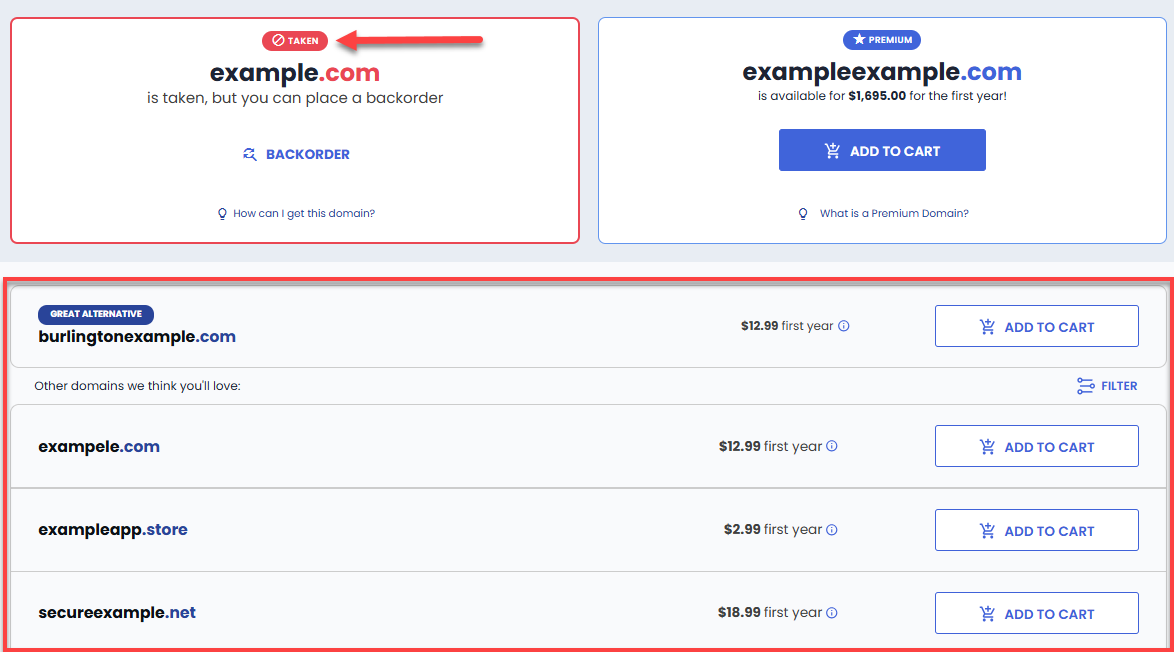
- If the domain name is unavailable, the system will indicate that the domain is taken and display alternative domain name suggestions and available domain extensions that the customer may choose from.
Unsupported TLD Extensions
Bluehost doesn't support every domain extension for registration. If you search for an unsupported extension, you will not be able to add the domain to your cart. Instead, the following message will appear:
Error: "Sorry, this domain extension is not supported .tld"

What to do: Choose a different domain extension and perform another search.
Need Help After Purchasing a Domain?
Contact Bluehost Support if you experience any of the following:
- Your order fails during checkout.
- You receive an error message related to domain registration.
- Your domain does not appear as registered in WHOIS within 24 hours.
- Your domain does not appear in your Bluehost account within 24 hours.
Transfer Your Domain to Us
Many domains can be transferred to Bluehost from another registrar, depending on the extension.
Important
Before starting a transfer, make sure your domain:
- Has been registered for at least 60 days
- Has not been transferred to another registrar within the last 60 days
- Is unlocked with your current registrar
Once these requirements are met, you can begin the transfer process from your Bluehost account.
Unsupported Domain Transfers
Some domain extensions are not eligible for transfer to Bluehost.
If your domain extension is not supported for transfer, you will see the following message:
Error: "This domain is not currently supported for transfer. It may be ineligible, unsupported, or invalid."
What to do: You can continue using the domain with your Bluehost hosting account by keeping the domain registered with your current registrar and updating the domain's DNS settings to point to your Bluehost hosting. Your website will continue to function normally, but the domain registration will remain with the current registrar.
Troubleshoot Your Domain Transfer
If a transfer cannot be initiated or completed, review the following common causes:
- Verify the domain's age. Use a WHOIS/RDAP lookup tool to confirm that the domain has been registered for at least 60 days and has not been transferred within the last 60 days. If it has not yet reached 60 days, wait until the eligibility period has passed before attempting the transfer again.
- Check if the domain is locked. If the WHOIS/RDAP lookup tool shows a ClientTransferProhibited status, the domain is currently locked. Contact your current registrar and request that the domain be unlocked before restarting the transfer.
- Check whether the transfer is in progress. If the WHOIS/RDAP lookup tool displays a PendingTransfer status, the transfer has already been initiated and is currently processing. Most transfers for common extensions (such as .com and .net) complete within five to seven days. Some country-code extensions follow different timelines set by their registry.
- Verify your authorization code. Domain transfers require an authorization code, which may also be referred to as an Auth Code or EPP Code. Obtain this code from your current registrar and enter it during the transfer process.
Summary
Bluehost supports many domain extensions for both registration and transfer. To determine whether a domain extension is supported, search for your desired domain on the Bluehost website. If an extension is unsupported, select a different extension before proceeding.
For domain transfers, registered for at least 60 days, has not been transferred within the last 60 days, is unlocked, and has a valid authorization code available. If a domain extension is not eligible for transfer, you can keep the domain with your current registrar and point its DNS settings to your Bluehost hosting account.
Related Articles
If you need further assistance, Bluehost Chat Support is available 24 hours a day, 7days a week while Bluehost Phone Support is available 7 days a week from 7 am-12 midnight EST.
- Chat Support - While on our website, you should see a CHAT bubble in the bottom right-hand corner of the page. Click anywhere on the bubble to begin a chat session.
- Phone Support -
- US: 888-401-4678
- International: +1 801-765-9400
You may also refer to our Knowledge Base articles to help answer common questions and guide you through various setup, configuration, and troubleshooting steps.