 ChatGPT,
 Claude,
 Gemini,
 Grok — all four for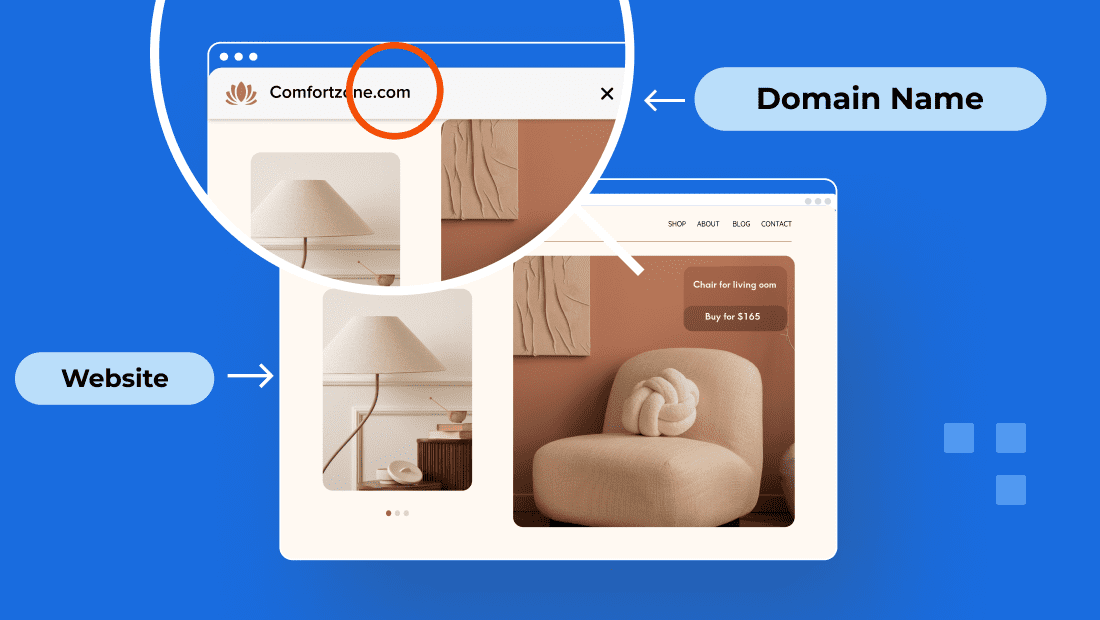
Key highlights
- Understand the clear difference between a domain vs website to build a solid online presence.
- Learn how domains function as digital addresses that make your website easily accessible.
- Explore the role of web hosting in storing your website files and delivering content to visitors.
- Discover why securing the right domain name is crucial for brand identity and professionalism.
- Gain practical insights on linking domains to hosting and launching your website effectively.
Imagine you’ve just secured the perfect street address in a busy city, but when you arrive, there’s nothing there but an empty lot. This scenario perfectly illustrates the core domain vs website difference for any business owner. While people often swap the terms, your domain is simply the digital address, while the website is the actual building where your content lives.
You can’t have a shop without a location and a location without a building is just a plot of land. Understanding the difference between domain and website is essential for anyone starting online; this guide breaks down exactly how they connect.
Domain vs website: Side-by-side quick comparison
A domain and a website are closely connected but play very different roles in your online presence, much like how a phone number and the actual conversation it enables are two separate things. While the terms are often used as synonyms, they serve distinct technical purposes; one acts as your identity on the web, while the other is the actual content your visitors interact with. Here is the core difference between a website and a domain:
| Feature | Domain | Website |
| Definition | The address users enter to access a website | A collection of web pages and content |
| Purpose | Identifies the website’s location online | Displays and organizes content for visitors |
| Dependency | Can exist without a website | Needs a domain to be accessible |
| Example | google.com | Google’s search engine and other services |
| Managed by | Domain registrars (e.g., Bluehost) | Web hosting providers (e.g., Bluehost) |
Once you grasp how these two elements interact, managing your online presence becomes much more straightforward.
Domain vs website: Overview
While people often use these terms interchangeably, they serve two distinct roles in getting your business online. Think of a domain name as your digital street address, the specific location (like [yourcompany].com) that someone types into a browser to find you. The website, on the other hand, is the actual building and everything inside it; it’s the collection of pages, images and code that visitors see once they arrive.
Let’s look at them in more detail:
What is a domain?
A domain name serves as your website’s unique address on the internet, allowing users to find and access it easily. Instead of remembering long strings of numbers, visitors simply type your domain like “bluehost.com” into their browser’s address bar.
Behind the scenes, computers communicate using IP addresses, which are complex numerical identifiers. To bridge this gap, the Domain Name System (DNS) acts as the internet’s phonebook, translating human-friendly domain names into machine-readable IP addresses. This seamless process ensures that users can navigate the web effortlessly without needing to recall technical details.
When you register a domain name, you claim a unique spot on the internet, helping users find you easily. Registering a domain with Bluehost is seamless, offering a variety of domain extensions, privacy protection and easy management tools to establish your online presence effortlessly.
Also read: What is a Domain Name? Everything You Need to Know
What is a website?
Now that we’ve talked about the address, let’s focus on the destination, the website. A website is a collection of web pages and site files that reside on a web server. Each page contains content such as text, images, videos and interactive elements.
Think of a website like a physical store. Just as a store has different sections and displays, a website has multiple pages organized for easy navigation. Hyperlinks connect these pages, guiding visitors through the content seamlessly.
The purpose of a website can vary widely, it may be an eCommerce store, a blog or a portfolio. Regardless of its function, a website serves as a platform to showcase information, products or services to the online world.
Also read: How Easy Is It To Build a Website? + More Questions Answered
What does a website domain look like?
A website domain follows a simple, recognizable pattern that serves as your site’s unique address on the internet. The most common format you’ll see is [yourbrand].com, where the part before the dot represents your chosen name and “.com” is the domain extension. Other popular extensions include [businessname].org, [startup].net or [company].info, depending on your website’s purpose.
Many websites also use subdomains, which appear before the main domain name. For example, you might encounter blog.[yourbrand].com for a blog section, shop.[company].com for an online store or support.[business].com for customer service pages. These subdomains help organize different sections of a website while maintaining the same root domain, making it easy for visitors to recognize they’re still on your main website.
Structure of a domain name
Every domain name follows a simple three-part structure that works like a street address for your website. The second-level domain is the main part you choose like “yourbrand” in [yourbrand].[com] and typically matches your business name. The top-level domain appears after the dot (.com, .org, .net) and helps categorize your site type.
You can optionally add a subdomain at the front, such as “shop” in shop.[yourbrand].com, to create separate sections within your main website. When someone types your domain into their browser, all these parts work together to direct them to your specific location online.
For instance, blog.[yourbrand].com would take visitors to your blog area, while the main [yourbrand].com leads to your homepage. This organized structure makes it easy to manage different sections of your online presence under one unified domain.
What is the difference between a domain name and a URL?
A domain name is just your website’s address, while a URL (Uniform Resource Locator) is the complete path to a specific page or resource on your site. The URL includes additional components like the protocol, path and parameters beyond the basic domain.
Think of a domain name as your street address like [yourbrand].com, which directs visitors to your website’s front door. A URL, however, provides the complete directions to a specific room in your house.
For example, https://[yourbrand].com/about contains the protocol (https://), your domain name ([yourbrand].com) and the path (/about) that leads to your About page.
URLs can also include additional elements like parameters (?product=hosting) that pass specific information to the page, making them more detailed than simple domain names.
How to choose a domain name?
Here are the steps to choose and secure a domain name for your website:
- Brainstorm like a pro: When choosing a domain name, aim for a name that’s short, punchy and easy to spell. Trust me, you’ll want to avoid those confusing hyphens or random numbers that people always forget.
- Check availability immediately: Use a domain search tool to see if your dream name is actually up for grabs. If your preferred domain is taken, don’t worry, there are always creative ways to pivot or find a variation that works even better.
- Pick the right extension: While .com is the gold standard for a reason, don’t overlook .org, .net or even industry-specific extensions if they help define what you’re all about.
- Don’t skip privacy protection: This is a big one. Adding privacy protection keeps your personal contact info out of public WHOIS databases, which is the best way to keep your inbox free from spam.
- Finalize the registration: This is where you make it yours. Pick a reputable registrar like Bluehost to ensure your registration is handled securely and your brand is protected right from the start.
- Set it and forget it: Always enable auto-renewal. There is nothing worse than building a successful site only to lose your domain because an expiration date slipped your mind.
As you’re narrowing down your favorites, try using bracket placeholders like [yourbusiness].com to visualize the final look. It helps you see how the name will actually appear to your customers before you pull the trigger.
Ready to stake your claim on the web? Don’t wait for someone else to grab your perfect name. Register your domain with Bluehost today and get the professional start, security and 24/7 support your project deserves.
Relationship between domains and websites
A domain and a website are two separate components that must work together to create a functioning online presence. While they serve different purposes, neither is truly complete without the other. Understanding how they interact helps you make smarter decisions when building and managing your site.
Can you have a domain without a website?
Yes, you can absolutely register and own a domain name without having a website attached to it. Many businesses and individuals purchase domains simply to protect their brand name, prevent competitors from using a similar address or hold onto a valuable name for future use. In the meantime, a registered domain without a website will typically display a placeholder or parking page rather than actual content.
If you have a domain but no website yet, you can still set up professional email addresses using that domain, giving your business a credible presence even before your site goes live. This is actually a common approach for entrepreneurs who want to secure their preferred domain name early while they work on building out their full website.
The process of linking domains to websites
To get your site live, you’ve got to point your domain name toward your hosting plan. This step is essentially the bridge between the name people type into a browser and the actual files sitting on a server. Usually, this involves tweaking your DNS (Domain Name System) settings so the two parts can communicate. It’s like updating a digital address book. Without this link, your domain is just a name without a home and your website remains invisible to the public.
Bluehost makes this whole process much easier. We’re widely considered one of the most reliable options available, officially recommended by WordPress.org since 2005, offering 99.99% uptime and 24/7 expert support. The process of connecting domain to Bluehost hosting is quite simple if you register a domain through us.
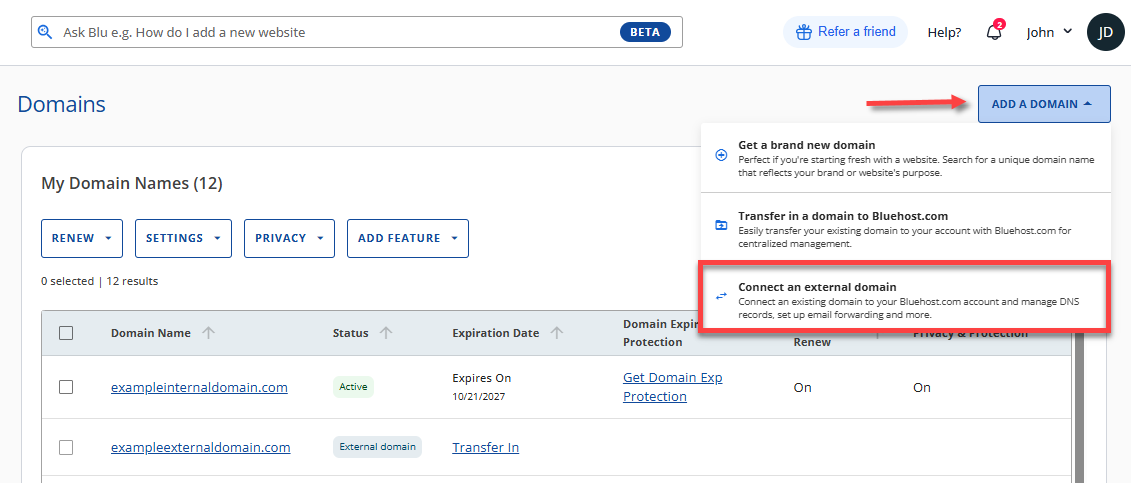
For connecting external domain, you can simply log into your Bluehost Account Manager, head to the “Domains” section and use the “Add a Domain” option to point your external domain to your hosting account. It’s a straightforward way to bypass technical hurdles and get your site online faster.
The role of domains and websites in online identity
A domain serves as your digital identity, making it easier for users to find you. It gives your brand credibility and a professional look, crucial for businesses and personal branding.
How domains serve as your digital address?
Domains simplify internet navigation. Instead of remembering an IP address like “192.168.1.1,” users can type an easy-to-remember name like “bluehost.com” to reach a website. Owning a domain allows businesses to create branded email addresses (e.g., [email protected]), enhancing professionalism.
Also read: How Do Domains Work? The Ultimate Guide
Websites as the embodiment of your online presence
Your website is where visitors engage with your brand. It houses your content, products, services and interactive elements, making it a crucial part of your digital footprint. A well-designed website improves user experience and can help boost SEO rankings, increasing visibility online.
Also read: WordPress Website Examples for Inspiration and Guidance
Now that you understand how domains and websites establish your digital identity, it is important to clarify how these elements relate to the servers where your data is stored.
Domain vs. Web Hosting: Understanding the Difference
Think of a domain name as your digital street address; it’s how people find you. Bluehost web hosting, on the other hand, is the actual high-performance foundation where your website’s files, images and databases live. While a domain claims your brand’s identity, you need the robust infrastructure and security of Bluehost to actually serve those files to visitors and keep your site running smoothly 24/7.
| Feature | Domain name | Bluehost web hosting |
|---|---|---|
| Purpose | Address & identity | Storage, speed & security |
| Function | Points users to a location | Stores and serves site data rapidly |
| Analogy | The street address | The high-performance building |
Getting your site online is effortless when you choose a provider that prioritizes performance and reliability. With Bluehost, you benefit from industry-leading uptime, 24/7 expert support and a free domain for your first year, ensuring your digital presence is both professional and powerful from day one.
To find the perfect foundation for your website, explore Bluehost web hosting plans today.
Some people get confused between domains, website hosting and email hosting. Let’s at how they are different from each other.
Difference between domains, website hosting and email hosting
It’s easy to get these terms mixed up when you’re first starting out, but they’re actually separate gears in the same machine. Your domain is essentially your digital street address, the specific name people type into a browser to find you.
Hosting, on the other hand, is the “plot of land” or the building where all your site’s files, code and images live so they’re ready for visitors. Then there’s email hosting.
This manages your professional inbox, allowing you to send and receive mail from your own domain name rather than a generic provider. They work together, but they aren’t the same thing.
| Service | What it does | Real-world analogy |
|---|---|---|
| Domain | Your unique online identity/URL | Street Address |
| Web Hosting | Storage for your site’s files | The Building |
| Email Hosting | Manages custom email accounts | Business Phone System |
Think of it this way: your domain is your business address, website hosting is the physical store where you keep your inventory and email hosting is your shop’s dedicated phone line.
Let’s say you’re opening a neighborhood bakery. You’d register [mybakery].com as your domain so customers know where to go. You’d then use website hosting to display your menu and cake photos online.
Finally, you’d set up email hosting to create professional addresses like orders@[mybakery].com. It just looks way more polished than using a personal Gmail account for business. Plus, it builds trust with your customers right from the start.
Final thoughts
Mastering the domain vs website distinction is the first real step in your digital journey. Think of it this way: your domain is the street address, while your website is the home where your brand lives. Understanding the difference between domain and website ensures your brand has a foundation that actually makes sense to your visitors. Without a clear address, even the most beautiful site stays hidden in the noise.
Bluehost makes this synergy easy. You can secure a professional domain and launch your site without the usual technical friction. Our tools are designed for creators who want to spend time growing their audience, not troubleshooting server settings. It’s about getting you online fast, with the support you need to stay there.
Ready to finally claim your space? Don’t let your best ideas stay on the shelf while someone else grabs your name. Take the leap and register your domain with Bluehost today.
FAQs
The first step is usually to register a domain. Your domain is your online identity and securing it early ensures no one else takes it. Once you have a main domain, you can then choose hosting and begin building your web pages. For example, if you plan to use .org or .net, it’s smart to lock it down first.
No, a domain name is just the address, similar to a house number, that directs users to your site. Your website consists of the actual content, files and web pages stored on a hosting server. For example, your website name could be “[mybusiness].[com],” but that’s only the entry point to all your pages.
A domain name is the uniform resource locator (URL) people type in their browser, while web hosting is the service that stores your site’s files. Think of the domain as your website’s address, while hosting is the house where your files, images and every other page live.
Yes. A domain can exist without a website. Many people register a domain just for email addresses, brand protection or future use. Similarly, a website can exist without a custom domain by using a hosting provider’s subdomain, but a unique domain improves credibility. For example, using .gov or .org builds trust faster.
A top level domain (TLD) is the last part of a web address, such as .com, .org, .net or .gov. Choosing the right TLD matters for branding, trust and even SEO. For example, Google often treats .org domains as nonprofit identifiers.
Good practices include keeping your website name short, easy to spell and memorable. Avoid long words that are hard to type. For example, use clear names like “[greenhouse].[org]” rather than complicated phrases.
Yes, you can register a domain and hold onto it without creating a site right away. Many people do this to accept offers later, protect branding or prepare for a launch.
Useful tips include keeping each web page focused, making navigation simple and reviewing your analytics regularly. Analytics tools let you track which pages people visit most and whether they accept cookies. For example, a review of your traffic may show one page is far more popular than another, helping you decide where to improve.
Your website name is what people remember and search for, but your analytics show how they actually interact with your site. For example, a clear name like “[artnetwork].[org]” makes it easier to track and analyze visitor behavior across multiple pages.

Write A Comment