 ChatGPT,
 Claude,
 Gemini,
 Grok — all four for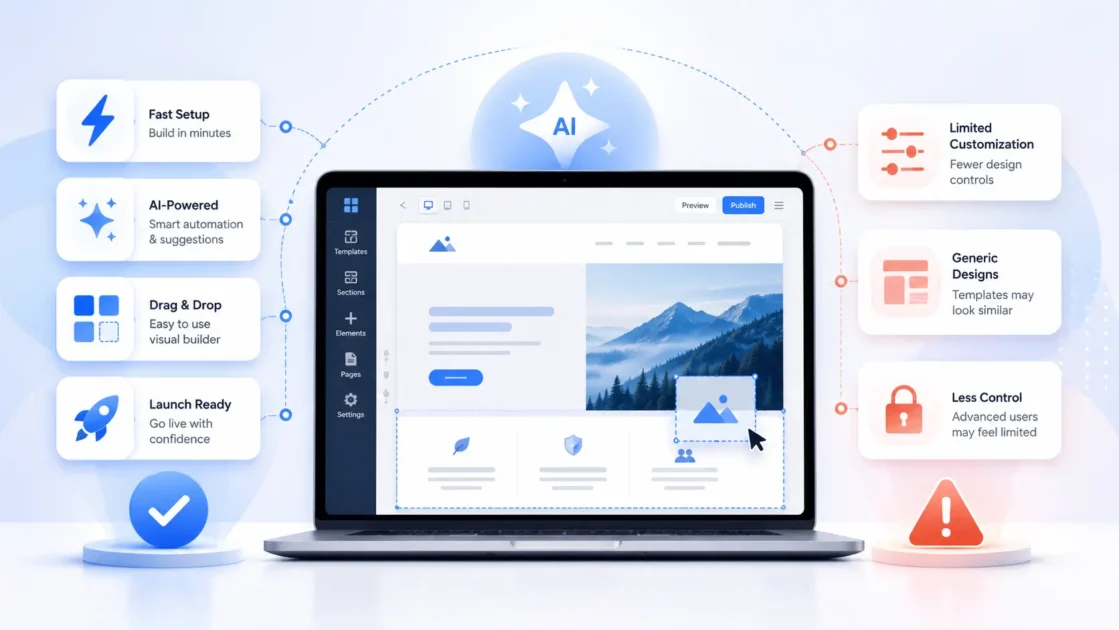
Key highlights
- AI website builders let you generate a functional, professional-looking site in minutes instead of weeks.
- Speed and lower upfront cost often come paired with less flexibility for advanced customization down the road.
- Small business owners and solo creators benefit most when they need a working site fast without hiring a developer.
- Understanding the trade-offs between automation and control helps you avoid a costly rebuild later.
- The right choice depends on your budget, technical comfort level and how much long-term flexibility your project actually needs.
You need a website live this week, not next quarter. An AI website builder promises exactly that: describe your business, watch a working site appear, publish before your coffee gets cold. It sounds almost too easy, which is usually the point where a sharp business owner starts asking what the catch is.
AI website builders can significantly reduce the time, cost and technical work required to launch a site, but they are not the right fit for every project.
This breaks down what actually works, what genuinely doesn’t and how to tell which side of that line your project falls on.
Here’s a quick look at the pros and cons of AI website builder before the breakdown below goes deeper on each point.
| Pros of AI website builder | Cons of AI website builder |
| Live site in under an hour for simple layouts | Templated look, especially the sameness across sites on the same platform |
| No coding or design software needed | Deep customization needs a manual override or hits a hard ceiling |
| Lower entry cost than hiring a designer for a first version | AI edits are usually capped by a monthly allowance |
| Removes blank-page paralysis with guided prompts | Output quality depends entirely on how specific your prompt is |
| Structure and copy scaffolding built in from the start | Accessibility and complex integrations often still need a manual pass |
The sections below examine each trade-off in detail, so you can judge which benefits matter most and which limitations could affect your website.
What are the real advantages of an AI website builder?
AI website builders earn their reputation for real reasons, not just marketing copy. Here’s what actually holds up, starting with the one that matters most to a deadline-driven launch.
1. Faster site creation
A basic four-to-five-page site once took two to four weeks of back and forth with a designer. Now it can go from prompt to published in under an hour, with copy and layout already in place. That head start alone justifies the tool for businesses that need to exist online before a specific deadline.
2. No coding or design software needed
You skip coding and design tools entirely, which removes the biggest barrier for non-technical founders. The builder handles layout logic and formatting, so you never touch a line of code to get a working site live.
3. Lower cost to get started
Hiring a designer or developer for a first version of your site costs more than most early-stage budgets allow. An AI builder gets you a comparable starting point without that upfront design bill, which matters most while you’re still validating whether the idea works.
4. No blank-page paralysis
Guided prompts do the first pass for you, so you’re never staring at an empty page deciding where to start. You react to and edit a draft instead of building one from scratch.
5. Structure and SEO scaffolding built in
Your site launches with basic page structure, navigation and starting SEO elements already in place. That’s a real head start over a manual build, where scaffolding like this often gets added as an afterthought.
Also read: Are AI Website Builders Good for SEO? Pros & Limits
6. Fast iteration for early validation
You can regenerate or test a different direction in minutes if the first attempt misses the mark. That speed suits early-stage validation better than a slow manual rebuild, where testing a new direction means starting over.
What are the real drawbacks of an AI website builder?
The honest drawbacks cluster around control, not capability. AI builders are excellent at getting you to a working site fast. They’re far less reliable once you need something that doesn’t fit inside their template library.
1. Templated look and design sameness
Your site can end up looking structurally similar to others on the same platform, since the design pulls from a shared pattern library. Two businesses in the same industry using the same builder often land on near-identical layouts.
2. A hard ceiling on deep customization
You hit a wall fast if you need bespoke interactions, complex layouts or anything outside the builder’s standard blocks. Getting past that ceiling usually means a manual override or a different tool entirely.
3. Output that’s only as good as your prompt
A vague, one-line description produces a generic result you’ll spend time fixing afterward. The builder can’t read your mind, so the quality gap between a rushed prompt and a detailed one is significant.
Also read: How to design a website with AI in 5 steps
4. Platform lock-in risk
You may face a full rebuild if you outgrow a closed platform, since some proprietary builders don’t let you export your site elsewhere. Builders on open systems like WordPress are easier to leave if you need to.
5. A capped AI edit allowance
You typically get a limited number of AI-assisted edits per month, so heavy post-launch iteration can hit a wall. That’s worth checking before you commit, not after you’ve already hit the ceiling.
6. Accessibility still needs a manual review
Automated output doesn’t reliably meet WCAG or ADA standards on its own. You still need to run a manual accessibility pass to catch what the AI missed.
How do you avoid the common AI website builder pitfalls?
Most of the drawbacks above are avoidable with a few decisions made before you start building, not after you’ve already paid for a plan.
- Write a specific opening prompt. Name your business, your industry, the pages you need and the tone you want, instead of a one-line description the AI has to guess at.
- Check the AI edit allowance before you commit. A builder that caps you at a handful of edits a month will frustrate you the moment you want to keep refining.
- Look for a Build-to-Buy model over a buy-first one. With Bluehost’s AI Website Builder, you get a conversational AI agent that builds your full site during a 14-day trial with no credit card required. You can judge the actual result before paying anything.
- Plan for a manual pass. Budget an hour to check accessibility, mobile behavior and anything that reads as template-generic before you call the site finished.
Pro tip: Before you commit to any builder, run the exact prompt you’d use for your real business. Judge the output against a competitor’s actual live site, not a demo reel. Demo prompts are written to make the tool look good.
Final thoughts
An AI website builder won’t replace a designer’s judgment or fix a business that hasn’t figured out its offer yet. But it removes the two most common reasons a website never launches. Nobody wants to write the first draft, and nobody wants to pay agency rates before knowing if the idea even works. Weigh the trade-offs above against what your site actually needs to do this year, not what it might need to do in three.
If you want to test the process without commitment, Bluehost AI Website Builder lets you build your full site first and decide afterward.
FAQs
The main pros are speed, lower cost and no coding requirement. The main cons are templated design, limited customization and capped AI edits after launch. Which side matters more depends on how bespoke your site needs to be.
Yes, for a functional launch. Most AI website builders produce a working, published site with real pages and working forms, which covers what many small businesses need on day one. Whether it stays “good enough” long-term depends on how much customization your business eventually requires.
Limited deep customization. AI builders pull from a library of pre-built blocks and layouts. Anything outside that library, like a bespoke interaction or a custom integration, usually needs a manual override or a different tool entirely.
It depends on the platform. Builders built on open systems like WordPress are easier to migrate, while proprietary AI builders can require a full rebuild if you decide to leave. Bluehost lets you upgrade directly from the AI Website Builder to the Sell Online plan and unlock full WooCommerce store features.
Not inherently. Most AI website builders include basic on-page SEO scaffolding out of the box. How well an AI-built site actually ranks depends on more than the builder alone, including your content and competition.
Speed and cost versus depth and originality. An AI website builder gets you a working site in minutes to hours at a fraction of a designer’s cost. A human designer brings strategic thinking and brand-specific design, and can build anything you can describe, at a higher price and a longer timeline.

Write A Comment