 ChatGPT,
 Claude,
 Gemini,
 Grok — all four for
Key takeaways
- Learn how to secure a Hermes Agent VPS before attackers can exploit exposed ports, weak SSH settings or misconfigured containers.
- Discover the safest way to run Hermes Agent with Docker isolation, least-privilege access and hardened network controls.
- Protect API keys, environment variables and connected services from leaks that could compromise your AI workflows.
- Set up monitoring, logging and security alerts to quickly detect suspicious activity and respond to threats.
- Build a backup and recovery plan that helps restore Hermes Agent data and operations after unexpected incidents.
Running Hermes Agent on your own VPS gives you more control, flexibility and privacy, but it also makes you responsible for security. A poorly configured server can expose API keys, sensitive data and connected services to attackers. Common risks include weak SSH settings, open ports, misconfigured Docker containers and leaked environment variables.
The good news is that securing a self-hosted AI agent does not require enterprise-level infrastructure. By following a few proven VPS hardening practices, you can significantly reduce your attack surface and improve reliability. In this guide, you’ll learn how to secure your VPS, harden Docker deployments, protect secrets, control network access, monitor suspicious activity and build a reliable backup and recovery strategy for Hermes Agent.
Why is Hermes agent security important on a VPS?
Hermes Agent is designed to handle autonomous agent workflows, browser automation, messaging apps and complex tasks with minimal manual input. To perform these actions, the agent often gets access to API keys, env files, messaging platforms, vector stores and internal tools. This level of access makes security a critical part of every Hermes setup.
If attackers compromise a working agent, they may gain access to conversation history, reusable skills, file management systems and connected services like a Telegram bot or MCP server. In some cases, a compromised container runs malicious commands, steals a GitHub token or spreads across other tools connected to the same infrastructure.
Securing yourself hosted Hermes environment helps reduce the blast radius of attacks. It also protects persistent memory, procedural memory and self-improving skills stored on your own infrastructure. Strong security controls improve your overall security posture and help keep Hermes running safely across long-term AI agent workloads.
Also read: What is Hermes Agent? A self-hosted AI agent guide for developers
Recommended secure architecture for Hermes agent
A secure Hermes setup should isolate services, limit public exposure and protect AI agent workloads from unauthorized access. The safest approach is to run Hermes Agent on VPS hosting with Docker, a reverse proxy and firewall protection.
Secure VPS architecture overview
A standard Hermes Agent architecture includes:
- VPS hosting
- Docker containers
- Reverse proxy like NGINX or Traefik
- Firewall rules
- Private container networking
Docker isolates Hermes services, browser automation tools and messaging gateways inside separate containers. A reverse proxy handles HTTPS traffic and SSL certificates. Firewall rules restrict unnecessary access.
Use private Docker networks for internal communication. This prevents direct exposure of vector stores, env file data and backend services. HTTPS encryption also protects API keys, conversation history and messaging platforms during data transfer.
Why Docker is better than direct host installation
Docker improves security by isolating processes inside separate containers. If one container runs malicious code, the attack is less likely to affect the full VPS environment.
Docker also simplifies rollback and recovery. You can redeploy older container versions if a Hermes update, new skills package or setup wizard change causes issues.
Container isolation reduces the attack surface as well. You can apply dropped capabilities, restrict root access and control resource usage for AI agent workloads.
Recommended VPS specifications
Your VPS plan depends on the size of your Hermes setup and agent workflows.
Recommended baseline:
- 1–2 vCPU cores
- 2–4 GB RAM
- NVMe SSD storage
- Ubuntu LTS or Debian
Advanced workloads with browser automation, persistent memory, reusable skills and multiple messaging apps may require higher RAM and CPU resources.
NVMe storage improves file management, vector store performance and conversation history retrieval speed.
Ports and services you should expose
Expose only required services to the internet.
Recommended setup:
- Port 443 for HTTPS
- Restricted SSH access
- Private internal container networks
Avoid exposing Docker ports, databases or MCP server services publicly. Restrict admin access using SSH keys, VPN connections or IP allowlisting. Limiting public services improves your overall security posture and reduces the blast radius of attacks.
Also read: How to Run Hermes Agent 24/7 on a VPS (The Complete 2026 Guide)
How do you secure a VPS before installing Hermes agent?
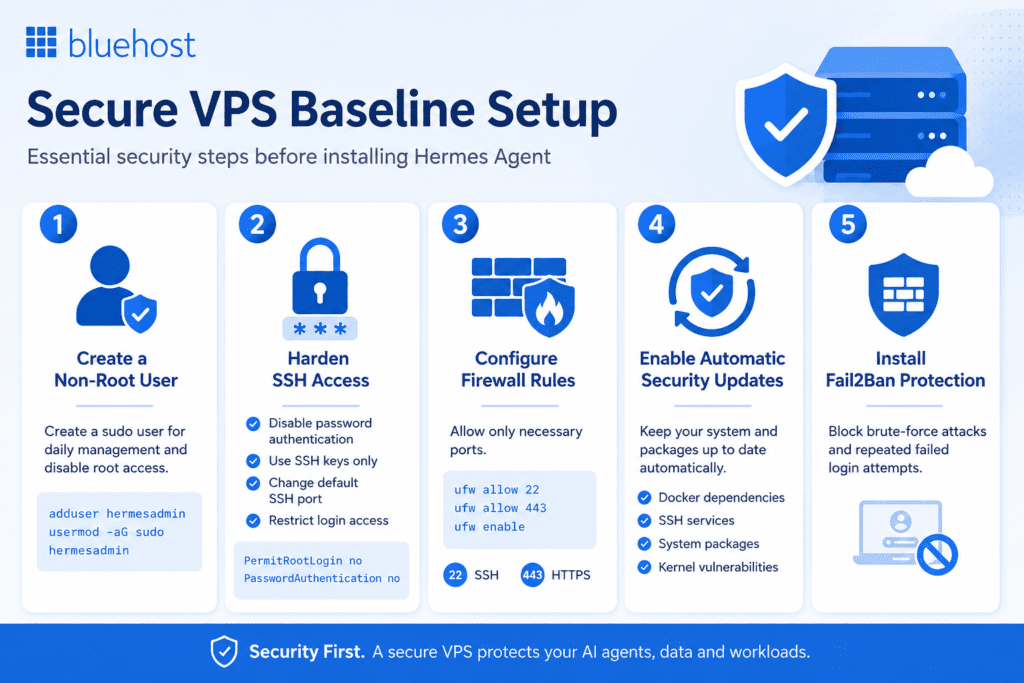
A secure VPS baseline reduces the risk of unauthorized access, leaked API keys and compromised AI agent workloads. Before you install Hermes Agent, secure the operating system, SSH access and firewall rules.
1. Create a non-root user
Avoid running Hermes setup tasks as the root user. Create a separate sudo account for daily management and disable direct root access later.
Example commands:
adduser hermesadmin
usermod -aG sudo hermesadmin
Using a non-root account limits the blast radius if attackers gain access to the server.
2. Harden SSH access
SSH is one of the most targeted services on a VPS hosting environment. Weak SSH settings can expose your own infrastructure to brute-force attacks and unauthorized admin access.
Recommended SSH hardening steps:
- Disable password authentication
- Use SSH keys only
- Change the default SSH port
- Restrict login access
Example SSH configuration:
PermitRootLogin no
PasswordAuthentication no
SSH keys provide stronger protection than passwords and improve the overall security posture of your Hermes Agent VPS.
3. Configure firewall rules
A firewall helps control which services are publicly accessible. Allow only the ports required for Hermes Agent runs and messaging gateway traffic.
Recommended UFW setup:
ufw allow 22
ufw allow 443
ufw enable
Port 443 handles HTTPS traffic. SSH access should stay restricted to trusted users or IP addresses. Avoid exposing internal containers, vector stores or MCP server services directly to the internet.
4. Enable automatic security updates
Outdated packages and kernels increase security risks for self hosted AI agent infrastructure. Enable unattended-upgrades to install important security patches automatically.
Automatic updates help secure:
- Docker dependencies
- SSH services
- system packages
- kernel vulnerabilities
Keeping Ubuntu LTS or Debian updated improves long-term stability for persistent memory and agent workflows.
5. Install Fail2Ban protection
Fail2Ban helps block repeated login attempts and brute-force attacks targeting SSH services.
It monitors authentication logs and temporarily bans suspicious IP addresses after multiple failed login attempts. This adds another security layer for Hermes Agent workloads, messaging platforms and admin access running on the VPS.
Also read: Hermes Agent + n8n: Build Automated Workflows That Actually Think
Securing APIs, secrets and environment variables
API keys, access tokens and credentials are some of the most sensitive assets in a Hermes setup. If exposed, attackers may gain access to model providers, messaging platforms, browser automation tools and other connected services. Proper secret management helps protect your AI agent and the infrastructure it depends on.
1. Never hardcode API keys
Never store API keys directly in source code, markdown files or configuration files tracked in Git repositories.
Instead:
- Use environment variables
- Store secrets in a separate env file
- Exclude secret files from version control
- Rotate credentials regularly
This reduces the risk of accidentally exposing a GitHub token, LLM provider credentials or messaging gateway secrets.
2. Use Docker secrets or secret managers
Store sensitive data outside the application whenever possible.
Docker Secrets and dedicated secret management tools provide:
- Secure credential storage
- Encrypted secret handling
- Controlled access to sensitive values
- Reduced exposure inside containers
This approach is safer than storing passwords, API keys or tokens directly inside Hermes config files or application code.
Also read: Hermes Agent Docker: Production Setup Guide That Works
3. Restrict API permissions
Follow the principle of least privilege. Every API key should have only the permissions required for its specific task.
For example:
- Use separate credentials for production and testing
- Limit access scopes where supported
- Create a new token when permissions change
- Remove unused keys immediately
Restricting permissions helps contain security incidents and limits what an attacker can access if a credential is compromised.
4. Prevent secrets from appearing in logs
Logs often contain more sensitive information than expected. Debug output can accidentally expose API keys, access tokens, conversation history or authentication details.
To reduce risk:
- Redact sensitive values before logging
- Disable verbose debug logging in production
- Review application and container logs regularly
- Prevent secrets from being written to monitoring systems
Keeping credentials out of logs strengthens your security posture and helps protect long-running Hermes Agent workloads.
Network security and access control
Network security helps prevent unauthorized access to Hermes Agent, connected tools and sensitive data. The goal is simple: expose only what users need and keep everything else private.
1. Restrict public exposure
Every public-facing service increases risk. Expose only HTTPS endpoints required for the Hermes gateway, messaging platforms or web-based interfaces.
Keep the following services private:
- Databases
- Vector stores
- MCP server instances
- Internal APIs
- Container management interfaces
When running Hermes Agent on your own infrastructure, private networking helps protect persistent memory, execution logs and agent workflows from unnecessary exposure.
2. Secure remote access with VPN or IP allowlisting
Administrative services should never be accessible from anywhere on the internet.
Use tools like WireGuard or Tailscale to create a secure management network. For additional protection, restrict admin access to trusted IP addresses whenever possible.
This approach helps secure:
- SSH access
- Server administration
- File management
- Hermes config updates
- Infrastructure monitoring
Limiting access points reduces opportunities for attackers to target your VPS.
3. Configure HTTPS with a reverse proxy
A reverse proxy sits between users and your Hermes services. Solutions such as NGINX and Traefik simplify HTTPS management and help secure incoming traffic.
Benefits include:
- SSL/TLS encryption
- Automatic certificate renewal
- Centralized traffic management
- Better control over public endpoints
HTTPS protects API keys, authentication tokens and conversation history while data moves between Hermes Agent, messaging apps and model providers.
4. Add rate limiting and request filtering
Public endpoints can become targets for automated attacks, credential stuffing and abuse attempts.
Rate limiting helps control how frequently users or systems can send requests. Request filtering blocks suspicious traffic before it reaches your application.
These controls help:
- Reduce abuse attempts
- Protect login pages
- Defend public APIs
- Improve overall security posture
For teams running Hermes Agent VPS Hosting, rate limiting adds another layer of protection around long-running AI agent workloads and messaging gateways without affecting normal usage.
Also read: Hermes Agent on Bluehost VPS: Run and scale AI agents
How to do monitoring and detecting suspicious activity
Even a well-secured Hermes setup requires continuous monitoring. Resource spikes, failed login attempts and unusual container activity can indicate security issues before they become major incidents.
1. Monitor VPS resource usage
Track CPU, RAM and disk usage across your VPS. Unexpected resource consumption can signal a compromised container, runaway process or abused AI agent workload.
Pay attention to:
- Sustained CPU spikes
- High memory usage
- Rapid disk growth
- Unusual network activity
This is especially important for Hermes Agent deployments running browser automation, persistent memory and multiple agent workflows.
2. Centralize logs
Logs provide visibility into what is happening across your infrastructure. Storing logs in one location makes troubleshooting and security investigations much easier.
Monitor:
- SSH logs
- Docker logs
- Reverse proxy access logs
- Application logs
Review logs regularly for unauthorized access attempts, configuration changes and unusual activity involving API keys, messaging channels or connected tools.
3. Set up security alerts
Monitoring is only useful if you know when something goes wrong. Configure alerts to notify administrators about critical events.
Recommended alerts include:
- Failed SSH login attempts
- High CPU or RAM usage
- Low disk space
- Service failures
- Downtime notifications
Early alerts help teams respond quickly before issues affect Hermes running in production or disrupt long-running agent workflows.
4. Scan for vulnerabilities regularly
Security threats evolve over time, so regular audits are essential. Schedule routine scans to identify weaknesses before attackers do.
Focus on:
- Docker image scanning
- Open port validation
- Dependency audits
- Container configuration reviews
Our Bluehost Hermes Agent VPS Hosting, combining vulnerability scans with regular system updates helps maintain a stronger security posture as agent infrastructure, reusable skills and connected services continue to grow.
What are the backup and recovery best practices?
Backups are your last line of defense against accidental deletion, failed updates, ransomware and infrastructure failures. If Hermes Agent stores persistent memory, reusable skills and workflow data on your VPS, losing that information can disrupt operations and require significant recovery effort.
1. Back up Hermes configurations and data
Identify and back up all components required to restore a working agent.
This typically includes:
- Docker volumes
- Databases
- Environment files
- Hermes config files
- Persistent memory data
- Custom skills and workflow definitions
A complete backup ensures you can quickly restore Hermes without rebuilding the entire setup from scratch.
2. Automate encrypted backups
Manual backups are easy to forget. Automate the process to ensure critical data is protected consistently.
Follow these best practices:
- Schedule daily backups
- Encrypt backup files
- Store copies in a separate location
- Retain multiple recovery points
For teams running Hermes Agent VPS Hosting, automated backups help protect memory files, execution logs and long-running agent workflows while reducing operational risk.
3. Test your recovery process
A backup is only useful if it can be restored successfully. Regular testing helps identify corrupted files, missing data or incomplete backup procedures before an actual incident occurs.
At a minimum:
- Verify backup integrity
- Test database restoration
- Confirm environment files load correctly
- Practice full recovery workflows
Testing reduces downtime and helps ensure Hermes Agent runs normally after a recovery event.
4. Create a rollback strategy
Software updates, configuration changes and new skills can occasionally introduce issues. A rollback plan allows you to restore a stable environment quickly.
Consider:
- VPS snapshots before major changes
- Container image versioning
- Configuration backups
- Database recovery points
Snapshot-based recovery and container rollback procedures make it easier to recover from failed deployments while keeping agent infrastructure, messaging gateways and connected tools available.
How to test if your Hermes agent VPS is secure
Securing your server is only half the job. Regular testing helps confirm that your Hermes setup remains protected as you add new skills, model providers, messaging platforms and agent workflows. Use the following checks as part of your Hermes Agent VPS security guide and ongoing security maintenance process.
1. Check open ports
Review all listening services on your VPS and verify that only required ports are exposed.
Run:
ss -tulpn Look for unexpected services, exposed Docker ports or publicly accessible tools. Databases, vector store services, MCP server instances and internal containers should not be reachable from the internet. This is especially important when running Hermes Agent, browser automation workloads and messaging gateways on the same server.
2. Verify firewall protection
Your firewall should expose only the services needed for normal operations.
Confirm that:
- HTTPS traffic is allowed
- SSH access is restricted
- Internal services remain private
- Unused ports are blocked
Whether you install Hermes Agent on a new VPS plan or migrate from a home server, firewall validation is a basic hygiene task that helps strengthen your overall security posture.
3. Test SSH hardening
SSH remains one of the most common attack targets on self-hosted infrastructure.
Verify that:
- Password authentication is disabled
- SSH key authentication works correctly
- Root access is restricted
- Fail2Ban blocks repeated login attempts
Proper SSH hardening helps protect admin access, file management systems, environment files and other sensitive components of your agent infrastructure.
4. Audit docker container permissions
Review container settings regularly to ensure services are running with the minimum privileges required.
Check for:
- Privileged containers
- Unnecessary root access
- Missing dropped capabilities
- Writable filesystems where read-only access is sufficient
Container isolation is particularly important when Hermes Agent runs browser automation, image generation workflows, web search tasks or integrations with a Telegram bot, Home Assistant and other tools.
5. Run a basic vulnerability scan
Security scanning helps identify weaknesses before they become exploitable.
Useful tools include:
- Lynis
- Docker Bench Security
Regular scans can uncover:
- Misconfigurations
- Outdated dependencies
- Weak permissions
- Exposed services
As your Hermes setup grows to include reusable skills, persistent memory, procedural memory, messaging apps, model providers and custom integrations, periodic security audits help reduce the blast radius of potential threats and keep your AI agent workloads running securely.
Common Hermes agent security mistakes to avoid
Many security incidents are caused by simple configuration mistakes rather than sophisticated attacks. Avoiding the following issues can significantly improve the security posture of your Hermes Agent deployment.
1. Running containers as root
Running a container with full root access gives attackers more control if the service is compromised. This increases the blast radius and can expose the host system, sensitive files and connected services.
Instead:
- Run containers as non-root users
- Apply the principle of least privilege
- Use dropped capabilities where possible
This is especially important for AI agent workloads that interact with browser automation tools, messaging platforms and external APIs.
2. Exposing Docker ports publicly
A common mistake during the initial setup is exposing Docker ports directly to the internet. While this may simplify testing, it can leave internal services vulnerable to unauthorized access.
Avoid exposing:
- Databases
- Vector store services
- MCP server endpoints
- Container management interfaces
Use a reverse proxy and private container networks instead. This creates a safer environment for Hermes Agent, the Hermes gateway and other supporting tools.
3. Storing API keys in git repositories
Hardcoding API keys, access tokens or credentials inside repositories is one of the fastest ways to create a security risk.
Never store:
- API keys
- GitHub token credentials
- New token values
- Password manager exports
- Sensitive env file data
Use environment variables, Docker Secrets or a dedicated secret manager to protect credentials connected to model providers, messaging apps and other services.
4. Ignoring VPS security updates
Unpatched systems remain one of the most common attack vectors. Delaying updates can leave your VPS hosting environment exposed to known vulnerabilities.
Keep the following updated:
- Operating system packages
- Docker components
- Reverse proxies
- Security tools
- Application dependencies
Whether you are running Hermes on a home server or Bluehost Hermes Agent VPS Hosting, regular updates help protect persistent memory, conversation history and long-running agent workflows.
5. Using weak SSH credentials
Weak passwords and poorly secured SSH configurations make it easier for attackers to gain admin access.
Follow these best practices:
- Use SSH keys instead of passwords
- Disable root login
- Enable Fail2Ban
- Restrict access to trusted IPs
- Rotate credentials regularly
Strong SSH security helps protect your own infrastructure, Hermes config files, reusable skills, execution logs and other critical components that keep a working agent running securely.
Also read: How Hermes Agent Memory Works: Architecture, Providers and Plugins
Hermes agent VPS security checklist
Use this checklist to verify that your Hermes Agent deployment follows core security best practices. Review these items after the initial setup and whenever you make changes to your agent infrastructure.
VPS hardening checklist
✓ Non-root user created for daily administration
✓ SSH secured with key-based authentication
✓ Direct root access disabled
✓ Firewall enabled and configured correctly
✓ Only required ports exposed
✓ Automatic security updates configured
✓ Fail2Ban installed and active
✓ Admin access restricted to trusted users or IPs
✓ HTTPS enabled for public-facing services
Docker security checklist
✓ Hermes Agent running in non-root containers
✓ Container permissions minimized
✓ Unnecessary capabilities dropped
✓ Private container networks configured
✓ Internal services not publicly exposed
✓ Environment files secured
✓ Docker images updated regularly
✓ API keys and secrets stored outside application code
✓ Container resource limits configured
Monitoring and recovery checklist
✓ CPU, RAM and disk usage monitored
✓ SSH, Docker and reverse proxy logs centralized
✓ Failed login alerts configured
✓ High resource usage notifications enabled
✓ Vulnerability scans performed regularly
✓ Backups tested successfully
✓ Environment files and persistent memory backed up
✓ Recovery workflow documented
✓ Snapshot and rollback procedures available
✓ Security reviews completed after major Hermes config changes
Completing these checks helps protect API keys, conversation history, reusable skills, messaging gateways and other critical components that support long-running Hermes Agent workloads.
Final thoughts
Running Hermes Agent in production requires more than a successful setup. As agent workflows grow and new skills, model providers and messaging platforms are added, security must remain a priority. A strong security posture comes from layered protection, including VPS hardening, container isolation, access controls, secret management and continuous monitoring.
At Bluehost, we designed Hermes Agent VPS Hosting to support long-running AI agent workloads with dedicated resources, full root access, persistent runtime and an isolated environment. This gives teams the flexibility to secure their own infrastructure while maintaining control over persistent memory, execution logs and agent configurations.
Security is an ongoing process. Regular updates, vulnerability scans, backups and audits help keep Hermes running reliably while reducing risks across your AI infrastructure.
FAQs
Yes, Docker provides process isolation, private networking and resource controls that help reduce the attack surface. Running Hermes Agent inside its own container is generally safer than installing everything directly on the host operating system. Containerization also makes it easier to deploy new skills, test updates and roll back changes if needed.
Only expose the services required for public access. Most deployments need HTTPS on port 443 for the Hermes gateway. Keep databases, vector store services, MCP server instances and other internal services private. Whether you connect Hermes to messaging platforms, a Telegram bot or a different tool, avoid exposing internal containers directly to the internet.
Store API keys in environment variables, Docker Secrets or a dedicated secret manager. Never hardcode credentials in source code, Hermes config files or Git repositories. This includes credentials for a Hermes model, Claude Code integrations, a single API endpoint or external model providers. Regularly rotate credentials and revoke unused tokens.
Yes, A VPN such as WireGuard or Tailscale helps protect SSH and admin access. This is especially important when running Hermes on your own infrastructure instead of a local machine or home network. Combining VPN access with IP allowlisting provides stronger protection for long-running agent workloads.
Apply critical security updates as soon as possible. Review Docker images, dependencies and VPS packages regularly. Before deploying updates, check release notes and test changes in a staging environment. Following the same pattern for updates helps maintain a stable and secure setup.
Popular tools include Lynis, Docker Bench Security and Fail2Ban. You should also validate open ports, review firewall rules and scan container images regularly. As your Hermes setup grows to include Hermes skills, browser automation, a built in learning loop, reusable workflows and integrations from the Skills Hub or Nous Portal, routine audits become even more important for maintaining a strong security posture.

Write A Comment