

Key highlights
- Understand how domain names function as human-readable addresses that connect users to specific websites on the internet.
- Learn the step-by-step process of how DNS lookups translate domain names into IP addresses to access the correct web server.
- Explore the importance of domain registration, ownership and renewal in maintaining control over your online presence.
- Discover how web hosting and domain management work together to ensure your website is accessible and secure.
- Uncover best practices for choosing a memorable and brandable domain name that supports your business success.
Every second, millions of internet users type domain names into their browsers without a second thought. But have you ever wondered how domains work behind the scenes?
When you enter a web address, a complex system springs into action: translating your request through DNS servers, connecting to hosting providers and delivering the exact content you seek. Understanding how does a domain work is essential for anyone building an online presence.
From preventing costly mistakes to avoiding website downtime, mastering domain fundamentals empowers businesses and individuals alike to create professional, reliable websites that stand the test of time and drive success.
TL;DR: How domains work explained for businesses?
- A domain name is a human-readable address that helps users reach your website.
- Behind the scenes, DNS translates your domain into an IP address computers understand.
- This process involves DNS resolvers, root servers, TLD servers and authoritative servers.
- Your domain connects to web hosting through nameservers, which tell browsers where your site lives.
- Understanding how domains work helps businesses avoid outages, protect ownership and scale confidently.
How does a domain work?
When you type a domain name into your browser, a sophisticated system called the Domain Name System (DNS) works behind the scenes to connect that name to the actual website. The DNS functions like the internet’s phone book, translating domain names into IP addresses that computers can understand.
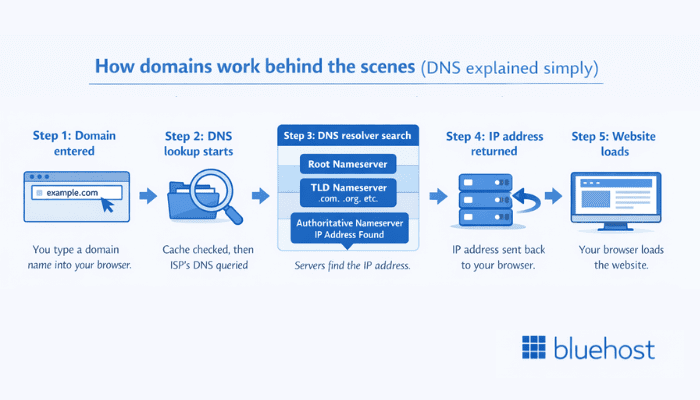
Here are the steps on how domains work explained for businesses:
Step 1: You enter a domain name
The process begins when you type a domain name (like [example].com) into your web browser’s address bar. Your browser needs to find the numerical IP address associated with this domain to load the website.
Step 2: DNS lookup begins
Your browser first checks its cache to see if it recently visited this domain. If not, it sends a request to your Internet Service Provider’s (ISP) DNS server. This server acts as the first point of contact in the domain resolution process.
Step 3: DNS resolver searches
If your ISP’s DNS server doesn’t have the information cached, it queries other DNS servers in a specific hierarchy:
- Root nameserver: Directs the query to the appropriate top-level domain (TLD) server
- TLD nameserver: Handles domains with specific extensions like .com, .org or .net
- Authoritative nameserver: Stores the actual IP address for your specific domain
Step 4: IP address is returned
Once the authoritative nameserver provides the IP address, this information travels back through the chain to your browser. The DNS resolver typically caches this information to speed up future requests.
Step 5: Your browser connects to the website
With the IP address in hand, your browser can now connect directly to the web server hosting the website. The server responds by sending the website files back to your browser, which displays the page on your screen.
This entire process happens in milliseconds, making it feel instantaneous even though multiple servers are communicating across the internet.
Understanding domain name structure
Domain names follow a hierarchical structure that provides organization across the internet. Each part of a domain name serves a specific purpose and tells you something about the website.
1. Top-level domain (TLD)
- .com: Originally for commercial businesses, now the most popular TLD
- .org: Traditionally for organizations and nonprofits
- .net: Initially for network providers
- .edu: Reserved for educational institutions
- .gov: Restricted to government entities
- Country codes: Like .uk, .ca, .de for specific countries
2. Second-level domain (SLD)
3. Subdomain
- blog.[yourdomain].com for your blog section
- shop.[yourdomain].com for your online store
- support.[yourdomain].com for customer help resources
Also read: How To Create A Subdomain
How to choose a domain name?
Choosing the right domain name is a crucial step for your online success. Your domain name should not only be memorable but also reflect your brand’s identity and the services you offer. Here are some tips to help you pick a domain name:
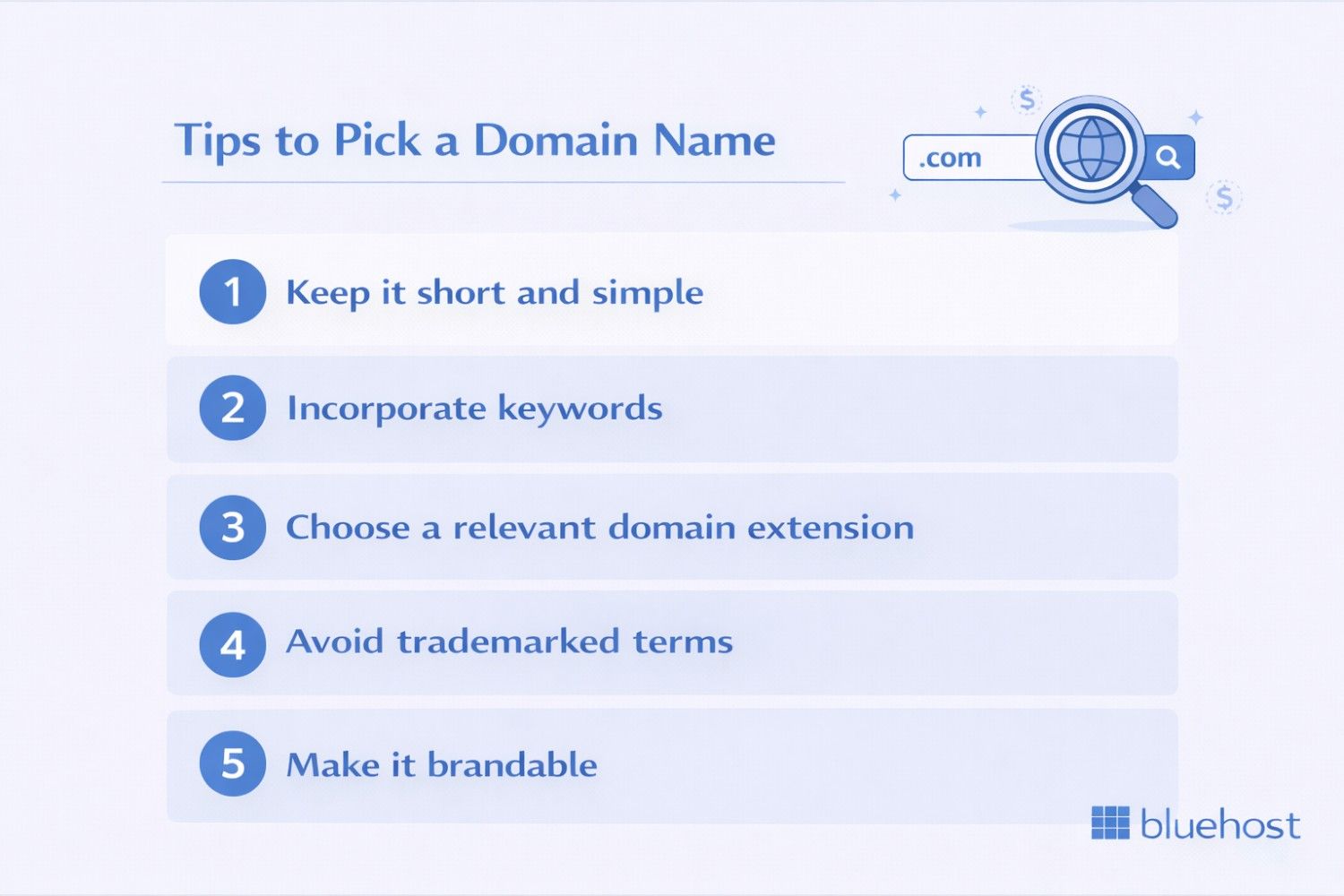
1. Keep it short and simple
A memorable domain name should be concise and easy to spell. Short domains are easier for visitors to remember, type correctly and share with others. Avoid using complicated spellings, excessive hyphens or numbers that can confuse potential visitors. Simple, straightforward names help ensure your audience can find your website quickly and return without difficulty.
2. Incorporate keywords
Including relevant keywords in your domain name helps search engines understand your website’s purpose and improves discoverability. For example, if you operate a cleaning business, incorporating terms like “cleaning” or “clean” directly signals your services to both visitors and search engines, making it easier for potential customers to find you online.
3. Choose a relevant domain extension
While .com remains the most popular choice, other extensions like .net, .org or specialized options such as .cleaning can create a distinctive web address. Generic top-level domains (gTLDs) categorize websites by purpose: .com for commercial, .org for organizations, .net for networks. Country code top-level domains (ccTLDs) like .uk or .de target specific geographic audiences.
4. Avoid trademarked terms
Selecting a domain name that infringes on existing trademarks can lead to serious legal complications, including costly lawsuits and forced domain transfers. Before finalizing your choice, research trademark databases to ensure your desired name doesn’t conflict with registered brands. Protecting yourself from trademark issues helps secure your online presence and prevents future legal challenges.
5. Make it brandable
Your domain name should reflect your brand identity and be memorable enough to market effectively. A brandable domain creates a lasting impression, distinguishes you from competitors and supports your overall marketing efforts. Choose a name that resonates with your target audience, conveys your business values and provides a strong foundation for building brand recognition across all platforms.
When you register a domain, it’s important to think long-term. Your website’s domain is a key part of building your brand and establishing your online presence. Your domain name will be associated with your business or project and it’s much easier to build brand recognition around a memorable, meaningful name.
Where to register domains?
You can register a domain name through a domain registrar, which serves as the bridge between you and the internet’s domain name system. Domain registrars are ICANN-accredited companies authorized to sell domain names and manage your registration. They provide tools to search for available domains, purchase them and handle all the technical details of domain ownership.
Bluehost makes domain registration simple and affordable, offering a seamless experience whether you’re registering your first domain or managing multiple domains for your business. We also offer a free domain name for the first year on our selected web hosting plans. Plus, you get an intuitive domain search tool, automatic renewal options and 24/7 support to help with any domain-related questions.
Ready to claim your online identity? Register your domain with Bluehost today and get started with a trusted name in web hosting.
How to register a domain name?
Registering a domain name is the first step to establishing your online presence. Here’s how the domain registration process works and what you need to know.
Step 1: Check domain availability
Before you can register a domain, you need to verify that your desired name is available. Domain names must be unique. No two websites can have the exact same domain name and extension combination.
Use a domain search tool to check if your preferred name is available. If someone else has already registered it, you’ll need to either:
- Choose a different name
- Try a different TLD extension
- Add words or modifiers to make it unique
- Contact the current owner about purchasing it
Step 2: Choose a domain registrar
A domain registrar is a company authorized to register domain names on your behalf. Domain registrars act as intermediaries between you and the organizations that manage TLDs.
When selecting a domain provider, consider:
- Pricing for registration and renewal
- Additional services included (like privacy protection)
- Domain management tools and interface
- Customer support availability
- Integration with web hosting services
Step 3: Complete the registration process
Once you’ve chosen your domain and registrar, you’ll need to:
- Provide contact information: Including name, address, email and phone number
- Select registration period: Typically 1-10 years
- Choose additional services: Like domain privacy protection
- Review and pay: Complete your purchase
Step 4: Domain propagation
After registration, your domain needs time to propagate across the internet. DNS propagation means updating all DNS servers worldwide with your new domain information. This process typically takes 24-48 hours, though it’s often much faster.
Core domain management concepts businesses should understand
Domain management involves controlling and configuring your domain after registration. Proper domain management ensures your website remains accessible and functions correctly. Key domain management tasks incluce:
1. DNS records
Managing your DNS settings allows you to control where your domain points. Common DNS records include:
- A Record: Points your domain to an IP address
- CNAME Record: Creates an alias for your domain
- MX Record: Directs email to your mail servers
- TXT Record: Stores text information for verification and security
2. Nameserver configuration
Nameservers determine where DNS records are managed. Changing nameservers shifts control of DNS to another provider. For businesses and agencies, nameserver changes often happen during:
- Website migrations
- Hosting changes
- Platform upgrades
Because nameservers control all DNS behavior, changes should be planned and documented to avoid service interruptions.
Security features connected to domains
Domains play a role in website security and trust, even though they are not security tools themselves.
1. SSL and HTTPS
After DNS directs a visitor to the correct server, the website uses HTTPS to securely transmit data. This requires an SSL certificate.
SSL certificates:
- Encrypt data between the browser and server
- Build visitor trust
- Support search engine visibility
From a business perspective, HTTPS is now a baseline requirement for credibility and compliance.
2. Domain privacy protection
When a domain is registered, ownership details are recorded in a public database. Domain privacy protection masks personal or business contact information from public view.
For businesses, this helps:
- Reduce spam and unsolicited contacts
- Protect administrative email addresses
- Add a layer of privacy to ownership records
How domain names connect to web hosting?
Understanding the relationship between domain names and web hosting is essential for getting your website online.
The difference between domains and hosting
Many people confuse domain names with web hosting, but they serve different purposes:
- Domain name: Your website’s address (like [yourbusiness].com)
- Web hosting: The physical space where your website files are stored
Think of it this way: if your domain is your website’s address, web hosting is the actual house where your website lives.
Connecting your domain to hosting
To make your website accessible at your domain name, you need to connect your domain to your web hosting account. This typically involves:
- Obtaining your hosting provider’s nameserver information
- Logging into your domain registrar account
- Updating your domain’s nameservers
- Waiting for DNS propagation (usually 24-48 hours)
Bluehost makes it simple to get both your domain name and web hosting in one place. With Bluehost web hosting, you get a free domain for the first year with selected plans, plus access to powerful hosting features including automatic WordPress installation, free SSL certificates, 24/7 expert support and reliable infrastructure trusted by millions of websites worldwide. Whether you’re launching your first website or managing multiple online properties, Bluehost provides the complete solution to get your domain connected and your website online fast.
Ready to claim your domain and launch your website? Explore Bluehost web hosting plans and bring your online vision to life today.
Domain ownership and renewal
Understanding domain ownership is critical for businesses, agencies and teams managing websites on behalf of others.
Who owns a domain name?
When you register a domain name, you become the owner for the duration of the registration period (typically one year). However, the domain is technically owned by a domain registrar and you manage it through your registrar’s account. Domain ownership is not tied to a physical location, but is instead determined by registration records.
Ownership grants you the right to use the domain, renew it, transfer it and set associated DNS records.
Bluehost allows users to manage domain ownership via their control panels, making it easy to handle domain settings and renewal.
How to renew a domain name?
Renewing your domain name ensures continuous ownership. Most registrars offer automatic renewal, which is the easiest way to avoid accidental expiration. You can also manually renew via your registrar’s dashboard.
It’s advisable to renew your domain well in advance to avoid any disruptions to your website’s availability.
What happens if you don’t renew your domain?
If you miss your renewal deadline, your domain enters a grace period, usually lasting 30-45 days. During this time, you can still renew the domain for the same price. However, if you don’t act before the grace period ends, your domain may enter a redemption period, where recovery fees may apply.
Eventually, if not renewed, the domain will be released back into the market and could be registered by someone else.
Importance of managing domain ownership
Properly managing your domain ownership is crucial for ensuring your website’s continuity and protecting your online brand. Failing to keep track of renewal dates could result in losing access to your domain and website. This can potentially damage your brand and online presence.
Many domain registrars, including Bluehost, offer management tools to help you stay on top of your domain’s renewal dates.
Common issues with domain names
Managing domain names effectively means understanding the common issues that can arise and how to troubleshoot them. Even with the best planning and practices, things can go wrong. From DNS misconfigurations to expired domains, these problems can have a significant impact not only on your website but also on the broader internet infrastructure by affecting the stability and security of online services.
Here are some of the most common problems you may encounter and how to address them.
1. DNS issues
Domain Name System (DNS) misconfigurations can prevent your website from loading properly or cause slow performance. The DNS is responsible for connecting your domain name with your website’s IP address and any problems here can make your website inaccessible.
Common DNS problems include incorrect DNS records, broken name servers or DNS propagation delays. To fix this, you can check and update your DNS settings through your domain registrar’s control panel.
If you’re using Bluehost as your hosting provider, you typically get support and troubleshooting guides to resolve DNS-related issues quickly. Additionally, using reliable DNS services and ensuring your DNS records are correct can help maintain smooth website functionality.
2. Expired domains
An expired domain occurs when the owner fails to renew their registration before the renewal deadline. If this happens, the domain becomes inactive and can no longer be accessed. You typically have a grace period to renew it, but once this period expires, the domain may be released back into the market for others to purchase.
3. Domain name conflicts
Domain name conflicts arise when two entities claim ownership of the similar or same domain name. This can result from trademark disputes or cases where a domain name is registered by someone else before you can secure it.
For instance, if a business name is trademarked but someone else owns a domain with that name, a conflict could occur.
To avoid this, ensure you research domain availability thoroughly before registering a name and consult a legal advisor if you suspect there could be trademark issues. Domain registrars also offer tools like WHOIS lookups to confirm ownership and avoid conflicts.
Handling domain name issues proactively ensures your website stays functional, secure and legally compliant. Regularly monitoring your domain’s health and staying on top of renewal dates and DNS configurations can save you from costly mistakes.
Managing multiple domains for a business or personal brand
Many businesses register several domain variations to protect their brand, redirect common misspellings or create separate domains for specific products, services or marketing campaigns. Managing multiple domains requires organization and strategic planning to ensure all domains are renewed on time, properly configured and serving their intended purpose.
Benefits of multiple domains
- Global businesses benefit from country-specific domains for improved SEO and local user engagement.
- Separate domains help businesses distinguish between different products or service lines.
- Companies operating in multiple industries can clearly separate distinct offerings.
Brand protection and consistency
Effective domain management protects brand identity. Acquiring similar domain variations prevents competitors from redirecting your traffic or damaging your reputation. Maintaining consistency across all domains creates a unified brand experience and reduces customer confusion.
Essential management tasks
- Security protocols: Install SSL certificates for each domain.
- Domain renewals: Track expiration dates to prevent lapses.
- Access continuity: Ensure customers can reach your sites without interruptions.
- Email accounts: Configure professional email for each domain.
You can manage multiple domains through a single registrar account, which simplifies billing, renewal tracking and DNS management across all your properties. Domain management tools offered by Bluehost allow you to view and control all your domains from one central dashboard, making it easier to update nameservers, configure email settings and monitor expiration dates.
Final thoughts
Understanding how domains work explained for businesses is essential for establishing a strong online presence. From the moment you register a domain name, you begin a process that includes maintaining its security, managing its renewal dates and setting up DNS (Domain Name System) records to ensure your website points to the correct server.
Managing your domain requires attention to security, renewal dates and DNS settings. Whether launching a business site, blog or online store, choosing the right domain sets the foundation for digital success.
Ready to secure your perfect domain? Register domain with Bluehost today.
FAQs
No, you don’t own domain name permanently. Domains are managed under a global system, so you’re essentially leasing the rights to the domain from the registry through a domain registrar. As long as you renew the domain on time, you retain full control.
A domain name is the web address you register, serving as a valid domain name that points to your website’s location on the internet. In contrast, a URL (Uniform Resource Locator) is the full address of a specific web page, including the domain name, protocol and path to a particular page within a website. This distinction helps users access a particular website or specific content easily.
Yes, but changing your domain name can impact your search rankings and brand recognition. It’s better to choose a valid domain that accurately represents your brand and online identity from the start. Changing it later might confuse visitors and search engines, affecting your website’s visibility.
Domain name registration costs typically range from $10 to $20 per year, depending on the domain registrar and the chosen domain extension. The cost secures your exclusive right to use that particular website address for the registration period.
No, domain names are typically registered on an annual basis, though you can prepay for multiple years. There is no option to purchase a domain name permanently, so maintaining your domain registration and renewal is essential to retain control over your web address.
DNS changes typically propagate within a few hours, but full global propagation can take up to 24–48 hours. During this time, some users may see the old configuration while others see the updated version.
Websites often go down after domain changes due to incorrect DNS records or nameserver updates. These issues usually resolve once DNS settings are corrected and propagation completes.
Yes. A single domain can connect to multiple services using different DNS records. For example, the website, email and third-party tools can all operate under the same domain.
A business can change its domain, but doing so requires careful planning. Domain changes can affect search visibility, branding and customer recognition, so they should be approached strategically.