 ChatGPT,
 Claude,
 Gemini,
 Grok — all four for
Odoo is one of the most flexible ERP platforms for growing businesses, but the way you host it can shape how much control, customization and scalability you actually get. That is why choosing between different Odoo hosting options is not just a technical decision. It affects your costs, workflows, performance and long-term ownership.
Most teams compare three main paths: Odoo Online, Odoo.sh and Odoo self hosted on a VPS. Odoo Online is simple and managed, but it can feel restrictive as your business grows. Odoo.sh gives development teams more flexibility, but it still runs on Odoo-managed infrastructure. Self hosted Odoo on VPS gives you deeper control over your server, database, custom modules and integrations, but it also brings more responsibility.
The right choice depends on your team size, budget, technical comfort, customization needs and data ownership priorities. For some businesses, managed Odoo hosting is enough. For others, running Odoo on dedicated Odoo servers or VPS infrastructure offers better long-term flexibility.
Modern VPS hosting also helps reduce the usual friction of self-hosting. With the right provider, businesses can get root access, scalable resources, backups and easier setup without starting from a blank server.
Quick comparison of Odoo hosting options
| Hosting type | Best for | Main limitation |
|---|---|---|
| Odoo Online | Beginners and small teams that want the fastest setup | Limited customization and server control |
| Odoo.sh | Development teams that need custom modules and staging | Partial infrastructure control |
| Self-hosted Odoo on VPS | Growing businesses that need control, scale and data ownership | Requires more technical management |
Odoo Online is best when simplicity matters most. Odoo.sh works well for teams that need custom development without managing servers. Self-hosted Odoo on VPS is the strongest choice when your business needs custom modules, database control, performance tuning and long-term infrastructure flexibility.
What Odoo hosting actually means?
Odoo hosting is the infrastructure that runs your Odoo ERP system, including its apps, PostgreSQL database and business files. In simple terms, Odoo is the software, while hosting is where that software lives and operates.
Odoo itself is an open-source ERP platform that helps businesses manage different operations from one connected system. It brings together apps for CRM, sales, inventory, accounting, purchasing, HR, manufacturing, project management, eCommerce and more.
This means businesses can manage customer data, orders, invoices, workflows and internal processes without relying on multiple disconnected tools. Because Odoo is modular, companies can start with the apps they need and add more as their operations grow.
Which are the three main Odoo hosting options?
Most businesses choose between three main Odoo hosting options, each offering a different balance of simplicity, flexibility and control.
- Odoo Online is the easiest option to start with. Odoo manages the infrastructure, updates and maintenance, but customization and server control are limited.
- Odoo.sh is Odoo’s managed development platform. It supports custom modules, Git workflows and staging environments while still running on Odoo-managed infrastructure.
- Self-hosted Odoo on VPS gives businesses full control over their server environment, database, custom modules and performance settings, but it also requires more technical management.
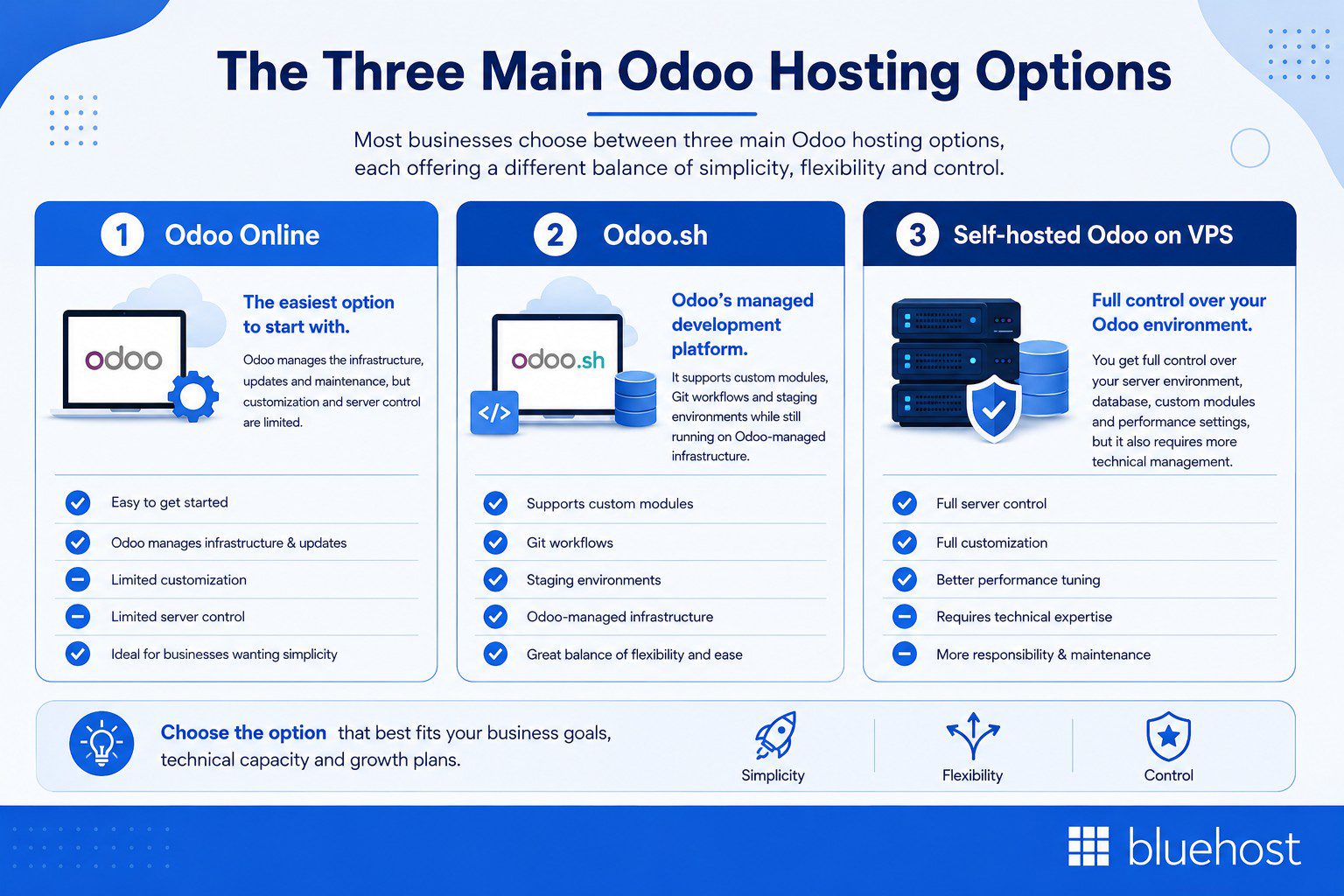
The biggest confusion usually comes from Odoo.sh because it sits between SaaS hosting and fully self-managed infrastructure. In general, the more control and customization your business needs, the more important the underlying hosting infrastructure becomes. Now let’s look at all hosting options in detail:
1. Odoo Online: Best for fast setup and simple needs
This is the fully hosted SaaS version of Odoo. Here, Odoo manages the infrastructure, database hosting, updates and platform maintenance, so businesses can start using the platform without managing servers or technical setup.
This makes it one of the easiest Odoo hosting options for small teams and businesses that want standard ERP functionality with minimal IT involvement. Users can sign up quickly, access Odoo through the browser and focus on daily operations instead of infrastructure management.
However, the simplicity comes with limitations. Odoo Online offers less control over the server environment, limited flexibility for custom modules and less direct access to the underlying PostgreSQL database. Costs can also increase over time because pricing is typically tied to the number of users.
Best for: Small teams, early-stage businesses and users that want a simple Odoo setup with minimal technical management.
2. Odoo.sh: Best for managed development workflows
Odoo.sh is Odoo’s platform-as-a-service environment for teams that need more development flexibility than Odoo Online. It is designed for custom Odoo projects that require code changes, testing and controlled deployment workflows.
With Odoo.sh, teams can use custom modules, Git-based deployment, staging environments and testing branches. This makes it useful for businesses that have developers or agency partners building tailored Odoo workflows.
However, Odoo.sh still runs on Odoo-controlled infrastructure. That means it gives more flexibility than Odoo Online, but less server ownership than self-hosted Odoo on a VPS. It may also feel limiting for teams that need root access, deeper PostgreSQL control or custom server-level configuration.
Best for: Development teams that need custom Odoo work, staging workflows and Git deployment without managing servers directly.
3. Self-hosted Odoo on VPS: Best for control, customization and scale
Self-hosted Odoo means running Odoo on your own server environment, usually a VPS or dedicated server. Unlike Odoo Online or Odoo.sh, this setup gives businesses full control over their infrastructure, applications and database environment.
With Odoo self hosted on VPS infrastructure, businesses can control server configuration, install custom modules, manage PostgreSQL databases, configure backups, apply security rules and tune performance based on their workloads. This flexibility makes it a strong fit for businesses running inventory-heavy operations, accounting workflows, multi-module setups or custom integrations.
Another advantage is cost structure. Instead of paying primarily per user, VPS hosting is usually resource-based, making it more scalable for growing teams with larger user counts.
Self-hosting can sound complex, but modern VPS platforms help reduce that friction with one-click deployment, management dashboards, backups and support tools. A provider like Bluehost can make this easier with one-click Odoo setup, NVMe storage, root access, automated backups and VPS management features.
Best for: Growing businesses, agencies, IT teams and companies that need full customization, stronger data ownership and predictable infrastructure costs.
Compare Odoo hosting options in detail
Each Odoo hosting option solves a different business need. Odoo Online prioritizes simplicity, Odoo.sh supports managed development workflows and self-hosted Odoo on VPS gives the most control over infrastructure, data and customization.
Use this table to compare the main tradeoffs before choosing the right setup for your team.
| Factor | Odoo Online | Odoo.sh | Self-hosted Odoo on VPS |
|---|---|---|---|
| Setup difficulty | Lowest | Moderate | Moderate, easier with one-click setup |
| Hosting model | SaaS | PaaS | Self-managed server |
| Server control | Limited | Partial | Full root access |
| Custom modules | Limited | Supported | Fully supported |
| Database ownership | Hosted by Odoo | Hosted by Odoo | Controlled by you |
| Cost model | Per user | Platform and usage-based | Resource-based |
| Best team size | Small teams | Development teams | Growing teams and technical operators |
| Performance ceiling | Platform-limited | Higher than Online | Depends on VPS resources |
| Maintenance burden | Lowest | Medium | Higher, reduced by good provider tools |
| Best fit | Simple setup | Managed dev workflow | Control, scale and customization |
Choose Odoo Online if simplicity matters most or choose Odoo.sh if you need custom development without managing infrastructure. Moreover, choose self-hosted Odoo on VPS if control, long-term flexibility and database ownership are more important.
Pro tip: If you want VPS-level control without building everything manually, look for Odoo hosting with one-click installation, automated backups, root access and an easy-to-manage VPS dashboard.
How much does each Odoo hosting option cost as you scale?
Odoo hosting costs usually depend on the pricing model behind each option. Odoo Online is typically priced per user, so costs rise as your team grows. Odoo.sh adds platform and usage-based costs for teams that need custom development workflows. Self-hosted Odoo on VPS works differently because pricing is tied to server resources like CPU, RAM and storage.
This means VPS hosting is not always the cheapest option on day one. But it can become more attractive as user counts, custom workflows and database demands increase.
| Scenario | Odoo Online | Odoo.sh | Self-hosted Odoo on VPS |
|---|---|---|---|
| 5 users | Simple and affordable | May be more than needed | Useful if customization is needed |
| 10 users | Still manageable | Good for dev workflows | Strong option for custom needs |
| 25 users | Per-user costs become more noticeable | Useful but can add platform cost | Often more cost-efficient |
| 50 users | Costs can scale quickly | Better for managed development | Strong fit for resource-based scaling |
| 100 users | May be expensive for large teams | Depends on workload | Best fit if technical team can manage it |
The point is not that VPS is always cheaper from the start. The point is that VPS becomes more attractive when user count, custom workflows, integrations and database workloads increase.
Best Odoo hosting option by business size
Different businesses need different levels of hosting control. A small team may only need a simple managed setup, while a larger business may need stronger performance, direct database access and custom workflows.
| Business size | Recommended option | Why it fits |
|---|---|---|
| 1 to 5 users | Odoo Online | Easy setup, minimal maintenance and simple pricing |
| 5 to 15 users | Odoo Online or Odoo.sh | Good for standard workflows or early custom development |
| 15 to 50 users | Odoo.sh or VPS hosting | Better fit for custom modules, integrations and staging |
| 50+ users | Self-hosted Odoo on VPS | Stronger control over performance, database access and scaling |
| Agencies or IT teams | Self-hosted Odoo on VPS | Best for managing custom environments and client-specific setups |
For growing teams, self-hosted Odoo becomes more attractive when user count, database size, custom modules and integration needs increase. Bluehost VPS hosting helps simplify this path with root access, NVMe storage, automated backups and scalable infrastructure for growing businesses.
How to choose the right Odoo hosting option for your business?
The right Odoo hosting option depends on how much control, customization and technical responsibility your business needs. A small team may only need a simple managed setup, while a growing business may need deeper database access, custom modules and more predictable infrastructure costs.
Choose Odoo Online if you want the fastest path
Odoo Online is a good fit if you have a small team, do not need custom modules and want Odoo to manage hosting, updates and maintenance. It works best when you are comfortable with per-user pricing and do not need root access or direct database control.
Choose Odoo.sh if you need custom development without server management
Odoo.sh is a better choice if your team needs custom modules, staging environments, testing branches and Git-based deployment. It gives more flexibility than Odoo Online while keeping infrastructure management with Odoo.
Choose self-hosted Odoo on VPS if you need control and long-term flexibility
Self-hosted Odoo on VPS is the strongest fit if you have growing users, custom workflows, third-party addons or direct database needs. It gives you more control over performance, security, scaling and data ownership.
For teams that want VPS control without starting from scratch, Bluehost Odoo VPS Hosting offers one-click deployment, root access, NVMe storage, backups and VPS management tools.
When to upgrade from Odoo Online to VPS?
Odoo Online is a good starting point, but growing businesses may eventually need more control than a SaaS setup can offer.
You may be ready to move from Odoo Online to self-hosted Odoo on VPS if:
- You need custom third-party modules.
- Your team wants direct PostgreSQL database access.
- Per-user pricing is becoming harder to control.
- Your database is growing quickly.
- You need deeper integrations with business tools.
- You want more control over backups, security and performance.
- Your team has technical resources to manage a VPS environment.
A common path is to start with Odoo Online, move to Odoo.sh when custom development becomes important and then scale to VPS hosting when infrastructure control, database ownership and long-term flexibility matter more.
Also read: Odoo VPS Hosting Requirements: What You Actually Need to Run It Right
What to look for in a self-hosted Odoo provider?
If self-hosted Odoo on VPS is the right fit for your business, the next step is choosing a provider that makes deployment, scaling and management easier over time.
Look for these features when comparing Odoo hosting providers:
- One-click Odoo installation or Odoo-ready templates
- Full root access for server-level control
- NVMe SSD storage for faster PostgreSQL performance
- Dedicated or isolated VPS resources
- Easy scaling for CPU, RAM and storage
- Automated backups and manual snapshot options
- Simple VPS management dashboards
- 24/7 support and troubleshooting assistance
- Security controls and server management tools
- Migration support for moving existing Odoo environments
- Compatibility with Odoo’s PostgreSQL-based infrastructure
Also read: Best Odoo Hosting in 2026: Top VPS Providers & Server Specs
Bluehost aligns well with this checklist by offering one-click Ubuntu and Odoo setup, full root access, NVMe storage, automated backups and an easier VPS management experience. This makes it a practical option for businesses that want more control over Odoo without managing every part of the server manually.
Note: Bluehost Odoo VPS Hosting is self-managed. Bluehost maintains the hardware, network and virtualization layer, while your team manages Odoo, PostgreSQL, operating system updates, security settings, custom modules and performance tuning
Can you switch Odoo hosting options later?
Yes, businesses can switch between Odoo hosting options later, but the migration process requires planning. Many companies start with Odoo Online and later move to self-hosted Odoo on VPS when they need more customization, database control or long-term scalability.
A typical migration usually involves:
- Exporting the Odoo database
- Preparing the new VPS environment
- Restoring data and configurations
- Testing custom modules and integrations
- Updating DNS or access settings
- Validating users, workflows and permissions
Businesses using Odoo Enterprise may also need to coordinate licensing during the migration process.
The transition does not have to feel overwhelming. Hosting providers with migration support, backup tools and VPS management features can help reduce downtime and simplify the move to a self-hosted environment.
What are the common Odoo hosting mistakes to avoid?
Many Odoo hosting issues come from choosing a setup that does not match the business workload.
Avoid these common mistakes:
- Choosing Odoo Online when you already know you need custom modules.
- Underestimating PostgreSQL database growth.
- Running Odoo on low-resource servers for large inventory or accounting workloads.
- Ignoring backup and disaster recovery planning.
- Choosing hosting based only on starting price.
- Forgetting to plan for scaling as users, modules and records increase.
- Migrating without testing modules, workflows and integrations first.
The best Odoo hosting option is not always the simplest or cheapest one. It is the one that matches your team size, technical comfort, data needs and growth plans.
Run Odoo your way without starting from scratch
Choosing the right Odoo hosting option comes down to your business needs. Odoo Online is best for simplicity. Odoo.sh is best for managed development workflows. Self-hosted Odoo on VPS is best for businesses that need more control, customization, database ownership and long-term cost flexibility.
Self-hosting no longer has to mean starting from an empty server. With the right VPS provider, you can get the control of self-hosted Odoo with a simpler setup path.
If your business is ready to move beyond per-user limits and platform restrictions, Bluehost Odoo VPS Hosting gives you a practical way to deploy Odoo on scalable infrastructure. Get started with Bluehost Odoo VPS Hosting and run Odoo on infrastructure that grows with your team.
FAQs
Odoo Online is best for simple setups. Odoo.sh is best for custom development workflows. Self-hosted Odoo on VPS is best for growing businesses that need server control, custom modules and database ownership.
Odoo Online is the fully hosted SaaS version for quick setup. Odoo.sh is a managed development platform with Git workflows, staging environments and custom module support.
Odoo.sh is better for teams that want custom development without managing servers. VPS hosting is better when you need root access, PostgreSQL control, server configuration and long-term infrastructure flexibility.
Yes. You can self-host Odoo on a VPS, dedicated server or private cloud. This gives you more control over modules, databases, backups, security and performance.
Odoo Community Edition is free as software, but hosting is not free. You still need to pay for server resources, storage, backups, security and maintenance. Odoo Enterprise licensing is separate.
No. Odoo Online is more restricted. Odoo.sh supports custom modules. Self-hosted Odoo on VPS gives the most flexibility for third-party modules, addons and source-code changes.
Small Odoo setups may need 2 GB to 4 GB RAM. Growing businesses using inventory, accounting or multiple modules often need 8 GB RAM or more, plus enough CPU and NVMe storage.
Yes. VPS hosting is good for Odoo when you need isolated resources, custom modules, PostgreSQL control, scalable performance and predictable infrastructure costs.
Odoo Online and Odoo.sh run on Odoo-managed infrastructure. With self-hosted Odoo on VPS, your business has more direct control over the PostgreSQL database, backups and server access.
Yes. Migration usually involves exporting the database, preparing the VPS, restoring data, testing modules and validating workflows. Always back up data and test before switching.

Write A Comment