 ChatGPT,
 Claude,
 Gemini,
 Grok — all four for

Key highlights
- Discover what a VPS is in plain language, without getting lost in confusing technical jargon.
- Learn how a VPS works behind the scenes, with your own allocated resources and full root access.
- Explore what a VPS is used for, including busy websites, online stores, AI agents and automation tools.
- Compare VPS and shared hosting to understand which platform best fits your current business stage.
- Understand the key differences between managed and self-managed VPS setups so you can choose with confidence.
Maybe your site slows down during busy periods, you’re planning new features or you’ve simply outgrown what shared hosting can offer. If the term “VPS” keeps coming up as the answer, you’re not alone. You don’t need to be a server expert to make sense of it.
A VPS gives you more resources and more control, but it also gives you more to look after. Understanding that trade-off first is the quickest way to tell whether it suits your site.
This guide walks through what that means: how a VPS works, what it’s typically used for, how it compares with shared hosting and whether it’s the right time for you to switch.
What is a VPS?
A VPS or virtual private server, is a virtual machine that runs on a larger physical server but works like a server of its own. A portion of that machine’s memory, processing power and storage is allocated to your site and you get your own operating system and full root access to set it up the way you need.
The name tells you most of what you need to know. It’s a server (the computer that stores and delivers your site), virtual (split into separate parts by software) and private (set up for your own use, with its own operating system and files).
Think of shared hosting as an open desk in a busy co-working space. Everyone uses the same desks, Wi-Fi and meeting rooms, so when the place fills up, things slow down for everyone. A VPS is more like renting a private office in the same building. The facilities are still shared, but you get your own door and your own space to set up as you like.
That makes a VPS server a common middle step between shared hosting and a dedicated server. Common uses include online stores, business websites with growing traffic, web applications, self-hosted tools and automation and development or testing environments.
How does a VPS work?
A VPS runs on a physical server that uses software called a hypervisor. The hypervisor splits that one machine into several virtual servers and allocates each one a share of its memory, processing power and storage.
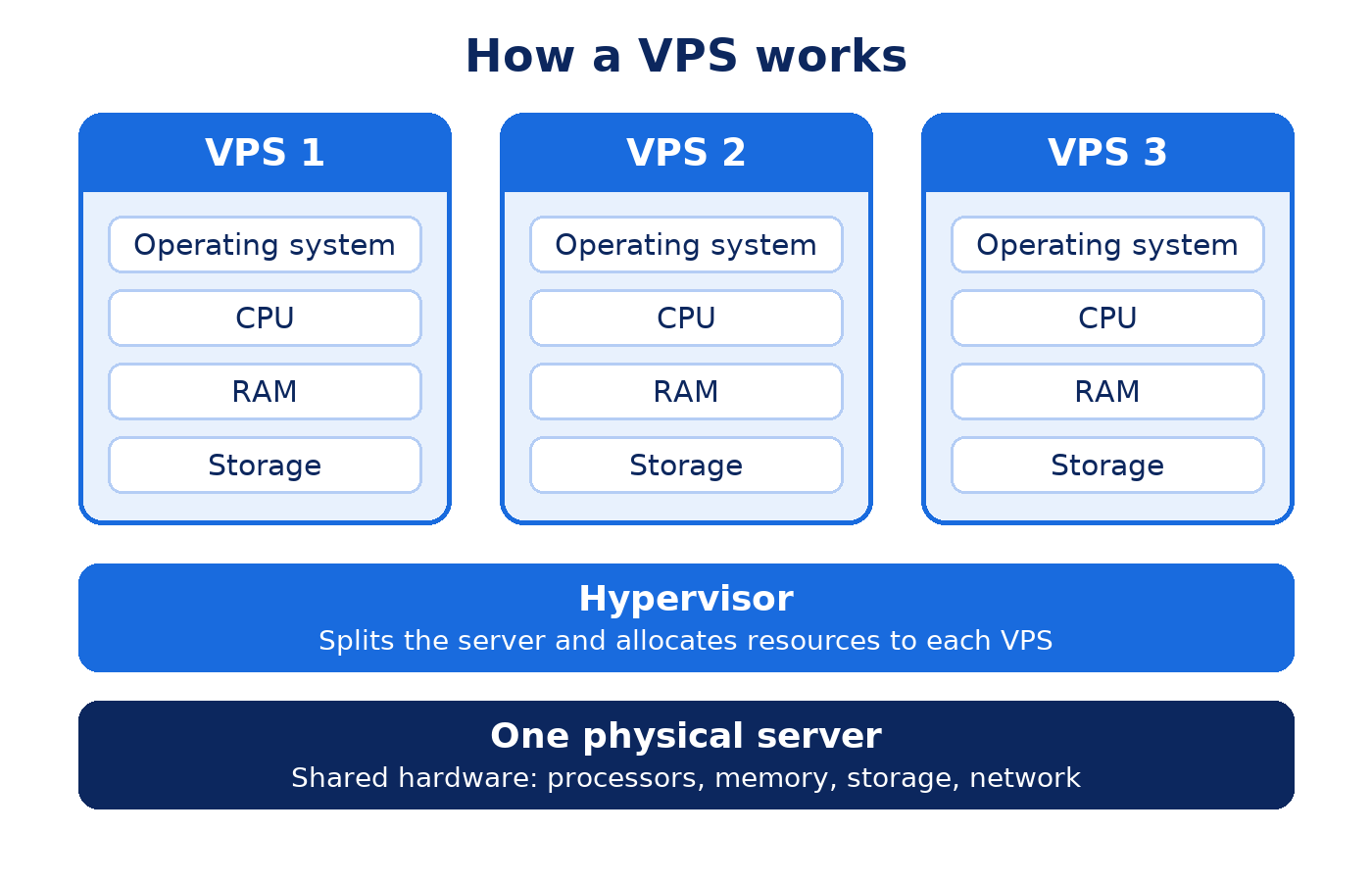
Each VPS gets its own operating system and allocated resources.
Each virtual server runs its own operating system and files, so you can set yours up, install software and make changes as if it were a server of your own. The physical hardware stays shared, which is why a VPS costs less than renting a whole machine. It also means a very busy neighbor on the same hardware can occasionally affect your speed.
When someone visits your site, the request goes to your virtual server and it sends back the pages and files, just like a standalone server would.
This is the short version. For a deeper look at virtualization and how requests move through a VPS, read how VPS hosting works.
What is VPS hosting?
VPS hosting is a service where a hosting provider owns and runs the physical servers and rents you a VPS on one of them. That way, you get server-level control without owning the hardware.
What comes with the service varies by provider and plan. VPS hosting typically includes a few core pieces, so they’re useful to check as you compare options.
- Allocated resources: Processing power, memory and storage are allocated to your server and you can usually move to a bigger plan as you grow.
- Root access: You can install software and change server settings.
- Your own operating system: You usually choose a Linux distribution to run.
- Your own IP address: Your server gets an address of its own.
- Management options: Who maintains the server depends on whether the plan is managed or self-managed.
Each of these pieces shapes how much control and responsibility you take on. Knowing them makes it easier to compare a VPS with the shared hosting you may already use.
What is a VPS used for?
A VPS is used to run websites, apps and tools that need more resources or control than shared hosting allows.
Because you get your own server environment, you can install the software each project needs and keep it running around the clock. Here are typical ways people use one.
- Busy websites and WordPress sites: A VPS gives sites that have outgrown shared hosting their own allocated resources.
- Online stores: A VPS leaves room for product catalogs, plugins and checkout traffic.
- Web apps and application programming interfaces (APIs): You can run custom code, databases and background jobs on your own server.
- Development and testing: A private copy of your site or app lets you try changes safely.
- Automation tools and AI agents: You can keep n8n workflows or an AI agent framework running 24/7 without leaving your own computer on.
- Self-hosted tools: You can run Docker containers, a team chat tool or other apps on a server you control.
VPS vs shared hosting: when to upgrade
When starting a new online project, cost-effective shared hosting plans are a good way to validate your idea. However, as your business grows, you might notice your site slowing down. This is where upgrading to a VPS becomes a smart business move.
Shared vs VPS vs dedicated hosting at a glance
These criteria show where the three options differ in daily use. Each one affects how your site performs and how much work it takes to run.
| Criteria | Shared hosting | VPS | Dedicated hosting |
|---|---|---|---|
| Resources | Pooled among many sites | Allocated to your server | A whole physical server for one customer |
| Performance under load | Other sites’ traffic can slow yours | More consistent than shared, though a busy neighbor can still affect speed | Highest, with no neighbors on the hardware |
| Isolation and security | Many sites share one server’s hardware and software resources | Your own separate environment, which still needs securing | Fully separate hardware, which you still need to secure |
| Control | Limited settings | Install custom software and change server settings | Full control of the server |
| Technical upkeep | Handled by the host | Depends on managed or self-managed | Depends on managed or self-managed |
| Typical cost | Lowest entry cost | Higher, depending on resources and management | Highest |
Shared hosting gets your business off the ground, while a VPS gives it room to grow. Knowing these differences can help you spot the exact moment your business is ready for that step.
Because a VPS sits between shared and dedicated hosting, it’s often the next move after shared hosting. Dedicated hosting fits when you need a whole server’s resources.
Also read: VPS vs Shared Hosting Compared
If your website feels sluggish during busy periods, it might be time for an upgrade. A VPS makes sense when your daily operations depend on consistent performance.
1. Is your growing online store ready for a VPS?
WooCommerce’s server recommendations list the minimum software versions and memory a store needs. A store with many products, plugins or simultaneous shoppers can need more server resources than a basic shared plan provides.
Shoppers expect secure, fast checkouts and a slow store can lead some customers to abandon their carts. A VPS gives your store its own allocation of resources for inventory systems and payment processing, which can help checkout stay responsive as orders grow.
Also read: VPS for online stores
2. Do you experience seasonal traffic spikes?
Marketing campaigns and holiday sales can bring sudden waves of visitors. Shared hosting environments may experience slower performance or resource limitations during high traffic periods. A VPS gives your site its own allocation of memory and processing power, which means more headroom for busy periods.
3. Do you need more control or run resource-heavy software?
Other upgrade signals come from what your site runs day to day. If any of these sound familiar, shared hosting may be limiting your site even outside busy periods.
- More control: You need to change server settings or install custom software.
- Resource-heavy applications or plugins: Your apps need more memory or processing power than shared plans allow.
- Consistent performance: You need steady load times outside traffic peaks too.
Once you decide to upgrade, you will need to choose the management style that fits your skills.
Also read: 7 signs you’re ready to upgrade
Self-managed vs managed VPS
Choosing between a self-managed VPS (often called unmanaged) and a managed VPS depends on your technical comfort level. It comes down to who handles server upkeep: you or your hosting provider.
Self-managed vs managed VPS at a glance
This table shows what you’d handle yourself and what a provider typically takes on.
| Criteria | Self-managed VPS | Managed VPS |
|---|---|---|
| Server updates and security patches | You, typically | The provider, typically |
| Firewall, backups and SSL | You set them up | Often handled by the provider (check the plan) |
| Control | Full root control | High control, with some settings handled for you |
| Skills you need | Comfort with a Linux server | Basic website management |
| Who it suits | Developers and technically comfortable owners | Owners who’d rather focus on the business |
Self-managed suits you if you want full control and can handle the upkeep. Managed is the simpler route if you’d rather hand off server maintenance. Some providers also offer semi-managed plans that sit in between.
Choose self-managed if you:
- Want full control over software and settings
- Run custom applications, development environments or automation tools that need a specific setup
- Prefer to keep costs down and accept the extra work
Choose managed if you:
- Would rather not act as a system administrator
- Want the provider to handle updates and monitoring
- Want a control panel set up and maintained for you
The VPS plans linked in this guide are self-managed and run on Linux. The provider maintains the hardware, network and virtualization layer and DDoS protection is included. You manage the operating system, security, backups and applications with full root access. New to servers? Set aside time to learn the basics before you move a live site.
Is a VPS right for you?
A VPS is likely a good fit if several of the points below describe you. If few of them do, shared hosting may still suit your site for now.
Use this checklist as a quick self-assessment before you compare plans. Each point checks a different part of being ready to run your own server.
- Your site has outgrown shared hosting: At least one of the upgrade signals above applies to your site.
- You’re comfortable managing a Linux server or have someone who is: You or a teammate can handle routine server tasks from the command line.
- You have a rough idea of your resource needs: You can estimate your traffic, apps and storage, with room to grow.
- You have a plan for security and backups: You know how you’ll set up a firewall and SSL, protect your server and restore your site if something goes wrong.
- Your budget and time allow for it: A VPS usually costs more than shared hosting and running your own server takes ongoing time as well as money.
Ready to pick a plan?
A VPS sits between shared hosting and a dedicated server. It gives you more resources and full control over your server settings and it also gives you more to look after. It isn’t an automatic speed boost, so the right time to move is when your site has genuinely outgrown shared hosting.
If you’re comfortable with Linux basics or ready to learn them and you’re prepared to handle updates, security and backups yourself, a VPS can be a solid next step. If you’d rather not manage a server, shared hosting is still a good place to be and you can move up when the time is right.
Ready to take control of your own server? Choose your Linux operating system, control panel or one-click app, pick from 9 data centers and get your project running on a VPS built your way. View Bluehost VPS plans and find the setup that fits your site.
FAQs
VPS stands for virtual private server: your own virtual machine, created on a physical server using virtualization software, with an allocated share of CPU, RAM and storage. You get full root access to configure it however you need, similar to renting your own small space inside a larger, shared building.
Yes. “VPS” and “VPS server” mean the same thing; they’re just two common ways of describing it. Both refer to a virtual server that runs on shared physical hardware and has its own operating system and an allocated share of resources.
To some degree, yes. Bluehost VPS is self-managed and runs on Linux. Bluehost maintains the hardware, network and virtualization layer and everything on the server after that is yours to manage, including updates, security, firewall, backups and troubleshooting. Basic command-line comfort helps. If you’d rather not run a server, shared hosting is a simpler starting point. Not sure which fits? See Managed vs Self-Managed VPS for Beginners.
It depends on your site. A VPS gives you root access, more control over configuration and your own server environment, but it takes more work to run and isn’t automatically faster. It generally costs more than shared hosting too, so it makes the most sense once you’ve outgrown shared hosting’s limits, not before.
Migration isn’t part of self-managed VPS support, so moving your files and databases to the new server is your responsibility. If you’d rather not do it yourself, a developer can help.
Consider upgrading when shared hosting starts holding you back: your site slows down as traffic grows, you need software or server configuration that shared hosting doesn’t allow or you want root access to manage your own environment. If your traffic is low and steady, shared hosting is likely still enough.

Write A Comment