


Key highlights
- Learn how cPanel simplifies complex VPS management tasks through an intuitive graphical interface.
- Discover the key differences between managed and self-managed VPS hosting solutions.
- Understand essential features to evaluate when selecting a VPS hosting provider.
- Explore step-by-step setup processes for launching your cPanel VPS environment.
- Uncover real-world use cases where a VPS with a control panel delivers maximum value.
Managing a high-performance website shouldn’t feel like rocket science. However, countless site owners waste valuable hours wrestling with complex server configurations rather than scaling their businesses. You need a platform that works for you, not one that requires a degree in computer engineering to operate.
VPS hosting with cPanel changes the equation entirely. This powerful combination provides the dedicated resources of a virtual private server paired with a simple point-and-click interface. You get enterprise-level performance and total control without the technical headaches of command-line management.
In this guide, you’ll discover how cPanel transforms VPS management into a streamlined process. We will explore key features, compare hosting options and show you the precise steps to get started with your new server. Let’s dive in.
Why does VPS hosting with cPanel remain a smart choice for growing businesses?
Agencies and enterprises face a critical infrastructure decision as traffic scales and client portfolios expand. Shared hosting buckles under load while dedicated servers introduce costs that outpace actual resource needs. VPS hosting with cPanel solves this tension by delivering isolated server resources paired with centralized management that keeps operations efficient.
Let’s look at why this combination addresses the most pressing hosting challenges businesses face today.
The operational gap between shared hosting and enterprise infrastructure
Shared hosting reaches its limits when your sites demand custom security configurations or experience substantial traffic growth. Pages slow down, clients complain and you lose revenue. While dedicated servers deliver enterprise-level power, they require managing hardware capacity you may not need, leaving you with an expensive middle ground to navigate.
That’s where VPS hosting bridges this gap perfectly. With guaranteed CPU, RAM and storage allocation, you get dedicated resources without the overhead of full server management. Root access enables custom software installations and firewall rules, while the infrastructure maintains the flexibility to scale precisely as your needs evolve.
These capabilities become especially valuable for agencies managing multiple client websites. A single VPS plan delivers streamlined operations and superior control, allowing you to consolidate billing, standardize security protocols and simplify backups across your entire portfolio. With a single unified interface, you can ensure consistent performance and professional-grade reliability for every client.
However, even with these robust resource advantages, the real challenge emerges when teams attempt to manage these environments without proper tooling.
Why does managing multiple websites become complex without a control layer?
Command-line server management works for experienced system administrators, but creates significant challenges for modern teams who need faster, more accessible workflows to keep pace with business demands.
Without a control panel, routine tasks become technical obstacles:
- Scaling operations becomes increasingly difficult
- DNS updates require manual configuration files and terminal commands
- SSL installations demand technical expertise
- Email account creation involves complex server configurations
- Onboarding new staff without advanced server skills creates bottlenecks
Fortunately, cPanel eliminates this friction by providing an intuitive graphical interface for server management. Instead of memorizing commands, you can create email accounts, manage databases and configure domains through simple point-and-click operations. As a result, your team completes tasks in minutes instead of hours while maintaining consistency across client environments. Beyond the time savings, the reduction in human error alone justifies the investment in the control panel when managing production workloads.
This efficiency advantage becomes even more apparent when examining how the platform handles enterprise demands and scales with your growing infrastructure needs.
How does VPS hosting with cPanel balance performance, control and usability?
Enterprise-grade performance requires more than raw server resources. To achieve optimal results, modern VPS configurations with cPanel deliver a comprehensive set of features that work together seamlessly:
- Automated backups and staging environments at the infrastructure level
- Security monitoring built into the core system
- Full root access for custom applications
- Intuitive management tools accessible to non-technical staff
This architecture is designed to scale with your business as it grows. As traffic increases, resource allocation adjusts automatically to meet demand. Additionally, the WHM interface enables resource partitioning across multiple accounts, making it perfect for agencies managing client billing or businesses running separate web properties.
With this solution, you get dedicated server control at VPS economics, combined with management simplicity that keeps SMBs and agencies competitive in today’s digital landscape.
Streamlining VPS hosting administration with cPanel
cPanel revolutionizes server management by converting complex command-line functions into an intuitive graphical interface. This abstraction minimizes the technical overhead of routine maintenance, empowering teams to allocate resources to business development rather than infrastructure upkeep.
Integrating cPanel into your VPS hosting environment drives operational efficiency through:
- Centralized dashboard: Replaces manual CLI operations with a visual layout for streamlined navigation and control.
- Rapid deployment: Enables instant provisioning of applications like WordPress, Joomla and Drupal to accelerate project timelines.
- File management: Provides robust tools for securely uploading, editing and organizing server assets.
- Email administration: Simplifies the creation of accounts, forwarders and spam filters for scalable communication.
- Database control: Provides access to phpMyAdmin through the cPanel interface for efficient creation and management of MySQL databases.
- Security configuration: Streamlines SSL implementation, directory protection and IP address filtering.
- Disaster recovery: Facilitates automated backup schedules and one-click restoration to ensure data integrity.
- Resource monitoring: Delivers real-time analytics on CPU, memory and disk utilization for proactive performance management.
These capabilities effectively separate complex server administration from daily workflows. By simplifying tasks like DNS configuration and security hardening, businesses maintain robust environments while maximizing operational throughput.
Also read: What Is VPS Hosting? Everything You Need to Know!
To understand the value of this tool, consider the differences between managing a VPS with and without cPanel assistance.
Comparison: VPS hosting with cPanel vs. without cPanel
When choosing a VPS hosting solution, one of the most important decisions you’ll make is whether to use cPanel or manage your server directly. Both approaches have their advantages and understanding the differences can help you select the right option for your technical skill level and website needs. The following comparison highlights the key differences between VPS hosting with cPanel and VPS hosting without cPanel.
| Feature | VPS with cPanel | VPS without cPanel |
| Setup time | 15-30 minutes with guided setup | Hours or days requiring technical expertise |
| File management | Drag-and-drop file manager | Command-line FTP or SSH access |
| Email setup | Point-and-click email creation | Manual mail server configuration |
| Software installation | One-click app installer | Manual download and configuration |
| Database management | Visual phpMyAdmin interface | Command-line MySQL operationsStaging environments, custom dependencies, granular configuration controlCDN integration, large file handling, traffic spike resilience |
| Backup process | Automated scheduling options | Manual scripting required |
| Security configuration | Form-based SSL and firewall setup | Complex command-line security rules |
| User access | Multi-level user permissions | Manual user account management |
| Monitoring | Real-time visual dashboards | Log file analysis and custom scripts |
| Technical knowledge | Beginner-friendly | Advanced system administration |
This comparison underscores why cPanel is essential for modern VPS users. The reduction in complexity and time expenditure makes it a worthwhile investment for businesses focused on growth rather than server management.
Ultimately, your choice between VPS hosting with cPanel and without cPanel depends on your technical expertise, available time and business priorities. If you prefer a user-friendly interface that simplifies server management tasks, VPS hosting with cPanel is the ideal solution. However, if you have advanced technical skills and require complete control over your server configuration, managing a VPS without cPanel may better suit your needs. Consider your team’s capabilities and your website’s requirements to make the best decision for your hosting environment.
What are the strategic benefits of using a cPanel?

cPanel provides a sophisticated abstraction layer for server administration, offering streamlined file and database management capabilities. This visual interface enables agencies and enterprise teams to interact with their hosting environment efficiently, eliminating the need for manual code execution. Consequently, technical staff can rapidly deploy software, configure email protocols and manage system settings with precision.
This operational efficiency renders VPS hosting scalable for organizations with varying levels of technical specialization. Beyond accessibility, these capabilities drive significant improvements in administrative productivity and infrastructure reliability.
Some of the key cPanel benefits include:
- Time efficiency: Drastically reduce administrative overhead by executing routine maintenance and complex cPanel workflows in minutes rather than hours.
- Error prevention: Minimize configuration risks and system instability through validated, form-based interfaces that help prevent syntax errors during setup.
- Resource optimization: Leverage visual analytics to identify performance bottlenecks and allocate VPS resources effectively for critical applications.
- Multi-site management: Centralize the administration of domains, subdomains and client portfolios within a single, unified control panel.
- Reduced learning curve: Empower teams to manage advanced server functions and configurations through an intuitive GUI without requiring deep command-line expertise.
- Consistent interface: Ensure operational continuity and reduce onboarding time with a standardized management layout, regardless of the underlying infrastructure provider.
These architectural advantages make VPS hosting with cPanel the preferred choice for businesses seeking robust server control without unnecessary technical friction. The investment in cPanel licensing delivers a high ROI through enhanced workflow efficiency and reduced operational downtime.
Understanding these strategic benefits helps decision-makers determine when cPanel VPS hosting best aligns with their organizational goals and infrastructure requirements.
With these benefits in mind, the next step is selecting a VPS hosting plan that aligns with your specific performance and resource requirements.
How to select the right cPanel VPS hosting plan?
Identifying the ideal infrastructure requires a strategic analysis of your application’s current resource consumption and growth trajectory. While different types of web hosting address various market entry points, scaling organizations inevitably require the dedicated throughput and isolation provided by virtual private servers.
High-performance environments demand more than basic shared resources. VPS hosting offers the necessary partition of RAM and CPU cores for data-intensive applications, effectively bridging the gap between standard shared environments and bare-metal infrastructure.
For enterprises requiring total autonomy, dedicated hosting grants full hardware control. Alternatively, cloud-based VPS solutions offer greater agility, enabling decision-makers to dynamically scale specifications. The choice ultimately hinges on your specific requirements regarding traffic volume, technical stack complexity and operational budget.
Visit our Bluehost website to configure a hosting environment tailored to your needs. Assess your current traffic and plan for future growth. Balancing immediate budget constraints with long-term management preferences is crucial for selecting a sustainable platform.
To simplify the process, the following chart aligns common business scenarios with recommended hosting configurations.
| Use case | Recommended hosting type | Key considerations |
| Personal blog | Shared Hosting | Cost-efficiency, lower traffic volume, standard feature requirements |
| Small business website | VPS with cPanel | Traffic growth, professional email reliability, infrastructure scalability |
| eCommerce store | VPS with cPanel | SLA uptime requirements, SSL/security compliance, database throughput |
| Corporate website | VPS or Dedicated Server | Brand reputation management, custom server config, high concurrency |
| Development projects | VPS with Root Access | Command-line MySQL operationsStaging environments, custom dependencies, granular configuration controlCDN integration, large file handling, traffic spike resilience |
| High-traffic blog | VPS with cPanel | Resource elasticity, performance tuning, CMS optimization tools |
| Multiple websites | VPS with WHM/cPanel | Multi-tenant architecture, reseller potential, centralized administration |
Establish your infrastructure based on current metrics while architecting for expansion. cPanel VPS hosting provides the elasticity to dynamically scale resources, eliminating the operational overhead of server migrations during critical growth phases.
Also read: VPS vs. Shared Hosting: Which Option Is Best for You?
Beyond technical metrics, it is equally vital to verify that your operational workflow aligns with the specific user profiles designed for this environment.
Who benefits the most from VPS hosting with cPanel?
cPanel VPS environments are optimized for professionals seeking granular server administration without the overhead of command-line management. The following user profiles achieve the greatest ROI from this dashboard-driven architecture.
| User type | Primary benefits | Typical requirements |
| Small business owners | Brand credibility, enterprise-grade email, operational flexibility | 5-50 staff accounts, custom domains, high availability email |
| Web developers | Streamlined client management, staging workflows, rapid deployment | Multi-tenant architecture, version control, staging sites |
| eCommerce entrepreneurs | Secure transaction processing, inventory database speed, data integrity | Dedicated SSL, optimized database queries, 99.9% uptime |
| Digital agencies | Client portfolio management, white-label capabilities, resource partition | Reseller tools, branded panels, scalable client resources |
| Content creators | High-volume media storage, concurrent traffic support, monetization stability | Command-line MySQL operations, Staging environments, custom dependencies, granular configuration control, CDN integration, large file handling, traffic spike resilience |
| SaaS startups | Application hosting, user data segregation, vertical scaling | Custom API environments, performance monitoring, rapid scaling |
| Non-profit organizations | Cost-efficient reliability, donor database management, volunteer portals | Budget optimization, simplified admin, communication stability |
These segments benefit effectively from the equilibrium between raw performance and administrative ease. If your operational model aligns with these profiles, cPanel VPS hosting offers the requisite stability and control.
Having established the ideal user base, the focus must now shift to identifying the specific feature sets that guarantee long-term performance and reliability.
What are the key capabilities to evaluate in VPS hosting with cPanel?
Choosing the right cPanel VPS hosting plan requires more than just comparing prices. You need to look at the infrastructure, control capabilities and operational tools that will actually support your business long-term. Instead of getting lost in technical jargon, let’s break down the specific features that make a hosting environment truly worth your investment.
1. Full root access
Root access gives you total administrative control over your server environment. This autonomy allows you to configure the server to your exact specifications, install custom software and optimize security protocols without restrictions.
Here is why root access is critical for your operations:
- Total control: Modify system files and install specialized software tailored to your specific needs.
- Performance tuning: Optimize site performance by adjusting server configurations that are usually locked on shared hosting.
- Integration capabilities: Connect seamlessly with third-party apps and development tools that require system-level permissions.
- Custom security: Implement specific firewall rules and intrusion detection systems to match your security requirements.
- Resource efficiency: Manage exactly how your CPU and memory resources are allocated to your applications.
While root access empowers you with granular control, it also requires responsible management, such as maintaining robust backups and testing changes in a staging environment. Having this level of control is powerful, but you also need an intuitive interface to manage it efficiently day-to-day.
2. User-friendly interface
A clean cPanel interface reduces the time you spend on maintenance, allowing you to focus on development and growth. You should look for a modern dashboard that simplifies routine tasks and puts essential tools right where you need them.
Look for these interface features:
- Intuitive navigation: Find administrative tools quickly with a logical layout.
- Fast response: Execute management tasks instantly without waiting for the interface to load.
- Mobile access: Manage your server from your tablet or phone, even when away from your desk.
- Workflow configuration: Optimize tools according to your workflow to keep your most-used features accessible.
- Extended utility suite: Access integrated tools for monitoring, security scanning and automation easily.
- Latest versions: Get immediate access to stable cPanel updates for new features and security patches.
Premium providers often enhance the standard cPanel experience with custom integrations that add even more value to your hosting environment. A streamlined interface simplifies your work, but it requires high-performance hardware to execute tasks without delay.
3. High performance and resources
Enterprise-grade VPS hosting must deliver consistent speed and reliability. Your provider should guarantee dedicated resources so your site always has the computing power it needs to handle demanding workloads.
Key performance specifications to evaluate include:
- NVMe or SSD infrastructure: Benefit from high-speed storage that drastically reduces load times compared to traditional drives.
- Dedicated processing power: Rely on guaranteed CPU cores to run concurrent processes without slowing down.
- Reserved memory: Ensure your applications always have sufficient RAM to handle peak traffic.
- Low-latency networking: Enjoy fast data transfer rates through carrier-neutral connectivity.
- Integrated CDN: Speed up content delivery to your global audience with a built-in Content Delivery Network.
- Data center location: Reduce network hops by choosing a facility near your target audience.
Top-tier hardware and network quality are decisive factors in providing a great user experience for your visitors. While speed is essential today, your hosting architecture must also be flexible enough to adapt as your traffic demands grow.
4. Scalability
Your infrastructure needs to scale smoothly as your business evolves. Superior VPS solutions let you provision additional resources instantly, enabling you to adjust capacity without disrupting your service.
Look for these scalability features:
- Vertical scaling: Add more CPU, RAM or storage instantly to meet rising resource demands.
- Horizontal expansion: Deploy additional nodes seamlessly to distribute heavier workloads.
- Automated elasticity: Set up logic-based adjustments to handle traffic spikes automatically.
- Zero-downtime upgrades: Scale your resources dynamically without taking your site offline for maintenance.
- Cost efficiency: Pay only for the resources you use with flexible billing models.
Automated scaling is particularly valuable for managing unpredictable traffic patterns, ensuring stability during surges while keeping costs under control. As your infrastructure expands, the ability to manage multiple environments from a centralized dashboard becomes essential.
5. WHM (Web Host Manager)
Web Host Manager is indispensable if you are an agency or managing multiple websites. It provides high-level administrative oversight that enables you to provision accounts, enforce security and govern resources efficiently.
Core capabilities of WHM include:
- Centralized provisioning: Create and manage isolated cPanel accounts quickly and easily.
- Resource governance: Set specific bandwidth and disk usage limits for each client or project.
- Server health monitoring: View real-time metrics on service status and hardware performance.
- Security enforcement: Implement server-wide security policies across all your accounts at once.
- Automated backups: Configure systemic backup routines to ensure data resilience for every site.
- Unified updates: Deploy system updates and patches centrally to keep everything secure.
Even for single-tenant architectures, WHM offers critical tools for server hardening and optimization that go beyond standard cPanel capabilities. However, even the best management tools are useless without a guarantee that your server will stay online.
6. High uptime and reliability
Service availability is the foundation of your digital presence. You should choose an enterprise VPS solution backed by a robust Service Level Agreement (SLA) that guarantees high uptime through resilient infrastructure design.
Indicators of true reliability:
- Binding SLAs: Look for contractual guarantees of 99.9% uptime or higher.
- N+1 redundancy: Ensure the architecture eliminates single points of failure for power and networking.
- Power backups: Verify the use of uninterruptible power systems and generators to handle utility failures.
- Geographic redundancy: Mitigate regional risks with multiple availability zones.
- Proactive surveillance: rely on 24/7 system monitoring to detect and fix issues before they impact your site.
- Transparent reporting: Access historical uptime logs to verify the provider’s performance claims.
You should demand comprehensive transparency regarding infrastructure performance. Transparency in uptime metrics builds trust and serves as the final checkpoint in your evaluation process.
With these critical architectural and operational standards defined, let’s examine how our infrastructure aligns with them to demonstrate why it is the optimal choice for cPanel VPS hosting.
Why is Bluehost a reliable choice for VPS hosting with cPanel?
We at Bluehost combine years of hosting expertise with comprehensive cPanel VPS solutions. Our platform delivers all the essential features discussed while maintaining competitive pricing and exceptional support.
Our cPanel VPS hosting includes:
- Full root access with the latest cPanel versions and WHM for advanced management
- NVMe storage and optimized server configurations ensure fast loading times for your websites
- Scalable resources to let you grow without service interruptions or complicated migrations
- One-click WordPress installation to host WordPress sites without extra setup
- Enhanced security features to protect your website against common threats
- Automated backups to safeguard your data without requiring manual intervention
- 24/7 expert cPanel support ticket available through multiple channels
Our VPS plans include generous resource allocations at competitive prices. This ensures enterprise-grade performance and control, making high-availability hosting accessible for growing organizations.
Ready to experience the Bluehost difference? Get our Bluehost cPanel VPS hosting for an easy and reliable hosting experience.
Now let’s walk through the essential steps to set up your cPanel VPS hosting and streamline your site management.
How to set up VPS hosting with cPanel at Bluehost?
At Bluehost, we simplify VPS hosting with cPanel by guiding you through every step of the setup process. Once your VPS plan is active, you can use WHM to create and manage individual cPanel accounts for each site.
Step 1: Choose a Bluehost VPS plan and complete your purchase
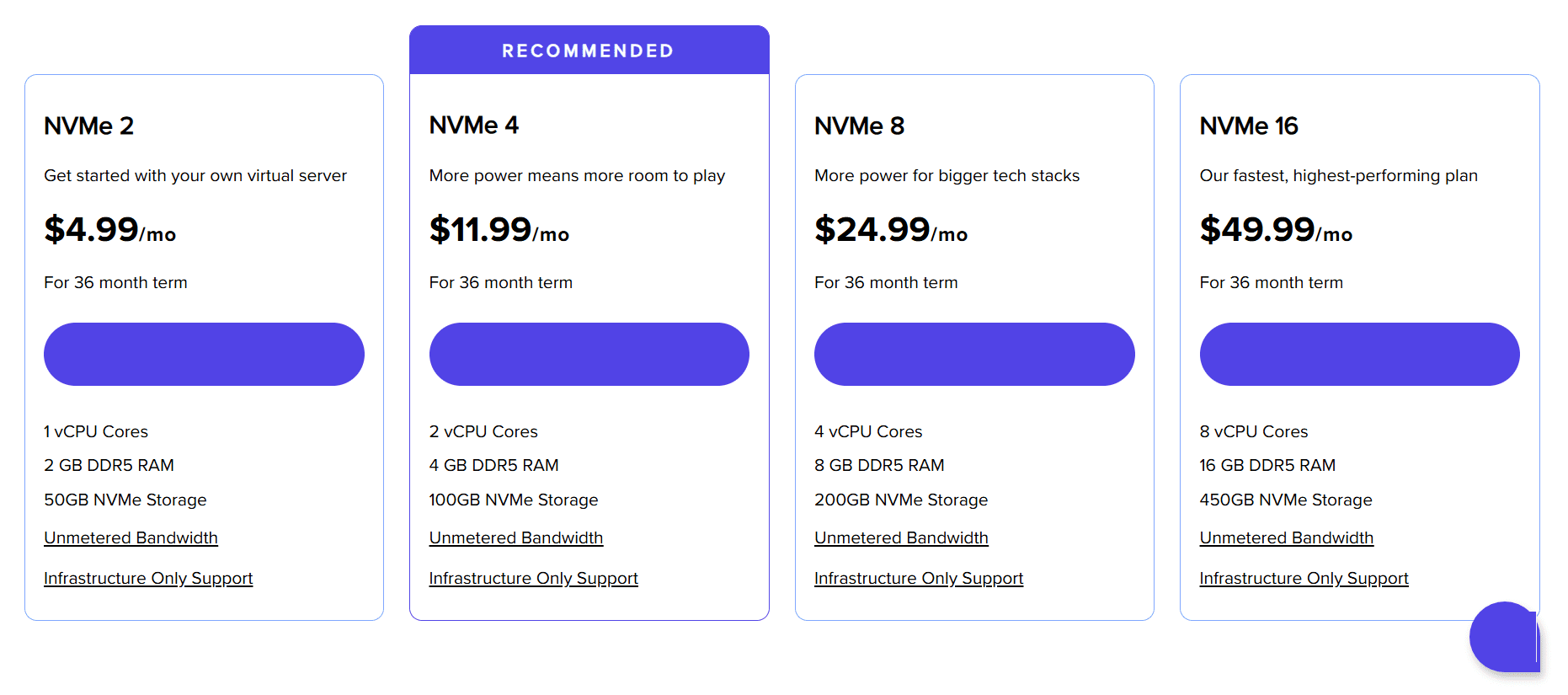
Start by selecting a Bluehost VPS plan that aligns with your current website requirements and future growth plans. When choosing a plan, consider factors such as disk space, RAM and bandwidth.
During checkout:
- Review your resource requirements carefully
- Select a server location that’s closest to your target audience
- Complete your account and payment details
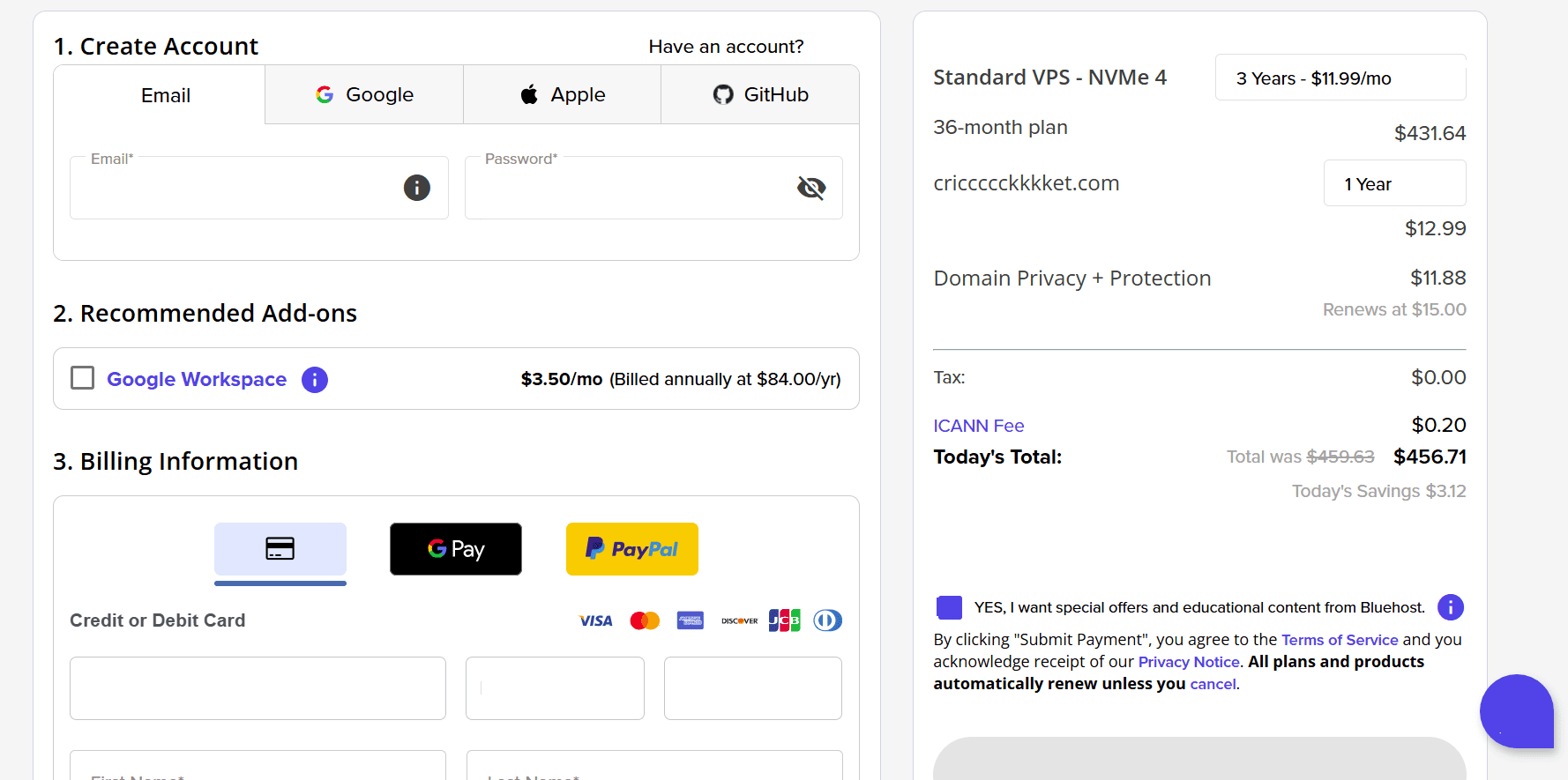
Once the purchase is complete, we automatically begin provisioning your VPS environment. Keep an eye on your inbox for the next critical piece of information.
Step 2: Receive your server access details
After provisioning, we send your VPS access information to the email address associated with your Bluehost account. This includes:
- Your server IP address
- Root username
- Temporary password
These credentials provide full access to your server and are required to manage your hosting through WHM. With these details in hand, you are ready to access the dashboard.
Step 3: Log in to your Bluehost dashboard and open WHM
To begin setting up cPanel accounts:
- Log in to your Bluehost Portal.
- Click Hosting from the left-hand menu.
- Open your VPS hosting details.
- Click the WHM button to launch Web Host Manager.
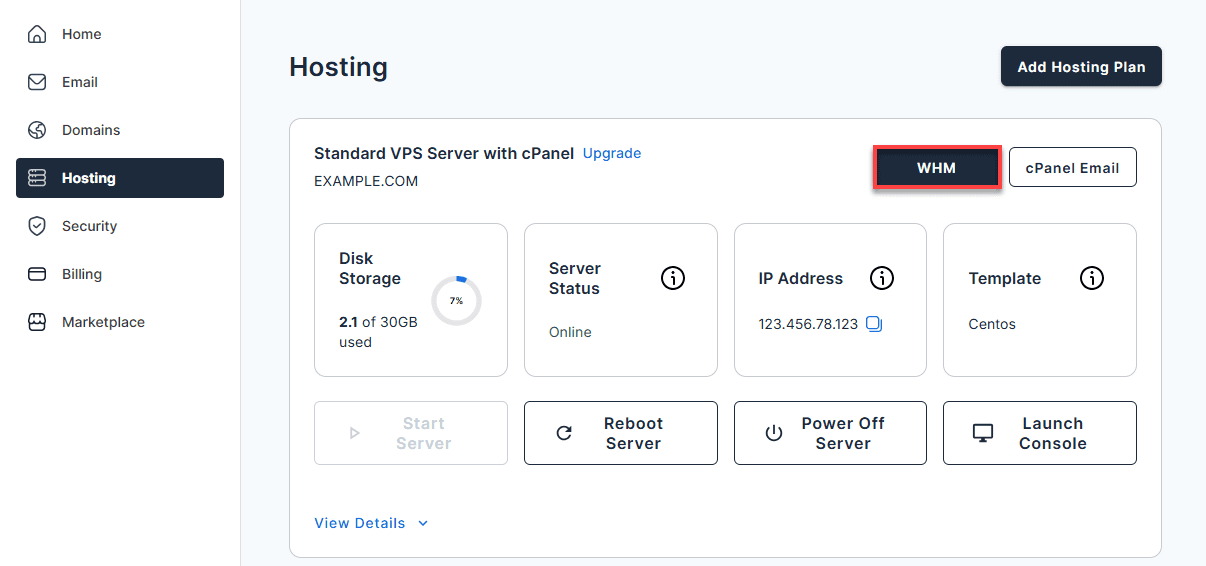
WHM offers top-level administrative control over your cPanel VPS environment, empowering you to provision cPanel accounts, define hosting packages and oversee global server configurations. Once the manager is open, you can move on to setting up individual hosting spaces.
Step 4: Navigate to “Create a New Account” in WHM
- Inside WHM, locate the Account Functions section in the left-hand panel.
- Scroll through the menu and select Create a New Account.
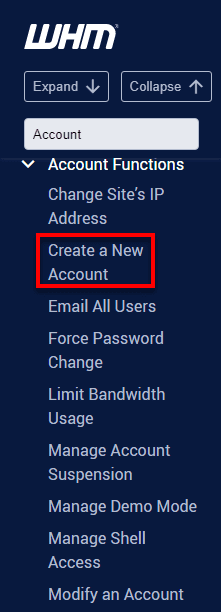
This option allows you to set up a separate cPanel environment for each domain on your VPS hosting account. Once you proceed with this selection, the next screen will prompt you to enter specific details about the website you are onboarding.
Step 5: Enter domain and account information
Under the Domain Information section, enter the required details for the new cPanel account:
- Domain name
- Username
- Password (entered twice)
- Contact email address
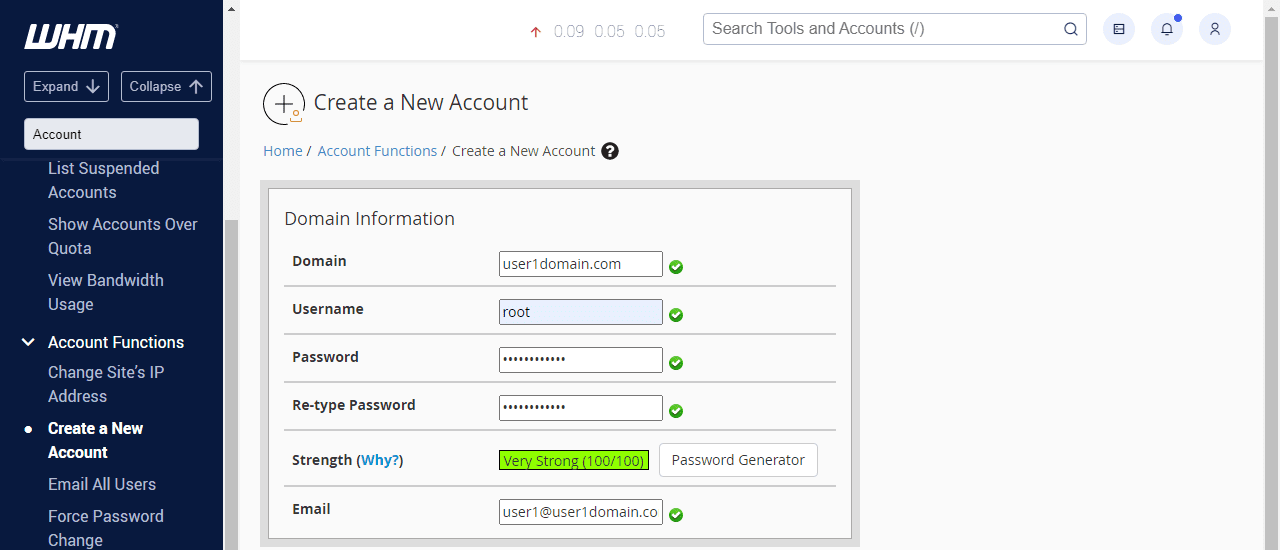
Each cPanel account you create is isolated, keeping files, users and settings separate from other sites on the server. After defining the site’s identity, you need to assign specific resource limits.
Step 6: Select a hosting package
Next, choose a package for the account. Packages define limits such as storage, bandwidth and other resource allocations.
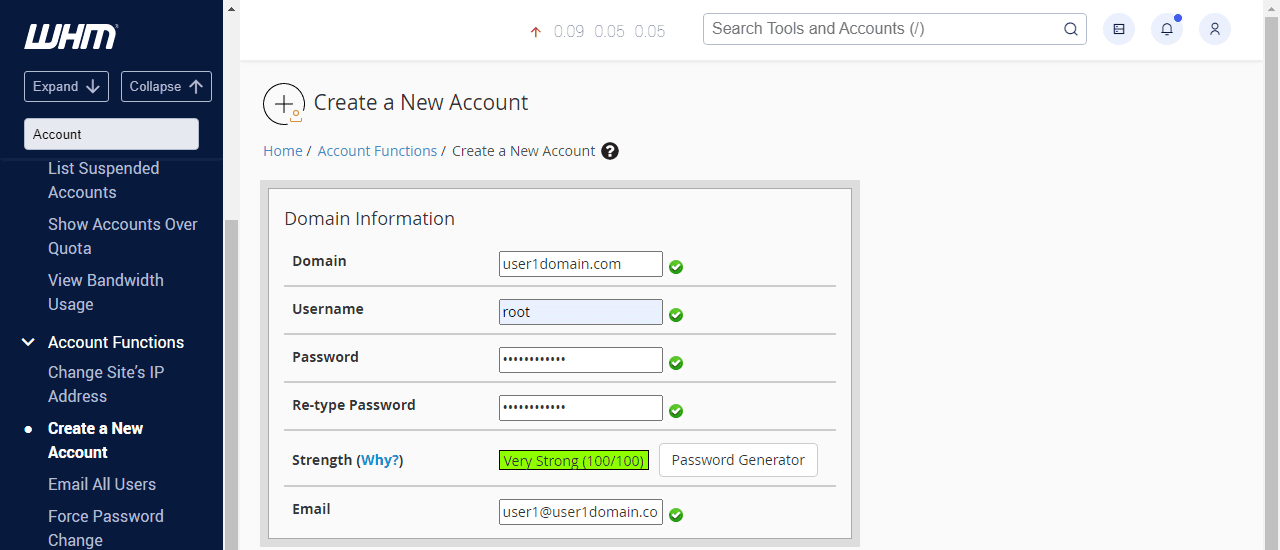
If you haven’t created a package yet, you’ll need to set one up in WHM before proceeding, then return to this step to assign it. With resources assigned, there are just a few more configuration preferences to adjust.
Step 7: Configure account settings
Before creating the account, review the available configuration options:
- Settings: Choose the cPanel theme and default language.

- Mail Routing Settings: Specify how email should be handled for the domain.
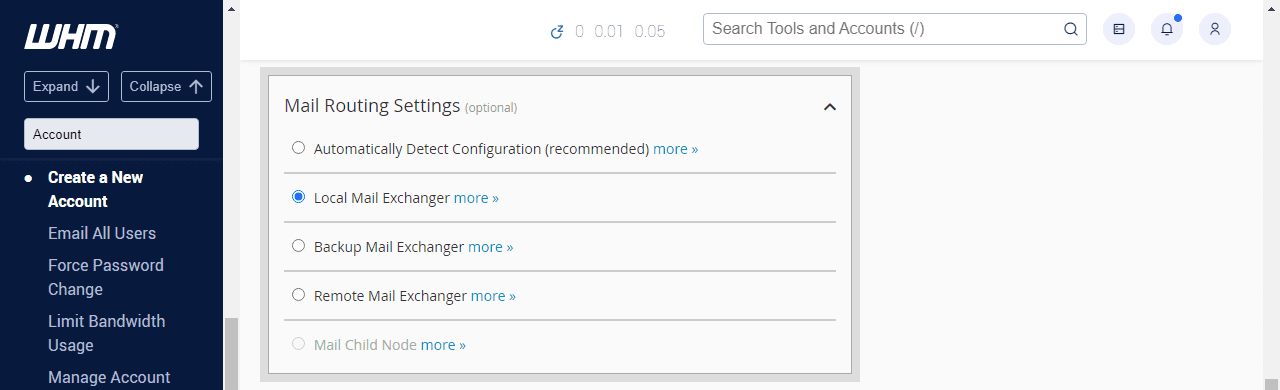
- DNS Settings: Confirm which nameservers will be used and enable SPF and DKIM records if required.
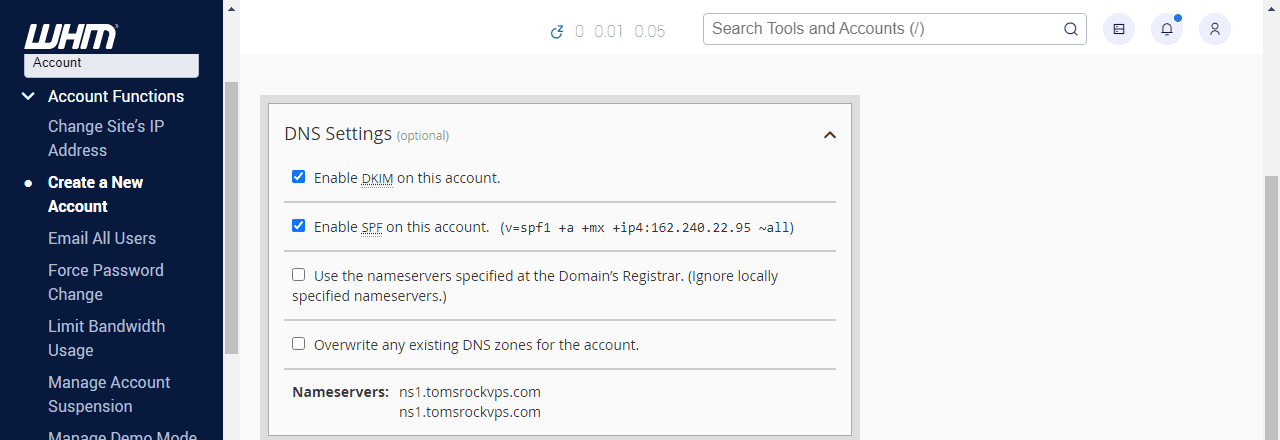
These options ensure proper email delivery and DNS configuration from the start. You are now ready to finalize the setup process.
Step 8: Create the cPanel account
Once all details are in place, click Create. If the setup is successful, you’ll see a confirmation message indicating that the account has been created. With your account now active, you’re ready to access your cPanel and begin configuring your VPS hosting environment.
Step 9: Access the new cPanel account
After creation, you can log in to the new cPanel account using:
yourdomain.com/cpanelor- Your server IP address followed by port
2083
From here, you can begin uploading website files, managing domains and configuring email through cPanel. Logging in lets you start deploying your site’s content.
Step 10: Add your website and verify functionality
Inside the cPanel:
- Add or confirm your primary domain.
- Update DNS records to point to the VPS.
- Upload website files using File Manager or FTP.
- Create and test email accounts.
- Confirm the website loads correctly.
Once these checks are complete, your cPanel VPS hosting environment is fully operational. This setup empowers you with dedicated resources and enhanced control, providing the stability needed for substantial growth. You can now begin deploying and managing your websites effortlessly through the intuitive cPanel interface.
Final thoughts
VPS hosting with cPanel transforms complex server management into simple point-and-click operations. You get enterprise-level control without the technical headaches that typically accompany powerful hosting solutions.
The combination of dedicated resources, scalable performance and intuitive management makes cPanel VPS hosting perfect for growing businesses. Whether you’re running an eCommerce store, managing multiple client websites or developing custom applications, this hosting solution adapts to your needs.
Remember that choosing the right provider matters as much as selecting the right hosting type. Look for companies that offer comprehensive support, reliable infrastructure and fair pricing without hidden fees.
Take control of your website with our Bluehost VPS hosting with cPanel. Enjoy enterprise-grade performance and user-friendly management tools for seamless growth!
FAQs
A cPanel dashboard is the main interface used to manage all aspects of a web hosting account. It organizes tools for file management, email accounts, databases, security settings and applications in one place. The dashboard also provides quick access to commonly used features and displays important account information such as resource usage and recent activity.
You can access the cPanel dashboard by entering your domain name or server IP address, followed by <code>:2083</code> in your web browser. For example, [<code>yourdomain.com:2083]</code> or <code>123.456.789.012:2083</code>. When prompted, enter your cPanel username and password. Many hosting providers also offer direct cPanel access links through their customer portals.
No, cPanel is not the same as hosting. Web hosting provides the server space and resources where your website files are stored. cPanel is the control panel software that makes hosting management easier by allowing you to manage files, emails, databases and settings through a graphical interface instead of command-line tools.
Many VPS providers offer cPanel as a pre-installed option or through an automated setup during server provisioning. If manual installation is required, you’ll need to purchase a cPanel license and install it on the server using root access. The installation process typically takes 30–60 minutes and may require technical knowledge.
Yes. VPS hosting with cPanel offers dedicated resources, better performance and scalability compared to shared hosting. It handles traffic spikes, supports resource-intensive applications and provides root access for customization—making it ideal for growing websites.
VPS setup with cPanel typically takes 30-60 minutes. Many providers offer pre-installed cPanel options or automated setup during provisioning, allowing you to start managing your website almost immediately after server activation.
Yes. cPanel remains highly relevant in 2026 with continuous updates, enhanced security features and WordPress optimization. Its user-friendly interface, extensive documentation and widespread adoption make it a trusted choice for modern hosting management.

Write A Comment