



Key highlights
- Learn about domain renewal importance and what happens when a domain expires, including traffic redirection or potential downtime.
- Understand every stage in the domain expiration timeline and renewal process.
- Discover how most registrars manage expired domains, grace periods and extra fees.
- Find out how to maintain consistent traffic and data security with auto-renewal and WHOIS updates.
- See how expired domains can affect SEO and brand trust and how to prevent it.
A domain name isn’t just a web address. It’s an essential part of your brand’s online identity. However, if you’re suddenly asking yourself, “My domain expired, now what?”, the consequences can be serious. When a domain name expires, it can lead to a series of issues that may harm your online presence and even your brand’s credibility.
When a domain expires, your website goes offline, making it inaccessible to visitors. This downtime can frustrate potential customers, reduce your site’s visibility and even impact your SEO rankings. Worse, if not renewed promptly, your domain could be released back onto the market, allowing competitors or opportunistic buyers to claim it, putting your brand at risk.
In this guide, we’ll walk you through what happens if your domain expires, along with essential tips on managing renewals to stay digitally present.
What is a domain name?
In simple terms, a domain name is the unique web address users type into their browser’s address bar to reach your site. For instance, the domain name for Bluehost is https://www.bluehost.com/
However, a domain name is more than just a URL. It’s an essential part of your brand’s online identity. A creative and memorable domain name can significantly enhance your website’s visibility and appeal, making it easier for visitors to find and remember.
Now that we know the basics of a domain name, we can head to understand the nuances of its expiration and renewal in depth!
The critical importance of domain renewal
The simple answer: domain names expire. If you don’t renew your domain name, it becomes available for anyone to purchase, including your competitors. Understanding the risks and importance of domain renewal is crucial for protecting your online presence and maintaining your digital identity.
Domain renewal is not just an administrative task, it’s a fundamental component of your digital business strategy. Failing to renew your domain on time can result in devastating consequences that extend far beyond temporary website downtime.
- Protection from domain hijacking: Expired domains become available to the public, allowing competitors, cybersquatters or malicious actors to register your brand’s domain name.
- Preservation of brand identity: Your domain name is often synonymous with your brand. Losing it means losing years of brand recognition and customer trust built around that web address.
- Maintaining search engine rankings: An expired domain can cause you to lose all the SEO value and search engine rankings you’ve worked hard to achieve, potentially taking months or years to rebuild.
- Preventing customer confusion: When your domain expires, customers can no longer find your website, leading to lost sales, frustrated users and damage to your reputation.
- Avoiding recovery costs: Recovering an expired domain can be extremely expensive, often costing thousands of dollars if it falls into the hands of domain resellers or competitors.
- Ensuring business continuity: Your domain is tied to email addresses, marketing campaigns and business operations. An expired domain disrupts all these critical functions simultaneously.
Taking proactive steps to monitor domain expiration dates and setting up automatic renewal is essential for safeguarding your online presence. Your domain name represents your digital real estate—protect it with the same diligence you would protect any valuable business asset.
What happens after a domain expires?
When you don’t renew your domain name, it moves through a cycle with three main stages: expiration, redemption grace period and pending delete. Each stage has different consequences and missing a renewal can affect your website, brand and customers.
From a wider perspective, domain names undergo the following stages, starting with the active stage where your domain is still intact and within your reach.
In the active phase, your domain name is under your control, keeping your website and any associated services running smoothly. You can make changes, update contact information and manage DNS settings. Your domain name will remain active as long as you renew it on time and many registrars, like Bluehost, offer convenient auto-renewal options so you won’t have to worry about tracking expiration dates.
1. Expired
Once the expiration date passes, your domain name officially expires. Your website and email will no longer function and visitors may see a “parked” page instead. Many registrars provide a short grace period (often around 30 days) to renew, but the exact window varies by TLD and registrar and isn’t guaranteed. Some TLDs may offer no grace period at all. During this time, you still have priority over third-party bids if you act quickly, but it’s important to renew before losing control of the domain completely.
2. Redemption grace period
After the grace period, the domain enters a redemption phase. After the initial grace period, many TLDs (including .com and .net) enter a redemption phase. Timing and rules vary by TLD and registrar. In this phase, your registrar might charge a redemption fee in addition to the usual renewal cost. Redemption fees vary depending on the registrar and it’s non-refundable, so renewing on time can save you money and hassle.
3. Pending delete
Once the domain reaches the pending delete phase, it can no longer be retrieved. This stage typically lasts five days and afterward, the expired domain is deleted from the registry and made available for public registration. At this point, anyone can buy it, including competitors or domain speculators, who may try to auction it or hold onto it to increase its resale value.
What happens after a domain is deleted or sold?
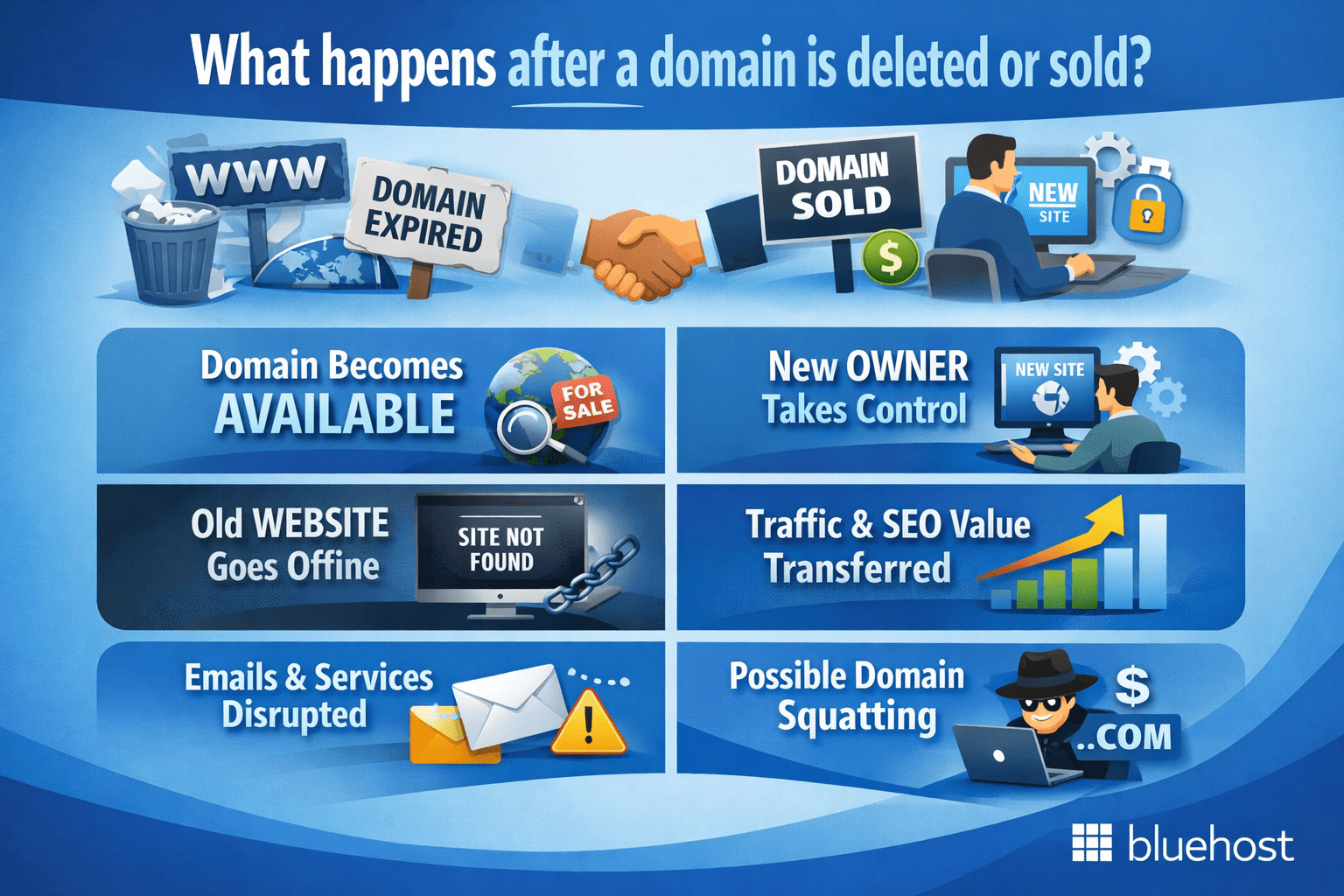
When a domain reaches the end of its lifecycle, it generally follows a predictable domain expiration timeline. However, the exact process depends on the registrar, registry and the specific domain extension involved. After deletion, the name doesn’t always become instantly available at the standard price.
Most registrars now list desirable expired domains on partner auction or back-order platforms before the official deletion phase. This holds true especially for popular gTLDs like .com or .net. These auctions let the highest bidder claim the name, while others can place a back-order sign-up to be notified if the auction fails or the winner doesn’t complete payment.
If no one bids, the domain usually moves into a closeout or pending-delete period. Here, it’s offered for a limited time at a fixed registration-period renewal cost before being dropped entirely. Once dropped, the name returns to the open market and can be registered again at the standard price, like any other new domain.
Tips for finding and buying expired domains
Buying an expired domain can be a strategic move for growing your digital footprint. Unlike a brand-new name, a domain that has been active often retains established SEO authority and a portfolio of existing backlinks.
This “link juice” can give a new website a significant head start in search rankings, effectively bypassing the slow initial growth phase new sites typically face. In this ecosystem, one person’s oversight regarding domain expiration becomes a valuable opportunity for another.
To find these hidden gems, you need to know where to look, as the best names are often captured before they hit the open market. Interested buyers typically rely on three main channels:
- Registrar auctions: Platforms like GoDaddy Auctions or NameJet allow you to bid on names that are in the final stages of the expiration cycle but haven’t been deleted yet.
- Backorder services: These services attempt to register a specific domain the exact millisecond it is dropped by the registry.
- Expired domain lists: Specialized databases track pending deletions, helping you filter millions of domains by age and authority metrics.
However, due diligence is critical before you buy. Always investigate the domain’s history using archive tools to ensure it wasn’t previously used for spam or hit with search engine penalties.
While the previous owner may have simply forgotten how to renew domain name registration, you must ensure their negligence doesn’t become your liability. A clean history ensures you inherit the SEO benefits without the digital baggage.
Also read: How to Find and Buy Expired Domains Names
Can you recover an expired domain?
Most domains can still be renewed for a limited window after expiration. However, your ability to recover one depends on how far along the domain expiration timeline has progressed and on the domain extension you own.
1. During the grace period
Log in to your registrar and renew directly. You’ll usually pay only the standard renewal fee, though some registrars add extra fees for late payments. For many common gTLDs like .com or .net, registrars may provide a renewal grace window before redemption begins. However, the exact timeline varies by TLD and registrar.
2. During the redemption period
Contact your registrar’s support team. You’ll need to pay a redemption charge plus the renewal cost. This stage usually lasts around 30 days for ICANN-regulated TLDs so the previous owner can reclaim the domain before it’s offered for resale.
3. Pending delete or auction
After the redemption period, your domain enters a 5-day pending deletion phase before it is permanently deleted. Once this process begins, the domain can no longer be recovered. In this case, you will need to wait until the registry deletes the domain and makes it available for public registration, at which point it can be registered again as a new domain.
4. After deletion
The name becomes available to the public. If another buyer acquires it, you no longer have legal ownership. To stay protected, act quickly. Most registrars recommend renewing before expiry and enabling auto-renew to avoid paying additional recovery charges or losing your domain altogether.
Don’t let your domain expire and risk losing your brand identity. Protect your online presence with a domain that truly represents your business. Bluehost makes it easy. Search available domains now to secure your brand today!
What are the key technical differences between domain expiration and domain deletion?
Understanding the difference between domain expiration and deletion is crucial for business owners to effectively manage their online presence. When a domain expires, it’s temporarily inactive, but not yet irretrievably lost.
In this phase, a domain may go offline, with the website displaying a parked page indicating its expired status. However, during the expiration period, domain owners usually have a 30-day grace window to renew the domain and reinstate their website before it advances to domain deletion.
This table clarifies each stage, showing how timing impacts the ability to retain or lose a domain.
| Aspect | Domain expiration | Domain deletion |
| Status | Domain is inactive but linked to the original owner. | Domain is removed from the owner’s account and fully released. |
| Grace period | Often ~30 days for many gTLDs, but varies by TLD/registrar and isn’t guaranteed; some TLDs have no grace period. | No grace period; the domain is permanently deleted. |
| Website behavior | Displays a “domain expired” or parked page, alerting visitors. | Not accessible; available for public re-registration. |
| Control | Owner retains exclusive rights and can renew at any time during grace or redemption periods. | Original owner loses all rights; anyone can register the domain after deletion. |
| Redemption phase | If not renewed, a 30-day redemption phase allows recovery with additional fees. | No recovery option after the redemption phase; domain moves to pending deletion. |
| Availability to public | In most cases, domains aren’t available to others until grace and redemption end; however, registrar handling of expired names can vary. | Fully available for others to acquire once deleted. |
| Risk level | Moderate risk if renewed within grace period; higher if waiting until redemption. | High risk of losing the domain permanently if not renewed before deletion. |
The table explains the difference between domain expiration and domain deletion, emphasizing how timing affects ownership and recovery options. When a domain expires, it becomes inactive but usually enters a grace and possible redemption period, allowing the original owner to renew it before losing rights. During this stage, it is typically not available to the public.
In contrast, once a domain is deleted, it is permanently removed from the owner’s account with no recovery option and it becomes fully available for anyone to register, significantly increasing the risk of permanent loss.
How expired domains affect SEO?
Google has clarified that when a domain lapses and is re-registered, it’s treated like a new property. The previous ranking signals don’t automatically carry over from the past site.
If an expired domain previously hosted spam or low-quality content, that history can reduce trust signals. This will continue until you rebuild relevance with fresh content and clean links. Extended downtime during expiration also risks deindexation; after renewal, allow time for re-crawling and rankings to recover.
To minimize damage:
- Renew promptly to limit downtime.
- Check WHOIS to confirm current status and name servers you control.
- Audit backlinks before relaunch; remove or disavow harmful links.
- Keep renewal alerts active so you’re aware of deadlines and DNS changes.
Top tips for easy domain renewal
Here are some practical tips to avoid the risks of expired domain names:
- Set up auto-renewal: Automatic renewal helps prevent domain expiration, so you don’t have to rely on reminders alone.
- Enable renewal reminders: Many registrars send reminders before expiration. Keep these notifications on to stay informed.
- Consolidate domain names: If you own multiple domains, keeping them with one registrar makes it easier to track renewal dates and manage your accounts.
- Enable privacy protection renewal: Don’t forget to add auto-renewal for domain privacy, which helps protect your site from unauthorized access.
Why choose Bluehost for domain registration?
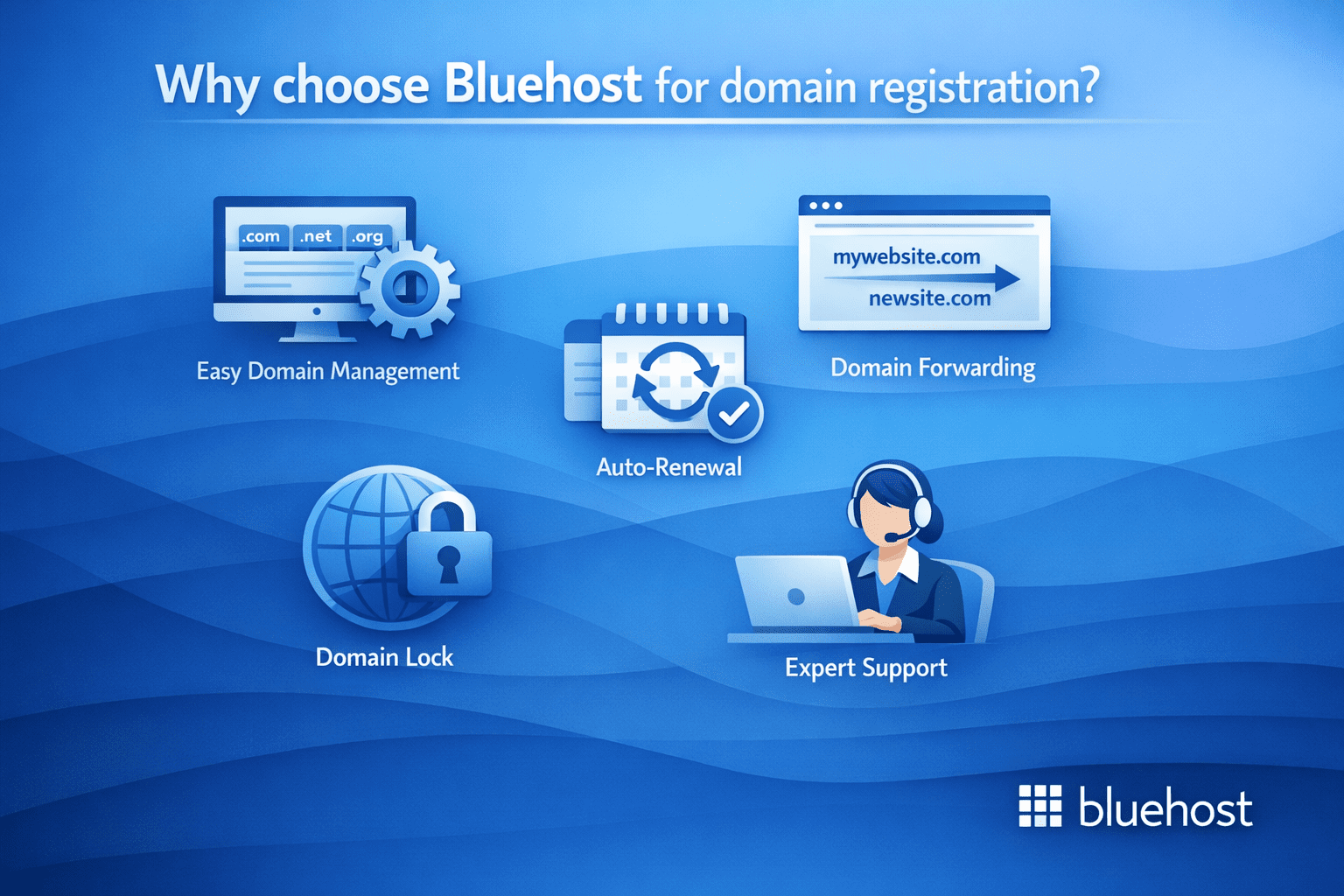
When you register your domain with Bluehost, you’re choosing more than just a domain registrar! You are actually partnering with a trusted hosting provider that simplifies and secures every aspect of domain management. Here’s what makes Bluehost domain registration stand out:
1. Easy domain management
Manage every aspect of your domains from a single, easy-to-use control panel. From checking registration details to updating DNS settings, contact information and renewals, everything is handled in one place, making day-to-day domain management simple and stress-free.
2. Domain forwarding
Automatically redirect your domain’s visitors to other desired locations on the web. Domain forwarding helps you send traffic from multiple domains or variations to one primary site, ensuring visitors always land where you want them to.
3. Auto-renewal
Protect your domain from expiring without you lifting a finger. By enabling auto-renewal, your domain is renewed automatically before it expires, helping you avoid downtime, lost traffic or the risk of someone else registering it.
4. Domain lock
Once you find your perfect domain, we help you lock it down to prevent unauthorized transfers. Domain lock adds an extra layer of protection by restricting changes or transfers unless you explicitly approve them.
5. Expert support
Ready to come to your aid by phone or chat anytime, for any reason. Bluehost’s 24/7 expert support is available to help with domain setup, renewals, DNS updates or any questions you may have along the way.
Also read: How to Register a Domain Name
How to renew your domain with Bluehost?
By default, Bluehost automatically renews your domain registration 15 days before it expires. This means we’ll attempt to renew your domain using the payment method linked to your account. However, if the automatic renewal fails, we’ll send you a reminder to manually renew your domain before it expires, giving you ample time to ensure continued service.
Whether you run a business blog or manage a personal website, our automatic renewal feature helps keep your domain active so your audience can always find you online.
To enable your domain’s Auto-Renew feature, please follow these steps.
- Log in to your Bluehost Portal.
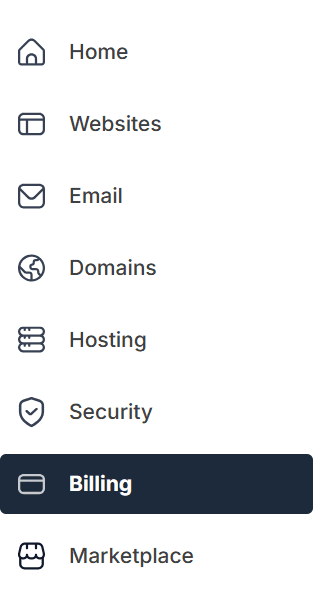
- In the left-hand menu, click ‘Billing’.
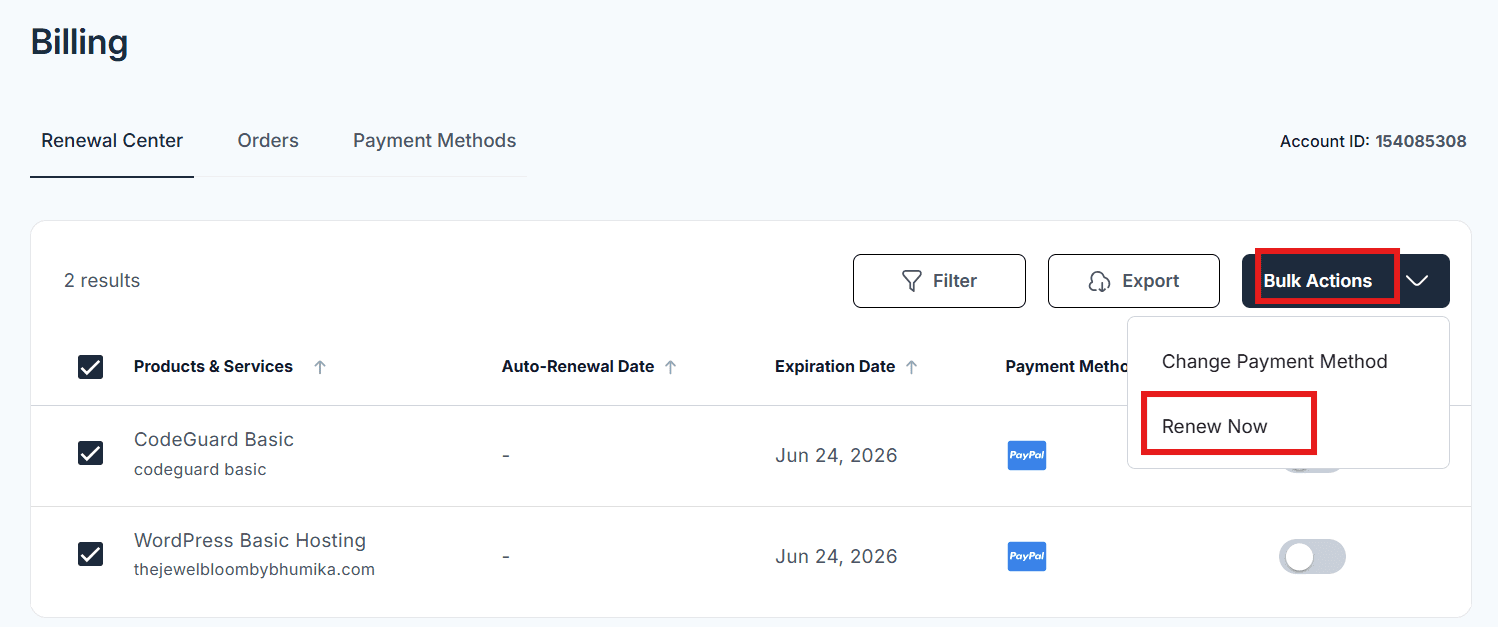
3. Under the ‘Renewal Center tab’, select the domain you want to renew.
4. Click ‘Bulk Actions’ in the upper-right corner, then select ‘Renew Now’ from the dropdown menu
5. You will be redirected to the Cart, where you can select your preferred billing term from the dropdown.
6. Add a Promo Code if you have one available, then click ‘CONTINUE TO CHECKOUT’ to proceed.
7. Click ‘SUBMIT PAYMENT’ to complete your payment transaction.
Also read: Renewing Your Domain Name
Final thoughts
Imagine losing your domain unexpectedly. It could mean lost customers, diminished trust and the challenge of reclaiming your online presence. Expired domains can lead to downtime, security risks and SEO setbacks. Don’t let your hard work go to waste! By staying proactive with your domain management, you avoid the costly consequences of a domain lapse.
With Bluehost, you’re equipped to protect your domain seamlessly. From intuitive auto-renewal settings to a streamlined control panel, Bluehost helps manage and renew your domains stress-free. This way, your site stays live, secure and ready for business.
Don’t let a missed renewal cost you your brand. Secure your domain with Bluehost today and stay in control!
FAQs
If you miss renewal, your domain enters an expired status and associated services like your website and email would stop working. It then becomes vulnerable to transfer, resale or auction. What this means is competitors or domain investors can purchase it if you don’t act quickly.
Most registrars provide about a 30-day grace period after expiration, followed by a 30-day redemption phase with added fees. However, this domain expiration timeline varies by registrar and domain extension since some ccTLDs have no grace period at all.
Yes. Once your domain reaches the pending delete stage, it’s released to the public. Some registrars even auction valuable names to the highest bidder before deletion, so it’s best to renew early. You can check your WHOIS record to see if your domain is still under your ownership.
Enable auto-renewal in your registrar account, keep your payment method current and make sure your WHOIS contact information is accurate. This way renewal reminders reach you.
It’s the post-grace recovery window that is typically around 30 days. This is where you can reclaim your domain by paying the redemption fee plus renewal cost before it’s released for public sale.


Write A Comment