


Key highlights
- Understand what a WHOIS domain lookup is and how it reveals vital details like domain owner details, domain registration info, expiration date and more.
- Learn how a WHOIS lookup tool works by accessing public domain records through platforms like Bluehost, ICANN and Whois.com.
- Explore how WHOIS data helps website owners, registrars and security experts verify domains, trace threats and protect their online assets in accordance with global registries and standardized protocols.
- Discover how Bluehost simplifies domain registration, renewal, privacy management and transfers, all from one secure dashboard.
Managing multiple client domains? Wondering who owns a particular domain or if your ideal domain name is available? Before you build your website or brand, it’s essential to verify domain registration info and identify the current owner.
WHOIS domain lookup for agencies is a free, reliable tool that displays domain owner details, registration data, expiration dates and nameserver information. It helps you perform a domain WHOIS check to confirm availability and prevent potential disputes.
In this blog, we’ll explain how a WHOIS domain lookup for agencies tool works, what kind of information it reveals, including IP addresses and registrar data and how you can use it to protect your website. We’ll also discuss how WHOIS privacy protection keeps your personal information secure.
Let’s get started.
What is a WHOIS domain lookup and how does it work?
A WHOIS domain lookup helps you check domain name availability and ownership. It provides key domain registration info, including domain status, expiration date and nameserver information. For agencies, WHOIS domain lookup for agencies is essential for client domain audits, competitor research and preventing brand infringement.
According to Domain Name Stats, there are approximately 700 million registered domains worldwide as of 2026, making it more important than ever to verify your desired domain name before registration. With domain squatting and cybersquatting on the rise, agencies using WHOIS domain lookup for agencies must perform due diligence before recommending domains to clients.
When someone registers a domain, their domain owner details become part of the WHOIS lookup results, stored in the WHOIS database. This database is governed by the Internet Corporation for Assigned Names and Numbers (ICANN) and accessed through the Registration Data Access Protocol (RDAP).
A WHOIS domain lookup tool gives you access to this registration data, unless it’s protected by WHOIS privacy, which many registrars offer.
What is the WHOIS database?
The WHOIS database is often mistaken for a single, centralized repository, but it is actually a distributed system of databases maintained by various independent registries and accredited registrars. Functioning as a public directory for internet resources, it stores critical contact and registration information for domain names and IP addresses. When a domain is registered, the specific registrar stores the owner’s details, contributing to this vast, decentralized network.
This system allows agencies using WHOIS domain lookup for agencies to query who is responsible for a domain or IP address, facilitating transparency and accountability on the web. By providing public access to ownership data, WHOIS domain lookup for agencies enables agencies to verify domain legitimacy, resolve technical disputes and identify the parties behind online resources, ensuring clients are protected from fraudulent domains and cyber threats.
How does WHOIS domain lookup work?
When a domain name is registered, the registrant must provide their contact information, including name, email, phone number and address. These domain owner details are stored in the WHOIS database, maintained by registrars and regulated by ICANN.
A WHOIS domain lookup tool retrieves this domain registration info, unless it’s protected by privacy services. Such tools help reduce spam and safeguard personal data by masking contact details from public access.
By running WHOIS domain lookup for agencies, you can: View the domain’s registration status, ownership history and key technical data such as IP addresses and nameserver information. This insight enables smarter decisions when buying, managing or investigating domains.
Also read: How to Secure a Websit: What is SSL & HTTPS?
Understanding how WHOIS domain lookup for agencies works gives your agency more control and transparency in client domain management workflows.
Who manages the WHOIS database?
The governance of the WHOIS system is overseen by the Internet Corporation for Assigned Names and Numbers (ICANN). ICANN acts as the governing body that establishes the global policies and protocols for how WHOIS domain data is collected and accessed. However, ICANN does not centrally store the records itself.
Instead, the actual database management is distributed among individual registries, such as Verisign for .com domains and accredited registrars like Bluehost. While ICANN sets the rules, these registrars are responsible for maintaining the accuracy of the WHOIS domain lookup data. This distinction is crucial because it means any updates to your contact information must be handled directly through your specific registrar rather than a central authority.
Why is WHOIS data important?
WHOIS data isn’t just technical information; it’s a powerful resource with real-world applications. Let’s examine the key reasons:

For website owners
WHOIS data is essential for website owners. It includes contact details, domain registration info, expiration dates and privacy settings.
Regularly reviewing your WHOIS record ensures that:
- Your ownership is properly listed
- Your contact information is up to date
- Your privacy settings are secure
It also lets you track changes, monitor domain availability and detect unauthorized updates, thereby strengthening your domain’s security and credibility.
For security
Security professionals use WHOIS data to trace the source of malicious activity. They analyze domain owner details and IP associations to:
- Identify suspicious domains
- Uncover fake identities
- Expose harmful website networks
Accurate WHOIS info enables faster reporting to hosting providers and supports takedown efforts against fraudulent or dangerous sites.
For networking and research
WHOIS is useful for business outreach and domain acquisition. If you find a domain of interest, WHOIS can provide contact details for professional outreach or negotiation.
It’s especially helpful when pursuing a domain that’s already registered; a WHOIS lookup may reveal contact paths to the current owner. Always approach outreach with professionalism and respect.
WHOIS data delivers practical value across ownership, security and networking. Now that you understand why it matters, let’s walk through how to perform one step by step.
For agencies
WHOIS data is essential for agencies managing client domains. It includes contact details, domain registration info, expiration dates and privacy settings.
Regularly reviewing WHOIS records ensures that: –
- Client ownership is properly documented and protected
- Contact information is up to date to prevent domain expiration
- Privacy settings are configured according to client preferences
- You can detect unauthorized changes or domain hijacking attempts
It also enables agencies to:
- Track domain portfolio status across multiple clients
- Monitor domain availability for acquisition opportunities
- Proactively alert clients about upcoming renewals
- Detect unauthorized updates, thereby strengthening domain security and credibility
Manage all your domains in one place with Bluehost Dashboard. Get bulk management tools, automated renewal reminders and advanced security features.
Also read: How to Buy a Domain That is Taken | Expert Advice from Bluehost
How to perform a WHOIS domain lookup (Step-by-Step)
Performing a WHOIS domain lookup is fast and easy using trusted online tools. Here’s how to get started.
1. Using the Bluehost WHOIS Lookup tool
Our Bluehost WHOIS Lookup tool provides instant WHOIS domain lookup for agencies, including domain owner details, registration status and expiration dates.
Bluehost’s WHOIS Lookup Tool provides real-time domain registration info, helping users stay secure and informed.

Bluehost’s WHOIS Lookup Tool provides real-time WHOIS domain lookup for agencies, helping agencies stay secure, informed and one step ahead of domain issues.
It’s perfect for: –
- Checking bulk domain availability for client campaigns
- Managing your client domain portfolios
- Researching competitors and market opportunities
Concerned about client privacy?
We also offer Domain Privacy + Protection to keep client personal contact info hidden from public WHOIS records, spam prevention, blacklist monitoring, malware scanning, identity theft and unwanted solicitation.
Try Bluehost’s WHOIS Domain Lookup for Agencies Free – No signup required. Check Domain Availability Now!
Other trusted WHOIS lookup services
- ICANN WHOIS Lookup – Offers official domain registration details, including registrar info and name servers. Ideal for anyone researching domain ownership.
- Whois.com – A user-friendly platform for finding domain ownership, availability, registration dates and name server data.
- MXToolBox – Primarily used by IT pros to monitor email and DNS records. It also supports WHOIS and domain health checks.
Also read: What Are DNS Records? Understanding the Basics
Understanding how to access and interpret WHOIS data empowers you to make informed decisions about domain names and online security. With that foundation, let’s dive into how to perform a domain WHOIS check step-by-step to get the information you need quickly and easily.
2. Using the IANA WHOIS service
The IANA (Internet Assigned Numbers Authority) WHOIS service functions as a high-level directory designed to identify the top-level registry responsible for a specific domain or IP address block. Unlike standard lookup tools that display detailed contact information, IANA is best used as a starting point to determine which organization holds the authoritative records for a Top-Level Domain (TLD).
This tool is particularly valuable for agencies when: –
- Investigating country-code TLDs (ccTLDs) for international client expansion
- Researching new generic TLDs (gTLDs) for client branding opportunities
- Verifying which registry manages emerging TLD extensions
3. Using a domain WHOIS API
For advanced users, developers or businesses managing large portfolios, performing manual lookups for every domain is inefficient. A Domain WHOIS API provides a streamlined solution, allowing applications to programmatically retrieve ownership data, expiration dates and technical details automatically. This automation enables users to scale operations and ensures data accuracy without the need for manual intervention.
Organizations leverage these APIs for critical tasks such as cybersecurity monitoring to track potential threats and brand protection efforts to identify infringing domains. Additionally, developers can integrate this domain intelligence directly into proprietary business tools, enabling real-time decision-making and efficient data analysis. By automating the lookup process, businesses save valuable time while maintaining comprehensive oversight of the digital landscape.
How to get WHOIS information updated: A step-by-step guide
A WHOIS domain lookup helps you uncover important domain registration info about any domain name. Whether you’re checking availability, researching competitors or verifying domain owner details, here’s how to do it step by step.
1. Visit a WHOIS lookup tool
Start by selecting a reliable WHOIS domain lookup tool. Popular options include the Bluehost WHOIS Lookup tool, ICANN Lookup, Whois.com and MXToolBox. These tools provide quick access to public WHOIS records with user-friendly interfaces. Our tool is especially convenient if you’re already managing domains through your Bluehost account.
2. Enter the domain name
Type the complete domain name you want to search, including the correct extension (.com, .net, .org). Double-check for typos to avoid inaccurate results. Some lookup tools allow domain WHOIS checks by subdomain or filter results by domain age and ownership history.
Also read: What is a Subdomain, Why Use One and How Do They Impact SEO?
If you’re managing advanced domain configurations, you may also need to update DNS server address settings. For instance, adding a CNAME record can point a subdomain to another service. Always follow your hosting provider’s instructions to avoid DNS server errors.
Also read: How to Add a CNAME Record: The Ultimate Guide (2025)
3. Review key data: registrar, expiration, name servers, etc.
Once the search is complete, you’ll get a full WHOIS report with essential domain registration information, including:
- Registrar – The company managing the domain registration
- Creation date – When the domain was registered
- Expiration date – When the domain is due for renewal
- Nameservers – Servers the domain points to (linked to your hosting provider)
- Domain status – Active, expired or transfer-prohibited states
This data helps you track ownership, manage renewals and verify whether a domain name is actively in use.
4. Spot privacy protection or proxy ownership
Many domain owners use WHOIS privacy services to hide their personal information. Instead of a real name, email or address, you’ll see masked or proxy contact details.
This doesn’t affect domain functionality, but it does limit public visibility for security and spam protection reasons. If you’re trying to contact the domain owner, check for a registrar-provided contact form or email forwarding option tied to the proxy.
Next, let’s take a closer look at the types of information you can uncover with a WHOIS search.
What information can you get from a WHOIS search?
When you enter a domain name into a WHOIS lookup tool, it generates a detailed report with key information about the domain. This data can help you identify the owner, check the domain’s status and spot any potential issues.
Here’s what you’ll typically find in a WHOIS report:
1. Domain registrar
The report shows which registrar manages the domain, such as Bluehost, GoDaddy, Namecheap and Google Domains. If you’re interested in acquiring the domain, this info helps you know where to start. You can begin by contacting the registrar or browsing domain marketplaces.
2. Registration and expiration dates
WHOIS results include the date the domain was registered and when it will expire. This helps you:
- Identify domains nearing expiration that may become available soon.
- Track your own domain’s renewal date to avoid losing it.
3. Nameservers
Nameservers indicate where the domain is hosted and how it connects to online services. Active domains usually point to hosting providers or configured servers. This helps verify if a site is live and who manages it.
4. Domain status codes
WHOIS reports include status codes that explain the domain’s current state, such as:
- Active – The domain is currently registered and in use.
- Pending renewal or deletion – The domain is near expiration or has expired.
- ClientTransferProhibited – The domain is locked to prevent unauthorized transfers.
These codes help determine if the domain is operational, available for transfer or experiencing issues.
5. Registrants contact info (if public)
If privacy protection isn’t enabled, WHOIS may show the domain owner’s name, email address, phone number and physical address. This can be helpful if you want to reach out for collaboration, inquiries or potential domain purchases. However, many registrars offer WHOIS privacy services to conceal this data.
By reviewing WHOIS data, you can:
- Uncover ownership details
- Assess domain status
- Gain historical insights
WHOIS domain lookup for agencies is a valuable resource for research, security and domain acquisition. Every agency should integrate WHOIS domain lookup for agencies into their standard workflow.
Next, let’s explore what WHOIS privacy protection is and why it plays a crucial role in safeguarding your clients’ personal information.
What is WHOIS privacy protection and why does it matter?
As a business owner, protecting your online information is just as important as securing your physical assets. According to a study by Statista, global cybercrime costs are estimated to reach $11.36 trillion annually by 2026. This highlights the need for you to take proactive steps to ensure cybersecurity.

WHOIS privacy protection safeguards your personal information by replacing it with proxy details in the public WHOIS database. Without this protection, your name, email, phone number and physical address are visible to anyone.
For agencies managing multiple client domains, this visibility can quickly lead to spam, unsolicited outreach, and even security threats. That’s why having built-in WHOIS privacy isn’t optional anymore, it’s a necessity.
To simplify domain management and ensure consistent protection at scale, agencies need a built-in WHOIS privacy solution that works automatically—without affecting domain ownership or control.
To address this at scale, Bluehost provides WHOIS privacy solution designed specifically to protect client data without impacting domain ownership or control.
Also read: Do I Need Domain Name Privacy Protection + WHOIS Privacy?
Bluehost Domain Privacy + Protection
We at Bluehost offer Domain Privacy + Protection to help keep client data safe. Our service replaces private contact details with generic information, while your clients remain the rightful domain owners. It protects your agency clients from:
- Spam and phishing attacks targeting domain registrants
- Unwanted calls and solicitation from competitors
- Identity theft and data breaches
- Unauthorized domain transfer attempts and hijacking
- Malware threats and SEO blacklist issues that could damage client sites
- Competitors trying to access client information for competitive intelligence
You can enable our protection for both new and existing client domains to enjoy greater security and peace of mind.
Protect Your Client Domains @$11.99/per domain namewith Bluehost. Add Domain Privacy + Protection to all client accounts with one click.
WHOIS Lookup: Privacy Protection vs. no Privacy Protection
Privacy protection significantly affects what information is visible in a WHOIS lookup. Here’s a quick comparison:
| Feature | WHOIS with privacy protection | WHOIS without privacy protection |
| Owner contact info visibility | Hidden (replaced with proxy) | Publicly visible |
| Spam and robocall protection | High (personal data is masked) | Low (exposed to scrapers/spammers) |
| Risk of identity theft | Low | Higher |
| Domain legitimacy perception | Slightly lower (uses proxy) | Higher (real name shown) |
| Security from domain hijacking | Improved (via registrar safeguards) | Moderate |
| Ability to receive inquiries | Via proxy email or contact form | Direct (via public email) |
| Cost | May involve a small yearly fee | Included (no extra cost) |
But even with these protections in place, you may still encounter issues with WHOIS data. Let’s examine the most common problems and how to address them.
Protect your domains and your clients from unnecessary risks.
With Bluehost, you can register and manage domains with built-in WHOIS Privacy Protection to shield sensitive details from spammers, unsolicited emails and calls, identity theft and fraudulent domain transfers.
Keep competitors from tracking your domain portfolio, reduce exposure to malware and SEO blacklists and stay informed with SMS notifications for critical domain changes.

What are common WHOIS issues and how to fix them?
While a WHOIS lookup is a valuable tool, it isn’t always flawless. Here are some common issues you may encounter and how to resolve them:

1. Missing or outdated WHOIS data
Sometimes, WHOIS records are incomplete or outdated because domain owners haven’t updated their contact info or registrars haven’t synced changes properly. For agencies, this can cause missed renewal notices, failed domain transfers and compliance issues.
Solution: Log in to your client’s domain registrar account and update their contact details. With Bluehost, managing client domain registration info is simple via your agency dashboard and reminders help you keep client details current. Set up a quarterly audit process to review all client domain contact information.
2. WHOIS data hidden by proxy or privacy
Many owners use WHOIS privacy services to protect personal information. While this secures data, it can make verifying ownership or contacting the domain owner more difficult.
Solution: Use proxy emails or registrar-provided contact forms to reach the owner. If you’re the owner, ensure your privacy service forwards important messages.
3. WHOIS blocked due to GDPR
The EU’s GDPR restricts public access to personal data. As a result, some WHOIS lookups may show limited or redacted information for domain owners in the EU.
Solution: Use alternative methods like contacting the registrar directly or checking verified domain marketplaces for ownership details.
4. Reverse WHOIS limitations
Reverse WHOIS searches allow finding domains by owner info, but privacy laws and database restrictions limit accuracy and availability.
Solution: Use trusted tools with licensed database access or consult cybersecurity experts. Reverse WHOIS is ideal for research and investigation, not unsolicited outreach.
Understanding these common WHOIS issues ensures you can troubleshoot effectively and keep your domain owner details and registration info accurate and secure.
How to manage domain settings with Bluehost?
Registering and managing domains with Bluehost is a seamless process that gives you full control over your online presence. From domain selection to advanced management tools, Bluehost makes it easy to handle all your domain needs.
Register domains with Bluehost
Domain registration with Bluehost is simple and efficient, offering an easy process from search to checkout.
Also read: How to Register a Domain Name
Method 1: Registering a domain through Bluehost dashboard
Step1: Log in to your Bluehost account
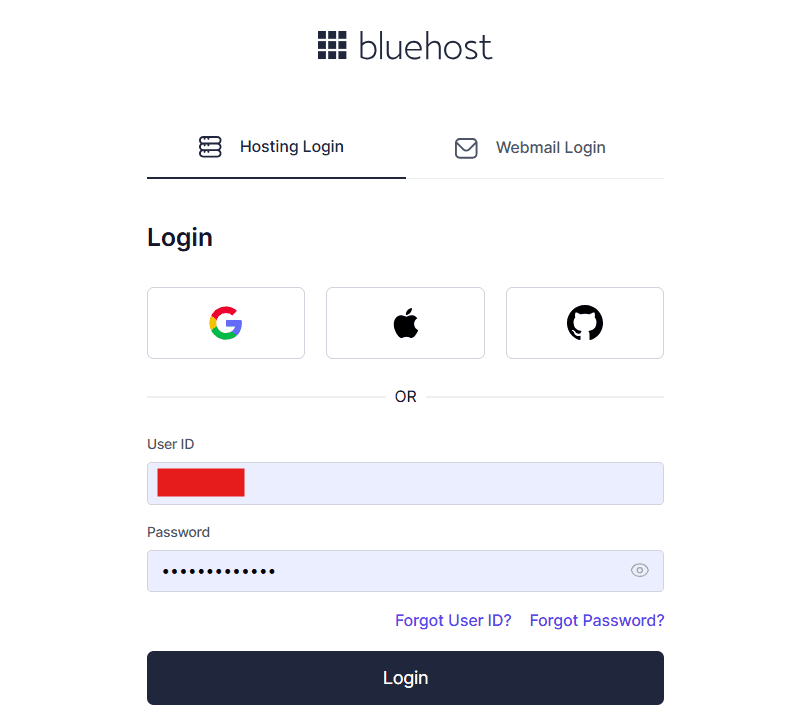
- Access your account to get started.
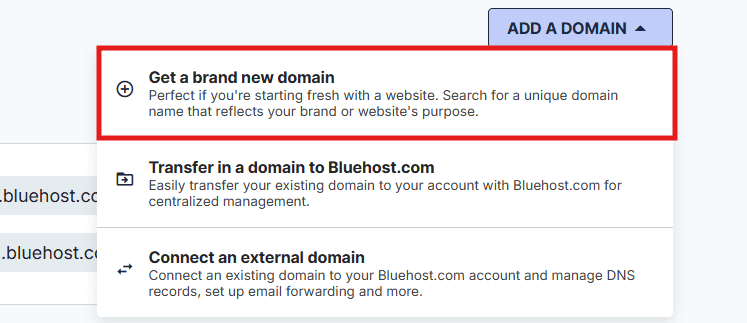
Step 2: Click on “Domains”, then click on “Add a domain”.
- Click on “Get a brand new domain” to check availability.
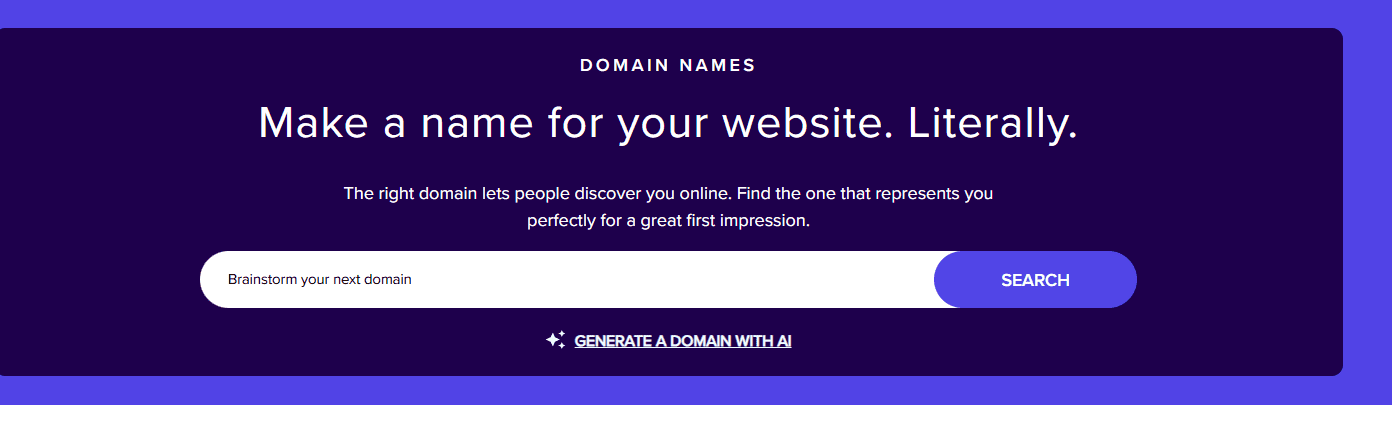
Step 3: Search your desired domain name
- Click on search bar to find your desire domain name.
Step 4: Select your domain
- Add the available domain to your cart.
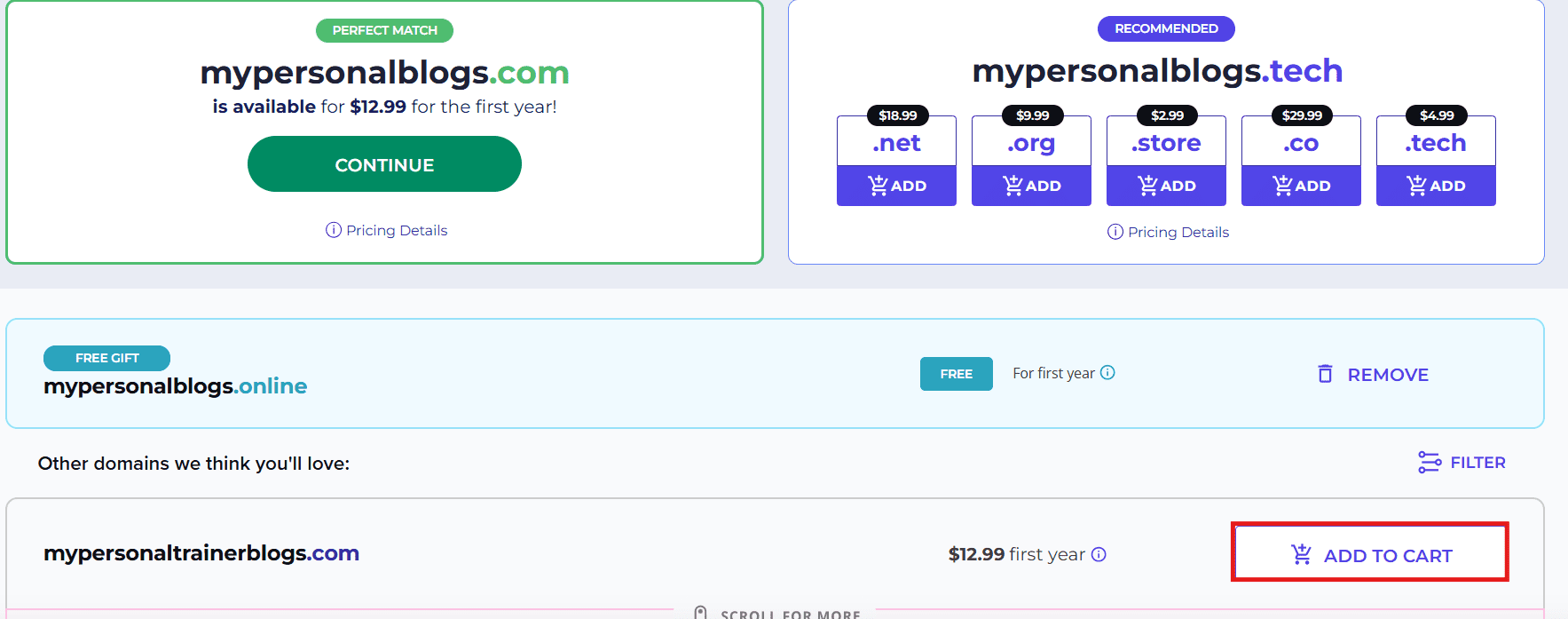
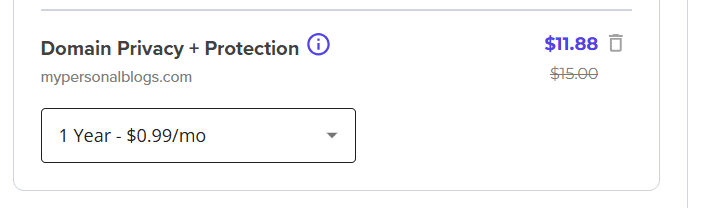
Step 4: Add privacy protection
- Optional but recommended for enhanced security.
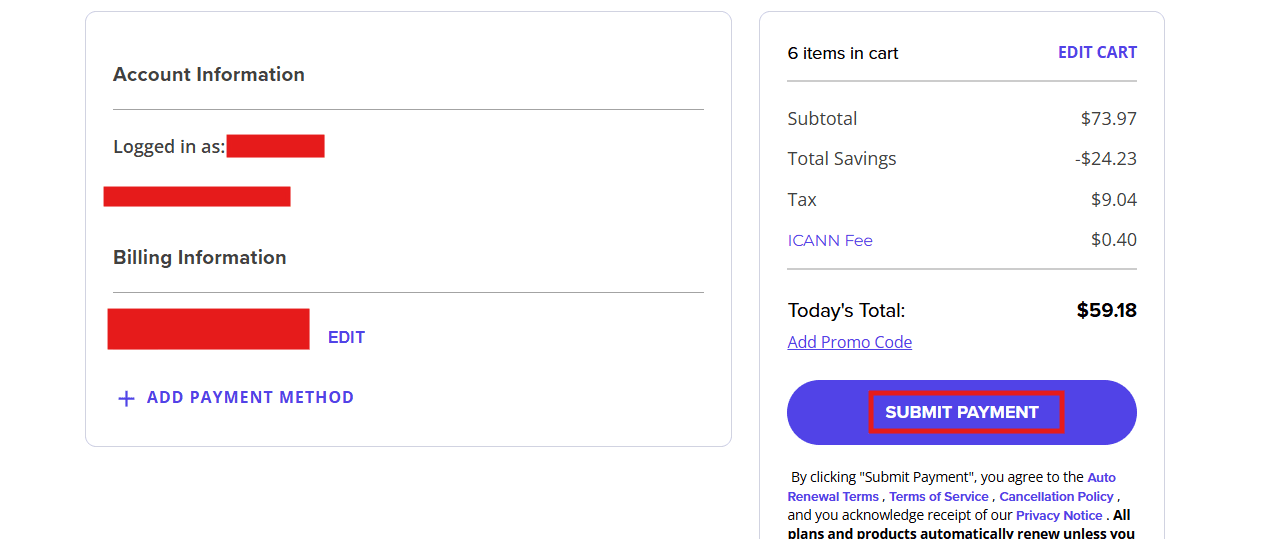
Step 5: Proceed to checkout
- Finalize your purchase and complete payment.
Method 2: Registering through Bluehost Domains (front-of-site)
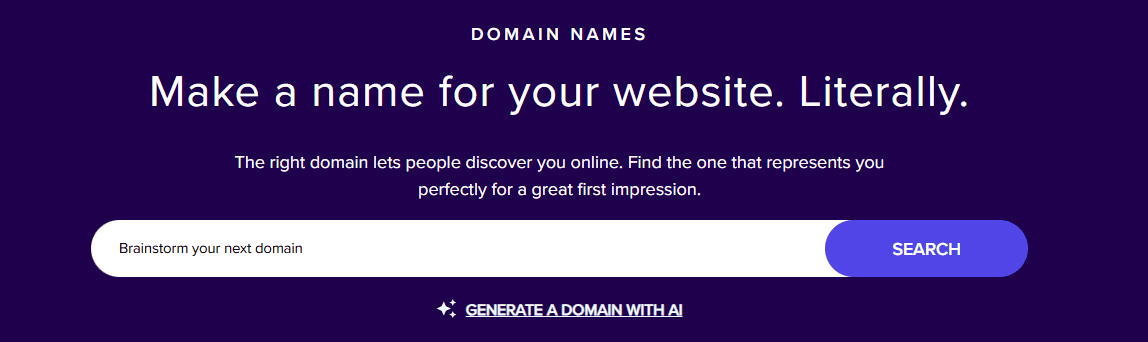
Step 1: Search for your domain
- In your browser, go to Bluehost domain registration and enter your preferred domain name to check for availability.
Step 2: Select your domain
- If the domain is available, you will be redirected to the Cart page. Click Proceed to continue.
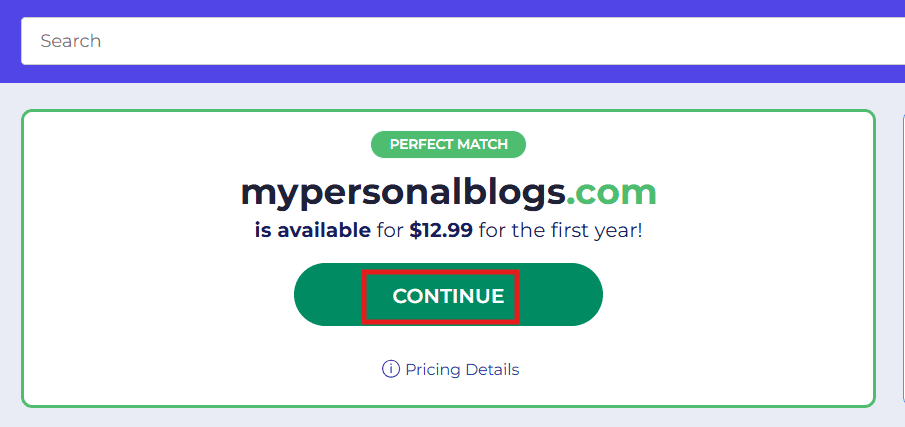
Step 3: Choose a similar domain (if unavailable)
- If the domain is unavailable, the Cart will suggest similar available domains. Click Add to Cart to select one of these alternatives.
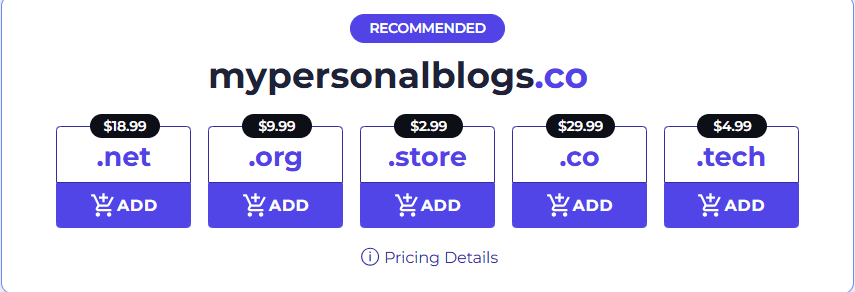
Step 4: Add privacy protection
- Protect your personal details with privacy protection (optional).
Step 5: Proceed to checkout
- Choose a hosting plan if required or simply proceed with registering the domain. Finish your registration and verify your domain.
Renew your domains automatically
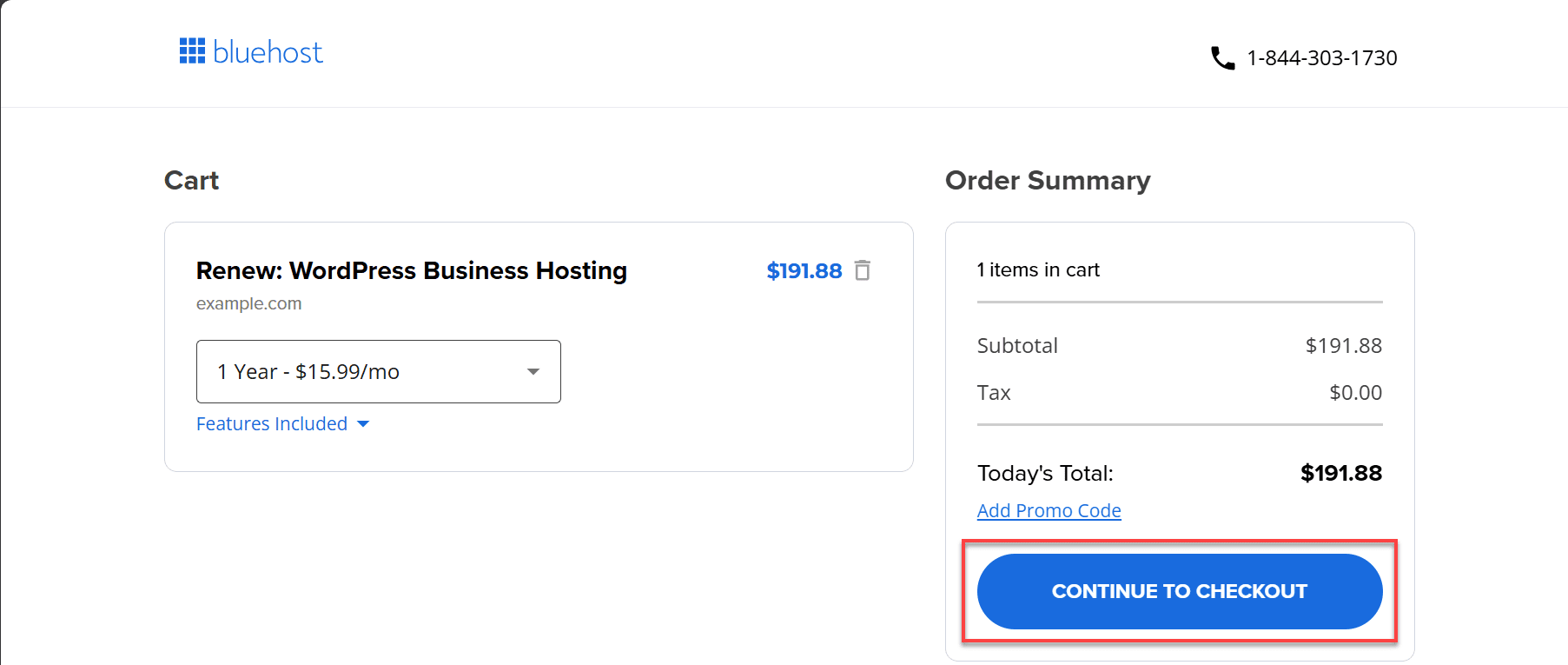
When it comes to maintaining your online presence, renewing your domain with Bluehost is a simple and straightforward process. This ensures your website stays live and accessible to your audience.
Step 1: Log in to your Bluehost account
- Access your Account Manager.
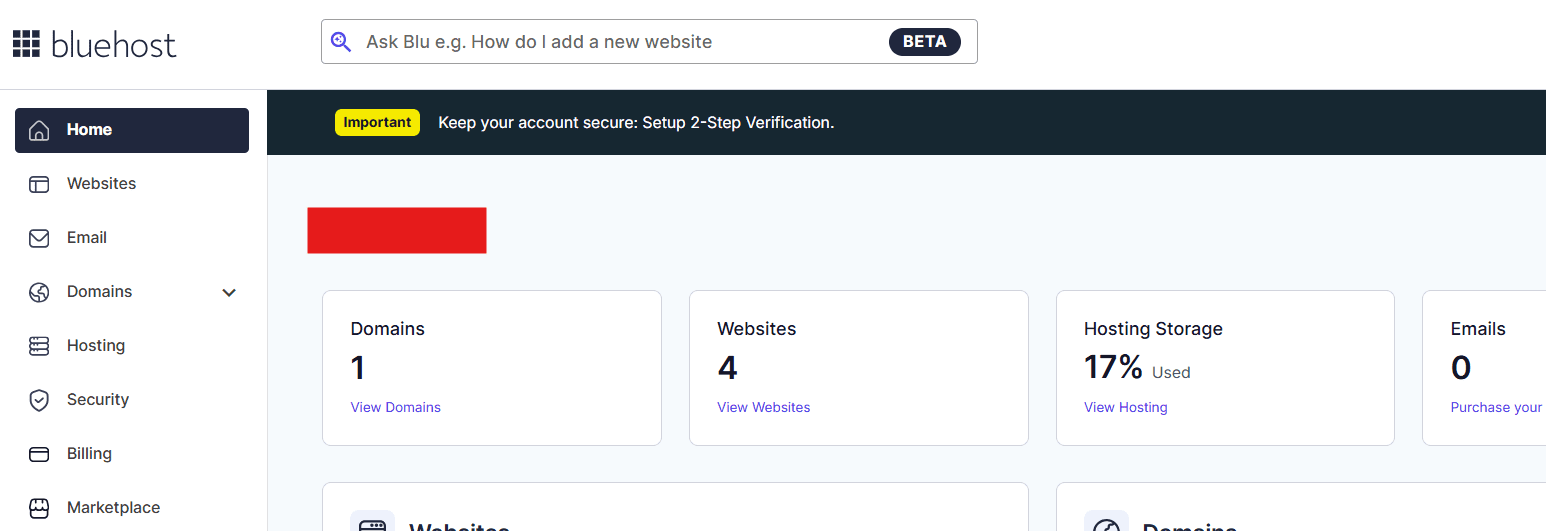
Step 2: Click on “Billing”.
- Now, click on three dots in right side. Then, choose “Renew Now”.
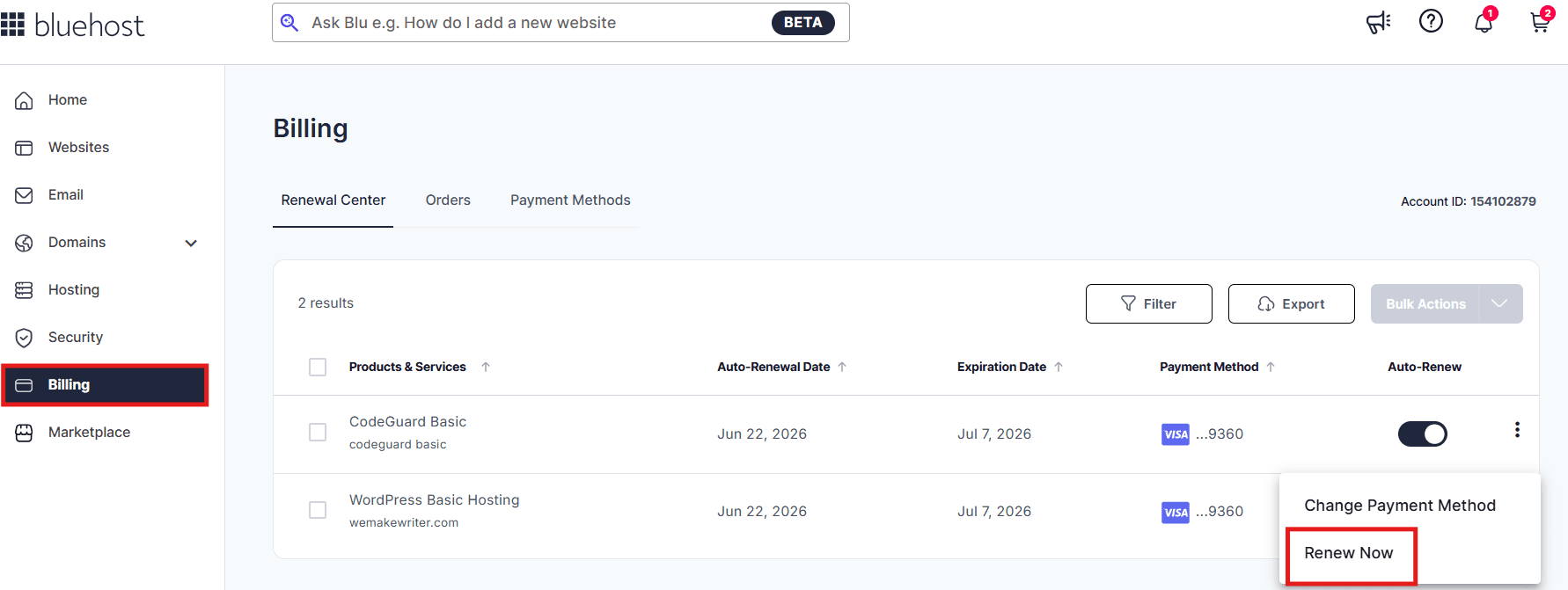
Step 3: Select the domains to renew
- Choose the domains you want to renew.
Add WHOIS privacy protection
Enabling domain privacy and protection with Bluehost helps safeguard your personal information by keeping your contact details private and secure from public view.
Step 1: Log in to your Bluehost Account
- Access your Account Manager.
Step 2: Go to the domain name section
- Click on the Domain Name tab from the left-side menu.

Step 3: Activate domain privacy
- Select the domain you want to update. In the Domain Overview section, click Turn On to enable privacy.

Step 4: Complete payment
- Finalize your purchase by completing the payment.
Transfer or consolidate domains easily
Before transferring your domain to Bluehost, ensure that it meets the necessary requirements. Your domain must be at least 60 days old and unlocked to proceed with the transfer.
Additionally, update your contact information to ensure that your email and other details are current for transfer verification.
Lastly, request the EPP code (also known as the authorization code) from your current registrar, as this is required to complete the transfer process.
Step 1: Start the transfer in your Bluehost Account
- Navigate to Domains or Marketplace, then select Start Transfer In.
- Enter your domain (without “www”) and submit.

Step 2: Confirm and checkout
- Select your preferred registration term and finalize payment.
Step 3: Enter the EPP code & configure settings
- After purchase, input your EPP code and update nameservers as needed.
Also read: Enable and Disable Domain Privacy and Protection
Final thoughts
WHOIS domain lookup for agencies is more than a technical tool. Now, it’s a crucial asset in your agency’s toolkit for managing client domains, protecting brand assetsand driving business growth. Accessing domain registration info, ownership details, statusand nameserver information through WHOIS domain lookup for agencies helps agencies make informed decisions and protect client brands.
Whether you’re checking if a domain is available for a new client campaign or verifying ownership for an acquisition, understanding WHOIS domain lookup for agencies gives your agency full control over client domains and online security.
Claim your perfect domain today with Bluehost Domains and start building your agency’s and your clients’ online presence with confidence.
Get Started with Bluehost for Agencies: Register Your First Domain Free with qualifying hosting plans!
FAQs
Run a WHOIS lookup for the domain. If privacy protection isn’t enabled, the results show the owner’s name, contact information and registrar details. This is useful for reaching out about domain inquiries, collaborations or potential acquisitions.
Not always. Some records may be outdated or incomplete. Many domain owners use privacy protection services, which replace personal contact details with proxy information to keep identities hidden from public access.
Use a WHOIS lookup to see who registered the domain, its expiration date and registrar details. This helps you contact the owner, monitor expiration or plan negotiations if you want to acquire the domain later.
Yes. Privacy protection conceals your name, address, email and phone number from public searches. It keeps your data secure, reduces spam and prevents unwanted contact or identity exposure.
WHOIS domain lookup for agencies lets you view public details about a domain name, including the registrar, registration dates and ownership information. It helps agencies verify ownership, check availability and understand a domain’s background before purchase or transfer on behalf of clients.
A domain availability check simply tells you if a domain is registered or available for purchase. WHOIS domain lookup for agencies provides detailed information about already registered domains, including owner details, registration datesand technical configuration. Agencies use both tools together for availability checks for new registrations and WHOIS domain lookup for agencies for research and acquisition.


Write A Comment