


Key highlights
- Discover the six primary reasons your emails are flagged as spam and how to prevent each one.
- Learn which trigger words and phrases automatically send your messages to spam folders.
- Learn how to write effective subject lines that prevent emails from going to spam and improve open rates.
- Explore proven email design techniques that improve inbox placement rates.
- Uncover the critical role of sender information accuracy in email deliverability.
Few things are as frustrating as this: you spend hours perfecting your email campaign, hit send and watch your messages vanish into spam folders instead of landing where they belong. If you’ve been asking yourself “why are my emails going to spam” or dealing with email deliverability issues, you’re definitely not alone.
Maybe you’re running a restaurant and trying to reach your customers. Or managing a WordPress site. Or just sending regular business emails. Whatever your situation, understanding what triggers spam filters matters a lot. This guide breaks down why emails get flagged as spam and, more importantly, shows you exactly how to fix it.
By the time you finish reading, you’ll have a clear roadmap for avoiding spam filters, setting up proper authentication and maintaining the kind of sender reputation that keeps your emails in the inbox.
TL;DR: Email goes to spam
- Spam filters block emails based on sender reputation, authentication protocols and content triggers
- Poor authentication (missing SPF, DKIM, DMARC records) is a major red flag for email providers
- Your sender reputation depends on engagement rates, complaint rates and sending patterns
- Simple fixes like proper authentication and clean email lists can dramatically improve deliverability
- Consistent monitoring and adjustments help maintain long-term inbox placement
Why emails go to spam in the first place?
Email spam filters exist to protect users from unwanted, malicious or irrelevant messages. However, these sophisticated systems sometimes catch legitimate emails in their nets, creating deliverability challenges for businesses and individuals alike.
How email spam filters work?
Modern spam filters like SpamAssassin use multiple layers of protection to evaluate incoming emails. These systems analyze dozens of factors simultaneously, including sender reputation, content quality, authentication protocols and recipient engagement patterns. Major email providers like Gmail, Outlook and Yahoo employ machine learning algorithms that continuously evolve to identify new spam patterns.
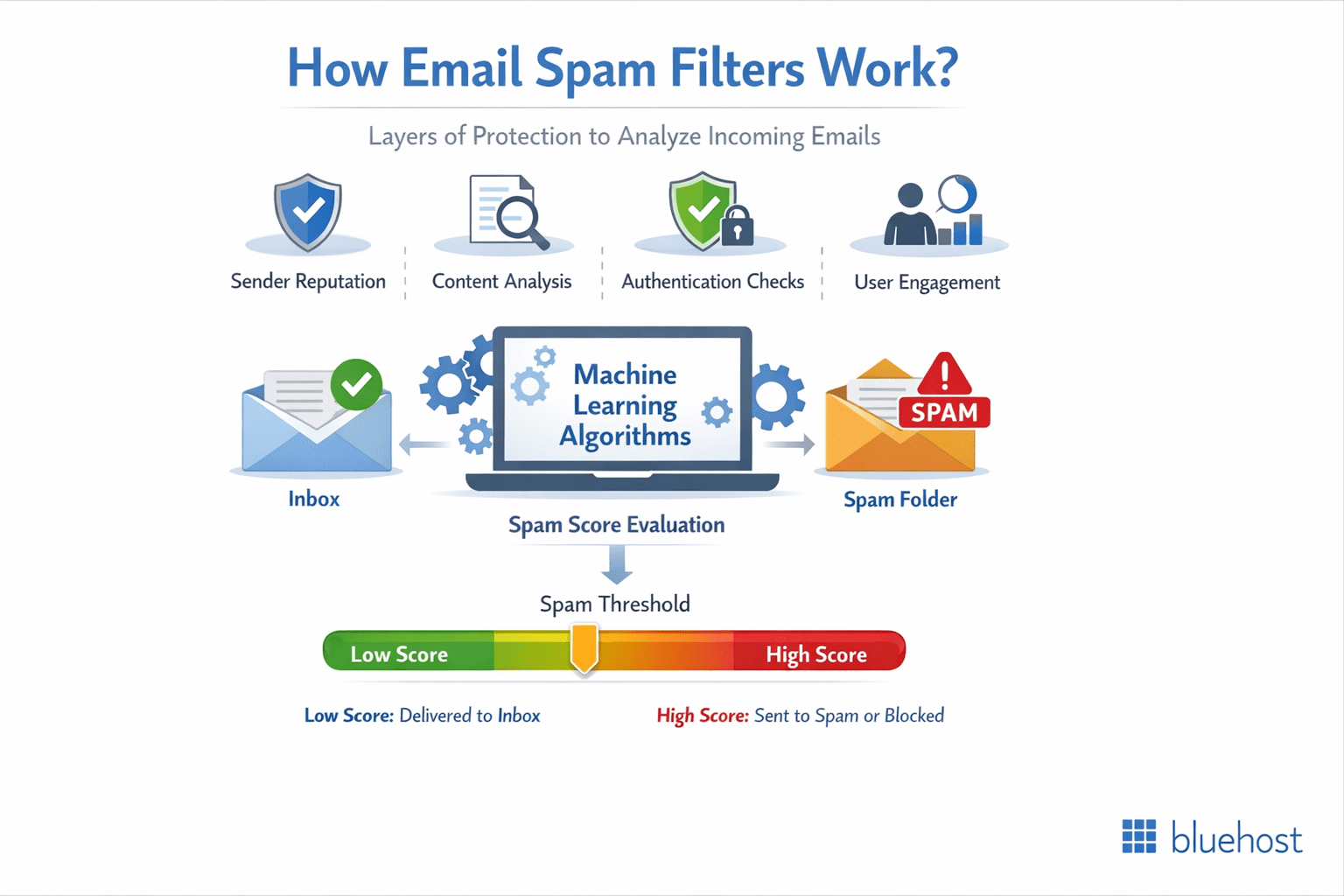
The filtering process happens in milliseconds, but involves complex calculations that assign spam scores to each message. If your email exceeds the spam threshold, it gets redirected to the spam folder or blocked entirely. Understanding this process is the first step in ensuring your emails reach the inbox.
Why even legitimate emails get flagged as spam?
Legitimate emails often trigger spam filters due to technical misconfigurations, poor sending practices or content that resembles spam patterns. Small businesses and WordPress website owners are particularly vulnerable because they may lack proper email authentication setup or use shared hosting environments with poor sender reputation.
Additionally, spam filters are intentionally aggressive to protect users, which means they’d rather mark a legitimate email as spam than let a dangerous message through. This “better safe than sorry” approach means that even minor red flags can cause your emails to be filtered.
Top 6 reasons emails go to spam
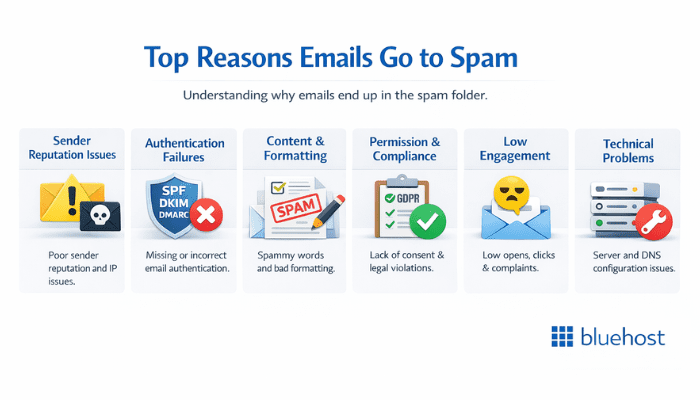
Understanding the specific factors that cause spam depends on recognizing the various elements spam filters evaluate. Let’s explore the most common culprits behind email deliverability problems.
1. Sender reputation and trust issues
Your sender reputation acts like a credit score for email delivery. Internet Service Providers (ISPs) track your sending history, including bounce rates, complaint rates and engagement metrics. If you’re sending from a new domain, shared hosting environment or have a history of poor email practices, your reputation suffers.
Domain age and consistency also matter significantly. Newly registered domains or frequent changes in sending domains raise red flags with spam filters. This is why many users experience initial deliverability challenges when setting up new websites or email campaigns.
IP reputation is equally important. If you’re using shared hosting, you’re sharing an IP address with other users. If any of those users engage in spammy behavior, it can negatively impact everyone using that IP. This is one reason why dedicated IP addresses or reputable email service providers often improve deliverability.
2. Missing or incorrect email authentication
Email authentication protocols like SPF (Sender Policy Framework), DKIM (DomainKeys Identified Mail) and DMARC (Domain-based Message Authentication, Reporting and Conformance) are essential for proving your emails are legitimate. Without proper authentication, spam filters treat your messages with suspicion.
SPF records tell receiving servers which IP addresses are authorized to send emails on behalf of your domain. DKIM adds a digital signature that verifies your message hasn’t been tampered with during transit. DMARC builds on both SPF and DKIM to provide clear instructions on how to handle authentication failures.
Many WordPress users and small business owners overlook these technical requirements, leading to deliverability problems. With Bluehost WordPress hosting, you get tools to set up these records, but they require proper configuration to work effectively.
3. Content and formatting issues
The content of your emails plays a crucial role in spam detection. Certain words, phrases and formatting choices can trigger spam filters. Common problematic elements include excessive use of capital letters, multiple exclamation points, misleading subject lines and suspicious links.
HTML formatting issues also contribute to spam filtering. Emails with broken HTML code, excessive images without alt text or poor text-to-image ratios often get flagged. Additionally, using URL shorteners or linking to suspicious domains can harm your deliverability.
Subject lines that sound overly promotional, contain special characters or make unrealistic promises are particularly problematic. Phrases like “Guaranteed results!” or “Act now!” are red flags for spam filters, even in legitimate business communications.
4. Permission and compliance problems
Sending emails to people who haven’t explicitly opted in is not only poor practice but also illegal in many jurisdictions. The CAN-SPAM Act in the United States and GDPR in Europe require clear consent before sending marketing emails. Violating these regulations can quickly land your emails in spam folders.
Purchased email lists are particularly problematic because recipients never consented to receive your messages. High complaint rates from these lists quickly damage your sender reputation. Additionally, failing to provide clear unsubscribe options or honoring unsubscribe requests promptly can trigger spam filters.
List hygiene is crucial for maintaining good deliverability. Continuing to send emails to addresses that consistently bounce or don’t engage signals to ISPs that you’re not maintaining your list properly.
5. Engagement and sending behavior issues
Low engagement rates signal to ISPs that your emails aren’t wanted by recipients. If people consistently delete your emails without opening them, mark them as spam or don’t interact with your content, spam filters take notice. This creates a negative feedback loop where poor engagement leads to worse deliverability.
Sending patterns also matter significantly. Sudden spikes in email volume, irregular sending schedules or blasting large numbers of emails from new accounts can trigger spam filters. ISPs prefer consistent, gradual sending patterns that indicate legitimate business communications.
Frequency and timing affect deliverability too. Sending too many emails too quickly can overwhelm spam filters, while sending at inappropriate times might result in higher complaint rates from annoyed recipients.
6. Technical and infrastructure problems
Technical issues with your sending infrastructure can cause deliverability problems. These include problems with your mail server configuration, DNS settings or hosting environment. Many WordPress users experience these issues when using default hosting email servers that aren’t optimized for bulk sending.
Shared hosting environments can be particularly problematic for email deliverability. Since you’re sharing resources with other users, any poor sending practices by your neighbors can affect your reputation. This is why many businesses eventually move to dedicated email sending services.
Reverse DNS lookup issues, missing or incorrect MX records and other technical misconfigurations can also trigger spam filters. These problems are often invisible to users but significantly impact deliverability.
How to identify why your emails are going to spam?
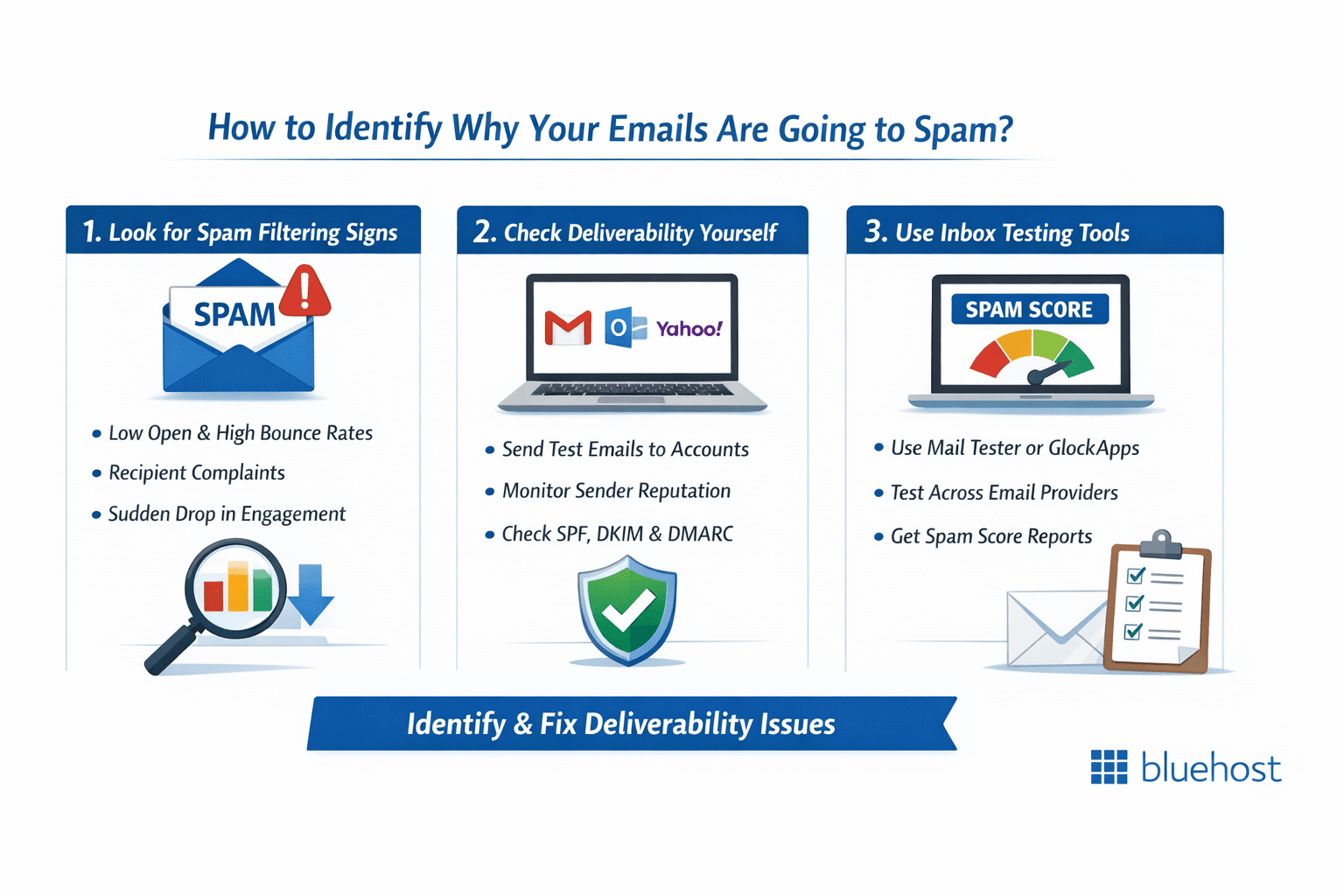
Before you can fix your spam problems, you need to accurately diagnose what’s causing them. Here are the key methods for identifying deliverability issues.
1. Look for signs your emails are being filtered as spam
The most obvious sign is dramatically poor email open rates compared to industry standards. If your typical open rate is below 15-20%, spam filtering might be the culprit. Additionally, high bounce rates, especially soft bounces, can indicate filtering issues.
Recipient feedback provides valuable clues. If people tell you they’re not receiving your emails or that they found them in their spam folder, you have a clear indication of deliverability problems. Pay attention to patterns – if Gmail users consistently report spam issues but Outlook users don’t, you can narrow down the problem.
Sudden drops in engagement metrics often signal new deliverability problems. If your open rates, click rates or reply rates suddenly decrease without changes to your content or sending practices, spam filtering is a likely cause.
2. Check email deliverability without asking recipients
Create test accounts with major email providers (Gmail, Outlook, Yahoo) and add them to your email list. Send campaigns to these accounts and check where your messages land. This simple method provides immediate feedback on deliverability across different platforms.
Monitor your sender reputation using free tools like Google Postmaster Tools, which provides insights into your Gmail deliverability. This tool shows your domain reputation, IP reputation and spam rate, helping you identify specific problems.
Check your email authentication status using tools like MXToolbox or DMARC Analyzer. These services verify that your SPF, DKIM and DMARC records are properly configured and provide recommendations for improvement.
3. Use tools to test inbox placement and spam scores
Several tools can help you test your email deliverability before sending campaigns. Mail Tester provides a comprehensive spam score analysis by examining your email content, authentication and sending practices. Simply send a test email to their service and receive detailed feedback.
GlockApps and EmailOnAcid offer inbox placement testing across multiple email providers. These services show you exactly where your emails land and provide specific recommendations for improvement.
WordPress users can leverage plugins like WP Mail SMTP to understand why emails go to spam and prevent deliverability issues. These tools include built-in testing features that integrate directly with your website, making it simple to monitor email performance and identify spam triggers without requiring advanced technical knowledge.
How to fix emails going to spam?
Once you’ve identified the causes of your spam problems, implementing the right solutions will dramatically improve your deliverability. Here are the most effective fixes.
1. Set up and verify SPF, DKIM and DMARC records
Proper email authentication is fundamental to avoiding spam filters. Start by creating an SPF record in your DNS settings that authorizes your mail servers to send emails on behalf of your domain. A basic SPF record might look like: “v=spf1 include:_spf.google.com ~all” for Google Workspace users.
DKIM setup requires generating a public public key to your DNS records. Your email service provider should provide specific instructions for DKIM configuration. Once set up, DKIM adds a digital signature to your emails that proves they’re authentic.
DMARC builds on SPF and DKIM authentication protocols to prevent emails from going to spam by instructing inbox providers how to handle authentication failures. Begin with a monitoring-only DMARC policy such as “v=DMARC1; p=none; rua=mailto:dmarc@[yourdomain].com” to gather authentication reports and understand why emails go to spam before implementing stricter enforcement policies.
To prevent emails from going to spam, always verify your email authentication setup using tools like MXToolbox or DMARC Analyzer to ensure SPF, DKIM and DMARC records are properly configured. Misconfigured authentication can actually harm your email deliverability more than having no authentication at all, making testing essential.
2. Improve subject lines, content and email design
Craft subject lines that are clear, specific and avoid spam trigger words. Instead of “Amazing deal – act now!” try “20% off WordPress hosting plans this week.” Be descriptive and honest about your email content to build trust with both recipients and spam filters.
Balance your content with appropriate text-to-image ratios. Aim for at least 60% text content and always include alt text for email images. Avoid excessive formatting, multiple fonts or colors that make your emails look unprofessional or spammy.
Include a clear unsubscribe link and your physical mailing address in every email. These elements are legally required and their absence is a strong spam signal. Make sure your unsubscribe process is simple and honors requests promptly.
Test your email content using spam checking tools before sending. Many email marketing platforms include built-in spam checkers that highlight potentially problematic content.
3. Clean your email list and remove inactive addresses
Regularly remove email addresses that consistently bounce or haven’t engaged with your emails in 6-12 months. These inactive subscribers hurt your engagement rates and signal to ISPs that you’re not maintaining your list properly.
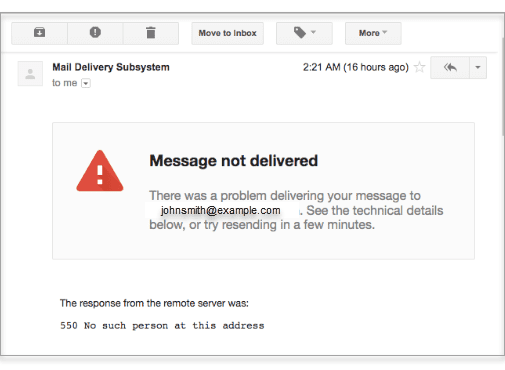
Implement a double opt-in process for new subscribers to ensure they actually want to receive your emails. This extra step significantly improves engagement rates and reduces spam complaints.
To prevent your emails from going to spam, segment your list based on engagement levels and send re-engagement campaigns to inactive subscribers before removing them. This gives genuinely interested people a chance to stay on your list while cleaning out truly inactive addresses that could harm your sender reputation and increase spam complaints.
Monitor your email bounce and complaint rates closely. Bounce rates above 5% or complaint rates above 0.1% indicate serious list hygiene problems that need immediate attention.
4. Use a reliable SMTP or email service provider
Your choice of email infrastructure directly impacts whether your messages reach the inbox or get flagged as spam. Default hosting email servers often share IP addresses with hundreds of other users, making it difficult to maintain a clean sender reputation. That’s why switching to a dedicated email solution makes such a significant difference in deliverability.
If you’re running a business website or sending important communications, a professional email service gives you the reliability and features you need. For WordPress users, plugins like WP Mail SMTP integrate seamlessly with business-grade email providers to ensure your WordPress notifications and contact forms bypass spam filters consistently.
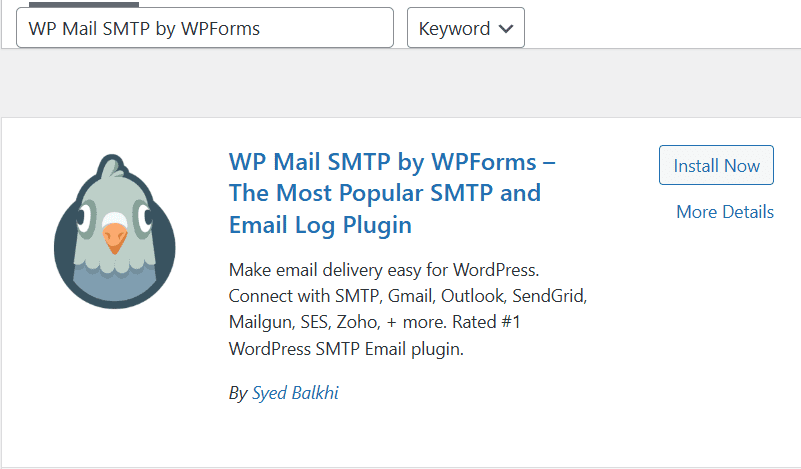
Beyond basic email delivery, professional email services provide built-in spam protection that works both ways – keeping spam out of your inbox while ensuring your outgoing messages meet ISP requirements. Features like advanced filtering, automatic authentication setup and dedicated support help you maintain a strong sender reputation. For high-volume senders, a dedicated IP address gives you complete control over your email reputation.
When you use Bluehost professional email, you get enterprise-grade infrastructure designed specifically to maximize deliverability. Our service includes features like custom domain addresses, calendar integration and contact management. So, you get everything needed to run professional business communications from one reliable platform. Switch to Bluehost professional email today to ensure your important messages always reach their destination.
Actions your subscribers can take to improve deliverability
While you can’t directly control recipient behavior, you can educate them on actions that help prevent emails from going to spam and improve deliverability for everyone.
1. Mark emails as “not spam”
When subscribers find your legitimate emails in their spam folder, marking them as “not spam” sends a positive signal to email providers. This action tells the spam filter that your emails are wanted, gradually improving your reputation.
Include instructions in your welcome emails asking subscribers to check their spam folders initially and mark your emails as legitimate if they find them there. This proactive approach can prevent deliverability problems before they start.
For restaurant owners and other local businesses, encourage customers who sign up for your email list during in-person interactions to whitelist your address – this simple step helps prevent your emails from going to spam and ensures they receive your updates reliably.
2. Add the sender to contacts or whitelist
Recipients who add your email address to their contacts list or create email rules to whitelist your domain help ensure your messages reach their inbox. This is the strongest positive signal recipients can send about your emails.
Provide clear instructions for adding your email to contacts in your welcome messages. Different email providers have different processes, so consider including instructions for major platforms.
Encourage engaged subscribers to whitelist your domain, not just your specific email address. This protects against deliverability issues if you need to send from different addresses within your domain.
How to prevent emails from going to spam long-term?
Sustainable email deliverability requires ongoing attention to best practices and proactive monitoring.
1. Warm up new domains and IP addresses
When starting with a new domain or IP address, gradually increase your sending volume over several weeks. Start with your most engaged subscribers and slowly add more recipients as your reputation builds.
Begin with just a few dozen emails per day and gradually increase to your target volume over 4-6 weeks. This gradual approach helps establish trust with ISPs and avoids triggering spam filters.
During the warmup period, prioritize high-engagement content to establish a strong sender reputation and avoid spam filters. Understanding why emails go to spam is crucial – new sending addresses without established credibility often trigger spam flags. Reserve promotional messages until your email reputation is fully developed and your domain’s trustworthiness is confirmed by recipient engagement patterns.
2. Maintain consistent sending patterns
Establish regular sending schedules that recipients can expect. Whether you send weekly newsletters or daily updates, consistency helps build trust with both recipients and ISPs.
Avoid sudden spikes in volume or frequency that might trigger spam filters. If you need to send additional emails, gradually increase your volume rather than making dramatic changes.
Timing your emails strategically around recipient time zones and preferences can significantly reduce the likelihood of why emails go to spam. Sending at optimal times improves engagement rates, which signals to inbox providers that your emails are valuable, thereby improving deliverability and avoiding spam filters.
3. Monitor engagement, complaints and bounce rates
To prevent emails from landing in spam, monitor essential deliverability metrics like open rates, click rates, bounce rates and complaint rates regularly. Set up automated alerts to catch sudden changes that could indicate why emails go to spam, allowing you to address deliverability issues before they impact your sender reputation.
To prevent your emails from landing in spam folders, monitor key performance benchmarks closely: maintain bounce rates below 2%, keep complaint rates under 0.1% and achieve open rates above 20%. When your email metrics consistently fall below these industry standards, it signals potential deliverability problems that require immediate attention to avoid spam filters.
Use the data to identify trends and patterns. If certain types of content or subject lines consistently perform poorly, adjust your strategy accordingly.
Final thoughts
Understanding why emails go to spam and the email spam reasons behind deliverability issues is crucial for business success. Whether addressing why are my emails landing in spam or fixing WordPress email going to spam problems, proper authentication and sender reputation are essential. The strategies in this guide help prevent situations where emails goes to spam and ensure your messages reach intended recipients.
Bluehost Professional email includes advanced spam and virus protection, data encryption, and is supported by a reliable infrastructure designed for high deliverability. Additionally, we offer 24/7 expert human support to help ensure business emails reach the inbox reliably and to assist with any issues that arise. These features collectively help maintain email security, credibility, and consistent delivery for business communications.
Ready to solve your email deliverability challenges? Get started with Bluehost Professional email today and experience worry-free email delivery.
FAQs
Your emails land in spam when they trigger filters—often due to poor sender reputation, missing authentication records or spammy content. Low engagement rates and complaint history can also hurt your deliverability over time.
Install an SMTP plugin to authenticate your emails properly, verify your domain with SPF and DKIM records and use a reputable email service provider. Default WordPress mail functions often lack proper authentication.
Spam filters flag emails containing excessive capitalization, overuse of exclamation marks, spam trigger words like “act now” or “free money,” and an excessive number of links. Understanding why emails go to spam helps you avoid these red flags—write with natural language, limit aggressive sales phrases and maintain a proper text-to-image ratio to improve deliverability.
Absolutely. Sending to inactive or purchased lists tanks your sender reputation fast. People who don’t recognize you mark emails as spam, which signals to providers that you’re a risky sender worth blocking.
SPF, DKIM and DMARC records verify you’re authorized to send from your domain. These authentication protocols tell receiving servers your emails are legitimate, significantly improving inbox placement rates and building sender trust.
Email providers track your sending patterns, complaint rates and engagement metrics. A damaged reputation from spam complaints or bounces can blacklist your domain or IP, making inbox placement nearly impossible until rebuilt.
Send consistently to engaged subscribers, remove inactive contacts regularly, authenticate your domain properly and monitor bounce rates. Warm up new IPs gradually, maintain clean lists and make unsubscribing easy to reduce complaints.
Gmail uses more aggressive spam filtering than many other providers and has stricter authentication requirements. Gmail also weighs user engagement more heavily in filtering decisions. If your Gmail recipients rarely open or interact with your emails, Gmail’s algorithms learn to filter similar messages. Focus on improving engagement with Gmail users and ensure your authentication records are properly configured.
Switching email providers can help if your current provider has reputation problems or lacks proper deliverability features. However, if the issues stem from your content, list quality or authentication setup, changing providers alone won’t solve the problem. Address the root causes first, then consider switching to a provider that specializes in deliverability if needed.
Yes, both images and specific words can trigger spam filters. Emails that are mostly images with little text often get filtered, especially if images lack alt text. Common spam trigger words include “free,” “guaranteed,” “act now,” and excessive use of capital letters or exclamation points. However, context matters more than individual words – focus on creating honest, valuable content rather than trying to avoid every potential trigger word.
Unsubscribes are actually better for deliverability than spam complaints. When people unsubscribe instead of marking emails as spam, it sends a neutral signal to ISPs. Clean lists with engaged subscribers perform much better than large lists with many uninterested recipients. Make unsubscribing easy to avoid spam complaints and maintain list quality.
Yes, transactional emails like order confirmations, password resets and WordPress notifications can end up in spam folders. This often happens due to authentication problems, poor sender reputation or hosting issues. WordPress users frequently experience this with contact form notifications and automated emails. Using a dedicated email service provider for transactional emails often resolves these issues.



Write A Comment