 ChatGPT,
 Claude,
 Gemini,
 Grok — all four for
Bluehost AI Builder: Plans, Credits, and How Credits Work
Bluehost AI Builder uses credits. A credit is used each time you ask AI Builder to create or change something. This article explains what each plan includes, what does and doesn’t use a credit, and what happens when you run out.
The Plans
Every plan lets you build and publish as many sites and apps as you like. What changes between plans is the number of credits you get and whether you can publish on a domain you own.
| Plan | AI credits | Where you can publish |
|---|---|---|
| AI Builder Free | 5 per day, up to 30 per 30-day period | Your free Bluehost AI Builder address |
| AI Builder Lite | 100 per month | Your own domain |
| AI Builder Standard | 200 per month | Your own domain |
| AI Builder Pro | 400 per month | Your own domain |
For current plans and pricing, visit the Bluehost AI Builder page.
Hosting is included on every plan. The AI Builder Free plan doesn’t require a credit card and has no end date. Free sites and apps go live on an automatically generated Bluehost AI Builder address ending in .app.bluehost.ai. To publish on a domain you own, such as yourbusiness.com, upgrade to a paid plan.
AI Builder Lite, Standard, and Pro are otherwise the same. The only difference is how many credits you get each month. You can pay monthly or for a 12-month term. Annual billing is charged up front for 12 months, and the term and renewal price are shown before you confirm.
What Uses a Credit
Each message that creates or changes your site or app uses 1 credit, whether you ask for a whole new feature or a change to a single word. The size of the request doesn’t change the cost.
| Action | Cost |
|---|---|
| Your first build | 1 credit |
| Any message asking AI Builder to add, change, or fix something | 1 credit |
| A build that fails or ends in an error | 1 credit. Contact Support, who can review it. |
| Attaching files or images to a message you’re already sending | Included in that message |
| Answering the questions AI Builder asks before your first build | Free |
| Asking a question that doesn’t change your site or app | Free |
| Previewing, publishing, and sharing | Free |
| Hosting your published site or app | Free |
Questions that don’t change your site or app, such as “What does this page do?” or “Why did you lay it out this way?”, don’t use credits. Free messages are limited to prevent abuse.
Note: Credits pay for building. Once your site or app is live, visitors don’t use your credits, and keeping it online doesn’t either.
Where to See Your Balance
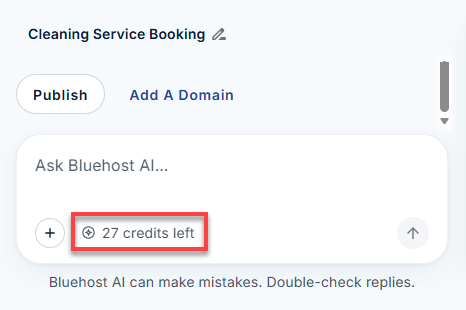
Your remaining credits are shown in the chat box while you work, for example, “27 credits left.”
When Credits Refresh
On the Free plan, your daily allowance resets at 00:00 UTC, and the 30-day limit is counted from the date you signed up, not the calendar month.
On a paid plan, your credits are added monthly. Annual plans receive the same monthly allowance rather than the full year at once.
Credits don’t roll over. Plan credits expire 30 days after they’re added, and top-up credits expire 30 days after purchase, on their own separate schedule.
Buying Extra Credits
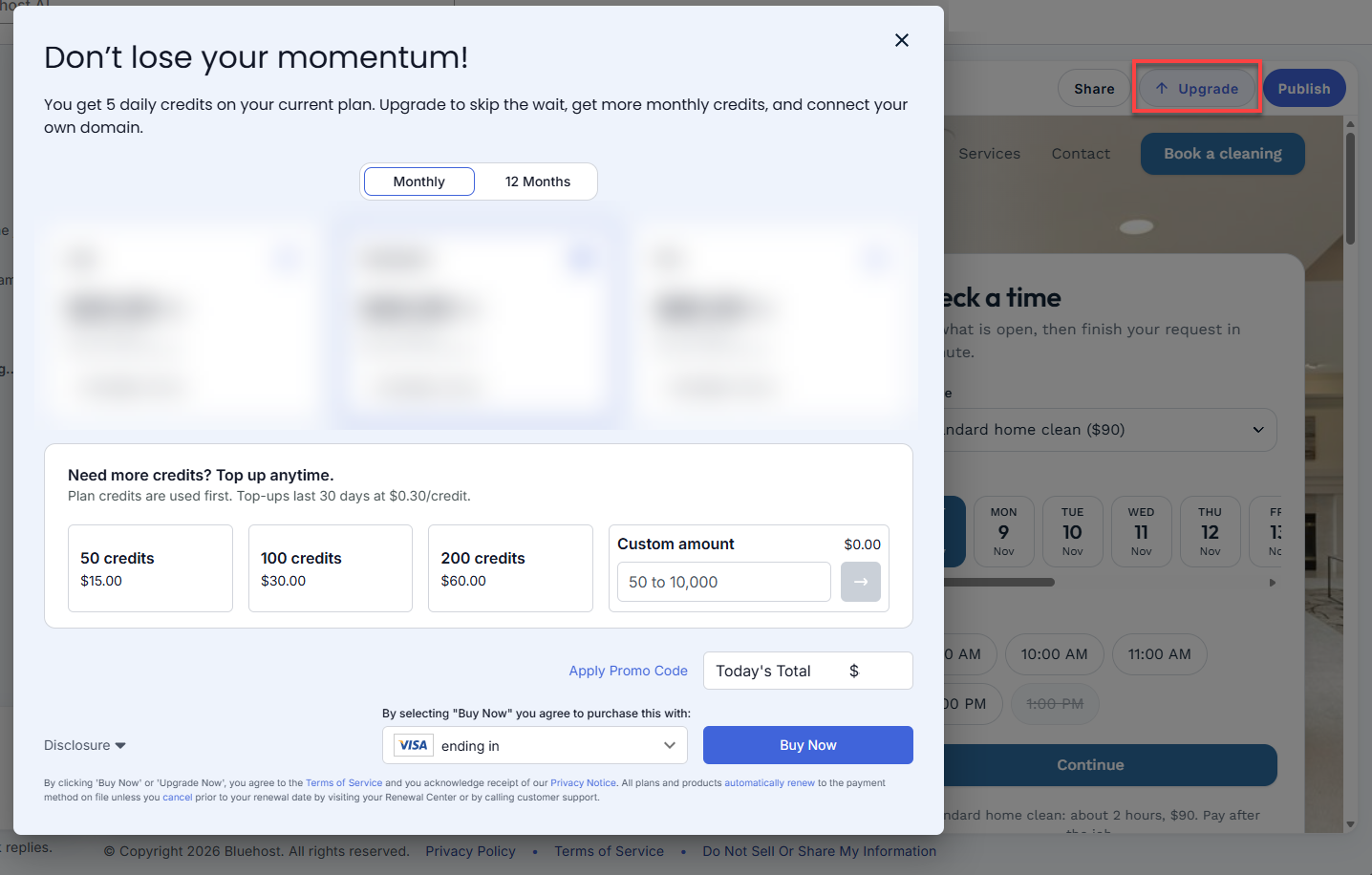
If you need more credits before your next refresh, you can buy a credit top-up. Top-ups are available on every plan, including Free.
- Choose a pack of 50, 100, or 200 credits, or enter a custom amount from 50 to 10,000 credits.
- Top-ups are a one-time purchase, not a subscription.
- Top-up credits expire 30 days after purchase.
To buy a top-up:
- In the AI Builder editor, click Upgrade above the preview.
- Choose a credit pack, or enter a custom amount from 50 to 10,000.
- Review Today’s Total, then click Buy Now.
Your plan credits are always used first. Top-up credits are used after those run out, starting with the ones you bought earliest.
What Happens If You Run Out
Your published site or app stays online and keeps working exactly as it did. Only new building pauses: the chat box is disabled, and a note explains why. This happens only when both your plan credits and any top-up credits are used up.
You have two options:
- Wait for your credits to refresh. On the Free plan, your daily allowance comes back at 00:00 UTC. On a paid plan, credits refresh at the start of your next monthly cycle.
- Add credits now. Buy a credit top-up, or upgrade to a plan with a larger monthly allowance. Either one turns the chat box back on right away, and AI Builder picks up where you left off.
Changing Your Plan
Moving Up
You can upgrade at any time. Your new credits are available right away, and the price is prorated for the part of the billing term you’ve already paid for. Upgrading keeps your billing term: monthly stays monthly, and annual stays annual.
To upgrade your plan:
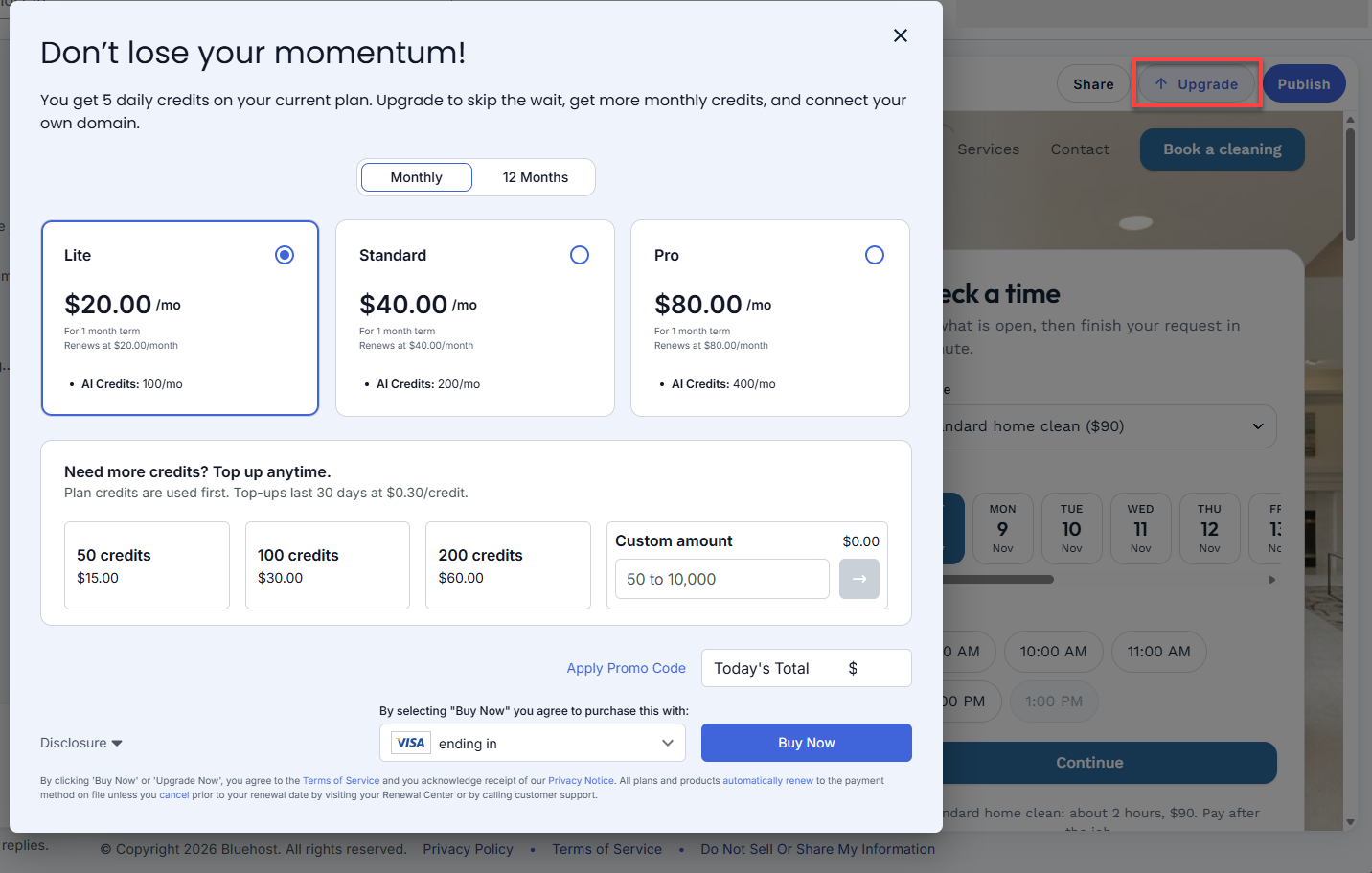
- In the AI Builder editor, click Upgrade above the preview.
- Choose Monthly or 12 Months, then select the plan you want. The plans you see depend on your current plan.
- Review Today’s Total, then click Buy Now.
Moving Down
To move to a smaller plan or back to the Free plan, contact Bluehost Support. Downgrades aren’t available in AI Builder.
Cancelling
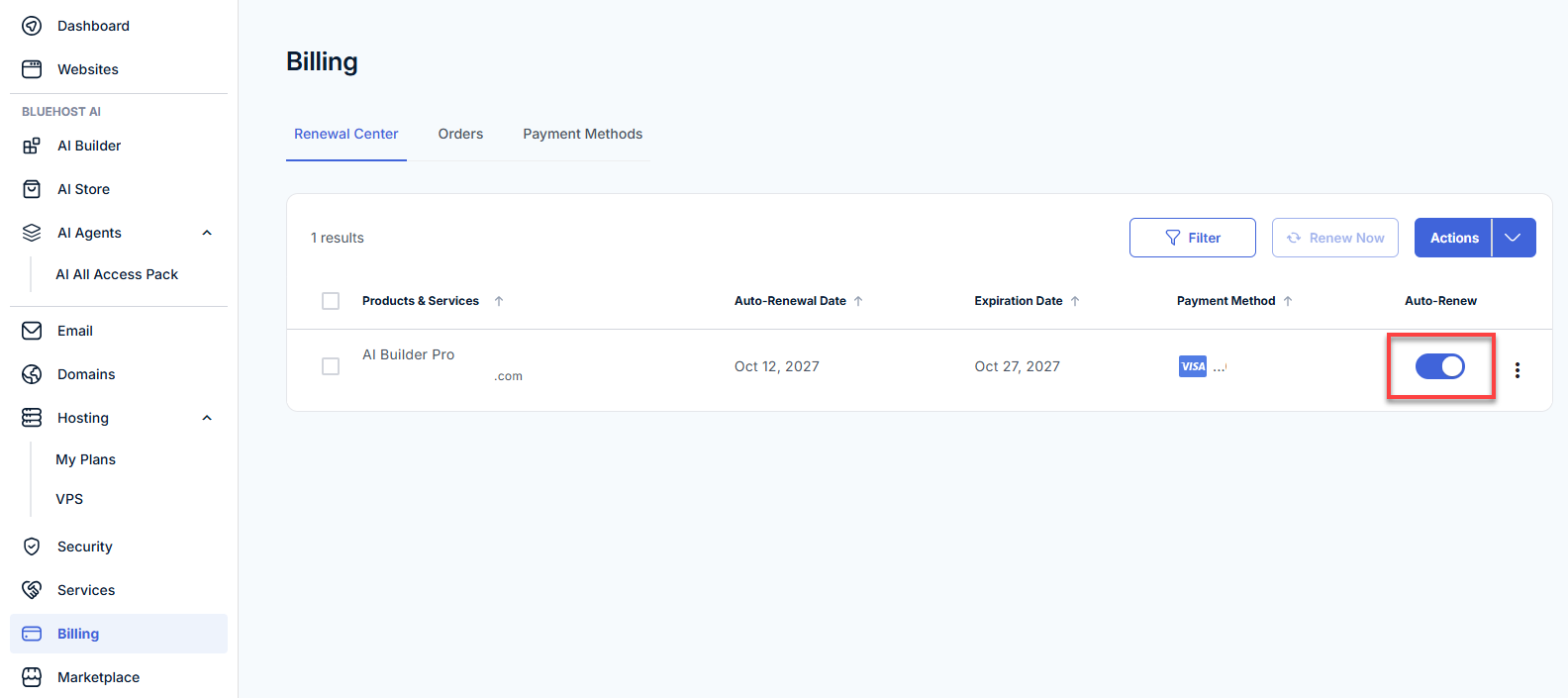
To cancel your paid plan, turn off auto-renewal:
- Log in to your Bluehost Portal.
- In the left menu, click Billing.
- In the Renewal Center, find your AI Builder plan.
- Use the Auto-Renew toggle to turn auto-renewal off.
Your plan stays active until the end of your current billing term. Then your account returns to the Free plan. Your sites and apps stay published on their free Bluehost AI Builder addresses, and your projects and chat history are kept. Any custom domain is disconnected, but it stays registered to you, and you can point it wherever you like.
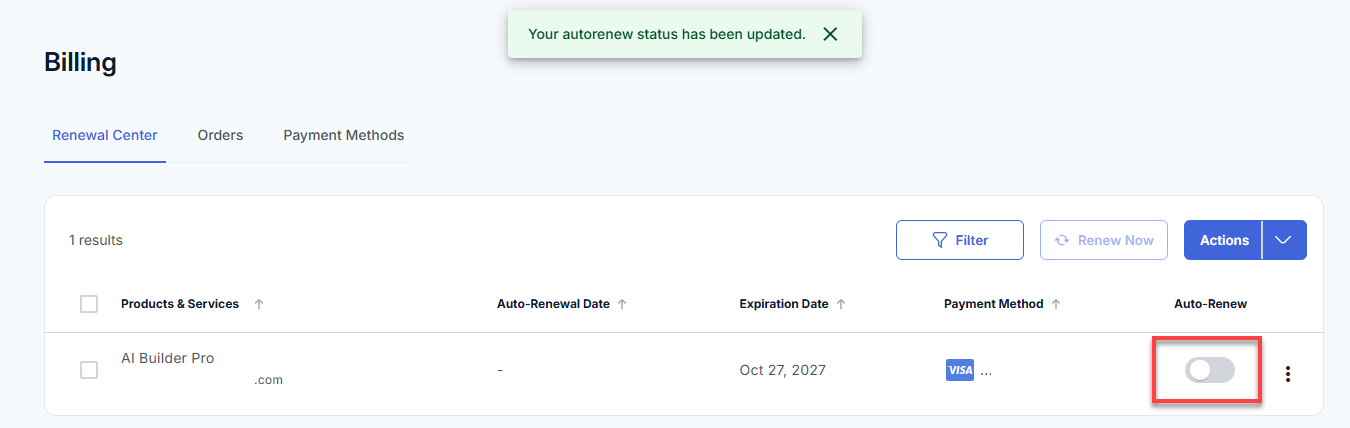
Note: When auto-renewal is off, a message confirms “Your autorenew status has been updated,” the toggle turns gray, and the Auto-Renewal Date shows a dash.
A domain you bought through Bluehost renews separately. To stop it from renewing, turn off its auto-renewal too.
If a Renewal Payment Fails
Your account returns to the Free plan instead of being suspended. Your sites and apps stay published on their free Bluehost AI Builder addresses, your projects are kept, and any custom domain is disconnected. You can upgrade again at any time, then connect your domain again. It isn’t reconnected automatically.
AI Builder Credits and Other Bluehost AI Products
AI Builder credits are separate from credits used by other Bluehost AI products. They aren’t shared and can’t be moved from one product to another.
Related Articles
- What Is Bluehost AI Builder?
- Bluehost AI Builder: How to Start a Builder Plan
- Bluehost AI Builder: Build and Publish Your First Website and App
- Bluehost AI Builder: Publishing Your App and Connecting a Domain
- Bluehost AI Builder: How to Write Effective Prompts
- Bluehost AI Builder: Frequently Asked Questions
Summary
Every Bluehost AI Builder plan lets you build and publish unlimited sites and apps. Credits pay for building: each message that creates or changes your site or app uses 1 credit, while questions, publishing, sharing, hosting, and visitors are free. When you run out, your live site stays online, and only new building pauses until your credits refresh, you buy a top-up, or you upgrade.
If you need further assistance, Bluehost Chat Support is available 24 hours a day, 7days a week while Bluehost Phone Support is available 7 days a week from 7 am-12 midnight EST.
- Chat Support - While on our website, you should see a CHAT bubble in the bottom right-hand corner of the page. Click anywhere on the bubble to begin a chat session.
- Phone Support -
- US: 888-401-4678
- International: +1 801-765-9400
You may also refer to our Knowledge Base articles to help answer common questions and guide you through various setup, configuration, and troubleshooting steps.