 ChatGPT,
 Claude,
 Gemini,
 Grok — all four for
Bluehost Google Workspace: How to Renew Your Subscription
Your Google Workspace subscription renews automatically by default, so your email, calendar, and other Google apps keep working, as long as your payment method on file is valid. You can also renew it yourself from your Bluehost Portal, which is useful if you want to renew early or if auto-renewal is turned off for your plan.
Note: You only need to renew Google Workspace manually if you want to renew before the renewal date or if auto-renewal is turned off. Otherwise, your plan renews on its own on the Auto-Renewal Date shown in your Renewal Center.
Important: Renewal pricing may differ from the price you paid when you first purchased Google Workspace, for example, if you started with an introductory offer. The renewal price is based on your plan and number of users, and the total is shown on the Checkout page before you submit payment. Automatic renewals are charged to the payment method on file.
How to Check Your Renewal Date
Before renewing, you can confirm your plan's renewal details from the Google Workspace tab.
- Log in to your Bluehost Portal.
- From the left-hand navigation menu, click on the Email tab.
- Click the Google Workspace tab.

- You’ll be automatically redirected to the Email Management page, where you can manage your email settings and subscriptions.
- On the Email Management page, review the Email Plan Overview section. It shows your plan name, connected domain, renewal settings, and user details.
How to Renew Google Workspace Manually
Use the Renewal Center to renew your Google Workspace plan right away.
- Log in to your Bluehost Portal.
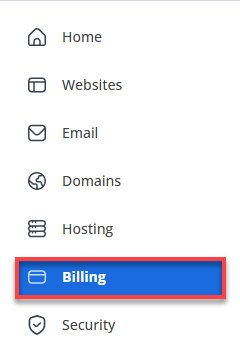
- In the left-hand menu, click Billing.
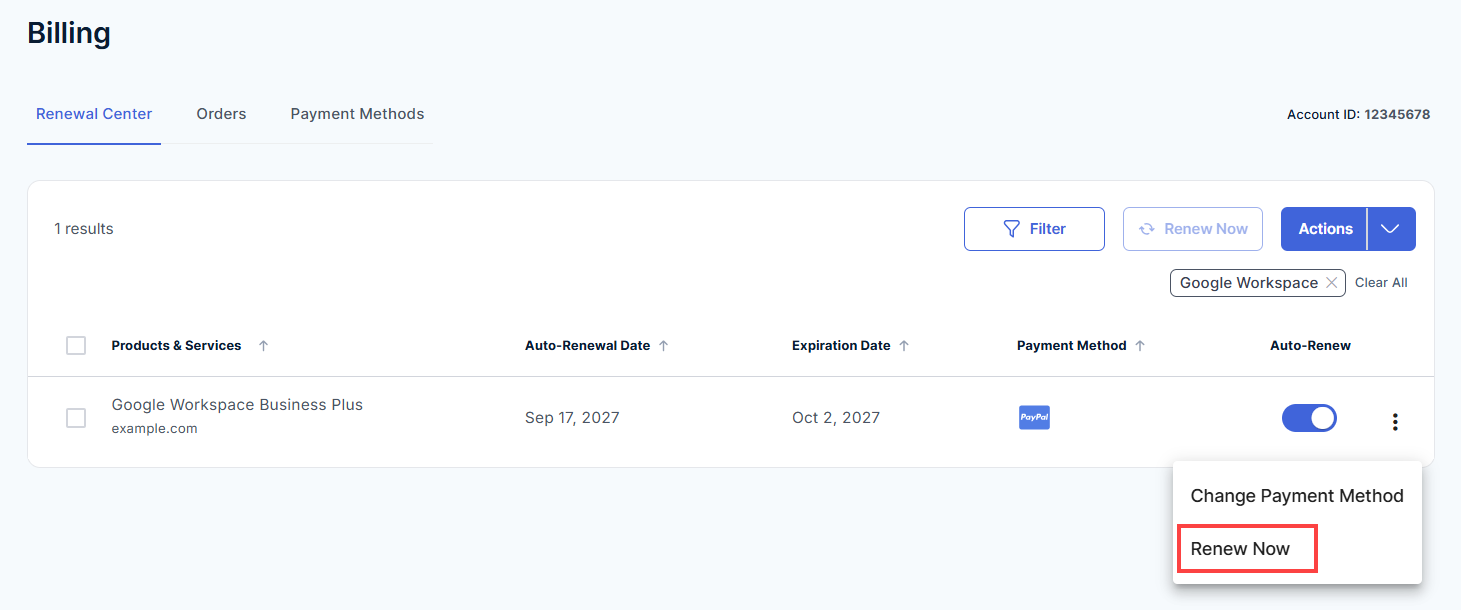
- In the Renewal Center tab, find your Google Workspace plan in the list of products and services.
- Click the three-dot icon at the end of the Google Workspace row, then select Renew Now.
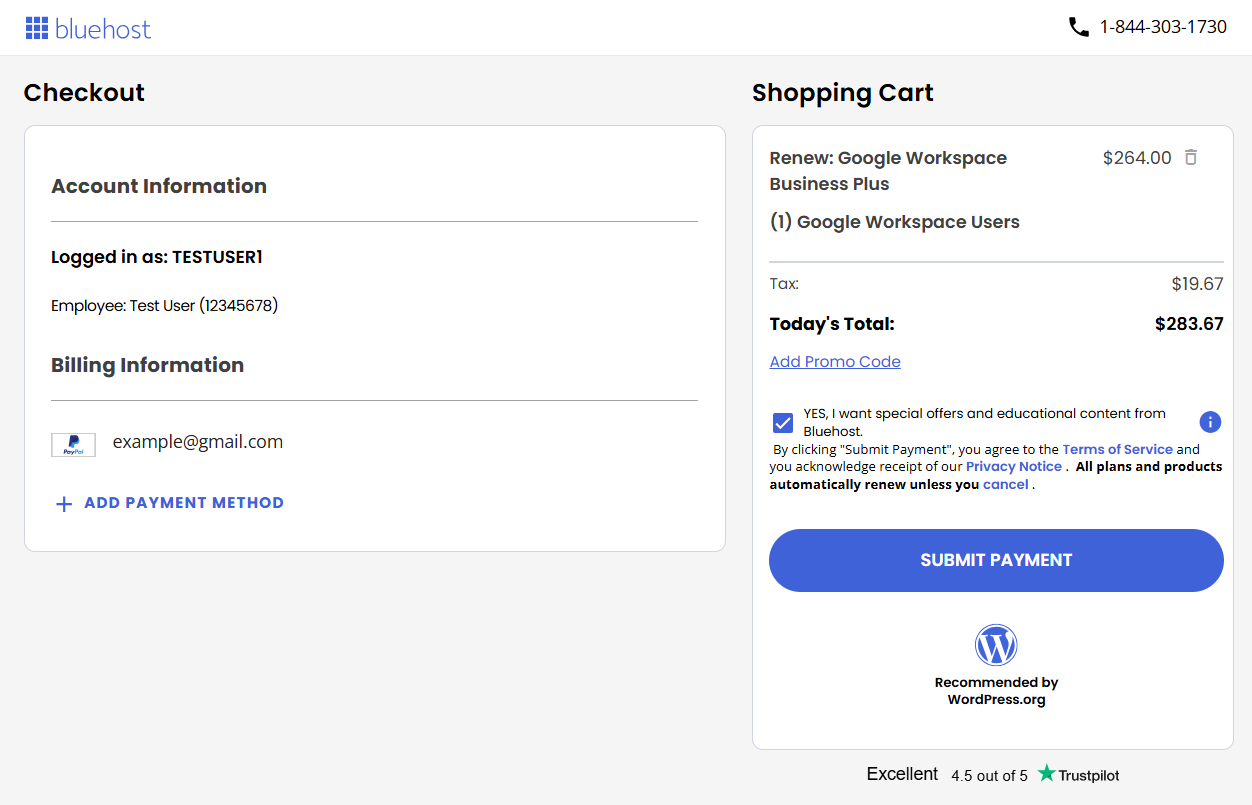
- On the Checkout page, review the following:
- Account Information: Confirm you're logged in to the correct account.
- Billing Information: Check the payment method on file. To use a different one, click Add Payment Method.
- Shopping Cart: Confirm your Google Workspace plan, number of users, tax, and Today's Total. If you have a promo code, click Add Promo Code to apply it.
Prices may vary. For current pricing, visit the Google Workspace page.
- Click Submit Payment to complete your renewal.
Note: By clicking Submit Payment, you agree to the Terms of Service and acknowledge receipt of the Privacy Notice. All plans and products renew automatically unless you cancel them. To stop automatic renewal, see How to Turn Auto-Renewal On or Off.
Once the payment goes through, your Google Workspace subscription is renewed for your current billing term.
How to Turn Auto-Renewal On or Off
Keep auto-renewal on to help avoid interruption to your Google Workspace service (as long as the payment method on file is valid), or turn it off if you prefer to renew manually.
- Log in to your Bluehost Portal.
- In the left-hand menu, click Billing.
- In the Renewal Center, find your Google Workspace plan.
- In the Auto-Renew column, use the toggle to turn auto-renewal on or off.
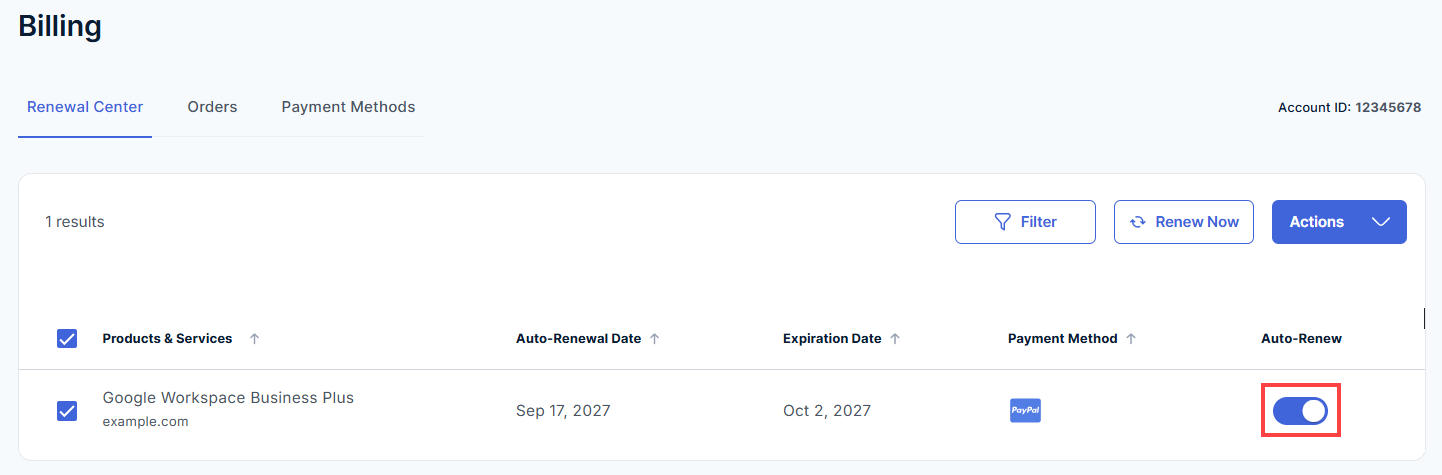
- Click Continue to confirm your choice.
Important: If auto-renewal is off and you don't renew before the Expiration Date, your Google Workspace subscription may be suspended, and your users could lose access to email and other Google apps.
Frequently Asked Questions
Do I need to renew Google Workspace manually?
No. Your subscription renews automatically by default. You only need to renew manually if you want to renew before the renewal date or if auto-renewal is turned off.
Will my renewal price be the same as what I paid when I first purchased?
Not always. Renewal pricing may differ from your first purchase price, for example if you started with an introductory offer. The renewal price is based on your plan and number of users, and the total is shown on the Checkout page before you submit payment.
Prices and plans may change. For current pricing, visit the Google Workspace page.
What happens if I don't renew before the Expiration Date?
If auto-renewal is off and you don't renew before the Expiration Date, your Google Workspace subscription may be suspended, and your users could lose access to email and other Google apps. Keep auto-renewal on to help avoid interruption, as long as the payment method on file is valid. See How to Turn Auto-Renewal On or Off.
Which payment method is used for my renewal?
Automatic renewals are charged to the payment method on file. When you renew manually, you can check the payment method on the Checkout page. To use a different one, click Add Payment Method.
Related Articles
Summary
Google Workspace renews automatically on your Auto-Renewal Date unless you turn auto-renewal off. To renew early or manually, go to Billing in your Bluehost Portal, find your plan in the Renewal Center, click Renew Now, and complete checkout with Submit Payment.
If you need further assistance, Bluehost Chat Support is available 24 hours a day, 7days a week while Bluehost Phone Support is available 7 days a week from 7 am-12 midnight EST.
- Chat Support - While on our website, you should see a CHAT bubble in the bottom right-hand corner of the page. Click anywhere on the bubble to begin a chat session.
- Phone Support -
- US: 888-401-4678
- International: +1 801-765-9400
You may also refer to our Knowledge Base articles to help answer common questions and guide you through various setup, configuration, and troubleshooting steps.