



Key highlights
- Diagnose what’s slowing your WooCommerce store using speed tests and Core Web Vitals.
- Optimize images, caching and scripts to speed up product, cart and category pages.
- Reduce plugin bloat and database overhead to improve server response time.
- Strengthen performance at checkout to cut cart abandonment and boost conversions.
- Monitor performance continuously to prevent slowdowns as your store grows.
- Speed up WooCommerce performance by optimizing hosting, CDN and server-level caching.
For any eCommerce store owner, speed is a major factor that can make or break the user experience and, ultimately, conversions. A fast, well-performing WooCommerce-hosted site provides visitors with a smooth shopping experience. It makes them more likely to explore products, complete purchases and return for future shopping. Knowing how to speed up WooCommerce Performance can greatly help engage more traffic.
Conversely, a slow WooCommerce site can lead to frustrated users, increased bounce rates and a drop in revenue. Site speed directly influences customer satisfaction and impacts search engine rankings, making it a vital part of your eCommerce strategy.
One key factor in your site’s performance is your hosting company, as it supplies the server resources your store needs to run smoothly. Additionally, implementing a range of optimization techniques, from image compression to caching, can dramatically enhance your WooCommerce site’s load time. It creates a faster experience for users and higher chances of conversion.
In this blog, you’ll find a detailed look at the most effective ways to speed up WooCommerce. It will cover strategies to optimize images, streamline server resources and enhance your website’s overall speed and efficiency.
Quick overview – How to speed up WooCommerce?
Here’s a quick snapshot of the 13 most effective ways to speed up WooCommerce performance. Use this table as a fast checklist to identify what to fix first and where you can unlock the biggest performance gains for your WooCommerce hosting.
| Optimization area | What to do | Impact on WooCommerce performance |
|---|---|---|
| 1. Performance audit | Test site speed using PageSpeed Insights & Core Web Vitals | Identifies bottlenecks hurting UX & conversions |
| 2. Hosting for WooCommerce | Use Bluehost WooCommerce hosting built for WooCommerce performance | Faster load times, stable checkout during traffic spikes |
| 3. Image optimization | Compress images, use modern formats & lazy loading | Faster product pages, lower bounce rates |
| 4. CDN setup | Use a CDN to serve static files closer to users | Faster global load times |
| 5. Caching configuration | Enable caching (exclude cart & checkout pages) | Reduces load time for repeat visitors |
| 6. Reduce HTTP requests | Minify & combine CSS/JS, remove unused scripts | Faster rendering, fewer server calls |
| 7. Lightweight WooCommerce theme | Use a fast, WooCommerce-optimized theme | Less bloat, quicker page loads |
| 8. Database optimization | Clean revisions, transients & expired data | Faster queries, smoother browsing |
| 9. Plugin & extension cleanup | Remove unused or heavy plugins | Improves server response time |
| 10. Server-level caching & resources | Ensure enough memory, CPU & caching at the server level | Handles high traffic without slowdowns |
| 11. Security hardening | Block brute-force attacks & bot traffic | Prevents performance drops during attacks |
| 12. Checkout & cart optimization | Simplify checkout fields & reduce scripts on checkout pages | Lower cart abandonment |
| 13. Ongoing monitoring & updates | Monitor with Query Monitor + keep themes/plugins updated | Prevents performance regressions |
While this quick overview helps understand ways to speed up WooCommerce store, let us understand why it is needed for your online store or business.
What is the importance of WooCommerce site speed?
Before you know how to speed up WooCommerce performance, knowing the importance of site speed is crucial. Here are reasons why site speed is important:
1. Better user experience
The speed of your WooCommerce site is one of the most important factors influencing user experience. Shoppers expect a seamless, fast-loading experience when browsing your store. A delay of even a few seconds can lead to frustration, causing potential customers to abandon their carts or leave the site entirely.
On the other hand, a fast-loading site encourages users to stay longer, explore more products and complete purchases. This eventually leads to higher engagement and better conversion rates.
2. Higher conversions
WooCommerce store speed has a direct correlation with conversion rates. Studies show that for every second of delay, conversion rates can drop by up to 7%. The quicker your WordPress website loads, the more likely customers will complete a purchase.
A smooth, fast experience not only makes shopping easier but also boosts customer confidence, making them more likely to return for future purchases. In fact, faster sites tend to have lower cart abandonment rates, as the checkout process is more efficient and streamlined.
3. Stronger SEO performance
Google and other search engines consider the site speed in their ranking algorithms. While you optimize your WooCommerce store for multiple factors, a slow WooCommerce site is less likely to rank higher in search result pages.
Faster sites, conversely, are rewarded with better search engine rankings. Since most shoppers start their search for products through search engines, being visible at the top of search results is essential for attracting traffic and increasing sales.
4. Competitive advantage
In current time, when it comes to eCommerce market, prioritizing site speed is crucial for staying ahead. If your WooCommerce store is sluggish, shoppers will easily find faster alternatives. A quick-loading site enhances your store’s credibility, promotes trust and ensures that you aren’t losing customers to faster competitors.
Moreover, a fast WooCommerce site helps with scaling, particularly during high-traffic periods like sales or promotions, without compromising performance.
Now that we’ve seen why speed matters, let’s look at what’s at stake when your WooCommerce store slows down.
What are the risks of a slow WooCommerce store?
Here are the risks that you can face due to a slow WooCommerce store:
1. High bounce rates
A slow-loading WooCommerce store can lead to high bounce rates, which is when users leave your site without interacting or making a purchase. Shoppers expect a fast, smooth experience and if your store takes too long to load, they move to a competitor’s website.
High bounce rates signal to the search engines that your site isn’t providing a satisfactory user experience, which can negatively impact your SEO rankings. This creates a vicious cycle where poor speed causes more bounce, which in turn hurts your visibility.
2. Abandoned carts
Abandoned carts are a significant concern for any WooCommerce website. Slow loading times, especially during checkout, are one of the leading reasons shoppers abandon their carts before completing a purchase.
A delay at the checkout page could be the tipping point for customers who were already on the edge of making a decision. Optimizing your store’s speed can ensure that customers remain engaged and less likely to leave their cart halfway through the process.
3. Negative impact on SEO
A slow WooCommerce WordPress site directly affects its search engine ranking. Search engines, like Google, take page speed into consideration when ranking your websites. A slow site is less likely to appear at the top of search results.
This is a crucial risk because lower search rankings equate to less organic traffic. Even if your site is highly optimized in other aspects, a slow loading time can make it harder to attract potential customers. This can significantly stunt the growth of your online store and decrease your visibility.
4. Decreased customer satisfaction and retention
When users encounter a slow WooCommerce speed, their satisfaction takes a hit. A negative shopping experience can turn first-time visitors into one-time customers and they may be less likely to return. Customer retention is key to long-term success and a sluggish store can undermine that goal.
Repeat customers are more likely to return to faster WooCommerce stores because they associate them with convenience and ease of use. Slow speeds can create friction and damage the relationship with customers, who may opt to shop elsewhere.
5. Lost revenue opportunities
A slower website can cost you revenue in various ways. Customers may abandon their purchases, reducing your conversion rates and search engines may rank your site lower, reducing your organic traffic. Additionally, slow loading times can make it harder for you to scale, especially during high-traffic events like promotions, sales or peak shopping seasons.
All of these issues combined can prevent your WooCommerce store’s performance from reaching its full revenue potential. Addressing site speed problems directly helps prevent lost opportunities and maximizes your store’s profitability. Let’s take a look.
How to speed up WooCommerce performance – 13 points to consider
To maintain the speed of your eCommerce store, you have to follow certain practices. Here are a few things to consider when you want to speed up WooCommerce performance:
1. Assessing your WooCommerce performance
Improving the WooCommerce store’s performance starts with understanding your current site speed, performance metrics and areas needing optimization.
Using tools to evaluate performance
Begin by using tools like Google PageSpeed Insights to get a snapshot of your WooCommerce site’s performance. These tools provide valuable metrics on page load times, core web vitals and specific issues like large images that impact site speed.
How to interpret results related to WooCommerce site speed?
Look for these key metrics in your reports:
- Page Load Time: How fast your WooCommerce store fully loads. Aim for under 3 seconds to reduce bounce rates.
- Largest Contentful Paint (LCP): How quickly the main content becomes visible. Target under 2.5 seconds.
- First Input Delay (FID): How fast your site reacts to clicks or taps. Keep it below 100 ms for smooth interaction.
Identifying bottlenecks and analyzing areas for improvement
Your WooCommerce store may experience bottlenecks due to various factors such as poorly optimized images, an overloaded database or too many HTTP requests. Analyze each area based on the performance tool recommendations, paying special attention to the server response time, image sizes and any external scripts that may slow down the site.
2. Choosing Bluehost – The right hosting provider for WooCommerce
Your hosting provider plays a critical role in how fast, secure and reliable your WooCommerce online store feels to customers. For stores that aim to convert and scale, generic hosting isn’t enough. You need infrastructure built specifically for WooCommerce performance and growth.
Why WooCommerce-optimized hosting matters?
WooCommerce online stores handle dynamic content, real-time inventory, payments and customer data. Hosting that’s optimized for WooCommerce ensures:
- Faster page loads across product, cart and checkout pages
- Consistent performance during sales, promotions and peak traffic
- Built-in security to protect customer data and transactions
- Access to WordPress + WooCommerce experts when you need support
Bluehost WooCommerce Hosting is designed for online stores that prioritize speed, reliability and growth. We combine enterprise-grade performance with WooCommerce-specific optimizations to deliver a premium eCommerce hosting experience. Our hosting handles:
- High transaction volumes
- Multiple concurrent users
- Resource-intensive WooCommerce operations
- Reliable uptime during peak shopping periods
With premium infrastructure and WooCommerce-first optimization, we provide a stable, high-performance foundation for serious online stores. Get started with Bluehsot now!
3. Optimizing images for faster load times
Images are essential for WooCommerce, but can slow down your site if not optimized. Heavy images often result in more space used leading to issues that can make user feel frustrated.
Importance of image optimization to speed up WooCommerce
High-resolution images can take up significant bandwidth, affecting page load speed. Optimizing images reduces file sizes without sacrificing quality, leading to faster loading times and better performance metrics.
Best practices for compressing images without losing quality
Use tools to compress images without quality loss. Choose file formats carefully – JPEG for product images and PNG for icons or transparent images is generally recommended.
Using responsive images and lazy loading to reduce page load times
Responsive images automatically adjust based on screen size, ensuring faster load times across devices. Lazy loading defers image loading until they are needed, reducing initial load times, especially for product-heavy pages.
4. Leveraging a content delivery network (CDN)
A CDN is a global network of servers that delivers content to users based on their geographic location. This can improve load times for WooCommerce stores with a global audience.
How CDNs distribute content to improve load time for global users?
CDNs cache and serve static files from the server closest to the user, reducing load time and enhancing WooCommerce performance for international customers.
Benefits of using a WordPress CDN for WooCommerce stores
By distributing content, a CDN minimizes latency, reduces server load and helps maintain consistent WooCommerce site speed during high-traffic periods.
Tips for setting up a CDN to enhance WooCommerce performance
Most major CDNs integrate with WordPress and WooCommerce through plugins. Choose a CDN provider that supports WooCommerce, configure caching settings and ensure that your content remains up-to-date with automatic cache purging.
5. Installing and configuring caching plugins
Caching plugins are essential for speeding up WooCommerce stores by reducing server requests and improving load time.
Role of caching in speeding up WooCommerce store load
Caching temporarily stores website data, so users don’t have to reload it with each visit. This reduces server load and ensures faster access to repeat visitors.
Popular caching plugins and how they improve speed?
WP Rocket is a top-rated caching plugin that simplifies caching setup with options for page caching, browser caching and file optimization. Other plugins like W3 Total Cache and LiteSpeed Cache also provide robust caching for WooCommerce.
Key settings for caching plugins to optimize WooCommerce performance
For WooCommerce, ensure that pages like the cart and checkout are excluded from caching to prevent issues with dynamic content. Enable options like minification, lazy loading and database cleanup to boost overall site speed.
6. Minimizing HTTP requests and optimizing CSS files
HTTP requests, which include images, scripts and stylesheets, can slow down page load time, especially if numerous elements are loaded simultaneously.
How to reduce the number of HTTP requests to improve site speed?
Reduce the number of files loaded per page by combining CSS and JavaScript files, removing unnecessary scripts and disabling unused WooCommerce features.
Minifying and combining CSS, JavaScript and other resources
Minification removes extra spaces, line breaks and comments from code, making it smaller and faster to load. Plugins like Autoptimize can combine and minify files, reducing the number of HTTP requests on your WooCommerce site.
Using lightweight, fast WooCommerce themes that minimize bloat and improve page speed
A fast, lightweight theme with minimal scripts and bloat is crucial for WooCommerce performance. Themes specifically optimized for WooCommerce are ideal, as they are built to handle product displays and eCommerce functionalities efficiently.
7. Aligning WordPress database for WooCommerce
A well-maintained database is vital for WooCommerce performance as it stores all data from orders, customers and products.
How a clean database can speed up WooCommerce performance
A clean database ensures faster access to data, reducing lag when customers browse or make purchases.
Regularly clear out post revisions, spam comments and expired transients. Use plugins like WP Optimize to streamline database tables and remove redundant data.
WP Optimize simplifies database management by automating cleanup tasks. Running regular cleanups prevents the accumulation of outdated or irrelevant data, maintaining the WooCommerce site speed.
8. Managing and limiting WordPress plugins and WooCommerce extensions
Optimizing your plugins and WooCommerce extensions is key to maintaining fast performance.
The impact of too many plugins on WooCommerce performance
Each active plugin on your WordPress website consumes server resources, increasing load time. Excessive or redundant plugins can cause a slow WooCommerce site, affecting both user experience and SEO. Prioritize plugins essential to your WooCommerce functionality, such as payment gateways and security.
Evaluate and manage plugin settings for optimal speed
Evaluate each plugin’s performance impact by testing load times with and without the plugin. Tools allow you to identify plugins causing slowdowns. Adjust plugin settings to ensure they only run on necessary pages, such as disabling unnecessary scripts on product or checkout pages.
Removing or replacing slow-performing plugins and WooCommerce extensions
Replace heavy plugins with lightweight alternatives wherever possible. For example, if you’re using a plugin to add basic CSS, consider adding custom CSS directly to your theme instead. Regularly review plugins to ensure each one adds value without slowing down your WooCommerce store.
9. Using server-level caching and optimizing server resources
Server-level caching and resource optimization improve your WooCommerce store’s ability to handle high traffic, preventing slowdowns during peak times.
Importance of server-level caching for WooCommerce performance
Server-level caching, provided by managed WordPress hosting providers, saves content directly on the server for faster delivery to users. Unlike plugin caching, server-level caching handles requests without affecting the database each time, reducing load time for frequently visited pages.
Upgrading server resources
A WooCommerce store requires more server power than a typical blog due to the higher volume of database queries and user transactions. Upgrading to a server with better resources ensures your site can handle complex tasks and large visitor numbers without compromising speed.
Adjusting your WordPress memory limit to handle high traffic and user requests
WooCommerce’s processes, such as managing carts, checkout and order processing, consume memory. Increase your WordPress memory limit in wp-config.php
Example:
define( 'WP_MEMORY_LIMIT', '256M' );)This prevents memory-related slowdowns and ensures smoother performance for high-traffic WooCommerce sites.
10. Preventing brute force attacks to secure your WooCommerce site
Security is essential not only for protecting customer data but also for maintaining WooCommerce performance.
How does security impact WooCommerce performance, especially during brute force attacks?
Brute force attacks involve repeated login attempts that can slow down or even crash your WooCommerce store by overloading your server. These attacks consume server resources, slowing down legitimate user requests.
Tips for securing the WordPress admin panel and WooCommerce dashboard
Implement strong passwords and two-factor authentication to protect your WordPress admin and WooCommerce dashboard. Plugins like Wordfence or iThemes Security add extra protection by limiting login attempts and blocking suspicious IPs.
Implementing security plugins
Security plugins monitor and protect against unauthorized access. By limiting login attempts and filtering malicious traffic, security plugins reduce the strain on your server. This is needed to prevent performance slowdowns caused by high server load during attacks.
11. Optimizing WooCommerce checkout and cart pages
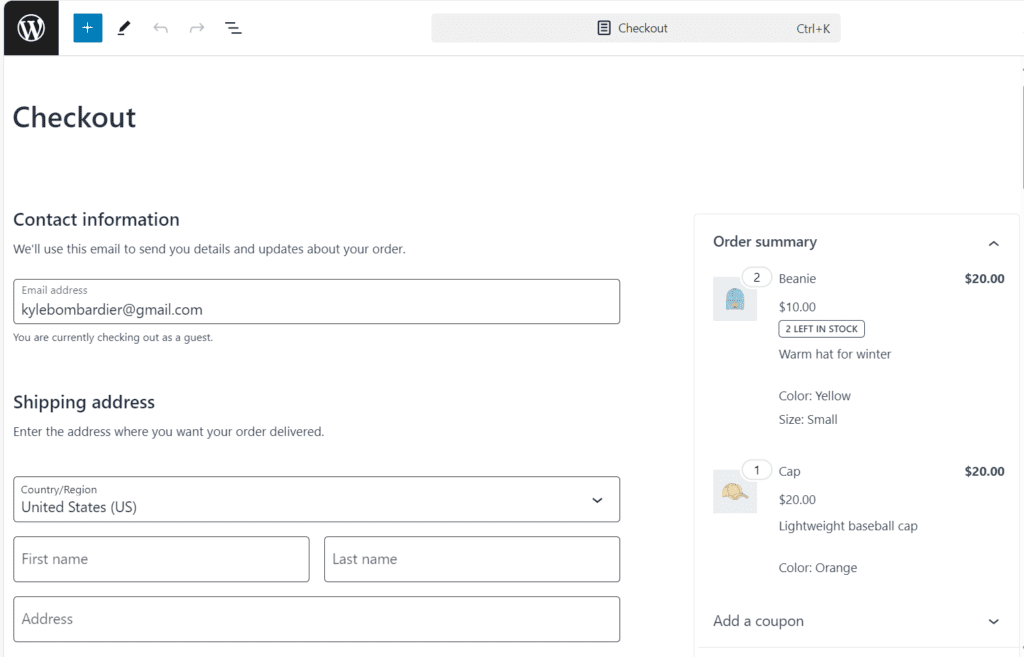
Your checkout and cart pages are critical to conversions, making it essential to keep these pages as fast as possible.
Importance of a fast checkout page for reducing cart abandonment
A slow checkout experience leads to higher cart abandonment rates as customers may leave before completing their purchase. A fast checkout page improves user satisfaction and conversion rates, directly impacting sales.
Tips for optimizing the WooCommerce checkout process to speed up performance
Limit the number of fields in your checkout form to reduce load time and make the process quicker for users. Use WooCommerce extensions like Checkout Field Editor to customize and streamline the checkout page. Disable unnecessary plugins or scripts from running on checkout pages to reduce the load.
Streamlining the cart functionality to improve load time and user experience
WooCommerce’s cart can be resource-intensive due to dynamic updates and AJAX calls. Simplify the cart by disabling live cart totals if not essential, as they can increase load times. Use lightweight cart plugins to prevent excessive server requests and ensure fast cart performance.
12. Monitoring performance with Query Monitor and other tools
Consistent performance monitoring helps maintain an optimal WooCommerce store, alerting you to any performance issues early on.
Query Monitor for tracking performance bottlenecks
Query Monitor is a valuable tool for WordPress users to identify performance issues in database queries, PHP errors and HTTP requests. By pinpointing specific performance bottlenecks, Query Monitor allows you to address slow-loading elements quickly.
Using tools to monitor WooCommerce site health and server load
Various tools provide real-time insights into server load, WooCommerce performance and site uptime. These tools help you track server response times, monitor downtime and address any issues that may arise from heavy server load.
Regular performance monitoring to ensure a fast WooCommerce store
Schedule regular performance tests, especially after updates or changes, to ensure your WooCommerce site remains optimized. Set up alerts for sudden increases in page load time or server errors. You can address them immediately to prevent user experience issues.
13. Updating your WordPress theme and plugins
Updates are crucial for both security and performance, as outdated plugins and themes can slow down WooCommerce performance.
How can outdated themes and plugins slow down WooCommerce performance?
Outdated themes and plugins can create compatibility issues, causing slowdowns or even site crashes. Additionally, old code may not be optimized for the latest WordPress and WooCommerce versions, resulting in slower WooCommerce site performance.
Tips for keeping your WordPress website updated for optimal performance
Set up automatic updates for minor WordPress and plugin updates to stay current. For major updates, test new versions on a staging site to ensure compatibility. Regular updates keep your WooCommerce store in line with the latest performance improvements and security patches.
Best practices for managing updates without affecting site stability
Use a staging environment to test updates before applying them to your live WooCommerce store. Backup your site regularly so that you can restore it quickly if an update causes issues. Prioritize updates for critical plugins and your theme, as these impact your WooCommerce store’s core functionality and speed.
Practicing these can not only help speed up WooCommerce but directly impact your conversion and customer experience. Ensure you practice these and keep scaling your online business to new heights.
Final thoughts
Your WooCommerce online store deserves hosting that can keep up with your growth. Performance issues at checkout, slow product pages or downtime during sales can quietly hurt conversions.
Don’t let hosting hold your store back. Switch to Bluehost WooCommerce Hosting for a faster, more reliable foundation built specifically for WooCommerce. Give your customers a smoother shopping experience – and give your business room to scale.
With the right hosting in place, your store can load faster, stay stable during peak traffic and deliver the kind of experience customers trust and return for. Strong performance isn’t just technical – it’s what helps turn browsers into buyers and one-time shoppers into loyal customers.
Get expert guidance in a 5-minute call
📞 Call 888-401-4678FAQs
A quality hosting provider can make a substantial difference in WooCommerce site speed by ensuring faster server resources and optimized infrastructure. At Bluehost, we focus on delivering quicker load times, smoother checkout and reliable uptime for all our online stores.
Yes. Caching plugins reduce database load and serve pages faster, improving WooCommerce performance during high traffic and peak sales. Proper configuration further boosts page speed.
Unused data slows database queries and increases server load. Regular cleanup keeps WooCommerce fast, responsive and stable as your store grows.
Check performance monthly and after major updates. Ongoing monitoring prevents slowdowns and keeps your WooCommerce store fast and reliable.




Write A Comment