 ChatGPT,
 Claude,
 Gemini,
 Grok — all four for
Key highlights
- Learn what OpenClaw needs from a server and how Bluehost VPS for OpenClaw meets each requirement.
- Compare Bluehost NVMe plan tiers so you can match processing power, memory and storage to your agents.
- Follow the one-click setup steps to deploy OpenClaw 2.0 and open its dashboard from your Bluehost Portal.
- Know what Bluehost manages on a self-managed VPS and which security and update tasks stay with you.
- Explore OpenClaw 2.0 features and use cases that depend on an always-on server with persistent storage.
Your agents don’t clock out when your laptop does. Give them a home that never sleeps. A Bluehost VPS for OpenClaw pairs always-on availability with root access, Docker support, and fast non-volatile memory express (NVMe) storage, plus a one‑click OpenClaw 2.0 deploy so you skip manual setup.
OpenClaw’s autonomous agents juggle APIs and multi‑step workflows across channels and tools. They need persistent uptime to listen, reason, and act; if your workstation sleeps, those schedules, events, and handoffs stall.
A VPS gives you dedicated compute, stable networking and fine‑grained control, so you move from AI tinkering to self‑hosted systems you own. In this guide, map needs to plans, deploy in a click and see what Bluehost manages versus what you do.
Why infrastructure matters for running OpenClaw
Infrastructure matters because OpenClaw operates as an automation layer that continuously processes tasks, communicates with external services and executes multi-step workflows. That makes the server a critical factor for performance and reliability. To power AI-driven workflows, autonomous agents and system integrations, OpenClaw needs stable compute resources, persistent storage and dependable connectivity.
1. Security and control for production use
As OpenClaw moves from experimentation to production, security becomes part of infrastructure planning. AI agents may interact with internal workflows, operational data and system-level actions, which means the hosting environment must give you strong operational control.
A VPS lets you manage access policies, firewall rules, update schedules, secret handling and service isolation. This makes it easier to protect sensitive integrations and keep control over how OpenClaw interacts with internal systems.
OpenClaw 2.0 adds application-level controls that matter when several people or automations share one instance. These controls sit on top of the server security you manage:
- Request-bound approvals: Approvals stay bound to the exact request, command, session and person.
- Protected credentials: Protected credentials can reach supported destinations without entering model-visible text.
- Device access: Removing or re-pairing a device retires its old access.
2. Continuous AI agent execution
OpenClaw agents are built to operate independently and handle tasks triggered by schedules, events or system conditions. To keep these agents available, you need a hosting environment built for long-running operation. Shared hosting caps how many processes can run at the same time, as Bluehost’s process limits on shared hosting show.
VPS hosting provides that stability with a dedicated virtual server environment that stays active for long-running processes. A VPS keeps running when your laptop sleeps, so scheduled and event-triggered agents stay available.
3. Multi-step reasoning and automation
Many OpenClaw workflows involve sequential task execution, where outputs from one stage become inputs for the next. This type of automation depends on consistent performance from the server. A VPS environment supports these workflows with reliable central processing unit (CPU) and memory allocation, helping agents process complex operations and maintain workflow continuity.
4. Integration-heavy architecture
OpenClaw is designed to connect with multiple systems and services. Your agents often interact with APIs, messaging platforms, databases and productivity tools to perform tasks across your technology stack. Because these integrations depend on stable networking and server performance, running OpenClaw on a VPS helps keep automation workflows responsive across connected systems.
5. Root access, Docker support and persistent storage
OpenClaw also needs three things from the server itself. Each one shapes how OpenClaw 2.0 installs, runs or updates.
- Root access: Lets the admin hub install and roll back plugins, ClawHub skills and Model Context Protocol (MCP) connectors. Updates can inspect an install first.
- Docker support: Lets you run OpenClaw’s documented containerized Gateway setup when you choose that path.
- Persistent storage: Keeps sessions, run history, skills and configuration through reboots.
Those requirements work as a checklist for any host. The next section maps each one to Bluehost VPS.
Also read: OpenClaw GitHub Guide: Install, Configure & Run on VPS
Why choose Bluehost VPS for OpenClaw?
Bluehost VPS meets each of those requirements with dedicated resources, root access, Docker support and persistent NVMe storage. It’s built for workloads like OpenClaw that need infrastructure ownership and flexibility.
1. One-click OpenClaw 2.0 deployment
OpenClaw VPS Hosting deploys OpenClaw 2.0 (Community edition) in one click on a self-managed Bluehost VPS. You control updates after deployment. Root access and Docker support stay available if you want a custom setup.
Also read: Introducing Bluehost OpenClaw VPS Hosting for OpenClaw 2.0
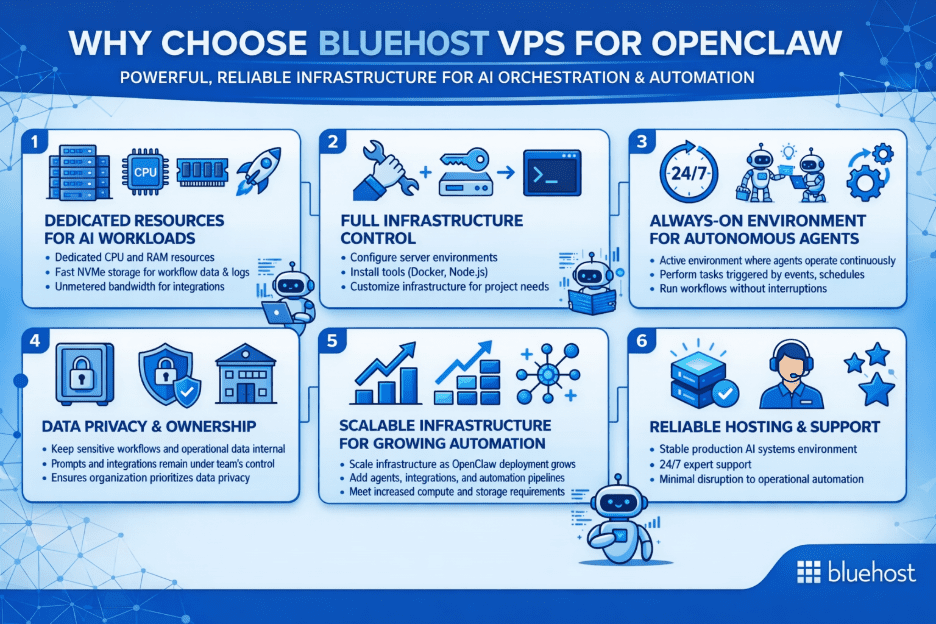
2. Dedicated resources for AI workloads
OpenClaw coordinates multiple AI agents that execute structured tasks across systems and workflows. These processes often run simultaneously and require consistent compute performance. With Bluehost VPS, you get:
- Dedicated compute: Dedicated virtual CPU (vCPU) and random access memory (RAM) resources for your agents.
- NVMe storage: Fast NVMe storage for workflow data and logs.
- Unmetered bandwidth: Bandwidth for integrations and automation traffic.
These resources help maintain stable performance when agents are executing multi-step tasks or handling multiple workflows.
3. Full infrastructure control
You may prefer hosting AI systems on infrastructure you fully control rather than relying on external software as a service (SaaS) tools. OpenClaw is designed for this model, letting you manage prompts, workflows, integrations and execution logic inside your own environment.
This is where Bluehost VPS fits naturally for OpenClaw deployments. We provide root access, which lets you:
- Server configuration: Configure server environments.
- Tool installation: Install tools such as Docker, Node.js and automation frameworks.
- Custom infrastructure: Customize infrastructure based on project needs.
This makes Bluehost VPS a strong fit if you want a self-managed environment shaped around your use case. It also suits you if you’d rather build AI systems into your own technology stack than consume AI only through subscription tools.
4. Data privacy and ownership
You may want to keep your AI systems and operational data within your own infrastructure. Running OpenClaw on a VPS helps keep sensitive workflows, prompts and integrations under your control rather than processed by external AI platforms.
You can deploy self-hosted AI agents and workflows on your own server instead of relying on external SaaS platforms. You also choose the model: connect OpenAI or Anthropic Claude with your own API keys, or run local models through Ollama.
5. Scalable infrastructure for growing automation
As AI workflows expand, infrastructure requirements often increase. Additional agents, integrations and automation pipelines can require more compute and storage resources. With Bluehost VPS, you can scale CPU, RAM and disk space as your deployment grows, without rebuilding the server.
6. Support scope and what you manage
Bluehost VPS is self-managed, so responsibility splits at the virtualization layer. Bluehost maintains the hardware, network and virtualization layer, and you manage what runs on top of it:
- The operating system
- OpenClaw configuration and updates
- Server hardening
- Applications and integrations
Premium Support is available as an optional paid add-on at checkout. If you’d rather build agents through a guided, visual setup, our hosting offers that path on Bluehost VPS.
Which key OpenClaw features benefit most from a Bluehost VPS?
OpenClaw 2.0 coordinates one or more agents through an observe, reason, act and persist loop. The features below benefit most from a Bluehost VPS because they depend on a server that stays on, with root access and persistent storage.
1. Automations that survive a restart
Automations are the headline OpenClaw 2.0 capability. Sessions, scheduled jobs and accepted messages are designed to persist through a restart, and run history tracks separately whether each run fired, delivered and completed. Missed work resumes without re-running finished jobs.
Unified scheduling covers the agent, Control UI, command-line interface (CLI) and apps, with event, schedule and heartbeat triggers. That resume behavior relies on persistent NVMe storage and a host that restarts predictably and comes back online, which a VPS provides.
2. Plugins, ClawHub skills and MCP connectors
An admin-managed hub lets you browse, install, enable, disable and roll back plugins, ClawHub skills and vetted MCP connectors. A failed install returns to a retryable state instead of breaking your existing configuration.
Skill Workshop lets you review proposed skill changes before they apply. The hub works at the system level, which is where root access and Docker support on Bluehost VPS come in.
3. Messaging channels and tool calling
One agent can serve your team across Slack, Discord, Telegram and WhatsApp, plus Signal, Microsoft Teams and Twilio text and multimedia messaging (SMS/MMS). Accepted messages persist through managed restarts, and connection state reports as usable, recovering or blocked.
Agents also call APIs and integrations such as Notion, GitHub, webhooks and custom APIs. A server that stays on keeps those channels and integrations reachable.
4. Rebuilt Control UI
The rebuilt Control UI is the main conversation-centered workspace in OpenClaw 2.0. In one browser workspace, you handle conversations, files, approvals, settings and live agent work. It stays reachable because the server stays on.
With the UI and services running reliably on your VPS, the next step is choosing a plan sized to your agents, channels and Automations.
Recommended Bluehost VPS plans for OpenClaw
The vCPU count, RAM, storage and renewal price separate these options. Together they set how many agents and Automations you can run and what you pay later.
The table compares the three NVMe plans offered for OpenClaw VPS Hosting.
| Plan | CPU | RAM | Storage | Intro price (24-month term) | Renews at | Ideal use |
|---|---|---|---|---|---|---|
| NVMe 4 | 2 vCPU | 4 GB | 100 GB NVMe | $9.49/mo | $11.99/mo | Recommended starting tier and functional minimum for OpenClaw: one agent, a few channels and a handful of Automations |
| NVMe 8 | 4 vCPU | 8 GB | 200 GB NVMe | $12.99/mo | $28.99/mo | Growing OpenClaw workloads, multiple workflow pipelines and more frequent integrations |
| NVMe 16 | 8 vCPU | 16 GB | 450 GB NVMe | $25.99/mo | $49.99/mo | Production-scale OpenClaw deployments, persistent agents, heavier automation and integration-heavy workflows |
Start with NVMe 4 and compare the renewal rate alongside the intro price. As your channels and Automations grow, move up to NVMe 8 or NVMe 16.
Note: Bluehost pricing was verified in October 2026 and may change. See current Bluehost plans and pricing.
Choose NVMe 4 if:
- You’re running one agent with a few messaging channels.
- You plan to start with a handful of Automations.
- You connect hosted models such as OpenAI or Anthropic Claude.
Choose NVMe 8 if:
- You’re moving to multi-container production.
- You expect heavier traffic across more channels.
- You run multiple workflow pipelines and more frequent integrations.
Choose NVMe 16 if:
- You run heavy AI workloads or enterprise stacks.
- You share one OpenClaw instance across a large team.
- You want more memory for local models through Ollama.
NVMe 2 suits light apps and development sandboxes and sits below the configuration Bluehost recommends for OpenClaw, so NVMe 4 is the starting point.
All three plans share the same baseline features, listed below. Your choice between tiers comes down to compute, memory and storage.
- Unmetered bandwidth: Traffic headroom for integrations and automation workflows (within the Terms of Service).
- Dedicated virtual resources: vCPU and DDR5 RAM for consistent performance.
- Secure connections: Free SSL certificates for encrypted access.
- Network protection: A dedicated IP address with DDoS protection; extra IPs are available as a paid add‑on.
- Infrastructure support: Core infrastructure and hardware support, with Premium Support available as an add‑on.
- Data center choice: Multiple data centers to choose from at checkout.
With these baseline features covered on every tier, you’re ready to deploy, let’s walk through the one‑click OpenClaw setup on your Bluehost VPS.
How to set up OpenClaw on Bluehost VPS
The one-click install deploys OpenClaw 2.0 for you and replaces manual configuration before first use. Each one-click install sets up one app per server.
1. Choose a plan and data center
Pick your NVMe plan, then select your data center. The cart opens with your plan selected. For the full walkthrough, see how to purchase a Self-Managed VPS with OpenClaw installation.
2. Select OpenClaw as your application
In the cart, go to Software > Application > OpenClaw and select Confirm. If OpenClaw is grayed out, the plan is below the app’s minimum. You can optionally add a Secure Shell (SSH) public key under Advanced options.
3. Check out and let the server provision
Choose your billing term and complete checkout. Once provisioning finishes, your VPS appears in the Hosting tab of your Bluehost Portal.
4. Open your OpenClaw dashboard
In your Bluehost Portal, go to Hosting > My Plans and select Manage for your Self-Managed VPS. From there, sign in to the OpenClaw dashboard, which opens the Control UI.
5. Connect your model provider
In the OpenClaw dashboard, add your OpenAI or Anthropic Claude API key in the configuration, or connect a local model through Ollama. The help article on how to connect APIs in OpenClaw shows where to add the key.
6. Update with guarded updates and verified backups
OpenClaw 2.0 stores sessions and transcripts in SQLite, so create a verified backup before upgrading. You choose when to update, and the supported update paths add guardrails:
- Install inspection: Supported update paths inspect the install before replacing it and stop unsafe candidates.
- Clearer diagnostics: Doctor and config-error guidance is clearer when something needs attention.
- Guarded backup and restore: Backup and restore follow a guarded flow.
With guarded updates, clearer diagnostics and verified backups in place, you’re ready to see how OpenClaw on Bluehost VPS delivers in practice, let’s look at the real‑world use cases.
What are the real-world use cases for OpenClaw on Bluehost VPS?
Once OpenClaw is running on Bluehost VPS, you can move AI from experimentation to a reliable operational capability. With dedicated infrastructure, you can deploy AI agents that integrate directly with internal systems while keeping control over your data and workflows.
1. Private AI knowledge assistants and copilots
You can build internal assistants that support your team with research, documentation lookup and data retrieval. Sensitive information stays within your own infrastructure while the assistant works.
- The challenge: Many teams want AI tools for internal use but prefer not to expose proprietary data to external AI platforms.
- How Bluehost VPS helps: Running OpenClaw on a self-hosted VPS keeps prompts, workflows and internal data on your own server.
- What OpenClaw enables: With memory and context systems, agents can persist information across interactions and give consistent support for ongoing research and operational tasks.
2. Autonomous DevOps and infrastructure monitoring
You can deploy AI agents that track system activity and respond to operational events. This suits technical teams that want automation tied to their own infrastructure.
- The challenge: Manual monitoring and ad-hoc automation often lack the reliability required for infrastructure management.
- How Bluehost VPS helps: Hosting OpenClaw on a VPS lets you monitor workflows, review logs and keep visibility over system activity.
- What OpenClaw enables: Using autonomous task execution, agents can respond to triggers such as scheduled events or system conditions with minimal manual input.
3. End-to-end business workflow automation
Operations teams often manage tasks across multiple platforms such as communication tools, repositories and knowledge systems. In this setup, automation tools can manage integrations and triggers while OpenClaw agents handle reasoning, analysis and AI-driven tasks.
- The challenge: Many AI tools generate responses but cannot directly interact with business systems or automate multi-step workflows.
- How Bluehost VPS helps: With one-click deployment, you can set up OpenClaw and begin connecting it to internal tools.
- What OpenClaw enables: Through tool calling and API chaining, agents can interact with internal services to update records, trigger workflows or retrieve data.
4. Multi-stage content and research triage
Some tasks require analyzing large volumes of information and producing structured outputs. Research, content review and analysis work often fall into this group.
- The challenge: Single-prompt AI outputs may not provide enough depth for complex research or analysis workflows.
- How Bluehost VPS helps: High-performance storage and reliable compute resources help support data-heavy automation tasks and workflow processing.
- What OpenClaw enables: Using multi-step reasoning flows, agents can execute structured plans where each stage informs the next, producing deeper results for research and analysis.
Final thoughts
Bluehost VPS is a solid fit if you want OpenClaw on infrastructure you control and you’re comfortable managing the OS. Start on NVMe 4 with the one‑click deploy; scale CPU, RAM and storage as your agents, channels and Automations grow.
Own your AI stack, always on, persistent and under your keys. Launch OpenClaw 2.0 in a click and get back to building. Launch OpenClaw on Bluehost VPS to start your first agent in minutes.
FAQs
Start with NVMe 4. It’s the recommended tier and functional minimum for OpenClaw, sized for one agent, a few channels and a handful of Automations. Move to NVMe 8 or NVMe 16 for larger workloads, more channels, multi-container production or larger teams.
Yes. Prompts, credentials and conversation history stay on a server you control. Prompts go only to the model provider you choose, or stay on the server if you run local models through Ollama.
No. OpenClaw’s Docker documentation lists Docker as optional. Bluehost VPS includes Docker support when you want the containerized Gateway setup, and the one-click install sets up OpenClaw for you.
Keep it private where you can. OpenClaw’s VPS documentation recommends keeping the Gateway on loopback and reaching it through an SSH tunnel or Tailscale. Binding to a local area network (LAN) or tailnet interface requires a token or password. OpenClaw also documents an openclaw security audit command to check for configuration drift.
No. OpenClaw doesn’t need a graphics processing unit (GPU) with hosted models such as OpenAI or Anthropic Claude, because the provider runs the model. Bluehost VPS plans are CPU-only, so check model size and memory before running local models through Ollama.

Write A Comment